
I started my career as a network engineer in the mid-’90s, back when understanding protocols wasn’t optional; it was your entire job. I spent years reading packet captures, tracing routes, and debugging connectivity issues by analyzing TCP handshakes at the byte level. These days, most engineers interact with networking through APIs and configuration files, which is fine for most tasks. But when something breaks at the network level (and it will), understanding the protocols underneath gives you a diagnostic superpower that no amount of high-level tooling can replace.
I’ve collected war stories from every protocol in this article. Each one taught me something about how networks really work, as opposed to how textbooks say they work. Let me share what I’ve learned.
The Protocol Stack: How It All Fits Together
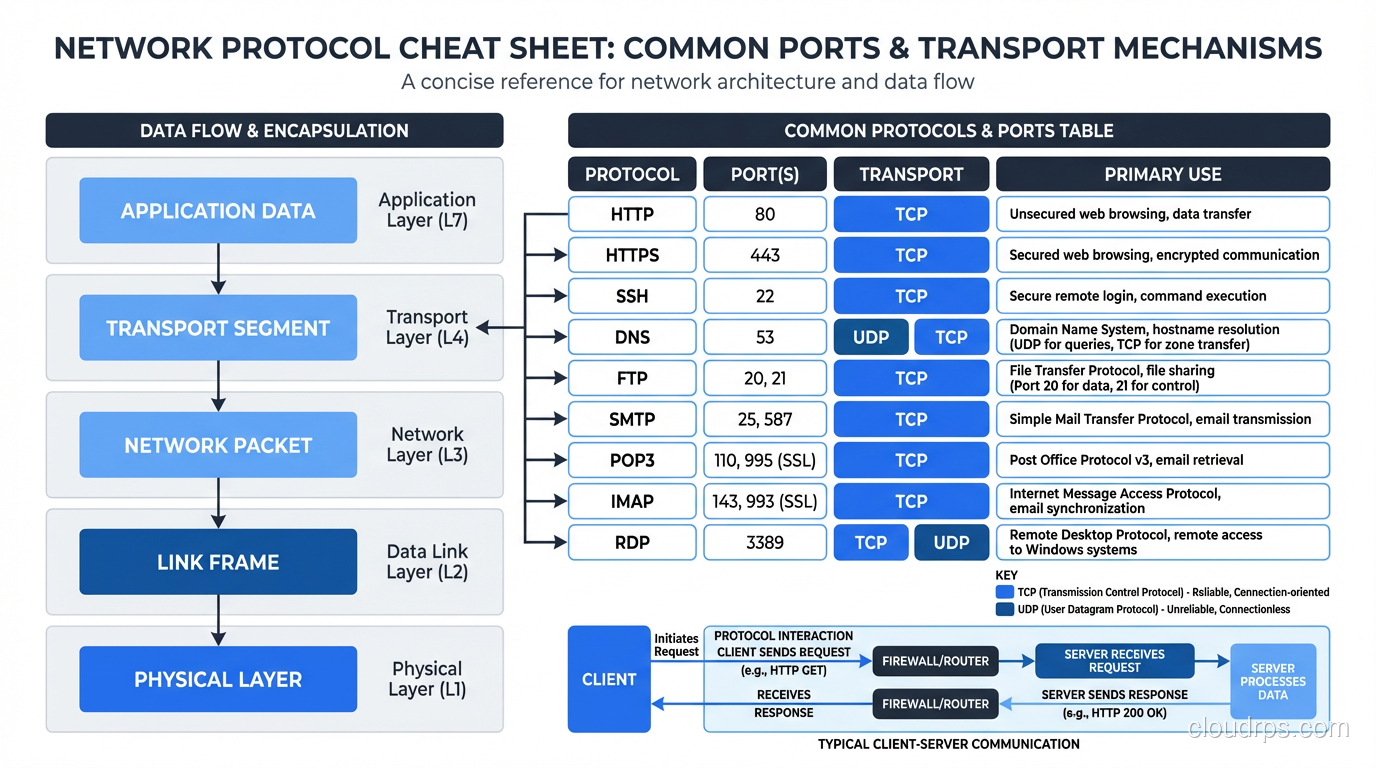
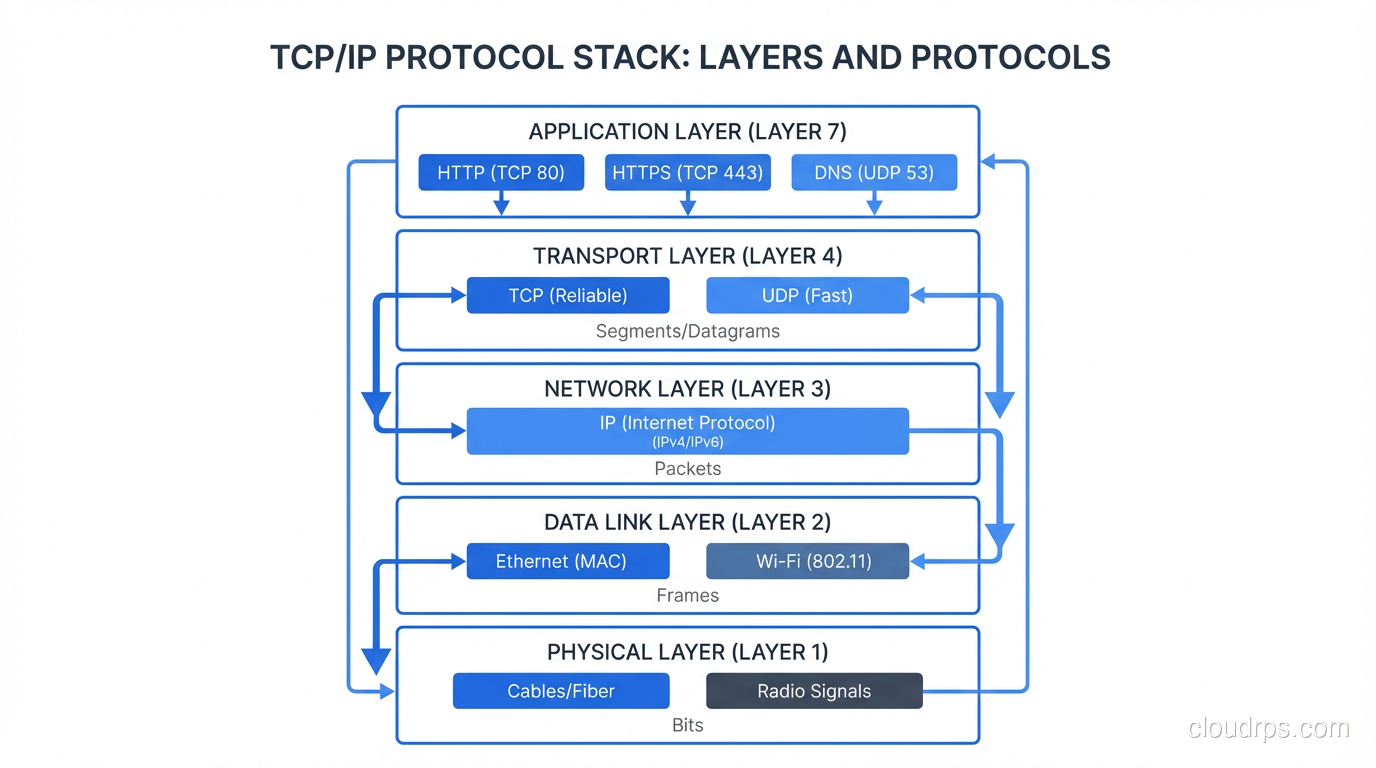
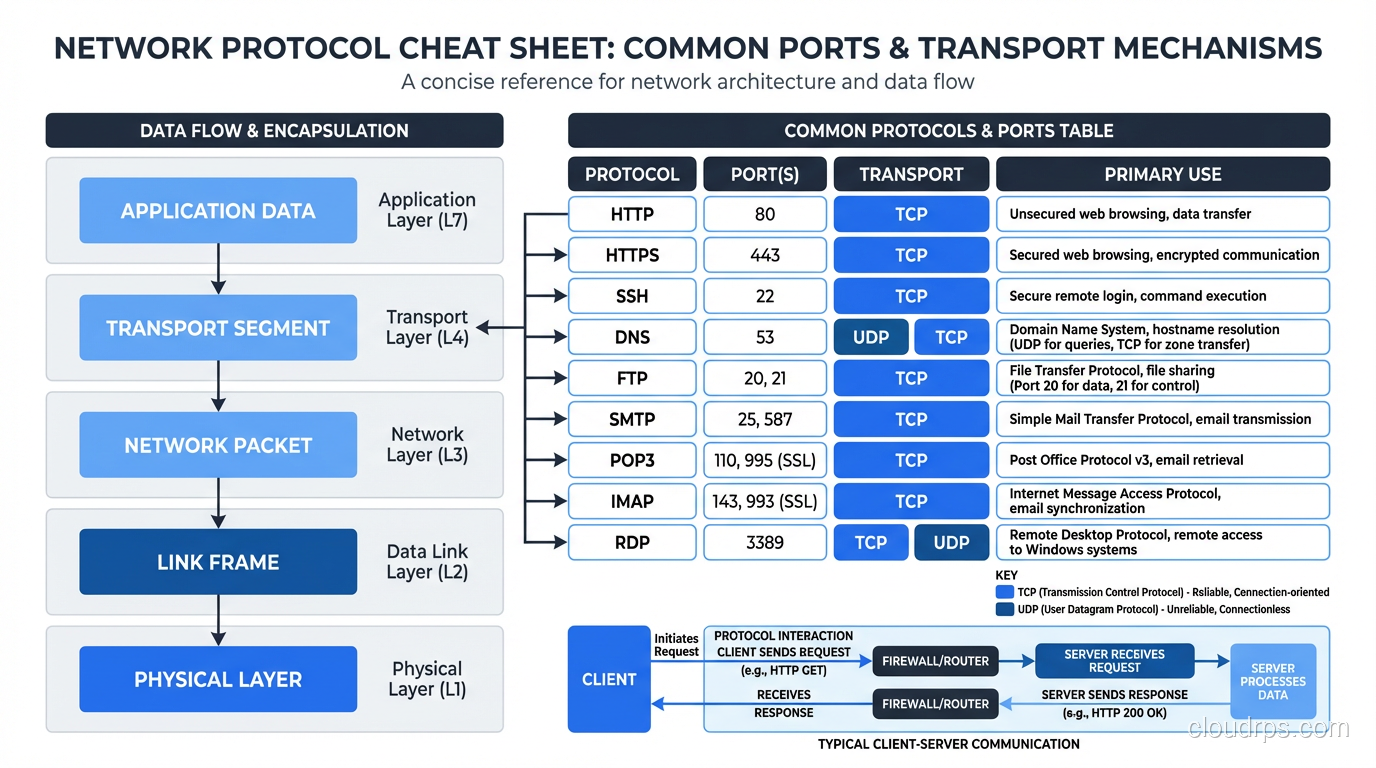
Before diving into individual protocols, you need the big picture. Network communication is organized in layers, with each layer providing services to the layer above it. The practical model (not the theoretical seven-layer OSI model, which is useful for exams and not much else) has four layers:
- Link Layer: Gets data across a single physical or logical link (Ethernet, Wi-Fi)
- Internet Layer: Gets data across networks using IP addresses (IP, ICMP)
- Transport Layer: Provides end-to-end communication between applications (TCP, UDP)
- Application Layer: Implements specific application functionality (HTTP, FTP, SMTP, DNS, SNMP)
Every piece of data you send starts at the application layer, gets wrapped in transport layer headers, then internet layer headers, then link layer headers, and is transmitted as bits on the wire. The receiving end unwraps each layer in reverse. This layered approach is what makes the internet work, with each layer handling its responsibility independently.
For a deeper look at layered networking models, see my breakdown of the OSI model’s seven layers.
TCP: The Reliable Workhorse
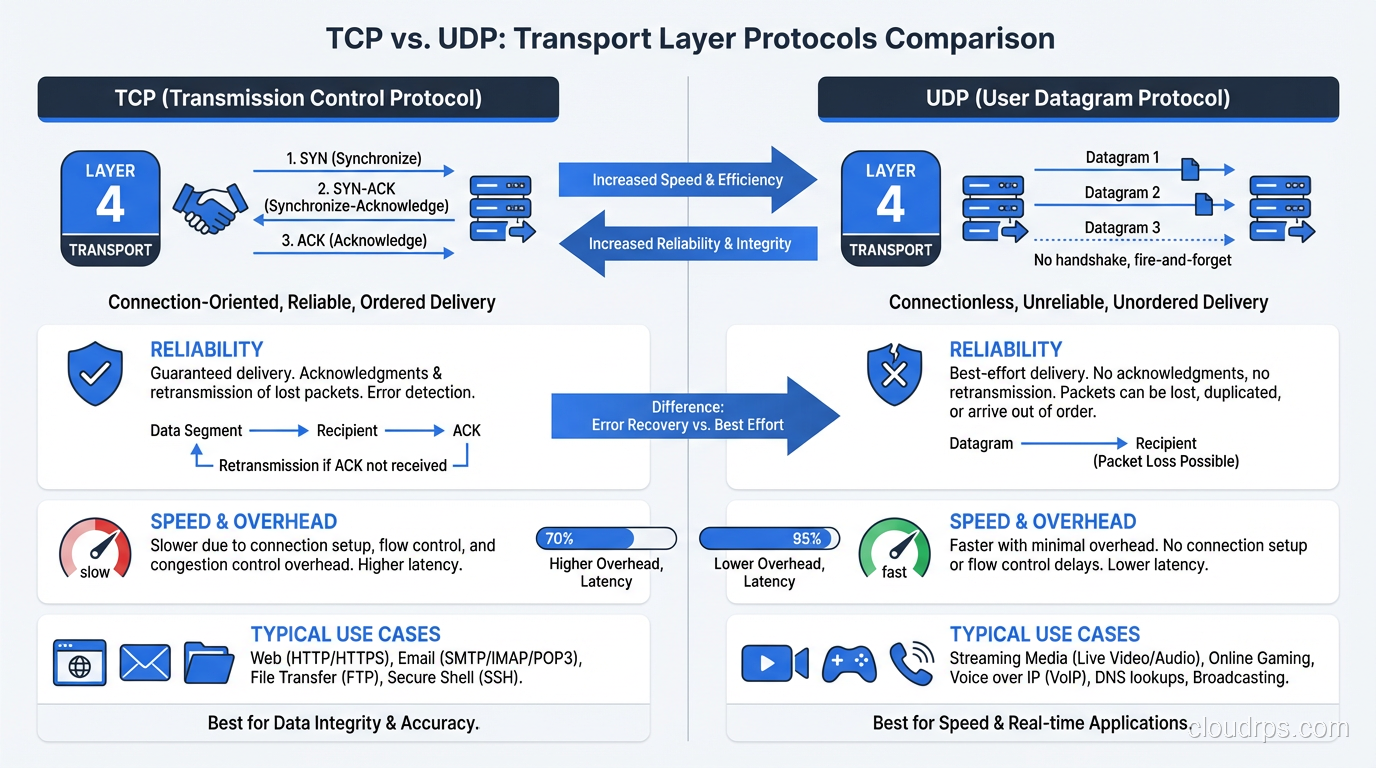
Transmission Control Protocol is the foundation of most internet communication. HTTP, HTTPS, SSH, FTP, SMTP, and database protocols all run on TCP. Understanding TCP is non-negotiable for anyone working with networked systems.
What TCP Guarantees
TCP provides reliable, ordered, error-checked delivery of data between applications. Specifically:
- Reliability: Every byte you send will arrive at the destination, or you’ll get an error. TCP uses acknowledgments and retransmissions to handle packet loss.
- Ordering: Data arrives in the same order it was sent, even if packets take different paths through the network.
- Flow control: TCP prevents a fast sender from overwhelming a slow receiver.
- Congestion control: TCP detects network congestion and reduces its sending rate to avoid making it worse.
The Three-Way Handshake
Every TCP connection starts with a three-way handshake: SYN, SYN-ACK, ACK. The client sends a SYN, the server responds with SYN-ACK, the client sends ACK, and the connection is established. This takes one round-trip time (RTT), which is why TCP connections to distant servers are noticeably slower to establish.
This matters in practice. If your server is in Virginia and your user is in Tokyo, the round-trip time is ~150ms. The TCP handshake alone takes 150ms. Add TLS (another 1-2 round trips) and you’re at 300-450ms before a single byte of application data has been exchanged. This is why CDNs exist: they put termination points closer to users.
TCP Performance Considerations
TCP slow start. New TCP connections start with a small congestion window and gradually increase it. This means the first few round trips of data on a new connection are slower than they could be. For short-lived connections (most HTTP requests), slow start can significantly impact throughput. This is why HTTP/2’s connection multiplexing is so valuable: one connection handles multiple requests, and slow start only applies once.
Nagle’s algorithm. TCP buffers small writes and combines them into larger segments for efficiency. This is usually good, but for interactive protocols (SSH, real-time APIs), the buffering adds latency. Disable Nagle’s algorithm (TCP_NODELAY) for latency-sensitive applications.
TIME_WAIT. After a TCP connection closes, the socket enters TIME_WAIT state for 2x the maximum segment lifetime (typically 60 seconds). A server handling many short-lived connections can exhaust its available ports if TIME_WAIT sockets pile up. This is a classic issue with HTTP/1.0 servers, where each request opened and closed a new connection.
For a dedicated comparison of TCP and UDP characteristics, see my TCP vs UDP deep dive.
UDP: Speed Over Reliability
User Datagram Protocol is TCP’s sibling that made very different trade-offs. Where TCP prioritizes reliability and ordering, UDP prioritizes speed and simplicity.
UDP is connectionless. There’s no handshake, no acknowledgments, no retransmissions. You send a datagram and hope it arrives. It might not. It might arrive out of order. It might arrive duplicated. UDP doesn’t care.
Why UDP Exists
“Why would anyone use an unreliable protocol?” is the question I always get. The answer: because for some applications, reliability at the transport layer is the wrong trade-off.
Real-time communication. Video calls, voice calls, live streaming. If a video frame packet is lost, retransmitting it is pointless because by the time the retransmission arrives, it’s too late to display. Better to skip it and display the next frame. TCP’s reliability guarantees would cause buffering and lag.
DNS. DNS lookups are typically a single request and response. The overhead of a TCP handshake (3 packets) to send a single question (1 packet) is wasteful. UDP lets you send the question in one packet and get the answer in one packet. (DNS does fall back to TCP for responses larger than 512 bytes or when reliability is needed.)
Gaming. Similar to real-time communication, player position updates need to be current, not reliable. A position update that arrives late is less useful than the next one arriving on time.
DHCP. How do you establish a TCP connection when you don’t even have an IP address yet? You can’t. DHCP uses UDP.
QUIC: UDP’s Revenge
QUIC deserves mention because it’s reshaping how we think about TCP and UDP. QUIC is a transport protocol built on top of UDP that provides TCP-like reliability and ordering, plus built-in TLS encryption, plus connection multiplexing (like HTTP/2). HTTP/3 runs on QUIC.
The clever part: QUIC handles reliability in application space rather than the kernel, so it can be updated and improved without waiting for OS kernel updates. It eliminates TCP’s head-of-line blocking problem, reduces connection establishment to a single round trip (0-RTT in subsequent connections), and handles connection migration (switching from Wi-Fi to cellular without dropping the connection).
Most major websites and CDNs now support HTTP/3 over QUIC. It’s the future of web transport.
ICMP: The Diagnostic Protocol
Internet Control Message Protocol is the internet’s signaling system. It doesn’t carry application data; it carries control messages about the network itself.
The Protocols You Use Without Thinking
Ping (ICMP Echo Request/Reply). The most basic network diagnostic. “Can I reach this host?” Ping sends an ICMP Echo Request and waits for an Echo Reply. If you get a reply, the host is reachable. If you don’t, either the host is down, the network is broken, or (increasingly common) ICMP is blocked by a firewall.
Traceroute. Uses ICMP Time Exceeded messages (or UDP probes on Unix) to discover the path between you and a destination. Each router along the path decrements the packet’s TTL (Time To Live). When TTL reaches 0, the router sends back an ICMP Time Exceeded message. By sending packets with incrementally increasing TTLs, traceroute maps each hop.
Path MTU Discovery. ICMP helps determine the maximum packet size (MTU) that can traverse a path without fragmentation. If a packet is too large, a router sends an ICMP “Fragmentation Needed” message. If ICMP is blocked (which some misguided firewall administrators do), Path MTU Discovery breaks, and large packets silently fail. I’ve debugged this issue more times than I’d like. The symptom is that small requests work fine but large transfers hang.
Destination Unreachable. When a router can’t deliver a packet, it sends an ICMP Destination Unreachable message. The various codes tell you why: network unreachable, host unreachable, port unreachable, administratively prohibited.
Don’t Block ICMP
I feel strongly about this: do not blindly block ICMP at your firewalls. Yes, ICMP can be used for reconnaissance and some attack vectors. But blocking all ICMP breaks Path MTU Discovery, breaks traceroute, and makes network debugging nearly impossible. Block ICMP types you don’t need, but allow Echo Request/Reply, Time Exceeded, and Destination Unreachable at minimum.
HTTP: The Web’s Protocol
Hypertext Transfer Protocol is the application-layer protocol that powers the web. If you’re building web applications, you interact with HTTP every day, but there’s a surprising amount of depth beneath the surface.
HTTP/1.1
The workhorse that powered the web for 20 years. Request-response model. One request at a time per connection (pipelining existed but was effectively broken in practice). Keep-alive connections helped but didn’t solve the fundamental head-of-line blocking problem.
HTTP/2
Multiplexing: multiple requests and responses on a single TCP connection, interleaved. Header compression (HPACK). Server push (mostly failed in practice, being removed). Binary framing instead of text. HTTP/2 was a massive improvement for page load times, especially for sites with many assets.
HTTP/3
HTTP over QUIC (which runs on UDP). Eliminates TCP head-of-line blocking because QUIC handles streams independently, so a lost packet in one stream doesn’t block other streams. Faster connection establishment. Better performance on lossy networks (mobile). This is the current state of the art.
HTTP Methods and Status Codes
I’m not going to explain GET and POST; you know those. But a few things I’ve learned from production:
PUT vs PATCH. PUT replaces the entire resource. PATCH modifies specific fields. Getting this wrong creates subtle bugs where fields get zeroed out or ignored.
204 vs 200 for success with no body. Use 204 (No Content) when the operation succeeded but there’s nothing to return. 200 with an empty body is technically fine but less precise.
429 Too Many Requests. If you’re not implementing rate limiting and returning 429, you should be. Include a Retry-After header to tell clients when to try again.
503 vs 502. 503 (Service Unavailable) means your server is overloaded or in maintenance. 502 (Bad Gateway) means your reverse proxy or load balancer couldn’t reach the backend. In troubleshooting, this distinction tells you whether the problem is the application itself or the connection to it.
FTP: Still Alive (Unfortunately)
File Transfer Protocol dates to 1971. It’s older than TCP/IP itself (it originally ran on NCP). I include it here because it’s still in active use in many organizations, particularly in financial services, healthcare, and government, where legacy integrations die hard.
FTP has two fundamental problems that make it painful in modern networks:
Active vs. Passive mode. FTP uses two connections: a control connection and a data connection. In active mode, the server opens the data connection back to the client, which breaks through NAT and firewalls. Passive mode fixes this by having the client open the data connection, but it requires a range of ports to be open on the server. Configuring firewalls for FTP is a special kind of pain.
No encryption by default. Plain FTP sends credentials and data in cleartext. FTPS (FTP over TLS) and SFTP (SSH File Transfer Protocol, a completely different protocol that confusingly has a similar name) address this, but many legacy systems still use plain FTP.
My advice: Replace FTP with SFTP or, better yet, with object storage APIs (S3-compatible APIs). If you must use FTP, use SFTP. If you can’t use SFTP, at least use FTPS. Never use plain FTP over the public internet.
SNMP: Monitoring the Network
Simple Network Management Protocol is how network devices (routers, switches, firewalls, servers) expose their operational metrics. SNMP uses a manager-agent model: the agent runs on the network device and exposes metrics. The manager (your monitoring system) polls the agents for data or receives traps (asynchronous notifications) from them.
SNMP Versions
SNMPv1/v2c. Community strings for authentication (essentially passwords sent in cleartext). Fine for isolated management networks, dangerous on any network with potential eavesdroppers.
SNMPv3. Adds authentication and encryption. Use this. There’s no excuse for running v1/v2c on anything but a completely isolated management VLAN.
SNMP in Practice
SNMP is still the primary monitoring protocol for network equipment. Prometheus with SNMP Exporter, Zabbix, LibreNMS, and PRTG all use SNMP to collect metrics from network devices. If you’re monitoring anything with a network port (switches, routers, UPS systems, storage arrays), you’re probably using SNMP.
The MIB (Management Information Base) is the schema that describes what metrics a device exposes. Vendor-specific MIBs extend the standard ones with device-specific metrics. Working with MIBs is one of those things that builds character. The formats are archaic and vendor documentation is often lacking.
For broader monitoring strategy including both network and application monitoring, see my guide on routing protocols for the network side.
Other Protocols Worth Knowing
DNS (Domain Name System)
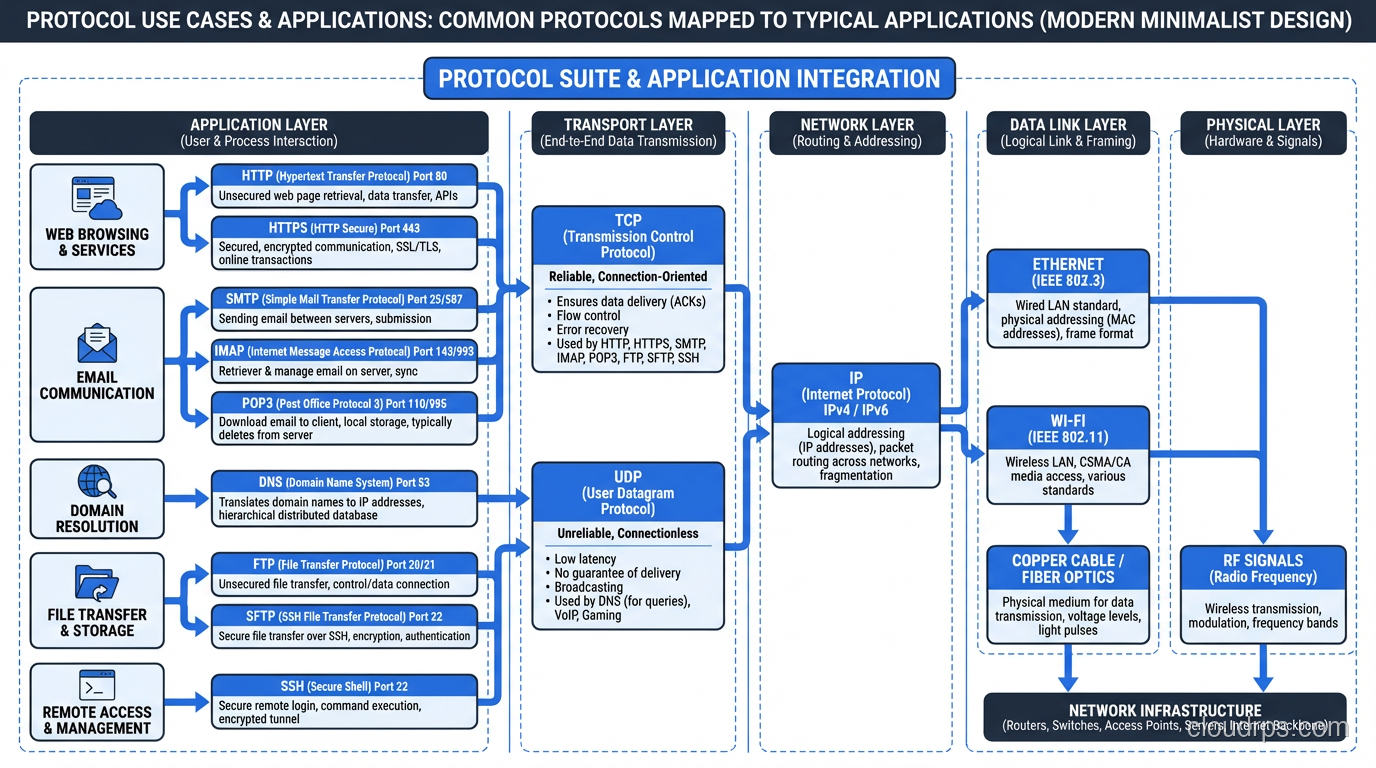
Translates domain names to IP addresses. Uses UDP on port 53 for queries (TCP for zone transfers and large responses). DNS is a distributed database with a hierarchical caching structure. Understanding DNS is essential because DNS failures or misconfigurations cause some of the most confusing outages. Everything looks healthy, but nothing works because names don’t resolve.
DHCP (Dynamic Host Configuration Protocol)
Automatically assigns IP addresses, subnet masks, gateways, and DNS servers to devices. Uses UDP on ports 67-68. The DORA process (Discover, Offer, Request, Acknowledge) is one of the few protocols that uses broadcast traffic, which is why DHCP doesn’t work across subnets without relay agents.
TLS/SSL (Transport Layer Security)
Not technically a separate protocol but a security layer that wraps other protocols. HTTPS is HTTP + TLS. SMTPS is SMTP + TLS. TLS provides encryption, authentication (via certificates), and integrity checking. TLS 1.3 is the current version and reduces the handshake to one round trip (0-RTT for resumed connections).
SSH (Secure Shell)
Encrypted remote access. Replaced Telnet for good reason. Also provides SCP and SFTP for file transfer, and port forwarding for tunneling other protocols through an encrypted connection. SSH key-based authentication (rather than passwords) is essential for production systems.
gRPC
Google’s RPC framework, built on HTTP/2. Uses Protocol Buffers for serialization (binary, compact, fast). Supports streaming (unary, server-streaming, client-streaming, bidirectional). Increasingly common for service-to-service communication in microservice architectures.
Practical Protocol Knowledge
Here’s what I actually use protocol knowledge for in day-to-day work:
Troubleshooting connectivity issues. When a service can’t reach another service, protocol knowledge tells you where to look. Can you ping the host? (ICMP/network layer.) Can you establish a TCP connection? (telnet/nc to the port.) Can you complete a TLS handshake? (openssl s_client.) Can you get an HTTP response? Each layer narrows the problem.
Performance debugging. Understanding TCP slow start, congestion control, and window sizing helps you diagnose throughput problems. Understanding HTTP/2 multiplexing helps you understand why your page load time improved (or didn’t). Understanding DNS resolution time helps you diagnose unexplained latency spikes.
Architecture decisions. TCP or UDP for your real-time service? HTTP/2 or gRPC for service-to-service communication? REST or WebSocket for your client API? Protocol knowledge informs these decisions with concrete trade-offs rather than abstract preferences.
Security. Understanding TLS tells you what you’re actually protecting (and what you’re not). Understanding DNS tells you about the DNS-based attacks your infrastructure is exposed to. Understanding SNMP tells you why you need v3.
The engineers who understand what’s happening at the protocol level solve problems faster, make better architecture decisions, and build more resilient systems. It’s not the most glamorous knowledge, but it’s some of the most enduring. TCP hasn’t changed fundamentally since the ’80s, and it still carries the vast majority of internet traffic. That’s the kind of knowledge investment that pays dividends for an entire career.
Get Cloud Architecture Insights
Practical deep dives on infrastructure, security, and scaling. No spam, no fluff.
By subscribing, you agree to receive emails. Unsubscribe anytime.