
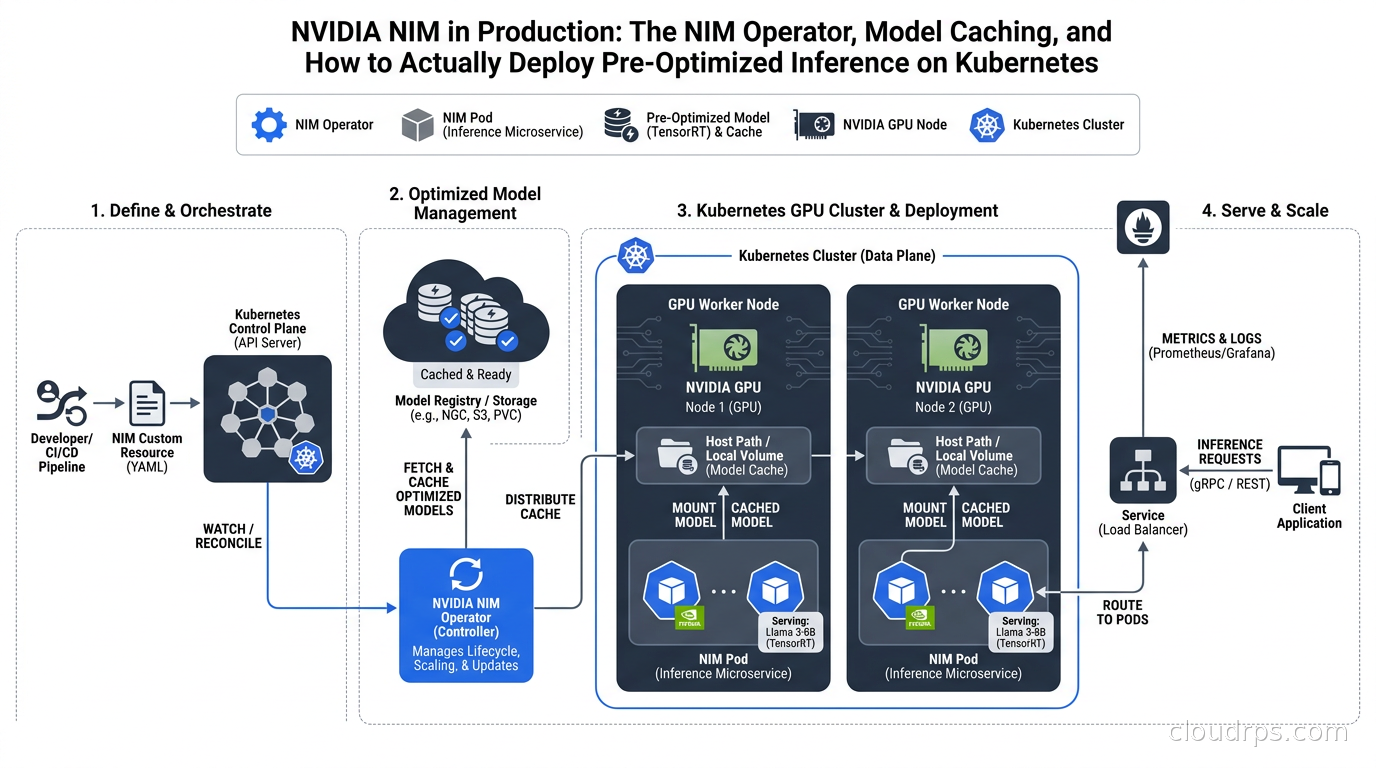
I spent a good chunk of last year helping three different enterprises answer the same question: we have NVIDIA GPUs in Kubernetes, we want to run LLMs, should we use NIM or just deploy vLLM ourselves? The answer is not as obvious as NVIDIA’s marketing suggests, and getting it wrong in either direction wastes real money.
NVIDIA NIM, short for NVIDIA Inference Microservices, is NVIDIA’s attempt to package the entire model serving stack, which means pre-optimized engine files, a containerized runtime, an OpenAI-compatible API endpoint, and lifecycle tooling, into a unit that a platform team can actually operate without deep ML engineering expertise. That pitch is genuinely compelling. The execution is more nuanced, and after twenty years of watching vendors promise “just deploy this container and you’re done,” my instinct is always to look carefully at what the abstraction is hiding before committing to it.
What NIM Actually Is (And What It Is Not)
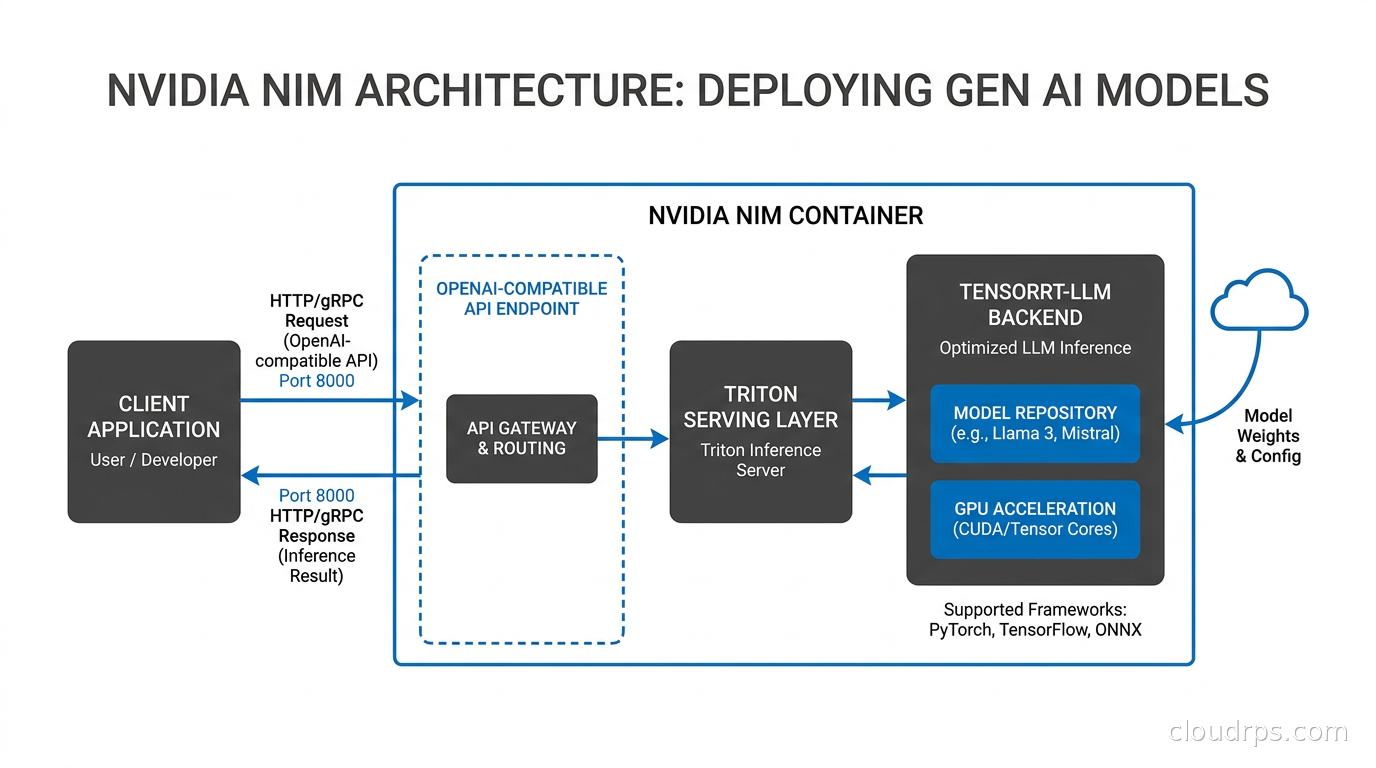
A NIM is a container image, published on NGC (NVIDIA’s container registry), that bundles a model runtime, configuration, and in many cases pre-built TensorRT-LLM engine files optimized for specific GPU hardware. When you pull a NIM for, say, Llama 3.1 70B, you are not just getting a generic vLLM container with the weights slapped in. You are getting a container that NVIDIA has already profiled against H100 and A100 silicon, selected an optimal attention backend, and in some cases pre-compiled the CUDA kernels for that specific combination of model architecture and GPU.
The runtime behind a NIM is not always TensorRT-LLM. NVIDIA documents NIM’s ability to select vLLM as a backend for some models, and uses Triton Inference Server as a serving layer in others. The point is that NIM abstracts the backend selection. You declare that you want Llama 3.1 on H100s and NIM picks the best engine for that combination. The tradeoff is reduced visibility into exactly what is running and limited ability to tune below the NIM abstraction boundary.
Two things NIM requires that raw vLLM does not: an NGC API key (NVIDIA NVAIE subscription for production use) and the NVIDIA GPU Operator on your Kubernetes cluster. NIM is not free software. If your organization has not already standardized on NVIDIA AI Enterprise, the licensing conversation needs to happen before you build the platform.
The API NIM exposes is OpenAI-compatible, meaning applications using the OpenAI Python SDK, or any tool that targets the /v1/chat/completions endpoint, can talk to NIM without modification. That compatibility is practically important because it means swapping between NIM, a managed provider endpoint, and your own vLLM deployment becomes mostly a configuration change rather than a code change.
The NIM Operator: Three CRDs That Actually Do Work
The NIM Operator is a Kubernetes operator that manages NIMs as first-class Kubernetes objects. It introduces three custom resource definitions that cover the full lifecycle of a NIM deployment: NIMCache for model artifact management, NIMService for the running inference deployment, and NIMBuild for compiling TensorRT-LLM engine files from source weights.
NIMCache is the piece that makes the whole thing viable at scale. Without it, every pod start triggers a full model download from NGC, which for a 70B model means tens of gigabytes over your cluster’s network link before the first inference request completes. NIMCache runs a Kubernetes Job that downloads the model artifacts to a PersistentVolumeClaim, and NIMService pods mount that PVC rather than downloading at startup. The result is that autoscaling events add capacity in seconds rather than minutes, and rolling updates do not cause a thundering herd of simultaneous NGC downloads.
NIMCache can pull from three sources: NGC directly (requiring your API key in a Kubernetes secret), NVIDIA’s NeMo Data Store if you are using the full NeMo ecosystem, and Hugging Face for models hosted there. The last option is significant because it means you are not locked into NVIDIA’s catalog even while using the operator’s lifecycle tooling.
apiVersion: apps.nvidia.com/v1alpha1
kind: NIMCache
metadata:
  name: llama3-70b-cache
spec:
  source:
    ngc:
      modelPuller: nvcr.io/nim/meta/llama-3.1-70b-instruct:latest
      pullSecret: ngc-secret
  storage:
    pvc:
      create: true
      storageClass: high-iops-ssd
      size: 200Gi
One thing the documentation undersells: the storage class matters a lot. A 70B model cache on a network-attached volume with 500 MB/s throughput will still add thirty seconds to pod startup. Use local NVMe or a high-throughput block storage class. I have seen teams provision NIMCache on standard gp3 EBS volumes, wonder why their HPA events are slow, and spend three days chasing a ghost before realizing the bottleneck is storage IOPS on the cache mount.
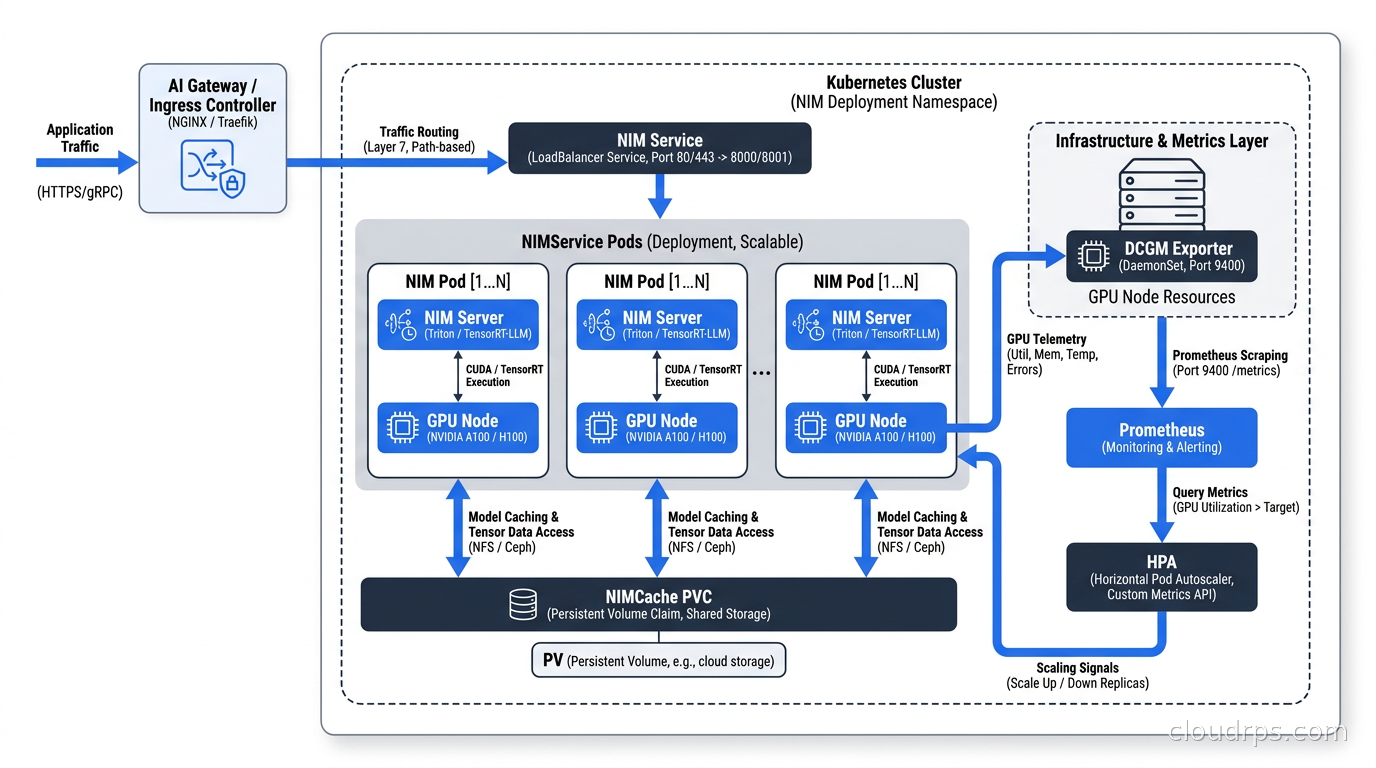
NIMService creates and manages the actual inference deployment. It generates a Deployment, Service, ConfigMap, HorizontalPodAutoscaler, and a startup probe, all from a single custom resource. The spec is consistent across LLM-specific, multi-LLM, and non-LLM NIMs, which matters when you are managing a catalog of models with the same GitOps tooling.
The startup probe default of 20 minutes is worth understanding. NIM containers perform CUDA kernel warmup and model shard loading at startup, which for large models on shared storage can genuinely take close to that boundary. The Operator v3.0.2 raised this default after teams reported pods appearing ready while still warming up. If you tighten the startup probe to look aggressive, you will see pods fail and restart in a loop that wastes GPU memory. Leave the default alone unless you have benchmarked your specific model and hardware combination.
NIMBuild is the newest CRD and the most interesting for teams that want to squeeze maximum performance. It takes a base model from HuggingFace or NeMo Data Store and compiles a TensorRT-LLM engine specifically for your GPU hardware profile. The compiled engine is then stored in a NIMCache and referenced by NIMService. This closes the gap between NIM’s turnkey convenience and raw TRT-LLM performance tuning. The tradeoff is build time, which can be hours for a 70B model, and the result being specific to your GPU SKU. If you change GPU types, you rebuild.
When to Choose NIM Over Raw vLLM
The decision framework I use after watching several teams go through this:
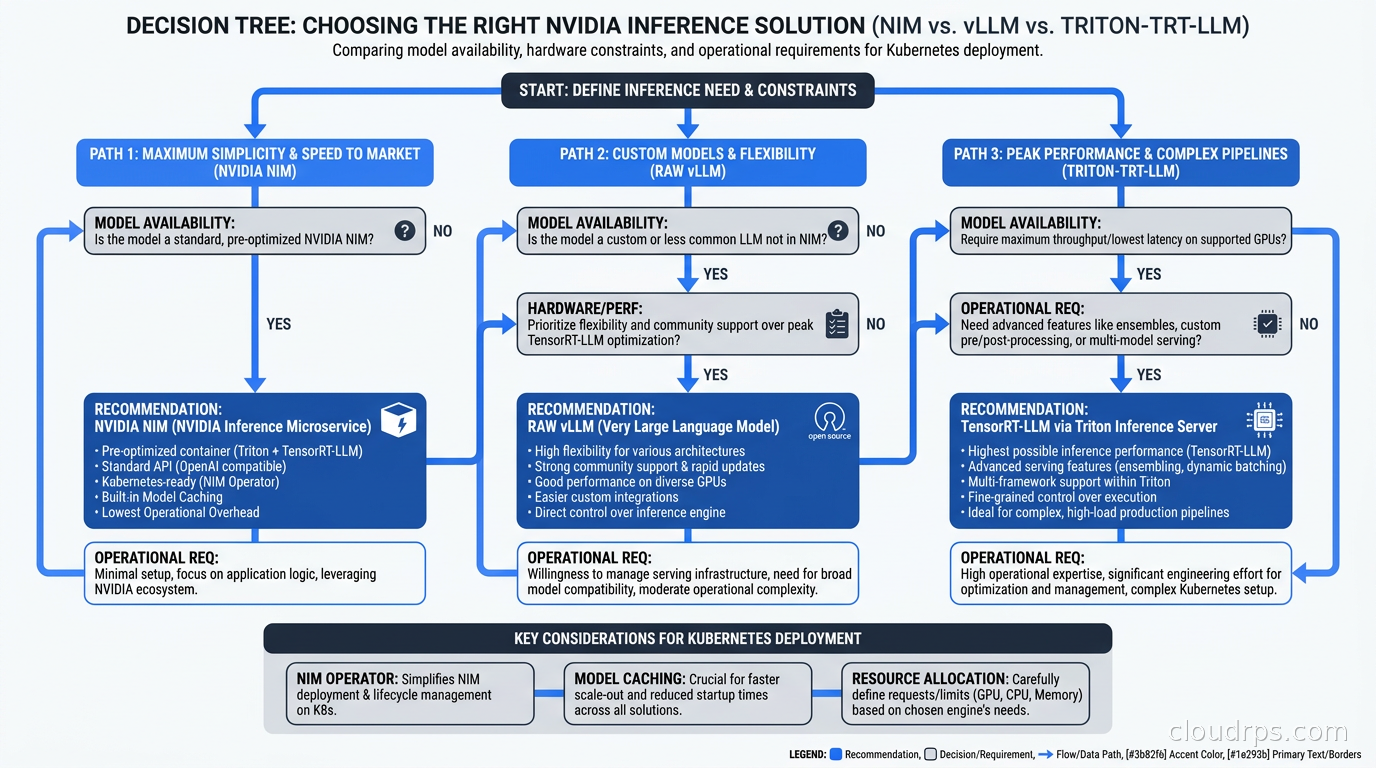
Choose NIM when the model you need is in the NGC catalog, you are running on H100 or A100, you want NVIDIA support SLAs, or your platform team needs to manage a catalog of models without deep ML infrastructure expertise. NIM’s operator lifecycle handling, pre-validated containers, and consistent API surface genuinely reduce operational complexity for these scenarios.
Choose raw vLLM when you need a model before NVIDIA adds it to the NIM catalog (which lags new releases by weeks to months), you need to run on hardware other than NVIDIA GPUs, you need to tune beyond NIM’s exposed knobs (batch size policies, attention backends, speculative decoding configurations), or your budget does not include NVIDIA AI Enterprise licensing.
The choice is not permanent. The most sensible pattern I have seen in production is to run new or experimental models on raw vLLM until the model stabilizes, then migrate the high-traffic version to NIM to take advantage of NVIDIA’s optimization work. The OpenAI-compatible API makes this migration mostly painless at the application layer.
For teams already covered by existing inference infrastructure, the LLM inference engines comparison has more detail on the vLLM and TensorRT-LLM side of that decision.
Production Scaling Patterns
HPA on GPU Metrics
The standard NIMService autoscaling uses Kubernetes HPA, but the metrics that actually predict load on an inference service are different from typical CPU-based workloads. NIM’s Operator integrates with DCGM Exporter to expose GPU utilization and memory bandwidth metrics. For inference workloads, I prefer scaling on request queue depth or pending token throughput rather than raw GPU utilization, because a lightly loaded GPU can still have queued requests waiting on memory bandwidth.
For anyone not already running DCGM Exporter, the GPU infrastructure observability guide covers getting those metrics into Prometheus before you hook them to HPA.
Multi-Node Inference via LeaderWorkerSet
For models too large to fit on a single GPU node, NIM Operator v3.0+ uses LeaderWorkerSet (LWS), a Kubernetes workload API designed specifically for multi-process leader-worker patterns like tensor parallelism. When you set multiNode: true in your NIMService spec with a replica count, the operator creates a leader pod that coordinates inference across worker pods. All pods share the same NIMCache PVC.
The critical operational requirement for multi-node NIM is your inter-GPU networking fabric. Tensor parallel inference over TCP will never saturate your GPUs. You need RDMA-capable networking, either InfiniBand or RoCE, and your Kubernetes pod spec needs to reflect that. The GPU cluster networking guide covers the RoCE and InfiniBand side in detail. Trying to run multi-node NIM over standard ethernet networking is a path I have watched teams take; the latency overhead of TCP coordination turns a theoretically faster multi-GPU setup into something slower than a single well-utilized node.
Availability and Disruption
For production NIM deployments I always configure:
- A PodDisruptionBudget with
minAvailable: 2(NVIDIA’s best-practices docs recommend at least 2 replicas for HA) - Pod anti-affinity to spread replicas across physical nodes and availability zones
- Node taints on GPU nodes so only NIM workloads and GPU-aware jobs land there, preventing CPU workloads from consuming node resources that warm GPU kernels need
affinity:
  podAntiAffinity:
    preferredDuringSchedulingIgnoredDuringExecution:
      - weight: 100
        podAffinityTerm:
          labelSelector:
            matchLabels:
              app: nim-llm
          topologyKey: kubernetes.io/hostname
The preferred rather than required anti-affinity is intentional. If your cluster has two GPU nodes and you need three replicas, a required rule will leave one replica perpetually unscheduled. The Kueue scheduler can also help manage GPU resource queuing across multiple inference workloads; see the Kueue batch scheduling guide for how that integrates with GPU workloads.
KServe Integration
NIM Operator v3.1.x added native KServe integration. When enabled, the operator creates an InferenceService CRD rather than a raw Deployment, which lets you use KServe’s routing, canary traffic splitting, and serverless scale-to-zero behavior on top of NIM’s lifecycle management. NIMCache still handles model pre-caching, which is important because KServe’s scale-from-zero behavior without a warm cache means your cold start latency is dominated by model download time.
The KServe integration is most compelling for teams already running KServe and wanting NIM’s optimization without abandoning their existing serving infrastructure. For teams starting fresh with NIM as the primary serving layer, the raw NIMService path is simpler.
NeMo Microservices: The Broader Context
NIM is one component in NVIDIA’s NeMo ecosystem. The same NIM Operator that manages LLM inference services also manages NeMo microservices for fine-tuning (NeMo Customizer), evaluation (NeMo Evaluator), guardrails (NeMo Guardrails), and data storage (NeMo Data Store). If your use case involves a feedback loop where you fine-tune models on production data, then evaluate, and redeploy, having these services managed by the same operator with the same GitOps workflow is a real operational win.
The catch is that NeMo fine-tuning, especially for 70B+ models, has substantial compute and storage requirements. NeMo Customizer uses LoRA and other parameter-efficient methods to keep this tractable, but you still need to think about GPU allocation for training jobs alongside inference jobs. For teams taking this path, the LLM fine-tuning infrastructure guide covers the underlying LoRA and QLoRA mechanics that NeMo Customizer is built on.
What NIM Does Not Solve
After helping teams deploy NIM, the places where expectations diverge from reality cluster around a few themes.
Cost optimization is still your problem. NIM gives you an efficient inference container, but it does not decide when to scale down to zero, which GPU SKU is cheapest for your traffic pattern, or whether some workloads should shift to serverless GPU platforms during off-peak hours. The efficiency of the inference serving layer is one variable in a FinOps equation that still requires your attention. The AI FinOps guide covers the cost optimization layer above the inference runtime.
Observability requires additional work. NIM exposes an OpenAI-compatible API and DCGM GPU metrics, but application-level tracing, prompt logging, token budget tracking, and evaluation pipelines are not included. Treat NIM as the compute layer and plan your observability stack around it separately.
Model support lags the frontier. On the day a new model architecture ships, NIM will not have it. NVIDIA typically needs weeks to profile hardware combinations, build optimized engines, and publish tested containers. If your competitive advantage depends on running the newest model the week it drops, that lead time is a real constraint. Raw vLLM with community-contributed implementations will almost always win on time to first deployment for new models.
Non-NVIDIA hardware is not supported. This sounds obvious but creates real architectural lock-in. AMD ROCm users, teams evaluating Google TPUs, and anyone using AWS Trainium will not find NIM useful. If hardware diversification is part of your cloud strategy, a vLLM or similar backend that runs across hardware types is worth the additional operational investment.
Security Considerations for NIM Deployments
NIM introduces a few security surface areas that differ from generic container deployments and are worth addressing explicitly.
NGC credentials management is the most immediate. Your NGC API key gives access to NVIDIA’s container catalog and model weights. In Kubernetes, that key lives as a Secret, and by default a Secret in the same namespace is readable by any pod in that namespace. For a cluster hosting multiple teams or multiple AI applications, create dedicated namespaces for NIM deployments and apply RBAC policies that prevent other workloads from mounting or reading the NGC secret. The Kubernetes secrets management guide covers the External Secrets Operator approach for pulling credentials from a secrets manager rather than storing them directly as Kubernetes Secrets.
Network isolation for inference workloads is one of the arguments for NIM that does not get enough attention. NIM containers expose the inference API on a known port with known semantics. That makes writing Kubernetes NetworkPolicies straightforward: allow ingress from your AI gateway tier and egress only to logging and metrics sinks. A raw vLLM deployment where teams run ad-hoc scripts and expose additional debug ports is harder to lock down. Standardizing on NIM’s predictable port and API surface makes the network policy work substantially easier.
Supply chain integrity is where NVIDIA’s distribution approach deserves scrutiny. NIM containers come from NGC, which is NVIDIA’s hosted registry. You are trusting NVIDIA’s build and signing pipeline for every container you deploy. For enterprises with strong supply chain security requirements, the container registry guide covers the patterns for mirroring NIM containers through an internal registry with Cosign verification, which lets you apply your organization’s image signing and scanning policies without blocking access to NIM’s optimized containers. See the container registry production guide for the mirroring and signing workflow.
GPU process isolation between NIM workloads on the same node is worth understanding. NVIDIA’s MIG (Multi-Instance GPU) partitioning provides hard isolation at the hardware level, but NIM without MIG means multiple pods on the same node share the GPU memory address space at the driver level. For multi-tenant environments where different application teams are running separate NIMs on the same cluster, MIG partitioning or physical node isolation between tenants is the right approach rather than relying on Kubernetes scheduling alone.
Before you write a single NIMService manifest:
- The NVIDIA GPU Operator must be running on your cluster. It installs the device plugin, DCGM Exporter, and driver containers that NIM depends on. See NVIDIA’s documentation for the GPU Operator and verify it is healthy before proceeding.
- You need an NGC API key. For non-commercial and development use, the personal NGC tier is available. For production use, NVIDIA AI Enterprise licensing applies.
- Plan your storage. NIMCache PVCs for large models need fast storage. Account for the full model size plus space for CUDA engine caches that NIM writes at first startup.
- Kubernetes 1.28 or higher, with cert-manager for admission webhooks, is the current documented requirement as of NIM Operator v3.1.x.
The operator installs via Helm. The NGC catalog pages list current Helm chart versions. Pin to a specific version in production rather than tracking latest, because the NIMCache and NIMService schemas have changed between minor versions.
Practical Takeaways
NIM earns its place in production when the model is in the NGC catalog, the hardware is NVIDIA, and the platform team values lifecycle automation over tuning flexibility. The NIM Operator’s handling of model caching, multi-node topology, and GPU-aware scheduling handles real operational complexity that you would otherwise build by hand on top of raw vLLM.
The places to be careful are the storage class choice for NIMCache, the startup probe timing, the anti-affinity configuration for HA, and the licensing conversation that needs to happen early. None of these are blockers but all of them create surprises for teams that skip them.
The fractional GPU guide and the Kubernetes DRA guide are worth reading alongside NIM deployment work because GPU sharing and allocation strategies interact directly with how NIMService pods get scheduled. A NIM deployment on a cluster without properly configured MIG or DRA may land all replicas on one node rather than spreading across the available GPU hardware, which defeats the HA configuration entirely.
For teams building AI platforms, NIM occupies a specific and useful position in the stack. It is not magic, it does not replace thinking about cost and observability, and it does not support every model. But for the cases it covers, the operator lifecycle management is genuinely better than the alternative of hand-rolling the same functionality with Helm charts and custom controllers.
Get Cloud Architecture Insights
Practical deep dives on infrastructure, security, and scaling. No spam, no fluff.
By subscribing, you agree to receive emails. Unsubscribe anytime.