
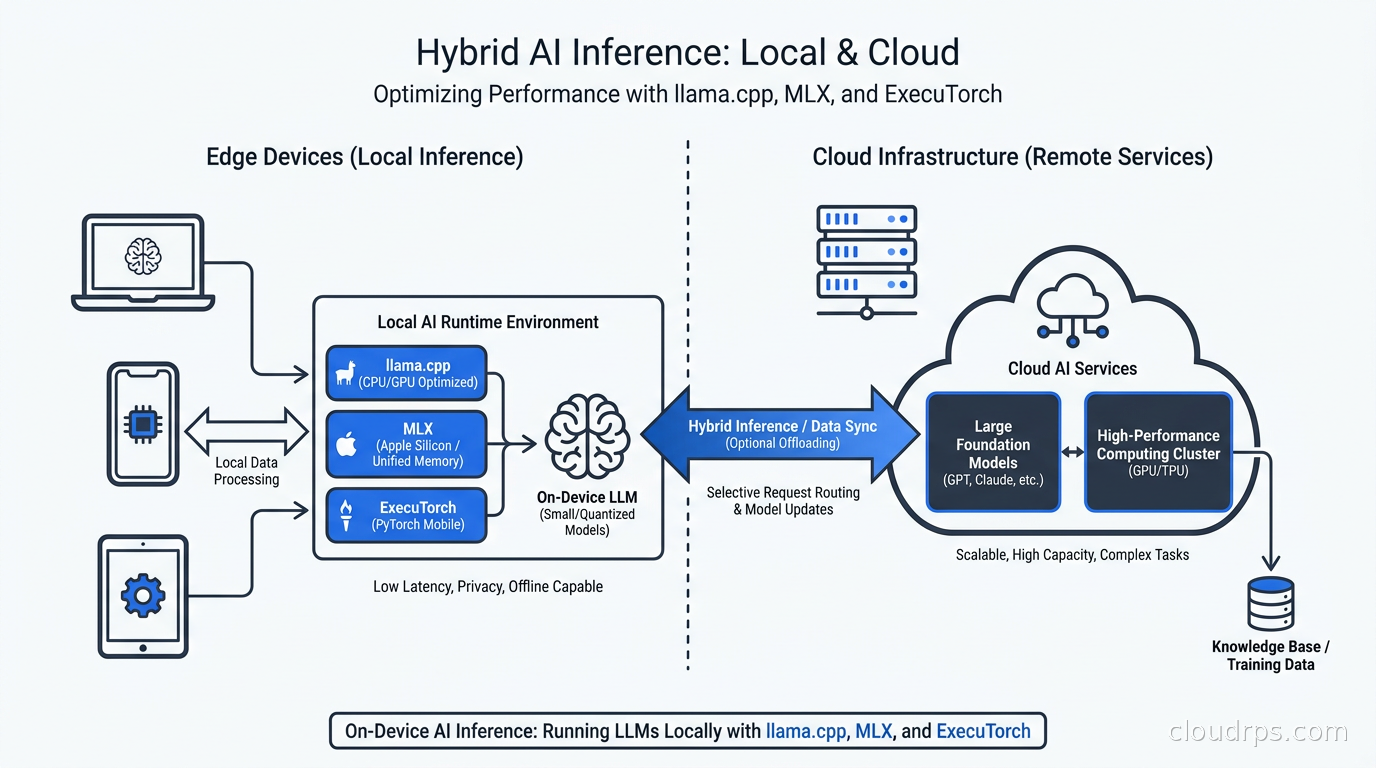
The assumption that AI inference belongs in the cloud made sense in 2023. Models were 70B parameters and larger, required multiple H100s to serve at acceptable latency, and the tooling for running them locally was a mess of Python dependency nightmares. That assumption is not just wrong today; it is expensive, slower for specific workloads, and in some jurisdictions legally questionable.
I have spent twenty years building cloud infrastructure, and in the last eighteen months I have watched a genuine architectural shift happen faster than almost anything I have seen before. The boundary between cloud inference and on-device inference is moving, and if you are still shipping every AI call to the cloud by reflex, you are leaving money on the table and building latency into your user experience that you do not need.
This guide covers what has actually changed, which frameworks to use for which workloads, how to design the hybrid split correctly, and when the whole thing is a waste of time.
What Actually Changed
Three things converged to make on-device inference viable right now.
First, the models got genuinely good at small sizes. When I say Phi-4-mini at 3.8B parameters can handle reasoning tasks that would have required a 70B model two years ago, I am not parroting a benchmark. I am reporting what I saw in production. The architecture improvements in Phi-4, Gemma 3, Qwen2.5, and Llama 3.2 squeezed meaningful capabilities into model sizes that a laptop can run. A 4-bit quantized Phi-4-mini takes about 2.5 GB of RAM. A modern laptop has 16-32 GB. The math now works in a way it simply did not before.
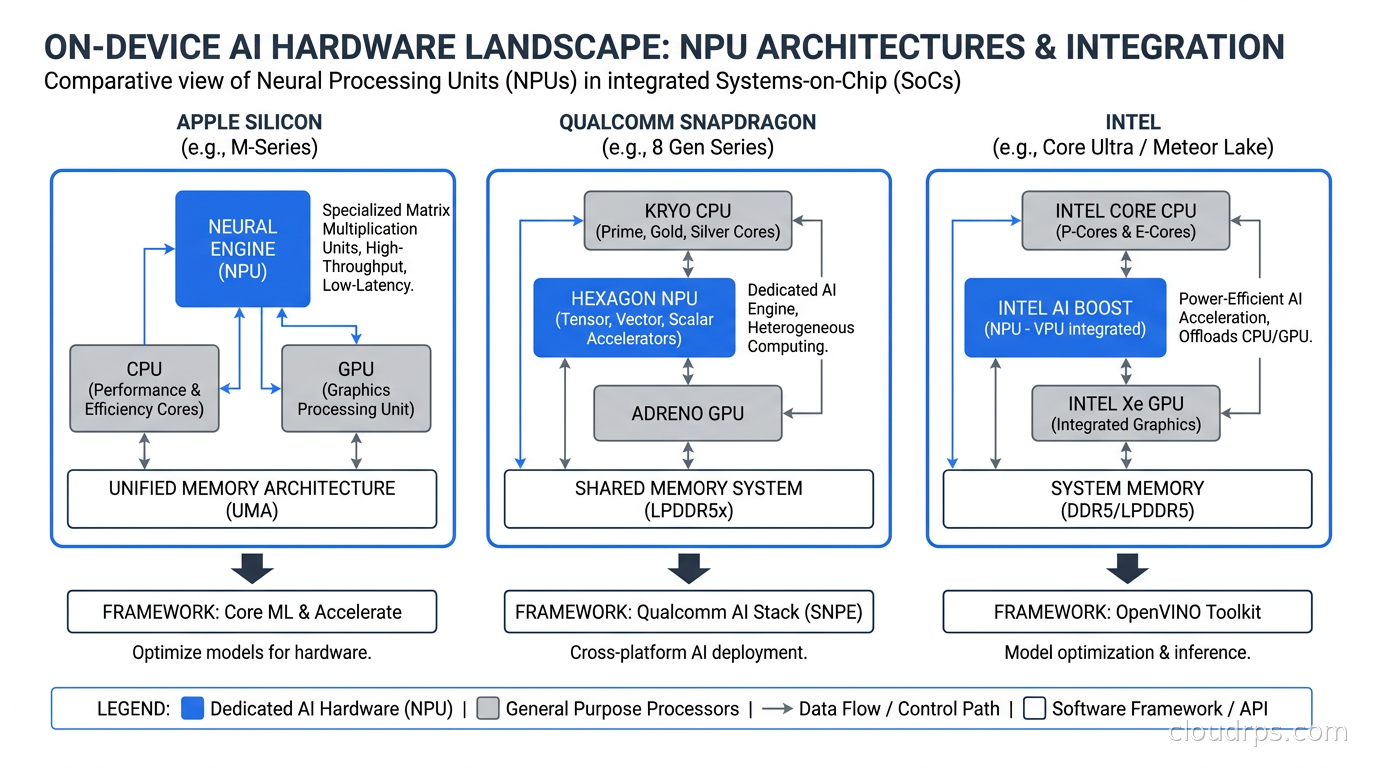
Second, the hardware has NPUs everywhere. Apple Silicon’s Neural Engine has been shipping since M1 in 2020, but the software to use it effectively took years to catch up. The M4 Neural Engine can do 38 TOPS (tera-operations per second). Qualcomm’s Snapdragon X Elite in Windows laptops ships a 45 TOPS NPU. Intel’s Meteor Lake AI Boost is more modest but still meaningful for lighter workloads. These are not GPU-class compute engines; they are specialized matrix multiplication accelerators that are power-efficient enough to run inference continuously without destroying battery life. That changes the economics for mobile and laptop workloads entirely.
Third, quantization finally became something you can do without a PhD. The GGUF format from llama.cpp and the AWQ/GPTQ tooling covered in my LLM quantization guide means you can take a model from HuggingFace and have a 4-bit INT4 version running locally in under an hour. Quality loss at INT4 is real but often acceptable; at INT8 it is almost imperceptible for instruction-following tasks.
The Framework Landscape
Before you can decide where to run inference, you need to know what you are running it with. The ecosystem has fragmented into at least five serious options, and they are not interchangeable.
llama.cpp is the foundation most tools are built on. Written in C++ by Georgi Gerganov, it started as a way to run Llama on a MacBook and has become the reference implementation for GGUF-format models. It runs on CPU, CUDA, Metal, and Vulkan backends. For production use cases where you need portability and do not want to deal with Python packaging headaches in a deployed binary, llama.cpp is often the right answer. You can embed it as a shared library and call it from Go, Rust, or C. The binding ecosystem is mature enough that this is not an adventure.
Ollama wraps llama.cpp behind a REST API with model management built in. If you are building a developer tool or internal application and want something that feels like calling a cloud API but runs locally, Ollama is the fastest path to working code. It handles model downloading, versioning, and serving in a way that abstracts the GGUF details cleanly. The cost: it is not the leanest option for embedded use cases, and the abstraction hides tuning knobs you sometimes need in production.
MLX is Apple’s framework for making inference fast on Apple Silicon specifically. It is purpose-built to use the unified memory architecture of M-series chips, where CPU and GPU share the same physical memory pool. A Gemma 3 4B model running on MLX on an M4 MacBook Pro achieves 80-100 tokens per second, which is faster than many GPU-equipped servers running unoptimized inference. If your target platform is macOS or iOS, MLX is not optional; it is the default. Nothing else comes close on Apple hardware.
ExecuTorch is Meta’s framework for deploying PyTorch models to edge and mobile devices. It converts standard PyTorch models into a format that runs on-device with quantization, delegate backends (XNNPACK for CPU, CoreML for Apple, Vulkan for Android), and a small runtime you can embed in a mobile app. It is the most mature option for shipping AI features in iOS and Android applications. The model conversion tooling is still rougher than I would like, but the runtime itself is solid and the LLVM-based compiler pipeline produces well-optimized kernels for each target.
ONNX Runtime from Microsoft is the cross-platform option that enterprise teams often land on. It fits the Windows AI ecosystem, has a stable and audited codebase, and the DirectML execution provider uses the Windows NPU and GPU through a unified API. If your organization has Windows laptops and uses Azure AI services, ONNX Runtime is the path of least resistance. It does not have the raw performance ceiling of MLX on Apple or llama.cpp on CUDA, but the deployment story for managed enterprise environments is much simpler.
Each framework targets a different point in the deployment spectrum: llama.cpp and Ollama for developer tools and server-adjacent edge, MLX for Apple-native apps, ExecuTorch for mobile, ONNX Runtime for enterprise Windows. Do not try to build one abstraction layer that wraps all of them cleanly. The hardware differences are too significant and you will spend all your time fighting the abstraction.
Models Worth Running On-Device
Not every model shrinks gracefully. Some architectures lose critical capabilities at 4-bit quantization; others hold up remarkably well. These are the models I would evaluate seriously today.
Phi-4-mini (3.8B): Microsoft’s small model family punches above its weight on instruction following and reasoning. The 4-bit GGUF version is about 2.5 GB. It runs well on both Ollama and MLX. For classification, summarization, intent detection, and structured extraction, it is often competitive with GPT-3.5-turbo class cloud models at a fraction of the operational cost.
Gemma 3 2B and 4B: Google’s Gemma 3 series was explicitly designed for on-device deployment, and it shows. The 2B model handles single-turn tasks well; the 4B hits a performance sweet spot. ExecuTorch support is solid because Google contributed the conversion scripts and tested them against their own hardware targets.
Llama 3.2 1B and 3B: Meta’s smallest Llama 3.2 models were the first Llama-family models explicitly designed for mobile. The 1B model runs on lower-end hardware; the 3B is the practical sweet spot for most applications. Both have multimodal variants if you need vision capabilities on-device.
Qwen2.5 1.5B and 3B: Alibaba’s Qwen2.5 is competitive on multilingual workloads, which matters significantly if you are building for non-English markets. The 1.5B model is surprisingly capable for structured output tasks, particularly for languages with rich morphology where smaller Western-trained models struggle.
Mistral 7B: Still the go-to for tasks needing a bit more reasoning depth without going to cloud-scale models. At Q4_K_M quantization, it runs well on 8 GB RAM machines. Not appropriate for memory-constrained mobile, but solid for laptops and edge servers where you have headroom.
Designing the Hybrid Architecture
The binary choice between cloud and on-device is a false dichotomy. Production systems need a principled split, and the criteria for that split are not what most engineers assume.
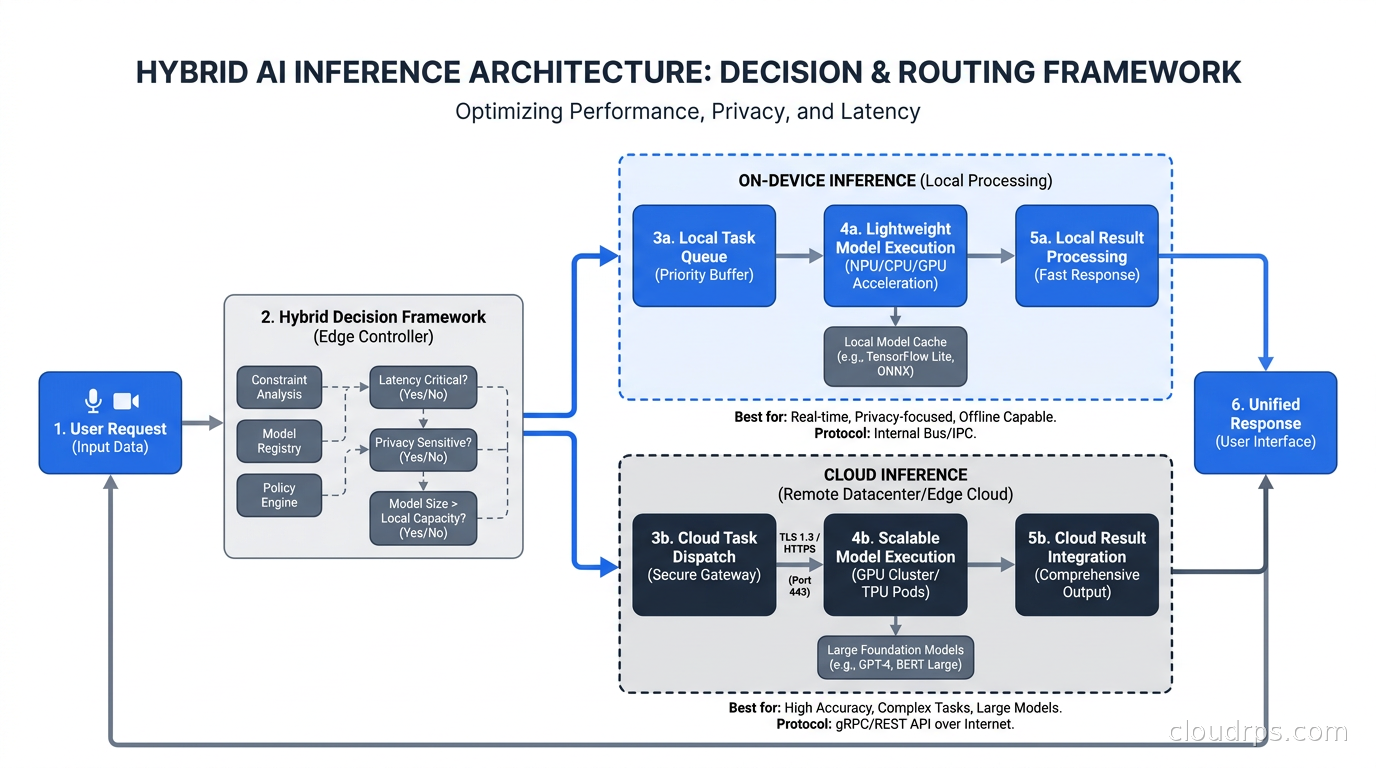
The naive approach is to split by model capability: simple tasks on-device, complex tasks in the cloud. That is a reasonable starting heuristic but misses the full picture. The better framework asks four questions about each task: latency sensitivity, privacy requirements, connectivity reliability, and context size requirements.
Latency-sensitive, short-horizon tasks belong on device. Autocomplete, real-time translation, intent classification, and UI suggestion generation all need sub-100ms response times to feel natural. The round trip to a cloud API alone is often 50-200ms before you add queueing, token generation, and response parsing. You cannot win that game with cloud inference for interactive features. I built a code autocomplete feature for an internal developer tool at a previous client and the switch from a cloud API to a local Phi-4-mini cut perceived latency from a noticeable pause to invisible.
Privacy-regulated data belongs on device. If you are building a healthcare application that processes clinical notes, or a financial tool that reads transaction data, or a legal tool that handles privileged communications, the data should not leave the device. Not because cloud providers are untrustworthy but because your lawyers, compliance auditors, and GDPR article 25 obligations say so. Processing on-device means no data leaves; the attestation is architectural rather than contractual. I worked with a fintech client whose GDPR audit flagged every transaction narrative being sent to a third-party inference API. Moving the classification step on-device solved the problem in a way that no DPA or data processing agreement could replicate.
Cloud inference wins on complex multi-step reasoning. When tasks require extended chains of thought, large context windows (128K-plus tokens), tool use across multiple function calls, or retrieval-augmented generation against large corpora, cloud inference is the right call. The on-device models simply do not have the parameter count to match frontier-class reasoning on hard problems. For RAG architectures, running the embedding model locally while routing generation to a cloud model is a practical and well-validated hybrid pattern.
Unreliable connectivity forces on-device fallback. Field service applications, mobile tools for emerging markets, and desktop applications that users expect to work offline all need an on-device inference path. Even if cloud inference is your primary path, you need a local fallback model or your application degrades to useless when the network drops. The fallback model does not need to match the cloud model’s capability; it needs to keep the application functional.
Real Deployment Challenges Nobody Talks About
The model evaluation benchmarks are the easy part. The deployment reality is harder.
Model distribution and updates. A GGUF model for Phi-4-mini is 2.5 GB. If you embed that in your application bundle, you have a 2.5 GB download. If you want to update the model version, you push another 2.5 GB. For developer tools where users have fast connections and large disks, this is manageable. For mobile applications in markets with 3G networks, it is disqualifying. The solution most teams land on is on-demand model download with background prefetch, delta compression between quantization versions, and graceful fallback to cloud while the local model is still downloading.
Hardware fragmentation. The NPU in an M4 MacBook Pro is not the same as the one in a Snapdragon X Elite laptop, which is not the same as a Raspberry Pi 5, which is not the same as an older machine running CPU-only inference. If you are targeting a heterogeneous fleet, benchmark on actual target hardware. I have watched teams build MLX-optimized inference that runs beautifully on their M3 MacBooks and then deploy to a client’s Intel-based enterprise laptops where it falls back to CPU and takes five seconds per token. The user experience at that point is worse than the cloud API they replaced.
Context window limitations. On-device models typically run at 4K-8K context windows. Cloud models routinely offer 128K-200K. This is not just a parameter count issue; the memory required for KV cache scales quadratically with context length. A 3B model with an 8K context already needs meaningful RAM for the cache. If your task requires long context, on-device is not yet the answer.
Latency characterization is runtime-dependent. Time-to-first-token on a cold start where the model loads from disk differs dramatically from warm inference where weights are resident in memory. The first generation after loading a 2.5B model from NVMe might be 200ms; after warm-up it is 20ms. Applications that do not keep the model warm in memory create inconsistent response times that users interpret as unreliability.
Evaluation and quality regression. When you update the model version shipped to devices, how do you know the new version did not regress on your specific use cases? The MLOps pipelines you built for cloud model deployment need significant adaptation for edge deployment. You cannot do A/B testing the usual way when the model runs locally. You need behavioral telemetry (aggregate, not per-request), automated evaluation as part of the release gate, and a canary rollout strategy that lets you compare behavioral distributions before full fleet deployment.
When On-Device Is the Wrong Choice
The excitement around this space can lead teams to on-device solutions for problems where it is entirely the wrong tool.
If your AI feature requires a 32K-plus context window, on-device is not viable today. If your use case requires the specific behavioral alignment of a heavily RLHF-tuned frontier model (safety-critical medical advice, legal document generation, financial regulation interpretation), the smaller on-device models have not had comparable alignment training and you should not substitute them. If your users are on hardware older than roughly 2019, inference speed on CPU-only hardware without dedicated NPUs can be too slow to be usable as a product.
The cost savings argument also deserves scrutiny. Yes, you eliminate per-token API costs. But you pay in developer time to build and maintain the on-device inference stack, model update infrastructure, hardware-specific testing, and a debugging environment that is considerably more complex than cloud logs. For an application doing five million tokens per day at cloud prices, the savings are significant. For an internal tool doing fifty thousand tokens per day, you might spend more engineering time on the on-device stack than you would have paid in API costs over three years.
The Infrastructure Implications
For cloud architects specifically, on-device inference changes the edge computing strategy in ways that extend beyond just “move the model.” The request patterns to your cloud services change: instead of raw text going to an inference API, you receive processed, intent-classified requests with structured payloads that a smaller cloud API can handle more cheaply. Your egress costs drop if you stop shipping documents from user devices to cloud inference endpoints and instead send only the structured results.
The observability picture changes too. You lose request-level visibility for inferences that happen on device. You cannot log every prompt and completion without either degrading privacy or adding significant bandwidth overhead. You need to rethink what signals matter: aggregate latency distributions, model confidence scores, fallback rate to cloud, and behavioral metrics rather than full audit trails.
Security is more complex in ways that cut both directions. On-device means model weights are distributed to potentially millions of endpoints; weight extraction and adversarial manipulation become vectors that do not exist for cloud inference. But on-device also eliminates the threat model of your inference API being breached and customer data being exposed in transit or at rest on a shared server.
The AI FinOps discipline that is emerging around cloud inference costs will need to expand to include on-device deployment cost as a real variable. The per-token cost savings are real, but the engineering, distribution, and device-side compute costs need to appear somewhere in your model.
Getting Started Without Building a Mess
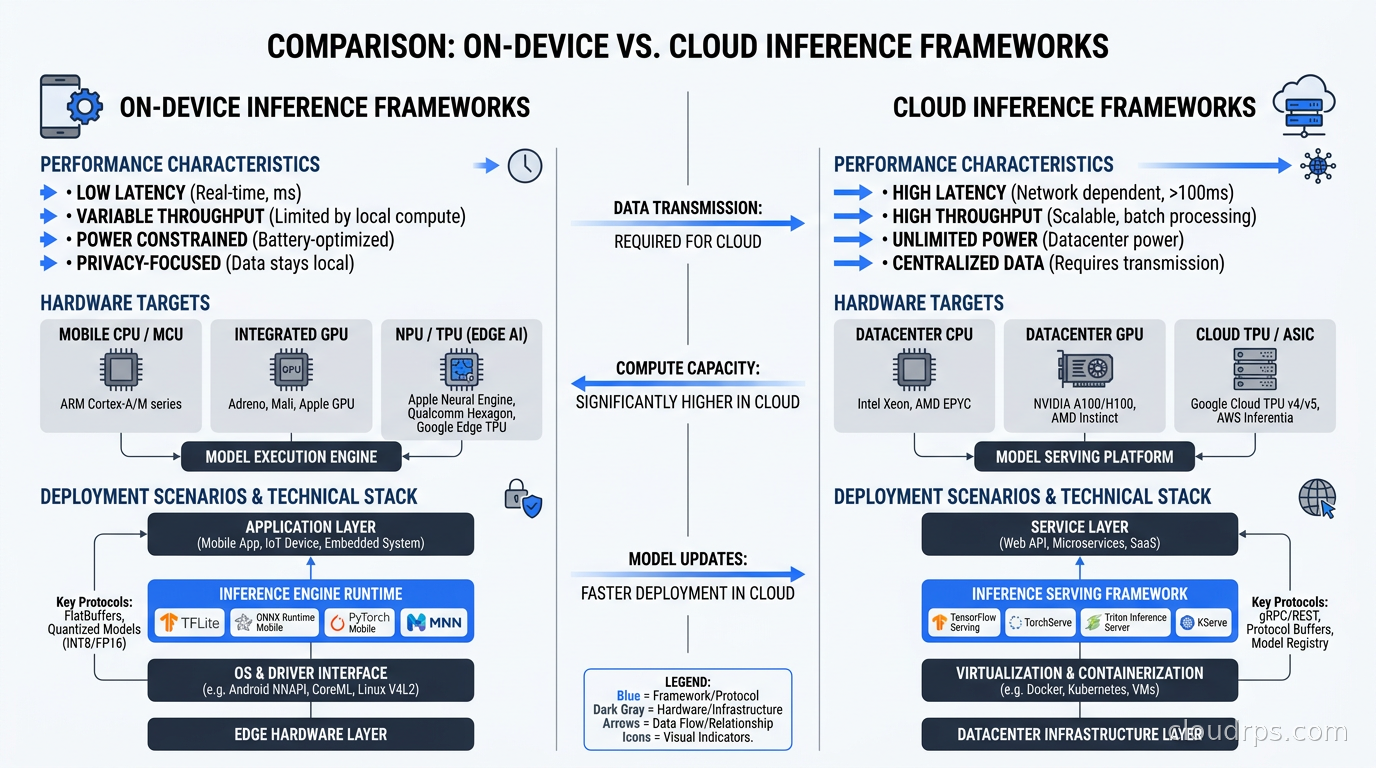
The practical path for teams evaluating on-device inference starts with Ollama for experimentation. Install it, pull Phi-4-mini or Gemma 3 4B, and point your existing inference client at localhost instead of the cloud API. If your use case works with the local model, you have validated the capability question. Then you address the distribution and deployment question, which is where the actual engineering work lives.
For production, the framework choice follows from your deployment target: MLX for macOS and iOS, ExecuTorch for Android, ONNX Runtime for Windows enterprise, and llama.cpp bindings for embedded Linux and edge servers. The Python ecosystem is fine for experimentation but not for production deployment where you need deterministic startup times and minimal dependencies.
Build the hybrid split as a routing layer in your application, not as inference-framework logic. The decision of “call local or call cloud” should be made before you send a request anywhere, based on the task classification, the current connectivity state, and the user’s privacy settings. Make it a pluggable policy so you can tune the split based on real usage data without rewriting inference code.
And invest in the fallback path. Whatever percentage of traffic you plan to handle on-device, you will occasionally need to fall back to cloud. Whether that is because the model has not downloaded, the hardware is underpowered for the request, or the task exceeds local model capability, your application needs to handle the fallback gracefully and transparently.
The Bigger Picture
The cloud inference model created a dependency that most teams have not fully examined: every AI feature in your product has a round-trip latency floor set by the speed of light to your inference provider’s data center, and a cost floor set by their pricing. On-device inference breaks both constraints for the right workload class.
This is not about replacing cloud AI. The frontier models will remain cloud-only for the foreseeable future, and many applications genuinely need their capabilities. The shift is about having a more nuanced architecture: use cloud inference where cloud inference wins, use on-device inference where on-device inference wins, and route intelligently between them based on the actual requirements of each request rather than the assumption that all inference belongs in the same place.
Teams that build this infrastructure now will have meaningfully better user experiences, lower inference costs, and stronger data privacy postures than teams that default to “everything to the API.” The tools are mature enough. The models are capable enough. The hardware is ready. The question is whether your architecture has caught up with what is now actually possible.
Get Cloud Architecture Insights
Practical deep dives on infrastructure, security, and scaling. No spam, no fluff.
By subscribing, you agree to receive emails. Unsubscribe anytime.