
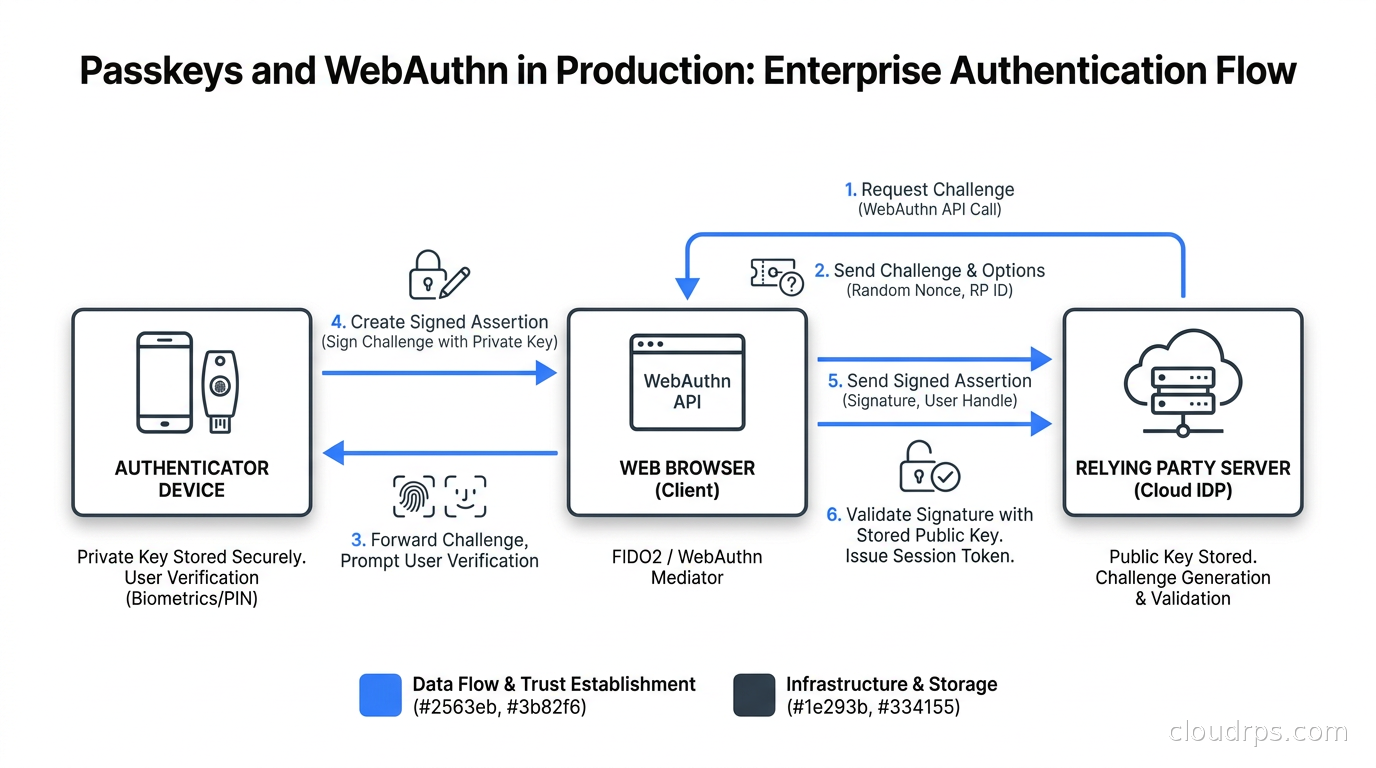
I have watched the same incident pattern repeat itself for twenty years: a credential stuffing attack, a breach notification, emergency password resets, damage to brand trust, and three months of forensics. The root cause is almost always the same thing. Passwords are shared secrets, and shared secrets get stolen. The tools to fix this have existed since 2019. The FIDO Alliance’s State of Passkeys 2026 report found approximately 5 billion passkeys in active use worldwide, with 68% of organizations deploying, piloting, or actively rolling out passkeys for employee authentication. The technology is mature. The question now is not whether to deploy, but how to do it correctly in a real production environment.
This guide is for the architects and engineers who need to build the infrastructure, not just evaluate the product pitch.
What WebAuthn Actually Is (and Is Not)
WebAuthn is a W3C specification that defines a browser API for public-key-based authentication. FIDO2 is the umbrella term that combines WebAuthn with CTAP (the protocol for external authenticators). A passkey is a FIDO2 credential, typically stored in the user’s device platform authenticator or on a hardware security key. The term “passkey” is the consumer-facing name; under the hood it is a WebAuthn credential.
The critical thing to understand architecturally: the private key never leaves the authenticator. During registration, the authenticator generates a key pair scoped to your relying party ID (your domain). It gives you the public key and keeps the private key in its secure enclave or TPM. During authentication, the authenticator signs a challenge with the private key. Your server verifies that signature with the stored public key. There is no shared secret to steal.
This is different in kind from MFA. With TOTP, you still need a password plus a time-based code. With WebAuthn, there is no password. The credential is phishing-resistant because the origin is cryptographically bound to the ceremony. A credential created for yourapp.com cannot be replayed against yourapp.com.attacker.com even if the user is socially engineered to visit the phishing site.
For a deeper look at the authorization layer on top of your authentication infrastructure, see our article on fine-grained authorization with OpenFGA and Zanzibar.
The Three Credential Types and Their Trade-offs
Before you write a line of server code, you need to understand what kind of passkeys you are deploying. They are not interchangeable.
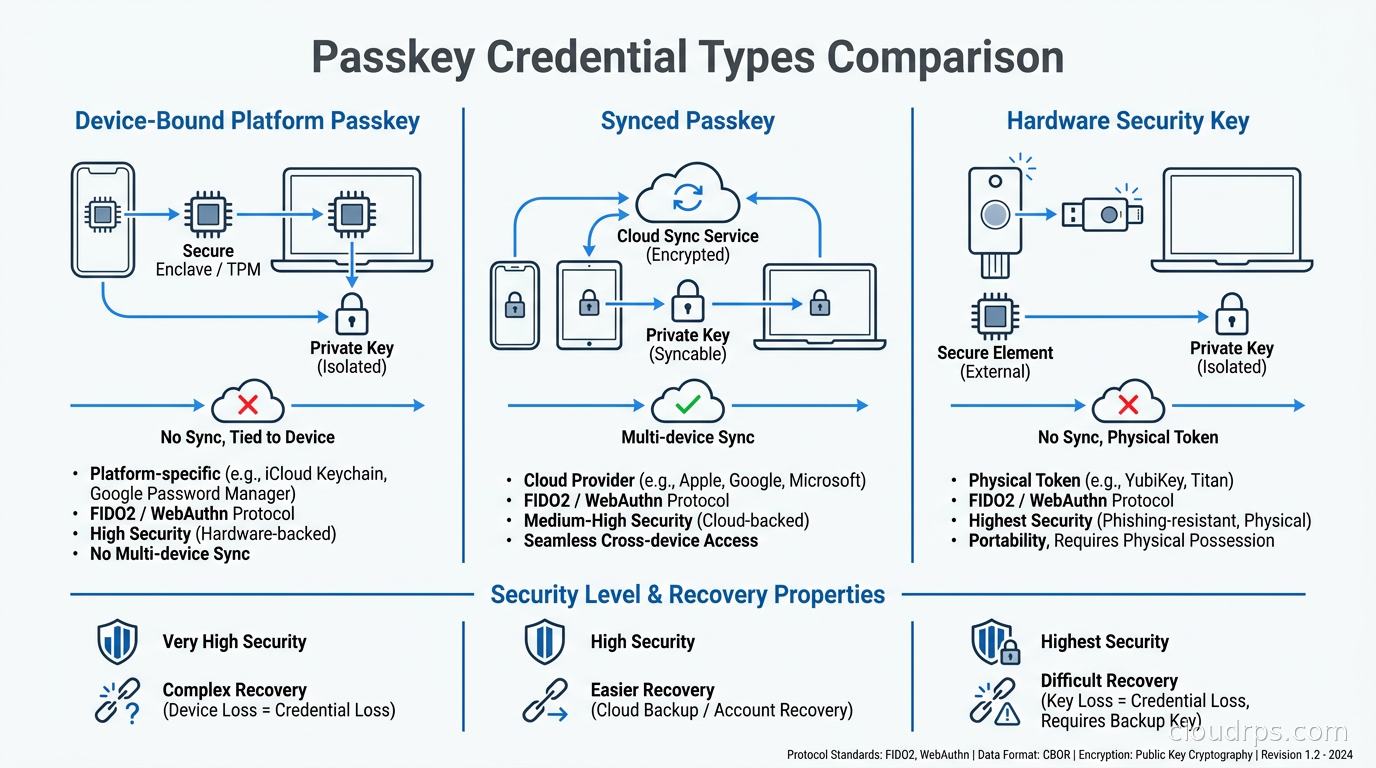
Device-bound platform passkeys are stored in the device’s secure enclave (Apple Secure Enclave, Android Strongbox, Windows TPM). The private key never leaves that hardware. This gives you the highest security assurance, including FIDO L2 certification for most modern devices. The downside is that the credential does not survive a factory reset, and users with a single device have a recovery problem the moment that device breaks.
Synced passkeys are stored by the platform’s credential manager (iCloud Keychain, Google Password Manager, Windows Hello with a Microsoft account). The credential material is backed up and can be restored to a new device. This is the model Apple and Google are pushing for consumer-facing apps. It is broadly accessible but the security posture inherits the security of the sync provider. The private key material does leave the device, encrypted, when synced. For most enterprise threat models this is acceptable; for sovereign or classified environments it may not be.
Hardware security keys (YubiKey, Google Titan Key) offer the strongest posture. The credential never leaves the physical token. Loss means re-enrollment. They are the right choice for privileged access and high-value accounts, and most organizations deploy them alongside platform passkeys rather than exclusively.
My recommendation for enterprise rollouts: start with synced passkeys for knowledge workers, require hardware keys for privileged roles (break-glass accounts, production access, service owners), and use attestation to distinguish between them in your policy engine.
The Relying Party Server: What You Actually Have to Build
The relying party (RP) is your server. WebAuthn puts real requirements on it. You need to implement two ceremonies correctly, store credential metadata securely, and handle a lot of edge cases that documentation glosses over.
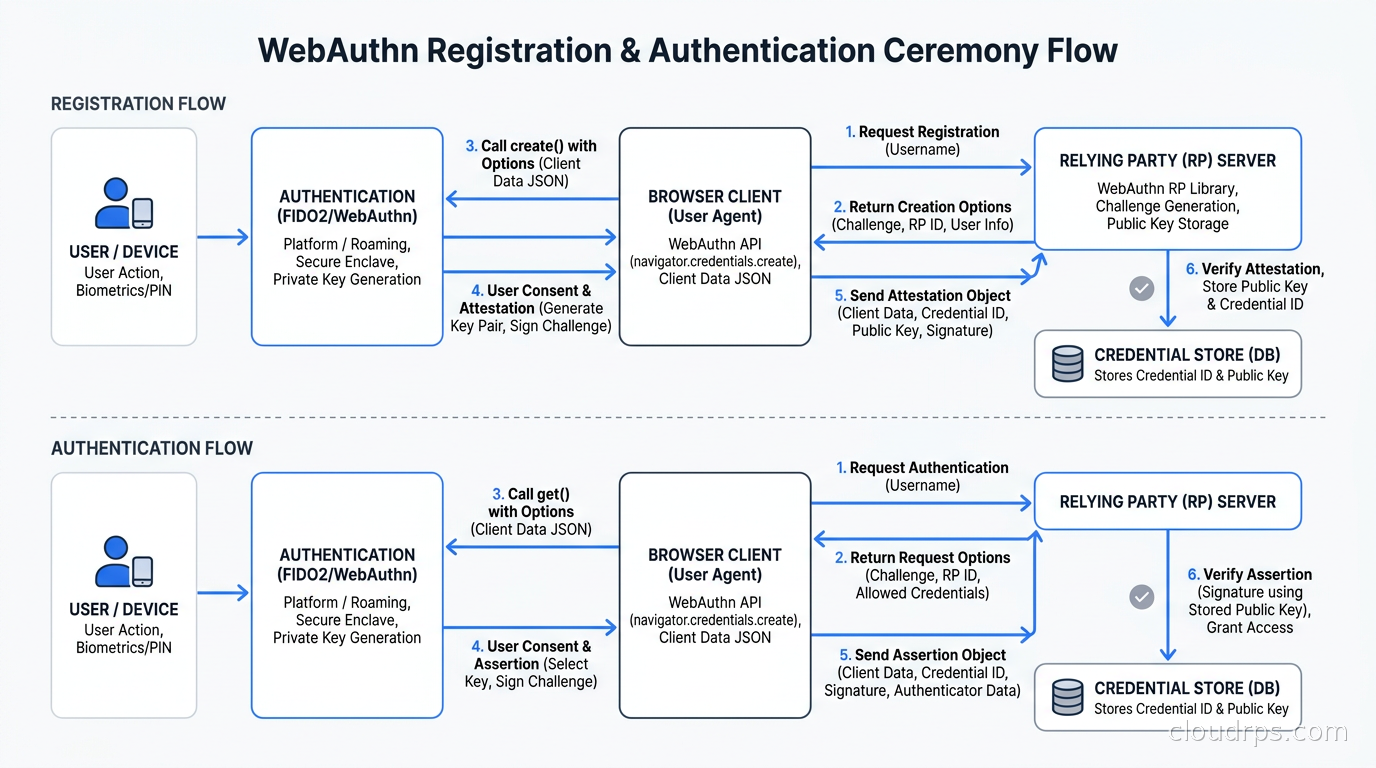
Registration ceremony (simplified):
- Generate a random challenge (minimum 16 bytes, cryptographically random).
- Send challenge plus your RP ID and RP name to the client.
- Client calls
navigator.credentials.create()and returns anAuthenticatorAttestationResponse. - Your server verifies the response: origin, RP ID hash, challenge, user verification, and attestation if required.
- Store the credential ID, public key (COSE format), sign count, AAGUID, and backup flags.
Authentication ceremony (simplified):
- Generate a new random challenge.
- Send challenge plus the user’s credential IDs (or none for conditional UI).
- Client calls
navigator.credentials.get()and returns anAuthenticatorAssertionResponse. - Your server verifies: origin, RP ID hash, challenge, signature against stored public key, and sign count.
- Update the stored sign count.
Do not implement this from scratch. The cryptography involves COSE key parsing, CBOR decoding, attestation format verification, and sign count handling. Use a maintained library: @simplewebauthn/server for Node.js, py_webauthn (Duo Labs) for Python, webauthn4j for Java, or the Go go-webauthn library. The ecosystem is mature enough that hand-rolling these ceremonies is purely risk with no upside.
The RP ID Decision You Cannot Take Back
This is the most important architectural decision you will make in a WebAuthn deployment, and it is permanent.
The RP ID is a domain suffix that scopes credentials. If you set it to auth.yourapp.com, credentials created there will only work on auth.yourapp.com. If you later decide to serve auth from login.yourapp.com, those credentials are invalid. Users have to re-register.
The rule: the RP ID must be a registrable domain suffix of the origin. You can set yourapp.com as the RP ID even if auth lives at auth.yourapp.com, because yourapp.com is a suffix of auth.yourapp.com. This gives you flexibility to migrate subdomains later.
Never use a shared hosting domain as your RP ID. If your staging environment lives at yourapp.vercel.app, you cannot use vercel.app as the RP ID since that would let any Vercel-hosted app claim your credentials. Use a custom domain for every environment. This is not optional.
Use the same RP ID across environments (dev, staging, prod) only if they share a domain. If they do not, credentials created in staging will not work in production. Most teams maintain separate credential stores per environment and accept that reality.
Decide on the RP ID before your first user registers a credential. You cannot change it without invalidating every registered passkey in your system.
Challenge State: The Load Balancing Problem Nobody Warns You About
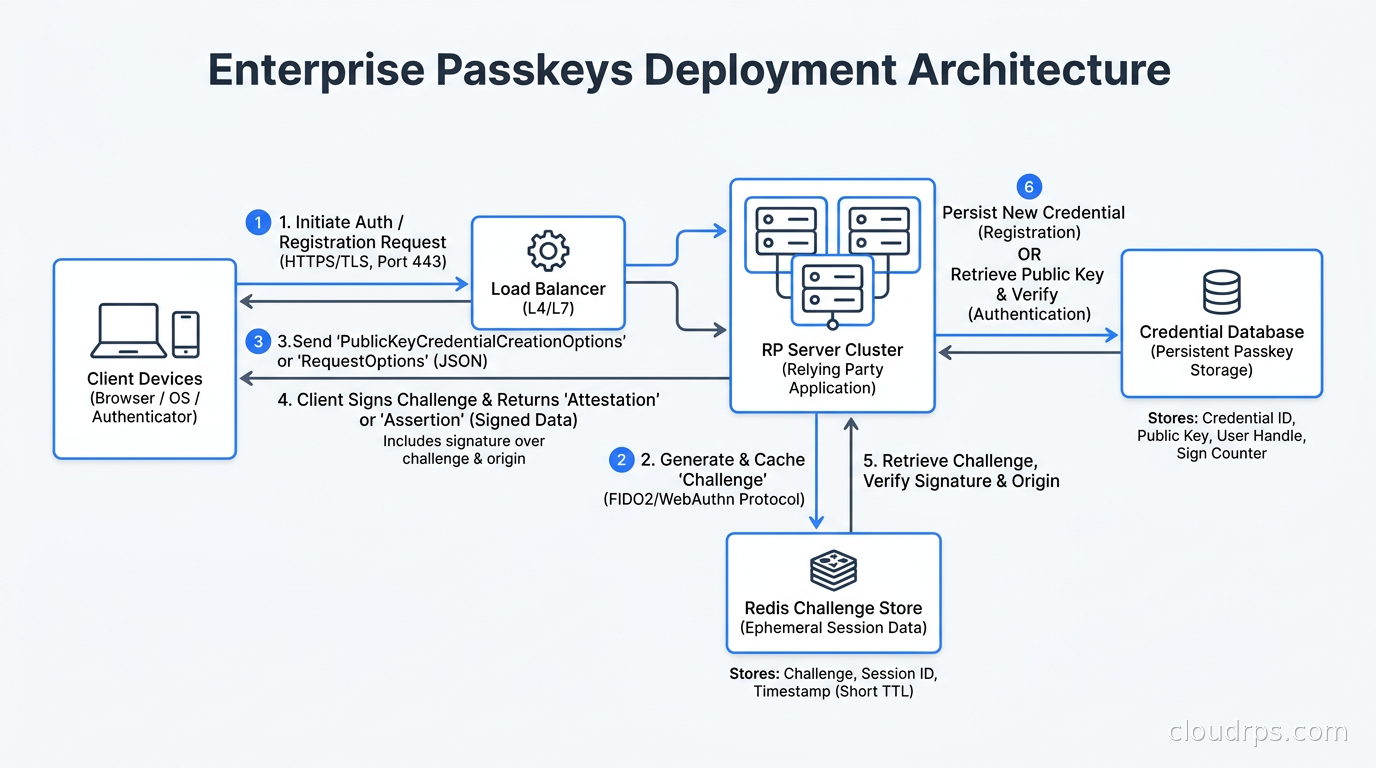
I have seen production WebAuthn rollouts fail at exactly this point. The registration and authentication ceremonies are stateful: you generate a challenge on the server, the client uses it, and you verify it on the next request. If you store challenges in process memory and have more than one server instance, the verification request may land on a different server that has no knowledge of the challenge. Authentication fails silently, users cannot log in, and you spend a week debugging what looks like a cryptography problem.
The fix is straightforward but must be planned for: externalize challenge state. Store the pending challenge in Redis (or any shared cache) keyed by session ID with a short TTL, typically 60 to 300 seconds. When the verification request arrives, retrieve and delete the challenge atomically before verifying. Use a Redis GETDEL or a Lua script to make retrieval and deletion atomic, preventing replay attacks where the same challenge is submitted twice against two server instances simultaneously.
A few things to get right:
Challenges must be single-use. After successful or failed verification, delete the challenge. A challenge that persists can be replayed.
Challenges should expire. A TTL of 60 seconds is enough for normal authentication flows. Registration flows where users may need to interact with a hardware key can be 300 seconds. Do not set infinite TTL.
Session binding is important. Tie the challenge to a session ID that is also validated server-side. A challenge floating in Redis with no user context is riskier than one bound to a specific pre-session.
For high-availability Redis, use a sentinel or cluster setup. A Redis outage should degrade gracefully to fallback authentication (passwords or OTP), not a complete authentication failure. We have a full treatment of distributed caching patterns in the Redis and Valkey caching guide.
What to Store Per Credential
Your credential table needs these columns, at minimum:
credential_id: the raw bytes returned by the authenticator, stored as base64url. This is your primary lookup key during authentication.credential_public_key: COSE-encoded public key, stored as bytes. Do not decode it at storage time; store it as-is and let your library decode during verification.user_id: foreign key to your user.sign_count: unsigned integer. Updated on every successful authentication. If an incoming assertion has a sign count lower than stored, this signals a cloned credential.aaguid: 16-byte UUID identifying the authenticator model. This is how you distinguish a YubiKey from a phone’s TPM from iCloud Keychain. You need this for attestation policy.backup_eligible: boolean. Whether the credential can be backed up (synced). Set at registration.backup_state: boolean. Whether the credential is currently backed up. Can change over time.transports: array of strings (internal, usb, ble, nfc, hybrid). Useful for UX hints.device_name: user-supplied name. Let users label their credentials (“Work MacBook”, “YubiKey 5C”).created_at,last_used_at.
Sign count deserves attention. The spec says you should compare the incoming sign count against the stored one and alert or reject if the incoming count is lower or equal (for non-zero counts). In practice, synced passkeys often reset or share sign counts across devices in unpredictable ways. You need a policy decision: hard reject on sign count mismatch (secure but breaks synced passkeys) or log and alert (less strict but synced-passkey compatible). Most enterprise deployments take the log-and-alert approach for synced credentials and hard-reject for hardware keys.
Enterprise Attestation: Knowing What Authenticated You
Attestation is the authenticator’s signed statement about what kind of device it is. During registration, the authenticator can optionally include an attestation statement that your RP can verify against the FIDO Metadata Service (MDS3). This is how you verify that a credential was created on a specific type of hardware.
For consumer apps, attestation is usually not required. For enterprise deployments with security policy requirements, it matters. You can:
- Verify that a credential was created on a real YubiKey (not a software emulator).
- Enforce that privileged users authenticate with FIDO L2-certified authenticators.
- Block authenticators with known security vulnerabilities (the FIDO MDS3 feeds status updates about authenticator security issues).
The FIDO Metadata Service is a JSON-based directory at mds.fidoalliance.org. Your server should download and cache the metadata blob at startup and refresh it periodically. The metadata includes the AAGUID for every registered authenticator model, its attestation root certificates, and its security level. During registration, if you require attestation, extract the AAGUID from the attestation statement and look it up in your local MDS3 cache.
One practical gotcha: not all authenticators support attestation, and users cannot tell you whether theirs does. If you make attestation required and block credentials without it, you will prevent some legitimate users from registering. A better model for most organizations: accept any authenticator at registration, record the AAGUID, and use that to gate access to high-privilege resources at authorization time rather than at registration time.
The Recovery Problem
This is where most deployments get into trouble, and where the planning pays off.
If a user loses their only authenticator device, they need to recover access. Recovery cannot be an email link because email is phishable. Recovery that falls back to passwords defeats the purpose. Recovery is a first-class design problem.
Enrollment of multiple credentials is the first line of defense. At registration, prompt users to register a second authenticator: their phone and a hardware key, or two devices. Show a registration state indicator in account settings so users can see how many credentials they have and which device each one belongs to.
Verified re-enrollment flow: when recovery is needed, the user goes through an out-of-band identity verification step. Depending on your threat model this might be: a biometric selfie check against a document, a video call with an HR representative, or a physical in-person verification for highly privileged roles. At the end, they create a new passkey. This is a new credential enrollment, not a reset, and it should be treated with the same security posture as a new hire’s first access grant.
Fallback authenticators for the transition period: during rollout, most organizations maintain passwords or OTP as a fallback. Passkey enrollment is encouraged but not required until a cutover date. Track enrollment rates per department and set department-level deadlines, not a single organization-wide date.
Hardware key backup policy for privileged users: anyone with production access should have two hardware keys enrolled and the second one stored securely (a physical safe, an IT hardware vault). This is the same logic as backup encryption keys for data at rest.
The recovery design and the account lifecycle management connect closely to your overall zero trust access architecture and the privileged access patterns you have established elsewhere.
Migration Strategy: Living in the In-Between
Dropping passwords cold-turkey for an enterprise with thousands of users is not realistic. Here is the migration strategy I have seen work.
Phase 1: Passkey as second factor. Register passkeys alongside existing credentials. When a user authenticates with password plus OTP, offer to register a passkey. This builds credential inventory without any user disruption.
Phase 2: Passkey as primary, password as fallback. If the user has a passkey registered, show the passkey UI first. Password authentication is still available but de-emphasized. Monitor fallback rates.
Phase 3: Passkey required for privileged paths. Enforce passkey authentication for production access, admin panels, and sensitive operations. Password authentication is no longer accepted for these paths even if the user has one registered. This is where you integrate with your authorization layer: resources require a session that was established via WebAuthn, not just any authenticated session.
Phase 4: Password removal for enrolled users. Once a user has at least two passkeys registered and has used them successfully for 90 days, remove their password. The system no longer has a shared secret to steal for that account.
This is similar to the expand-contract pattern used in zero-downtime database migrations: you add the new capability alongside the old one, verify it works, and then remove the old capability only after the new one is stable.
Conditional UI: The UX Layer That Makes or Breaks Adoption
WebAuthn supports a mediation: "conditional" mode that displays passkey suggestions in the browser’s built-in autofill dropdown as the user focuses on a username field. This is how Safari and Chrome show passkeys without any custom UI: the user sees their passkeys in the same autofill popup as saved passwords.
To use conditional UI, call navigator.credentials.get() with mediation: "conditional" on page load. This is non-blocking. If the user chooses a passkey from autofill, the promise resolves. If they type a username and click a login button instead, the regular WebAuthn flow handles it. This is what makes passkeys feel native rather than bolted-on.
On the server, this means you need to handle the case where the incoming assertion does not identify the user by username in the initial request: the credential ID itself is the user identifier. Your server looks up the user by credential ID, then verifies the assertion. This is a different lookup order than password authentication and requires a credential-to-user index in your database.
Operational Concerns
Rate limiting must cover the registration and assertion endpoints separately. Registration is more expensive (it creates a new credential in your database). Authentication assertions should be rate-limited per username or per IP to prevent brute-force attempts against sign count manipulation.
Monitoring: track registration success rate, authentication success rate, fallback-to-password rate, and device type distribution from AAGUID. Sudden spikes in fallback rate indicate a user-experience problem or a certificate/RP ID configuration issue. A drop in synced passkey authentications can mean an upstream sync provider had an outage.
Key rotation for your RP server: your RP server itself does not hold private keys, so there is nothing to rotate on your side for the core authentication function. However, if you use attestation verification, you need to keep your MDS3 metadata cache fresh and update your trust anchors when the FIDO Alliance publishes updates.
Keycloak integration: if you are running Keycloak as your identity provider, WebAuthn/passkeys support has been built in since Keycloak 21. The configuration surfaces through the Authentication Flows UI. See our Keycloak production guide for deployment considerations. If you are using a hosted IdP (Okta, Microsoft Entra, Ping), passkey support is now generally available in their enterprise tiers.
Logout and session invalidation need care. A WebAuthn assertion establishes a session; the passkey itself cannot be remotely revoked. What you can revoke is the session and the stored credential. Build an admin interface that shows all registered credentials per user with last-used timestamps and allows revocation. Connect this to your HR offboarding automation.
Putting It Together: The Production Checklist
Before going live with WebAuthn in production:
- RP ID locked to a custom domain you control.
- Challenge state in Redis with atomic GETDEL and appropriate TTL.
- Credential table with AAGUID, backup_eligible, backup_state, sign_count.
- Multiple-credential enrollment enforced in UX.
- Recovery flow designed and tested, not deferred.
- Attestation policy defined: which resources require FIDO L2 authenticators.
- FIDO MDS3 metadata refresh scheduled.
- Conditional UI enabled on login page.
- Rate limiting on registration and assertion endpoints.
- Fallback to MFA (not passwords) for unregistered users.
- Monitoring on fallback rate and device type distribution.
The authentication problem is genuinely solved by WebAuthn if you implement the infrastructure correctly. The protocol has no shared secrets to leak, no replay vectors if challenges are single-use, and no phishing vectors because the credential is origin-scoped. The hard parts are operational: RP ID governance, challenge state management across a distributed fleet, recovery design, and migration pacing. Those are infrastructure engineering problems, not cryptography problems, and they are well within scope for any team that has navigated MFA rollout or federated identity before.
The credentials stuffing attacks I have been cleaning up for twenty years only work because passwords exist. Passkeys remove the target. That is the cleanest security improvement available right now, and it is within reach for any team willing to spend a few weeks on the infrastructure plumbing described above.
For the authorization layer that sits above authentication, see our guide to building zero trust security infrastructure.
Get Cloud Architecture Insights
Practical deep dives on infrastructure, security, and scaling. No spam, no fluff.
By subscribing, you agree to receive emails. Unsubscribe anytime.