
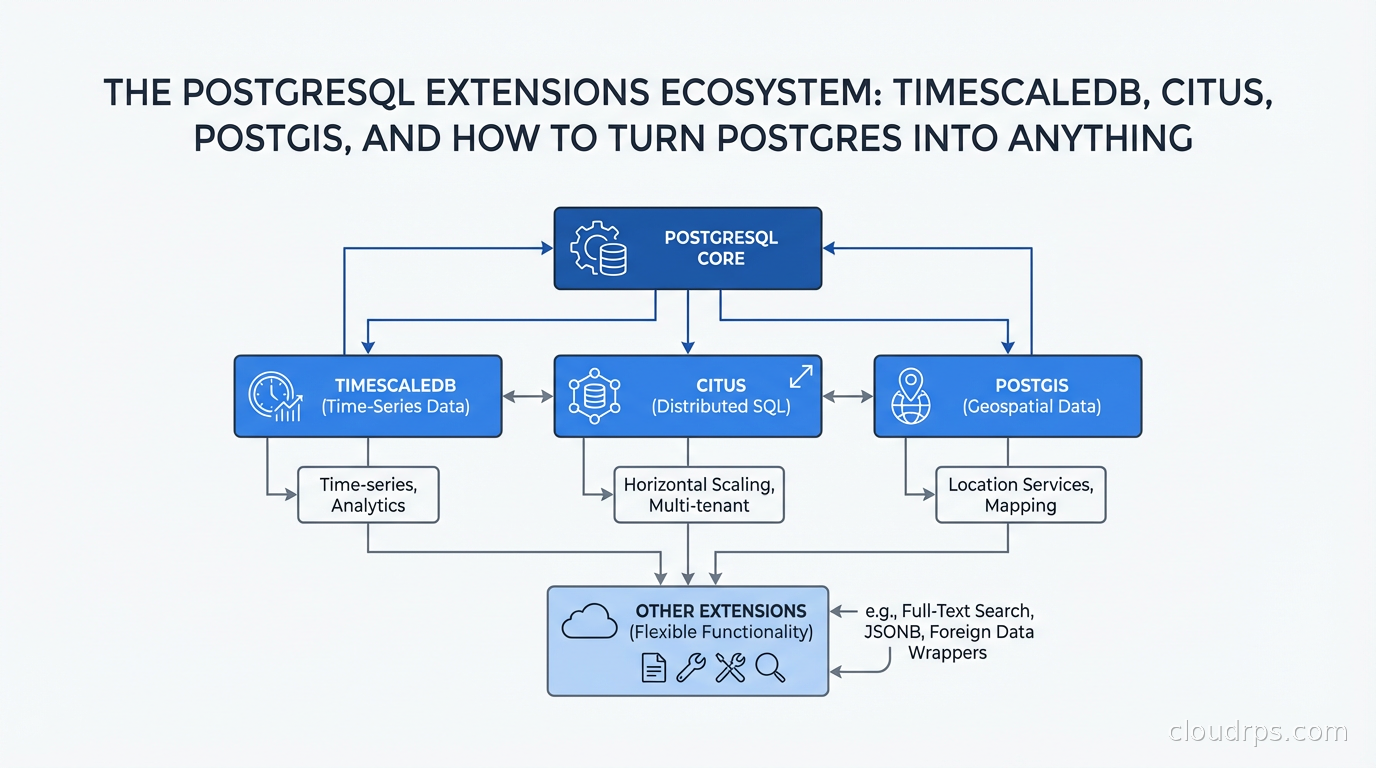
I have a strong opinion that has made me unpopular in certain architecture discussions: you should exhaust what PostgreSQL can do before you introduce a specialized database. I have seen teams add InfluxDB for time-series data that TimescaleDB would have handled without adding another system to operate. I have seen teams adopt MongoDB for geospatial search that PostGIS would have covered with better query expressiveness. I have seen teams add Cassandra for write throughput that Citus would have handled at a fraction of the operational complexity.
PostgreSQL is not perfect for every use case. But its extension architecture means it can be meaningfully extended for workloads people usually reach for specialized systems to handle. The question is knowing when the extension is genuinely sufficient versus when you are torturing a round peg into a square hole.
How Extensions Actually Work
A PostgreSQL extension is a package that extends the database server’s functionality. Unlike plugins in other databases, Postgres extensions run inside the database server process. They can define new data types, operators, index methods, functions, aggregate functions, and even hooks into the query planner and executor.
Extensions are loaded via CREATE EXTENSION extension_name, which runs a SQL script that registers the extension’s objects in the database catalog. For extensions that include compiled C code (most serious ones do), the shared library is loaded into the Postgres server process. This is why you need to install extensions on the server, not just in the database.
The key directories are: $(pg_config --sharedir)/extension for the SQL scripts and control files, and $(pg_config --pkglibdir) for the compiled shared libraries. When you install TimescaleDB or PostGIS from your package manager, they put files in both of these locations.
This architecture means extensions can be very powerful and very fast (they run in-process, with direct access to Postgres internals) but also means a buggy extension can crash your database. Choosing extensions from reputable projects with active maintenance is not optional.
TimescaleDB: When Your Postgres Needs to Think in Time
If your data has a time column and you are querying it by time ranges, aggregating over time windows, or storing sensor or metrics data, TimescaleDB is worth evaluating before reaching for a purpose-built time-series database like InfluxDB.
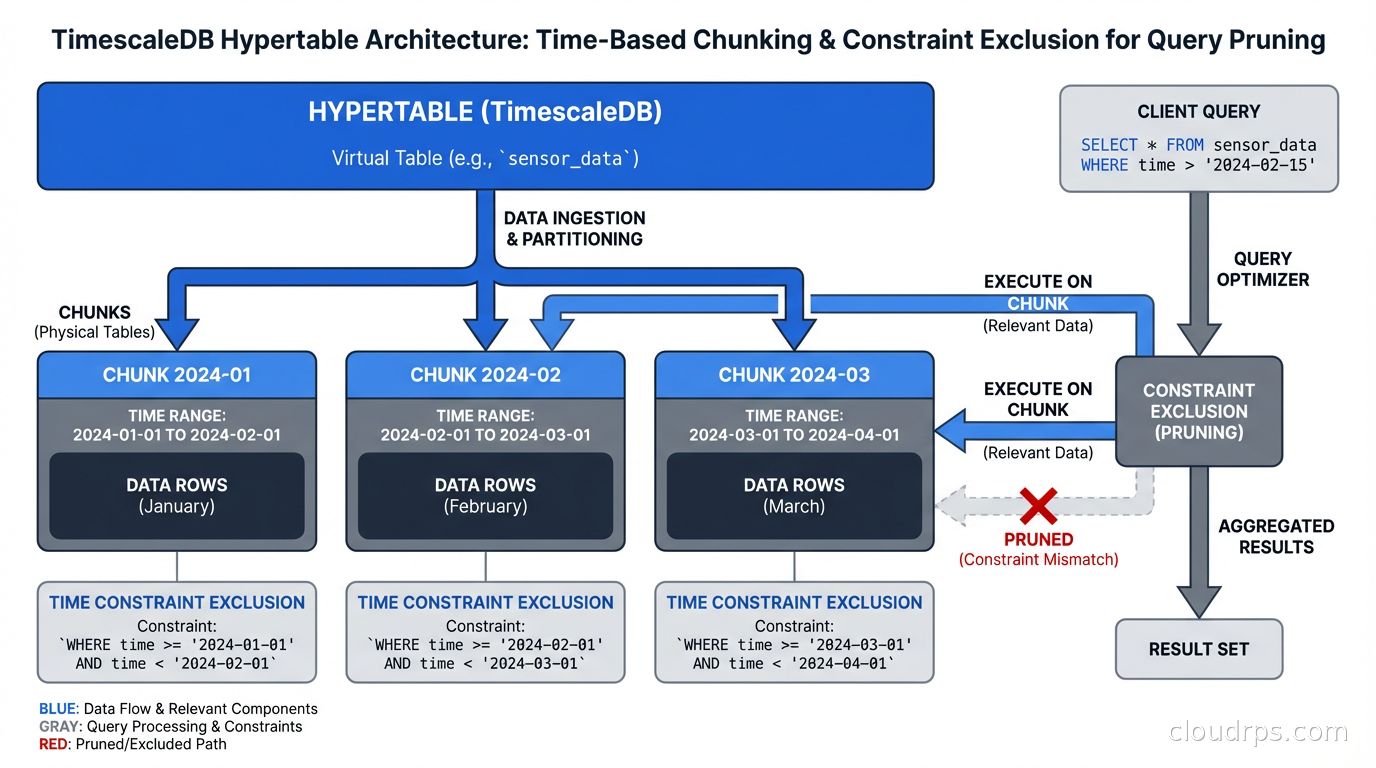
TimescaleDB introduces the concept of a hypertable, a PostgreSQL table that is automatically partitioned by time (and optionally by a second dimension like device ID). Under the hood, a hypertable is a set of standard Postgres tables called chunks, each covering a specific time range.
-- Convert an existing table to a hypertable
SELECT create_hypertable('sensor_readings', 'recorded_at');

-- Or create one directly
CREATE TABLE sensor_readings (
    time        TIMESTAMPTZ NOT NULL,
    device_id   TEXT NOT NULL,
    temperature DOUBLE PRECISION,
    humidity    DOUBLE PRECISION
);
SELECT create_hypertable('sensor_readings', 'time');
Queries that filter on the time column automatically hit only the relevant chunks. A query for the last 24 hours of data from a table with 5 years of history will scan only one or two chunks rather than the entire table. This is automatic constraint exclusion, and it is why time-series query performance on TimescaleDB can match InfluxDB on many workloads.
TimescaleDB also provides:
Continuous aggregates: materialized views that are incrementally updated as new data arrives, ideal for pre-computing hourly or daily rollups without a batch job.
Data retention policies: automatic chunk deletion after a configurable period.
Compression: TimescaleDB’s columnar compression can achieve 90-95% compression ratios on time-series data with predictable access patterns, comparable to what specialized time-series systems achieve.
The operational advantage over a separate time-series database is significant. You keep all your data in one system, use standard SQL, use existing PostgreSQL backup tooling, and avoid managing inter-system consistency. Connection pooling with PgBouncer works identically on TimescaleDB hypertables. Logical replication replicates hypertables to replicas. The operational surface area stays the same.
Where TimescaleDB is not the right answer: cardinality explosions (billions of unique tag combinations, which is more a Prometheus/Thanos problem than a time-series data problem), sub-millisecond write latency requirements, or IoT edge ingestion where you need a wire-efficient binary protocol rather than SQL. For those cases, the time-series database comparison of InfluxDB 3, TimescaleDB, QuestDB, and VictoriaMetrics covers how to choose when PostgreSQL is the wrong starting point.
Citus: Horizontal Scaling Without Leaving Postgres
Sharding and partitioning are the standard approaches to scaling a database beyond what a single node can handle. Citus brings sharding to PostgreSQL as an extension (now open-source after Microsoft acquired the company and open-sourced the core).
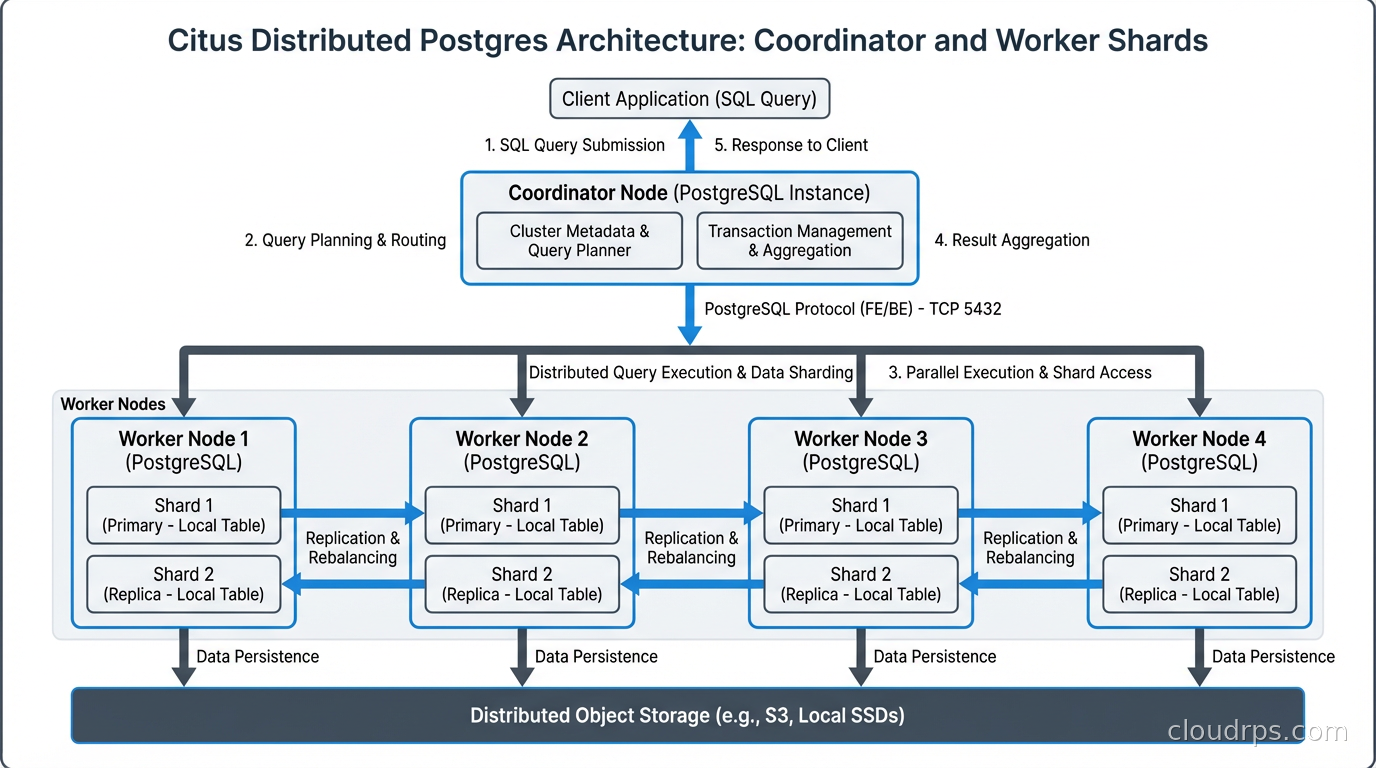
Citus distributes tables across multiple worker nodes called shards. A coordinator node handles query planning and routes queries to the appropriate workers. The application connects to the coordinator and runs standard SQL without knowing about the underlying sharding.
The key concept is the distribution column. You choose one column to shard on, and Citus co-locates related rows on the same shard. For a multi-tenant SaaS application, tenant_id is the natural distribution column:
-- Mark the tenants table as the reference table (replicated to all workers)
SELECT create_reference_table('tenants');

-- Distribute orders by tenant_id
SELECT create_distributed_table('orders', 'tenant_id');

-- Distributed queries transparently route to the right worker
SELECT count(*) FROM orders WHERE tenant_id = 'acme-corp' AND created_at > NOW() - INTERVAL '30 days';
Queries that filter on the distribution column hit a single shard. Queries that aggregate across all tenants (an admin dashboard) will scatter-gather across workers. Citus handles both, though cross-shard queries are more expensive.
Citus is a strong fit for:
- Multi-tenant SaaS where each tenant’s data is largely independent
- High-throughput analytics across large datasets that cannot fit on a single Postgres instance
- Workloads where you want to keep SQL semantics and Postgres tooling while scaling out
It is a poor fit for workloads requiring frequent cross-shard JOINs without the distribution key (Citus can do this but it requires data shuffling between nodes), or for operational databases with complex foreign key relationships across the distribution boundary.
One operational note: Citus requires careful thought about your distribution column choice. Changing it after the fact is painful. If you are not sure whether your access patterns will fit Citus’s model, run a proof of concept with production-representative query patterns before committing.
PostGIS: Geospatial Superpowers Built Into Postgres
PostGIS is one of the most capable geospatial databases in existence, and it runs as a PostgreSQL extension. It implements the OGC Simple Features standard for geometry types and spatial operations, adds spatial index support via GIST and SP-GIST, and provides hundreds of spatial functions.
-- Find all restaurants within 2km of a location
SELECT name, address,
       ST_Distance(location::geography, ST_MakePoint(-73.985, 40.758)::geography) as distance_meters
FROM restaurants
WHERE ST_DWithin(
    location::geography,
    ST_MakePoint(-73.985, 40.758)::geography,
    2000  -- 2000 meters
)
ORDER BY distance_meters;
PostGIS handles 2D and 3D geometries, geographic (spheroid) calculations, raster data, topology, and routing (via the pgRouting extension that builds on PostGIS). For applications that need proximity search, coverage analysis, or route optimization, PostGIS is mature enough to power production systems at significant scale.
The spatial index is important for performance. A GIST index on your geometry column turns a full table scan for proximity queries into an efficient bounding-box lookup followed by precise distance calculation only for candidates. Without it, geospatial queries will be slow at any meaningful data size. If you are new to PostgreSQL’s index types beyond B-tree, the PostgreSQL indexing strategies guide covers GiST, GIN, BRIN, and the full range of index patterns in detail.
PostGIS has a steeper learning curve than the other extensions I am covering. Spatial concepts (coordinate reference systems, projections, datum transformations) take time to learn correctly. Getting projections wrong produces subtly incorrect results rather than obvious errors. But if you have developers with GIS background or are willing to learn, PostGIS gives you capabilities that dedicated geospatial platforms charge significant licensing fees for.
The Operational Extensions You Probably Need Regardless
Beyond the specialized extensions, several Postgres extensions should be on your radar for operational reasons:
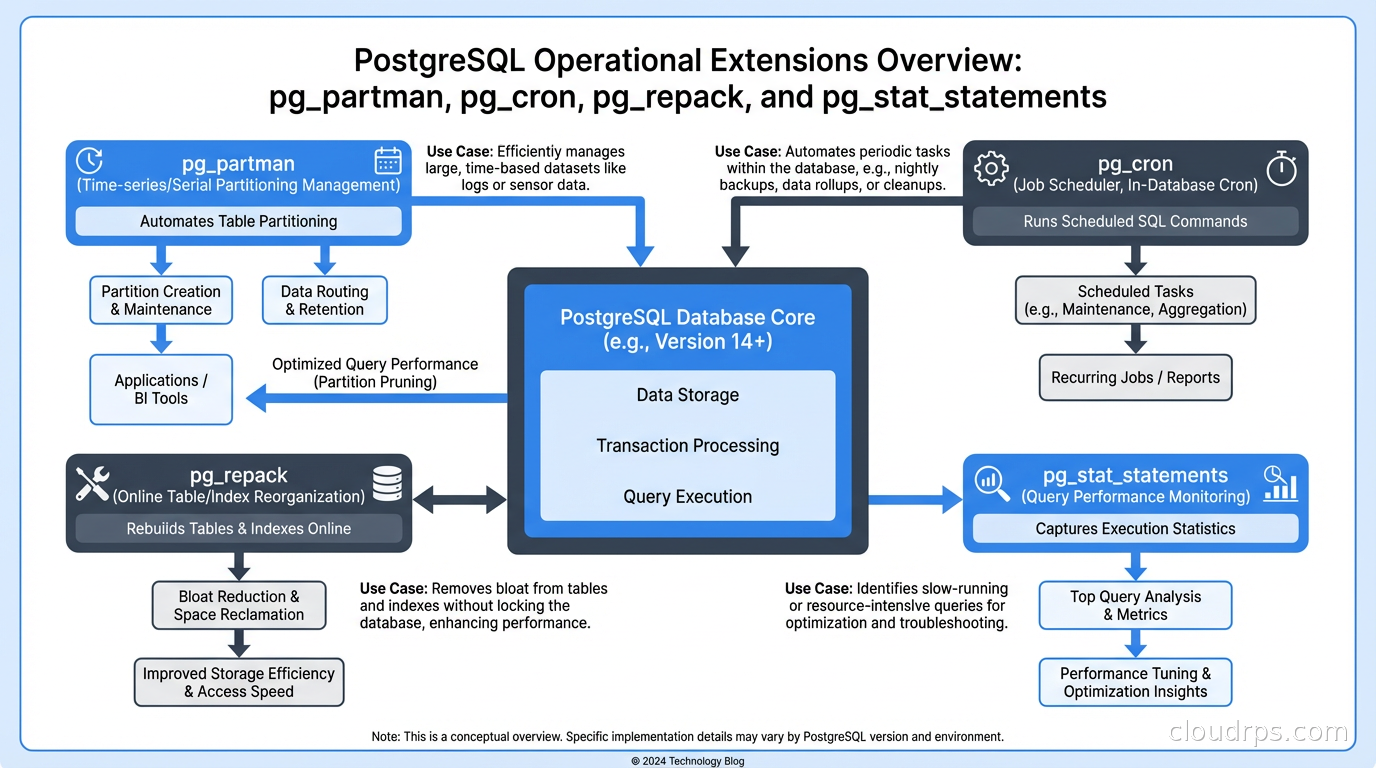
pg_partman automates partition management. Native Postgres partitioning is declarative but managing retention (dropping old partitions) and creation (adding future partitions) is manual. pg_partman handles this automatically based on configurable policies:
SELECT partman.create_parent(
    p_parent_table := 'events',
    p_control := 'event_time',
    p_type := 'native',
    p_interval := 'monthly',
    p_premake := 3  -- Create 3 future partitions in advance
);
If you are doing database partition-based data retention without pg_partman, you are probably writing cron jobs to manage partitions. Replace them with pg_partman.
pg_cron enables scheduled SQL jobs directly in Postgres, avoiding the need for external schedulers for database maintenance tasks:
-- Run VACUUM ANALYZE on a heavily updated table every Sunday at midnight
SELECT cron.schedule('weekly-maintenance', '0 0 * * 0', 'VACUUM ANALYZE transactions');
For jobs that need to run inside the database context (table maintenance, aggregation refreshes, data archival), pg_cron eliminates the dependency on external cron infrastructure.
pg_repack performs online table reorganization without long locks. Postgres tables accumulate bloat over time from updates and deletes. Standard VACUUM FULL reclaims space but acquires an exclusive lock for its duration. On a large, busy table, this is often not operationally feasible. pg_repack rebuilds the table concurrently, swapping in the new version with a brief lock at the end:
-- Check table bloat
SELECT schemaname, tablename,
       pg_size_pretty(pg_total_relation_size(schemaname||'.'||tablename)) as total_size,
       pg_size_pretty(pg_relation_size(schemaname||'.'||tablename)) as table_size
FROM pg_tables WHERE schemaname = 'public' ORDER BY pg_total_relation_size(schemaname||'.'||tablename) DESC;

-- Repack a bloated table online
-- (run from command line, not SQL)
-- pg_repack -t transactions
If you are managing a production Postgres instance with write-ahead logging and high update volumes, pg_repack is one of the most operationally valuable tools in the ecosystem.
pg_stat_statements (bundled with Postgres, often not enabled by default) tracks execution statistics for every query type seen by the database. It is the foundation of query performance analysis. Enable it in every production instance:
CREATE EXTENSION IF NOT EXISTS pg_stat_statements;
This is the extension you use to answer “which query is using the most total time?” and “what are my highest-frequency slow queries?” Without it, you are largely guessing about database performance.
Extension Compatibility and Cloud Managed Postgres
Not all extensions are available on all managed Postgres services. AWS RDS for Postgres and Aurora Postgres have curated lists of supported extensions. TimescaleDB is available on RDS. PostGIS is available on RDS. Citus is not available on RDS (you need Azure Database for Postgres flexible server or run Citus yourself on EC2/ECS).
Amazon RDS Custom (which gives you OS-level access) opens up more extension options. Google Cloud SQL for Postgres has its own extension list. Azure Database for Postgres flexible server has the most complete extension support of the three major managed Postgres offerings.
Before committing to an extension in a managed database context, verify it is supported on your target platform and at your target Postgres major version. Extensions have version-specific compatibility requirements, and major Postgres version upgrades sometimes require reinstalling or upgrading extensions.
This also affects your database replication strategy. Logical replication requires that the subscriber supports the same extensions as the publisher if you are replicating tables that use extension-provided types.
The ACID Guarantee Across Extensions
One thing that makes the Postgres extension ecosystem robust is that extensions operate within Postgres’s transaction model. A TimescaleDB hypertable insert participates in the same ACID transaction guarantees as any other table. A PostGIS geometry update is fully transactional. A Citus distributed query maintains Postgres semantics across shards (with some caveats around cross-shard transactions, which Citus handles via two-phase commit).
This is different from the “bolt on” approach where you have a primary database and a separate specialized store that you synchronize asynchronously. Extension-based specialization keeps everything in the transaction boundary, which is a significant architectural advantage for systems that need correctness guarantees.
The practical takeaway: if a workload fits into an extension that runs in Postgres, you get specialized capabilities without sacrificing transactional integrity. Before you add a second database to your architecture, spend an afternoon evaluating whether the right Postgres extension solves the problem. More often than you might expect, it does. pgvector deserves special mention for LLM and semantic-search workloads, and I covered it in depth in vector databases and pgvector.
Get Cloud Architecture Insights
Practical deep dives on infrastructure, security, and scaling. No spam, no fluff.
By subscribing, you agree to receive emails. Unsubscribe anytime.