
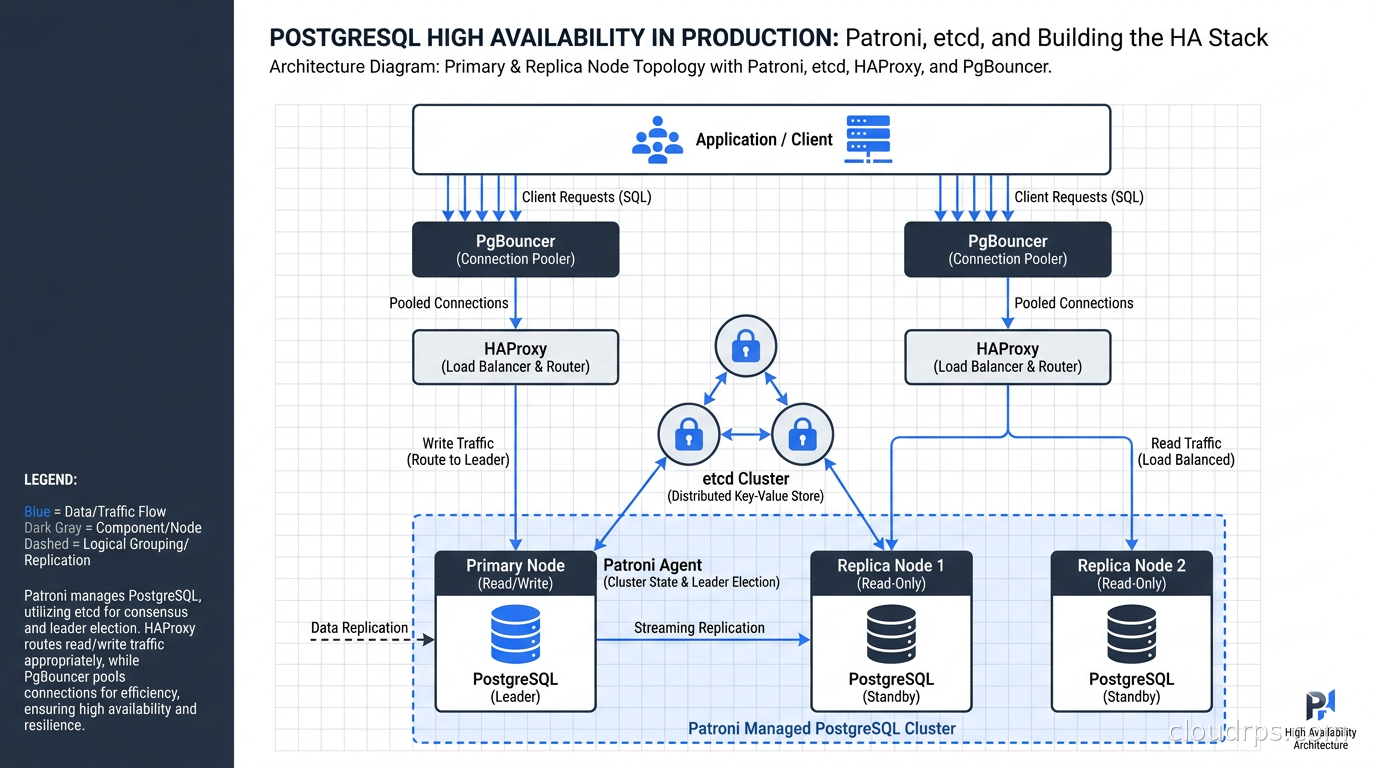
In twenty years of running production databases, I have seen more PostgreSQL outages caused by a missing HA layer than by any other single factor. The database itself is extraordinarily stable. It’s the operational wrapper around it that falls apart.
When a developer tells me they’re running PostgreSQL on a VM with no automated failover, I hear: “We have a 15-minute outage every time that instance needs to reboot.” When they tell me they’re doing manual failover, I hear: “We have a 30-minute outage minimum, a pile of error-prone steps, and some poor engineer executing them at 3am while everyone stares at the status page.” Neither is acceptable for anything beyond a development environment.
The good news is that the PostgreSQL ecosystem has a mature, battle-tested answer: Patroni, running against an etcd cluster, fronted by HAProxy. This is the same HA architecture that Zalando runs at scale, that Amazon runs quietly inside RDS, and that Google runs under Cloud SQL. When you spin up an RDS Multi-AZ instance, you are essentially getting a managed version of what this article teaches you to build yourself. Understanding it removes the magic, and once you understand it, you can make an informed choice between DIY and managed.
What Patroni Actually Is
Patroni is a Python daemon that wraps PostgreSQL and provides automated failover. You run one Patroni process per database node. That process manages the local PostgreSQL instance: starting and stopping it, configuring it as primary or standby, and communicating with a distributed consensus store (DCS) to coordinate cluster state across nodes.
Patroni does not replace PostgreSQL replication. It uses streaming replication under the hood. What it adds is the automation layer on top: watching the primary for health, maintaining a leader key in the DCS, and orchestrating promotion when the primary goes down. Without Patroni, promoting a replica involves stopping the replica, removing the recovery.conf (or standby.signal in Postgres 12+), updating connection strings, and reconfiguring remaining replicas to point to the new primary. With Patroni, the whole sequence happens automatically in under 30 seconds.
One thing I want to be clear about: Patroni is a template and a framework, not a turnkey appliance. You configure it. You integrate it with your DCS. You wire it to HAProxy. The initial setup takes a few hours, and getting it right in production takes a few days of testing. This is not a complaint; it is the honest trade-off. That investment buys you a system whose behavior you understand completely, which is worth a lot when you are debugging a failover at 2am.
Choosing Your Distributed Consensus Store
Patroni needs a DCS to coordinate cluster state and prevent split-brain scenarios. The DCS stores the leader key: a distributed lock that only one node can hold at a time. When the primary holds this key and its lease expires (because the primary is unhealthy), a replica can acquire it and promote itself.
You have four DCS options: etcd, Consul, ZooKeeper, and the Kubernetes API. I will give you my honest assessment of each.
etcd is my default recommendation for most teams. It was designed specifically for this kind of distributed coordination. The operational model is straightforward, the community documentation is excellent, and the Patroni etcd integration is the most battle-tested path. You need an odd number of etcd nodes, minimum three, because etcd uses the Raft consensus algorithm which requires a strict majority. Three nodes survive one failure; five nodes survive two failures. For most production deployments, three etcd nodes are sufficient. For a full explanation of why Raft imposes these constraints and what happens during network partitions, see the distributed consensus in production guide.
Consul is a good choice if you are already running Consul for service discovery or secrets. Consolidating DCS infrastructure makes sense operationally. The Patroni-Consul integration is solid. If you are not already running Consul, the operational overhead of learning and maintaining it just for Patroni is not worth it.
ZooKeeper works, and large companies have run Patroni-ZooKeeper in production for years. But ZooKeeper is a JVM application with its own operational quirks, and unless you have ZooKeeper expertise on your team or are already running it for Kafka, skip it.
Kubernetes API is the right choice if you are running Patroni on Kubernetes. Patroni can use the Kubernetes API (specifically, ConfigMaps and Endpoints) as its DCS, which eliminates the need for a separate etcd cluster. Most Kubernetes distributions already run etcd internally, and Patroni-on-K8s reuses that dependency indirectly. I will cover the Kubernetes path in detail later.
For this guide, I will focus on etcd since it covers the most common deployment scenario: Patroni on VMs, bare metal, or cloud instances.
The Reference Architecture
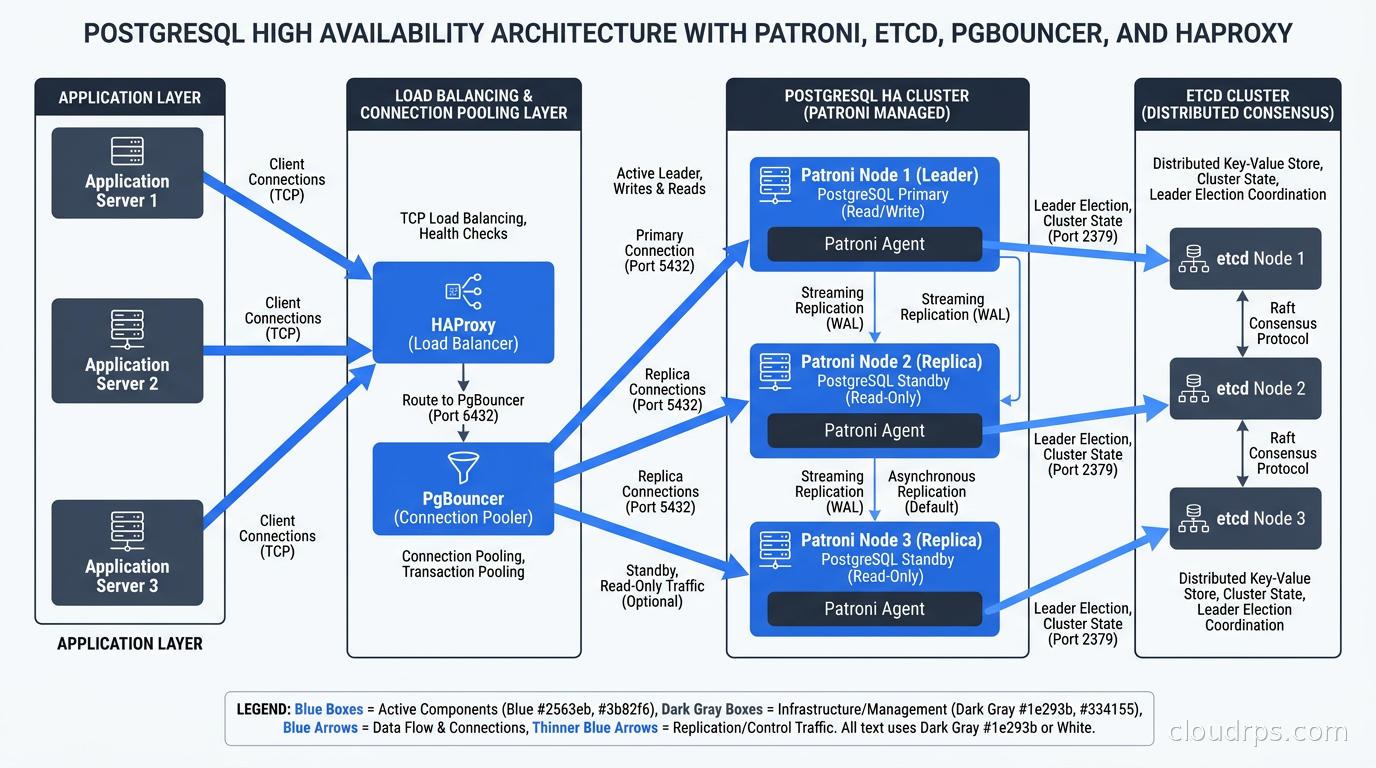
A production Patroni cluster looks like this:
etcd cluster: Three dedicated nodes (or colocated with the database nodes, though I prefer dedicated for isolation). These nodes form a Raft quorum and store Patroni’s cluster state. They do not need much CPU or memory. A t3.small or equivalent is fine.
Database nodes: Three nodes minimum, one primary and two replicas. Why three? Because Patroni’s failover and replica management works best with a synchronous replica. If you have only one replica and you’re using synchronous commit, you now have a single point of failure on the replica side. Two replicas give you room. In practice, many teams run one synchronous replica and one asynchronous for read scaling.
HAProxy: One or two HAProxy instances (with keepalived for a virtual IP between them) that route traffic based on Patroni health check endpoints. Patroni exposes an HTTP API on port 8008 by default. HAProxy queries /master to find the current primary (returns 200 if the node is primary, 503 otherwise) and /replica to find healthy replicas. This is how connection routing stays accurate without any manual intervention.
PgBouncer: Running alongside HAProxy or on the application servers, handling connection pooling. PostgreSQL’s process-per-connection model means that at scale, without a pooler in front, you will hit connection exhaustion before you hit any other limit.
The connection path for write traffic: application → PgBouncer → HAProxy → Patroni health check → primary. For read replicas: application → PgBouncer (separate pool) → HAProxy (separate backend) → replica.
How the Leader Election Actually Works
This is the part most tutorials skip, and it’s the part you need to understand when something goes wrong.
Each Patroni node that is the primary continuously writes a heartbeat to the etcd key /service/{cluster_name}/leader. This key has a TTL (time-to-live), typically 30 seconds. As long as the primary is healthy, it refreshes this key every 10 seconds (configurable via ttl and loop_wait settings). The primary also holds a lock that prevents replicas from promoting.
When the primary dies, it stops refreshing the leader key. After the TTL expires, the key disappears. Replica nodes notice this, and they race to acquire a new leader key. The Patroni node that successfully writes to the leader key first wins the election and promotes its local PostgreSQL instance to primary.
This is where the synchronous_commit configuration becomes critical. If you have been running with synchronous_commit = remote_apply and a defined synchronous_standby_names, Patroni knows which replicas have the most current data. It will prefer to elect a synchronous replica as the new primary, preventing data loss. If you are running fully asynchronous replication and the primary died with transactions that had not yet been replicated, those transactions are gone. This is the replication lag problem, and it is a fundamental trade-off between performance and durability, not a Patroni limitation. Understanding ACID properties and durability guarantees at the database level is what lets you reason about this clearly.
One safety mechanism Patroni uses is maximum_lag_on_failover. If the replica that wins the leader election is lagging behind the old primary by more than this many bytes, Patroni will not promote it and will keep trying other candidates. This prevents catastrophically stale replicas from becoming primary.
Building the Cluster
Here is the actual Patroni configuration that I use as a starting point. The key sections and the reasoning behind each:
scope: my-postgres-cluster
namespace: /service/
name: node1

restapi:
  listen: 0.0.0.0:8008
  connect_address: 10.0.1.10:8008

etcd3:
  hosts: 10.0.2.10:2379,10.0.2.11:2379,10.0.2.12:2379

bootstrap:
  dcs:
    ttl: 30
    loop_wait: 10
    retry_timeout: 10
    maximum_lag_on_failover: 1048576  # 1MB
    postgresql:
      use_pg_rewind: true
      use_slots: true
      parameters:
        wal_level: replica
        hot_standby: "on"
        max_wal_senders: 10
        max_replication_slots: 10
        wal_log_hints: "on"
        synchronous_commit: remote_apply
        synchronous_standby_names: "ANY 1 (*)"

  initdb:
    - encoding: UTF8
    - data-checksums

postgresql:
  listen: 0.0.0.0:5432
  connect_address: 10.0.1.10:5432
  data_dir: /var/lib/postgresql/data
  pgpass: /tmp/pgpass0
  authentication:
    replication:
      username: replicator
      password: your-replication-password
    superuser:
      username: postgres
      password: your-superuser-password

tags:
  nofailover: false
  noloadbalance: false
  clonedfrom: false
  nosync: false
A few things worth calling out. The use_pg_rewind: true setting enables pg_rewind, which allows an old primary that was briefly ahead of the cluster to rejoin as a replica without a full base backup. This is critical for fast rejoining after transient failures. Without it, the old primary has to stream the entire database content back from the new primary, which for a large database can take hours.
The synchronous_standby_names: "ANY 1 (*)" syntax means that writes require acknowledgment from any one standby node. This is a quorum-based approach that works well in practice: you get synchronous durability guarantees without being blocked if one replica is temporarily unreachable.
The HAProxy configuration looks like this:
listen postgres_write
    bind *:5432
    option httpchk GET /master
    http-check expect status 200
    default-server inter 3s fall 3 rise 2 on-marked-down shutdown-sessions
    server pg1 10.0.1.10:5432 check port 8008
    server pg2 10.0.1.11:5432 check port 8008
    server pg3 10.0.1.12:5432 check port 8008

listen postgres_read
    bind *:5433
    option httpchk GET /replica
    http-check expect status 200
    default-server inter 3s fall 3 rise 2 on-marked-down shutdown-sessions
    server pg1 10.0.1.10:5432 check port 8008
    server pg2 10.0.1.11:5432 check port 8008
    server pg3 10.0.1.12:5432 check port 8008
HAProxy checks the Patroni REST API every 3 seconds, marks a server down after 3 consecutive failures, and brings it back up after 2 consecutive successes. The shutdown-sessions option ensures that active connections to a demoted primary are terminated immediately rather than being kept alive against a node that is no longer accepting writes.
The Failover Sequence
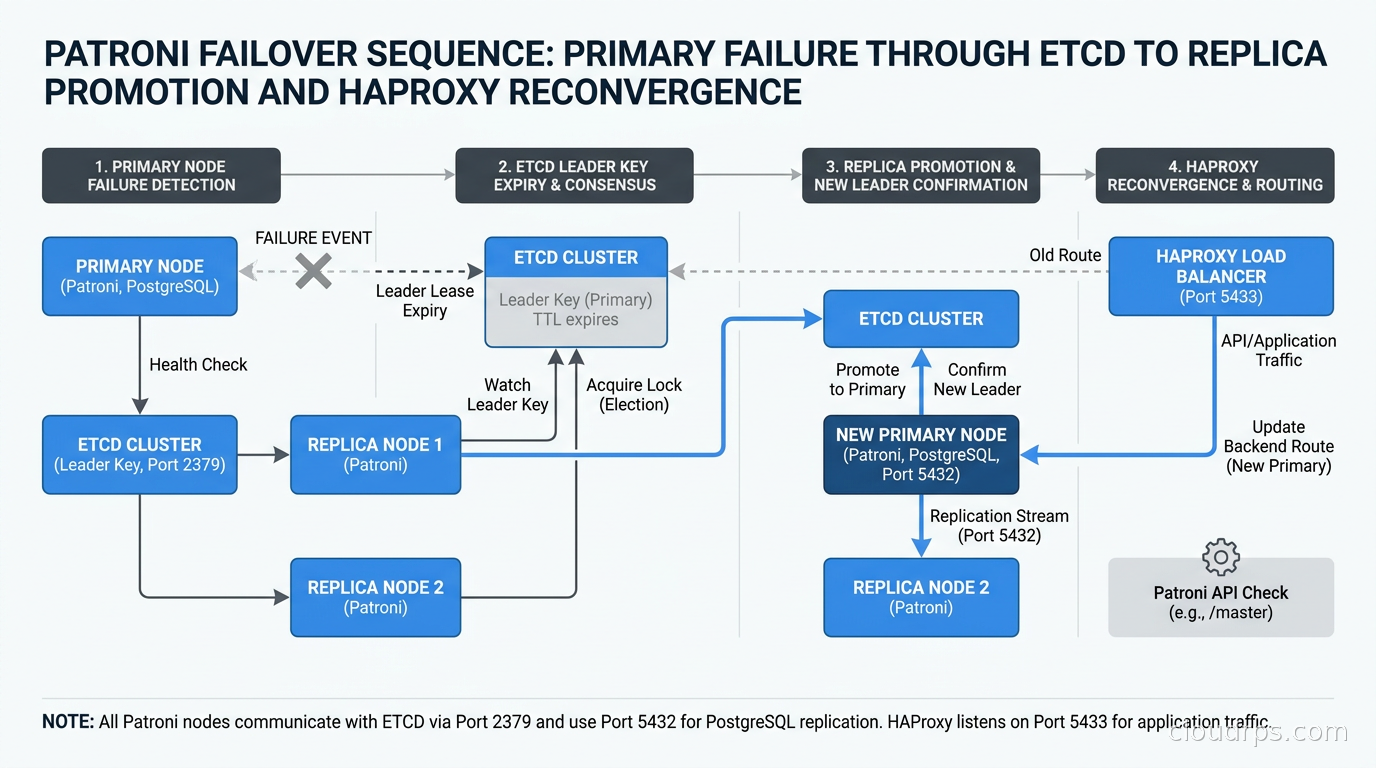
When a primary fails, here is the sequence of events:
- Primary stops refreshing the etcd leader key.
- After
ttlseconds (30 by default), the leader key expires. - Replica nodes detect the expired key and race to acquire it.
- The winning replica acquires the key and begins promoting.
- PostgreSQL promotion takes 1-5 seconds for most workloads.
- Patroni on the new primary starts responding 200 to
/masterhealth checks. - HAProxy detects the new primary within
interseconds (3 by default). - Traffic routes to the new primary.
Total failover time in a well-tuned cluster: roughly 30-40 seconds from primary death to application traffic resuming. You can tune this down to about 15-20 seconds by reducing ttl and loop_wait, but you increase the risk of false failovers under momentary network hiccups. I have found 30 seconds to be the right balance for most production environments.
The old primary, when it comes back up, will be a replica. Patroni detects that another node holds the leader key and demotes the local PostgreSQL instance to standby mode, configuring it to stream from the new primary. This is the auto-rejoin behavior, and it is what makes Patroni genuinely hands-off for most failure scenarios.
I learned this architecture the hard way in 2013, running a single Postgres instance for a fintech application with no replication whatsoever. A disk failure at 2am took us down for four hours. We had backups, but restoring from backup while everyone yelled in Slack channels is a different experience than watching a replica promote in 30 seconds. That incident was my motivation to build a proper HA layer, and I have been refining this architecture ever since.
Backup Integration with pgBackRest
Patroni handles HA and failover. It does not handle backups. You need a separate backup tool, and the production-grade choices are pgBackRest and Barman.
I prefer pgBackRest for most deployments. It supports parallel backup and restore, delta restores (only restoring changed blocks, which is much faster than full restores), and repository encryption. Configuration integrates with Patroni through the archive_command and restore_command settings:
# In postgresql.conf (managed by Patroni)
archive_mode: "on"
archive_command: pgbackrest --stanza=main archive-push %p
restore_command: pgbackrest --stanza=main archive-get %f %p
One critical integration point: configure pgBackRest to run the backup against a replica, not the primary, using Patroni’s REST API to identify which node is currently a replica. Taking a base backup from a replica avoids putting backup I/O load on your write-serving primary. pgBackRest’s --type=standby option handles this cleanly.
For zero-downtime database migrations, having WAL archiving configured is essential: you can pause replication during a migration window and let WAL archive catch replicas back up rather than streaming the changes, which gives you more control over the migration window.
The Kubernetes Path: CloudNativePG and Percona Operator
If you are running workloads on Kubernetes, the question of whether to run databases on Kubernetes has largely been answered: with the right operator, yes, for PostgreSQL specifically. The two serious operators in 2026 are CloudNativePG (CNCF sandbox project, formerly by EDB) and Percona Operator for PostgreSQL.
CloudNativePG takes an opinionated approach. It implements its own HA automation without using Patroni directly, but uses the same underlying concepts: streaming replication, a leader election mechanism using Kubernetes leader election APIs, and health-based routing through a Kubernetes Service resource.
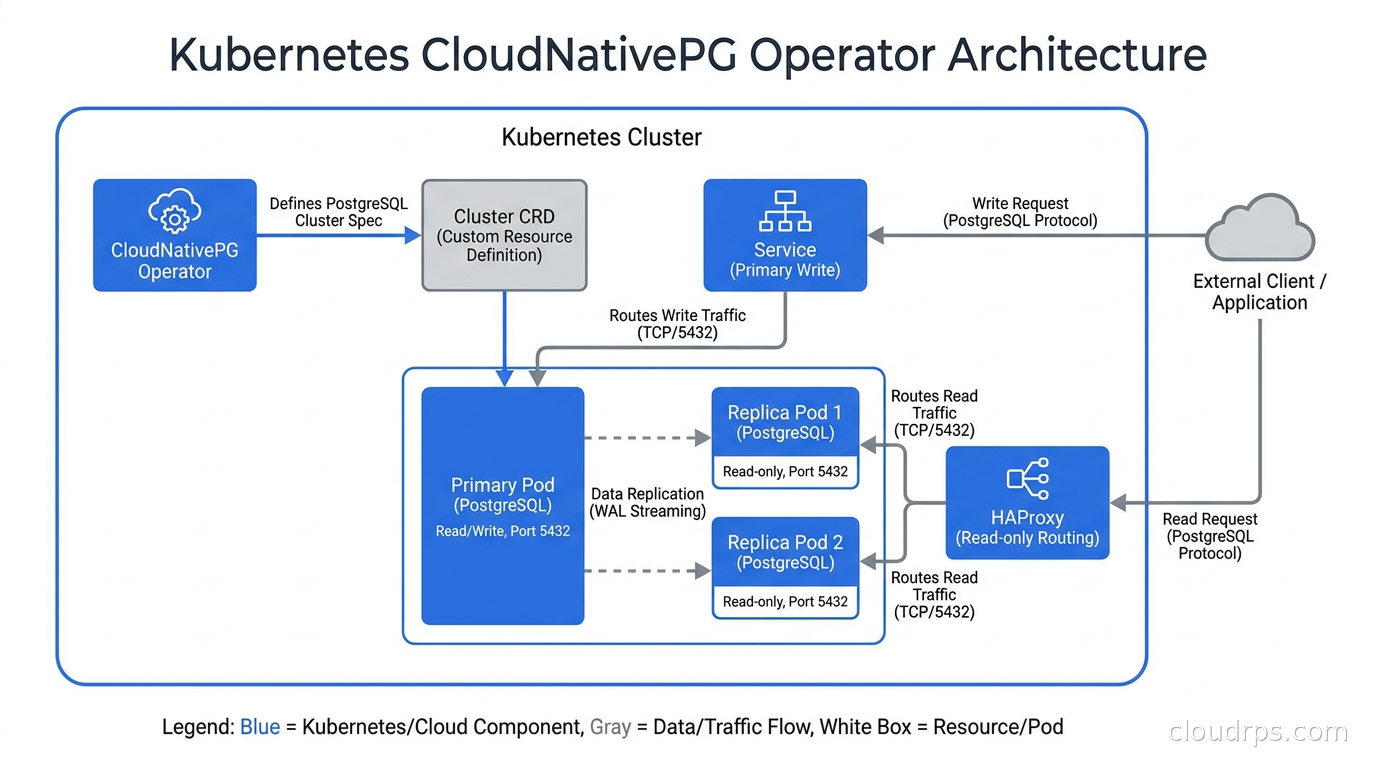
A CloudNativePG cluster definition looks like this:
apiVersion: postgresql.cnpg.io/v1
kind: Cluster
metadata:
  name: postgres-cluster
spec:
  instances: 3

  storage:
    size: 100Gi
    storageClass: fast-ssd

  postgresql:
    parameters:
      max_connections: "200"
      shared_buffers: "4GB"
      synchronous_commit: "remote_apply"

  backup:
    retentionPolicy: "30d"
    barmanObjectStore:
      destinationPath: s3://my-backups/postgres
      s3Credentials:
        accessKeyId:
          name: aws-creds
          key: ACCESS_KEY_ID
        secretAccessKey:
          name: aws-creds
          key: SECRET_ACCESS_KEY

  resources:
    requests:
      memory: "8Gi"
      cpu: "2"
    limits:
      memory: "8Gi"
      cpu: "4"
CloudNativePG automatically creates a Service pointing to the primary pod and a read Service pointing to replicas. Failover is handled by the operator, which promotes a replica if the primary pod becomes unresponsive. The whole thing is Kubernetes-native: declarative configuration, CRD-based management, and backup integration baked in.
The Percona Operator is another strong choice, particularly if you are running other Percona products (PMM for monitoring, for example). It uses Patroni under the hood for HA, which means you get all the tuning knobs discussed earlier but with a Kubernetes-native management layer on top.
For greenfield Kubernetes deployments in 2026, CloudNativePG is where I would start. For teams migrating an existing Patroni cluster onto Kubernetes, the Percona Operator’s Patroni foundation means a more familiar operational model.
When Patroni Makes Sense vs. Managed Databases
I want to give you an honest answer here rather than a “it depends” cop-out.
Use a managed database (RDS, Cloud SQL, Azure Flexible Server) when:
- You’re a small to medium team without dedicated database operations expertise.
- The premium of managed services (typically 30-50% over raw instance costs) is justified by the engineering hours you’d spend on Patroni operations.
- You need point-in-time recovery with minimal configuration effort.
- You are on a single cloud provider and have no cloud repatriation concerns.
Use Patroni when:
- You’re running on-premises or in a colocation facility where managed databases aren’t available.
- Your compliance requirements mandate full control over where and how database software runs.
- At scale, managed database pricing becomes prohibitive. I have seen teams save hundreds of thousands of dollars annually by running Patroni on reserved instances versus equivalent RDS configurations.
- You need PostgreSQL features or extensions that managed services don’t support. If you need advanced PostgreSQL extensions like TimescaleDB with full chunk compression or a custom extension for your use case, Patroni gives you that freedom.
- You are building a multi-cloud or hybrid architecture where you need database portability.
- Your read replica topology is complex (cascaded replicas, geo-distributed standbys) in ways that managed services don’t support.
The honest math for a team running a large PostgreSQL cluster: RDS Multi-AZ for a db.r6g.4xlarge is roughly $0.96/hour per node. Running that on EC2 reserved capacity is about $0.22/hour. Multiply that by three nodes and 8760 hours per year: managed costs roughly $25K per node per year vs $5.8K for self-managed. At scale, that difference pays for a half-time DBA, with money to spare. If you are evaluating managed PostgreSQL before committing to self-hosted, the Aurora, AlloyDB, and Azure Flexible Server comparison covers the full cost and architectural tradeoffs across the major options.
Common Pitfalls and How to Avoid Them
Split-brain from network partitions: If network connectivity between nodes degrades (but doesn’t fail completely), you can get a situation where nodes disagree about cluster state. The etcd quorum prevents this for the DCS state itself, but network partitions between application nodes and database nodes require careful VIP and connection management. Use HAProxy’s health check mechanism religiously and never bypass it.
Cascading failures from OOM: PostgreSQL’s memory configuration interacts with Patroni’s process model in non-obvious ways. If shared_buffers, work_mem, and max_connections are set too high, an OOM kill of the PostgreSQL process looks like a primary failure to Patroni and triggers failover. Tune PostgreSQL’s memory settings carefully, and understand how your connection pooling configuration affects actual connection count before tuning max_connections.
Ignoring the old primary after failover: After a failover, the old primary will rejoin as a replica. But it may have been ahead of the new primary in WAL position, which requires pg_rewind to reconcile the timelines. Ensure wal_log_hints = on in postgresql.conf, which pg_rewind needs to function. Without this, the old primary cannot rejoin without a full base backup.
Inadequate monitoring of replication lag: Patroni handles failover, but it does not alert you when replication lag is growing before a failover happens. Set up monitoring on pg_stat_replication.write_lag, flush_lag, and replay_lag. For teams using PostgreSQL indexing strategies and complex queries, periods of high I/O can cause replica lag spikes worth knowing about before they become a failover event.
etcd cluster neglect: Patroni’s HA depends entirely on etcd being healthy. A two-node etcd cluster (or three-node cluster with two nodes down) loses quorum and Patroni can’t perform failovers. Monitor your etcd cluster with the same rigor you apply to the database nodes.
Running patronictl
The command-line interface for managing a Patroni cluster is patronictl. A few commands you’ll use regularly:
# Check cluster health
patronictl -c /etc/patroni/patroni.yml list

# Trigger a planned switchover (graceful, minimal interruption)
patronictl -c /etc/patroni/patroni.yml switchover --master node1 --candidate node2

# Restart a specific node (will handle gracefully)
patronictl -c /etc/patroni/patroni.yml restart my-postgres-cluster node1

# Show history of leader changes
patronictl -c /etc/patroni/patroni.yml history my-postgres-cluster

# Reinitialize a replica from scratch (after data corruption)
patronictl -c /etc/patroni/patroni.yml reinit my-postgres-cluster node3
The switchover command is particularly valuable for planned maintenance. It gracefully promotes a replica, waits for the old primary to acknowledge the demotion, and completes the role swap with minimal downtime, typically under 5 seconds of write unavailability. Use this before any planned maintenance on your primary node, including OS updates, hardware changes, and instance resizing.
Integrating with Your Observability Stack
For database schema management, Patroni introduces one important consideration: migrations must be applied to the primary only, and your migration tooling must know which node that is. Point your migration runner at the HAProxy write endpoint, never at individual nodes directly.
For observability, Patroni exposes a /metrics endpoint (in newer versions) that exports Prometheus metrics including cluster state, leader key TTL remaining, and per-node replication lag. Add this to your scrape configuration and set alerts on patroni_cluster_unlocked (which fires when no node holds the leader key, indicating a failed failover) and on replication lag exceeding your acceptable threshold.
Summary
Patroni is not simple to set up, but it is understandable, and understandable systems are the ones you can operate confidently in production. The architecture: a three-node PostgreSQL cluster with Patroni on each node, backed by a three-node etcd quorum, fronted by HAProxy for traffic routing and PgBouncer for connection management. This is the same architecture that powers managed PostgreSQL services, and running it yourself gives you full control over configuration, extensions, and cost.
For Kubernetes environments, CloudNativePG wraps these same concepts in a Kubernetes-native operator that handles most of the operational overhead declaratively. For VM-based deployments, the bare Patroni-etcd-HAProxy stack remains the most battle-tested path.
Test your failover before you need it. Run patronictl switchover in production on a regular schedule, just as you would run a disaster recovery test. A failover that you have exercised forty times is not a crisis. A failover you discover in anger during an incident is. For teams looking to go further, Database Reliability Engineering covers how to wrap your HA stack with formal database SLOs, automated failover testing, and the observability needed to catch the failure modes Patroni does not protect against.
Get Cloud Architecture Insights
Practical deep dives on infrastructure, security, and scaling. No spam, no fluff.
By subscribing, you agree to receive emails. Unsubscribe anytime.