
A few years back I was reviewing a pull request for a fairly significant UI change. The engineer had included two screenshots in the PR description, but the first was from a month-old staging environment, and the second was a local dev screenshot taken on a Mac where the fonts render completely differently than on Linux. The description said “works as expected.” Approving or rejecting based on that felt like reading tea leaves.
I asked to see it running. The engineer said staging was currently broken because someone else had pushed a half-finished migration. The feature branch couldn’t be easily merged into staging because of conflicts. We ended up scheduling a thirty-minute call so the engineer could screen share and demo the change. For a cosmetic fix. That is the kind of friction that slows teams down at precisely the worst time, when you have a backlog of PRs to review and everyone is trying to ship.
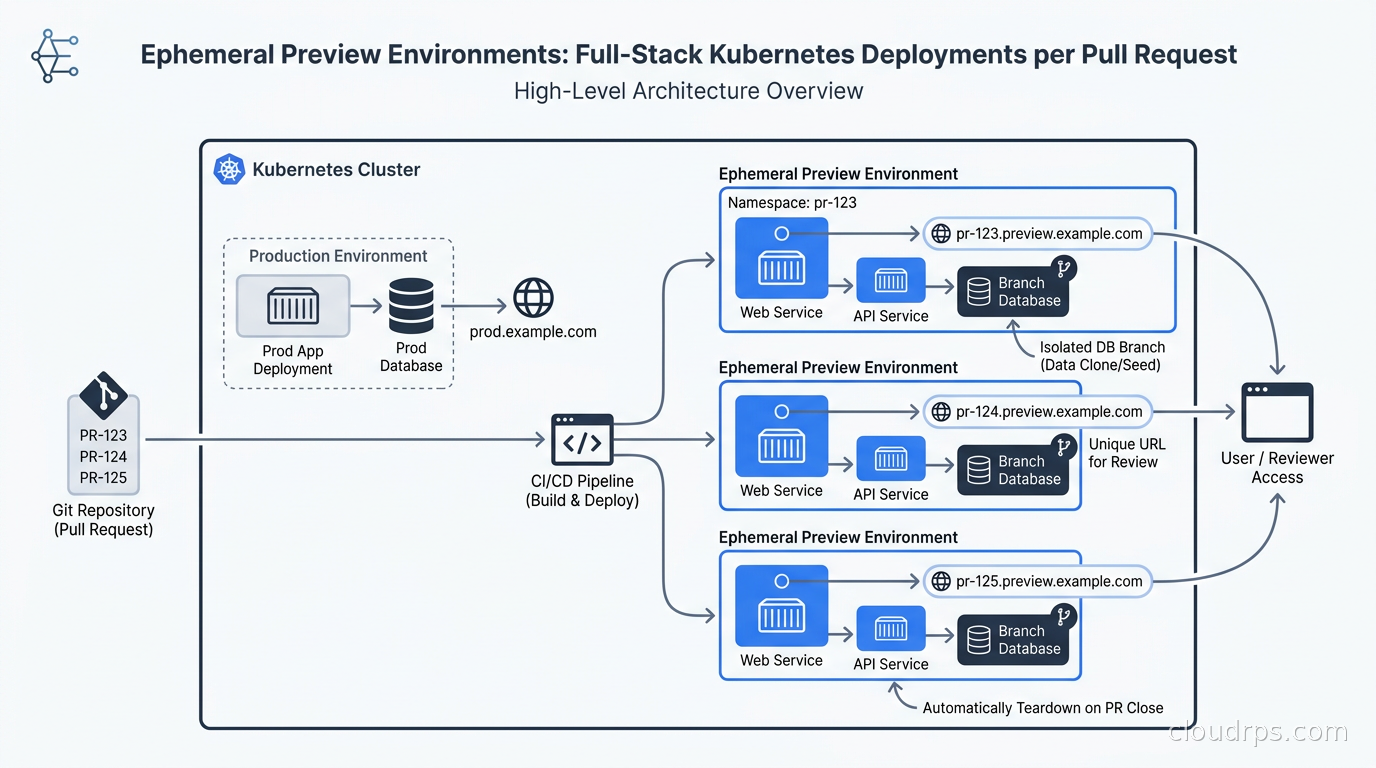
That experience is what drove me to build proper preview environments. The premise is simple: every pull request gets its own full-stack deployment. You open a PR, CI builds the image, a unique environment spins up with its own URL, its own database state, its own secrets. The reviewer clicks a link in the PR description and sees the actual running change. When the PR closes, the environment disappears. No cleanup tickets. No “who left that namespace running?” No billing surprises from forgotten staging environments.
Getting there requires solving several independent problems: namespace isolation, database branching, TLS automation, cost controls, and CI wiring. I have built this from scratch twice and used managed platforms for clients three times. Here is what I learned.
What a Preview Environment Actually Is
A preview environment is an isolated, short-lived deployment that mirrors your production stack as closely as practical. The key properties are: it is scoped to a single PR or feature branch, it is created automatically when the PR opens, it is accessible at a predictable URL, and it is destroyed automatically when the PR closes.
“Full-stack” is the part that separates a real preview environment from a cheap half-measure. If you only deploy the frontend pointed at a shared staging database, you have not isolated anything. Reviewer A’s test data from yesterday interferes with Reviewer B’s test today. A schema migration in one PR can break all the others. The value of preview environments comes from isolation: each one gets its own application instances, its own database state (or database branch), and its own configuration.
This is different from a cloud development environment, which is a persistent workspace where a developer writes code. A preview environment is ephemeral, created by CI not by a developer, and intended for reviewers rather than the person writing the code.
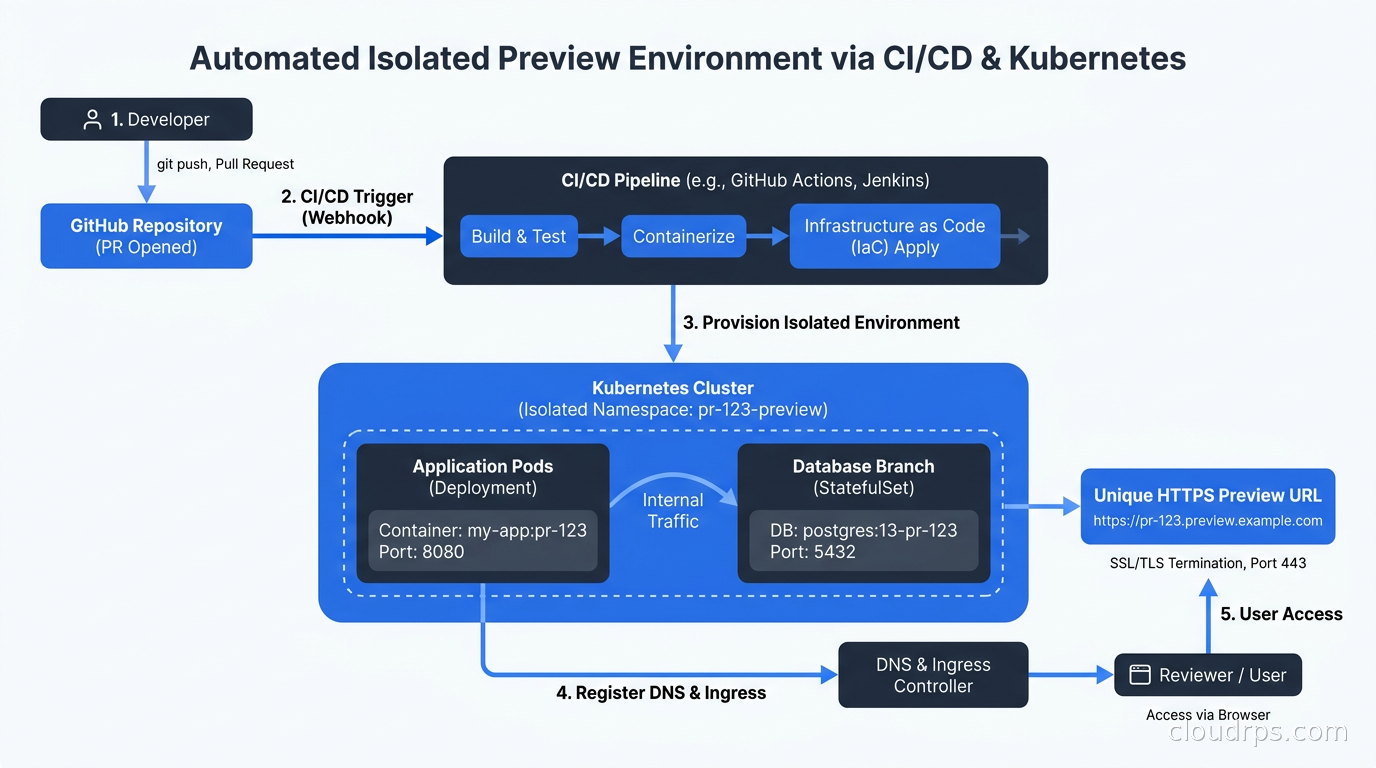
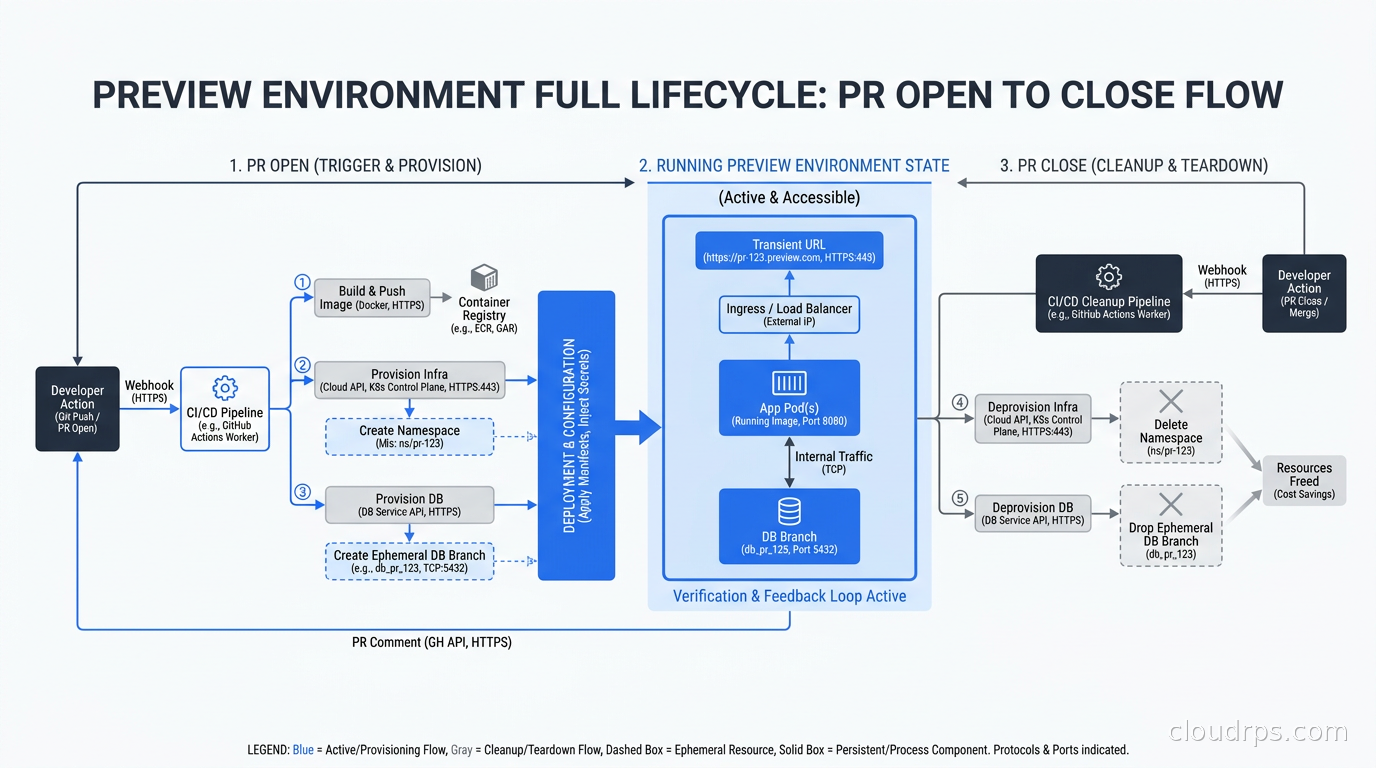
The lifecycle looks like this: a developer opens a PR, GitHub Actions (or your CI of choice) triggers, builds a container image tagged with the PR number, and sends a webhook or commits a manifest change that tells your deployment system to create the environment. The environment gets a URL like pr-1234.preview.yourcompany.com. The reviewer clicks the link in the automatically-updated PR description and tests the change. When the PR is closed or merged, a cleanup job tears the environment down.
The Kubernetes Namespace-per-PR Approach
The most common DIY pattern is a dedicated Kubernetes namespace per PR. This gives you hard isolation at the network policy level, independent resource quotas, and clean teardown (deleting a namespace deletes everything inside it). If you are already using GitOps with ArgoCD or Flux, this fits naturally into your existing workflow.
The mechanism I reach for is ArgoCD’s ApplicationSet with the Pull Request generator. You configure ArgoCD to watch your GitHub repository, and for every open PR it automatically creates an ArgoCD Application pointing at a Helm chart or Kustomize overlay rendered with PR-specific values (PR number, branch name, image tag). When the PR closes, the ApplicationSet removes the Application and ArgoCD deletes the namespace.
A minimal ApplicationSet looks roughly like this (I have omitted the full Helm values for brevity, but the principle is the generator driving per-PR rendering):
apiVersion: argoproj.io/v1alpha1
kind: ApplicationSet
metadata:
  name: preview-environments
  namespace: argocd
spec:
  generators:
    - pullRequest:
        github:
          owner: yourorg
          repo: yourapp
          tokenRef:
            secretName: github-token
            key: token
          labels:
            - preview
  template:
    metadata:
      name: "preview-{{number}}"
    spec:
      project: previews
      source:
        repoURL: https://github.com/yourorg/yourapp
        targetRevision: "{{branch}}"
        path: helm/app
        helm:
          values: |
            image:
              tag: "pr-{{number}}"
            ingress:
              host: "pr-{{number}}.preview.yourcompany.com"
            database:
              branchName: "pr-{{number}}"
      destination:
        server: https://kubernetes.default.svc
        namespace: "preview-{{number}}"
      syncPolicy:
        automated:
          prune: true
          selfHeal: true
        syncOptions:
          - CreateNamespace=true
The labels filter is important. I add a preview label to PRs that are ready for review, which means draft PRs do not get environments spun up. This cuts down on wasted compute significantly.
One thing to get right early: the ArgoCD Application for each preview needs to live in a dedicated ArgoCD Project with appropriate permissions. You do not want preview environments to have the same RBAC privileges as your production namespace. Set resource limits, restrict the destination namespaces, and deny cluster-scoped resource creation.
The image build side is simpler. In your CI/CD pipeline, add a job that builds and pushes an image tagged pr-{number}-{sha} on every PR push. Your ApplicationSet can use the branch generator to always pull the latest commit from that branch, or you can commit the exact image tag to a values file in a separate configuration repo. The latter is safer for production workloads because it prevents an in-progress CI build from accidentally deploying a half-built image.
The Hard Part: Databases
Application isolation is straightforward. Database isolation is where most DIY preview environment implementations get stuck.
The naive approaches fail predictably. Shared staging database means data leakage between PRs and schema migration conflicts. One environment per database instance means paying for N PostgreSQL instances (each with its own minimum footprint), which gets expensive fast. In-memory SQLite per environment breaks as soon as you have a schema that cannot run in SQLite.
The approach that actually works depends on your database. For PostgreSQL, there are two good options.
Database branching. If you are using Neon, PlanetScale, or another serverless database that supports branching, this is the cleanest solution by far. You maintain a baseline “preview seed” branch that has a realistic but sanitized dataset. When a PR opens, your CI pipeline creates a new branch from this seed using the provider’s API. The branch gets its own connection string, which your Helm values inject into the preview environment. When the PR closes, the branch is deleted. Neon’s branch creation takes under a second and the branch uses copy-on-write storage, so you are not paying for N copies of your full dataset. For teams already on Neon this is essentially free.
Schema-only cloning with seeded data. If you are on RDS, Cloud SQL, or another traditional managed Postgres, the most practical approach is a shared preview cluster running multiple databases (one per PR, using PostgreSQL’s native multi-database support). A CI job runs pg_dump --schema-only against your production database, creates a new database named pr_{number}, applies the schema, then runs a seed script that inserts a standardized test dataset. This avoids PII issues and gives reviewers consistent data to work with. The downside is you need to maintain that seed script, which tends to lag behind schema changes if you are not disciplined about it.
I have seen teams try to use production data snapshots with PII scrubbing for preview databases. It sounds thorough but in practice the scrubbing scripts always miss something, the snapshot restore takes too long to be useful in a CI pipeline, and suddenly you have a compliance audit question about why production customer emails are sitting in forty preview namespaces. Seed data is safer and faster.
TLS and DNS: Making Preview URLs Actually Work
Every preview environment needs a unique hostname and a valid TLS certificate. Managing this manually does not scale past about three preview environments.
The cleanest solution is a wildcard DNS record and a wildcard TLS certificate. Set *.preview.yourcompany.com as a CNAME pointing at your cluster’s ingress load balancer IP. Then create a single wildcard certificate for *.preview.yourcompany.com using cert-manager with a DNS01 challenge. Each preview environment’s Ingress resource uses the shared wildcard cert and a hostname like pr-1234.preview.yourcompany.com. No per-environment certificate provisioning required.
If your Kubernetes ingress controller is NGINX or Traefik, you reference the wildcard certificate’s TLS secret in your Ingress resources. If you are using the Kubernetes Gateway API, the same pattern applies at the Gateway level. I store the wildcard cert in a dedicated preview-tls namespace and use a Kubernetes ExternalSecret or a simple certificate copy controller to make it available in each preview namespace.
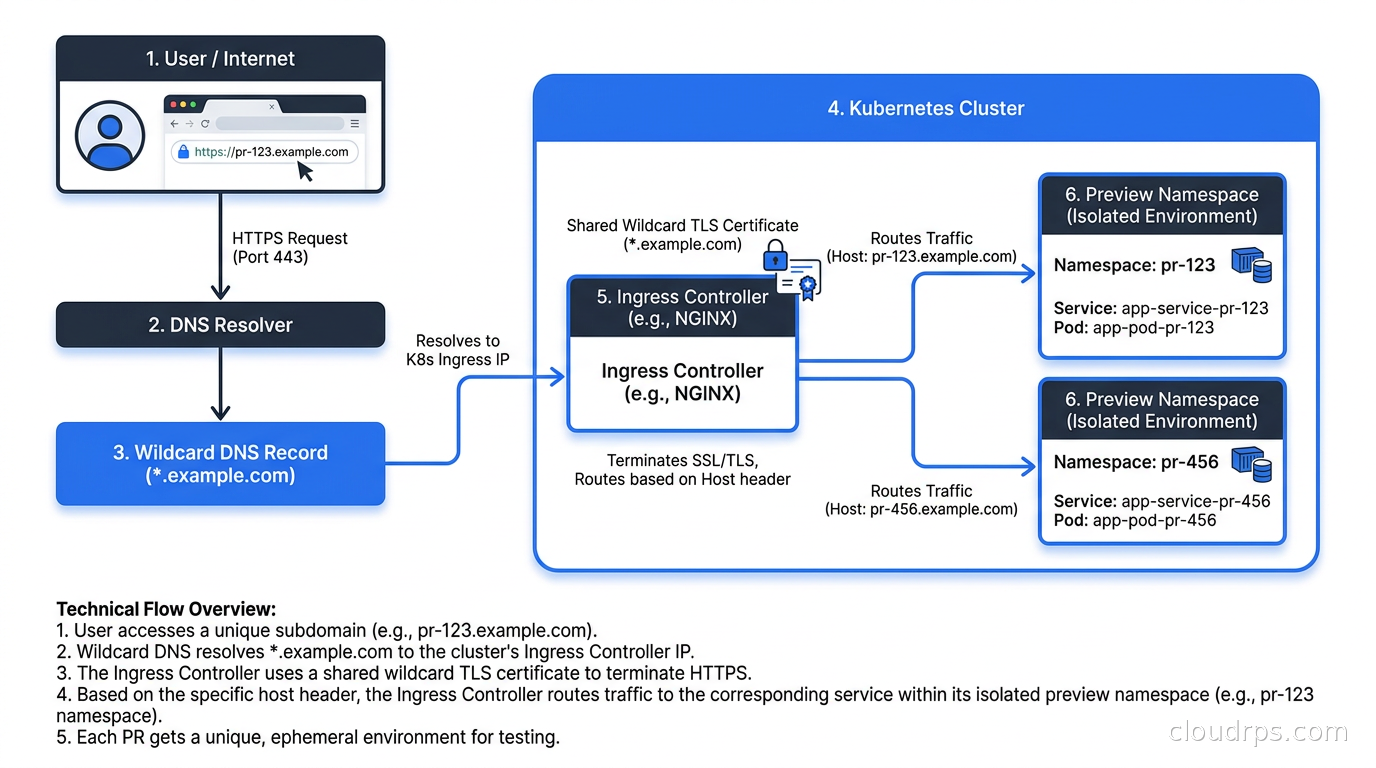
One gotcha: if your application does backend-to-backend calls using internal service DNS, those calls work fine within the namespace. But if your frontend JavaScript is hardcoded to call api.staging.yourcompany.com, your preview environment’s frontend will call the staging API, not the preview API. You need to parameterize the API base URL as an environment variable at build time or inject it via a config endpoint. This is the kind of assumption that catches teams by surprise when their preview environments work for static pages but silently point at shared state for API calls.
Cost Controls and Cleanup
Running N preview environments simultaneously costs money. Left unmanaged, you end up with namespaces from PRs that closed weeks ago still consuming CPU and memory because nobody bothered to clean them up. I have seen preview clusters that were spending more on idle environments than on production.
Automatic cleanup tied to PR state is non-negotiable. ArgoCD’s Pull Request generator handles this natively: when GitHub reports the PR as closed, the ApplicationSet removes the Application and ArgoCD prunes the namespace. If you are not using ArgoCD, add a GitHub Actions workflow that triggers on pull_request events with types closed and calls kubectl delete namespace preview-{number} or triggers a cleanup via your CD system.
Beyond cleanup, set aggressive resource limits. Preview environments do not need production-grade resources. A LimitRange in each preview namespace that caps containers at 500m CPU and 512Mi memory is usually sufficient for review purposes. Add a ResourceQuota that caps the total namespace at 2 CPU and 2Gi to prevent a single environment from starving the cluster.
I also add a TTL-based cleanup job as a safety net. A CronJob that runs every six hours and deletes any namespace older than 48 hours (cross-referencing against GitHub’s PR API to confirm the PR is closed) catches orphaned environments from botched cleanup webhooks. Running this CronJob has saved me from several billing surprises.
For clusters where preview environments share nodes with other workloads, consider using Kubernetes node taints and spot instances for the preview node pool. Spot instances at 70-90% discount are perfectly acceptable for environments that exist for hours to days and where an occasional eviction just triggers a new pod.
Managed Platforms vs Rolling Your Own
I have built the DIY version twice. The second time was faster, but it still took about two weeks of platform engineering time to get it solid: ApplicationSets, DNS, wildcard certs, database branching, cleanup jobs, resource quotas, the GitHub bot that posts preview URLs to PRs. Two weeks is not nothing.
Managed platforms have gotten genuinely good. Okteto provisions a full stack per PR with its own Kubernetes namespace, handles secrets injection, and integrates with most CI systems through a GitHub App. Bunnyshell takes a similar approach but with better support for multi-service environments and built-in database provisioning. Northflank provides a managed Kubernetes environment with native database support and a UI for configuring preview templates. Signadot takes a different angle: instead of spinning up a full copy of your stack, it routes a specific PR’s traffic to isolated pods while sharing the rest of the stack, which reduces overhead significantly for microservices with many dependencies.
None of these are cheap at scale. Okteto’s pricing is per developer seat plus cluster costs. If you have fifty engineers all actively using preview environments, the managed platform cost adds up. The break-even point depends on how much you value not maintaining the DIY platform.
My honest take: for small to mid-sized teams, a managed platform gets you there faster with less operational burden. For large organizations with existing Kubernetes platform teams, the DIY approach using ArgoCD ApplicationSets is more flexible and integrates better with whatever internal tooling you have already built. The platform engineering investment is real, but so is the ownership over the full system.
Integrating with Feature Flags
One thing I have learned the hard way: not everything belongs in a preview environment deployment. Some features, particularly backend behaviors that affect shared infrastructure or require gradual rollout, are better controlled through feature flags rather than isolated preview deployments. A reviewer can test the flag-gated behavior in a preview environment by setting the flag to enabled for their session, while production remains unaffected. This hybrid approach, isolated deployments for UI and API changes, feature flags for infrastructure and behavioral changes, works better in practice than trying to make preview environments handle every possible test scenario.
What Will Go Wrong
I want to be honest about the failure modes because the happy path tutorials make this look easier than it is.
Image pull delays. If your image build takes ten minutes and the preview environment tries to start before the image is pushed, pods will crash with ImagePullBackOff. Solve this by triggering the ArgoCD sync only after the CI image build is confirmed complete, not on PR open. Use a GitHub Actions workflow that builds, pushes, then updates an image tag in a values file, then the ApplicationSet picks up the commit.
Shared secrets. Preview environments need secrets: API keys, third-party service credentials, database passwords. Sharing production secrets with preview environments is a security problem. Sharing staging secrets is fine for most services, but you need a secrets strategy that injects the right set for each environment. External Secrets Operator with a ClusterExternalSecret scoped to preview namespaces is the cleanest approach I have found.
Flaky ingress DNS propagation. Preview URLs sometimes do not resolve for a minute or two after the environment starts because of DNS caching. The GitHub bot posting the URL immediately after ArgoCD sync completes can send reviewers to a URL that returns NXDOMAIN. Add a health check in your CI workflow that polls the preview URL until it returns a 200 before posting it to the PR.
Database migration timing. If your application runs schema migrations on startup and you are using a shared preview database cluster, concurrent PR environments running migrations against their separate databases simultaneously can cause CPU spikes on the database server. Throttle environment creation to avoid spinning up more than three or four new environments simultaneously, especially if each runs a full migration suite.
The Real Payoff
Twenty years in this industry and I can tell you that the tools that actually improve engineering velocity are usually the ones that remove friction from review workflows, not the ones that add process. Preview environments fall into that first category. When reviewers can click a link and see the actual change running, with their own test data, without needing to set up anything, review quality goes up and review time goes down.
The teams I have seen adopt this pattern consistently report two things: fewer bugs making it to production (because reviewers actually test instead of eyeballing diffs), and faster PR cycles (because reviewers can unblock themselves instead of waiting for access to a shared staging environment). Neither of those outcomes requires a particularly sophisticated implementation. A namespace per PR, a database branch per PR, a wildcard cert, and a cleanup job. That is the core of it. Everything else is polish.
Start simple. Get one preview environment working end-to-end. Build the cleanup job before you build anything else. Then iterate. The platform engineering investment pays back fast.
Get Cloud Architecture Insights
Practical deep dives on infrastructure, security, and scaling. No spam, no fluff.
By subscribing, you agree to receive emails. Unsubscribe anytime.