
Three years ago, I got a Slack message from our CFO that I still think about. It was a screenshot of our Datadog invoice. Seventy-two thousand dollars. For one month. We had maybe 400 services and a mid-sized Kubernetes cluster. I had no good answer for why observability cost more than our compute.
That conversation sent me down a path of building a fully open-source observability stack, and I want to share exactly what I learned: the architecture, the sharp edges, the scaling surprises, and the points where you might genuinely want to stick with a SaaS vendor instead. No vendor marketing, just what actually works at scale.
Why the Observability Tax Is Real
Before I get into stack architecture, it is worth understanding why this problem exists in the first place. Traditional observability vendors price on units: per host, per GB ingested, per span traced, per log line. This model has a fundamental misalignment with good engineering practice.
When you do the right thing, you pay more. Add more granular services? More hosts, higher bill. Better instrumentation on your critical path? More spans, higher bill. Richer structured logging? More GB ingested, higher bill. The pricing model actively punishes observability maturity. One architectural response to this problem is inserting a telemetry pipeline between your applications and your backends: the OpenTelemetry Collector with filter and sampling processors can cut ingestion volume dramatically, often by more than half, before any byte reaches a SaaS vendor, and it pairs naturally with the PLGT stack described here.
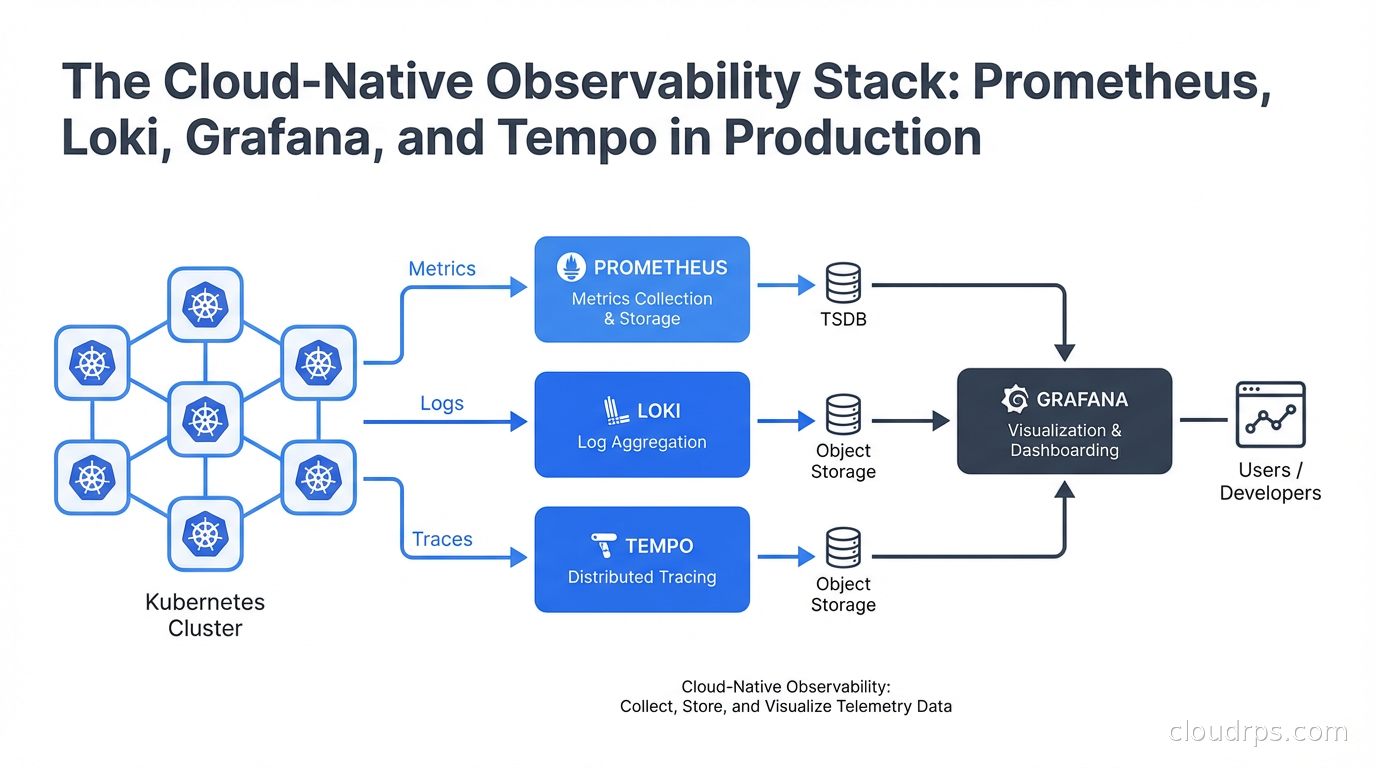
The open-source alternative, often called the PLGT stack (Prometheus, Loki, Grafana, Tempo) or the Grafana OSS stack, separates your observability costs from the vendors and ties them only to your own infrastructure costs. You pay for storage and compute, not per signal. This fundamentally changes the economics.
That said, I am going to be honest throughout this piece about where the OSS stack is painful, because it absolutely has rough edges.
The Four Pillars: What Each Component Does
Understanding the role of each component before you wire them together saves a lot of backtracking.
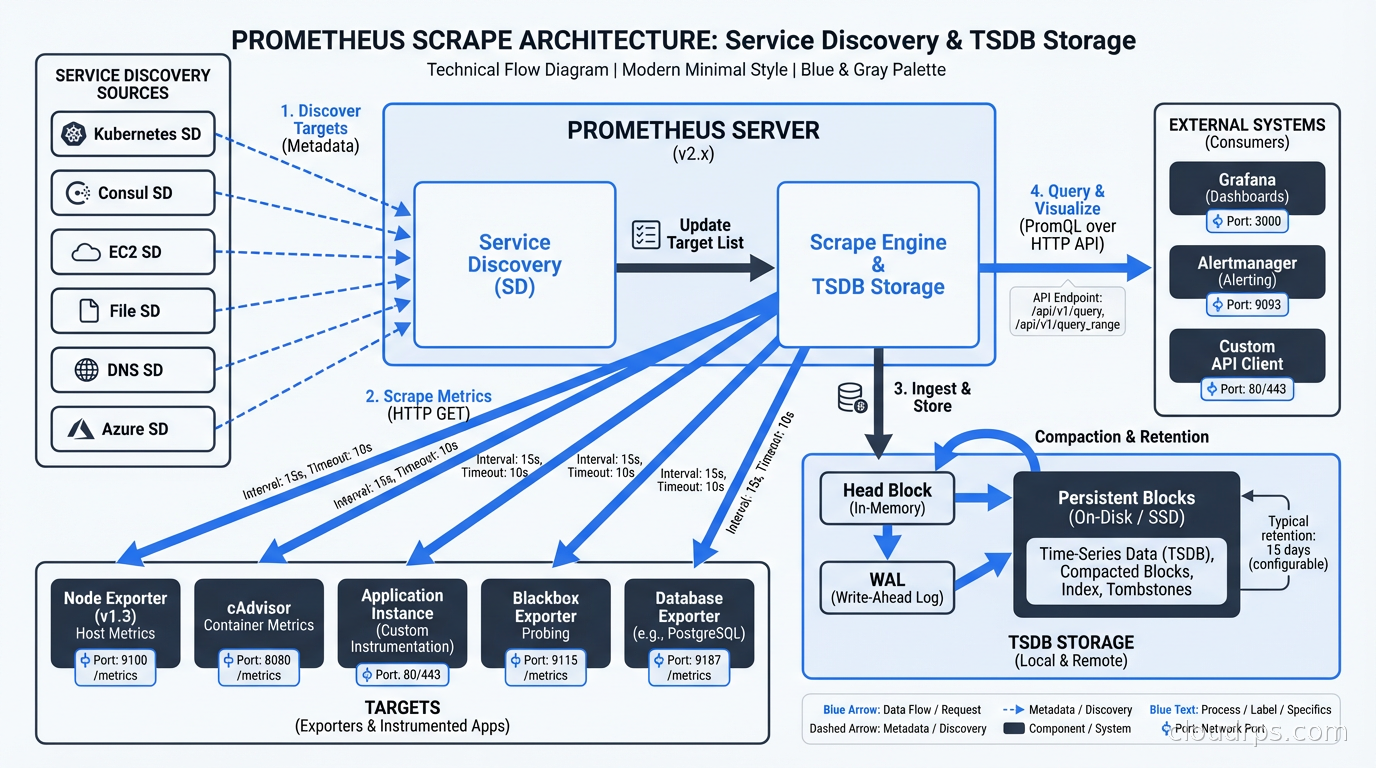
Prometheus handles metrics: time-series numeric data. CPU usage, request rates, error rates, latency percentiles. It uses a pull-based scrape model where Prometheus reaches out to your services’ /metrics endpoints on a configured interval. This is different from push-based systems, and the distinction matters architecturally.
Loki handles logs. It was explicitly designed to be the “Prometheus for logs,” which means it uses the same label-based approach instead of full-text indexing. This is the critical design decision that makes Loki cost-effective and the source of its main limitation.
Grafana is the visualization and alerting layer. It speaks natively to Prometheus, Loki, and Tempo, plus dozens of other data sources. It is where your engineers actually live: dashboards, alert rules, on-call notifications, and now AI-assisted analysis.
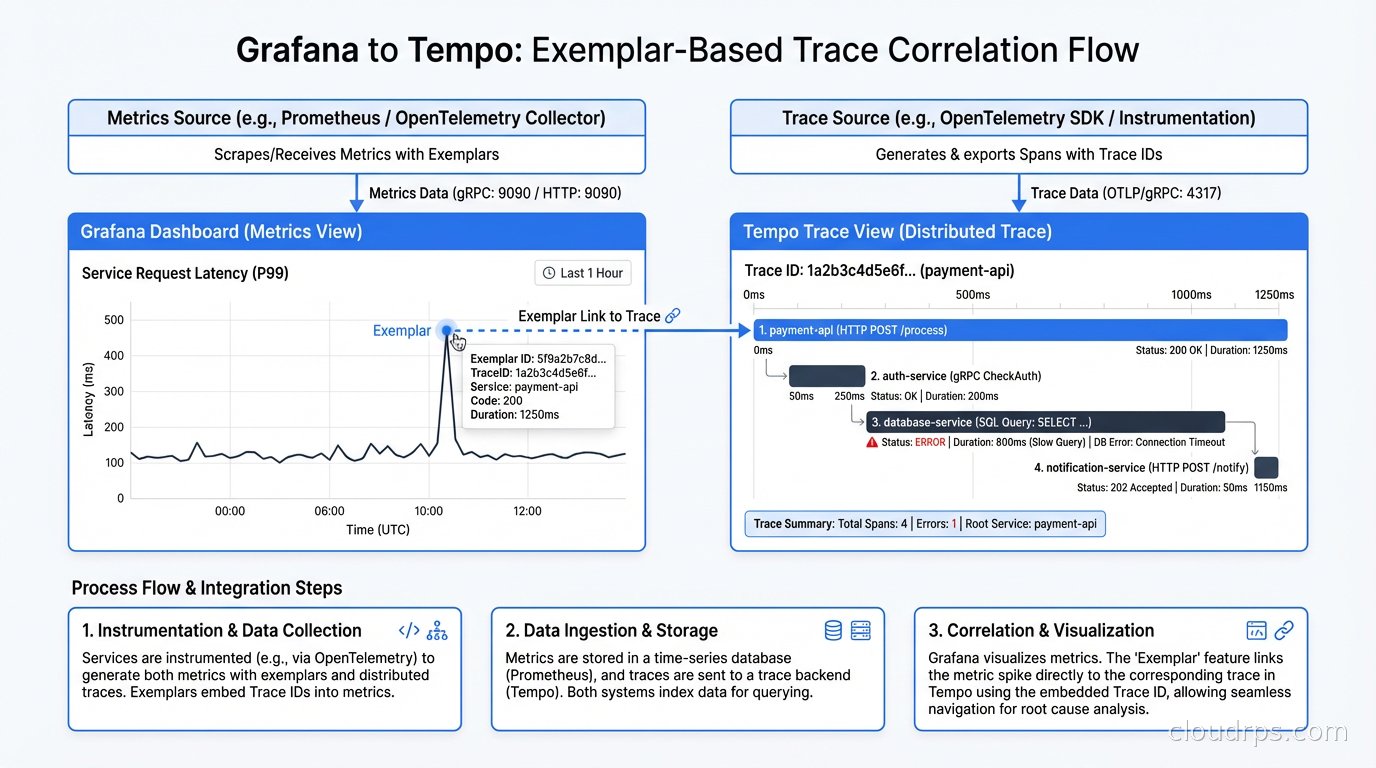
Tempo handles distributed traces. It is designed to be cheap to operate because it stores traces as flat files in object storage (S3, GCS) rather than in Elasticsearch, which is what Jaeger traditionally used. Tempo pairs with Grafana for trace visualization and can correlate directly with logs and metrics using exemplars.
The four work together to give you the three signals of observability: metrics for knowing something is wrong, logs for diagnosing why, and traces for understanding where in your distributed system the problem lives.
Prometheus in Production: The Cardinality Problem
Prometheus is genuinely battle-tested. It is the de facto standard for Kubernetes metrics. The Kubernetes control plane exposes metrics in Prometheus format. Almost every cloud-native project ships a /metrics endpoint. The ecosystem is mature.
But Prometheus has one sharp edge that will bite you if you do not understand it upfront: cardinality.
Prometheus stores every unique combination of label values as a separate time series in its TSDB (Time Series Database). If you have a label for http_requests_total with labels method, status_code, and endpoint, and you have 5 methods, 15 status codes, and 200 endpoints, you get 5 x 15 x 200 = 15,000 time series for that single metric. That is fine. But if someone adds a label for user_id, and you have 1 million users, you now have 1 billion time series. Prometheus falls over. Hard.
I watched this happen at a company where a developer added a customer_id label to their billing metrics “for easier debugging.” By the time we caught it, the Prometheus pod was using 200GB of RAM and had started OOMing. The metric cardinality had exploded from a modest baseline into the tens of millions of time series, several orders of magnitude beyond where it should have been.
The rules for avoiding this are simple but must be enforced:
- Labels should have bounded cardinality. Status codes, HTTP methods, service names: fine. User IDs, request IDs, timestamps: never.
- Implement recording rules to pre-aggregate high-cardinality queries into lower-cardinality summaries.
- Use
metric-relabel-configsto drop labels at scrape time before they hit the TSDB. - Monitor cardinality itself with
prometheus_tsdb_head_series.
For teams taking observability seriously, I recommend reading our SLO and error budget guide alongside this, because Prometheus is the backbone of SLO tracking. Your SLO metrics need to be high-quality, low-cardinality, and scraped at consistent intervals.
Long-Term Storage: Thanos or Mimir
Out-of-the-box Prometheus stores data locally for a configured retention period (default 15 days). For anything beyond that, or for high-availability setups, you need a layer on top.
Thanos adds a sidecar to each Prometheus instance that continuously uploads TSDB blocks to object storage. You get a global query layer that federates across multiple Prometheus instances and unlimited retention for the cost of S3 storage. The query latency for historical data is higher than for recent data, but it is acceptable for most use cases.
Grafana Mimir is a more opinionated, horizontally scalable metrics backend. It ingests Prometheus remote-write, stores data in object storage, and provides a single scalable query endpoint. If you are running at serious scale (hundreds of billions of samples), Mimir is worth the operational complexity. For most shops, Thanos is simpler. For a detailed comparison of these options alongside VictoriaMetrics, including how to choose between them and what multi-cluster architectures look like in practice, see the Prometheus at scale guide.
Loki: Prometheus for Logs (With Caveats)
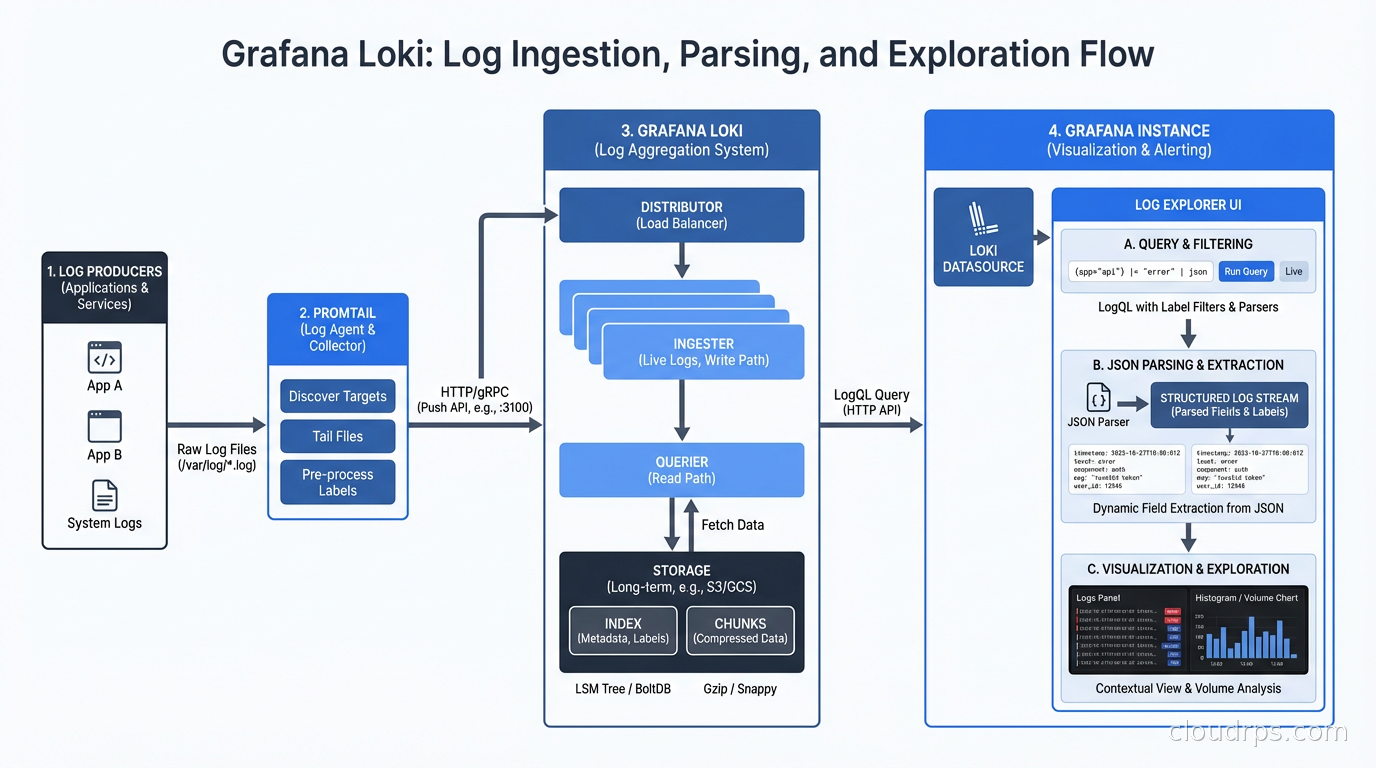
Loki’s design philosophy is deliberate: index only the labels, not the log content. This keeps storage costs dramatically lower than Elasticsearch. A log line in Loki costs roughly the same to store as a compressed text file in S3, because that is essentially what it is. The index is tiny because it only contains the label metadata.
This is a great trade-off when your query patterns look like: “show me all logs for service=payment-api, env=production in the last 15 minutes.” That query uses only indexed labels, and it is fast.
It is a painful trade-off when your query pattern is: “find all logs containing the string ‘connection refused’ across all services in the last 24 hours.” Loki can do this with a filter expression, but it has to scan the full log chunks for every matching stream. At scale, this query can time out.
The practical lesson: design your Loki labels to match your most common query patterns. Good labels: service, environment, namespace, pod, container. These are how you narrow the log stream to something manageable before you apply full-text filters.
LogQL, Loki’s query language, is worth learning properly. It borrows heavily from PromQL and has two parts: the stream selector (label-based, fast) and the pipeline (filter expressions, regex, parsing, slow but powerful). A query like {service="api"} |= "error" | json | latency > 500 first fetches all logs for the api service, then applies the text filter, then parses JSON, then filters on a parsed field.
For teams running Kubernetes, the standard setup is to deploy Grafana Alloy (the successor to the deprecated Grafana Agent) as a DaemonSet that tails container logs from /var/log/pods and ships them to Loki with appropriate Kubernetes labels automatically applied from pod metadata. This pairs naturally with the Kubernetes networking setup your cluster likely already has.
Tempo: The Cheap Traces Argument
Distributed tracing used to be expensive to operate. Jaeger’s default storage backend is Elasticsearch, which is resource-hungry. Every span you trace goes into an index. At high request rates, that index grows fast and Elasticsearch starts demanding more RAM, more disk, and more babysitting. For teams already running Elasticsearch or its AWS-backed OpenSearch fork for log analytics, it can make sense to reuse that cluster as a Jaeger backend rather than adding Tempo, though the storage cost difference is real. The Elasticsearch vs OpenSearch comparison is worth reading if you are deciding which search cluster to operate alongside this stack.
Tempo upends this by storing traces as objects in S3 or GCS. There is almost no index. You find a trace by trace ID, not by searching. This is a deliberate limitation: Tempo is designed for “I have a trace ID from a log line or from a Grafana exemplar, I want to see the full trace.” It is not designed for “show me all slow traces across all services from the last hour.”
For that use case, Tempo adds a separate component called TraceQL and Tempo search, which does maintain an index of a subset of fields. But the core storage is still objects.
The integration story is where Tempo shines. In Grafana, you can configure Prometheus exemplars: special annotations on metrics that contain a trace ID. When you are looking at a spike in a Prometheus latency histogram, you can click an exemplar datapoint and jump directly to the corresponding Tempo trace. You can then click a trace span’s service name and jump to the Loki logs for that service during that time window. This drill-down flow, metrics to traces to logs, is what observability vendors charge a premium for. With the OSS stack, you wire it up yourself once and it works everywhere.
For the foundational concepts behind what you are capturing in those traces, our OpenTelemetry and distributed tracing guide covers instrumentation best practices in detail. The short version: instrument with the OpenTelemetry SDK in your application code, and configure the OpenTelemetry Collector to export traces to Tempo’s OTLP endpoint.
Grafana: More Than Dashboards
Most teams use Grafana as a dashboarding tool and miss half its capabilities. Here is what is worth knowing.
Unified Alerting is now the default alerting engine in Grafana (replacing the older legacy alerting). You can write alert rules that query Prometheus (metrics-based), Loki (log-based), or any other data source. All alerts funnel through a single notification policy with routing to PagerDuty, Slack, OpsGenie, or anything else. This means you do not need a separate Alertmanager config if you do not want to; you can manage alert routing entirely in Grafana’s UI. I still prefer keeping Alertmanager for the Prometheus side because it handles deduplication and grouping extremely well, but Grafana Unified Alerting is genuinely good.
Grafana OnCall (the OSS version) is a rotation and escalation scheduler that integrates directly with Unified Alerting. You can manage on-call schedules, override rotations, and handle escalation chains without paying for PagerDuty. For teams watching their SaaS spend, this is a meaningful saving.
Dashboard versioning is a feature most teams do not realize exists. Every save to a Grafana dashboard creates a version you can diff and roll back to. For teams practicing GitOps with ArgoCD, you should be managing Grafana dashboards as code using the Grafana Operator or dashboard provisioning via ConfigMaps, not clicking around in the UI. Hand-crafted dashboards that live only in the Grafana database are a reliability risk.
Grafana Scenes and the newer Grafana App Platform let you build custom application experiences, not just generic dashboards. If you are a platform team building an internal developer platform, a custom Grafana app can give your developers a purpose-built service health view without exposing the complexity of raw PromQL.
Deployment Architecture for Production
Running this stack in a toy environment is straightforward. Running it reliably at scale requires deliberate architecture decisions.
High-availability Prometheus: Run at least two Prometheus instances scraping the same targets. They will have identical (or near-identical) data. Thanos or Mimir’s query layer handles deduplication. Do not run a single Prometheus instance for production workloads. When Prometheus OOMs or gets evicted during a node failure, you have a blind spot in your metrics. In my experience, Prometheus is the most frequently restarted component in the stack, usually due to cardinality explosions or scrape config mistakes, so HA is not optional.
Loki in microservices mode: Loki ships as a single binary (for dev/small deployments) or as individual microservices that can be scaled independently. For production, run the components separately: distributors, ingesters, queriers, query-frontends, compactors, rulers. Scale the ingesters (which buffer recent writes) and queriers (which handle reads) based on your actual load patterns. Your write load typically peaks during incidents, exactly when you need the stack most.
Tempo in distributed mode: Same principle. The components (distributor, ingester, querier, compactor) can scale independently. The ingester holds recent traces in memory before flushing to object storage, so size it appropriately for your trace volume and flush interval.
Object storage: Use a managed object storage service (S3, GCS, Azure Blob) for Loki chunk storage, Tempo trace storage, and Thanos/Mimir blocks. Do not try to self-host a distributed object store for this. The economics favor managed S3. Loki compressed log chunks typically achieve 5-10x compression, so 1TB of raw logs might cost you $20-40/month on S3.
Grafana HA: Run multiple Grafana instances behind a load balancer. Use a shared PostgreSQL or MySQL backend for the Grafana database instead of the embedded SQLite. Session handling and alert state require the shared backend for multi-instance setups.
The infrastructure as code patterns you already use apply here: deploy all of this via Helm charts with custom values files, managed through Terraform or a GitOps workflow. The Grafana Labs Helm chart repository ships well-maintained charts for each component.
The Operational Costs They Do Not Tell You About
I want to be honest about where this stack requires genuine investment.
You own the upgrades. Prometheus, Loki, and Tempo ship breaking changes. Loki in particular has had storage format changes between major versions that required careful migration procedures. Staying current is your team’s job now, not a vendor’s.
Scaling requires expertise. When a SaaS tool starts getting slow, you file a ticket. When your Loki querier starts timing out under load, you need to know whether it is chunk cache misses, too-wide time ranges in queries, too many concurrent queries, or insufficient ingester memory. This is specialized knowledge.
eBPF-based observability is worth watching alongside this stack. Tools built on eBPF can generate telemetry directly at the kernel level without application code changes. Our eBPF networking and observability guide covers how Cilium and similar tools are starting to blur the line between infrastructure observability and application observability. The most relevant development here is OpenTelemetry eBPF Instrumentation (OBI), which runs as a DaemonSet and generates Tempo-compatible OTLP traces and Prometheus-compatible RED metrics for every service on each node with no SDK changes required.
The monitoring-of-monitoring problem: Your observability stack needs to be monitored. I run a small, simple Prometheus instance dedicated solely to monitoring the health of the observability stack itself. It scrapes the PLGT components and alerts on unusual conditions: Prometheus target scrape failures above a threshold, Loki ingester lag, Tempo queue depth. This meta-monitoring has caught problems before they became incidents.
When SaaS Is Still the Right Answer
I promised honesty, so here is when I would tell a team to keep the SaaS tool.
If you have fewer than 5 engineers and your observability team is also your application team, the operational overhead of self-hosting is not worth it. A smaller Datadog spend is fine when the alternative is spending a third of your engineering time on Loki tuning.
If your compliance requirements include managed, audited infrastructure for all tooling, self-hosting adds certification scope. Some teams legitimately cannot self-host.
If you generate extremely high trace volumes (millions of spans per second), the object storage query latency of Tempo may be insufficient for your interactive debugging workflow. Datadog APM’s in-memory indexing is genuinely faster for large-scale trace search.
The inflection point, in my rough experience, tends to land somewhere in the low five figures per month for a SaaS observability bill, though this varies a lot by team size and data volume. Below that, the operational investment to self-host may not pencil out. Well above it, the math tends to become clear fast. Compute to run the OSS stack for a 200-service Kubernetes cluster is typically a small fraction of that SaaS bill, including storage.
Measuring What Matters
No observability stack is useful unless it actually improves your engineering outcomes. The metrics worth tracking are your DORA metrics: deployment frequency, lead time for changes, change failure rate, and MTTR. MTTR in particular should be directly correlated with observability quality.
I track a few specific leading indicators for observability stack health. Alert signal-to-noise ratio: what percentage of pages are actionable versus noise. Time-to-first-relevant-log after an alert fires: how long does it take for an on-call engineer to find the log line that explains the problem. These are not standard dashboard metrics; you have to instrument them yourself, usually by surveying on-call engineers after incidents. But they tell you whether your observability investment is actually reducing your mean time to detect and resolve issues or just generating more dashboard screenshots.
The AIOps Layer
One trend worth tracking is the integration of AI-assisted analysis into the Grafana stack. Grafana’s Sift feature can automatically analyze recent changes, correlate metrics anomalies with logs, and suggest root cause hypotheses. This is conceptually similar to what AIOps platforms promise, but layered on top of your existing OSS data rather than requiring a separate data pipeline.
Grafana is also experimenting with natural language query interfaces layered on top of PromQL and LogQL. These are early, but the direction is clear: the PLGT stack will grow AI-assisted capabilities over the coming years, and those capabilities will be open-source, not locked behind a vendor relationship.
Getting Started: The Practical Path
For teams starting from scratch, the Grafana Labs kube-prometheus-stack Helm chart is the right starting point. It deploys Prometheus Operator, a base set of Kubernetes dashboards, and alerting rules in about 15 minutes. Layer Loki and Alloy on top with the Loki distributed Helm chart and the Alloy chart configured as a DaemonSet log collector. Add Tempo last, after you have OpenTelemetry instrumentation in at least a few services. Once those three pillars are stable, the natural next step is adding Grafana Pyroscope for continuous profiling: the same Alloy agent that ships logs can also collect eBPF-based CPU and memory flamegraphs from every pod on each node, turning the LGTM stack into a complete four-signal observability platform. See the continuous profiling guide with Pyroscope and Parca for the deployment specifics.
Do not try to design the perfect cardinality scheme upfront. Run Prometheus for a month, look at what your highest-cardinality metrics are, and make deliberate decisions about what to drop and what to aggregate. Loki’s label schema follows the same pattern: start simple, let real query patterns tell you what labels you actually need.
The PLGT stack is not magic. It requires engineering investment to operate well. But the investment is bounded, it builds internal expertise, and it eliminates a class of vendor lock-in that has become increasingly painful as SaaS observability pricing has inflated faster than inflation. The teams I have seen run it well describe the same experience: it is more work upfront, and noticeably cheaper and more flexible at steady state.
That CFO conversation I started with cost me about a week of my life designing the migration plan. The migration itself took a quarter. But we cut our observability spend dramatically, well more than half, and our on-call engineers had better debugging tools, not worse ones, because we designed the dashboards for our specific systems rather than relying on Datadog’s generic views. That is the argument for the open-source stack in one sentence: you trade vendor convenience for control and cost. Whether that trade is right for your team depends on your engineering capacity and your current bill.
Updated September 1, 2026: removed unsourced statistics as part of an accuracy review.
Get Cloud Architecture Insights
Practical deep dives on infrastructure, security, and scaling. No spam, no fluff.
By subscribing, you agree to receive emails. Unsubscribe anytime.