
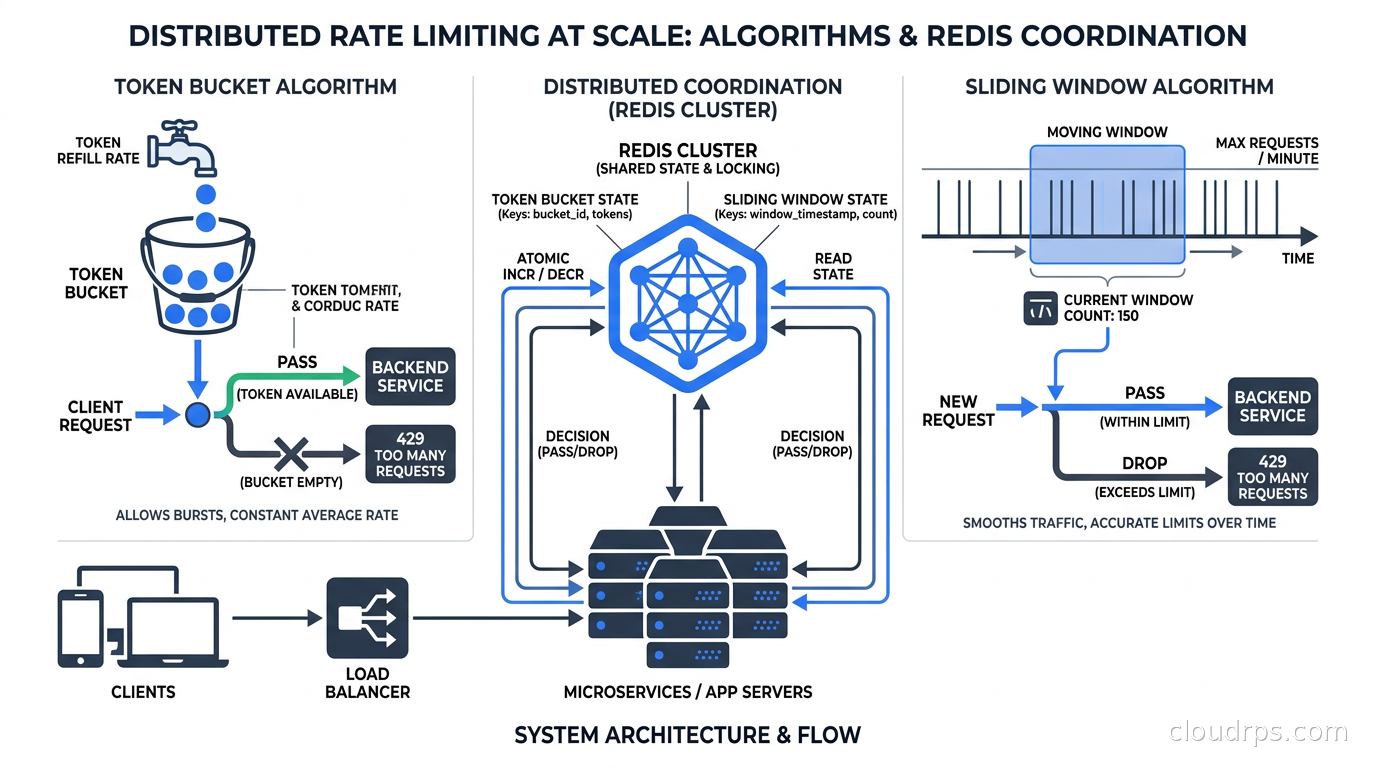
I got paged at 2 AM on a Tuesday because one of our partners had a bug in their webhook retry loop. Instead of backing off exponentially, their client was hammering our API at ten thousand requests per second. We had no rate limiting in place. The database fell over in about four minutes. Three services went down. I spent six hours in incident response mode, and another two days explaining to leadership why a single misbehaving client could take out the whole platform.
After twenty years building cloud infrastructure, I have seen variations of this story more times than I care to count. Rate limiting is one of those things that teams treat as an afterthought until it becomes the only thing that matters at 2 AM.
The concept sounds simple: limit how many requests a client can make. In practice, it is a distributed systems problem with real tradeoffs, subtle failure modes, and at least five distinct algorithms that each optimize for different things. This article covers all of it, from the math behind each approach to production-grade Redis implementations to where in your stack you should actually enforce limits.
Why Rate Limiting Is Harder Than It Looks
On a single server, rate limiting is trivial. You keep a counter in memory, increment it on each request, reset it every minute, and reject requests above the threshold. Ten lines of code.
The moment you have two servers, everything breaks. Each instance has its own counter. A client can hit Server A at 999 requests per minute and Server B at 999 requests per minute and never get rate limited, even though they sent 1,998 requests against a 1,000 request limit. You need a shared counter. That means network round-trips, consistency tradeoffs, and new failure modes.
Add horizontal scaling, regional deployments, and the requirement that rate limiting must not become a single point of failure, and you have a real engineering problem.
Before choosing an algorithm, you need to be clear about what you are actually protecting. Rate limiting serves several overlapping purposes:
- Traffic shaping: Preventing a single client from overwhelming shared infrastructure
- Cost control: Keeping compute and egress costs predictable
- Fair use enforcement: Ensuring one tenant cannot starve others in a multi-tenant system
- Abuse prevention: Detecting and blocking credential stuffing, scraping, and DoS attempts
- API monetization: Tiering access by subscription level
Each purpose has slightly different requirements. Abuse prevention needs sub-second enforcement. API monetization can tolerate a few seconds of lag. Traffic shaping needs to handle burst gracefully. Know which problem you are solving before you pick an algorithm.
The Four Core Algorithms
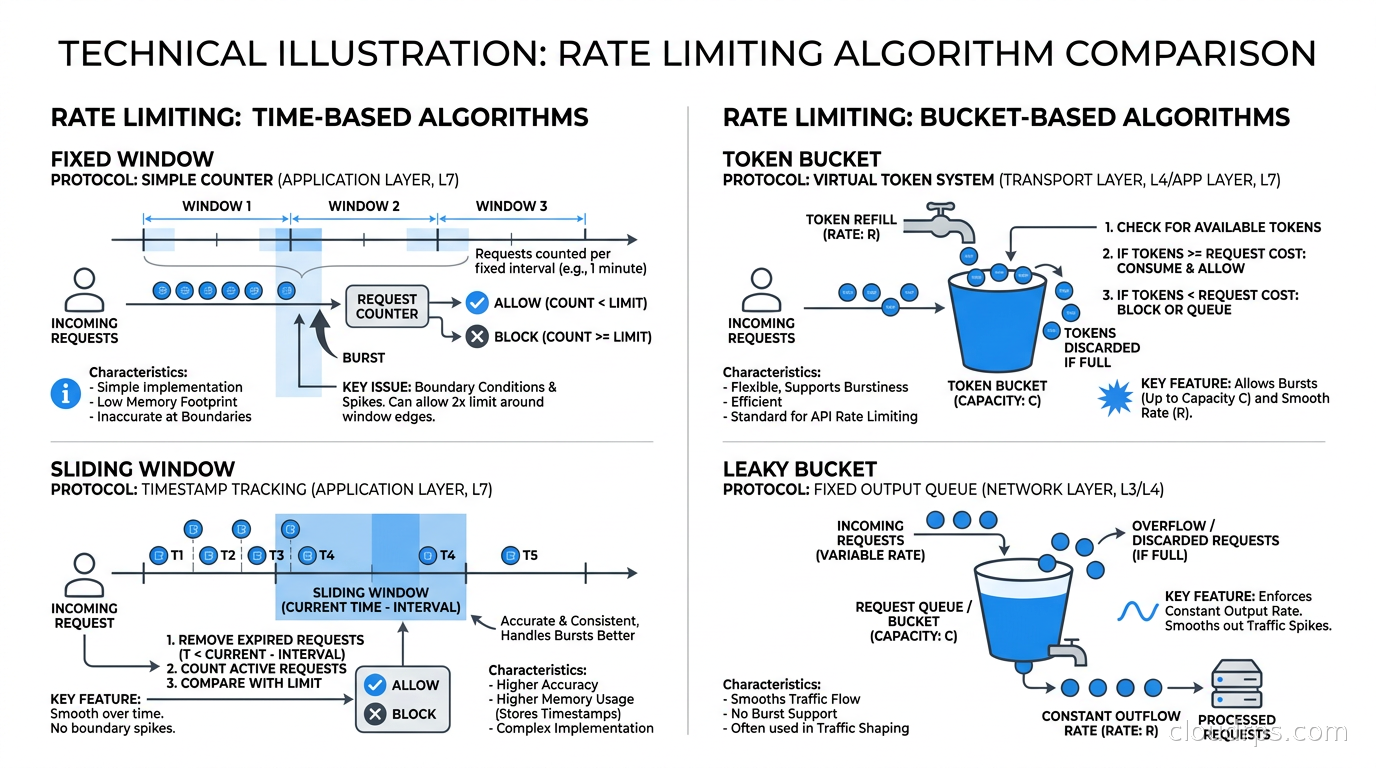
Fixed Window Counter
This is the simplest approach. Divide time into fixed windows — one minute buckets, for example. Count requests in the current window. If the count exceeds the limit, reject the request.
The implementation in Redis is two operations: INCR key followed by EXPIRE key 60 (if the key is new). Fast, cheap, easy.
The problem is the boundary condition. A client can make 1,000 requests in the last second of window one, then another 1,000 requests in the first second of window two. That is 2,000 requests in two seconds against a 1,000-per-minute limit. The fixed window sees both bursts as compliant. Your downstream system sees a 2,000 request spike.
For internal services that are genuinely tolerant of bursts, fixed window is fine. For anything customer-facing or tied to database load, the boundary problem is real.
Sliding Window Log
The accurate solution: keep a log of every request timestamp. When a new request arrives, remove all timestamps older than the window duration, count the remaining timestamps, and either allow or reject the request.
In Redis, you implement this with a sorted set. The score is the Unix timestamp in milliseconds. On each request: ZADD key timestamp member, ZREMRANGEBYSCORE key 0 (now - window_ms), ZCARD key. If ZCARD exceeds the limit, reject.
This is perfectly accurate. It has no boundary problem. It also stores one entry per request, so if your limit is 10,000 requests per minute, the sorted set holds up to 10,000 members per client. At scale with thousands of clients, the memory cost becomes significant. For high-volume APIs, sliding window log is often impractical in pure form.
Sliding Window Counter (Hybrid Approach)
This is the algorithm Cloudflare wrote about and what most production systems use. Instead of logging every request, keep two fixed window counters: the current window and the previous window. When a request arrives, calculate an approximate current rate using the weighted average:
rate = (previous_count × (1 - elapsed_fraction)) + current_count
Where elapsed_fraction is how far through the current window you are. If you are 40% through the current minute, and the previous minute had 800 requests while the current minute so far has 200, your approximate sliding rate is 800 × 0.6 + 200 = 680.
This requires only two integers per client, handles the boundary problem with good accuracy, and is cheap to compute. The approximation introduces a small error — in the worst case, you might allow slightly more or reject slightly fewer requests than the exact sliding log would. For almost every use case, that tradeoff is completely acceptable.
Token Bucket
Token bucket is the algorithm behind AWS API throttling, Stripe’s rate limiting, and most cloud provider quotas. Understanding it is mandatory for working with any major cloud service.
Imagine a bucket that holds a fixed maximum number of tokens. Tokens are added to the bucket at a constant rate (the refill rate). Each request consumes one or more tokens. If the bucket has tokens, the request goes through. If not, it is rejected.
The key property: token bucket allows controlled bursting. A client that has been idle accumulates tokens up to the bucket capacity. When they suddenly send a burst of requests, the bucket has tokens to spend and the burst goes through. But sustained traffic above the refill rate will drain the bucket and start getting rejected.
Stripe publishes per-endpoint rate limits with burst allowances on top of a steady sustained rate, which is the token bucket shape: a bucket that refills at a constant rate but has room to absorb a short burst above it.
Implementation in Redis requires storing two values per client: the current token count and the last refill timestamp. On each request, you calculate how many tokens have accumulated since the last check, add them (capped at bucket capacity), then subtract the tokens required for the request. This has to be atomic, which means a Lua script:
local key = KEYS[1]
local rate = tonumber(ARGV[1])      -- tokens per second
local capacity = tonumber(ARGV[2])  -- max bucket size
local now = tonumber(ARGV[3])       -- current time in ms
local requested = tonumber(ARGV[4]) -- tokens needed

local last_time = tonumber(redis.call('HGET', key, 'ts') or now)
local tokens = tonumber(redis.call('HGET', key, 'tokens') or capacity)

local elapsed = (now - last_time) / 1000.0
local new_tokens = math.min(capacity, tokens + elapsed * rate)

if new_tokens >= requested then
    redis.call('HSET', key, 'tokens', new_tokens - requested, 'ts', now)
    return 1  -- allowed
else
    redis.call('HSET', key, 'tokens', new_tokens, 'ts', now)
    return 0  -- rejected
end
The Lua script executes atomically on Redis, eliminating race conditions. The EXPIRE is set separately to clean up inactive clients.
Leaky Bucket
Leaky bucket enforces a strict output rate by modeling requests as water flowing into a bucket with a hole at the bottom. Requests enter the queue; they are processed at a fixed rate regardless of how fast they arrive. The bucket has a maximum size; if it overflows, requests are dropped.
The practical effect: leaky bucket smooths traffic into a perfectly consistent output rate. No bursting allowed. This is ideal when protecting downstream systems that cannot tolerate spikes — a legacy database, a third-party API with strict quotas, a batch processor.
In Kubernetes, when you configure a rate limit filter in Envoy or Istio that queues excess requests rather than rejecting them immediately, that is leaky bucket behavior. It buys downstream stability at the cost of adding latency for burst traffic.
Most API rate limiting should use token bucket, not leaky bucket. Leaky bucket is for traffic shaping at the egress side of your own services when you need to protect something downstream.
Distributed Rate Limiting in Production
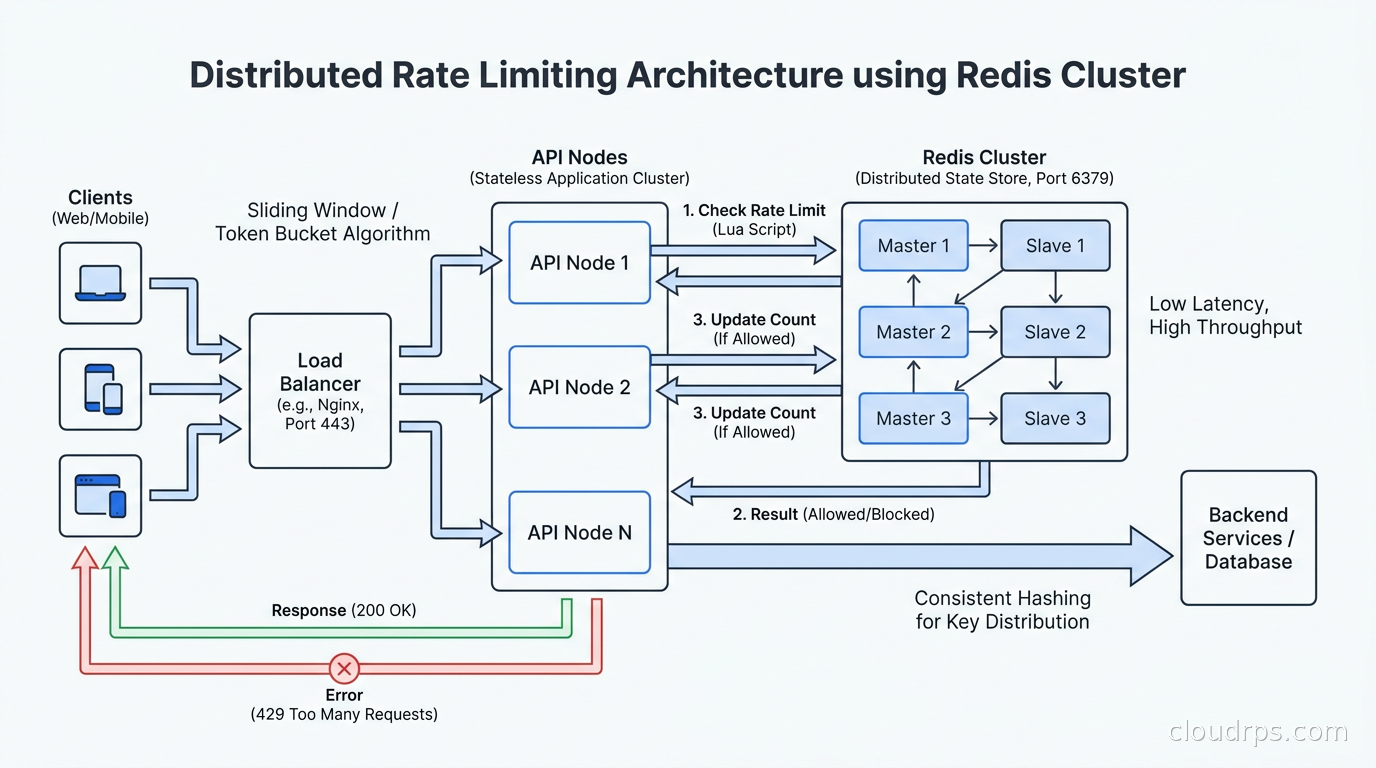
The algorithms above describe the logic. The hard part in production is the distributed coordination layer.
Redis is the standard choice for shared state, and for good reason. Redis is fast (sub-millisecond for simple operations), has excellent data structures (sorted sets, hashes, atomic Lua scripting), and is widely available as a managed service. For rate limiting, you generally want a Redis Cluster or a replicated setup with a replica in the same region.
There is an important tradeoff between consistency and latency. Strong consistency requires that every rate limit check hits the same authoritative Redis instance. For globally distributed APIs, that might mean adding 100ms of latency to every request just to check the rate limit. Most teams accept eventual consistency — each region maintains its own counters and periodically syncs with others. This means a client could technically exceed limits by a factor proportional to the number of regions they hit. In practice, clients making globally distributed requests simultaneously are rare, and the error is acceptable.
Redis Cell is a Redis module (available as redis-cell) that implements the GCRA (Generic Cell Rate Algorithm), which is a variant of leaky bucket with good burst handling. A single CL.THROTTLE command handles the entire check atomically and returns the limit, remaining tokens, retry-after, and reset values in one round-trip. If you can install the module, it simplifies implementation considerably.
For teams running Redis on AWS, ElastiCache Serverless handles automatic scaling. One thing I have seen trip people up: ElastiCache Redis in cluster mode does not support Lua scripts that access multiple keys unless those keys are in the same hash slot. Ensure your rate limit keys include a hash tag {user_id} or use single-node Redis for rate limiting state.
The circuit breaker pattern applies here. If your Redis instance goes down, you need a fallback policy. Options are: fail open (allow all requests), fail closed (reject all requests), or degrade to local in-memory limiting. Fail closed protects downstream but will impact legitimate users badly. Fail open leaves you exposed. Local in-memory is my preference for most cases: you degrade from distributed to per-instance limits, which is imperfect but keeps the service running. Log the degraded state aggressively so you can detect it.
Where to Enforce Rate Limiting in Your Stack
This is where architects make expensive mistakes. You can enforce rate limiting at multiple layers, and the right answer depends on what you are protecting.
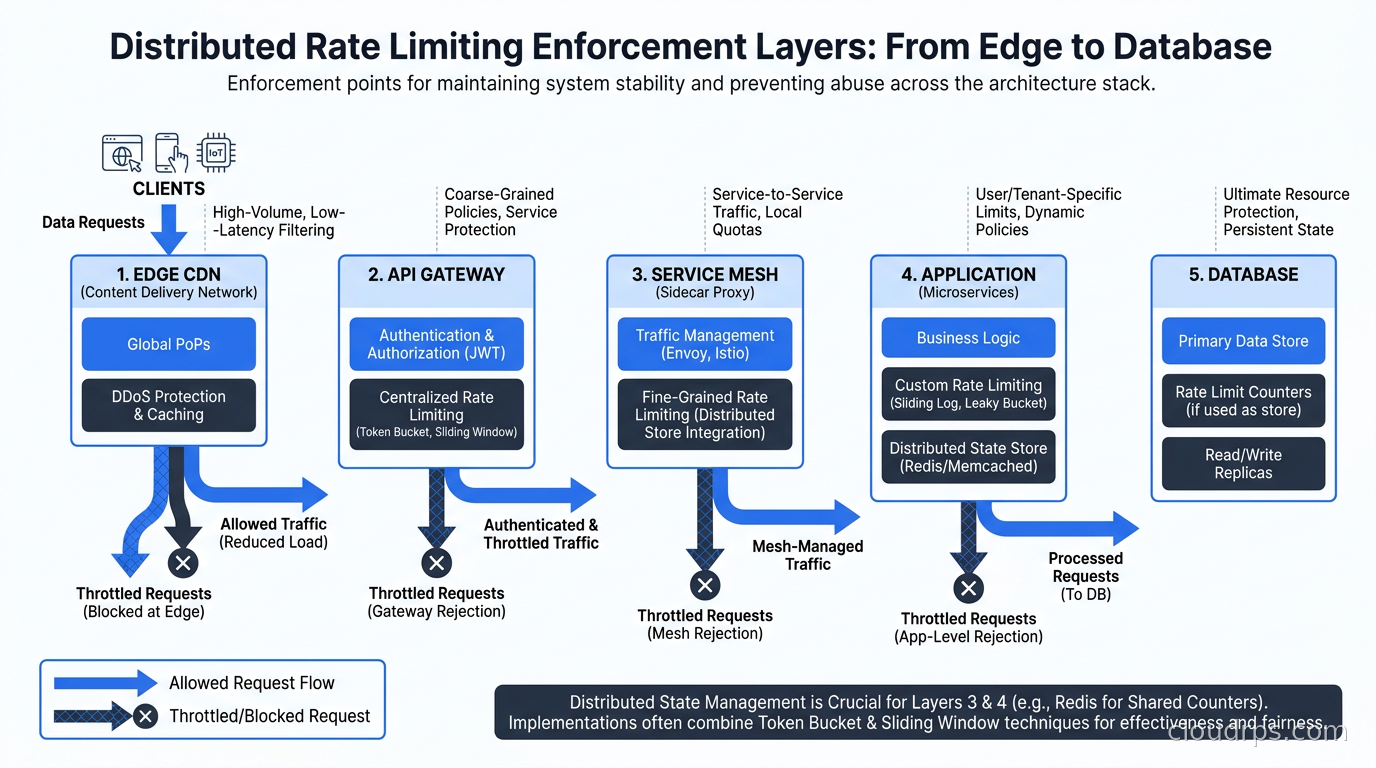
At the edge (CDN/WAF): Cloudflare, Akamai, and CloudFront all offer edge rate limiting. This is your first line of defense against large-scale abuse and DDoS. It stops traffic before it hits your infrastructure. The downside is that edge rate limits are coarse-grained — they typically work on IP address or simple header values, and you cannot easily apply per-tenant business logic at the edge.
At the API gateway: This is where most teams should implement their primary rate limiting logic. API gateways like Kong, AWS API Gateway, and Google Cloud Apigee handle authenticated rate limiting — per-customer limits, tier-based quotas, per-endpoint throttling. This is the right layer for API monetization and fair-use enforcement. Kong’s Rate Limiting Advanced plugin supports sliding window with Redis backend and handles cluster synchronization automatically.
At the service mesh: If you are running Istio or another service mesh, you can apply rate limiting at the proxy layer using Envoy’s rate limit service integration. This is particularly useful for service-to-service limits — preventing one internal service from overwhelming another during a traffic spike. The Istio ambient mesh approach handles this without per-pod sidecars, reducing overhead. Envoy’s local rate limit filter is fast but per-instance; the global rate limit service adds Redis coordination. The Envoy proxy architecture article explains how the rate limit filter plugs into Envoy’s HTTP filter chain and how the circuit breaker interacts with your retry budget.
In the application: Application-level rate limiting is for business logic that requires context the infrastructure cannot see — things like “only three password reset emails per account per hour” or “maximum five concurrent AI inference jobs per user.” The AI gateway pattern centralizes this for LLM APIs. For general application rate limiting, libraries like bottle-throttle, slowapi (Python), or express-rate-limit (Node) wrap the Redis operations described above.
The database itself: PostgreSQL and MySQL have no native rate limiting. Connection limits and connection poolers like PgBouncer are your protection layer there. Rate limiting at the database level is usually a sign that rate limiting at the API layer has failed.
My general recommendation: enforce coarse rate limits at the edge, business-tier limits at the API gateway, service-to-service limits at the mesh, and application-specific limits in code. Do not duplicate effort across every layer — maintain each layer for a specific purpose. For teams running on Cloudflare’s network, Durable Objects give you a consistent global edge-layer implementation without a Redis cluster: each rate limit key maps to a single Durable Object instance that handles all requests for that key sequentially. We walk through the full architecture in Cloudflare Workers and Durable Objects.
Designing for Real-World Behavior
A few patterns I have found essential in production:
Use separate limits for read and write operations. Read endpoints can usually tolerate higher rates than writes. A user reading their feed 100 times per minute is annoying but harmless. Writing 100 posts per minute is suspicious. Different limits for different operations prevents write-specific abuse without restricting read behavior.
Return useful headers. Clients cannot handle rate limits gracefully if they do not know what the limits are. Return X-RateLimit-Limit, X-RateLimit-Remaining, X-RateLimit-Reset, and Retry-After on every response, not just on 429s. Well-behaved clients will back off automatically if they see remaining counts dropping. This dramatically reduces the number of 429s you serve, because clients self-regulate.
Implement a soft limit before the hard limit. At 80% of the limit, add a small latency penalty (50ms) rather than rejecting. This creates a progressive signal that a client is approaching limits, without hard-cutting them off. Some teams also return a X-RateLimit-Warning header at 80%. This is how Stripe handles it, and it significantly reduces client complaints about rate limiting.
Distinguish between rate limiting and throttling. Rate limiting rejects requests over a threshold. Throttling slows them down. For bulk operations where clients can tolerate higher latency, throttling is friendlier than rejection. An upload endpoint might let you process at 10 files per second instead of rejecting the eleventh.
Key design for multi-tenant systems. Your rate limit key should typically be <tier>:<customer_id>:<endpoint>. This lets you vary limits by subscription tier, namespace limits per customer so one customer’s consumption does not affect another’s, and track per-endpoint usage for cost analysis. The distributed caching patterns for key expiration and memory management apply directly here.
Testing Your Rate Limiter
I have reviewed a lot of rate limiter implementations that looked correct in code but had subtle bugs that only showed up under load.
The boundary condition: send exactly limit requests and verify the limit+1 request is rejected. Then send from two concurrent clients to verify the distributed counter works correctly, not just in-process.
The window boundary: send requests that straddle the window reset time. A fixed window implementation with a race condition between INCR and EXPIRE will sometimes create keys that never expire, leading to clients being permanently rate limited.
The Redis failure case: kill your Redis instance mid-test and verify the fallback behavior matches your policy (fail open vs fail closed vs in-memory degradation).
The token bucket refill: for token bucket implementations, verify that a client that is quiet for ten seconds can then burst up to the bucket capacity but no more.
Tools like Vegeta, k6, and Locust are useful for load-testing rate limiting behavior under concurrent traffic. Wire up dashboards to watch your Redis key counts alongside response code distributions, and you will quickly see whether your rate limiter is behaving as expected.
Connecting Rate Limiting to Your Broader Architecture
Rate limiting does not live in isolation. It is one component of a larger traffic management system.
Event-driven architectures on AWS use SQS as a natural rate limiting buffer: consumers process at their own pace regardless of producer rate. This is leaky bucket at the architecture level, without writing any rate limiting code.
Service meshes with mTLS and circuit breakers provide complementary protection. Rate limiting stops excessive traffic; circuit breakers stop cascading failures when a downstream service is slow. You want both.
For AI inference infrastructure, rate limiting takes on extra importance because GPU compute is expensive and inference latency is high. A user who can send unlimited requests can tie up a GPU for minutes. Token-based rate limiting — measuring by input token count rather than request count — is standard in production LLM APIs. You track token consumption the same way you track requests, just with different bucket sizes per tier.
What I Would Build Today
After twenty years of maintaining systems under pressure, here is the setup I reach for on new projects:
A Redis Cluster with three primary nodes and synchronous replication to replicas. The sliding window counter algorithm implemented as a Lua script, with token bucket for endpoints that need burst tolerance. Rate limit enforcement at two layers: Kong at the API gateway for customer-facing limits, and Envoy local rate limit filters for service-to-service protection.
Every 429 response gets logged with the customer ID, the limit key, the algorithm used, and the current counter value. Those logs go into a dashboard. When the on-call engineer gets paged about rate limiting at 2 AM, they should be able to see exactly who is hitting what limit and why within thirty seconds.
The fallback policy when Redis is unavailable: in-memory token bucket per instance, with a lower limit (50% of normal), and a metric that fires an alert immediately. The service stays up but starts logging degraded state. We fix Redis before anyone notices the looser limits.
Rate limiting is not glamorous. Nobody gets promoted for writing a good rate limiter. But the first time it saves your database at 2 AM, you will understand why experienced architects treat it as foundational infrastructure rather than an afterthought.
Updated September 1, 2026: de-specified an unverified Stripe rate-limit figure as part of an accuracy review.
Get Cloud Architecture Insights
Practical deep dives on infrastructure, security, and scaling. No spam, no fluff.
By subscribing, you agree to receive emails. Unsubscribe anytime.