
I have spent twenty years watching engineers try to scale machine learning workloads, and the pattern is always the same. You write your training script on a beefy workstation, it runs fine, then someone asks you to train on ten times the data or sweep through five hundred hyperparameter combinations. You add more GPUs. You hit single-machine limits. You try to hand-parallelize things with subprocess calls and SSH scripts. Three weeks later you are debugging race conditions in a bash script at two in the morning.
Ray exists to end that pattern. It is a distributed execution framework built from the ground up for AI workloads, and after years of watching teams fight with Spark, Celery, and hand-rolled parallelism for ML tasks, I would put it in the short list of genuinely important infrastructure software from the last decade. OpenAI runs their training pipelines on it. So does Cohere, Spotify, and dozens of other serious AI shops. Understanding how Ray works and when to use it is quickly becoming a baseline skill for anyone building AI infrastructure at scale.
What Ray Actually Is
The framing that clicks for most engineers is this: Ray lets you turn any Python function into a distributed task, and any Python class into a distributed stateful service, with almost no changes to your code.
That sounds like marketing, but the underlying model is genuinely simple. You decorate a function with @ray.remote, and calling it no longer runs locally, it schedules the work on whatever cluster node has capacity. Return values become futures you can pass to other remote functions before they resolve. Ray handles serialization, scheduling, and data movement automatically.
The three primitives everything else is built on:
Tasks are stateless remote function calls. You fire them off, Ray distributes them across workers, you collect results when you need them. Fan-out parallelism, data preprocessing, hyperparameter search, batch inference. All of this maps cleanly to tasks.
Actors are remote objects with persistent state. Think of them as services that live somewhere in your cluster and process calls over their lifetime. Actor state lives in the actor’s memory and is not copied on every call. Useful for things like a parameter server, a model replica you want to keep warm, or a stateful data loader.
The Object Store is a shared-memory layer (backed by Apache Arrow’s Plasma store) that lets tasks and actors share large objects like datasets and model checkpoints without copying them through the driver. When you pass a large tensor between Ray tasks, it goes through the object store, not over the network redundantly.
These three primitives are the substrate. Everything in the Ray ecosystem, including Ray Data, Ray Train, Ray Tune, and Ray Serve, is built on top of them.
The Ray AI Libraries
The core runtime is powerful but general-purpose. The AI libraries are where the ML-specific value lives.
Ray Data handles distributed data loading and preprocessing. It is lazy and streaming by default, which matters when your training dataset does not fit in memory. It reads from S3, GCS, HDFS, HuggingFace datasets, and most other sources, and pipelines data transformations directly into training loops without materializing the entire dataset. I have used it to replace ad-hoc multiprocessing pools in data pipelines and the speedup was immediate, mostly because the old code was serializing objects through Python’s GIL without realizing it.
Ray Train provides distributed training integrations for PyTorch, TensorFlow, XGBoost, and LightGBM. You wrap your training loop in a training function, give Ray Train a scaling config that specifies the number of workers and whether you want GPU workers, and it handles distributed setup including DDP, FSDP, or whatever strategy is appropriate. The abstraction is thin enough that you keep your existing PyTorch code nearly intact.
Ray Tune is a hyperparameter optimization library that runs search algorithms like Optuna, Hyperband, ASHA, and population-based training at cluster scale. Submitting fifty parallel hyperparameter trials that each use two GPUs is four lines of configuration. I have seen teams cut experiment cycle time from a week to an afternoon by moving from sequential grid search to parallel Tune runs.
Ray Serve is a model serving framework built on Ray actors. Each model replica is an actor, and Ray Serve handles HTTP routing, batching, autoscaling, and composition of multiple models into pipelines (useful for things like preprocessing plus inference plus postprocessing as a chain). It is not as mature as purpose-built serving systems like Triton or the vLLM, SGLang, and TensorRT-LLM family for pure LLM inference, but it is the right choice when you need flexible multi-model composition or want a single framework from training through serving.
RLlib handles reinforcement learning workloads and is the most specialized of the libraries. If you are not training RL agents, you will never touch it.
Ray Cluster Architecture
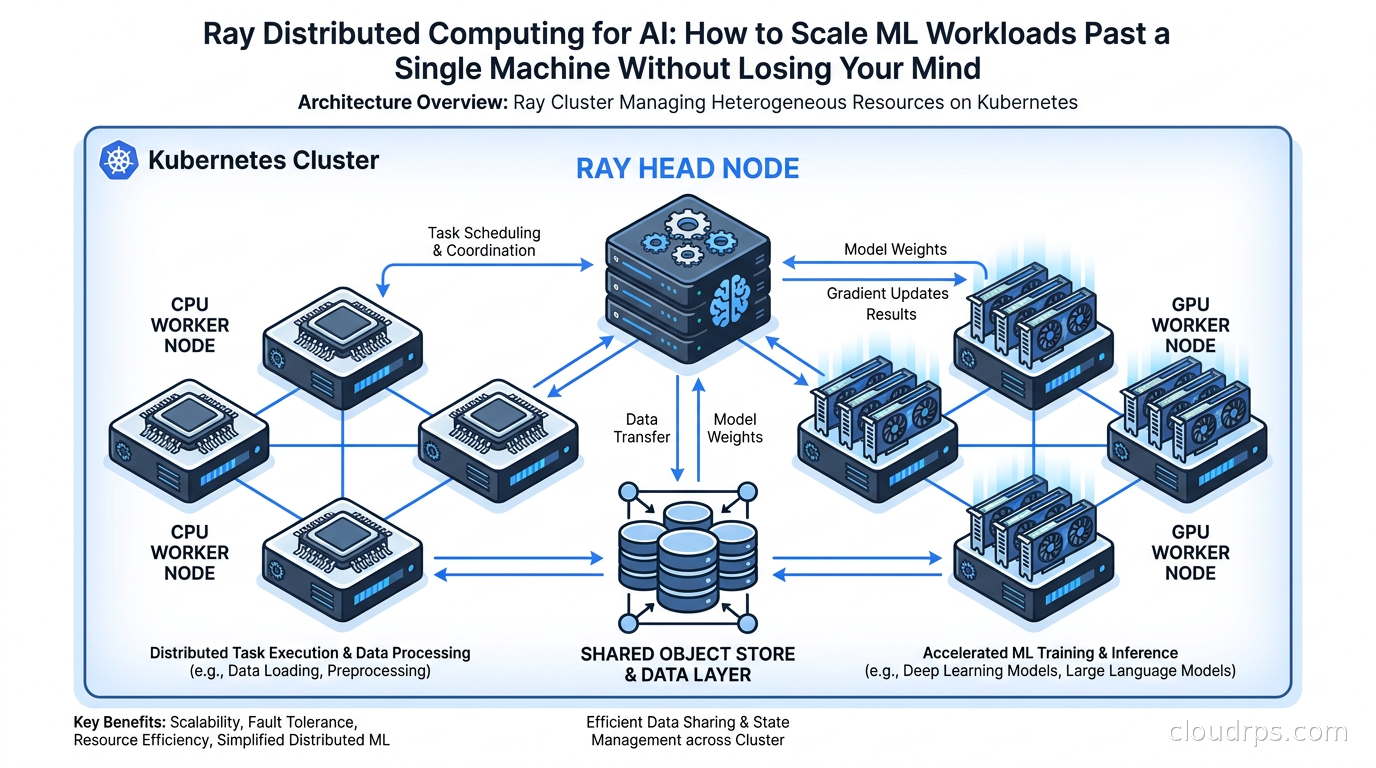
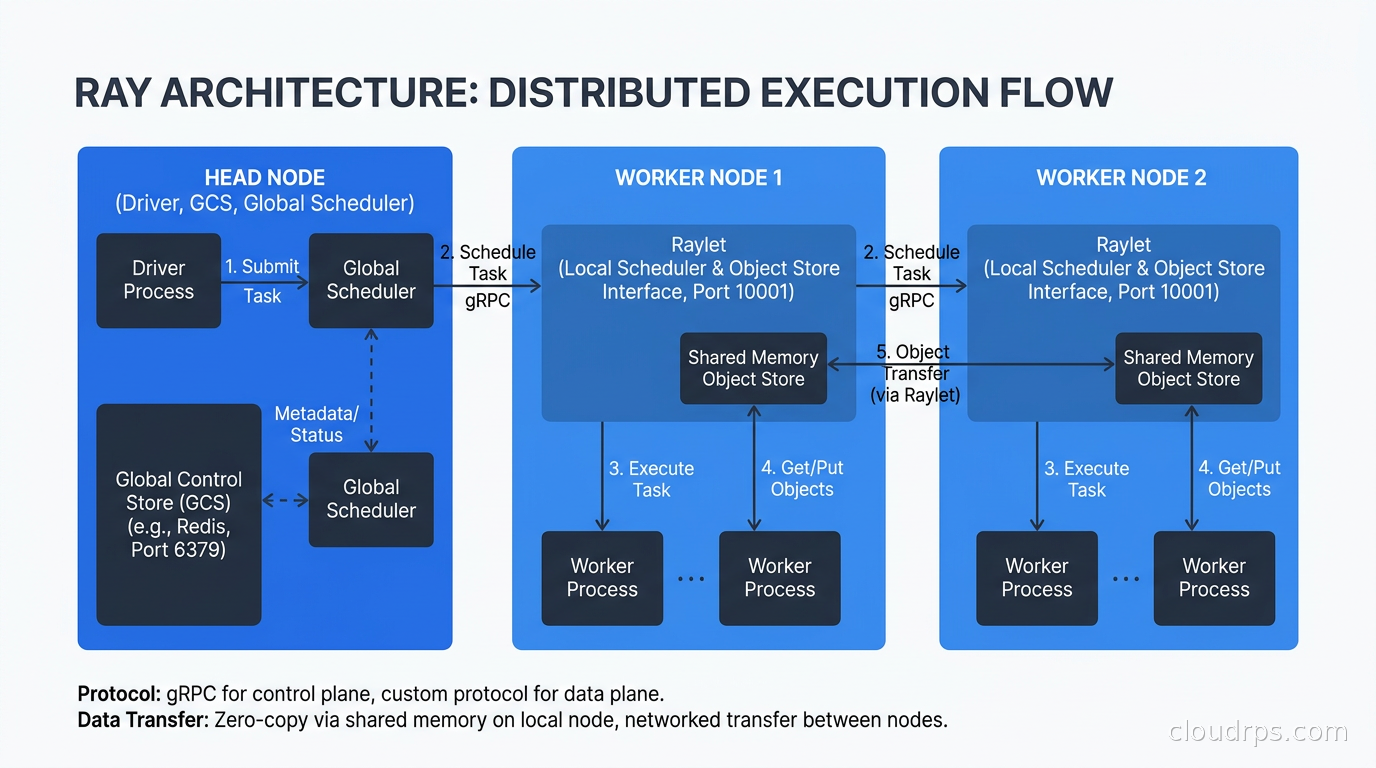
A Ray cluster has a head node and worker nodes. The head node runs the Ray Global Control Service (GCS), which is the authoritative store for cluster metadata including task scheduling state, actor locations, and object references. It also runs the driver when you submit a job.
Worker nodes run Ray worker processes. Each worker process is a single OS process, and Ray typically creates one worker per CPU core by default, with additional GPU workers if GPUs are present.
When a task is submitted, the distributed scheduler on the head node finds a worker with the required resources (you annotate tasks with @ray.remote(num_gpus=1) or similar) and schedules it there. Tasks that depend on object store references are preferentially scheduled on the node where that data lives, which minimizes network transfers. This data-locality awareness is one of the things that makes Ray faster than naive work queues for ML pipelines.
The object store on each node is a shared-memory segment that all workers on that node can read from via zero-copy. When a task on node A needs an object that lives on node B’s object store, Ray transfers it over the network and caches it in node A’s object store so subsequent tasks can read it locally. For GPU training workloads, the speed of that cross-node transfer depends entirely on the underlying network fabric: whether you are running InfiniBand, RoCEv2, or EFA has a direct impact on all-reduce performance, which the GPU cluster networking guide covers in detail.
One thing that trips people up early: the head node is a single point of coordination. It is not stateless. In older Ray versions, head node failure was catastrophic for the cluster. Ray 2.x introduced GCS fault tolerance backed by Redis or an external store, which means you can lose and restart the head node without losing running tasks, but you need to configure this explicitly. If you are running production Ray workloads without GCS fault tolerance, you are one head node restart away from a bad day.
Running Ray on Kubernetes with KubeRay
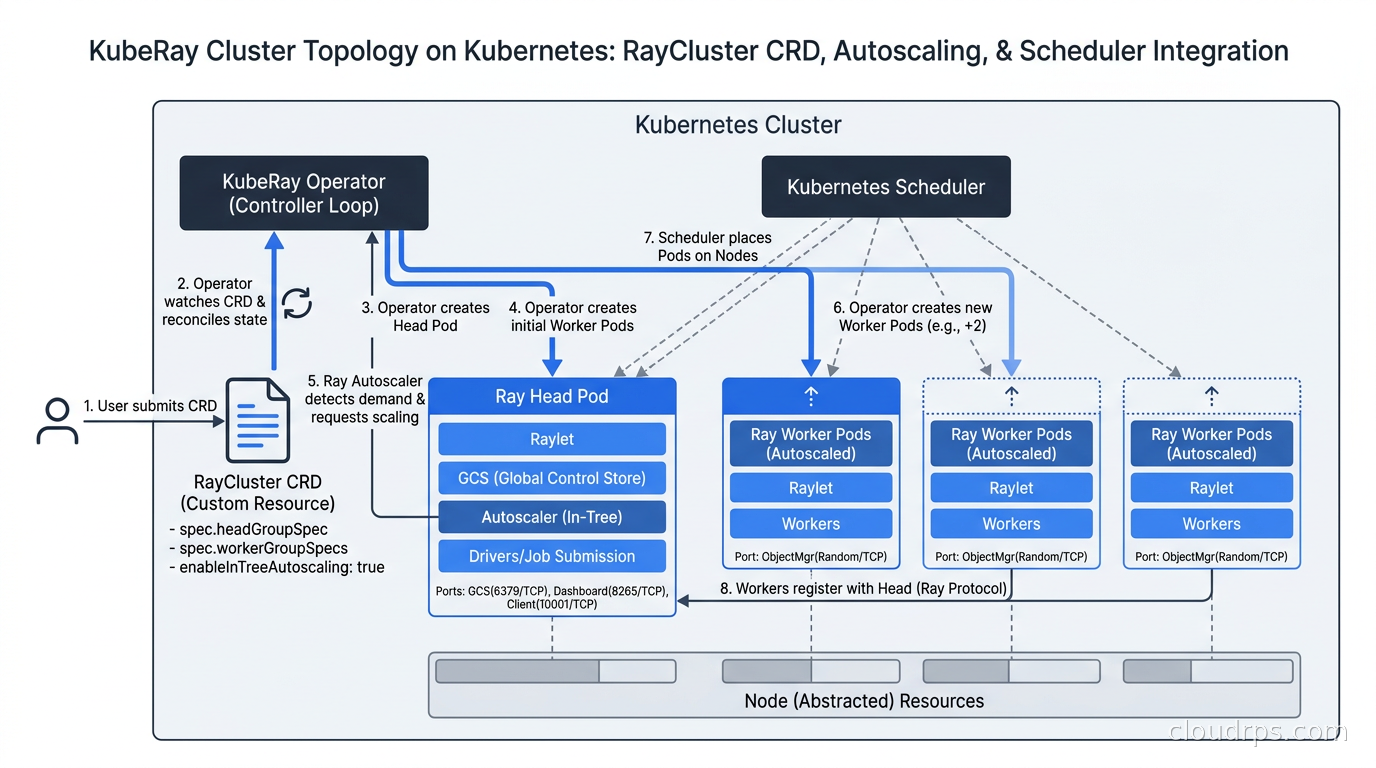
The practical deployment path for most organizations today is KubeRay, the Kubernetes operator for Ray. This is almost certainly how you should run Ray unless you are on a managed Anyscale environment or have a specific on-prem reason to roll your own cluster management.
KubeRay introduces two main custom resources. RayCluster defines a cluster with a head group and one or more worker groups. RayJob submits a one-off job to a cluster and tears it down when the job completes. RayService wraps a Ray Serve deployment with Kubernetes service semantics.
apiVersion: ray.io/v1
kind: RayCluster
metadata:
  name: ray-gpu-cluster
spec:
  headGroupSpec:
    rayStartParams:
      dashboard-host: '0.0.0.0'
    template:
      spec:
        containers:
        - name: ray-head
          image: rayproject/ray:2.55.1-gpu
          resources:
            limits:
              cpu: 4
              memory: 16Gi
  workerGroupSpecs:
  - replicas: 4
    minReplicas: 1
    maxReplicas: 16
    groupName: gpu-workers
    rayStartParams: {}
    template:
      spec:
        containers:
        - name: ray-worker
          image: rayproject/ray:2.55.1-gpu
          resources:
            limits:
              cpu: 8
              memory: 64Gi
              nvidia.com/gpu: 1
The worker group supports autoscaling through the Ray Autoscaler, which communicates with Kubernetes to scale worker pods up and down based on pending task demand. This integrates naturally with Karpenter for node provisioning so that new nodes are provisioned when there are no available pods and deprovisioned when they go idle, a pattern that works very well for bursty training workloads.
For GPU scheduling on Kubernetes, KubeRay respects GPU resource requests on the worker group pods, and Ray’s own scheduler handles GPU allocation at the task level. You request GPUs per task with the decorator, and Ray will not schedule that task on a node without the required GPUs.
Production Considerations
Getting a proof of concept working is fast. Getting Ray working reliably in production takes more care.
Object store memory pressure is the most common production issue. The object store has a fixed size (default 30% of node memory). When you spill over, Ray evicts objects to disk. If you have tasks that produce large intermediate objects and you are not pinning them carefully, you can flood the object store and tank performance. Monitor ray memory output and set explicit resource limits on your objects or use ray.put() with careful lifecycle management in pipelines that produce large intermediate datasets.
Task fan-out and scheduling overhead become relevant at very high parallelism. Scheduling 100,000 tasks per second is theoretically possible but in practice the head node and GCS become bottlenecks before that. If your workload involves millions of tiny tasks, consider batching them. One remote task that processes a thousand small items is almost always faster than a thousand remote tasks of one item each, because you eliminate the scheduling and serialization overhead per item.
Serialization of function arguments goes through pickle by default. Large NumPy arrays and PyTorch tensors serialize reasonably well, but if you are passing complex Python objects with weird __reduce__ implementations, you can hit silent correctness issues. I have seen gradient accumulation bugs that were actually serialization bugs. Test your serialization explicitly if your actors carry complex state.
Observability is Ray’s weak point relative to more mature distributed systems. The Ray Dashboard gives you a live view of tasks, actors, and object store usage, and it improved significantly in 2.x, but it still does not integrate as cleanly into production observability stacks as you would like. Ray exports metrics in Prometheus format, so you can scrape them into your existing monitoring. For production deployments I recommend explicitly configuring Prometheus scraping and building dashboards around the key Ray metrics: scheduling latency, object store usage, task throughput, and worker CPU/GPU utilization.
Cost is a real consideration for bursty training workloads. Mixing spot and preemptible instances with Ray is possible but requires configuration. Ray actors that get preempted will fail, and any work they had not checkpointed is lost. Ray Train has built-in checkpointing that handles this for training loops, but if you have custom actors holding important state, you need fault-tolerance logic. For production FinOps on AI workloads, the pattern I recommend is: on-demand for the head node and critical actors, spot for stateless data preprocessing tasks, and reserved capacity for steady-state training jobs with well-understood runtimes.
Ray vs. The Alternatives
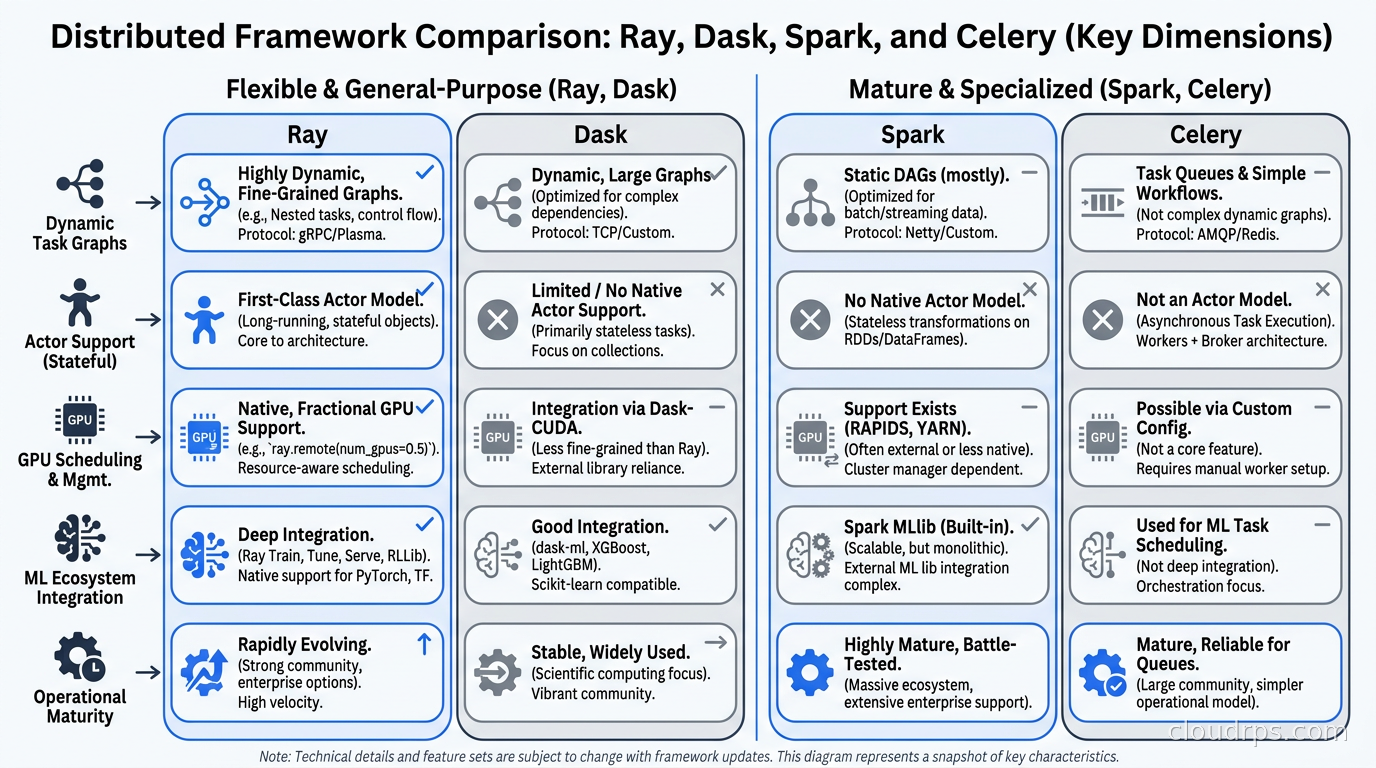
The comparison question I get most often is Ray vs. Dask vs. Spark vs. just using Celery.
Dask is Ray’s closest alternative and the comparison is not as clear-cut as Ray advocates suggest. Dask is excellent for data-parallel workloads on tabular data and integrates deeply with the pandas/NumPy ecosystem. If your workload is primarily ETL and dataframe manipulation and ML is a secondary concern, Dask might be the simpler choice. Ray wins on dynamic task graphs, actor-based workloads, and anything that requires the full Ray AI library ecosystem. Dask’s fault tolerance story is also less mature than Ray’s.
Apache Spark is the right choice when you have an existing Spark investment, your data engineers know it well, and your workload is predominantly batch ETL at enormous scale. Spark’s execution model (DAG over RDDs/DataFrames) is optimized for that pattern. Using Spark for ML training is possible (Spark MLlib, Delta Lake integration) but it is fighting the architecture. I have watched teams spend months trying to make Spark work for distributed PyTorch training. The answer was always Ray or Horovod.
Celery with Redis or RabbitMQ works for task queues but it is not a distributed computing framework. It has no object store, no data locality awareness, no GPU scheduling, no native tensor serialization. Using Celery for ML workloads means you are building Ray by hand, worse. I have seen this go badly in at least three production systems.
The managed options are worth knowing about. Anyscale is the commercial platform built by the Ray team, and it handles the operational burden of running Ray clusters in exchange for a significant premium. For teams that want Ray without managing Kubernetes operators and autoscaling, Anyscale is worth evaluating. Google Cloud offers Ray on Vertex AI as a managed integration. AWS has no first-party managed Ray offering but KubeRay on EKS with Karpenter is a well-trodden path. On shared GPU clusters, pairing KubeRay with Kueue for batch job queuing adds fair-share scheduling and gang admission control across teams, which dramatically improves cluster utilization compared to submitting RayJobs without any queuing layer.
When Not to Use Ray
Ray is the right tool for a specific set of problems. It is not a universal solution.
If your training workload fits on a single multi-GPU machine, you do not need Ray. PyTorch DDP across eight A100s on a single machine is simpler to operate, has lower latency, and requires no cluster management. I have seen teams add Ray to single-machine workloads and watch training get slower because of scheduling overhead that did not exist before.
If your use case is purely inference serving and you do not need multi-model composition or custom Python logic in your serving path, dedicated LLM inference engines will outperform Ray Serve. Ray Serve’s flexibility is also its overhead.
If your team has deep Spark expertise and your pipeline is primarily batch ETL with incidental ML, stay on Spark. The operational familiarity beats the theoretical elegance of switching.
If your organization is in early-stage ML and running one or two training jobs a week, the operational overhead of maintaining a Ray cluster (even on Kubernetes) is not justified. Start simple, scale when you need to.
A Practical Starting Point
My recommended path for a team that wants to get value from Ray without a full platform engineering project:
Start with Ray on a single machine in local mode. ray.init() with no arguments starts a local cluster using all available cores. Run your first distributed workload this way, understand the programming model, and get comfortable with the Dashboard. You learn 80% of what matters without a cluster.
When you need multi-machine scale, deploy KubeRay to an existing Kubernetes cluster. Use a small fixed-size worker group initially, three or four nodes, and wire up Prometheus scraping before you do anything else. Observability first is not optional here.
Integrate Ray Train for distributed PyTorch training before you try to hand-parallelize anything. The training abstractions are good and the checkpointing support is worth using even if you only have four workers.
Add Ray Tune for hyperparameter optimization once your training loop is stable. The payoff is immediate: parallel trials make experiment iteration dramatically faster, and the search algorithms (ASHA in particular) will find better hyperparameters than grid search with the same compute budget.
The MLOps production patterns that scale best treat Ray as the execution layer: Ray handles parallelism and resource management, your orchestration layer (Airflow, Prefect, Flyte) handles workflow scheduling and dependencies, and your model registry handles versioning. These concerns are separate and it pays to keep them that way.
Twenty years in, the problems in distributed ML are mostly still the same ones they have always been: getting data to the compute efficiently, managing failures gracefully, and keeping costs from spiraling when experiments are running. Ray does not solve all of these automatically, but it gives you a foundation that is much closer to right than anything I was working with a decade ago. The teams I see struggling least with distributed training today are almost universally on Ray or a managed platform built on top of it. That is not a coincidence.
Get Cloud Architecture Insights
Practical deep dives on infrastructure, security, and scaling. No spam, no fluff.
By subscribing, you agree to receive emails. Unsubscribe anytime.