
In 2011, I was the lead architect for a financial services firm when their primary data center lost power. Not for five minutes. For fourteen hours. The generators failed (turned out nobody had tested them under full load in two years). When the power came back and we started recovery, the CEO asked me two questions: “How much data did we lose?” and “When will we be back online?”
Those two questions are, in essence, RPO and RTO. And the answers I gave that day (“about six hours of transactions” and “roughly twelve more hours”) nearly cost me my job. Not because the numbers were wrong, but because nobody had explicitly agreed on what those numbers should be before the disaster. The business assumed zero data loss and instant recovery. The infrastructure was designed for neither.
That experience taught me that RTO and RPO are not technical specifications. They’re business decisions with technical implementations. Getting this wrong is one of the most expensive mistakes an organization can make.
What RPO and RTO Actually Mean
Let me define these precisely, because I see them confused and conflated constantly.
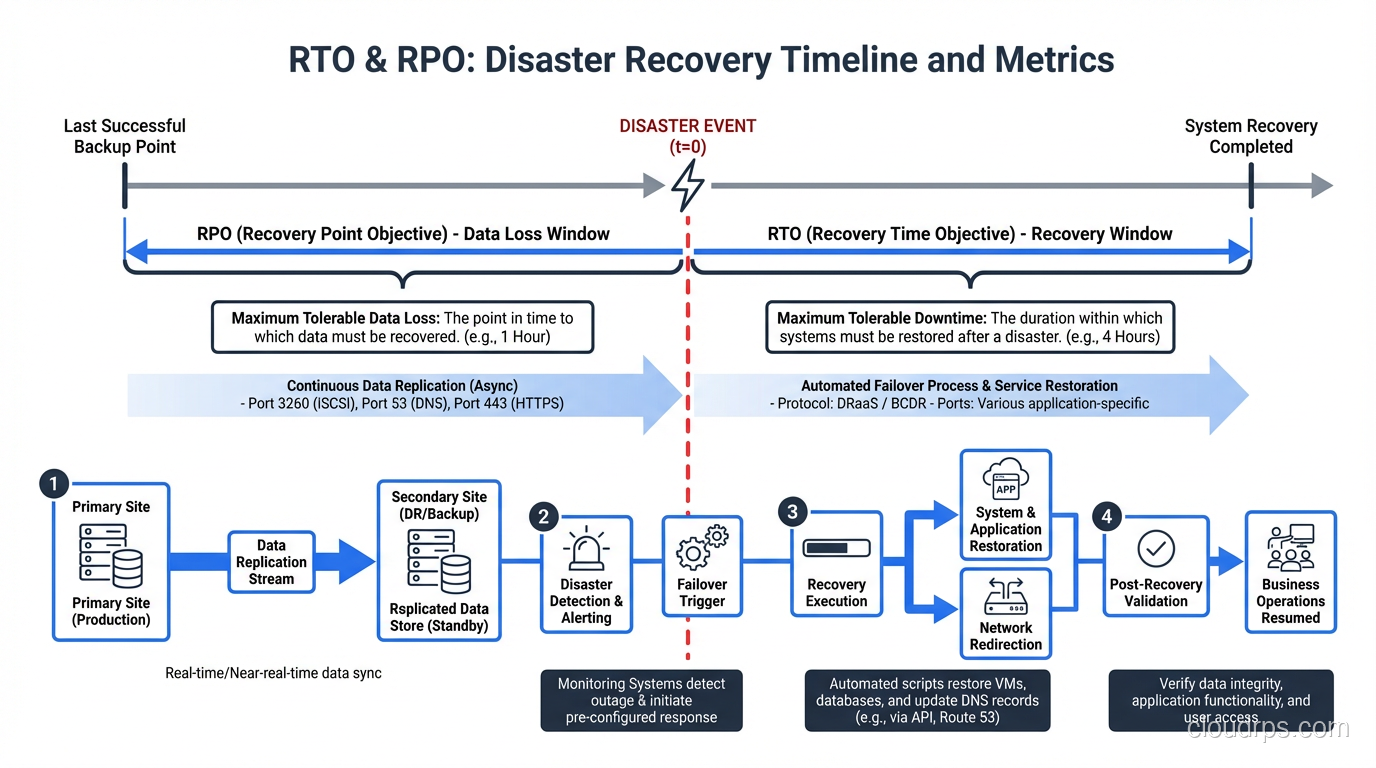
Recovery Point Objective (RPO)
RPO answers: How much data can we afford to lose?
It’s measured in time. An RPO of one hour means that in the worst case, you’ll lose up to one hour of data. Everything written to the system in the hour before the disaster is potentially gone.
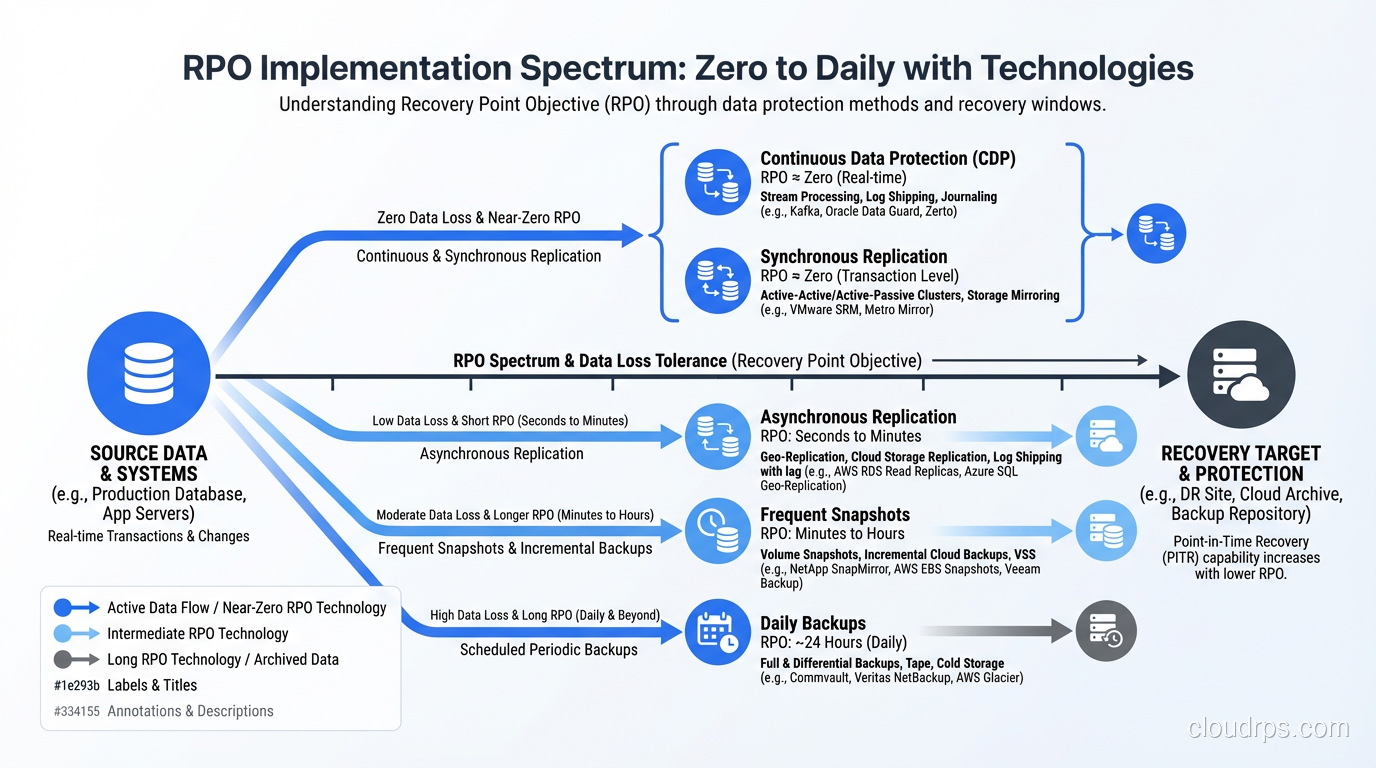
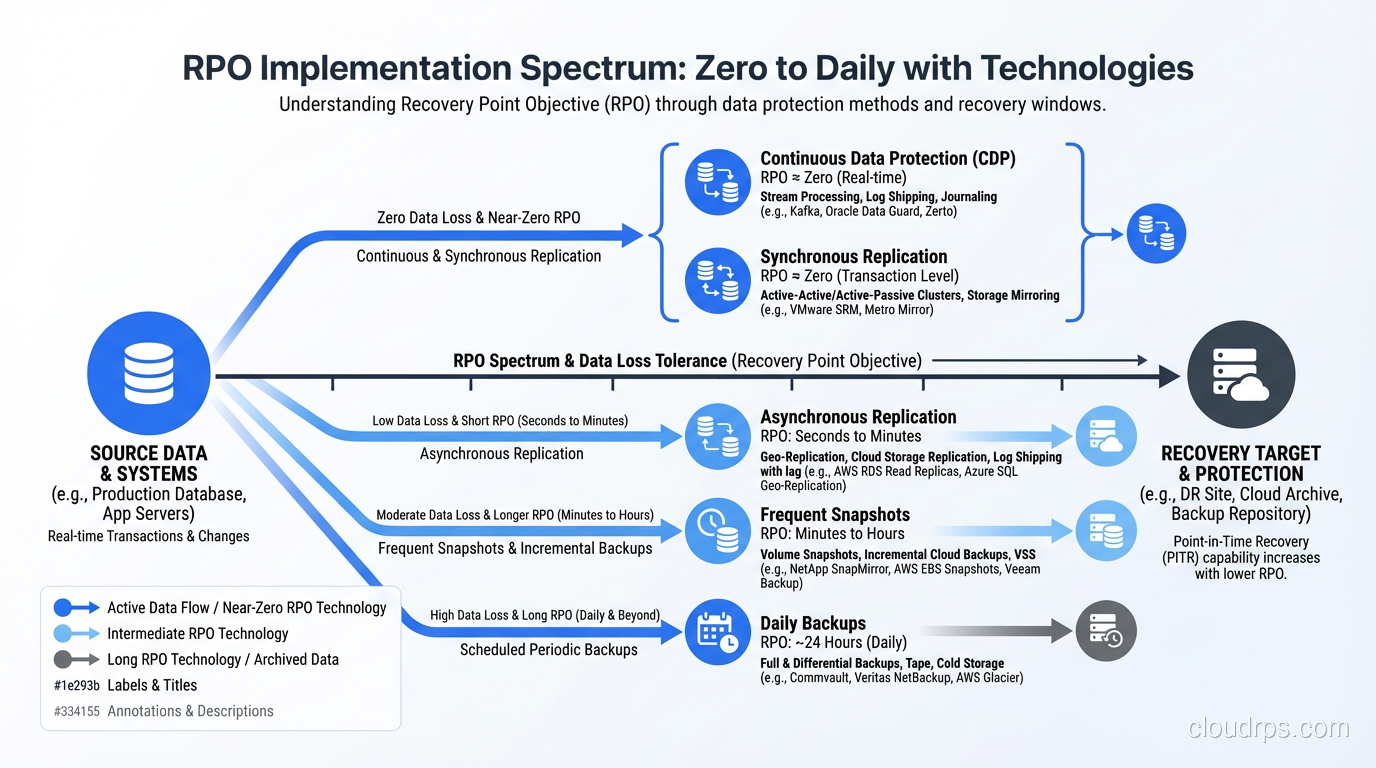
RPO is directly tied to your backup and replication strategy:
- RPO of 0 (zero data loss): Requires synchronous replication. Every write must be confirmed by at least two locations before it’s acknowledged. This is expensive and adds latency to every write operation.
- RPO of minutes: Asynchronous replication with very frequent checkpoints. Think streaming replication in PostgreSQL or near-continuous WAL shipping.
- RPO of hours: Periodic backups. Database dumps every few hours. Transaction log backups at regular intervals.
- RPO of 24 hours: Daily backups. The classic nightly backup job.
Recovery Time Objective (RTO)
RTO answers: How long can the system be down?
It’s the maximum acceptable duration between the disaster occurring and the system being fully operational again. An RTO of four hours means the business can tolerate four hours of downtime.
RTO is tied to your recovery infrastructure and procedures:
- RTO near 0: Requires active-active deployment across multiple locations with automatic failover. The system is already running somewhere else.
- RTO of minutes: Hot standby. A pre-configured secondary environment that can take over quickly with automatic or semi-automatic failover.
- RTO of hours: Warm standby. Infrastructure exists but needs to be activated, configured, or brought up to speed.
- RTO of days: Cold standby. You have backups and documentation but need to provision infrastructure from scratch.
The Relationship Between RTO, RPO, and Cost
Here’s the fundamental truth that every architect needs to internalize: lower RTO and RPO cost more money. The relationship is not linear; it’s exponential. Going from a 24-hour RPO to a 1-hour RPO might increase your infrastructure costs by 50%. Going from a 1-hour RPO to zero might triple them.
I draw this curve for every stakeholder I work with. It’s the most important conversation in disaster recovery planning because it forces the business to make explicit trade-offs.
A zero-RPO, zero-RTO system for a transactional database might require:
- Synchronous multi-region replication (doubles your write latency and your database costs)
- Active-active application deployment across regions (doubles your compute costs)
- Global load balancing with health-check-based failover
- Automated failover procedures with extensive testing
That same system with a 1-hour RPO and 4-hour RTO might only need:
- Asynchronous replication to a standby region
- Pre-provisioned but idle infrastructure in the standby region
- Semi-automated failover runbook
The cost difference can be 3-5x. For some systems, the zero/zero option is justified. For others, it’s wildly overengineered. The business has to decide, and they can only decide if you present the options clearly.
How to Set RTO and RPO: A Practical Framework
I’ve facilitated dozens of these conversations across industries. Here’s the process that works:
Step 1: Identify Your Systems and Data
List every system and every category of data your organization depends on. Don’t just list the obvious ones. Include the systems people don’t think about until they’re gone. DNS. Active Directory. The monitoring system itself. The CI/CD pipeline. The internal wiki where all your runbooks live.
Step 2: Assess Business Impact
For each system, answer: What happens if it’s down for 1 hour? 4 hours? 24 hours? 1 week? Quantify the impact:
- Revenue loss: Direct financial impact per hour of downtime
- Contractual obligations: SLA penalties, compliance requirements
- Operational impact: Can employees work? Can customers be served through other channels?
- Reputational damage: What’s the long-term cost to your brand?
This analysis often produces surprises. I worked with a company that assumed their e-commerce platform was their most critical system, but the impact analysis revealed that their order management system was actually more critical, because when it went down, they couldn’t fulfill orders that were already paid for, leading to chargebacks and customer service nightmares.
Step 3: Define Tiers
Not every system needs the same RTO and RPO. I typically define three to four tiers:
Tier 1, Mission Critical: Revenue-generating, customer-facing systems. Tight RTO (minutes to 1 hour), tight RPO (0 to 15 minutes).
Tier 2, Business Critical: Internal systems that support operations. Moderate RTO (1-4 hours), moderate RPO (15 minutes to 1 hour).
Tier 3, Business Operational: Important but not urgent. Relaxed RTO (4-24 hours), relaxed RPO (1-24 hours).
Tier 4, Administrative: Nice to have. RTO and RPO of days is acceptable.
Step 4: Get Sign-Off
This is the step people skip, and it’s the most important one. Get the RTO and RPO for each tier signed off by someone with budget authority. Write it down. Make it a formal document. Because when the disaster happens, you don’t want the argument about “we assumed zero data loss” to happen during the recovery.
For a comprehensive look at how these objectives fit into a broader recovery strategy, see my post on disaster recovery planning.
Implementing RPO: The Technical Side
Zero RPO
Synchronous replication. Every write is committed to at least two locations before the application receives confirmation. Technologies:
- PostgreSQL: Synchronous replication with
synchronous_commit = remote_apply - MySQL: Group Replication in single-primary mode with
group_replication_consistency = AFTER - Cloud-native: Aurora Multi-AZ, Cloud SQL HA, Azure SQL Geo-Replication (synchronous)
The trade-off: write latency increases by the round-trip time to the replica. If your replica is in the same region, that’s 1-2ms. If it’s cross-region, that’s 20-100ms. Your application has to tolerate this.
Near-Zero RPO (seconds to minutes)
Asynchronous replication with very small lag. This is where most organizations land for Tier 1 systems because it provides a strong RPO without the write latency penalty.
Technologies: PostgreSQL streaming replication, MySQL asynchronous replication, database replication solutions from every major vendor.
Monitor your replication lag. If your target RPO is 1 minute, your replication lag should normally be under 10 seconds. If lag exceeds your RPO, you need to alert and investigate.
Hourly to Daily RPO
Periodic backups. Automated snapshots. Transaction log shipping. These are the workhorses of data protection and they work well when the business can tolerate the data loss window.
The critical thing with backups: test your restores. I’ve lost count of the number of organizations I’ve seen with beautiful backup automation and zero restore testing. Backups that can’t be restored are not backups. They’re false confidence.
Implementing RTO: The Technical Side
Near-Zero RTO
Active-active deployment. The application runs in multiple locations simultaneously. If one location fails, the others continue serving traffic immediately. The failover is automatic and invisible to users.
This requires:
- High-availability architecture across the entire stack
- Global load balancing (DNS-based or anycast)
- Data replication that supports multi-region writes (or careful request routing)
- Stateless application design (or externalized state)
This is the gold standard, and it’s complex. But for systems that genuinely cannot tolerate any downtime, it’s the right answer.
Minutes-to-Hours RTO
Hot or warm standby. A secondary environment exists and can be activated quickly. The failover might involve:
- Promoting a database replica to primary
- Starting application instances in the standby region
- Updating DNS or load balancer configuration
- Running data consistency checks
Automate as much of this as possible. Manual failover procedures add time and introduce human error. I’ve seen failovers that should take 15 minutes take 3 hours because someone mistyped a database connection string during a stressful recovery.
Hours-to-Days RTO
Cold standby. You have backups and infrastructure-as-code templates. Recovery means:
- Provisioning new infrastructure (from CloudFormation, Terraform, etc.)
- Restoring data from backups
- Configuring and testing the restored system
- Updating DNS and routing
This is acceptable for Tier 3 and Tier 4 systems but terrifying for anything customer-facing.
Testing: The Part Nobody Wants to Do
Having an RTO of 4 hours means nothing if you’ve never actually recovered your system in 4 hours. Paper RTOs are wishful thinking. Tested RTOs are engineering.
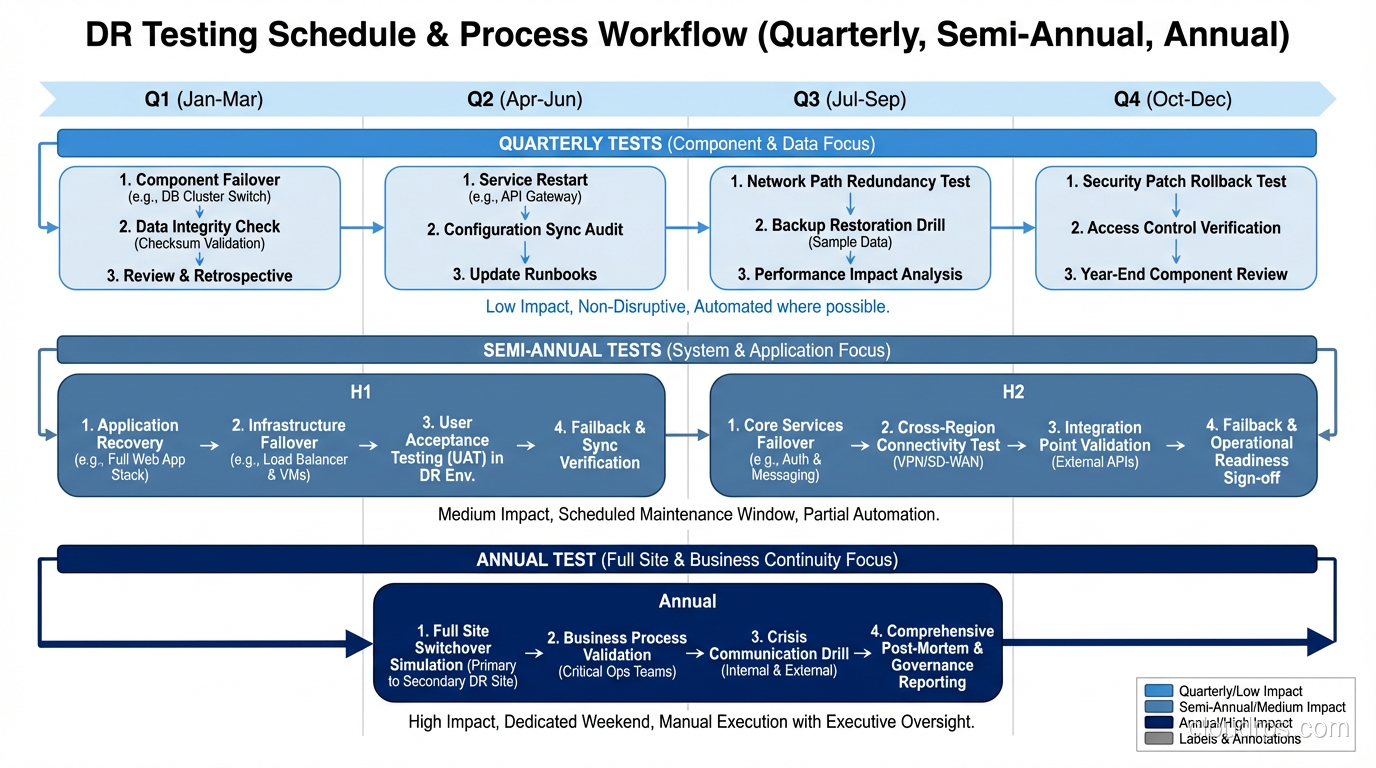
I insist on regular DR testing:
- Quarterly tabletop exercises: Walk through the recovery process verbally. Identify gaps in documentation and runbooks.
- Semi-annual failover tests: Actually fail over to your secondary environment. Do it during business hours so you feel the pressure.
- Annual full DR simulation: Simulate a complete loss of your primary environment. Time the recovery. Compare to your RTO.
Every test I’ve ever run has revealed problems. DNS records that pointed to hardcoded IPs. Credentials that had expired. Runbook steps that were out of date. Recovery scripts that hadn’t been updated to reflect recent architecture changes.
Find these problems during a test, not during an actual disaster.
Real-World RTO/RPO Examples
To make this concrete, here’s what I’ve typically seen across different industries:
E-commerce platform: RPO 5 minutes, RTO 15 minutes. Every minute of downtime is lost revenue. Data loss means lost orders and angry customers.
Internal ERP system: RPO 1 hour, RTO 4 hours. Important but employees can work around it for a few hours using manual processes.
Analytics data warehouse: RPO 24 hours, RTO 8 hours. The data can be reloaded from source systems. Users can wait a business day.
Healthcare records system: RPO 0, RTO 15 minutes. Regulatory requirements and patient safety demand zero data loss and near-instant recovery.
Development/staging environments: RPO 24 hours, RTO 24-48 hours. Developers are inconvenienced but no business impact.
The Conversation That Matters
I’ll end with this: the most valuable output of defining RTO and RPO is not the numbers themselves, but the conversation that produces them. When the CFO understands that zero data loss costs $500,000 per year in infrastructure, they might decide that 5 minutes of potential data loss is an acceptable business risk. When the CTO understands that a 4-hour RTO means 4 hours of downtime during a data center failure, they might fund the infrastructure for a 15-minute RTO.
These are business decisions with technical implications, not the other way around. As architects and engineers, our job is to present the options, quantify the trade-offs, and implement whatever the business decides. When we do this well, the organization is prepared for disaster. When we skip this conversation, we end up like I did in 2011, explaining to an angry CEO why we lost six hours of financial transactions.
Don’t skip the conversation.
Get Cloud Architecture Insights
Practical deep dives on infrastructure, security, and scaling. No spam, no fluff.
By subscribing, you agree to receive emails. Unsubscribe anytime.