
I still remember the afternoon in 2004 when a junior admin walked into my office and asked me whether we should buy a SAN or “just use the drives in the server.” I spent the next two hours at the whiteboard, and by the end of it, we had a purchase order for a Fibre Channel SAN that served us well for nearly a decade. That conversation, and about five hundred like it since, is why I decided to write this post.
Storage architecture is one of those foundational decisions that haunts you for years if you get it wrong. I have seen companies blow six-figure budgets on SANs they never needed, and I have watched startups lose data because they thought a handful of local disks was good enough. The truth, as usual, lives somewhere in the middle and depends entirely on what you are actually building.
Let me walk you through how SAN, NAS, and DAS actually work, when each one makes sense, and where each one will bite you.
Direct Attached Storage: The Simplest Path
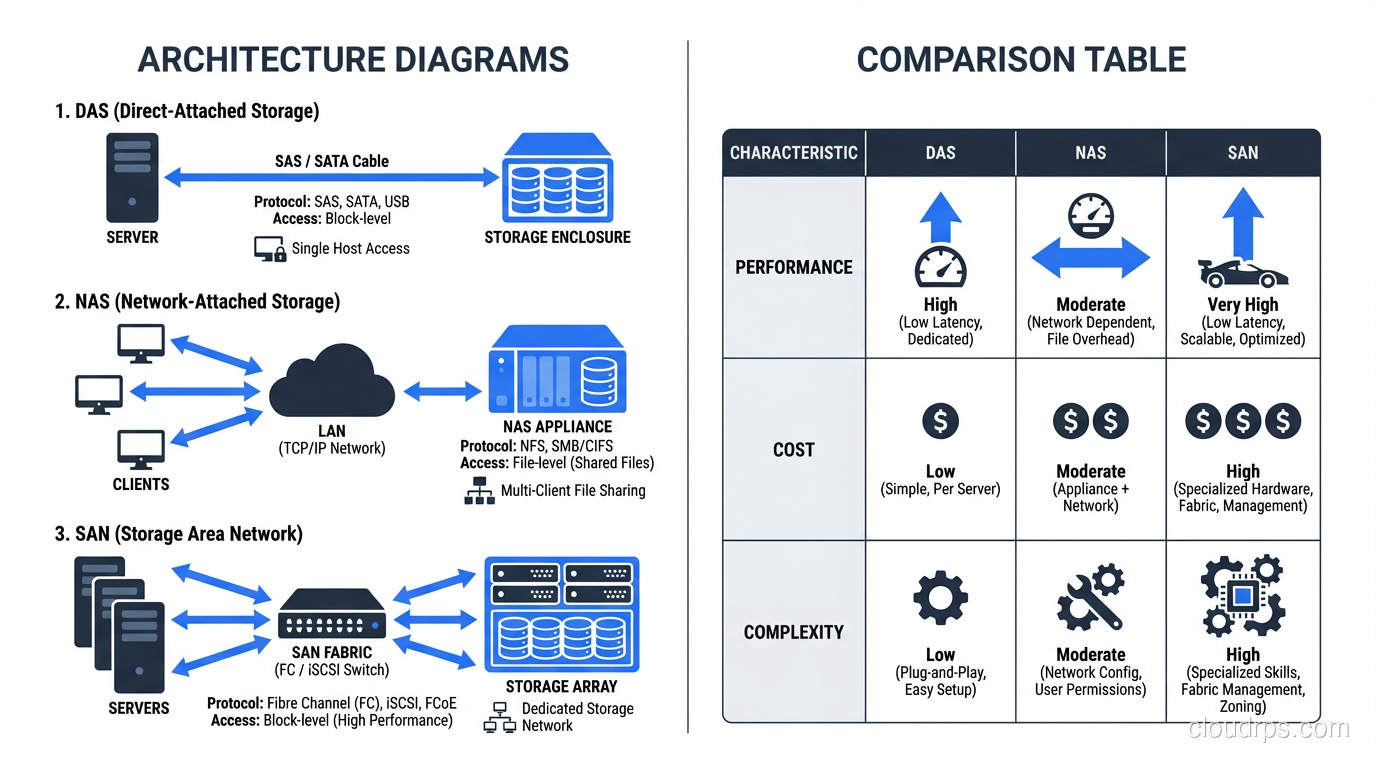
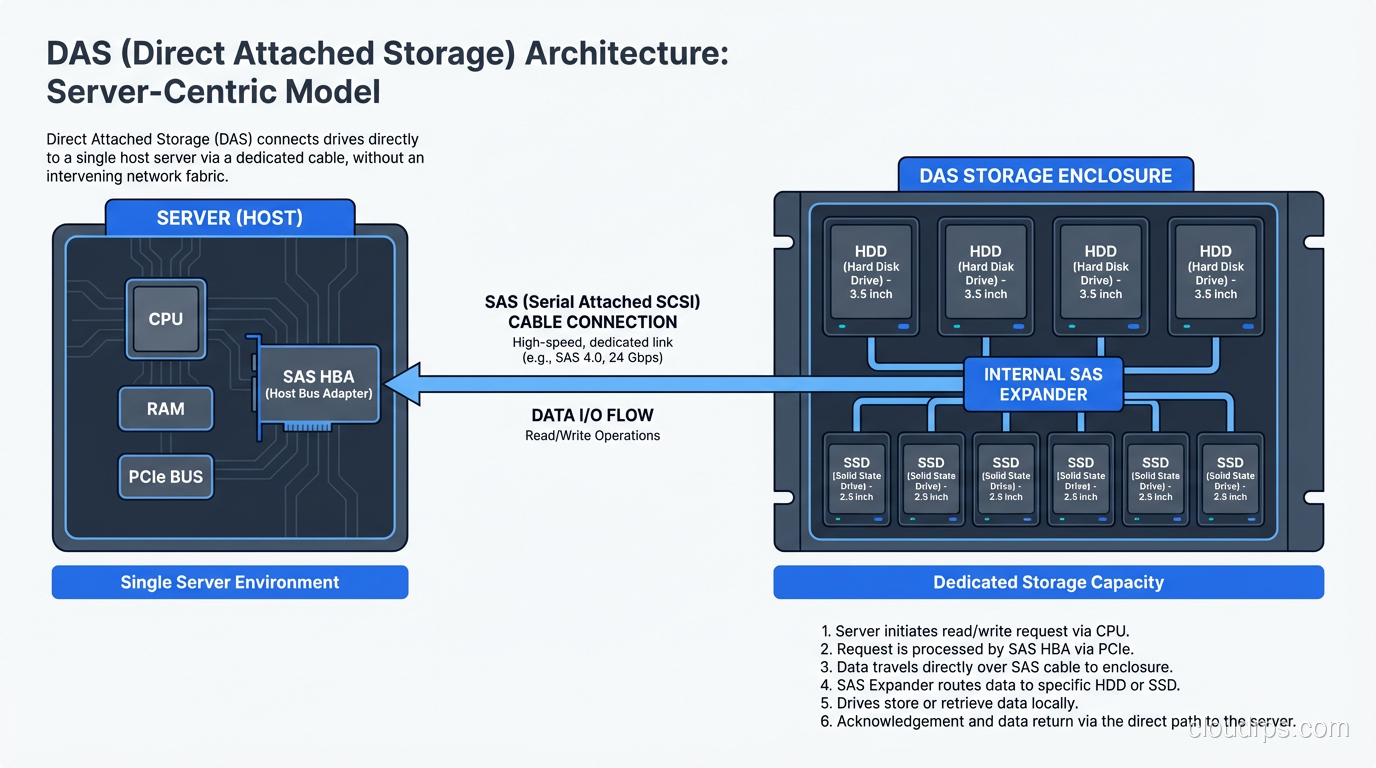
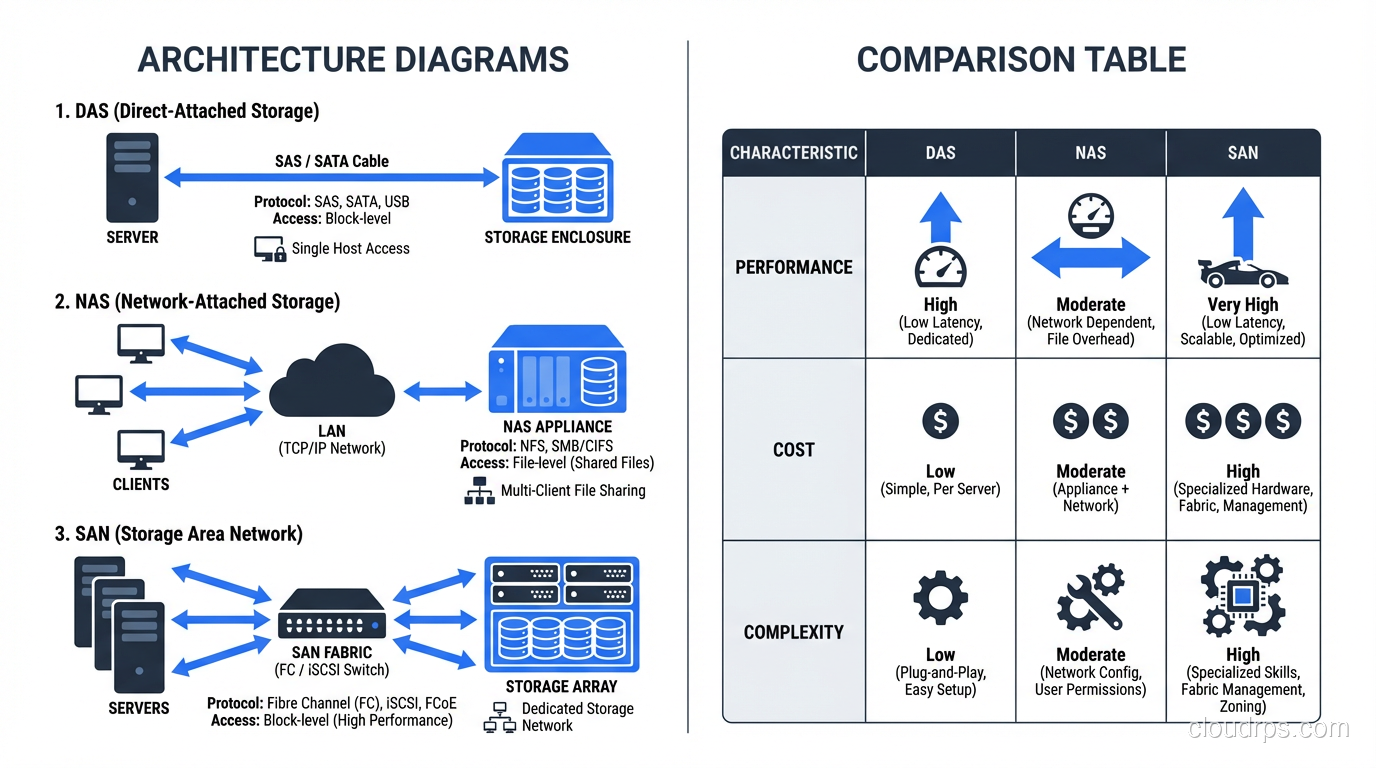
DAS is exactly what it sounds like. You take a disk (or a shelf of disks) and plug it straight into your server. No network in between. No fabric. No protocol translation. Just a cable and a controller.
Every server you have ever racked up with internal drives is running DAS. That JBOD shelf hanging off an HBA card in your database server? DAS. The NVMe drives bolted directly to the motherboard of your application server? Also DAS.
When DAS Makes Perfect Sense
DAS wins on latency. There is no network hop, no packet encapsulation, no switch traversal. When I was running a high-frequency trading analytics platform back in 2011, we used DAS NVMe drives because every microsecond of I/O latency translated directly into dollars. The workload was local to one machine, the dataset fit on local storage, and sharing that data with other servers was not a requirement.
DAS is also the right call when you are building a single-server application that does not need shared storage. A standalone database server with a good RAID controller and a dozen SSDs or HDDs can deliver phenomenal performance at a fraction of the cost of a SAN.
Where DAS Falls Apart
The moment you need two servers to access the same data, DAS becomes a problem. You cannot share a DAS volume between hosts without some seriously ugly workarounds. If your server dies, those drives are offline until you can get them into another machine or restore from backup.
Scaling DAS means scaling individual servers. You cannot pool storage across machines. You end up with islands of capacity (one server is 90% full while another sits at 20%) and no clean way to rebalance. I learned this the hard way managing a cluster of eight database servers in 2008. Each one had its own DAS, and the storage utilization across the fleet was embarrassingly uneven.
Network Attached Storage: Files Over the Network
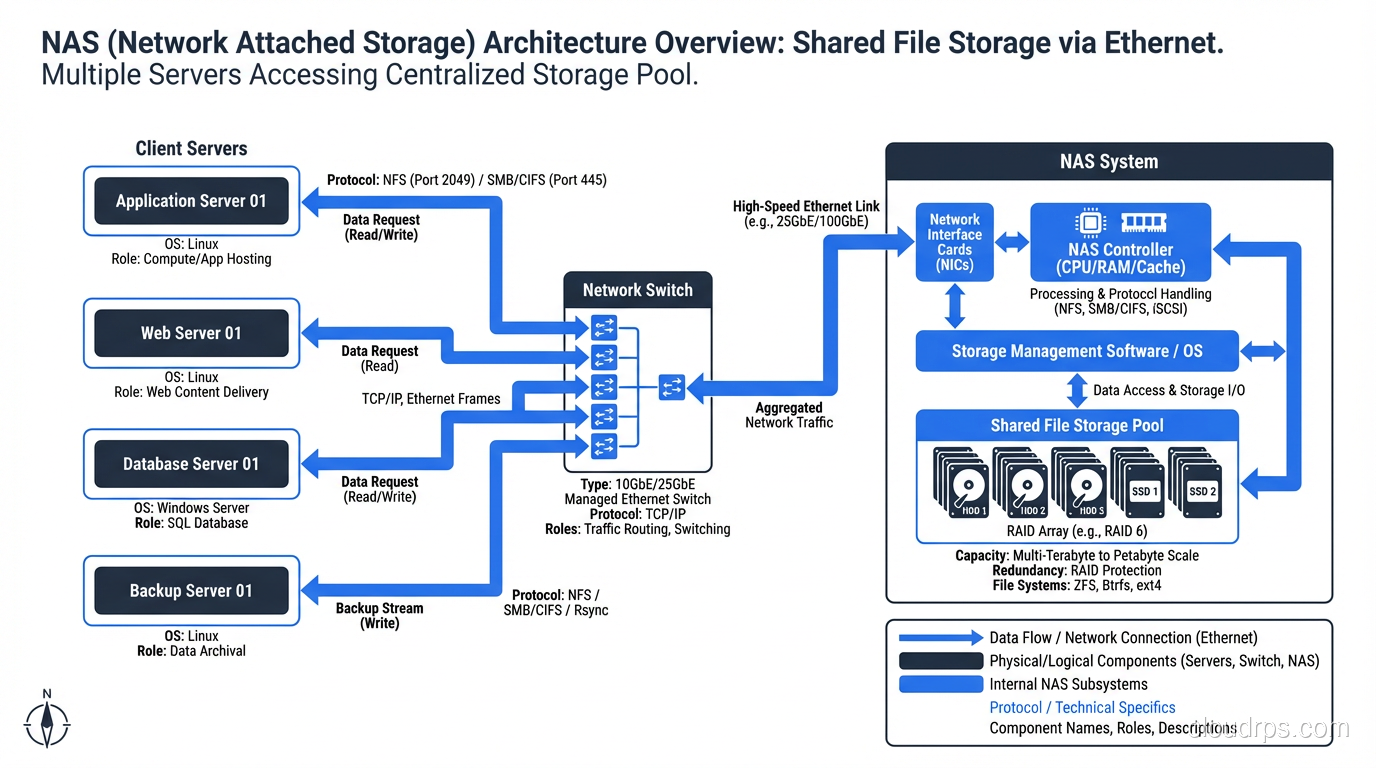
NAS is a dedicated storage appliance that serves files over a network using protocols like NFS or SMB/CIFS. Your servers connect to the NAS over standard Ethernet, mount a file share, and read and write files just like they would on a local filesystem.
The key distinction here is that NAS operates at the file level. When your application reads a file from a NAS, it is asking the NAS appliance to find that file, read the relevant blocks, and send back the file data. The NAS owns the filesystem.
Why NAS Became Ubiquitous
NAS solved the sharing problem that DAS could not. Multiple servers can mount the same NFS export and read from (and write to) the same files. This is why NAS took over the world of shared application data, home directories, media assets, and any workload where multiple hosts need concurrent access to the same file tree.
I set up my first NetApp filer in 2001 for exactly this use case: a web farm of twelve Apache servers that all needed to serve the same content. NAS was the obvious answer. Mount the share, point Apache at it, done.
NAS is also relatively simple to manage. You do not need specialized networking knowledge. It runs over your existing Ethernet infrastructure. Most NAS appliances come with decent management interfaces, snapshot capabilities, and replication features baked in.
The NAS Performance Ceiling
Here is where I get blunt: NAS is not the right choice for heavy transactional database workloads. I have seen people try to run PostgreSQL or Oracle on NFS mounts, and the results ranged from “disappointing” to “catastrophic.”
The problem is protocol overhead and latency. Every file operation goes through NFS or SMB, over TCP/IP, through at least one network switch. For sequential reads of large files, this works fine. For random 4K I/O patterns (the kind databases generate constantly) the per-operation overhead adds up fast.
That said, modern NAS with NVMe-backed storage and 25/100GbE networking has narrowed the gap significantly. I have run some perfectly acceptable analytics workloads on high-end NAS in the last couple of years. But for your primary OLTP database? Use something else.
Understanding the difference between block, object, and file storage is crucial here, because the file-level abstraction is both the strength and the limitation of NAS.
Storage Area Networks: Block Storage Over a Dedicated Fabric
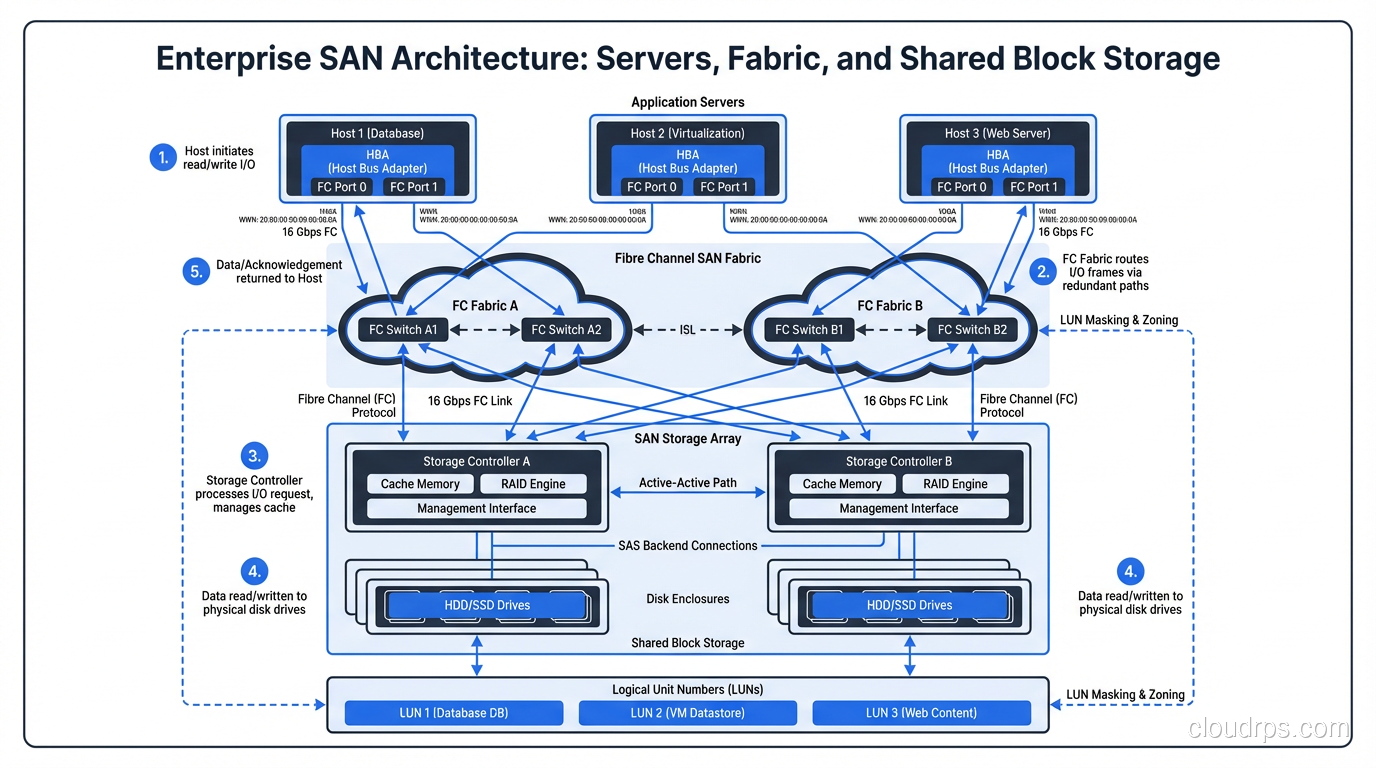
A SAN is a dedicated network, separate from your regular LAN, that provides block-level storage to servers. When a server connects to a SAN, it sees the storage as a local disk. The server owns the filesystem, formats the volume however it wants, and issues block-level reads and writes directly.
Traditional SANs run over Fibre Channel, which is a purpose-built protocol for storage traffic. Modern SANs also run over iSCSI (block storage encapsulated in TCP/IP packets) or Fibre Channel over Ethernet (FCoE). The common thread is that the server gets raw block devices, not files.
Where SANs Dominate
SANs exist because databases need fast, reliable, shared block storage. When I was architecting storage for a financial services company in 2013, we had twelve Oracle RAC nodes that all needed access to the same block devices with sub-millisecond latency. A SAN was the only answer.
The ability to present the same LUN (logical unit number) to multiple servers is what makes clustered databases, live migration of virtual machines, and high-availability configurations possible. Your VM host can move a running virtual machine from one physical server to another because the storage is on the SAN, not local to either host.
SANs also give you centralized management of your storage. You can thin-provision volumes, take snapshots, replicate to a disaster recovery site, and manage capacity across your entire fleet from a single console. When you are responsible for hundreds of terabytes of database storage, that centralization matters enormously.
The Cost and Complexity of SANs
Let me be direct: SANs are expensive. Not just the storage arrays (though those are expensive too) but the entire ecosystem. Fibre Channel switches, HBA cards, dedicated cabling, multipathing software, specialized administrators who understand zoning and LUN masking. The total cost of ownership for a SAN environment is dramatically higher than NAS or DAS.
I have watched organizations spend more on their SAN fabric and licensing than on the actual disk capacity. And when things go wrong in a SAN (a bad zone configuration, a firmware bug in a switch, a multipathing misconfiguration) the blast radius can be enormous. One mistake can take down storage for every server connected to that fabric.
iSCSI SANs reduce some of this complexity by running over standard Ethernet, but you trade away some of the performance and reliability guarantees that Fibre Channel provides. For many workloads, iSCSI is a perfectly reasonable middle ground.
Making the Decision: A Framework That Actually Works
After three decades of building storage infrastructure, here is the mental model I use.
Start With the Workload
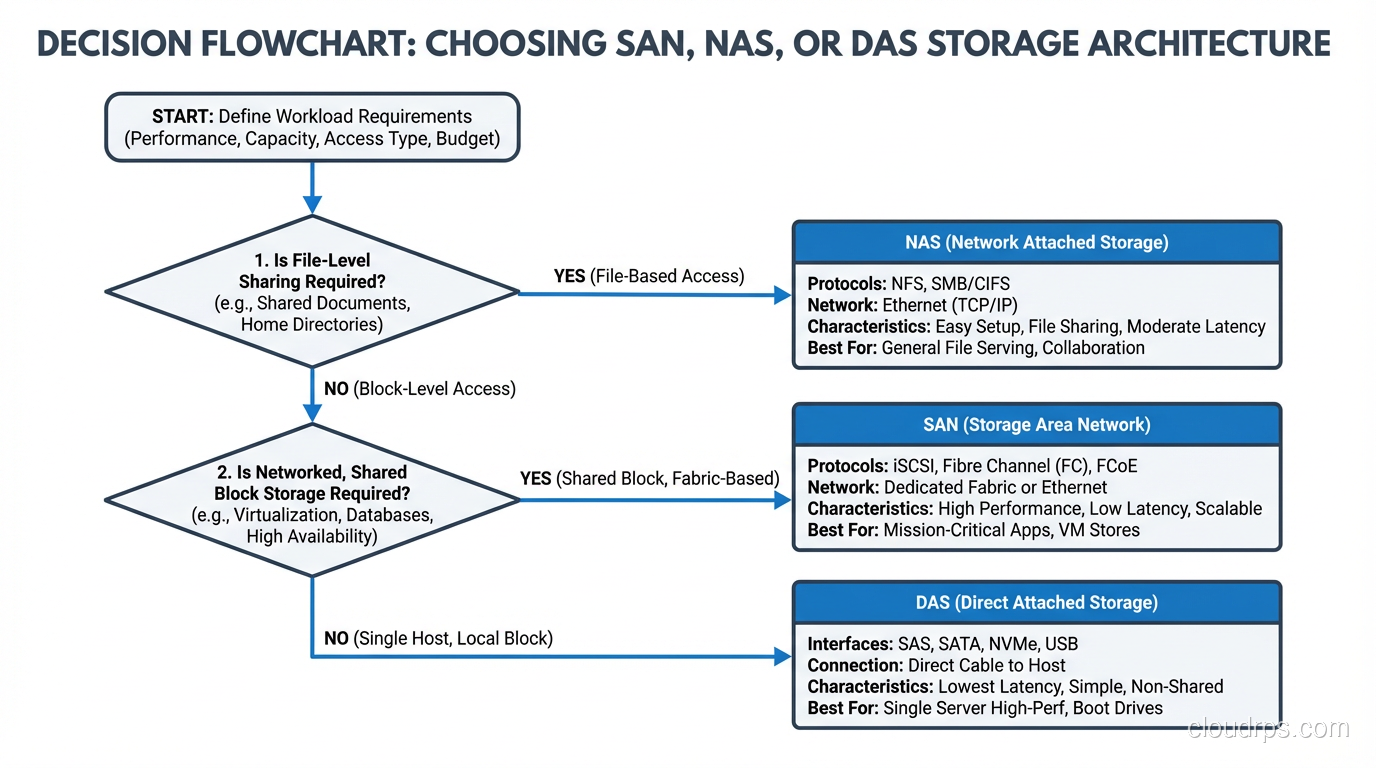
Ask yourself two questions: Does more than one server need to access this data simultaneously? And is the access pattern block-level (database, VM disk) or file-level (shared documents, media, application assets)?
If only one server needs the data, DAS is your default answer. Do not overcomplicate it. A good RAID configuration on local storage gives you performance and redundancy without the cost and complexity of a network storage solution.
If multiple servers need file-level access, NAS is the obvious choice. Shared file storage over NFS or SMB is a solved problem, and modern NAS appliances are remarkably capable.
If multiple servers need block-level access (clustered databases, virtualization platforms, any workload that requires raw block devices shared across hosts) you need a SAN, or at minimum an iSCSI target.
Then Consider Scale
DAS does not scale beyond the capacity of a single server’s storage shelves. If your data is growing rapidly and you need the ability to add capacity without downtime, NAS and SAN both handle this better.
NAS scales well for file workloads and is generally easier to expand: add more shelves, add more appliances, federate namespaces. SAN scales for block workloads but requires more careful planning around fabric capacity, port counts, and zone configurations.
Finally, Be Honest About Budget and Expertise
I have watched small teams try to build and operate Fibre Channel SANs without dedicated storage engineers. It never ends well. If you do not have the budget for the hardware and the staff to manage it, an iSCSI solution or a well-configured NAS will serve you better than a SAN you cannot properly operate.
The Cloud Changed Everything (And Nothing)
Cloud providers have abstracted away the physical infrastructure, but the fundamental concepts still apply. EBS volumes in AWS are essentially SAN LUNs delivered over a network fabric; you get block devices attached to your instances. EFS is NAS: NFS served from a managed appliance. Instance store volumes are DAS: local disks that disappear when the instance stops.
Understanding SAN vs NAS vs DAS is not just about buying hardware anymore. It is about understanding the performance characteristics, sharing models, and failure modes of each approach, because those characteristics persist whether you are racking your own gear or clicking buttons in a cloud console.
Hybrid and Converged Approaches
The lines between these architectures have blurred over the years. Unified storage platforms from vendors like NetApp and Dell can serve both block (iSCSI, FC) and file (NFS, SMB) from the same hardware. Software-defined storage solutions like Ceph can present block, file, and object storage from a single cluster.
I have deployed a few of these converged platforms, and they work well when the workloads are moderate. But when you push them hard (when you have a database hammering block storage at 100K IOPS while a file-serving workload is streaming large sequential reads from the same array) the contention can get ugly. Separate workloads with fundamentally different I/O profiles still benefit from separate storage architectures, even if the marketing brochures say otherwise.
What I Would Build Today
If you asked me to design storage for a new application platform today, here is what I would do.
For databases with heavy transactional workloads, I would use local NVMe DAS with good RAID protection and robust backup. The performance is unbeatable and the simplicity is worth a lot. For high availability, I would use database-level replication rather than shared storage.
For shared application data, media, logs, and anything that multiple servers need to read, I would use NAS over 25GbE or faster. Modern NAS performance is excellent for file workloads.
For virtualization platforms or clustered databases that genuinely require shared block storage, I would use a SAN, but I would seriously evaluate iSCSI before committing to Fibre Channel unless the performance requirements absolutely demand it.
The worst architectures I have seen are the ones where someone picked a storage solution first and then tried to make every workload fit it. Do not be that person. Match the storage architecture to the workload, accept that you might need more than one approach, and save your complexity budget for the problems that actually require it.
Storage architecture decisions are unsexy, but they are the bedrock that everything else sits on. Get them right and nobody notices. Get them wrong and you will be explaining to your CTO why the application is slow, the migration is going to take six months, and the budget needs to triple. Take the time to understand these fundamentals. Your future self will thank you.
Get Cloud Architecture Insights
Practical deep dives on infrastructure, security, and scaling. No spam, no fluff.
By subscribing, you agree to receive emails. Unsubscribe anytime.