
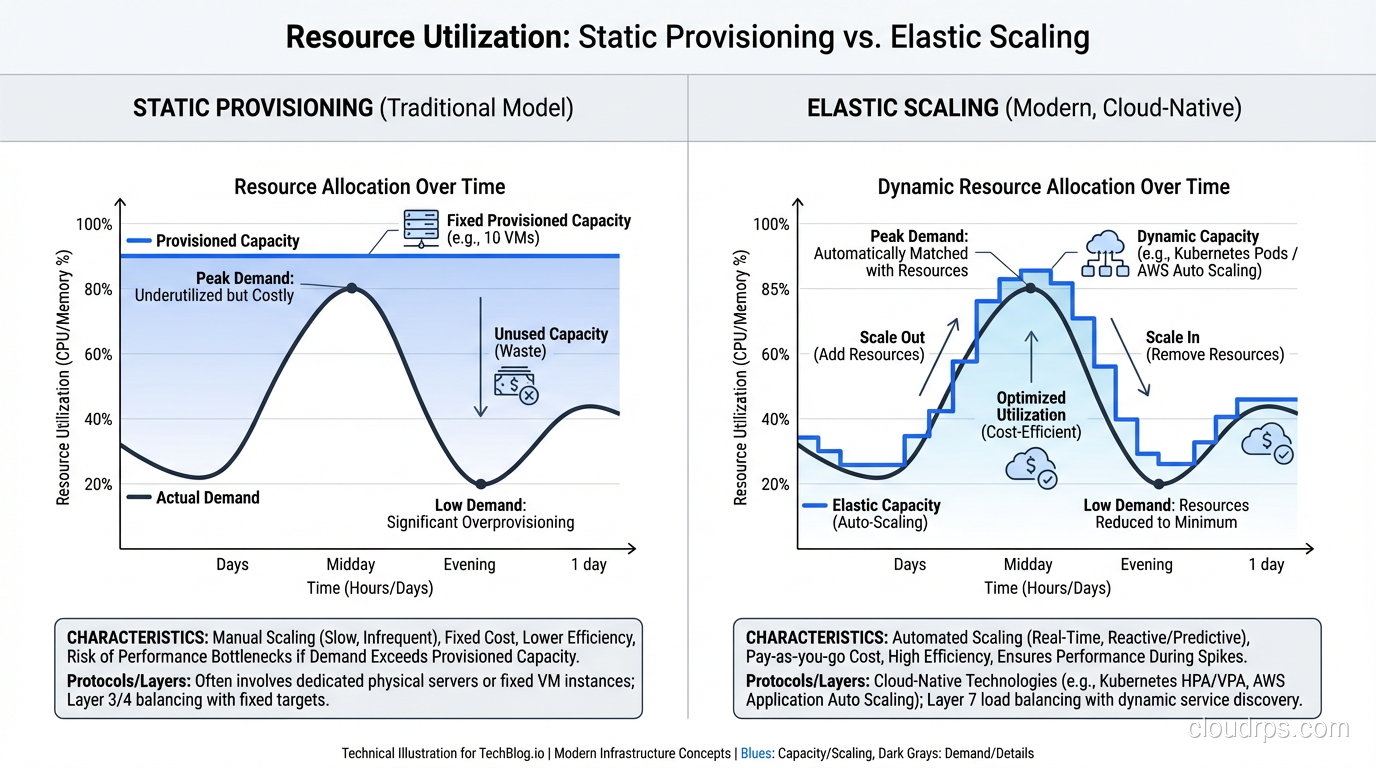
I sat in a meeting last year where a VP of Engineering used “scalable” and “elastic” interchangeably for thirty minutes. Nobody in the room corrected him because most people think they’re the same thing. They’re not. And the distinction isn’t academic hairsplitting. It directly affects how you architect systems, how you budget, and whether your platform survives a traffic spike.
I’ve been designing systems that need to handle unpredictable load for over twenty years. The first ten were on physical hardware where neither scalability nor elasticity was easy. The last ten have been in the cloud where both are achievable but require very different design decisions. Let me break down what these terms actually mean and why you should care.
Scalability: Can Your System Handle More?
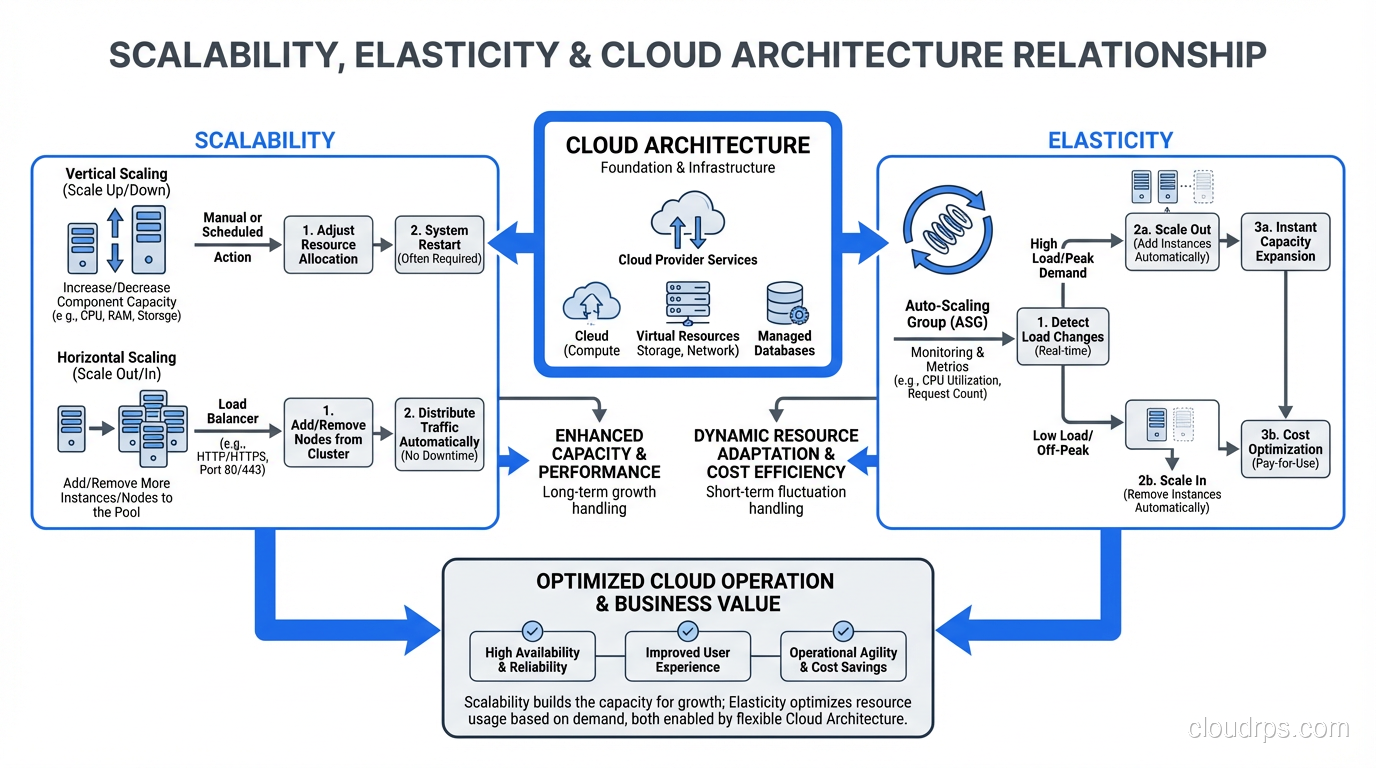
Scalability is the ability of a system to handle increased load by adding resources. It’s a capability, a property of your architecture. A scalable system can grow to handle more users, more data, more transactions.
Scalability answers the question: “If I add more resources, does the system handle more load?”
That question has a less obvious follow-up: “Does it handle more load proportionally?” If you double your server count, does throughput double? If it does, you have linear scalability. If doubling servers gives you 1.8x throughput, you have sub-linear scalability. If doubling servers gives you 1.2x throughput, you have a scalability problem somewhere, a bottleneck that adding more resources doesn’t fix.
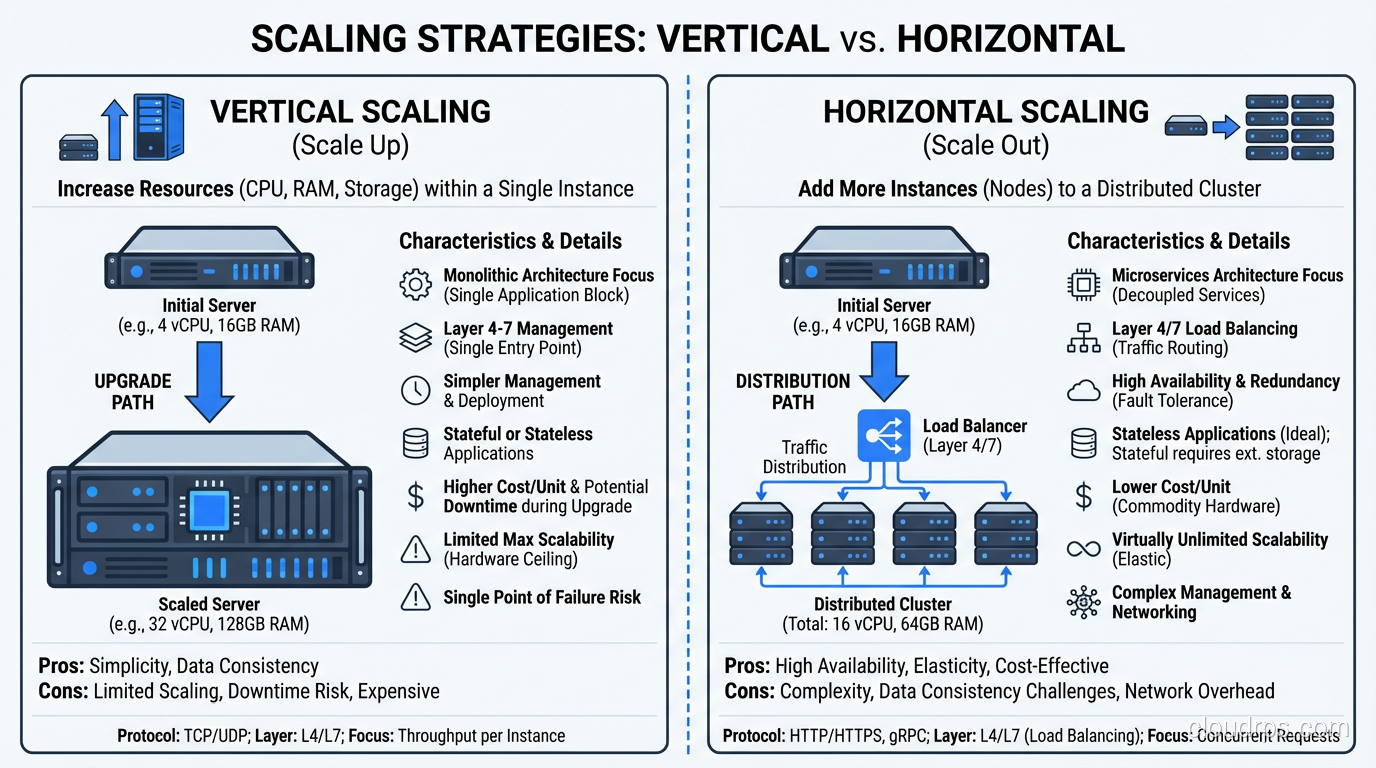
Vertical Scalability (Scaling Up)
Vertical scaling means making individual components bigger. Bigger servers, more RAM, faster CPUs, more disk I/O. You take your existing system and give it more power.
In the physical data center world, this was the default approach. Need more database performance? Buy a bigger database server. This works until you hit the ceiling, and there’s always a ceiling. The biggest server you can buy has finite CPU, finite RAM, finite I/O. I’ve hit that ceiling on several projects, and it’s not a fun conversation with stakeholders.
In the cloud, vertical scaling means changing instance types. Move from a db.r5.xlarge to a db.r5.4xlarge. More CPU, more RAM, more network bandwidth. The ceiling is higher in the cloud (the largest instances are enormous), but it still exists.
Vertical scaling is simple, requires minimal architecture changes, and works for many workloads. But it’s not elastic; it typically requires downtime to resize, and you’re stuck at the new size until you manually resize again.
Horizontal Scalability (Scaling Out)
Horizontal scaling means adding more instances of a component. More web servers, more application servers, more database read replicas. Instead of one big server, you have many smaller ones sharing the load.
Horizontal scaling has no theoretical ceiling. Need to handle 10x traffic? Add 10x servers (roughly). Need to handle 100x? Add 100x servers. This linear relationship between resources and capacity is what makes horizontal scaling the preferred model for cloud architectures.
But horizontal scaling requires architectural support. Your application must be stateless (or use distributed state). Your data tier must support read distribution or sharding. Your load balancers must distribute traffic effectively. You can’t just throw more servers at a monolithic application that stores sessions in local memory and expect it to scale.
I’ve spent enormous effort converting systems from vertically-scaled to horizontally-scaled architectures. It’s one of the most impactful and most difficult refactors you can undertake.
Elasticity: Does Your System Adapt Automatically?
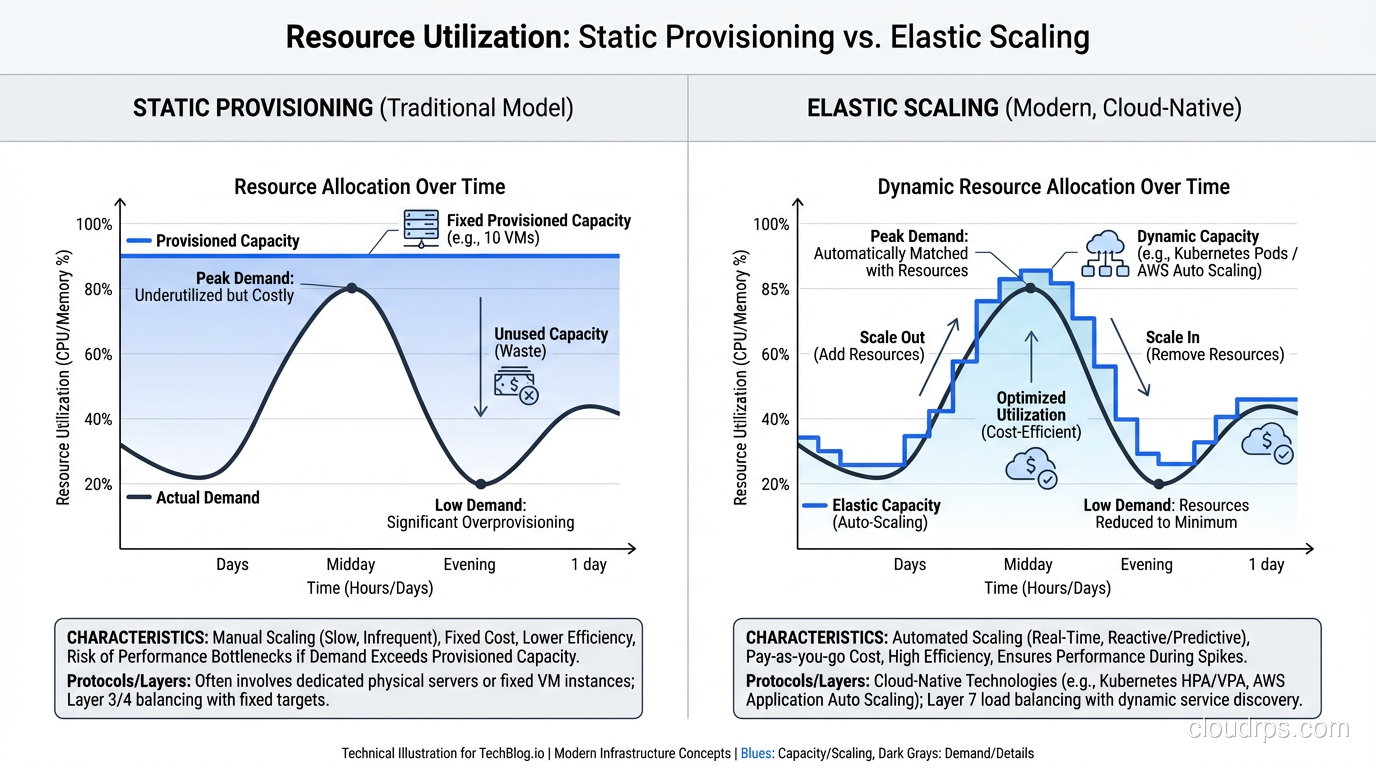
Elasticity is the ability of a system to automatically adjust its resource allocation in response to changing demand, both scaling up when demand increases AND scaling down when demand decreases. It’s about dynamic, automatic adjustment.
Elasticity answers the question: “Does the system automatically match resources to current demand?”
That “scaling down” part is critical and often overlooked. A system that scales up but doesn’t scale down is scalable but not elastic. You’ll end up paying for peak capacity 24/7 even though you only need it during peak hours.
The Time Dimension
Scalability is about capacity: can the system handle X amount of load? Elasticity is about time: how quickly does the system adjust to changing load?
Think of it this way:
- Scalability: “Our system can handle 100,000 concurrent users.” (Capacity statement)
- Elasticity: “Our system adjusts from 10,000 to 100,000 concurrent users in 5 minutes and back down to 10,000 when traffic subsides.” (Dynamic behavior statement)
You can be scalable without being elastic (manually adding servers to handle more load). You can’t be truly elastic without being scalable (automatic adjustment requires the ability to handle more load with more resources).
Elasticity in the Cloud
Cloud platforms make elasticity possible in ways that physical infrastructure never could. High availability and elasticity work together: HA ensures your system stays up, elasticity ensures it performs well under varying load.
In AWS, elasticity is implemented through:
- Auto Scaling Groups: Automatically add or remove EC2 instances based on metrics (CPU utilization, request count, custom metrics).
- Lambda: Automatically scales from zero to thousands of concurrent executions. This is the purest form of elasticity: zero resources when idle, exact resources needed under load.
- DynamoDB On-Demand: Automatically adjusts read/write capacity based on traffic patterns.
- Aurora Serverless: Automatically adjusts database compute capacity based on connection demand.
- Fargate: Automatically manages container placement and scaling.
Every one of these services represents elasticity: automatic, bidirectional resource adjustment.
Why the Distinction Matters
Cost Implications
A scalable-but-not-elastic architecture costs you money during low-demand periods. If you’ve scaled to handle Black Friday traffic and your infrastructure stays at that size through January, you’re paying for capacity you don’t need.
An elastic architecture right-sizes continuously. Peak-hour traffic gets peak-hour resources. Middle-of-the-night traffic gets minimal resources. The cost tracks the demand curve.
I worked with a retail client that had a classic traffic pattern: 10x traffic during business hours compared to overnight. Their original architecture was scaled for peak and ran there 24/7. After implementing auto-scaling with proper scale-down policies, their compute costs dropped 40% with zero impact on peak-hour performance. Kubernetes clusters benefit from this same principle through tools like HPA and Cluster Autoscaler, which can automatically adjust both pod count and node count to match demand.
Architecture Implications
Designing for scalability means designing components that can handle more load when resources are added. This is primarily about stateless design, efficient algorithms, and distributed data management.
Designing for elasticity means designing components that can be added and removed dynamically, quickly, and without disruption. This adds requirements:
- Fast startup: Instances must be production-ready in seconds, not minutes. This means pre-baked AMIs or container images with minimal bootstrapping.
- Graceful shutdown: Instances being removed must finish in-flight requests and drain connections cleanly.
- External state: All state must be external so instances can be destroyed without data loss.
- Health check responsiveness: New instances must respond to health checks quickly so the load balancer starts sending traffic promptly.
Operational Implications
Scalable systems require capacity planning. Someone needs to decide how much capacity to provision and when to change it. This is a human-driven process that requires judgment and anticipation.
Elastic systems require policy configuration. Someone needs to define the scaling rules: what metrics trigger scaling, what the thresholds are, what the cooldown periods are. Once configured, the system operates autonomously.
In my experience, elastic systems require more upfront engineering but less ongoing operational effort. The investment in auto-scaling configuration pays off in reduced operational toil.
Designing for Both
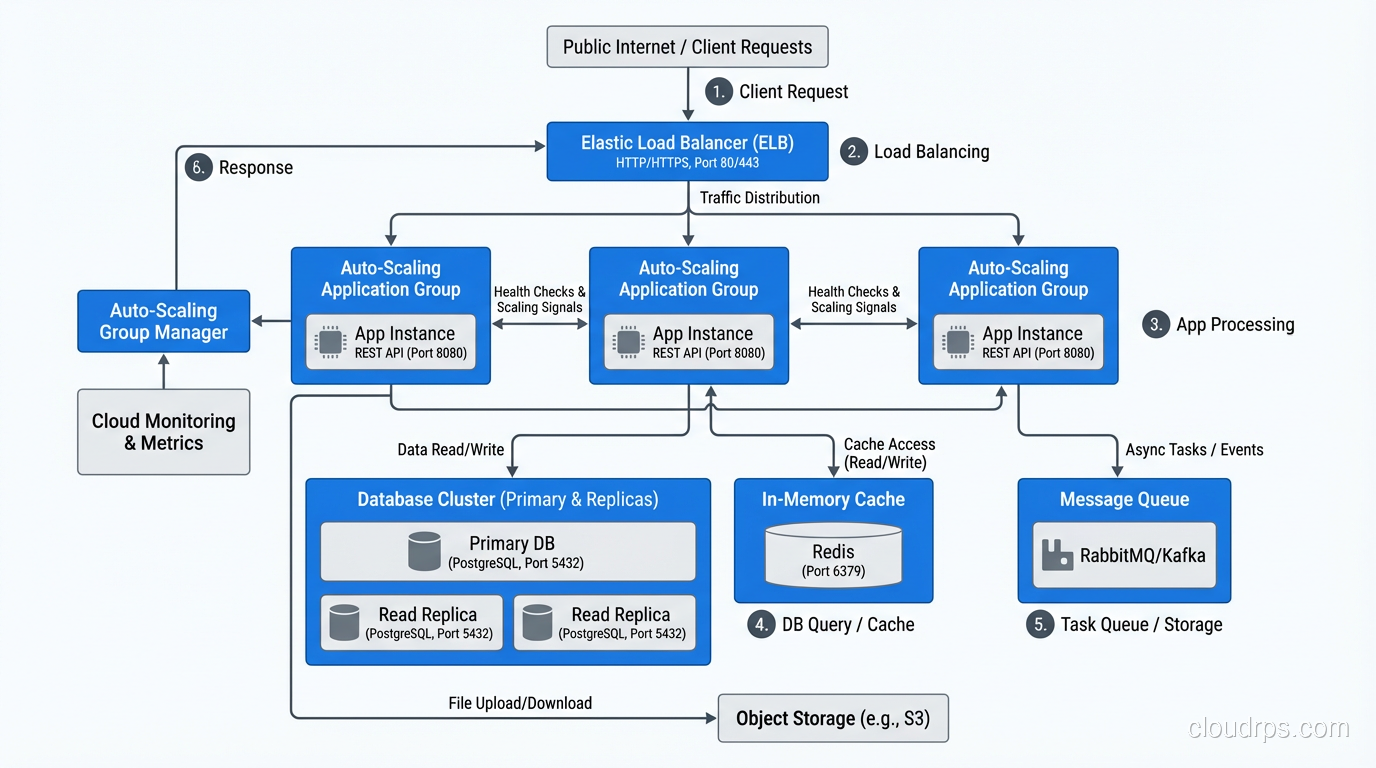
The best cloud architectures are both scalable and elastic. Here’s how I approach it:
Application Tier
Scalability: Stateless design, horizontal scaling capability, efficient request processing.
Elasticity: Auto Scaling Groups with target tracking policies (I usually target 60-70% CPU utilization), launch templates with pre-baked AMIs, graceful shutdown handling in the application code.
Data Tier
Scalability: Read replicas for read scaling, sharding for write scaling, caching for both.
Elasticity: This is harder for traditional databases. DynamoDB On-Demand provides true elasticity for key-value workloads. Aurora Serverless provides elasticity for relational workloads, though with some limitations. For most relational databases, I scale the data tier based on capacity planning rather than true elasticity, because the consequences of an under-scaled database are worse than paying for some excess capacity.
Cache Tier
Scalability: Redis Cluster or Memcached with consistent hashing.
Elasticity: ElastiCache with auto-scaling (available for Redis Cluster mode). Caches are a special case; scaling down can cause cache misses that hit the database, creating a thundering herd. I’m cautious about aggressive cache tier elasticity and usually keep a higher minimum than the application tier.
Queue/Messaging Tier
Scalability: SQS, SNS, EventBridge, Kafka. All designed for horizontal scaling.
Elasticity: SQS and SNS are inherently elastic (fully managed, pay-per-message, no capacity to manage). Kafka requires more active capacity management. Serverless messaging services are the most elastic option for event-driven architectures.
Common Mistakes
Scaling Too Slowly
If your auto-scaling takes 10 minutes to respond to a traffic spike, and the spike duration is 15 minutes, you spend most of the spike under-resourced. Pre-warming (scheduling scale-up before known traffic events) and aggressive scaling policies (scale up fast, scale down slowly) address this.
Scaling on the Wrong Metric
CPU utilization is the default auto-scaling metric, but it’s not always the right one. If your bottleneck is database connections, memory, or network bandwidth, scaling on CPU adds servers that don’t help. Use custom metrics that reflect actual resource contention.
I once debugged a system that kept auto-scaling to maximum instances despite low CPU. The bottleneck was a downstream API with a rate limit. Each new instance made more calls to the rate-limited API, which meant more requests were failing, which meant more retries, which meant more auto-scaling. The system was amplifying the problem. We fixed it by scaling on response latency (which reflected the actual user experience) instead of request rate.
Not Testing Scale-Down
Everyone tests scale-up. Few test scale-down. Does your application handle connection draining correctly? Does the load balancer stop sending traffic before the instance shuts down? Are in-flight requests completed? I’ve seen data loss from instances being terminated before they finished processing requests.
Forgetting About Costs
Auto-scaling can run away if your scaling policies are too aggressive or your scale-down cooldowns are too long. I always set maximum instance counts as a safety valve, and I configure billing alerts for when compute costs exceed expected thresholds.
The Scalability vs Elasticity Cheat Sheet
| Aspect | Scalability | Elasticity |
|---|---|---|
| Question answered | Can it handle more? | Does it adjust automatically? |
| Direction | Up (and out) | Up AND down |
| Trigger | Human decision or capacity plan | Automated metric-based |
| Time scale | Hours to days (manual) | Minutes (automated) |
| Cost model | Pay for provisioned capacity | Pay for used capacity |
| Architecture need | Stateless, distributable | Fast startup, graceful shutdown |
Where to Go From Here
If you’re building for scalability, start with your web application architecture. Make the application tier stateless, externalize state to managed services, and ensure each component can be scaled independently.
If you’re building for elasticity, invest in auto-scaling configuration, fast instance provisioning (containers help enormously), and comprehensive monitoring that drives scaling decisions.
The best systems do both. They’re architecturally capable of handling more load (scalable) and they automatically adjust to match actual demand (elastic). Getting there takes deliberate design, but it’s the foundation of cost-effective, reliable cloud architecture.
After twenty years of capacity planning and scaling systems, I can tell you: elasticity is the single biggest operational improvement the cloud provides over traditional infrastructure. The ability to match resources to demand in real-time, automatically, without human intervention. That’s not incremental. That’s transformational.
Get Cloud Architecture Insights
Practical deep dives on infrastructure, security, and scaling. No spam, no fluff.
By subscribing, you agree to receive emails. Unsubscribe anytime.