
I’ve scaled systems from zero to one, from one to a thousand, and from a thousand to millions. Each transition looks nothing like the others. The architecture that serves 100 users beautifully will collapse under 10,000 users, and the architecture that handles 10,000 users is grotesquely over-engineered for 100.
The mistake I see most often is engineers scaling for the wrong problem. They read about how Netflix handles 200 million users and start implementing microservices, event sourcing, and custom service meshes for an application that has 500 users. Or they build a monolith with a single database for an application that clearly needs to handle millions of concurrent users from day one.
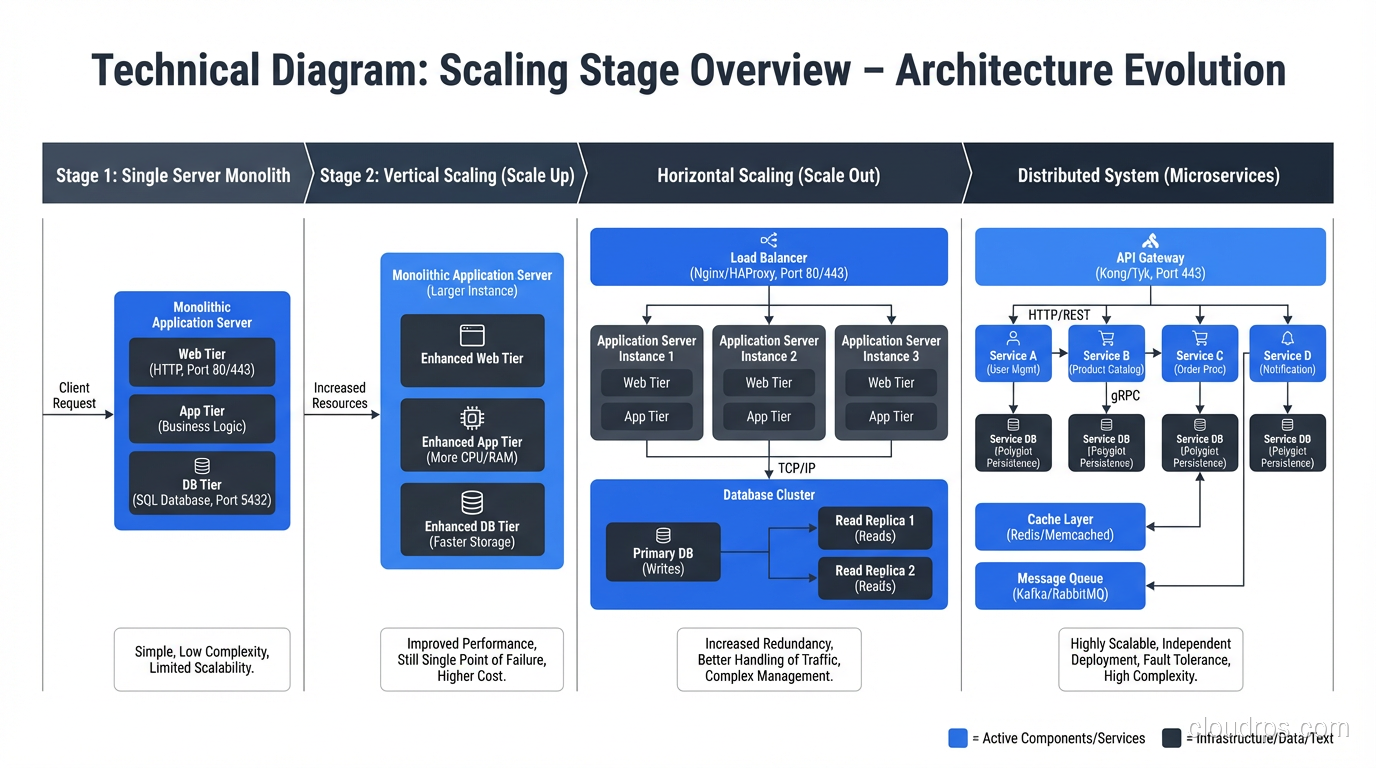
Scaling is not a destination. It’s a journey with distinct stages. Let me walk you through each stage, what breaks, and how to fix it.
Stage 1: The Single Server (0 to ~1,000 Users)
Everything runs on one server. Your web application, your database, your background jobs, maybe even your file storage. This is where every application starts, and there’s no shame in staying here for a while.
At this stage, your architecture is:
- One server (or one cloud instance)
- Application and database on the same machine
- DNS pointing directly to the server’s IP
What works: Everything. It’s simple. Latency between your app and database is microseconds (they’re on the same machine). Deployment is straightforward. Debugging is easy because everything is in one place.
What breaks: Eventually, the single server runs out of CPU, memory, or I/O capacity. Or you need to restart the application for a deployment, which means downtime.
When to move on: When your server consistently hits 70%+ CPU utilization during peak traffic, or when you need zero-downtime deployments, it’s time for Stage 2.
Stage 2: Separate the Database (1,000 to ~10,000 Users)
The first scaling move I always recommend: put your database on its own server.
- Application server(s)
- Dedicated database server
- Separate the concerns
This buys you independent scaling (add CPU to the database without restarting the app server), dedicated resources (the database gets all the I/O and memory it needs), and the ability to run multiple application instances if needed.
At this stage, I also introduce a reverse proxy or load balancer in front of the application, even if I only have one application server. It gives me TLS termination, the ability to add servers later without changing DNS, and health checking.
What breaks: The database becomes the bottleneck. Read queries start competing with write queries. Connections pile up. Query latency increases during peak traffic.
Stage 3: Add Read Replicas and Caching (10,000 to ~100,000 Users)
Most web applications are read-heavy. Users browse products, read articles, view dashboards, generating far more reads than writes. This is where read replicas and caching make a massive difference.
Database read replicas: Route read queries to one or more read replicas and write queries to the primary. Your ORM or database connection library needs to support this routing, but most modern frameworks do. This effectively multiplies your read capacity.
Application caching with Redis or Memcached: Cache the results of expensive queries, rendered page fragments, session data, and any computation that doesn’t need to be real-time. A well-designed cache can absorb 80-90% of your database read load. For a complete breakdown of caching patterns, eviction strategies, and the emerging Valkey alternative to Redis, see the distributed caching guide.
CDN for static assets: Move images, CSS, JavaScript, and other static files to a CDN. This reduces load on your application servers and improves latency for users in different geographic regions.
I also start adding background job processing at this stage. Offload email sending, report generation, image processing, and other non-real-time work to a job queue (Sidekiq, Celery, Bull) with dedicated workers.
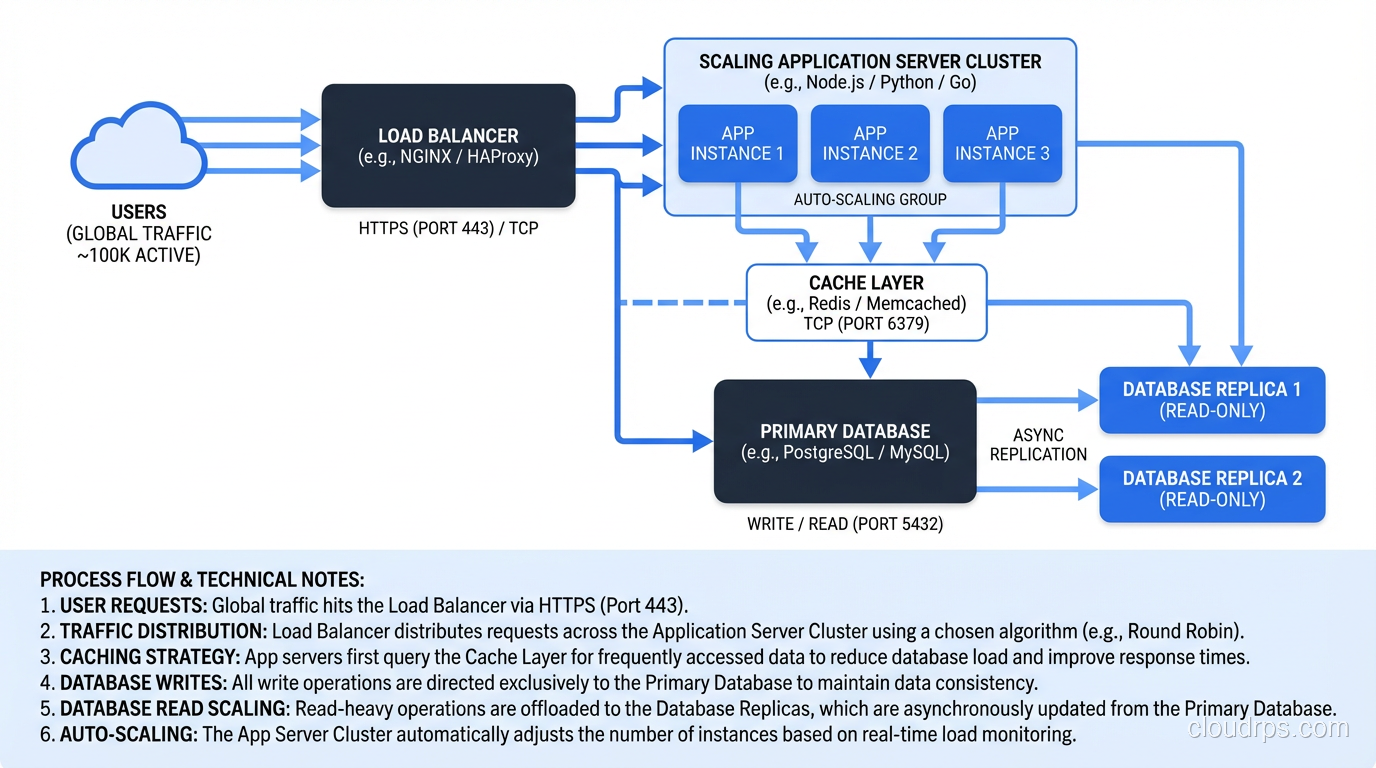
What breaks: Individual application server capacity becomes a constraint. Connection limits on the database primary. Cache invalidation complexity. Session management across multiple servers.
Stage 4: Horizontal Application Scaling (100,000 to ~1,000,000 Users)
Now you’re running multiple application servers behind a load balancer, and you need to think about statelessness and shared infrastructure.
Stateless application servers. Your application cannot store anything locally: no local file uploads, no in-memory sessions, no local caches that aren’t backed by Redis. Everything must be externalized so that any request can be handled by any server. This is non-negotiable for horizontal scaling.
Session externalization. Move sessions to Redis or a shared session store. Sticky sessions at the load balancer are a temporary hack, not a solution. They create hot spots and complicate failover.
Auto-scaling. Configure auto-scaling policies that add and remove application servers based on CPU utilization, request count, or custom metrics. In AWS, this means Auto Scaling Groups or ECS Service Auto Scaling. If you’re running on Kubernetes, you have multiple autoscaling options including HPA, VPA, and KEDA, each solving different problems. Check out our Kubernetes autoscaling deep dive for the details. Set conservative scale-in policies; it’s better to have one extra server than to have users hitting 503s during a traffic spike.
Connection pooling. With many application servers, each maintaining its own database connection pool, you can easily exhaust your database’s connection limit. This is where PgBouncer (for PostgreSQL) or ProxySQL (for MySQL) becomes essential. They multiplex connections between your application servers and the database.
What breaks: The database primary becomes the write bottleneck. Single database can’t handle the write throughput. Some queries become too slow regardless of optimization.
Stage 5: Database Scaling (1,000,000+ Users)
This is where things get genuinely hard. Scaling the stateless application layer is relatively straightforward: add more servers. Scaling the stateful database layer is fundamentally more complex because data has to be consistent.
You have several options, and they’re not mutually exclusive:
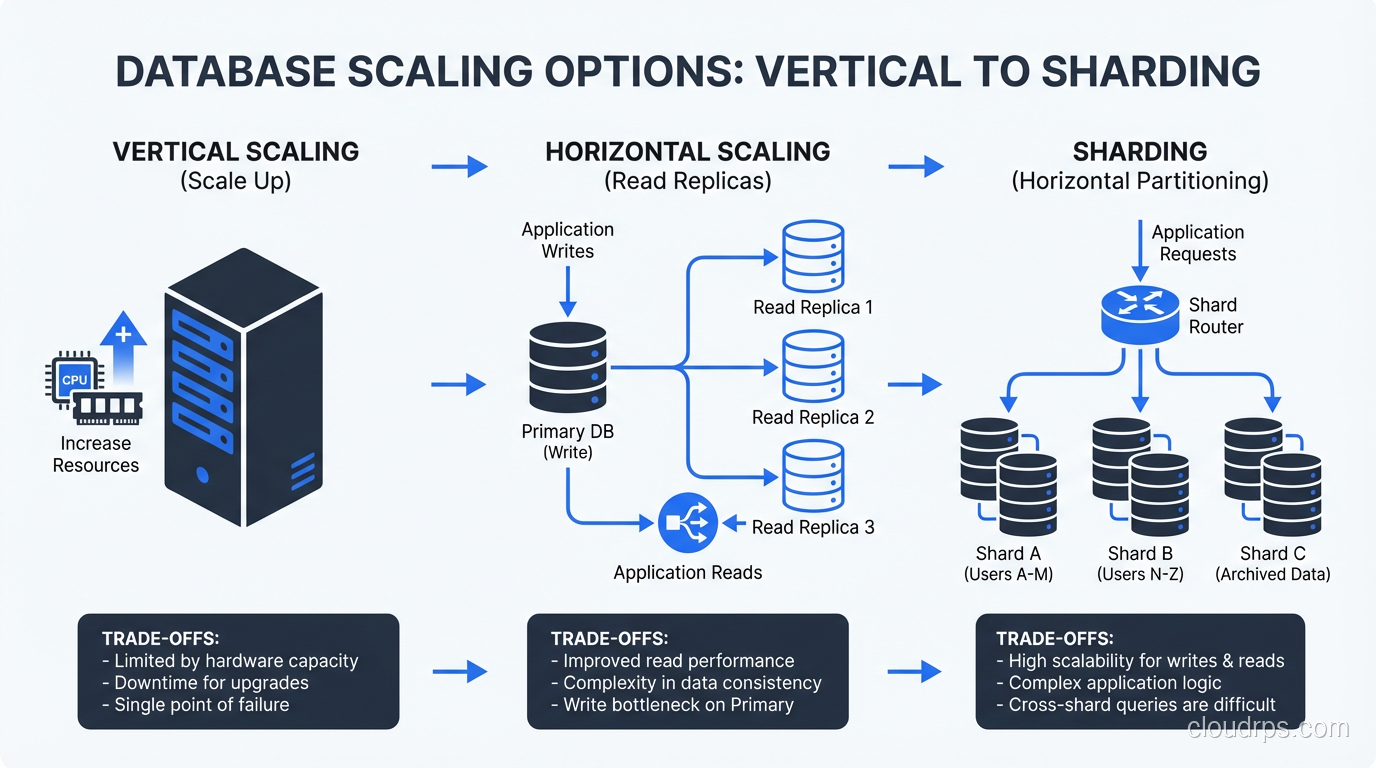
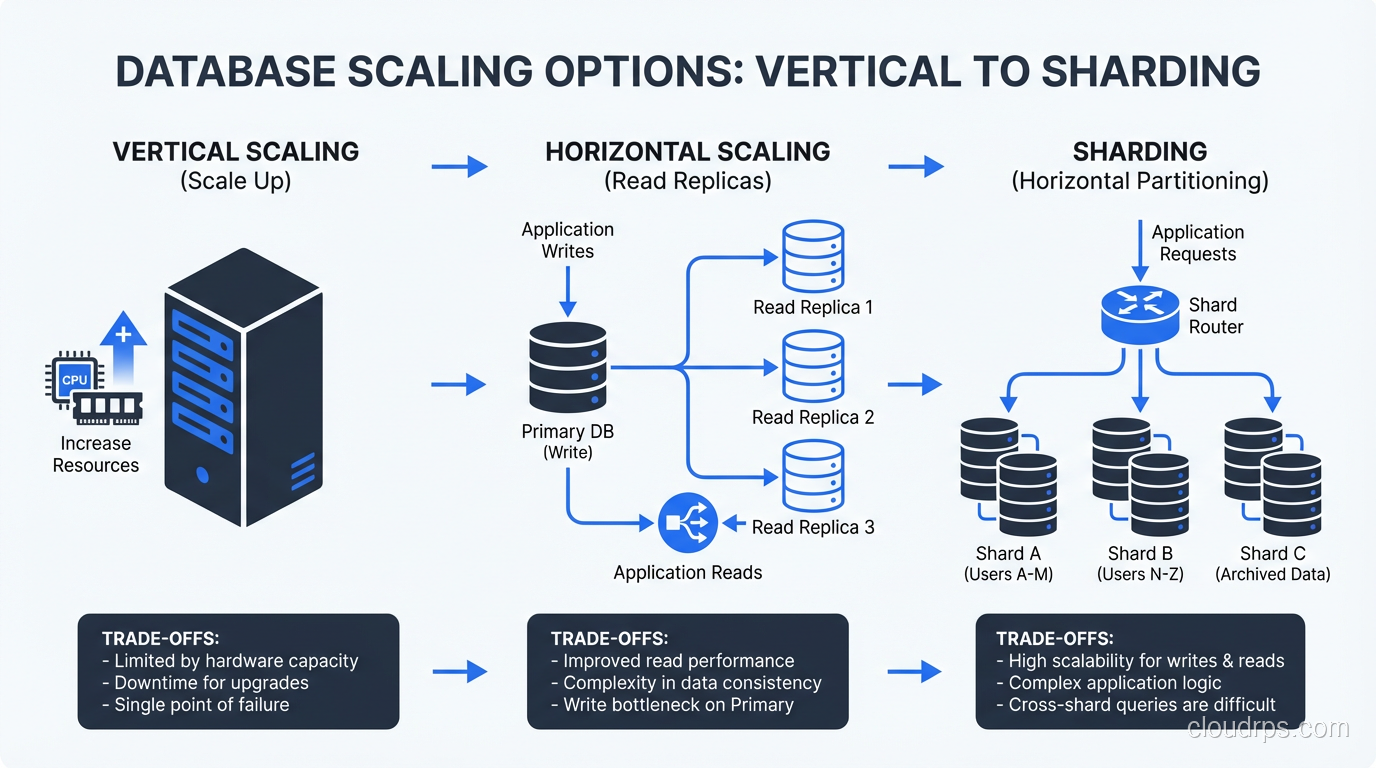
Vertical Scaling the Database
Before you jump to distributed databases, make sure you’ve exhausted vertical scaling. Modern database instances with 96 CPUs, 768GB of RAM, and NVMe storage can handle an enormous amount of traffic. PostgreSQL on a properly sized and tuned instance can sustain hundreds of thousands of transactions per second.
This is often the right answer for longer than people think. Vertical scaling is simple, maintains strong consistency, and doesn’t require application changes.
Functional Partitioning
Split your data by function: orders in one database, user profiles in another, analytics in a third. Each database handles a subset of your total traffic. Your application needs to know which database to query for which data, but this is usually straightforward.
This works well when your data domains are clearly separable and don’t require cross-domain joins. For more on partitioning strategies, see my piece on sharding vs partitioning.
Horizontal Sharding
Distribute data across multiple database instances based on a shard key (usually user ID or tenant ID). Each shard handles a fraction of the total data and traffic.
Sharding is powerful but comes with significant complexity:
- Cross-shard queries are expensive or impossible
- Rebalancing shards when data distribution is uneven is painful
- Every query needs to know which shard to hit
- Transactions across shards require distributed transaction protocols
I don’t recommend sharding until you’ve genuinely exhausted other options. It’s the right tool for very specific situations, not a default architecture choice.
Specialized Data Stores
Move specific workloads to specialized systems:
- Full-text search: Elasticsearch or Solr instead of
LIKE '%query%' - Caching: Redis for session data, frequently-accessed objects, and rate limiting
- Analytics: ClickHouse, BigQuery, or Redshift for analytical queries that would crush your transactional database
- Time-series data: InfluxDB or TimescaleDB for metrics and event data
This is the “polyglot persistence” approach, and it works well when applied judiciously. Don’t use five different databases because it’s architecturally interesting. Use them because each workload has genuinely different requirements.
Stage 6: The Distributed System (10,000,000+ Users)
At this scale, you’re dealing with:
- Multiple geographic regions
- Hundreds of servers across multiple services
- Complex data consistency requirements
- Traffic patterns that vary by orders of magnitude
This is where you need:
Service decomposition. Break the monolith into services with clear boundaries, independent deployment, and independent scaling. The key word is “independent.” If you have to deploy all your services together, you don’t have services, you have a distributed monolith. That’s worse than a regular monolith.
Global load balancing. Route users to the nearest region. Use DNS-based routing (Route 53 latency-based routing, Cloudflare) or anycast.
Multi-region data. Decide on your consistency model. Strong consistency across regions is expensive (it adds cross-region latency to every write). Eventual consistency is cheaper but introduces complexity in the application. Most systems use a mix: strong consistency within a region, eventual consistency across regions.
Message queues for decoupling. Services communicate asynchronously through message queues (Kafka, SQS, RabbitMQ). This decouples services in time, so a downstream service being slow doesn’t block the upstream service.
Robust high-availability architecture at every layer. At this scale, something is always failing. Your system needs to tolerate individual server failures, service failures, and even regional failures gracefully.
Scaling Principles I’ve Learned the Hard Way
Don’t Scale Prematurely
The architecture for 1 million users is wrong for 1,000 users. It’s too complex, too expensive, and too slow to develop against. Build for your current scale with an eye toward the next order of magnitude. Don’t build for three orders of magnitude ahead.
Profile Before You Scale
Before adding infrastructure, understand where the bottleneck actually is. I’ve seen teams add ten more application servers when the bottleneck was a single slow database query. Adding servers to fix a database problem is like adding lanes to a highway where the traffic jam is caused by a broken traffic light.
Scale Horizontally When You Can, Vertically When You Can’t
Horizontal scaling (more servers) is generally better than vertical scaling (bigger servers) because it provides redundancy, avoids single points of failure, and has a higher ceiling. But some components (especially databases) are hard to scale horizontally, and vertical scaling is simpler. Use both strategies where they make sense.
Cache Aggressively, Invalidate Carefully
Caching is the most cost-effective scaling strategy available. But cache invalidation is genuinely hard. Build your caching strategy with clear TTLs, explicit invalidation triggers, and the understanding that stale data will occasionally be served. If stale data is unacceptable for a particular use case, don’t cache it.
Measure Everything
You can’t scale what you can’t measure. Instrument your application with metrics that tell you where time is being spent, where resources are constrained, and where the next bottleneck will be. The teams that scale successfully are the teams with the best observability.
The Path Forward
Scaling is iterative. You’ll rarely get the architecture right on the first try, and that’s fine. What matters is that you understand the patterns, know the trade-offs, and make conscious decisions about when to apply complexity.
Start simple. Measure relentlessly. Scale the bottleneck. Repeat.
Every system I’ve scaled followed roughly this same path. The specific technologies changed (from Apache to Nginx, from MySQL to PostgreSQL, from VMs to containers) but the principles stayed the same. Separate concerns. Externalize state. Cache aggressively. Scale horizontally. And always, always measure before you optimize.
The application that starts on a single server and eventually serves millions of users isn’t special because of its architecture. It’s special because the team behind it made the right scaling decisions at the right time, avoided premature complexity, and never stopped measuring.
Get Cloud Architecture Insights
Practical deep dives on infrastructure, security, and scaling. No spam, no fluff.
By subscribing, you agree to receive emails. Unsubscribe anytime.