
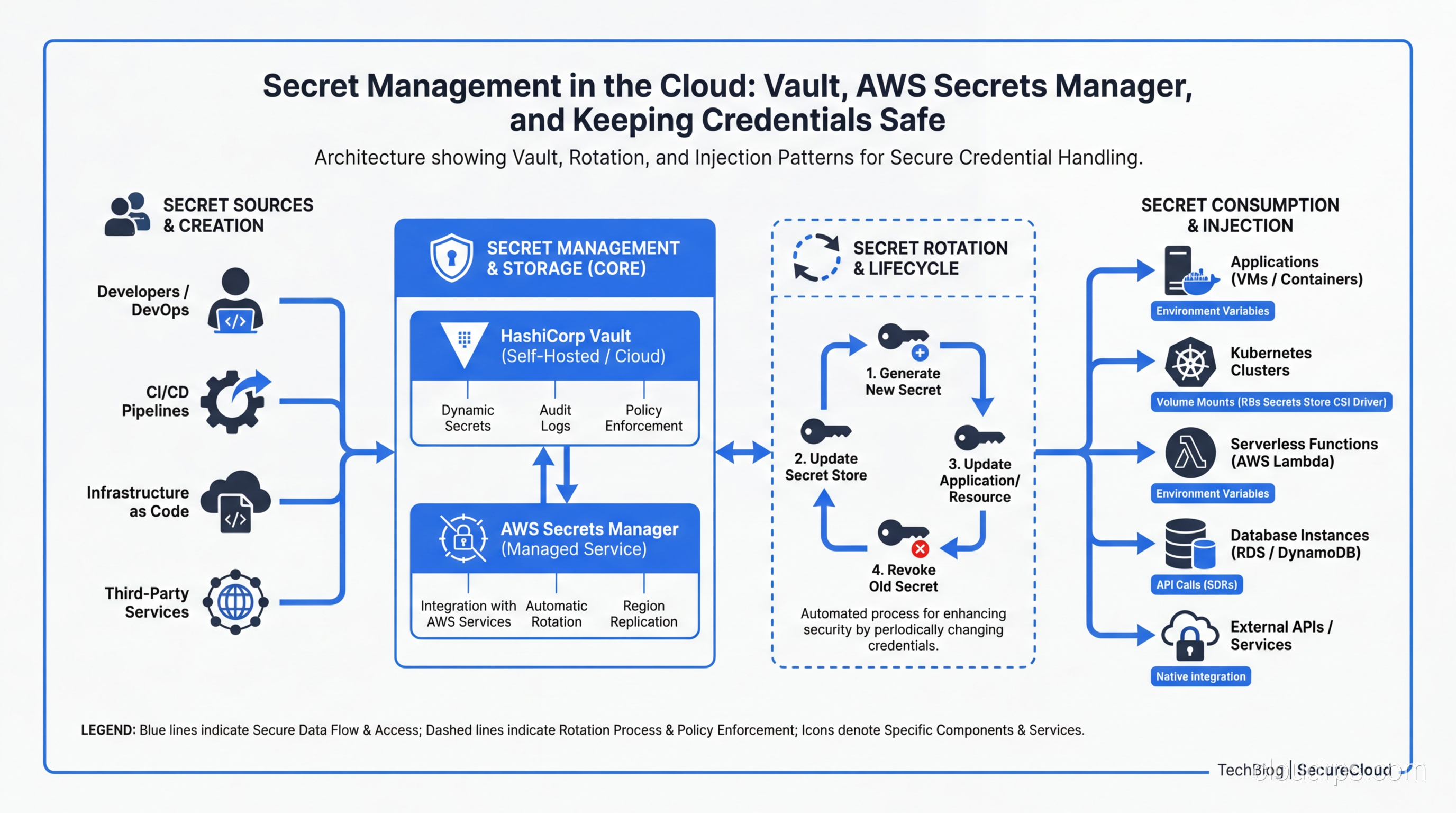
I once spent a very long weekend helping a startup recover from a breach that started with a single database password committed to a public GitHub repo. The attacker found it in under four minutes. Not four hours. Four minutes. There are bots that scan every public commit in real time, looking for patterns that match API keys, database credentials, and cloud provider tokens. By the time the developer noticed the mistake and force-pushed a fix, the attacker had already spun up crypto miners across three AWS regions using the IAM credentials they found in the same repo.
That experience changed how I think about secrets in cloud infrastructure. It is not enough to tell people “don’t commit passwords to git.” You need systems that make the right thing easy and the wrong thing hard. That is what secret management is really about.
Why Hardcoded Secrets Are Still the Number One Problem
You would think that by now, with all the tooling available, hardcoded secrets would be a solved problem. They are not. GitHub’s own secret scanning reports that they find millions of leaked secrets every year across public repositories. The 2023 Uber breach started with hardcoded credentials in a PowerShell script. The CircleCI incident in early 2023 exposed customer secrets because of how they were stored internally. The list goes on.
The root cause is not ignorance. Most engineers know they should not hardcode secrets. The problem is friction. When you are debugging a production issue at 2 AM, the fastest path is to paste that connection string directly into your code. When you are setting up a new microservice, it is tempting to throw the API key into an environment variable and move on. These shortcuts accumulate, and eventually one of them ends up somewhere it should not be.
This connects directly to zero trust security principles: you cannot build a zero trust architecture if your secrets are scattered across config files, environment variables, and Slack messages. Every secret needs to be centrally managed, audited, and rotatable.
The Secret Management Lifecycle
Before we compare tools, let’s establish what good secret management actually looks like. There are four phases to the lifecycle, and most organizations only think about the first two.
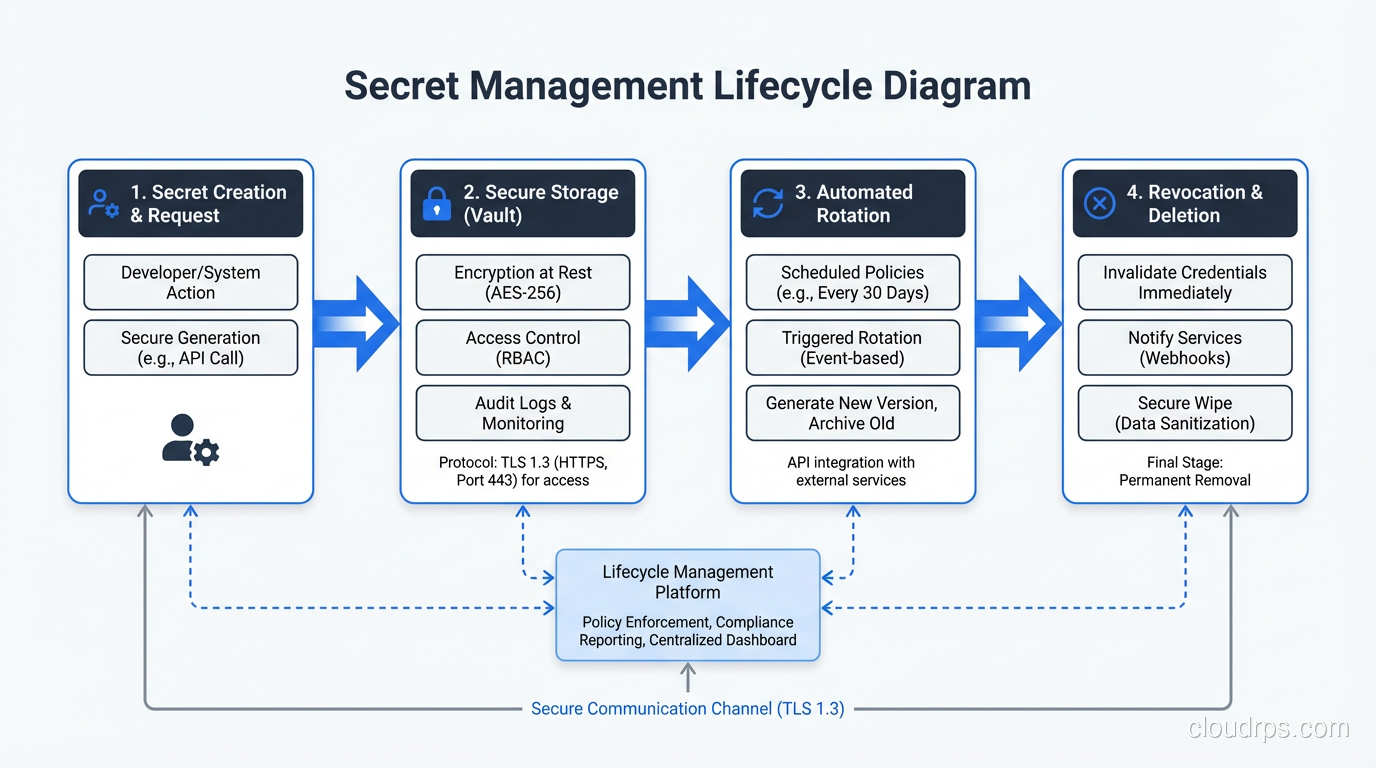
Creation is where you generate the secret. This sounds simple, but it matters how you do it. Secrets should be generated with cryptographically secure random number generators, not by a human picking a password. They should be created with a defined scope (what can this secret access?) and a defined lifetime (when does it expire?). I have seen organizations where a single “master” API key was shared across 40 services. When that key leaked, they had to rotate credentials for every service simultaneously. It was a nightmare.
Storage is where most people focus their attention, and rightly so. Secrets need to be encrypted at rest, access-controlled, and audit-logged. If you are interested in the cryptographic details of how encryption at rest works, I wrote a deep dive on encryption at rest and in transit that covers the primitives. The key principle here is that secrets should never be stored in plaintext, anywhere, period. Not in config files, not in environment variables on disk, not in CI/CD pipeline definitions.
Rotation is where most organizations fall apart. Even if you store secrets properly, a credential that never changes is a ticking time bomb. If it was ever exposed (and you may not know it was), an attacker has unlimited time to exploit it. Good secret management means automated rotation on a schedule, with zero downtime during the transition.
Revocation is the emergency brake. When a secret is compromised, you need the ability to kill it instantly and have all dependent services pick up a new credential without manual intervention. If revoking a secret requires a deployment, you are doing it wrong.
Comparing the Big Four: Vault vs AWS Secrets Manager vs Azure Key Vault vs GCP Secret Manager
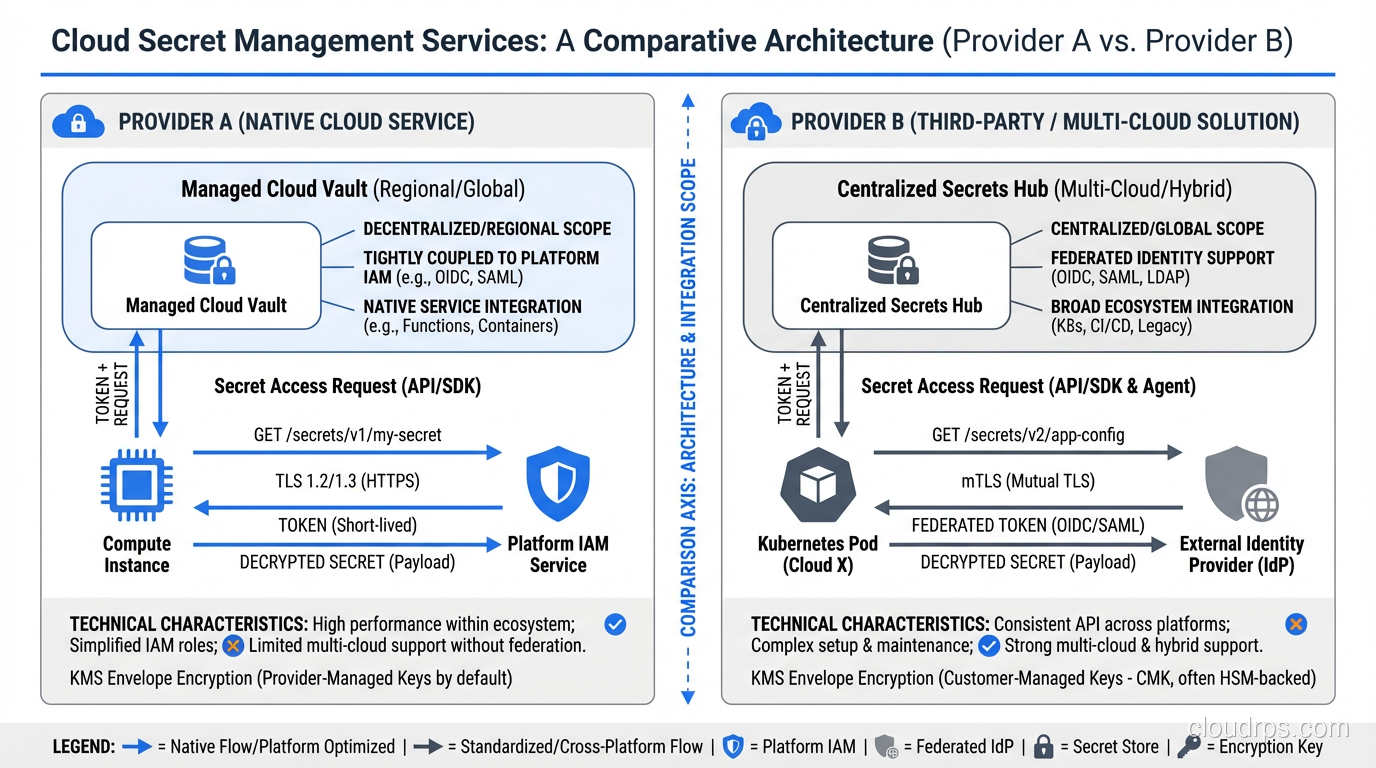
Let’s get into the tools. I have used all four of these in production, and they each have distinct strengths and weaknesses.
HashiCorp Vault
Vault is the most powerful and the most complex option. It is cloud-agnostic, which makes it the go-to choice for multi-cloud environments or organizations that want to avoid vendor lock-in. I have run Vault clusters for companies ranging from 50-person startups to Fortune 100 enterprises, and the operational overhead is real but manageable if you know what you are getting into.
The killer feature of Vault is dynamic secrets. Instead of storing a static database password that gets rotated every 90 days, Vault generates a unique, short-lived credential for every request. When your application needs to connect to PostgreSQL, it asks Vault for credentials. Vault creates a new database user with a 1-hour TTL, hands the credentials to your app, and automatically revokes them when they expire. If those credentials leak, the blast radius is tiny: one service, one hour of access, one specific set of permissions.
I ran dynamic secrets for a fintech company’s database layer, and it transformed their security posture. Before Vault, they had 12 services sharing 3 database passwords that had not been rotated in over a year. After Vault, every database connection used a unique, ephemeral credential. Their auditors were thrilled.
Vault also supports multiple authentication backends (LDAP, OIDC, cloud IAM, Kubernetes service accounts, TLS certificates), multiple secret engines (KV, databases, PKI, SSH, transit encryption), and has a robust policy system. This flexibility relates to the broader concepts of authentication versus authorization, where Vault cleanly separates who can authenticate and what they are authorized to access.
The downside? Vault requires significant operational investment. You need to manage the cluster, handle unsealing (or set up auto-unseal with a cloud KMS), monitor it, back it up, and upgrade it. The HCP Vault managed service reduces this burden, but it costs more and gives you less control.
AWS Secrets Manager
If you are all-in on AWS, Secrets Manager is the pragmatic choice. It integrates natively with RDS, Redshift, DocumentDB, and other AWS services for automatic rotation. The Lambda-based rotation functions work well for standard database credentials, and the IAM integration means you do not need a separate authentication layer.
I like Secrets Manager for teams that do not have a dedicated platform engineering group. It is simple to set up, simple to use, and the rotation for RDS credentials is essentially turnkey. You enable it, pick a schedule, and AWS handles the rest.
The limitations become apparent when you step outside the AWS ecosystem. Cross-cloud secret sharing is clunky. Dynamic secrets are not supported in the Vault sense; you get rotation, but credentials are still static between rotation windows. The policy model is IAM-based, which is powerful but can get complicated when you have hundreds of secrets with different access patterns.
Pricing is per-secret, per-month, plus API call charges. For a mid-size deployment with a few hundred secrets, you are looking at $50-100/month. Not expensive, but it can surprise you if you have a chatty application that reads secrets frequently.
Azure Key Vault
Azure Key Vault is solid for Azure-native shops. It handles secrets, encryption keys, and certificates in a unified service, which is convenient. The managed HSM tier provides FIPS 140-2 Level 3 compliance, which matters for regulated industries.
The integration with Azure AD (now Entra ID) for access control is clean, and the certificate management features are genuinely useful. I have used Key Vault’s certificate auto-renewal to manage TLS certificates across dozens of services, and it works reliably.
Where Key Vault falls short is in secret rotation. Unlike AWS Secrets Manager, there is no built-in rotation mechanism. You have to build your own using Azure Functions or Logic Apps, and Microsoft’s documentation on this is scattered and inconsistent. The API is also quirky; secret versions work differently than you might expect, and the soft-delete behavior can trip you up.
GCP Secret Manager
GCP Secret Manager is the newest and simplest of the four. It does one thing (stores and serves secrets) and does it well. The IAM integration is clean, the API is straightforward, and the pricing is the most affordable of the group.
The replication policies are a nice touch: you can choose automatic replication across regions or pin secrets to specific regions for data sovereignty. The integration with Cloud Run and Cloud Functions is seamless.
The downsides are the same as Azure Key Vault: no built-in rotation, no dynamic secrets. You are getting a secure key-value store with good access controls, not a full secret management platform.
Which One Should You Pick?
Here is my honest recommendation based on years of doing this:
- Multi-cloud or complex requirements: Vault. Accept the operational cost and invest in running it well.
- AWS-only, small-to-mid team: AWS Secrets Manager. The RDS rotation alone is worth it.
- Azure-only with certificate needs: Azure Key Vault.
- GCP-only, simple needs: GCP Secret Manager.
- Regulated industry needing HSM: Azure Key Vault (managed HSM) or Vault Enterprise with cloud HSM.
Secret Injection Patterns
Storing secrets properly is half the battle. The other half is getting them into your applications securely. This is where I see the most anti-patterns in the wild.
Environment Variables
The twelve-factor app methodology popularized environment variables for configuration, and many teams extended this to secrets. It works, but it has real drawbacks. Environment variables are visible in process listings, they get logged by crash reporters, they persist in shell history, and they are inherited by child processes. If you run printenv on a production server that uses env vars for secrets, every credential is right there in plaintext.
For simple deployments, env vars populated from a secret manager at startup are acceptable. But for anything running in Kubernetes, there are better options.
Kubernetes Native Secrets
Kubernetes has a built-in Secret resource type, but calling it “secret management” is generous. K8s secrets are base64-encoded (not encrypted) by default, stored in etcd, and accessible to anyone with the right RBAC permissions. You can enable encryption at rest for etcd, and you should, but the default is insecure.
K8s secrets are fine as a delivery mechanism (mounting secrets as files or env vars in pods), but they should not be your source of truth. The source of truth should be an external secret manager, with something like External Secrets Operator syncing secrets into K8s.
Sidecar Injection
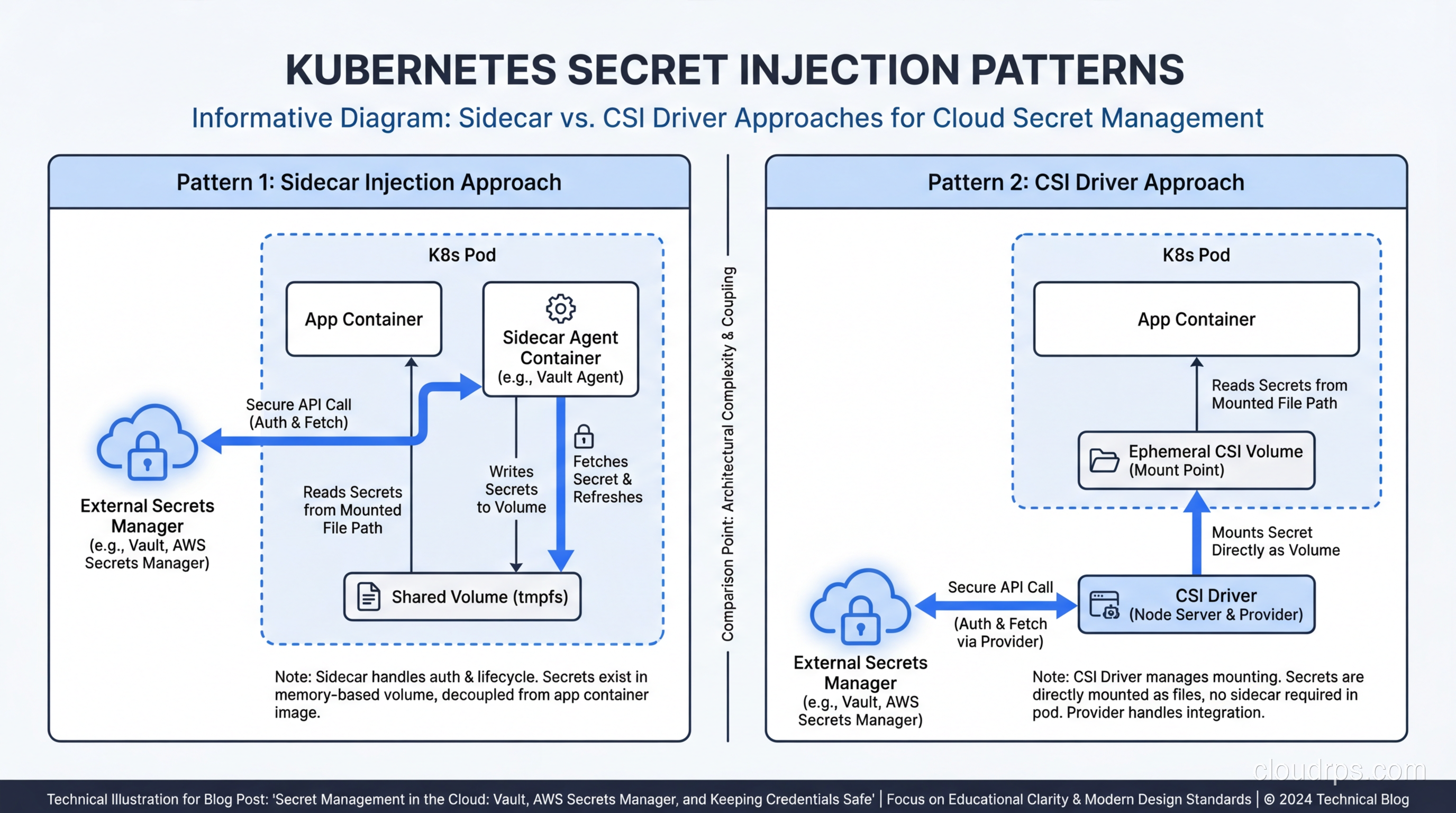
The sidecar pattern runs a secret-fetching agent alongside your application container. Vault Agent is the most common implementation. It authenticates to Vault using the pod’s Kubernetes service account, fetches secrets, renders them as files on a shared volume, and handles rotation by re-rendering when secrets change.
I like the sidecar pattern because it keeps secret management logic out of your application code. Your app just reads a file. It does not need a Vault client library, it does not need to handle authentication, and it does not need to know about rotation. The sidecar handles all of that.
The downside is resource overhead. Every pod gets an extra container, which adds CPU and memory costs. In a cluster with thousands of pods, this adds up.
CSI Secret Store Driver
The Secrets Store CSI Driver is a Kubernetes-native approach that mounts secrets from external stores as volumes. It supports Vault, AWS Secrets Manager, Azure Key Vault, and GCP Secret Manager through provider plugins. It is lighter than a sidecar because the CSI driver runs as a DaemonSet (one per node, not one per pod).
The CSI driver can also sync secrets to Kubernetes Secret objects, giving you the best of both worlds: external secret management with K8s-native consumption. I have been using this approach for most new deployments and it works well.
Init Containers
A simpler alternative to sidecars: an init container fetches secrets before your main application starts, writes them to a shared volume, then exits. Your application reads the files at startup. This works well for secrets that do not change during the pod’s lifetime, but it does not handle rotation without restarting the pod.
Secret Rotation Strategies
Rotation is where theory meets reality, and reality usually wins. Here are patterns that actually work in production.
Dual-credential rotation is the safest approach for database passwords. You maintain two valid credentials at all times. When rotating, you create a new credential (credential B), update the secret store to point to B, wait for all consumers to pick up the change, then revoke credential A. At no point is there only one valid credential, so there is no window where consumers might fail to authenticate.
Grace period rotation works similarly but uses time instead of explicit coordination. The old credential remains valid for a defined grace period (say, 30 minutes) after the new one is issued. This gives consumers time to refresh without tight coordination. AWS Secrets Manager uses this approach for its RDS rotation.
Dynamic credentials (Vault’s approach) sidestep rotation entirely. If every credential has a 1-hour TTL and is unique to each consumer, there is nothing to rotate. The credentials are ephemeral by design. This is the gold standard, but it requires Vault or a similar system.
For CI/CD pipelines, rotation is especially critical. Build systems often have access to production credentials, and those credentials tend to be long-lived. I recommend using OIDC federation where possible (GitHub Actions, GitLab CI, and most CI systems support this) so that your pipeline authenticates to your cloud provider with a short-lived token rather than a stored secret.
Common Anti-Patterns
Let me call out the mistakes I see most often, because I keep seeing them even in organizations that should know better.
Secrets in git history. Even if you remove a secret from your current code, it is still in the git history forever (unless you rewrite history, which has its own problems). Use pre-commit hooks like git-secrets or truffleHog to catch secrets before they are committed. Better yet, use a secret manager so there are no secrets in your codebase to leak.
.env files in production. Dotenv files are a development convenience, not a production secret management strategy. They sit on disk in plaintext, they are easy to accidentally include in Docker images, and they have no access controls or audit logging. I have seen .env files with production database passwords checked into repos, copied to shared drives, and emailed between team members. Just, don’t.
Shared service accounts. When five services share one set of credentials, you cannot tell which service made which request, you cannot revoke access for one service without affecting the others, and you cannot apply the principle of least privilege. Every service should have its own identity and its own credentials. This is a core tenet of zero trust, and it matters.
Secrets in container images. I have seen Dockerfiles that copy .env files or embed API keys directly in environment variables. Even if you delete the file in a later layer, it is still accessible in the image’s layer history. Secrets should be injected at runtime, never baked into images.
Over-permissioned secrets. A secret that grants admin access to your entire database is a liability. Secrets should be scoped to the minimum permissions required. If a service only reads from two tables, its database credential should only allow reads on those two tables.
No monitoring or alerting. If someone accesses a secret they should not, you need to know about it immediately, not discover it during a quarterly audit. Every secret access should be logged, and anomalous access patterns should trigger alerts. This ties into broader monitoring and logging best practices for your infrastructure.
Practical Architecture for a Mid-Size Company
Let me sketch out what I would build for a company with 50-200 engineers, running a mix of Kubernetes and serverless workloads on AWS.
Secret store: AWS Secrets Manager as the primary store for most secrets, with Vault for teams that need dynamic secrets (typically the platform and data engineering teams). This hybrid approach gives you simplicity where you can afford it and power where you need it.
Injection layer: External Secrets Operator syncing AWS Secrets Manager secrets into Kubernetes, with Vault Agent sidecars for services that need dynamic database credentials. Serverless functions pull from Secrets Manager directly using the AWS SDK with IAM-based access.
Rotation: automated across the board. RDS credentials rotate via Secrets Manager’s built-in Lambda rotation every 30 days. Third-party API keys rotate quarterly with custom Lambda functions. Vault dynamic secrets rotate every hour by default.
Access control: least privilege, enforced by policy. Each service has its own IAM role (for Secrets Manager) or Vault policy that grants access only to the specific secrets it needs. No wildcard policies. No shared credentials.
Audit and monitoring. CloudTrail captures every Secrets Manager API call. Vault’s audit log captures every secret access. Both feed into your SIEM. Alerts fire on: access from unexpected IP ranges, access to secrets by services that have never accessed them before, failed authentication attempts above threshold.
Developer workflow. Engineers never touch production secrets directly. They define secret references in their Kubernetes manifests or Terraform configs. Secrets are provisioned through infrastructure-as-code, reviewed in pull requests, and applied through the CI/CD pipeline. For local development, they use a separate set of development credentials that only work against development infrastructure.
Emergency procedures. A documented and practiced runbook for secret compromise: revoke the compromised secret, rotate all potentially affected credentials, check audit logs for unauthorized access, notify the security team, and write a post-incident review. This should be practiced quarterly, just like your disaster recovery drills.
The security of your secrets also depends on securing the access paths to your infrastructure. If an attacker can SSH into your bastion host, they can potentially access your secret manager. Layer your defenses: use MFA everywhere, restrict network access, and monitor all privileged sessions.
Final Thoughts
Secret management is not glamorous work. Nobody gets promoted for setting up credential rotation. But it is the foundation that everything else sits on. Your encryption, your access controls, your zero trust architecture: all of it falls apart if an attacker can grab a database password from a git repo.
Start with the basics: get secrets out of code and into a secret manager. Then build up: automate rotation, implement dynamic secrets where you can, monitor every access. The tools are mature enough that there is no excuse for hardcoded credentials in 2025.
The hardest part is not the technology. It is changing the culture. Engineers will take shortcuts unless the secure path is also the easy path. Your job as an architect is to make the right thing the default thing. Make it easier to fetch a secret from Vault than to paste it into a config file. Make it impossible to deploy without a secret manager integration. Remove the temptation, and the problem solves itself.
That startup I mentioned at the beginning? They are now running Vault with dynamic secrets for everything. Their security posture went from “hoping nobody commits a password” to “every credential is unique, short-lived, and audited.” The transition took three months and required real investment. But nobody has spent a weekend cleaning up a credential leak since.
Get Cloud Architecture Insights
Practical deep dives on infrastructure, security, and scaling. No spam, no fluff.
By subscribing, you agree to receive emails. Unsubscribe anytime.