
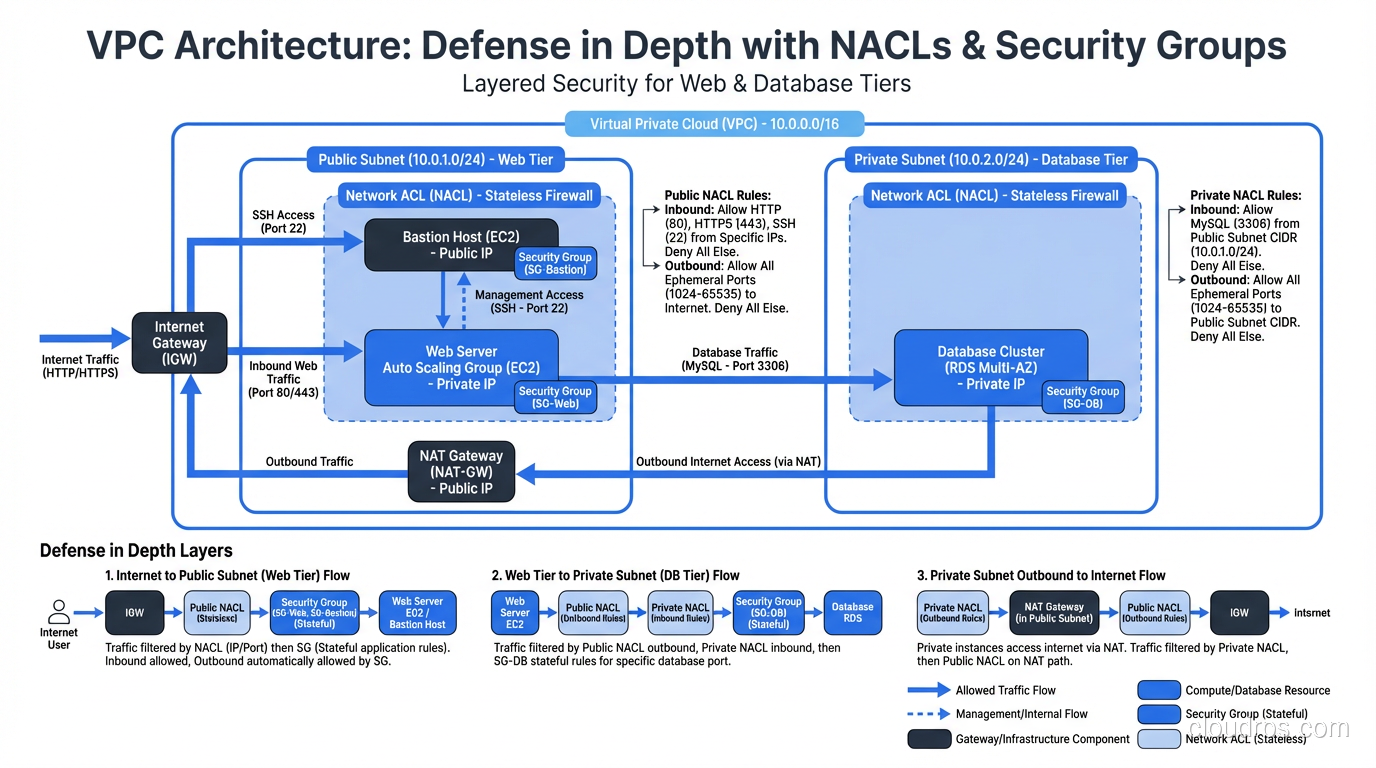
The single most common cloud security misconfiguration I encounter (and I’ve been doing cloud security assessments since AWS was just EC2 and S3) is teams not understanding the difference between security groups and network ACLs. They confuse which one is stateful and which is stateless, they duplicate rules in both layers without understanding why, and they leave gaps because they assumed one layer was covering something the other actually handles.
I once audited an AWS environment where the team had meticulously configured their network ACLs with strict inbound rules but had wide-open outbound rules and no meaningful security group policies. They’d essentially built half a wall. In another engagement, I found the opposite: tight security groups but default-allow NACLs, which meant the coarse outer filter was doing nothing.
These aren’t exotic mistakes. They’re fundamental misunderstandings of how cloud network security controls layer together. Let me fix that.
The Two Layers of Cloud Network Security
Every major cloud provider (AWS, Azure, GCP) offers network security controls at two distinct levels. AWS terminology is the most widely recognized, so I’ll use that as the primary reference, but the concepts map directly to Azure NSGs/ASGs and GCP firewall rules.
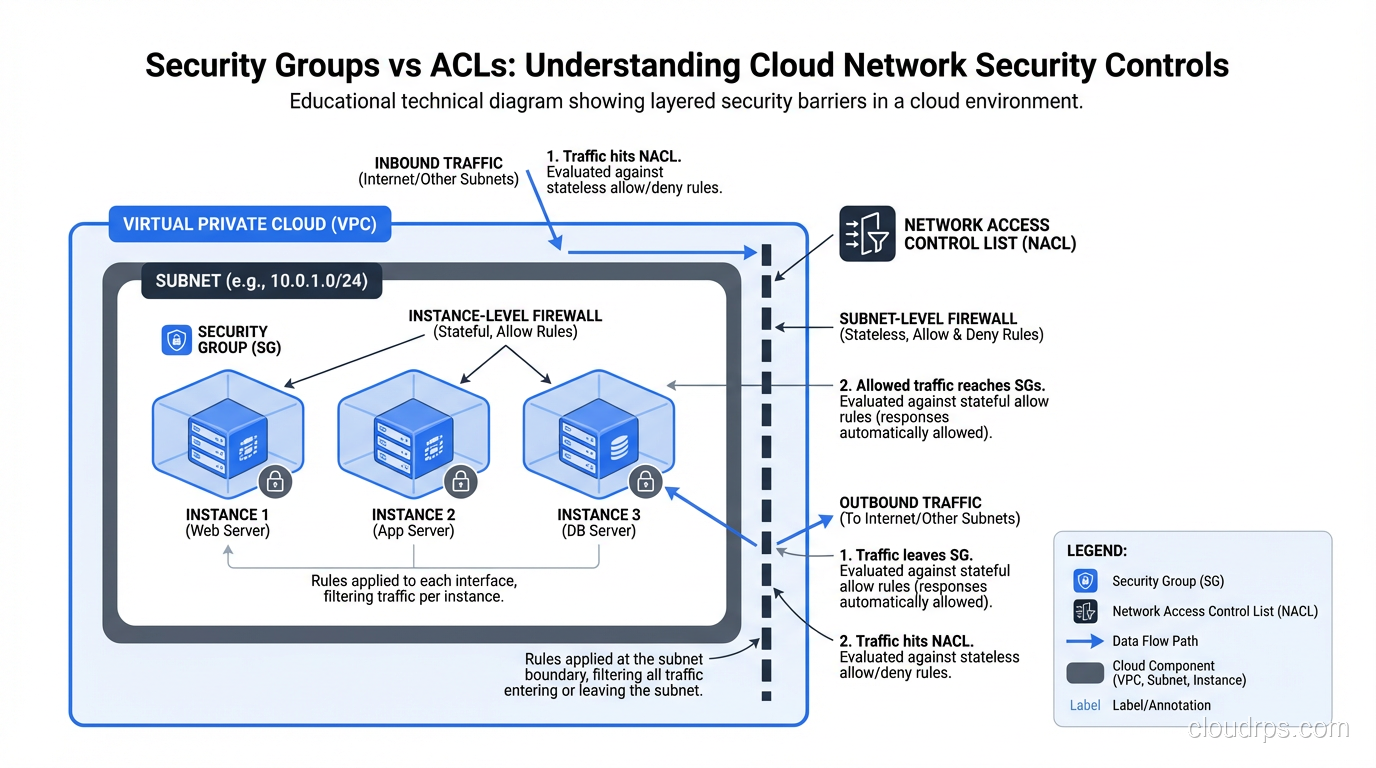
Network ACLs (NACLs) operate at the subnet level. Every packet entering or leaving a subnet passes through the NACL. They’re stateless, meaning each packet is evaluated independently with no connection tracking.
Security Groups operate at the instance (or ENI) level. They wrap individual resources and control traffic in and out of each instance. They’re stateful, so if you allow an inbound connection, the return traffic is automatically permitted.
These two controls serve different purposes in your defense-in-depth strategy. Understanding where each one operates and how each one behaves is what separates a secure cloud architecture from one that just looks secure.
Network ACLs: The Subnet-Level Stateless Filter
NACLs are the blunt instrument. They sit at the subnet boundary and evaluate every packet, inbound and outbound, against a numbered list of rules. The packet hits the first matching rule, and that rule’s action (allow or deny) is applied. If no rule matches, the default action applies (deny, by default, on custom NACLs).
Stateless Means Both Directions
This is where the stateless vs stateful firewall distinction gets very practical, very fast.
Because NACLs are stateless, they evaluate inbound and outbound traffic independently. If you create an inbound rule allowing TCP port 443 from the internet, you also need an outbound rule allowing the return traffic. That return traffic will come from port 443 on your server to an ephemeral port (typically 1024-65535) on the client.
This means your NACL outbound rules need to allow traffic on the ephemeral port range. Forget this, and your HTTPS server accepts connections but can never respond. I’ve seen this bite experienced engineers who are used to security groups handling return traffic automatically.
A minimal NACL for a public web subnet:
Inbound rules:
| Rule # | Protocol | Port | Source | Action |
|---|---|---|---|---|
| 100 | TCP | 443 | 0.0.0.0/0 | ALLOW |
| 110 | TCP | 80 | 0.0.0.0/0 | ALLOW |
| 120 | TCP | 1024-65535 | 10.0.0.0/16 | ALLOW |
| * | All | All | 0.0.0.0/0 | DENY |
Outbound rules:
| Rule # | Protocol | Port | Source | Action |
|---|---|---|---|---|
| 100 | TCP | 1024-65535 | 0.0.0.0/0 | ALLOW |
| 110 | TCP | 443 | 0.0.0.0/0 | ALLOW |
| 120 | TCP | 5432 | 10.0.2.0/24 | ALLOW |
| * | All | All | 0.0.0.0/0 | DENY |
Notice how the outbound rules include ephemeral ports (1024-65535) to 0.0.0.0/0. That’s the return traffic for inbound web requests. And inbound rule 120 allows ephemeral ports from the VPC CIDR for return traffic from internal outbound connections. Managing these bidirectional rules is the operational overhead of stateless filtering.
Rule Processing Order
NACL rules are evaluated in order by rule number, lowest first. The first matching rule wins. This is different from security groups, which evaluate all rules and apply the most permissive match.
Rule numbering matters. I always leave gaps (100, 110, 120 instead of 1, 2, 3) to allow inserting rules later without renumbering everything. Start deny-specific rules at lower numbers and broader allows at higher numbers.
The Default NACL Trap
Every VPC comes with a default NACL that allows all inbound and outbound traffic. If you create subnets without explicitly associating a custom NACL, they inherit the default. This means your subnets are wide open at the NACL level unless you actively change it.
Custom NACLs default to denying everything. This is the secure default, but it catches people off guard when they create a custom NACL and suddenly nothing can talk to anything.
Security Groups: The Instance-Level Stateful Filter
Security groups are where most of your cloud security policy should live. They’re stateful, they’re flexible, and they operate at exactly the right level of granularity: individual instances or ENIs.
Stateful Means Automatic Return Traffic
When you allow inbound TCP port 443 in a security group, the return traffic (from port 443 to the client’s ephemeral port) is automatically allowed. You don’t need outbound rules for return traffic. The security group tracks the connection and permits the response.
This dramatically simplifies rule management. Your security group rules describe the traffic you want to permit, and the statefulness handles the bidirectional nature of connections.
Allow-Only Model
Security groups can only allow traffic; there are no deny rules. All traffic is denied by default, and you add rules to permit specific traffic. If you want to block a specific IP range while allowing broader access, you need to do that at the NACL level (which does support deny rules).
This allow-only model is actually a strength. It forces an allowlist approach: nothing gets through unless you explicitly permit it. You can’t accidentally create a deny rule that shadows a more specific allow rule, a mistake I’ve seen many times with traditional firewalls.
Security Group References: The Killer Feature
Here’s the feature that makes security groups dramatically more powerful than NACLs: you can reference other security groups in your rules.
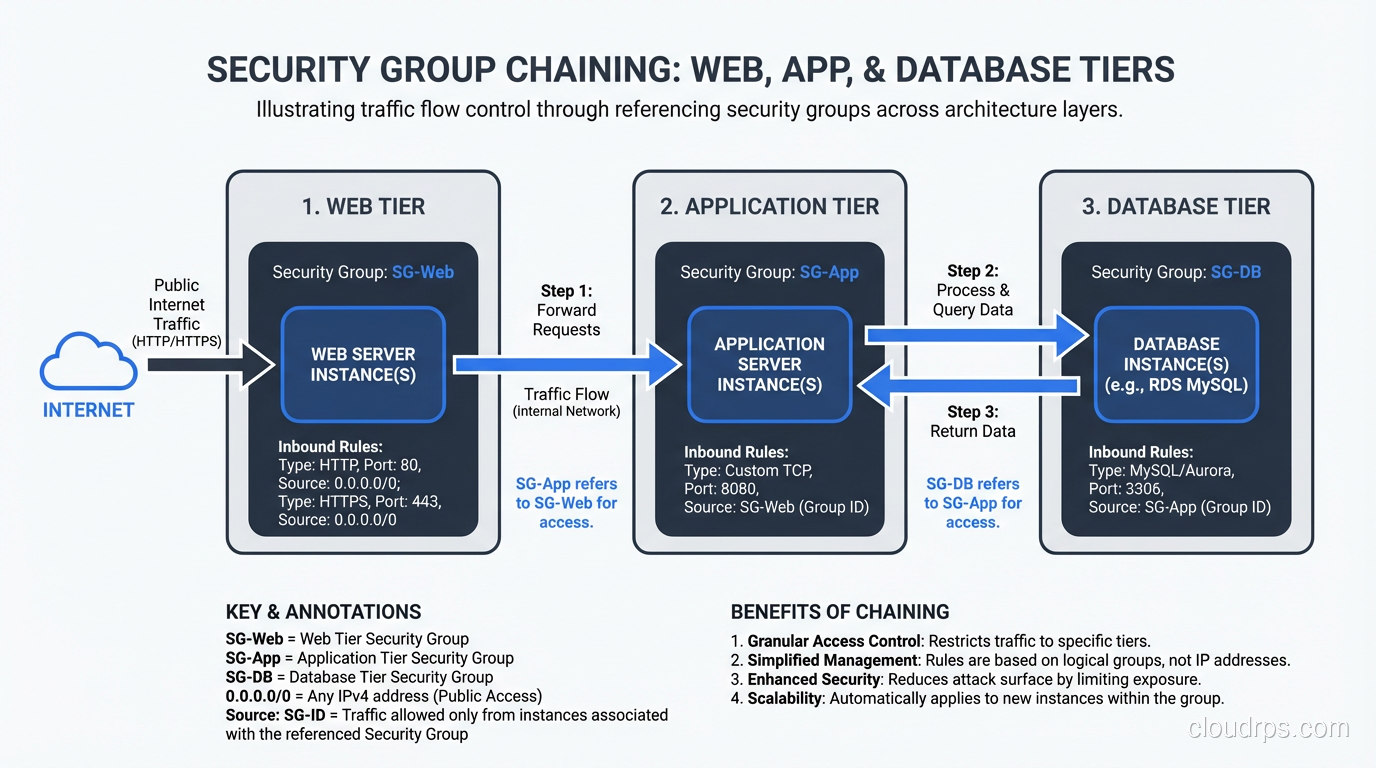
Instead of saying “allow inbound TCP 5432 from 10.0.2.0/24” (which allows any instance in that subnet), you can say “allow inbound TCP 5432 from sg-webapp,” which allows traffic only from instances that are members of the webapp security group, regardless of their IP address.
This is infrastructure-as-identity. Your access rules reference the role of the source, not its network address. If you add a new web server and assign it to the webapp security group, it automatically gets database access. If you move a server to a different subnet, the security group rules follow it.
In practice, this looks like:
Web tier security group (sg-web):
- Inbound: TCP 443 from 0.0.0.0/0
- Inbound: TCP 80 from 0.0.0.0/0
App tier security group (sg-app):
- Inbound: TCP 8080 from sg-web
Database tier security group (sg-db):
- Inbound: TCP 5432 from sg-app
Each tier can only be reached by the tier in front of it. No direct internet-to-database traffic is possible. And these rules are IP-address-independent; they work regardless of how your subnets are structured.
Key Differences at a Glance
| Feature | Network ACLs | Security Groups |
|---|---|---|
| Operates at | Subnet level | Instance/ENI level |
| Statefulness | Stateless | Stateful |
| Rule type | Allow and Deny | Allow only |
| Rule evaluation | Ordered by rule number | All rules evaluated |
| Default behavior | Custom: deny all; Default: allow all | Deny all inbound, allow all outbound |
| Return traffic | Must be explicitly allowed | Automatically allowed |
| Can reference | CIDR blocks only | Security groups or CIDR blocks |
| Applies to | All instances in subnet | Only associated instances |
| Rule limits | 20 rules per direction (adjustable) | 60 rules per group (adjustable) |
How to Layer Them: Defense in Depth
The question I get most often is: “If security groups are stateful and more granular, why do I need NACLs at all?”
Fair question. Here’s my answer, informed by years of production cloud architectures and a few incidents where the layering saved us.
NACLs as the Coarse Outer Filter
NACLs serve as your first line of defense at the subnet boundary. They’re where you:
- Block known-bad IP ranges:Threat intelligence feeds, geographic restrictions, known attacker IPs. These change frequently, and NACLs are the right place for broad IP-based blocking.
- Enforce subnet-level isolation:Production subnets shouldn’t accept any traffic from development subnets. A NACL deny rule at the subnet boundary enforces this regardless of security group configurations.
- Provide explicit deny capability:Since security groups can’t deny, NACLs are your only tool for blocking specific sources while allowing broader access in the security group.
- Act as a safety net:If someone misconfigures a security group (opens 0.0.0.0/0 on a sensitive port), a properly configured NACL can limit the blast radius.
Security Groups as the Fine-Grained Policy
Security groups are where your detailed access policy lives:
- Per-application rules:Each application or service gets its own security group with precisely the ports it needs.
- Tiered architecture enforcement:Web-to-app-to-database chaining through security group references.
- Role-based grouping:All bastion hosts share a security group, all monitoring agents share another. Add or remove instances without touching rules.
- Cross-VPC and cross-account references:With VPC peering or Transit Gateway, you can reference security groups across VPCs.
A Real Architecture
Here’s a pattern I’ve deployed repeatedly for web applications:
Public subnets (NACL: allow 80/443 inbound from internet, deny all else):
- ALB with sg-alb (inbound 443 from 0.0.0.0/0)
Application subnets (NACL: allow from public subnet CIDR and within VPC, deny internet):
- ECS tasks with sg-app (inbound 8080 from sg-alb)
Database subnets (NACL: allow from app subnet CIDR only, deny everything else):
- RDS instances with sg-db (inbound 5432 from sg-app)
Management subnet (NACL: allow SSH from corporate IP range only):
- Bastion hosts with sg-bastion (inbound 22 from corporate CIDR)
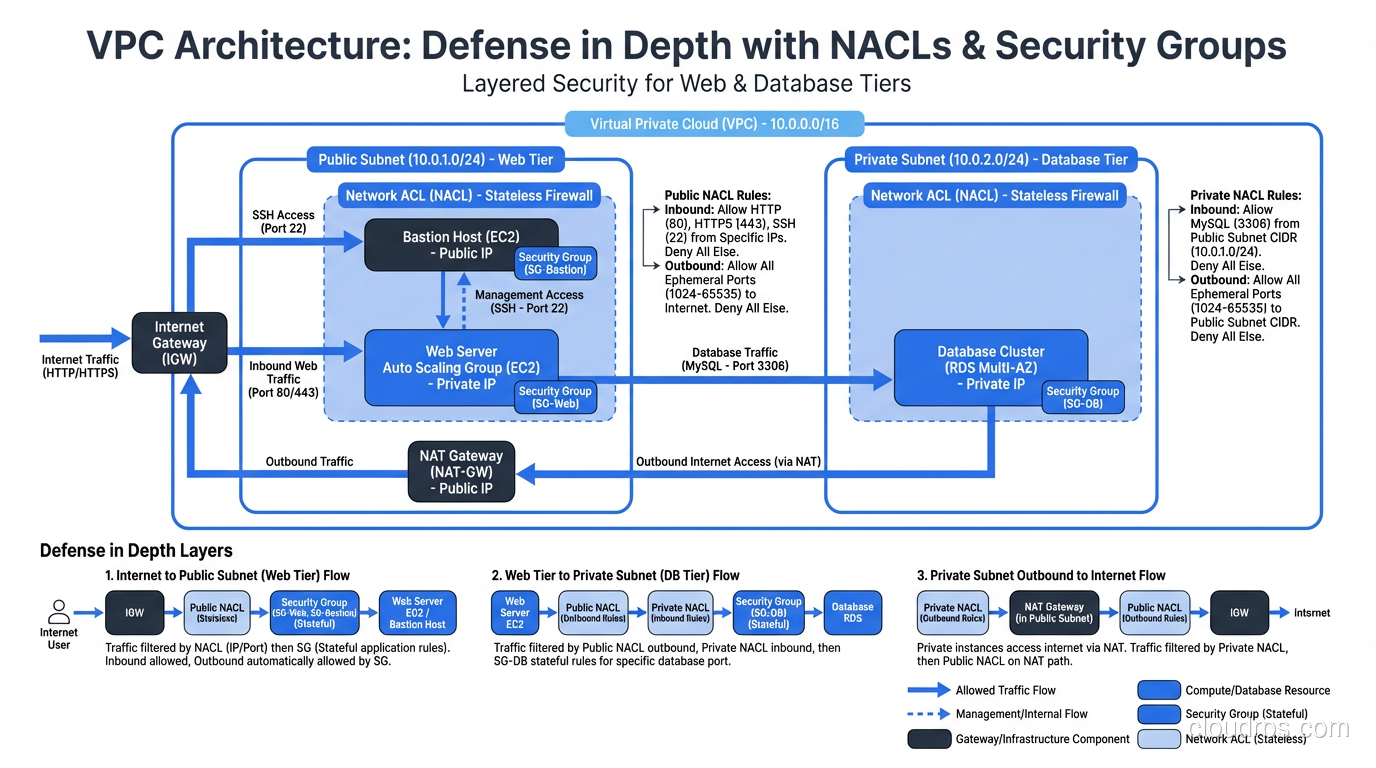
The NACLs provide subnet-level isolation. The security groups provide instance-level precision. An attacker who somehow compromises a web-tier instance faces security group restrictions blocking lateral movement to the database, AND NACL restrictions blocking traffic to the database subnet. Two independent controls, both of which must be bypassed.
Common Mistakes and Misconfigurations
Mistake 1: Default NACLs Everywhere
The default NACL allows all traffic. If you haven’t created custom NACLs for your subnets, your NACL layer is doing nothing. I see this constantly. Teams put all their effort into security groups and leave default NACLs in place. You’ve built one layer of defense instead of two.
Mistake 2: Overly Broad Security Groups
0.0.0.0/0 on port 22 is the classic. I’ve found it in production more times than I can count. SSH should be restricted to bastion hosts or a VPN CIDR, never open to the internet. The same goes for database ports (3306, 5432, 27017). If these are in your security group inbound rules with 0.0.0.0/0, you’ve got a critical finding.
Mistake 3: One Security Group for Everything
Using a single security group for all instances in a VPC defeats the purpose. Your web servers, application servers, and database servers should have separate security groups with specific rules. One group means every instance can talk to every other instance on every permitted port.
Mistake 4: Forgetting Outbound Rules
Security group default outbound rules allow all traffic. Most teams never touch this. For sensitive workloads, you should restrict outbound traffic to only what’s needed: specific API endpoints, DNS, package repositories. This limits data exfiltration channels and command-and-control communication if an instance is compromised.
At one organization I worked with, we detected a compromised instance because it was trying to reach a C2 server on an unusual port. It was caught because we had restricted outbound traffic in the security group, and the blocked connection triggered an alert. With default outbound allow, that traffic would have flowed freely.
Mistake 5: Not Using Security Group References
Teams that use IP CIDRs in security groups instead of group references are making their lives harder and their security more fragile. Every time an IP changes, the rules need updating. Group references are dynamic; instances join and leave groups, and the rules adapt automatically.
Multi-Cloud Mapping
The concepts translate across clouds, though the names differ:
AWS: Network ACLs (stateless, subnet-level) + Security Groups (stateful, instance-level)
Azure: Network Security Groups can be applied to both subnets and NICs. They’re stateful and support both allow and deny rules. Application Security Groups (ASGs) provide the grouping capability similar to AWS security group references.
GCP: VPC Firewall Rules are stateful and apply to instances via network tags or service accounts. GCP doesn’t have a direct NACL equivalent; all filtering is at the instance level, though you can use hierarchical firewall policies for organization-wide rules.
Regardless of the cloud provider, the principle is the same: layer your controls, use the most granular control for detailed policy, and use the broader control for coarse filtering and safety nets.
Integration with Broader Security Architecture
Security groups and NACLs are Layer 3/4 controls. They filter based on IP addresses, ports, and protocols. They don’t inspect the content of the traffic. For application-layer threats (SQL injection, XSS, API abuse) you need web application firewalls operating at Layer 7.
In a Zero Trust architecture, security groups become a key enforcement mechanism for microsegmentation. Each workload gets its own security group, traffic between workloads is explicitly permitted, and default-deny prevents lateral movement. This is cloud-native microsegmentation without needing third-party tools.
The evolution of cloud network security is toward more granular, identity-aware controls. AWS PrivateLink, VPC Lattice, and service mesh implementations push access control closer to the application and further from the network address. But security groups and NACLs remain the foundation. They’re the controls you can’t skip.
Wrapping Up
Security groups and NACLs are complementary controls that operate at different levels of your cloud network. NACLs are stateless and work at the subnet boundary; use them for coarse filtering, explicit denies, and safety nets. Security groups are stateful and work at the instance level; use them for detailed application-level access policy with group-based references.
The layering is the point. Neither control alone is sufficient. NACLs without security groups give you only coarse filtering with no per-instance precision. Security groups without NACLs give you no explicit deny capability and no subnet-level isolation. Together, they provide defense in depth that limits the impact of any single misconfiguration.
Get both layers right, and you’ve built a network security foundation that’s genuinely hard to break through. Get either one wrong, and you’ve left a gap that won’t show up in a dashboard but will absolutely show up in an incident report.
Get Cloud Architecture Insights
Practical deep dives on infrastructure, security, and scaling. No spam, no fluff.
By subscribing, you agree to receive emails. Unsubscribe anytime.