
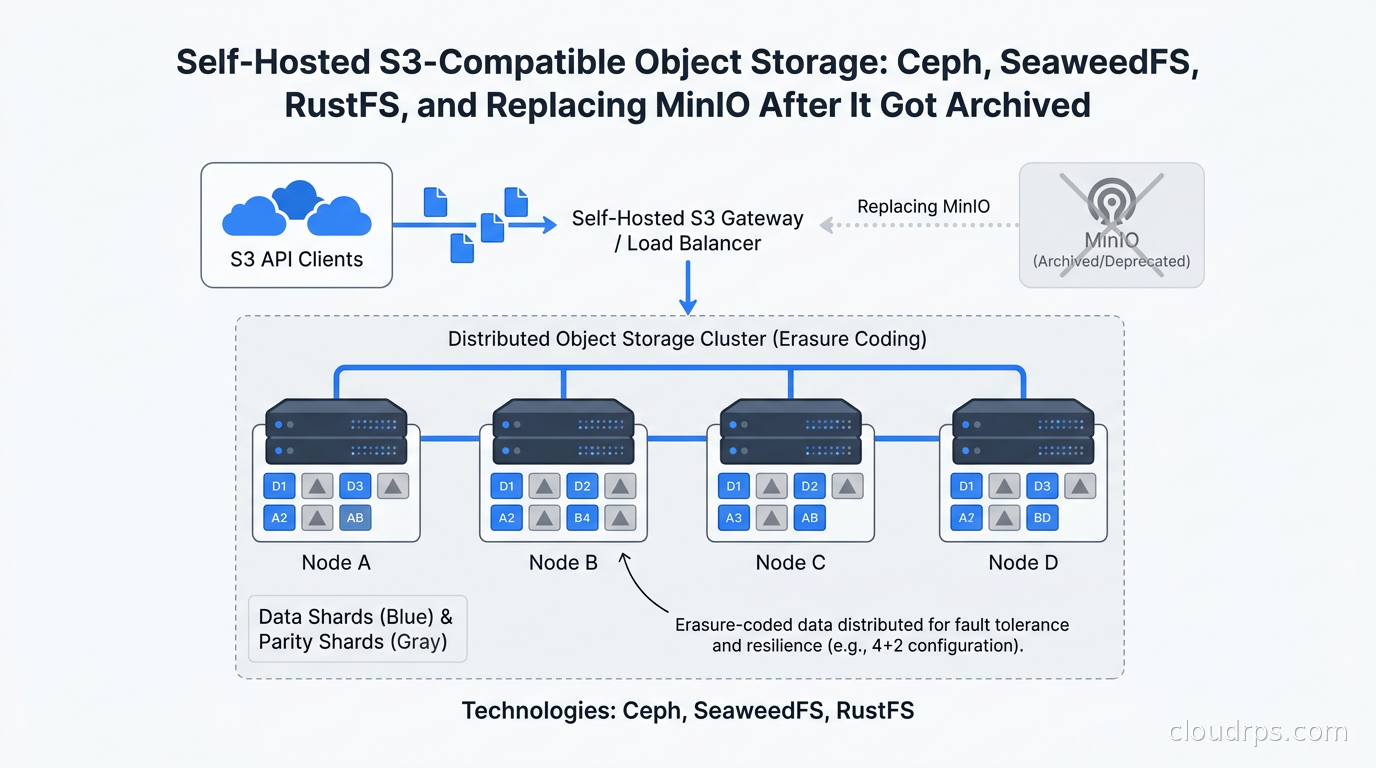
In February 2026, the MinIO Community Edition GitHub repository went read-only. No announcement, no migration guide, just a banner: archived by the owner.
After twenty years of watching infrastructure projects come and go, that one still surprised me. MinIO basically wrote the playbook for self-hosted object storage. Easy to deploy, fast, S3-compatible out of the box. Thousands of companies ran it as their private data lake foundation, their ML training data store, their backup target. And then it was gone, at least the free version.
If you are running MinIO Community Edition right now, you need a plan. No security patches means every CVE that drops becomes your problem indefinitely. But even if you are not a MinIO user, the S3 API has become the universal standard for object storage, and knowing how to run it yourself is a core skill for any cloud architect who takes cloud repatriation seriously.
This guide covers what you need to know: why self-host at all, what the options look like in the post-MinIO landscape, and how to actually deploy something production-worthy.
Why Self-Host Object Storage in the First Place
Before we talk about specific tools, let me make the case for why this is worth the operational overhead.
Egress costs are genuinely brutal at scale. Cloud S3 charges you nothing to store data and nothing to write it. Retrieve it, and you pay. AWS charges $0.09 per GB to move data to the internet, and $0.01-$0.02 per GB even between regions. If you are running an ML training pipeline that reads 50 TB of training data per epoch across multiple training runs, the math gets uncomfortable fast. I have seen teams spend more on S3 egress for training data than they spend on the GPU instances doing the actual training. The full breakdown is in our cloud egress cost guide, but the short version is this: at sufficient volume, self-hosted storage pays for itself.
Data sovereignty and compliance. GDPR, HIPAA, various national data localization laws. Sometimes data genuinely cannot touch a third-party cloud provider. I spent two years working with a European financial services company that needed to keep specific document categories on infrastructure they directly controlled, not just a VPC managed by AWS. Self-hosted object storage was the only answer, and it worked well once we got the operational model right.
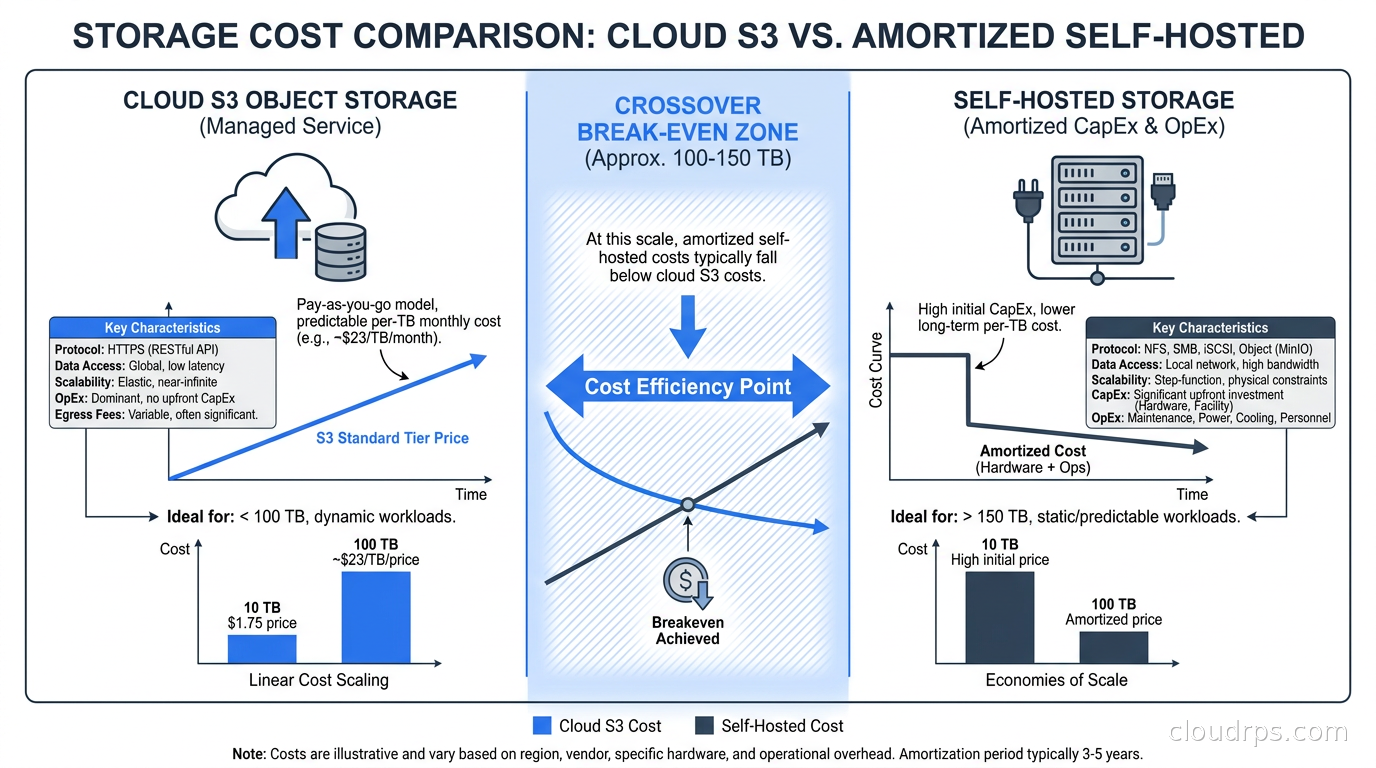
Predictable cost at scale. Cloud S3 has a pricing model that looks cheap at small scale and terrifying at petabyte scale. Buying a rack of servers with a few hundred terabytes of disk gives you flat, predictable storage costs. The break-even point varies, but in my experience it falls roughly in the 100-200 TB range depending on your access patterns and egress volume.
Latency for co-located compute. If your machine learning training cluster and your training data sit in the same datacenter or on the same NVMe-equipped servers, you can saturate 100 GbE links with object reads. That is not achievable against cloud S3 from a cloud instance, where you are limited by instance network bandwidth and storage service throttling.
I want to be honest: self-hosted object storage is not free. You are trading a managed service for operational responsibility. I will come back to when that tradeoff does not make sense.
The S3 API as the Universal Standard
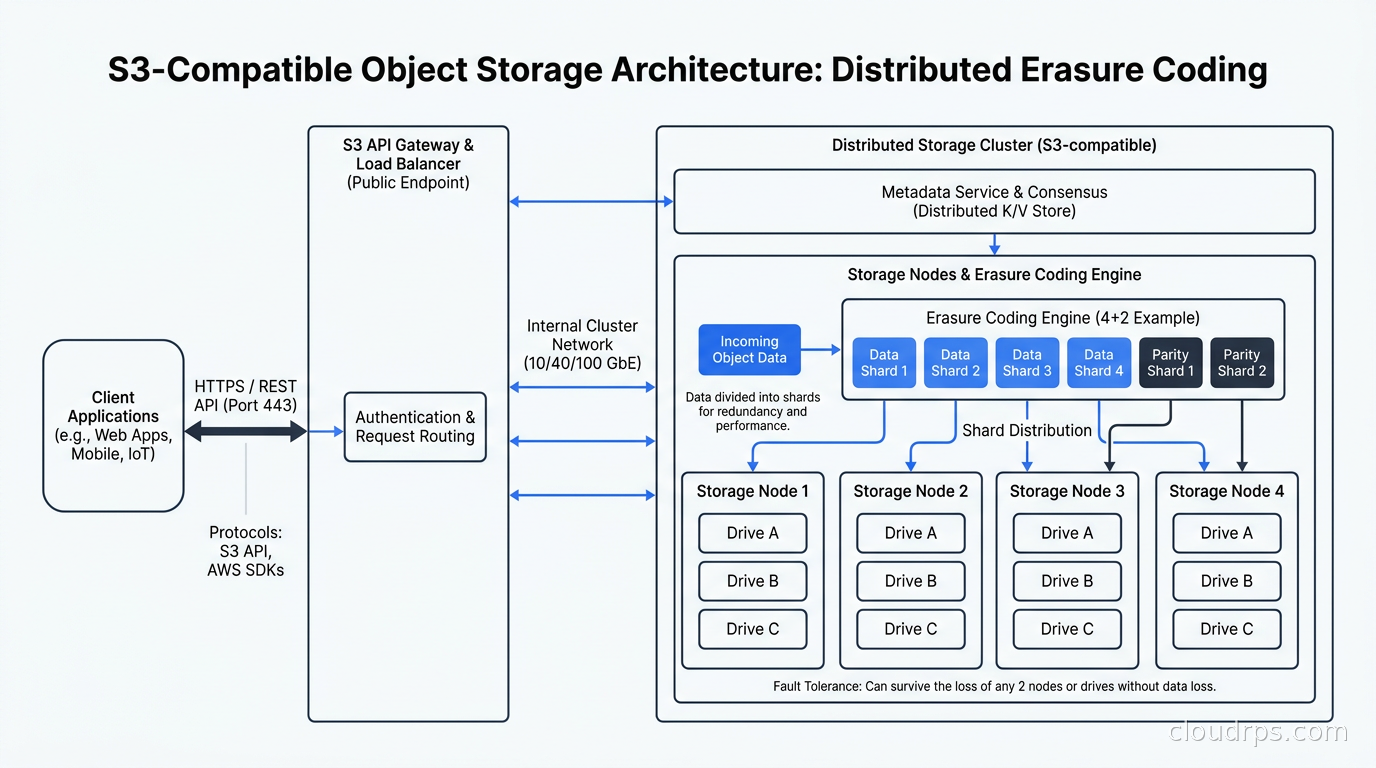
If you are newer to object storage, understand this first: the S3 API is not just an AWS thing. It is the de facto protocol standard for object storage across the industry. Every major cloud has an S3-compatible API. Every major self-hosted option speaks S3. Tools like the AWS CLI, boto3, s3fs, Apache Iceberg, and virtually every backup solution expect S3 semantics.
This is actually good news. It means switching from cloud S3 to self-hosted is largely a matter of changing an endpoint URL and access credentials. Your application code stays the same, your pipeline code stays the same, your Apache Iceberg data lakehouse keeps reading Parquet files without modification. The portability is real, and it is one of the most underappreciated aspects of the ecosystem.
Block, object, and file storage all have their place, but for unstructured data at scale, the object model has won. Flat namespace, HTTP-accessible, infinitely horizontally scalable, no POSIX semantics to worry about. The S3 API is the contract; who provides the storage underneath is what we are here to figure out.
The Post-MinIO Landscape
MinIO had a complicated relationship with open source for years. The AGPL-3.0 license created friction for commercial use, and the company progressively moved features into their commercial AIStor product. By early 2026, the math became clear: continued development of the free version was not economically viable for them. The repository went read-only, and the community scattered.
The response has been predictable: fork, replace, or migrate. A few options have emerged as serious contenders.
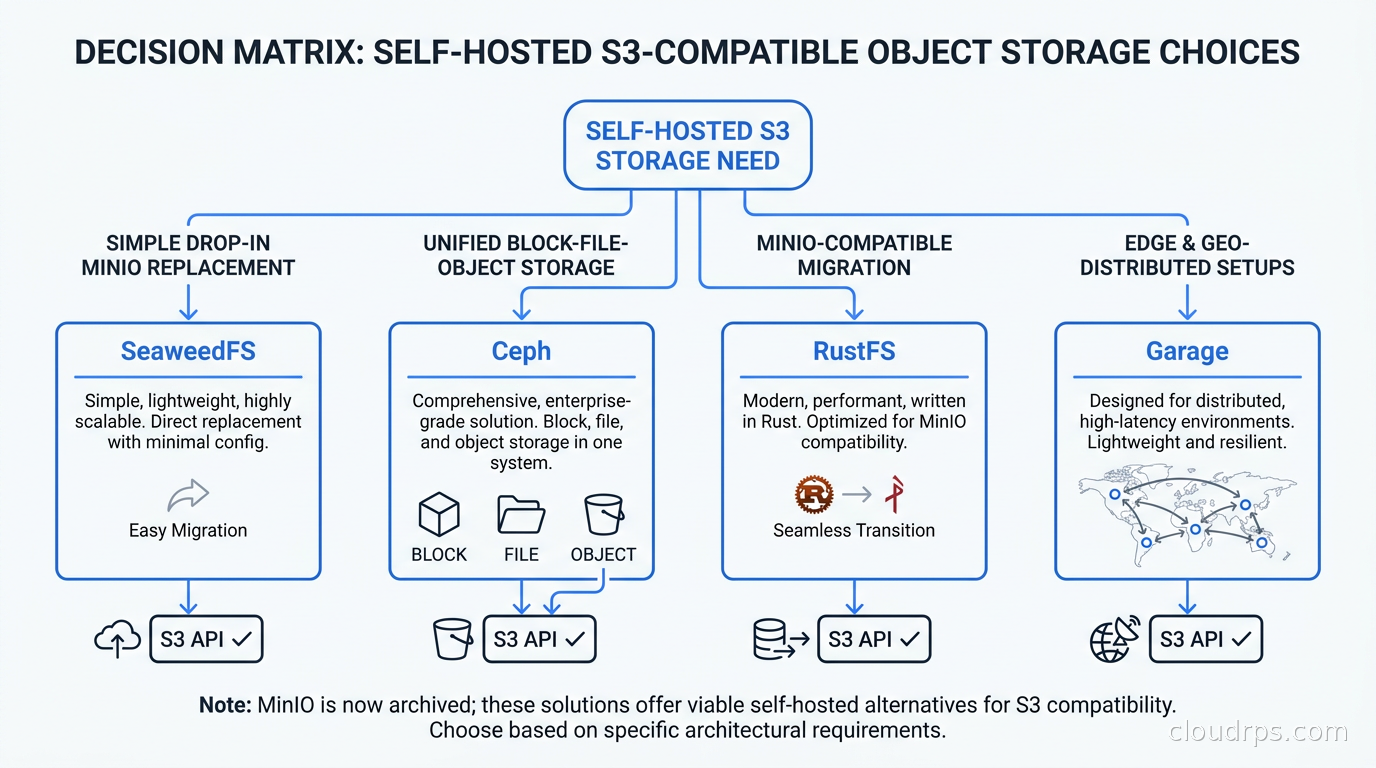
SeaweedFS is currently the closest thing to a drop-in MinIO replacement that makes sense for most teams. Originally built at LinkedIn to handle billions of small files, it has evolved into a full-featured distributed object store with an S3-compatible API. Apache 2.0 licensed, actively maintained, and with strong community momentum after the MinIO announcement. Performance is excellent, and the operational model is simpler than Ceph.
Ceph RadosGW has been running production petabyte-scale storage clusters for years. The RADOS Gateway component provides S3 and Swift compatibility on top of Ceph’s underlying RADOS distributed object store. If you need block storage and file storage alongside object storage, Ceph is compelling because you run one cluster that provides all three. The tradeoff is significant operational complexity.
RustFS is the newest serious contender. Think of it as MinIO rebuilt in Rust with an Apache 2.0 license. It is designed to be API-compatible with MinIO and provides erasure coding, a built-in web console, and the familiar operational model. Early-stage but gaining adoption quickly from teams that want a clean break from MinIO without learning a completely different operational paradigm.
Garage is a lightweight S3-compatible store written in Rust, designed specifically for geo-distributed deployments. If you are building something with nodes spread across multiple physical locations with unreliable connectivity, Garage’s design assumptions are better suited than any of the above. For under 10 TB, edge deployments, and smaller setups, Garage is worth serious consideration.
Cloudian HyperStore rounds out the list for teams with enterprise budgets and support contract requirements. Purpose-built for petabyte-scale S3-compatible storage with a commercial support model. Not free, but for large organizations the support SLA is worth something real.
SeaweedFS in Production
For most teams migrating off MinIO Community or starting fresh with self-hosted storage, SeaweedFS is where I would start. Let me explain the architecture so you understand what you are getting.
The system consists of a Master server (which manages volume allocation and cluster metadata), Volume servers (which store actual data), and a Filer (which provides the S3 API interface, along with POSIX-like semantics if you need them). The design intentionally separates metadata from data storage, which helps with performance at scale and makes each component independently scalable.
Starting a basic cluster is genuinely straightforward: bring up a Master, bring up Volume servers pointing at the Master, and start the Filer with S3 enabled. The resulting S3 endpoint is usable with any S3-compatible client immediately. There is no bootstrapping ceremony like you have with Ceph.
What impresses me about SeaweedFS is how it handles small files. Most distributed storage systems perform poorly with millions of tiny files because they were designed around large object assumptions. SeaweedFS aggregates small files into larger needle files at the storage layer, which reduces metadata overhead dramatically. If your workload involves lots of small objects like ML feature stores, image thumbnails, or log files, this architecture choice matters more than you might think.
For high availability, you run multiple Master servers with Raft consensus for leader election, and multiple replica Volume servers so each data chunk has copies across failure domains. Erasure coding is supported for the cold storage tier to reduce storage overhead compared to replication.
One practical note: SeaweedFS’s S3 IAM policy support is good for core operations (PUT, GET, DELETE, ListObjects, multipart uploads) but fine-grained bucket policies are still maturing. If you have complex authorization requirements, plan for an additional authorization layer or evaluate whether RustFS or Ceph RadosGW’s more complete IAM implementation serves you better.
Ceph RadosGW: When You Need the Heavy Iron
I have deployed Ceph on clusters ranging from 12 OSD nodes to several hundred. Let me be direct: Ceph is powerful, and it is operationally demanding. Teams that succeed with Ceph either have dedicated storage engineers or invest the time to become them.
Ceph’s architecture consists of OSDs (Object Storage Daemons, one per disk), Monitors (which maintain the cluster map and consensus), Managers (which handle metrics and orchestration), and the RADOS Gateway for S3 access. Modern Ceph deployments use cephadm for orchestration, which has significantly improved the operational experience compared to the older manual deployment methods.
The compelling case for Ceph is the unified storage platform. You get object storage (RadosGW, S3-compatible), block storage (RBD, the foundation for Kubernetes PVCs via Rook), and shared file storage (CephFS). If you are running databases on Kubernetes and need persistent volumes alongside an object storage layer for backups and training data, Ceph provides both from a single cluster with a single operational team managing it.
The erasure coding story in Ceph is mature and flexible. You can configure different erasure code profiles per pool, mixing replication for hot metadata with erasure coding for cold data objects. In production I typically see a 4+2 or 6+3 configuration: six data chunks plus three parity chunks, which tolerates three simultaneous OSD failures with 67% storage efficiency (versus 33% for triple replication). For cost-per-terabyte at scale, erasure coding is the right answer once you understand the read amplification tradeoffs.
For an organization already running Kubernetes with Rook-Ceph for persistent storage, adding RadosGW to that existing cluster for S3 access is the obvious move. The operational overhead is already being paid; you are just exposing another interface on infrastructure you already manage.
Hardware and Infrastructure Decisions
The hardware you choose matters enormously for self-hosted object storage. Mistakes here are expensive because storage nodes are not easy to retrofit once deployed.
Drives: For most use cases, high-capacity spinning disks (12 TB to 20 TB SATA HDDs) provide the best cost per terabyte. Use NVMe SSDs for metadata and caching layers, not for bulk data storage. The economics of bulk object storage almost never justify all-flash unless your access patterns are extremely random-read intensive, like serving media content at high IOPS, or you are running time-sensitive ML training where storage I/O is on the critical path.
Network: Use at least 25 GbE between storage nodes. For GPU training clusters reading training data, 100 GbE is justified; the cost of a 100 GbE switch port is trivial compared to the GPU time you waste waiting on storage I/O. Critically, separate your storage replication traffic from client-facing traffic using different network interfaces and subnets. Rebalancing traffic during node recovery should not degrade read performance for your training jobs.
CPU and RAM: Object storage is not particularly CPU-intensive except during erasure coding encode/decode operations. The bottleneck is almost always I/O. However, do not underprovision RAM. The kernel page cache does significant work for read-heavy workloads, and metadata layers benefit from generous memory headroom. I generally target 128-256 GB of RAM for storage nodes.
Failure domain design: Think carefully about your failure boundaries before you deploy. The goal is that a single rack power failure does not take down your cluster or cause data loss. If you have a single rack, you are limited in what you can accomplish, but at minimum separate your master and monitor processes from your storage nodes, and spread replicas or erasure code shards across separate physical switches.
Security: Encryption and Access Control
Encryption at rest and in transit is non-negotiable for any storage system handling sensitive data. For self-hosted object storage, this requires deliberate configuration rather than inherited cloud defaults.
TLS on the S3 endpoint: Every client connection should use TLS. Both SeaweedFS and Ceph RadosGW support TLS on the S3 interface. Use cert-manager or your internal CA to issue and rotate certificates automatically. Do not use self-signed certs with hard-coded trust in application configs; that path leads to outages when certificates expire and nobody remembers how to regenerate them.
Encryption at rest: SeaweedFS supports volume-level encryption. Ceph supports full-disk encryption via LUKS managed by cephadm. RustFS inherits MinIO’s server-side encryption design, supporting SSE-S3 (cluster-managed keys) and SSE-C (client-provided keys). Decide whether you need application-layer encryption, storage-layer encryption, or both, based on your threat model and compliance requirements. For regulated data, storage-layer encryption satisfies most auditors’ encryption-at-rest requirements.
Access control: S3 IAM policy support in self-hosted systems is less mature than cloud S3. For SeaweedFS, bucket-level access control with basic policies works well for most workloads. For more complex requirements such as per-prefix permissions or cross-account access patterns, you may need to put a proxy in front for policy enforcement. Ceph RadosGW has the most complete S3 IAM policy implementation of the self-hosted options, which is another point in its favor for enterprise deployments with complex authorization structures.
Replication and Disaster Recovery
One thing cloud S3 does exceptionally well is cross-region replication: click a button, pay a small fee, done. If you self-host, you build this yourself.
For active-active multi-site setups, SeaweedFS supports site replication through its volume server replication mechanism. Ceph has multi-site RadosGW replication with bi-directional sync. Neither is as operationally seamless as configuring a managed service, but both work at production scale with appropriate tuning.
For disaster recovery at minimum, you want your object storage data replicated to a second physical location. Whether that is a second datacenter you control, a colocation facility, or a cloud S3 bucket as the offsite DR target, you need to design for site-level failure. Storing everything in one physical location is not a resilience strategy regardless of how many replicas you have within that location.
I have used Rclone extensively for the cloud DR copy pattern: scheduled Rclone sync jobs replicate from self-hosted storage to an S3 Glacier Deep Archive bucket as the cold DR copy. Ongoing storage costs for a cold copy in Deep Archive are minimal. You are paying for the insurance that you can recover if your self-hosted cluster is destroyed in a fire or a catastrophic infrastructure event. That is a reasonable FinOps decision: the cloud as your offsite tape replacement.
Cost Math: When Self-Hosting Wins
Let me put some real numbers on this to make the conversation concrete. These are rough order-of-magnitude figures.
Cloud S3 costs roughly $0.023 per GB-month for standard storage in us-east-1. For 500 TB, that is about $11,500 per month in storage fees alone, before counting egress charges on any data you read out.
A self-hosted storage cluster for 500 TB raw using 16 TB SATA HDDs at roughly $250 each requires about 32 drives across several servers. With erasure coding at 6+2 overhead (75% efficiency), your usable capacity is around 375 TB. Server hardware for a small cluster: five nodes at roughly $8,000-$12,000 each including drives, RAM, and dual 25 GbE NICs, plus networking, for a total capital cost in the $50,000-$70,000 range.
At $11,500 per month in pure storage costs, you approach break-even within six to seven months on storage fees alone, before counting egress savings. For teams already doing cloud repatriation for compute, the economics are even more favorable: you are already paying for datacenter space, power, and network, so the marginal cost of adding storage nodes is primarily drives and a bit of additional rack space.
The honest caveat is operational cost. Someone has to monitor this cluster, respond to drive failures, plan capacity, and manage upgrades. If you do not have that capacity on your team, cloud S3 may win on total cost of ownership even when the unit economics look unfavorable. Managed infrastructure often wins when you honestly account for the cost of the person hours required to run the alternative.
When to Stick with Cloud S3
I want to be equally clear about when self-hosted is the wrong answer, because I have seen teams waste significant engineering effort on this when they should not have.
Under 50 TB of data: The operational overhead is not worth it. Pay for cloud S3, use the time for something that moves your product forward.
Unpredictable or spiky access patterns: Cloud S3 handles traffic spikes transparently. Self-hosted systems need to be provisioned for peak load, which means you pay for capacity you do not always use.
Small teams without storage experience: Running Ceph or even SeaweedFS requires operational knowledge that takes time to build. If your infrastructure team is two or three people and they are already managing Kubernetes, CI/CD, and application infrastructure, adding a storage cluster is a recipe for a painful 3 AM drive failure incident.
Regulatory requirements mandating specific cloud providers: Some compliance frameworks (FedRAMP, certain government certifications) require specific approved cloud providers. Self-hosting does not satisfy those requirements.
Global distribution requirements: If your users and workloads are spread across the globe and need low-latency object access everywhere, cloud providers’ globally distributed S3 infrastructure is very hard to replicate yourself. Garage handles multi-site setups, but you are constrained by your own physical locations and the connectivity between them.
Choosing Your Path
My recommendations as of mid-2026:
Start with SeaweedFS if you need a straightforward MinIO replacement. It is operationally simple, actively maintained, Apache 2.0 licensed, and performs well for both small file and large object workloads. Most teams evaluating this space should start here.
Choose Ceph RadosGW if you are already running Ceph for Kubernetes persistent volumes, or if you need unified block-file-object storage from one platform. Do not start a Ceph deployment just for S3; the operational complexity is not justified unless you need what the rest of Ceph provides.
Evaluate RustFS if you want the closest possible behavioral and operational compatibility with MinIO, especially if your tooling and runbooks are built around MinIO’s specific behaviors. It is newer but moving fast, and the Apache 2.0 license removes the commercial friction that contributed to MinIO’s withdrawal from the community space.
Use Garage for geo-distributed setups, edge nodes, or smaller-scale deployments where you want something simple, well-designed, and Rust-based with good eventual-consistency guarantees across sites with intermittent connectivity.
The self-hosted S3 ecosystem is more mature than it was three years ago. MinIO leaving the community space actually accelerated investment in the alternatives. SeaweedFS in particular has seen significant adoption and contributions since early 2026. The S3 API is stable, the tooling ecosystem works against any compliant endpoint, and the core infrastructure problem of distributed erasure-coded object storage is well-understood. This is buildable. You just need to pick the right tool and allocate the right operational resources to keep it running.
Get Cloud Architecture Insights
Practical deep dives on infrastructure, security, and scaling. No spam, no fluff.
By subscribing, you agree to receive emails. Unsubscribe anytime.