
Every cloud migration starts with the same question for every application: what do we do with this thing? Move it as-is? Rewrite it? Replace it with a SaaS product? Just turn it off?
The 7 Rs framework gives you a structured vocabulary for answering that question. I’ve used it on every migration I’ve led since AWS originally published their migration strategies (it started as 5 Rs, then grew). The framework isn’t just useful for technical planning; it’s essential for communicating with business stakeholders who don’t care about the technical details but absolutely care about cost, timeline, and risk.
Let me walk through each strategy with the unvarnished truth about when each one works, when it doesn’t, and the trade-offs nobody puts in the slide deck.
The 7 Rs Overview
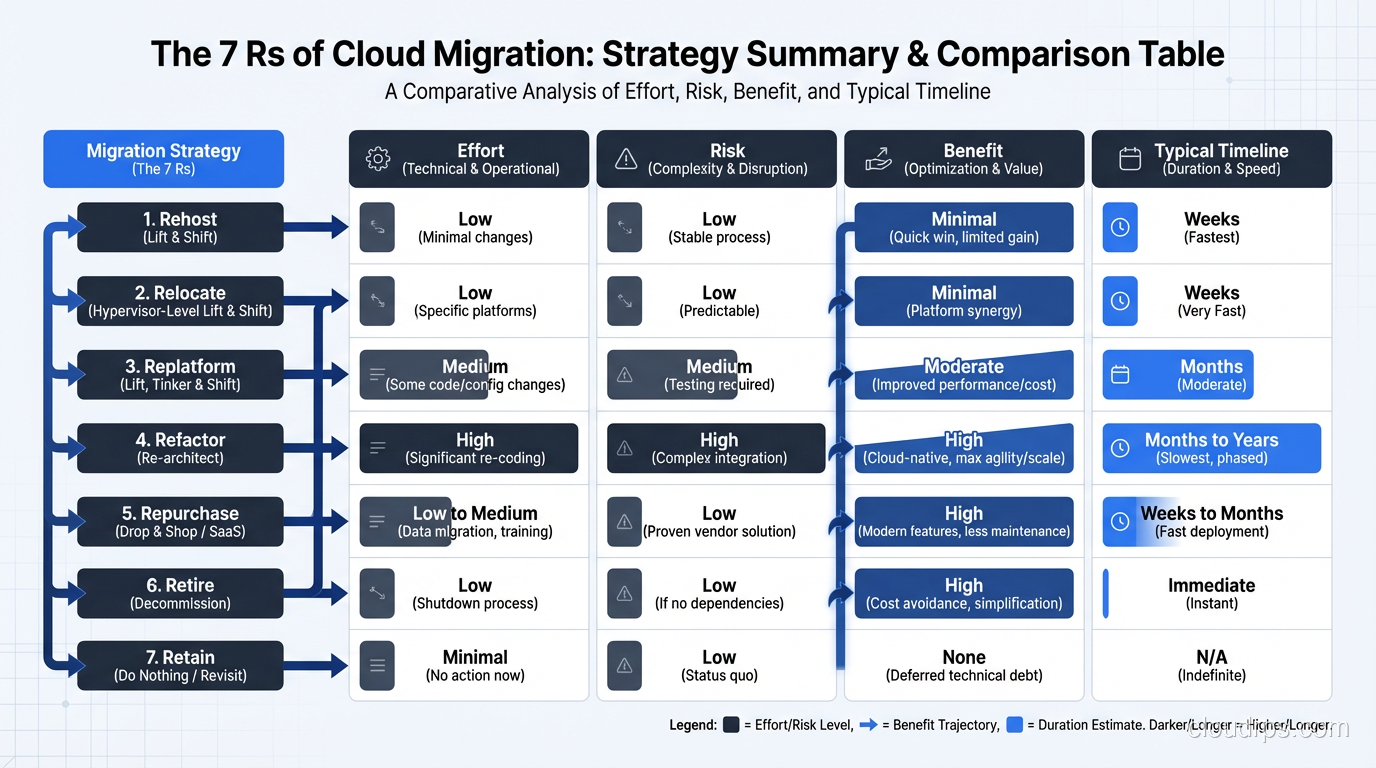
Before diving deep, here’s the spectrum. The strategies range from lowest effort/lowest cloud benefit to highest effort/highest cloud benefit:
- Retire: Turn it off
- Retain: Keep it where it is
- Relocate: Move to a different on-premises location or VMware Cloud
- Rehost: Lift and shift to cloud IaaS
- Replatform: Lift, tinker, and shift
- Repurchase: Replace with SaaS
- Refactor/Re-architect: Redesign for cloud-native
The first step in any cloud migration process is choosing the right R for each application. Get this wrong and you’ll either overspend (refactoring an app that should have been rehosted) or underdeliver (rehosting an app that desperately needed redesign).
Retire: The Most Underused Strategy
Retire means decommissioning the application entirely. You’d be surprised how many applications in a typical enterprise portfolio are candidates for retirement. In every portfolio assessment I’ve done, 10-20% of applications are either unused, redundant, or replaceable.
I once worked with a company that had 1,200 applications in their portfolio. After a thorough assessment, we retired 180 of them. Some hadn’t been accessed in over a year. Others had been replaced by newer systems but never formally decommissioned, so the old servers just kept running, consuming power, licenses, and someone’s attention.
When to retire: The application has no active users, or its functionality has been absorbed by another system, or the business process it supports no longer exists.
The catch: Getting sign-off on retirement is politically harder than it should be. Application owners are reluctant to say “yes, you can turn off my application” because they’re afraid something will break. My approach: turn off the application (but don’t decommission the infrastructure) and wait 30 days. If nobody screams, it’s safe to decommission fully.
Retain: The Honest Answer for Some Workloads
Retain means the application stays on-premises, at least for now. This isn’t failure; it’s pragmatism. Some workloads genuinely don’t belong in the cloud, at least not yet.
Legitimate reasons to retain:
- Mainframe applications that would require a complete rewrite (and you’re not ready for that investment yet)
- Applications with hard latency requirements to on-premises hardware (manufacturing systems, lab instruments)
- Regulatory requirements that prohibit cloud deployment (rare, but real in some sectors)
- Applications that are scheduled for retirement within 12-18 months anyway
Illegitimate reasons to retain (but I hear them constantly):
- “The cloud isn’t secure enough” (debunked endlessly, but the myth persists)
- “We’ve already paid for the hardware” (sunk cost fallacy)
- “It works fine where it is” (until the hardware needs refresh and the maintenance contract expires)
In a typical migration, 10-15% of applications get retained, with a plan to revisit them in the next planning cycle.
Relocate: The VMware Escape Hatch
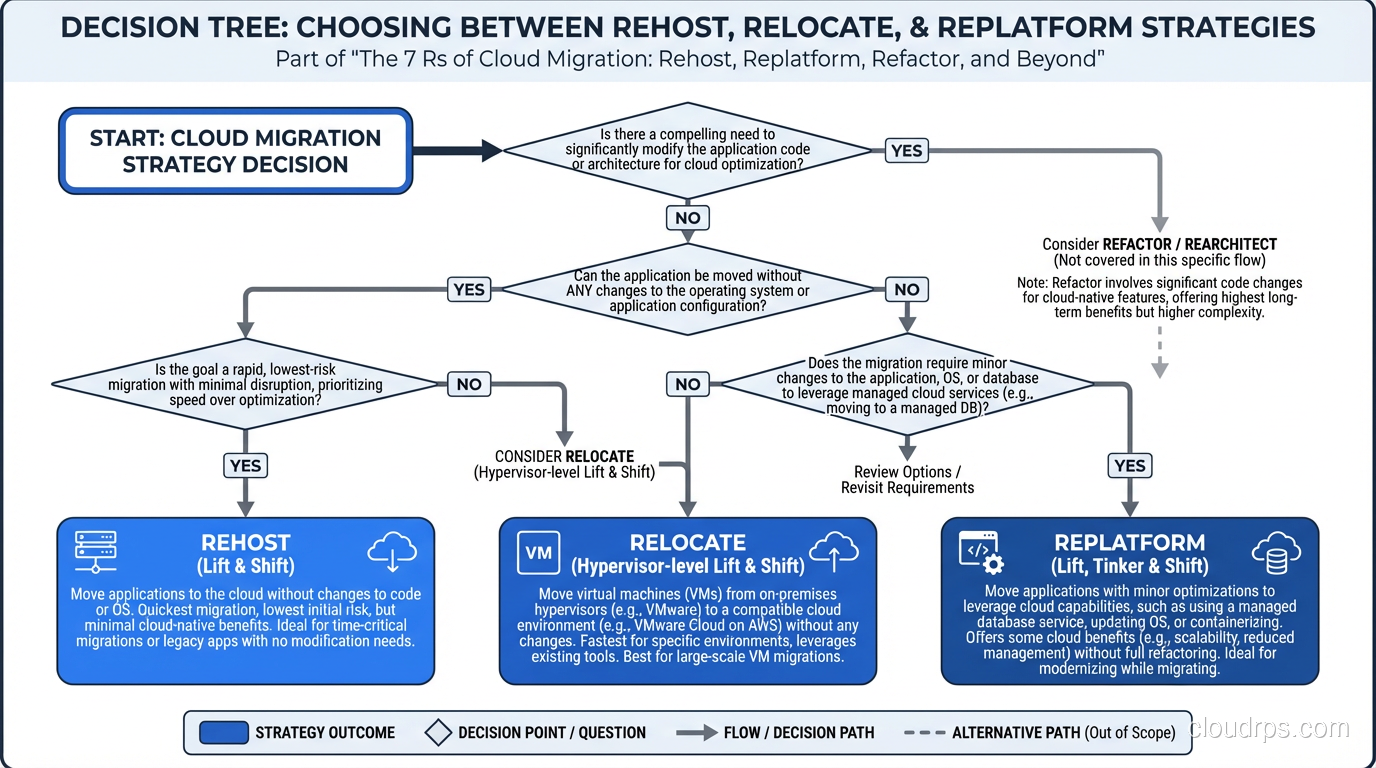
Relocate is the newest addition to the Rs, and it specifically addresses VMware workloads. Services like VMware Cloud on AWS, Azure VMware Solution, and Google Cloud VMware Engine let you move VMware VMs to cloud infrastructure with minimal changes.
I’ve used this strategy for organizations with deep VMware investments (custom VM templates, sophisticated vSphere configurations, NSX networking) where a full rehost would require rebuilding all that operational knowledge.
When to relocate: You’re running VMware on-premises and want to exit the data center quickly without changing your operational model.
The risk: You’re moving your on-premises patterns to the cloud without adopting cloud-native practices. It solves the “get out of the data center” problem but doesn’t deliver the agility, scalability, or cost benefits of cloud-native architecture. I view it as a transitional step, not a destination.
Rehost: Lift and Shift, the Workhorse Strategy
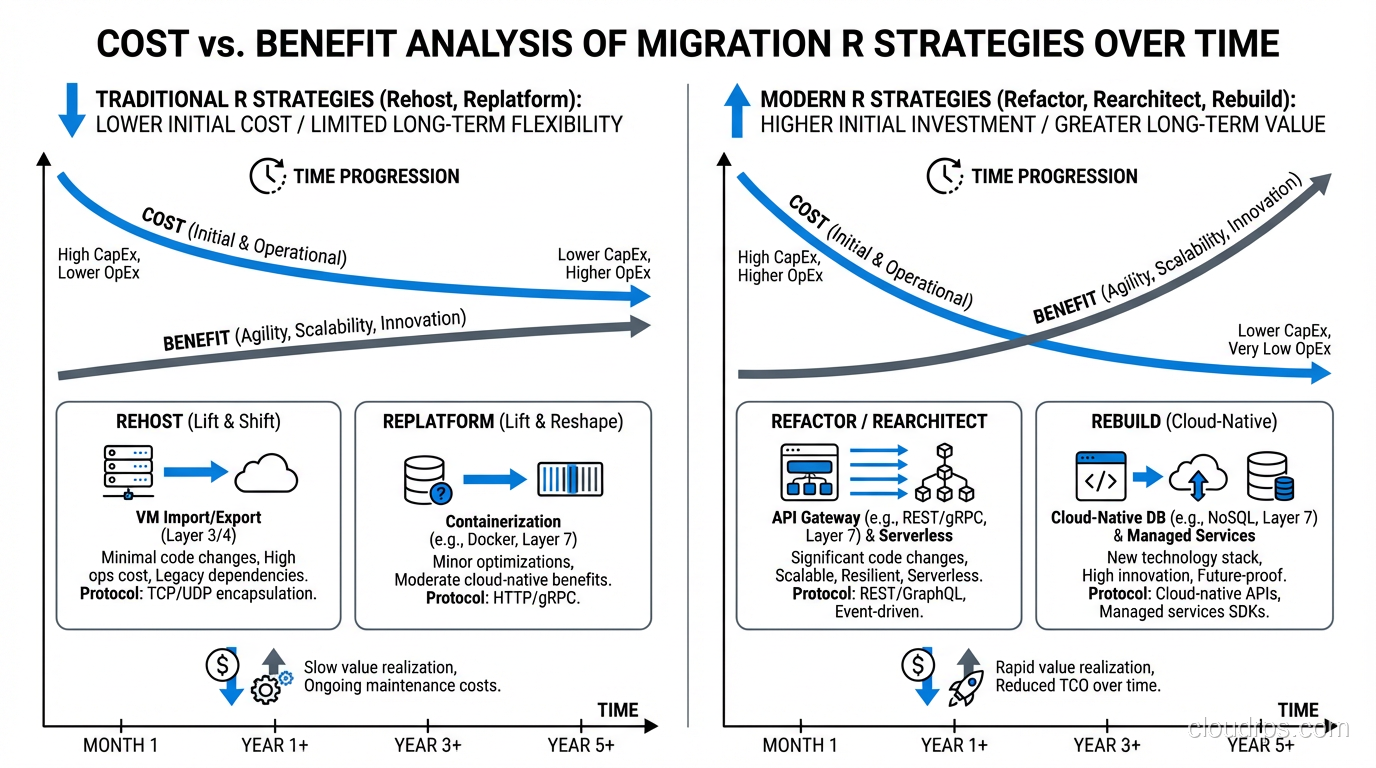
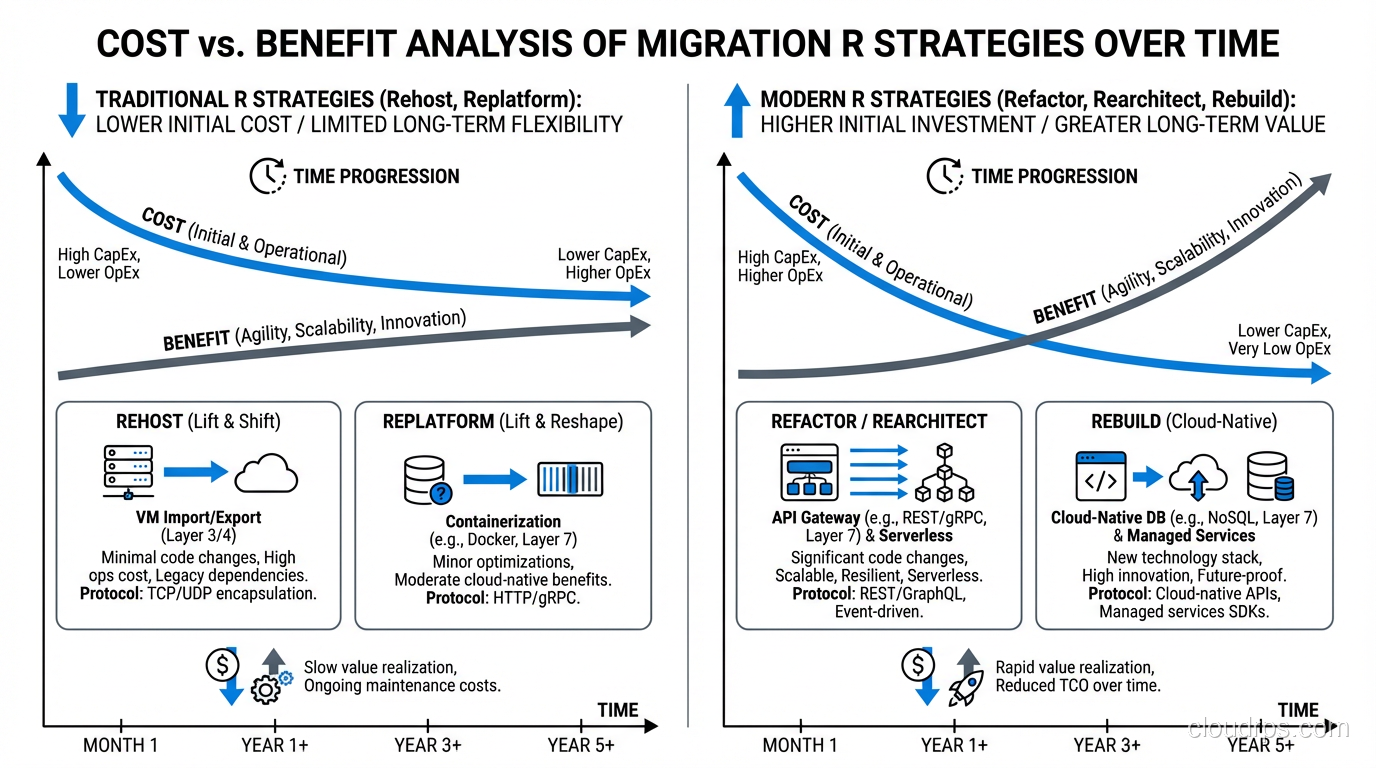
Rehosting means moving an application to cloud infrastructure with minimal changes. Same OS, same application code, same configuration, just running on EC2 instead of a physical server, or on Azure VMs instead of VMware.
This is the most common migration strategy, and for good reason. It’s the fastest path from on-premises to cloud, it has the lowest risk, and it unlocks the “exit the data center” goal that drives most migrations.
Tools for rehosting: AWS Application Migration Service (MGN), Azure Migrate, Google Migrate for Compute Engine. These tools handle the replication, testing, and cutover workflow.
What you get: Your application runs in the cloud. You get basic cloud benefits: no hardware management, geographic flexibility, on-demand scaling (if you set it up).
What you don’t get: Cloud-native scalability, managed services, serverless efficiency, or significant cost savings. A rehosted application is still a VM running 24/7, still sized for peak capacity, still manually patched and maintained.
My honest take: Rehost everything that can be rehosted in the first phase. It gets you to the cloud quickly, which stops the clock on data center leases and hardware refresh cycles. Then optimize. Trying to refactor during migration is how projects stall.
Replatform: The Sweet Spot
Replatforming makes targeted changes to leverage cloud services without a full re-architecture. Think of it as “lift, tinker, and shift.”
Common replatforming moves:
- Moving a self-managed MySQL database to Amazon RDS or Azure Database for MySQL
- Replacing a self-managed Redis cluster with ElastiCache
- Swapping an on-premises load balancer for an ALB/NLB
- Moving from self-managed Kafka to Amazon MSK
- Changing the application’s logging to use CloudWatch or Azure Monitor instead of local files
Each of these changes is relatively small in scope but delivers meaningful operational benefits. You stop managing database backups, patching, replication, and failover. The cloud provider handles it.
When to replatform: The application uses standard middleware or databases that have direct managed-service equivalents in the cloud. The effort to switch is days or weeks, not months.
What makes replatforming tricky: Connection strings, driver versions, and subtle behavioral differences between self-managed and managed services. RDS MySQL is MySQL, but it’s not exactly the same as self-managed MySQL. There are parameter differences, version constraints, and operational differences (like how backups work). Test thoroughly.
In a mature cloud migration factory, replatforming moves become standardized. You build a playbook for “migrate from self-managed PostgreSQL to RDS PostgreSQL” and execute it repeatably.
Repurchase: Replace With SaaS
Repurchasing means replacing a custom or licensed application with a SaaS equivalent. Moving from on-premises Exchange to Microsoft 365. Replacing a custom CRM with Salesforce. Swapping a self-hosted CMS with a managed one.
The appeal: Zero infrastructure to manage, automatic updates, vendor handles security and availability.
The challenges: Data migration, integration re-wiring, feature gaps, and vendor lock-in. I’ve seen repurchase projects take longer than expected because the SaaS product doesn’t handle edge cases that the custom application had been solving for fifteen years.
My advice: Repurchase is the right call when the SaaS product genuinely covers your requirements, you’re willing to adapt your processes to the product (rather than demanding customization), and the total cost (subscription plus integration plus migration) is favorable.
Don’t repurchase just because “SaaS is the future.” If you’re going to spend six months customizing Salesforce to replicate exactly what your existing CRM does, you haven’t gained much.
Refactor/Re-architect: The Full Redesign
Refactoring means fundamentally redesigning the application for cloud-native architecture. Breaking a monolith into microservices. Moving to serverless. Containerizing with Kubernetes. Implementing event-driven architecture.
When refactoring is worth it:
- The application is strategically important and will live for years
- You need scalability characteristics that the current architecture can’t provide
- You need to dramatically reduce operational costs (serverless can achieve 80%+ cost reduction for sporadic workloads)
- The application needs to be fundamentally more resilient
When refactoring is a trap:
- During the initial migration (refactor later, migrate now)
- When the application is stable and meets current requirements
- When you don’t have the skills or capacity for cloud-native development
- When the business case doesn’t justify the investment
I’ve watched a company spend two years and $4 million refactoring an application that was handling its workload fine as a rehosted VM. The refactored version was technically beautiful (microservices, Kubernetes, CI/CD) but the business outcomes were identical. The $4 million would have been better spent on applications that actually needed the investment.
For a broader understanding of how cloud computing enables these different strategies, see what is cloud computing.
How to Choose: The Decision Framework
For each application, I run through this decision tree:
- Is the application still needed? No → Retire
- Is there a SaaS product that meets 80%+ of requirements? Yes → Repurchase
- Does the application need to stay on-premises? Yes → Retain
- Is it a VMware workload with deep VMware dependencies? Yes → Consider Relocate
- Does it use standard middleware with managed service equivalents? Yes → Replatform
- Is it strategically critical and in need of architectural improvement? Yes → Refactor (but schedule it post-migration)
- Default → Rehost
This decision tree is deliberately biased toward simpler strategies. In my experience, organizations over-refactor and under-rehost. Speed of migration has compounding benefits; the faster you exit the data center, the faster you stop paying for it.
Mixing Strategies: The Phased Approach
For complex applications, I often recommend a phased approach: rehost now, replatform next quarter, consider refactoring next year.
Take a three-tier web application running on-premises:
- Phase 1 (Rehost): Lift and shift all three tiers to EC2 instances. Timeline: 2-4 weeks.
- Phase 2 (Replatform): Move the database from EC2 to RDS. Move the cache to ElastiCache. Put the web tier behind an ALB. Timeline: 2-4 weeks.
- Phase 3 (Refactor): Containerize the application tier, deploy on ECS or EKS, implement auto-scaling, add CI/CD. Timeline: 2-6 months.
Each phase delivers value independently. If phase 3 gets deprioritized (as it often does), you still have a well-running application on managed cloud services.
The Uncomfortable Truth
The 7 Rs framework is useful, but it’s not the hard part. The hard part is getting stakeholders to agree on a strategy, finding the budget, allocating the team, and maintaining momentum through the inevitable setbacks.
I’ve had application owners insist on refactoring because they wanted to “do it right,” when the business needed them migrated in three months. I’ve had executives mandate “everything to SaaS” without understanding the integration complexity. I’ve had operations teams resist rehosting because they were afraid of losing their jobs.
The framework gives you the technical options. The success of the migration depends on matching those options to your organization’s reality: its skills, its budget, its timeline, and its appetite for change.
Get Cloud Architecture Insights
Practical deep dives on infrastructure, security, and scaling. No spam, no fluff.
By subscribing, you agree to receive emails. Unsubscribe anytime.