
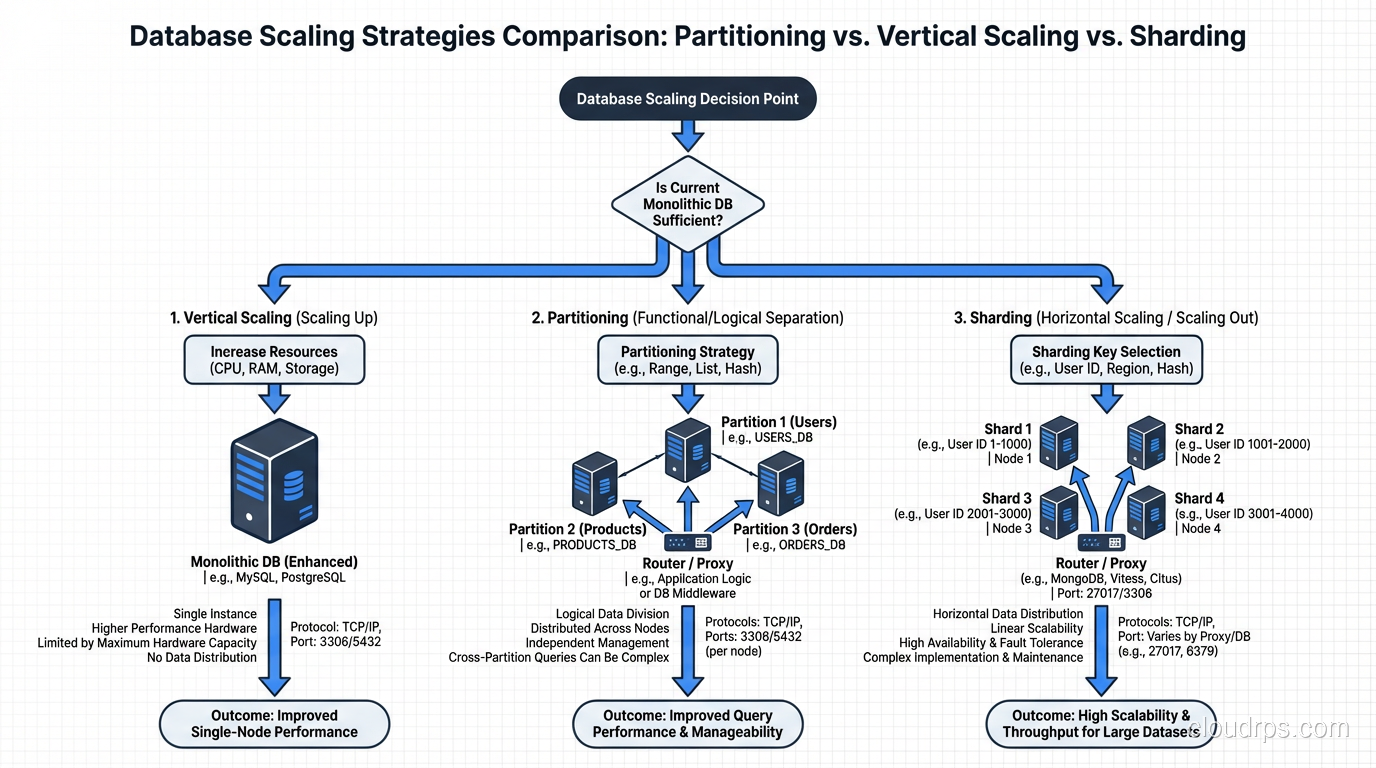
In 2014, I was called in to help a SaaS company whose primary database had grown to 4TB and was grinding their application to a halt. Queries that once took 50 milliseconds were now taking 8 seconds. Their initial instinct was to shard the database across multiple servers, and they had already spent two months designing a sharding scheme. When I looked at the workload, I realized that partitioning (on a single, bigger server) would solve their problem in a fraction of the time, with a fraction of the complexity.
They were not happy to hear that their two months of sharding design was unnecessary. But they were very happy when we had partitioning deployed in three weeks and their query times dropped back to under 100 milliseconds.
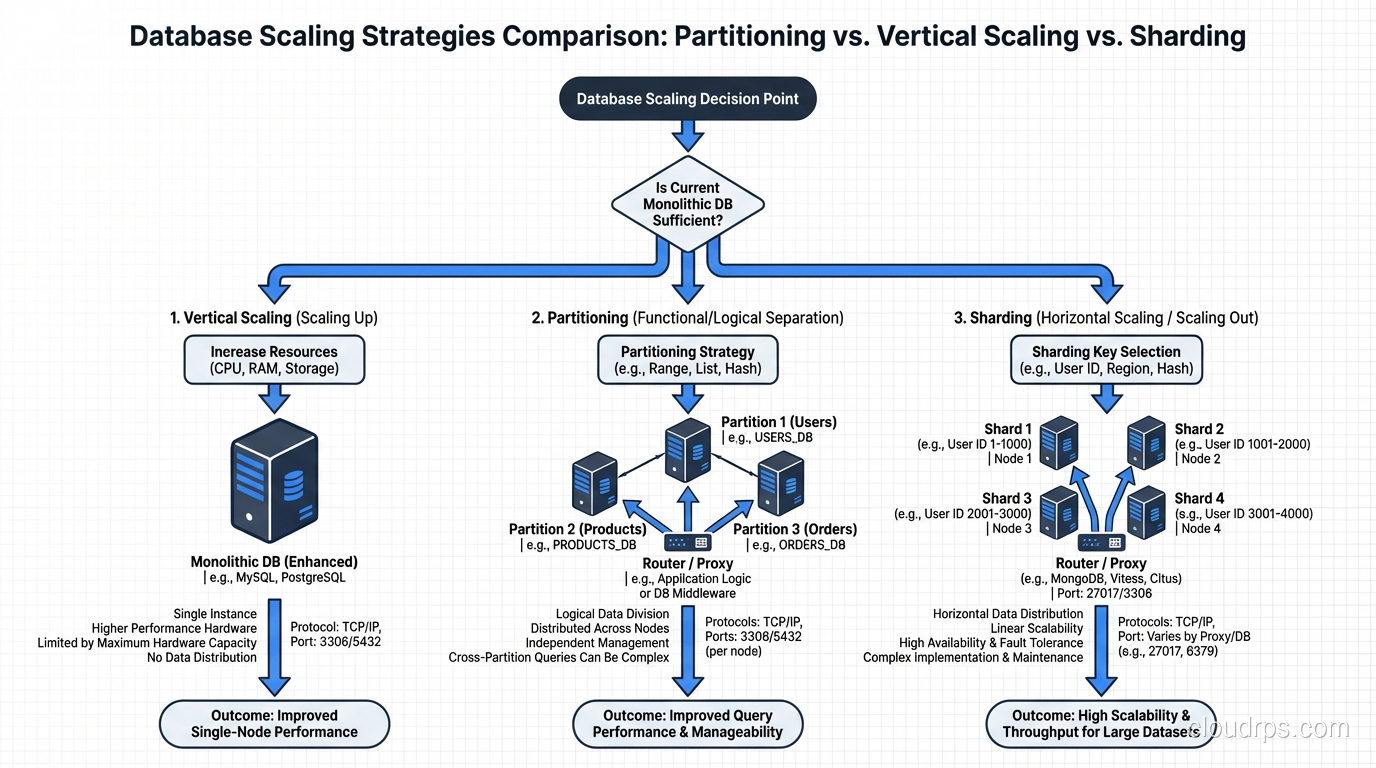
This scenario plays out constantly. Sharding and partitioning solve related but different problems, and confusing them leads to either over-engineering (sharding when partitioning would suffice) or under-engineering (partitioning when you actually need to distribute across machines). Let me untangle these concepts.
Partitioning: Dividing Data Within a Single Database
Partitioning splits a large table into smaller, more manageable pieces called partitions, all within the same database instance on the same server. The database engine manages the partitions transparently. Your application queries the table as if it were one big table, and the database routes queries to the relevant partitions automatically.
How Partitioning Works
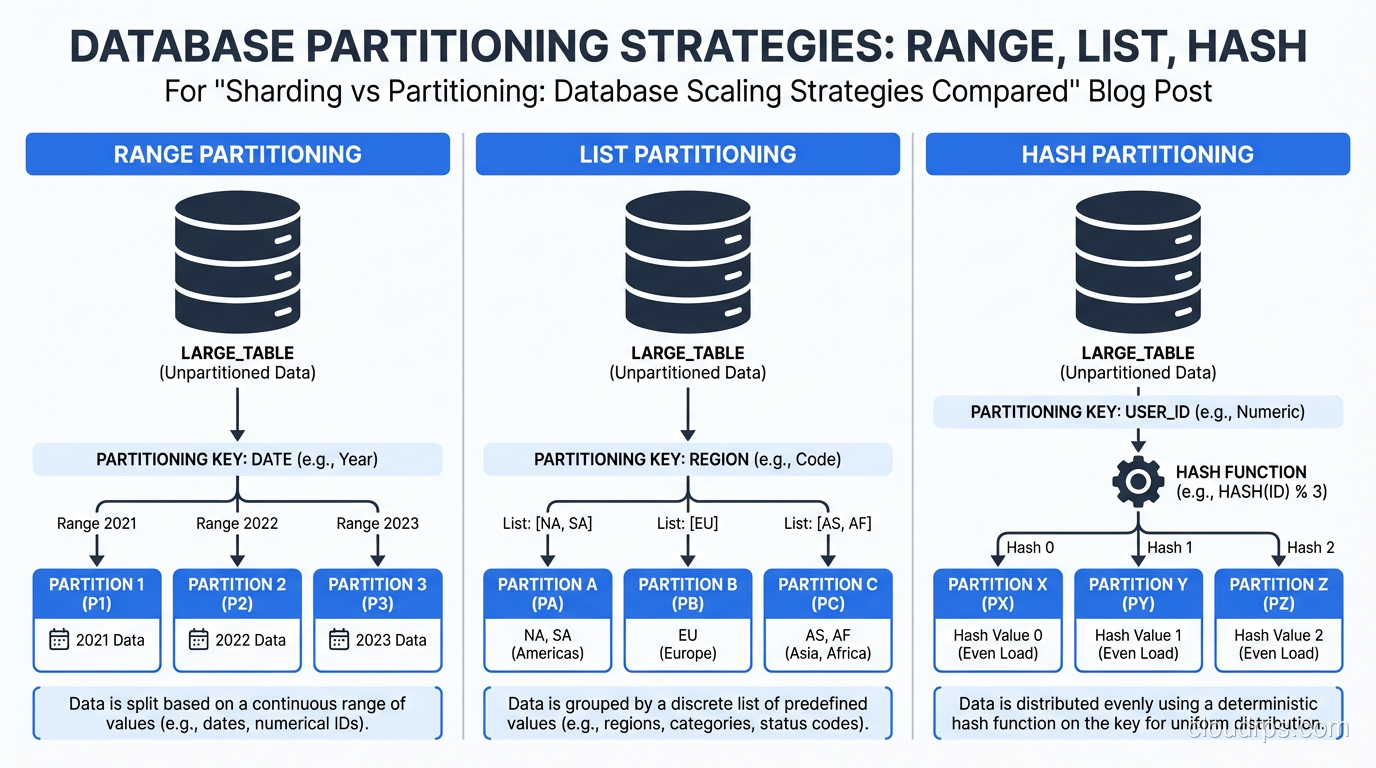
There are three common partitioning strategies:
Range Partitioning divides data based on a continuous range of values. The most common example is partitioning by date (one partition per month, per quarter, or per year). A table of orders partitioned by order_date might have partitions for January 2025, February 2025, March 2025, and so on.
List Partitioning divides data based on discrete values. You might partition a customers table by region: one partition for North America, one for Europe, one for Asia Pacific. Each row goes to the partition that matches its region value.
Hash Partitioning applies a hash function to a column value and distributes rows across partitions based on the hash result. This spreads data evenly across partitions regardless of the actual values, which is useful when there is no natural range or list to partition on.
PostgreSQL, MySQL, and Oracle all support native table partitioning. The implementation details vary, but the concept is the same across all of them.
Why Partitioning Is Powerful
The performance benefit of partitioning comes from partition pruning. When you query a range-partitioned orders table with WHERE order_date BETWEEN '2025-01-01' AND '2025-01-31', the database only scans the January 2025 partition. It does not touch any other partition. If your table has 100 partitions covering eight years of data, you just eliminated 99% of the I/O.
This is exactly what saved that SaaS company I mentioned. Their 4TB table had eight years of data, and almost every query included a date range. Partitioning by month meant that each partition was about 40GB instead of one 4TB monster. Index lookups were faster, sequential scans hit less data, and vacuum operations (in PostgreSQL) ran against individual partitions instead of the entire table.
Partitioning also makes data lifecycle management trivial. Need to drop data older than seven years? Detach and drop the partition. That is a near-instant metadata operation, not a multi-hour DELETE that generates gigabytes of WAL and holds locks. I have saved teams days of downtime by switching from DELETE-based retention to partition-based retention.
Partitioning Limitations
Partitioning does not help with write throughput bottlenecks. All partitions live on the same server, share the same CPU, memory, and I/O bandwidth. If your problem is that a single server cannot handle the write volume, partitioning will not solve it.
Cross-partition queries can also be slower than expected. If your query does not include the partition key in the WHERE clause, the database has to scan all partitions (a partition scan) which can be worse than scanning a single large table due to the overhead of opening and scanning many smaller tables.
Sharding: Distributing Data Across Multiple Servers
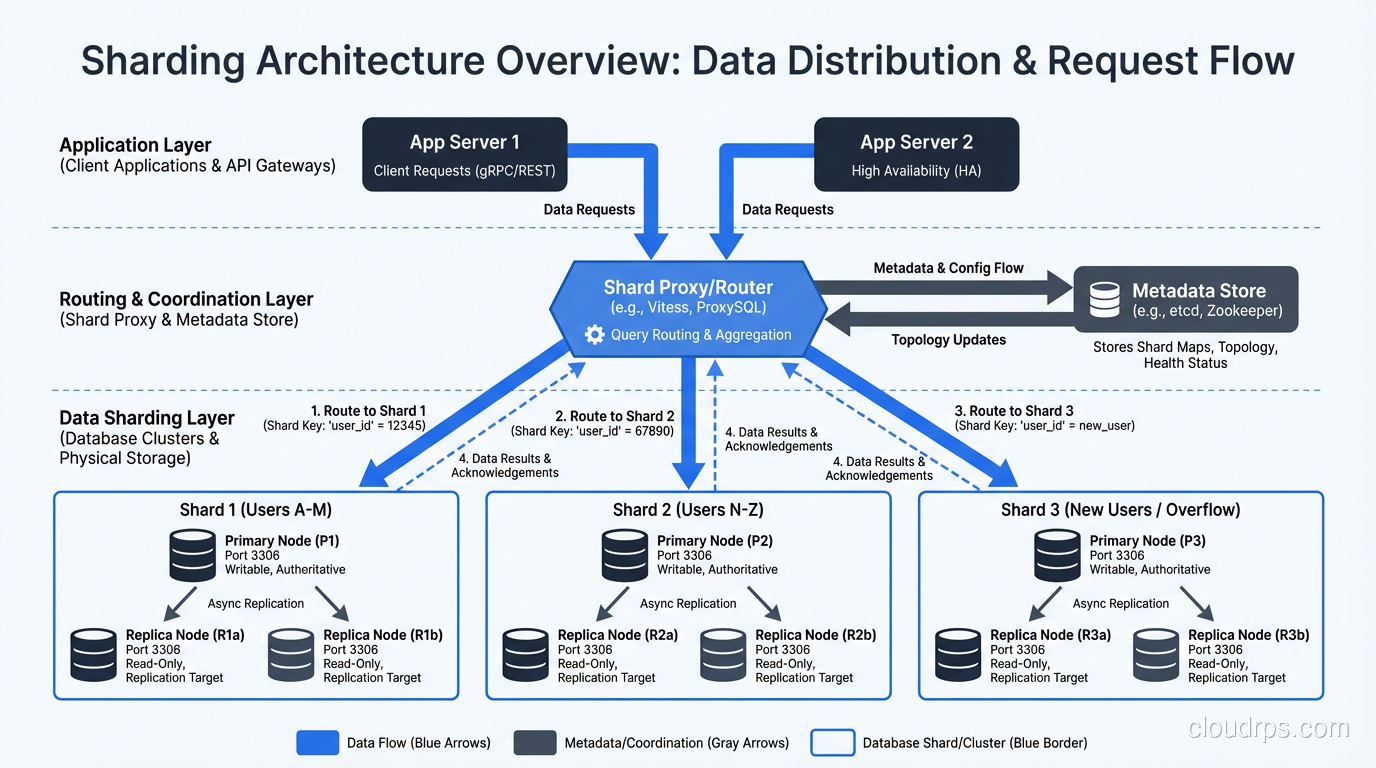
Sharding takes the concept of partitioning and extends it across multiple independent database servers (shards). Each shard holds a subset of the data and runs on its own hardware. Together, the shards contain the complete dataset.
The Fundamental Difference
Partitioning divides data within one database. Sharding divides data across many databases on different machines. This is the critical distinction. Partitioning is a single-server optimization. Sharding is a distributed systems architecture.
When you shard, each server has its own CPU, memory, disk, and network. Write throughput scales linearly with the number of shards. If one server can handle 10,000 writes per second, three servers can handle 30,000 (roughly, assuming the sharding key distributes writes evenly).
Sharding Strategies
The strategies mirror partitioning, but now the routing is across servers instead of within one.
Range-based sharding assigns ranges of a key to specific shards. Users with IDs 1 through 1 million go to shard 1, 1 million through 2 million to shard 2, and so on.
Hash-based sharding applies a hash function to the sharding key and routes the result to a shard. This distributes data more evenly than range-based sharding, avoiding hot spots where one shard has disproportionately more data or traffic.
Directory-based sharding uses a lookup table that maps each key (or key range) to a specific shard. This is the most flexible approach (you can move data between shards by updating the directory) but the directory itself becomes a dependency and potential bottleneck.
The Sharding Tax
Sharding is not free, and I want to be very direct about the costs because I think they are consistently underestimated.
Cross-shard queries are expensive. If you need to join data across shards, you are doing a distributed join, pulling data from multiple servers over the network and combining it in your application or a middleware layer. This is orders of magnitude slower than a local join within a single database. Every SQL query that touches multiple shards becomes a distributed coordination problem.
Transactions across shards are hard. If a single business operation needs to update data on two different shards, you need a distributed transaction (a two-phase commit or equivalent protocol). These are slower, more complex, and more failure-prone than local transactions. Your ACID guarantees get much harder to maintain.
Resharding is painful. When you need to add shards (because your data grew) or rebalance shards (because one got bigger than the others), you have to physically move data between servers while the system is running. This is a complex, risky, and time-consuming operation. I have spent entire weekends supervising resharding operations, and I do not recommend it.
Operational complexity multiplies. Instead of managing one database, you are managing N databases. Backups, monitoring, failover, schema migrations, version upgrades: all of these multiply by the number of shards. Your team needs to be large enough and skilled enough to operate a distributed database fleet.
I have seen teams shard prematurely and spend more engineering time managing the sharding infrastructure than building product features. This is the wrong trade-off for most companies.
When to Partition vs When to Shard
Here is my decision framework, built from two decades of making this exact choice.
Partition When…
Your table is large but your server is not maxed out on CPU, memory, or I/O. Partitioning can dramatically improve query performance by reducing the amount of data scanned, without any of the distributed systems complexity.
Your queries naturally filter on a partition key. Date-based queries against time-series data, region-based queries against geographically organized data, tenant-based queries in a multi-tenant application. These all benefit enormously from partitioning.
You need better data lifecycle management. If you regularly purge old data, partition by time and drop old partitions. It is the single most impactful optimization I have ever deployed for data retention workflows.
Shard When…
A single server genuinely cannot handle the write throughput your application requires. Not “might not handle it someday,” but cannot handle it now, based on measured load, after you have already optimized queries, indexes, and hardware.
Your dataset is too large to fit on a single server, even with the largest available storage. If you need 100TB of hot data and no single server can hold that much with acceptable performance, sharding is the answer.
You need geographic distribution. If regulatory or latency requirements demand that European users’ data lives on European servers and Asian users’ data lives on Asian servers, sharding by geography is the right approach.
The Middle Ground: Vertical Scaling First
Before sharding, I always explore vertical scaling first: upgrading the server hardware. A modern database server with 128 cores, 1TB of RAM, and NVMe storage can handle workloads that would have required sharding five years ago. Hardware got cheaper much faster than the distributed systems engineering required for sharding.
I have personally seen PostgreSQL instances with 10TB of data serving 50,000 transactions per second on a single, well-provisioned server. Many teams that think they need sharding actually need a bigger server and better indexes.
Real-World Sharding Patterns
When sharding is genuinely the right call, here are the patterns I have seen work well.
Application-Level Sharding
Your application code maintains a mapping of which shard holds which data and routes queries accordingly. This is the simplest approach and gives you full control. The downside is that every developer needs to understand the sharding logic, and cross-shard operations require explicit handling in application code.
Most early sharding implementations I have built or worked with used this pattern. It works well when the sharding key aligns cleanly with your access patterns and cross-shard queries are rare.
Middleware Sharding
A proxy layer (like Vitess for MySQL or Citus for PostgreSQL) sits between your application and the database servers. The application sends queries to the proxy, and the proxy routes them to the appropriate shard. Cross-shard queries are handled by the proxy, which pulls data from multiple shards and combines the results.
I have become a big fan of Citus for PostgreSQL sharding. It handles the routing, distributed joins, and distributed transactions with minimal application changes. It is not magic (cross-shard queries are still slower than single-shard queries) but it removes a lot of the manual plumbing.
Built-in Sharding
Some databases, like CockroachDB, TiDB, and YugabyteDB, provide automatic sharding as a core feature. You use them like a single database, and the system handles distributing data across nodes, rebalancing, and routing queries. These systems trade some single-node performance for operational simplicity at scale.
For greenfield projects that anticipate needing horizontal write scaling, these distributed SQL databases are increasingly compelling. For existing applications, migrating to a new database engine is a significant undertaking that needs to be weighed against the alternatives.
Combining Partitioning and Sharding
In practice, well-designed large-scale systems use both. Each shard is itself partitioned. This gives you the distributed write scaling of sharding plus the query performance and data management benefits of partitioning within each shard.
The SaaS company I mentioned at the beginning eventually did need to shard, about three years after we implemented partitioning, when their dataset grew to 30TB and a single server could no longer keep up. By then, each shard was range-partitioned by date, which meant that queries against individual tenants’ recent data hit a small number of partitions on a single shard. The combination was dramatically more effective than either technique alone.
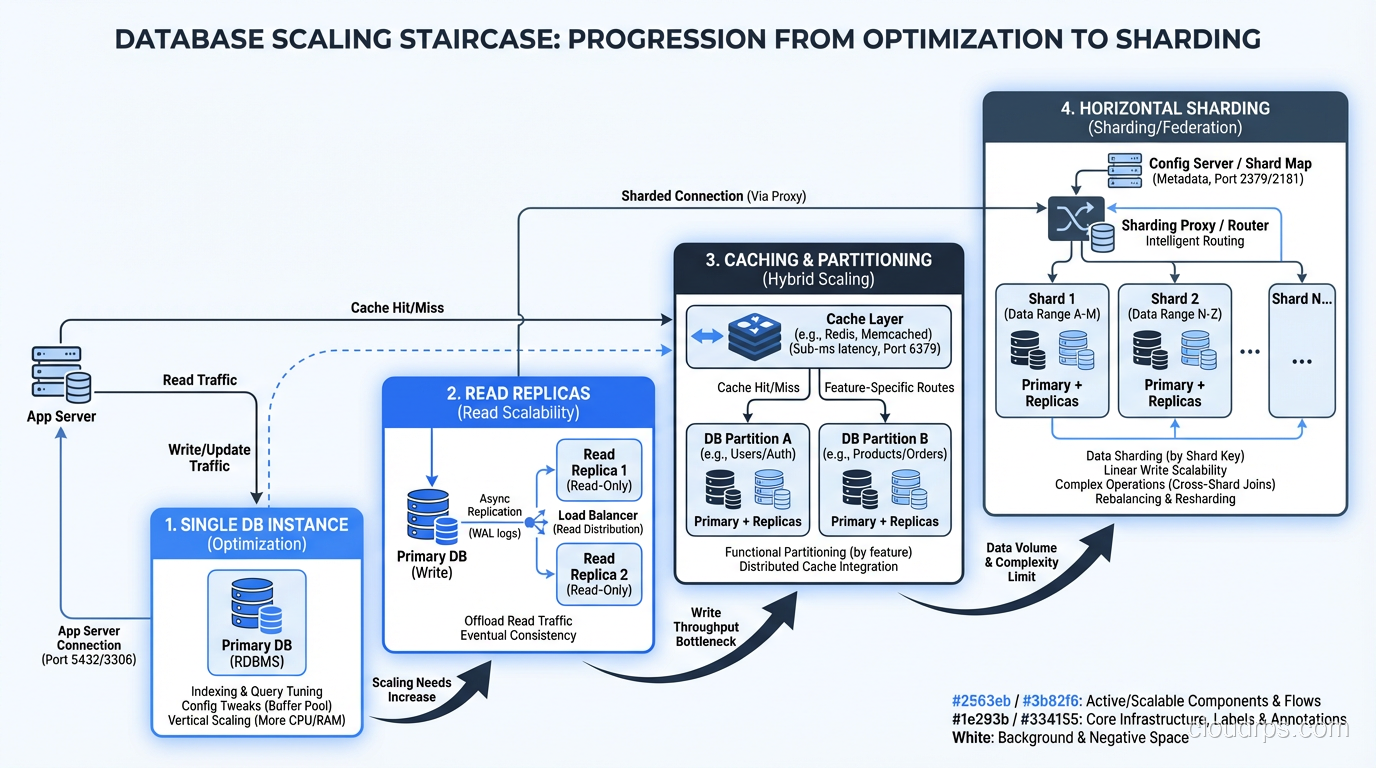
The Scaling Staircase
I think of database scaling as a staircase with increasing complexity at each step:
- Optimize queries and indexes on your existing single server
- Partition large tables to improve query performance and manageability
- Scale vertically: bigger server, more RAM, faster storage
- Add read replicas for read-heavy workloads, as part of a database replication strategy
- Shard when you have exhausted the previous steps
Most applications never get past step 3. Many never get past step 1. If you find yourself reaching for sharding before you have thoroughly worked steps 1 through 4, stop and reconsider. Sharding is the right tool when it is the right tool, but it is never the first tool to reach for.
The team that spends two months designing a sharding scheme when their real problem is missing indexes and unpartitioned tables is not just wasting time; they are adding the wrong complexity to their system. And complexity, once added, is remarkably hard to remove.
Start simple. Measure everything. Escalate to the next step only when you have evidence, not assumptions, that you need it. This approach has served me well for three decades, and I have never regretted following it.
Get Cloud Architecture Insights
Practical deep dives on infrastructure, security, and scaling. No spam, no fluff.
By subscribing, you agree to receive emails. Unsubscribe anytime.