
There is a moment that every cloud engineer experiences exactly once: the moment you terminate an EC2 instance and realize the ephemeral volume containing your database was not backed up. The data is gone. Not recoverable. Not in a recycle bin. Gone.
I had that moment in 2012. It was a development environment, thankfully, but it cost us two weeks of test data and a thorough re-examination of every assumption I held about cloud storage. That experience drove me to understand cloud storage primitives (volumes, snapshots, images, and their relationships) at a level of depth that has saved my teams from disaster more times than I can count.
Volumes and snapshots are the two fundamental building blocks of persistent block storage in every major cloud. Understanding what they are, how they relate to each other, and when to use each one is foundational knowledge for anyone managing data in the cloud.
What a Volume Actually Is
A cloud volume is a virtual block storage device. In AWS, it is an EBS volume. In Azure, it is a Managed Disk. In GCP, it is a Persistent Disk. The specifics differ, but the concept is identical across all three.
When you create a volume, you are allocating a chunk of block storage that behaves like a physical hard drive. Your operating system can format it with a filesystem, mount it, and read/write to it using standard I/O operations. From the perspective of your application, there is no difference between writing to a local disk and writing to a cloud volume.
But the physical reality underneath is very different from a local disk. A cloud volume is typically backed by a distributed storage system. Your data is not sitting on a single drive in a single server. It is replicated across multiple drives in multiple servers within a single availability zone. This replication is invisible to you but provides durability that no single physical drive can match. AWS, for example, claims 99.999% durability for EBS volumes, meaning that in any given year, you lose about one in 100,000 volumes.
The key characteristic that trips people up: a volume is tied to a specific availability zone. You cannot attach an EBS volume in us-east-1a to an instance in us-east-1b. This is a physical constraint: the volume’s data lives on storage infrastructure in that AZ, and the low-latency connection required for block I/O does not work across AZ boundaries.
This is where snapshots become essential.
What a Snapshot Actually Is
A snapshot is a point-in-time copy of a volume’s data, stored as an object in the cloud provider’s durable object storage (S3 in AWS’s case). The first snapshot of a volume copies all the blocks that contain data. Subsequent snapshots are incremental, copying only the blocks that have changed since the last snapshot.
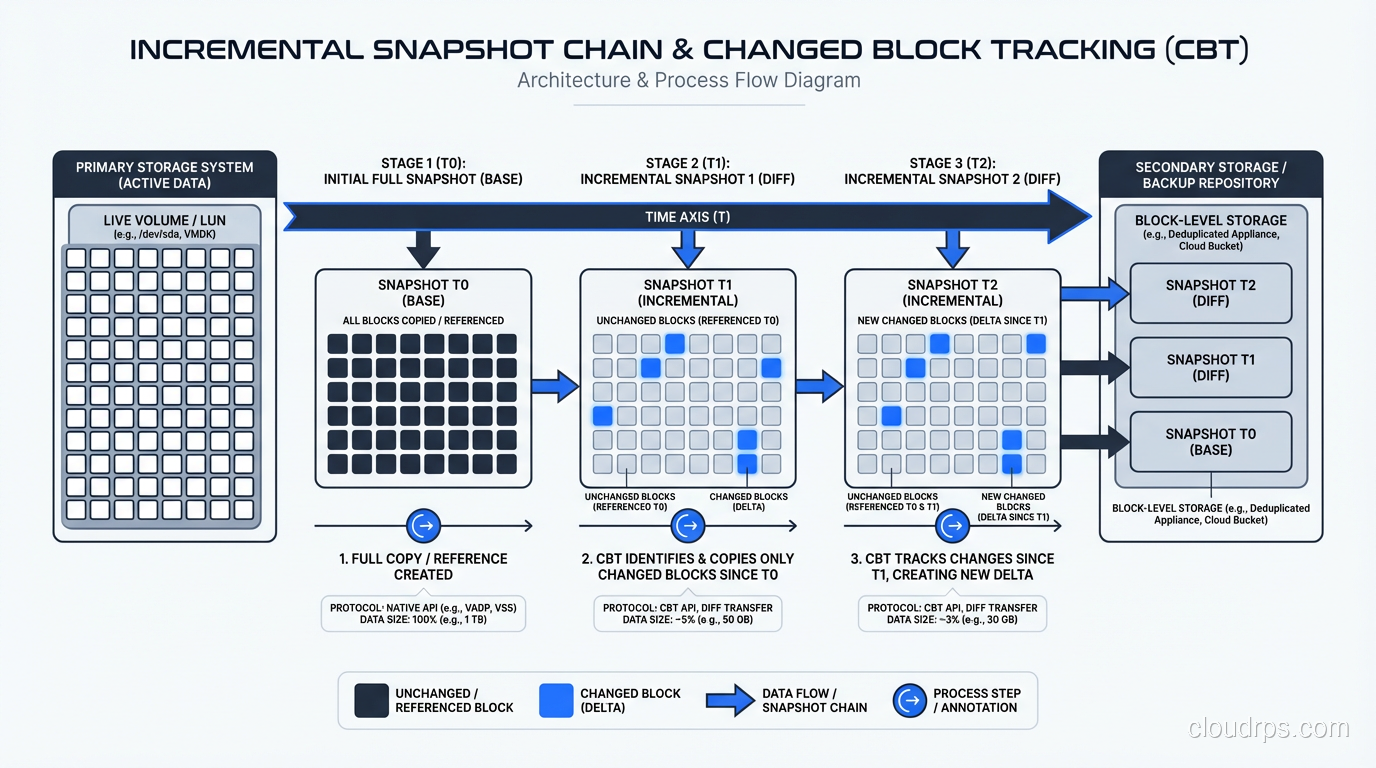
This is a critical distinction to understand. Snapshots are not full copies every time. If you have a 1 TB volume and only 10 GB has changed since the last snapshot, the new snapshot stores approximately 10 GB of data (plus metadata). This makes frequent snapshots surprisingly affordable.
Snapshots are also region-scoped, not AZ-scoped. When you create a snapshot of an EBS volume in us-east-1a, that snapshot can be used to create a new volume in us-east-1b, us-east-1c, or any other AZ in the region. You can also copy snapshots across regions for disaster recovery.
This AZ-vs-region distinction is the single most important thing to understand about the volume/snapshot relationship. Volumes are your active working storage within an AZ. Snapshots are your portable, durable backups that transcend AZ boundaries.
The Relationship Between Volumes and Snapshots
Think of it this way: a volume is a live, mounted, readable and writable block device. A snapshot is a frozen copy of that device’s state at a point in time, stored cheaply in object storage.
You can create a volume from a snapshot (restoring a backup), create a snapshot from a volume (taking a backup), copy snapshots between regions, and share snapshots with other AWS accounts. The snapshot is the currency of data mobility in the cloud.
Here is a pattern I use on every production database deployment:
- Volume attached to the primary database instance, sized for performance and capacity.
- Automated snapshots taken every hour, with a retention policy that keeps hourly snapshots for 24 hours, daily snapshots for 30 days, and weekly snapshots for a year.
- Cross-region snapshot copies for DR, with a separate retention policy.
- Documented runbook for creating a new volume from a snapshot and attaching it to a standby instance.
This gives us point-in-time recovery at one-hour granularity, cross-AZ portability, and cross-region disaster recovery. The cost is modest because snapshots are incremental and stored in S3, which is cheap.
Volume Types and Performance Characteristics
Not all volumes are created equal, and choosing the wrong volume type is one of the most common performance mistakes I see in cloud deployments.
In AWS EBS, the options as of 2025 are:
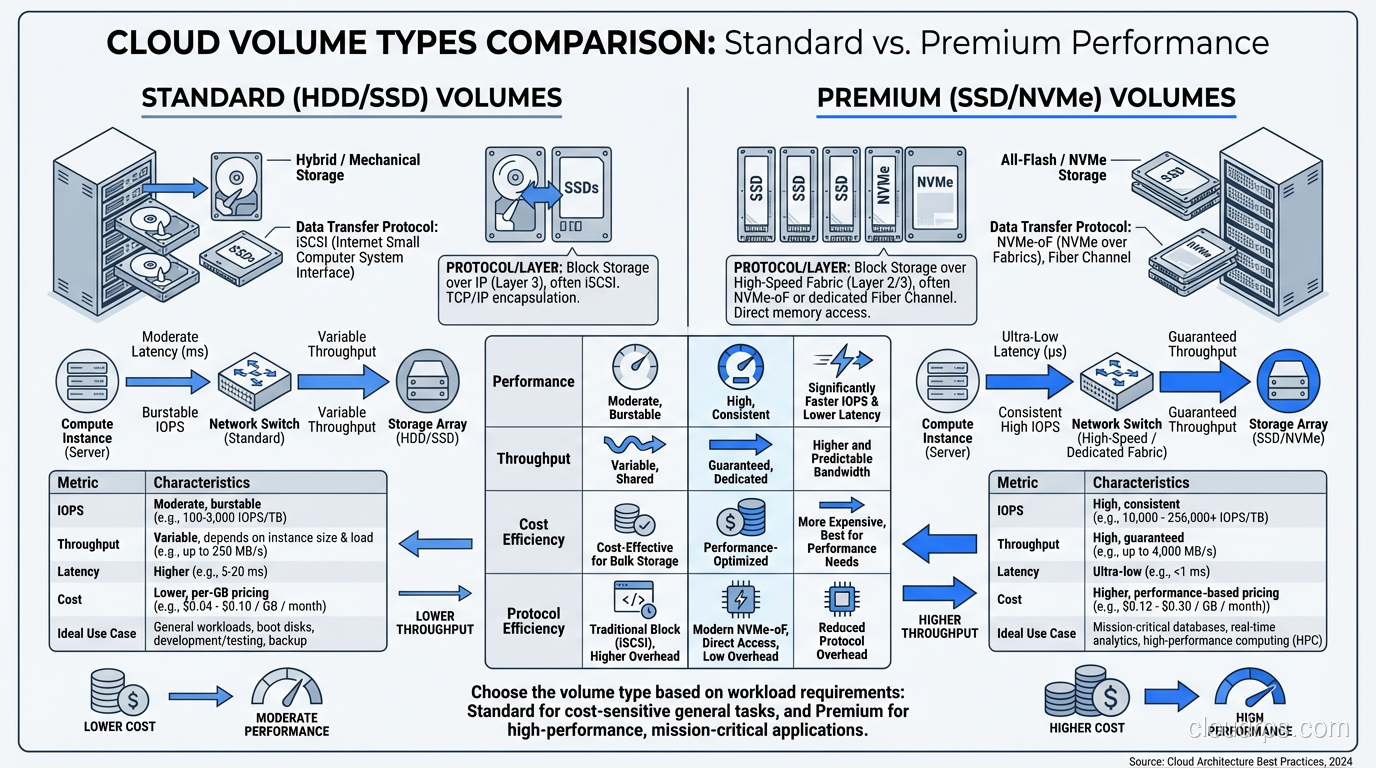
gp3 (General Purpose SSD): The default and the right choice for most workloads. You get a baseline of 3,000 IOPS and 125 MB/s throughput, with the ability to provision up to 16,000 IOPS and 1,000 MB/s independently of volume size. I use gp3 for most database volumes because the cost-per-IOPS is excellent.
io2 Block Express (Provisioned IOPS SSD): For workloads that need guaranteed, consistent I/O performance. Up to 256,000 IOPS and 4,000 MB/s per volume. I use io2 for latency-sensitive production databases where I cannot tolerate any I/O variability. The cost premium is significant, typically 3-5x the cost of gp3 for equivalent capacity.
st1 (Throughput Optimized HDD): For sequential, throughput-heavy workloads. Up to 500 MB/s throughput but low IOPS. Good for Hadoop data nodes, log processing, and large sequential reads. Very cheap per gigabyte.
sc1 (Cold HDD): The cheapest option for infrequently accessed data. Low throughput, low IOPS. I use sc1 for archival storage where data is accessed monthly or less.
For a deeper understanding of how these map to underlying storage technologies, see my post on block vs object vs file storage.
Snapshot Performance: The Lazy Loading Problem
Here is something that bites people who do not know about it: when you create a volume from a snapshot, the data is not immediately present on the volume. It is loaded lazily from S3 as blocks are accessed for the first time. The first read of any block that has not yet been loaded from S3 is dramatically slower than subsequent reads, potentially 5-10x slower.
For a database, this means that restoring from a snapshot and immediately putting the server into production can result in terrible performance for minutes to hours as the database engine reads blocks that have not yet been loaded.
The solution is initialization (formerly called pre-warming). After creating a volume from a snapshot, you read every block on the volume before putting it into production. In Linux, this is as simple as running dd or fio to read the entire device. For a 1 TB volume on an io2 volume with provisioned IOPS, initialization takes 15-30 minutes.
AWS also offers EBS Fast Snapshot Restore (FSR), which pre-initializes volumes created from a snapshot. FSR eliminates the lazy loading latency, but it costs extra and needs to be enabled per snapshot per AZ. I use FSR for production database snapshots where fast recovery time is critical.
Snapshot Consistency: The Silent Danger
Taking a snapshot of a volume while a database is writing to it raises a consistency question that I have seen teams ignore until it causes data loss.
A snapshot captures the state of the volume’s blocks at the moment the snapshot starts. But a database writes data in a specific order (for example, writing WAL records before data pages to maintain crash consistency). If a snapshot captures the data page write but not the preceding WAL write, the snapshot contains an inconsistent state.
For single-volume databases, the cloud providers guarantee that a snapshot is crash-consistent, equivalent to pulling the power cord on a physical server. A well-designed database (PostgreSQL, MySQL with InnoDB, SQL Server) can recover from a crash-consistent state because the WAL ensures data integrity.
For multi-volume databases (where WAL is on one volume and data is on another) you need to use multi-volume snapshots (AWS supports this) or quiesce the database before snapshotting. Otherwise, the snapshots of the two volumes may capture different points in time, and the database cannot recover.
I always put database WAL and data on the same volume in cloud deployments unless there is a specific performance reason to separate them. It simplifies the snapshot story enormously.
Cost Optimization Strategies
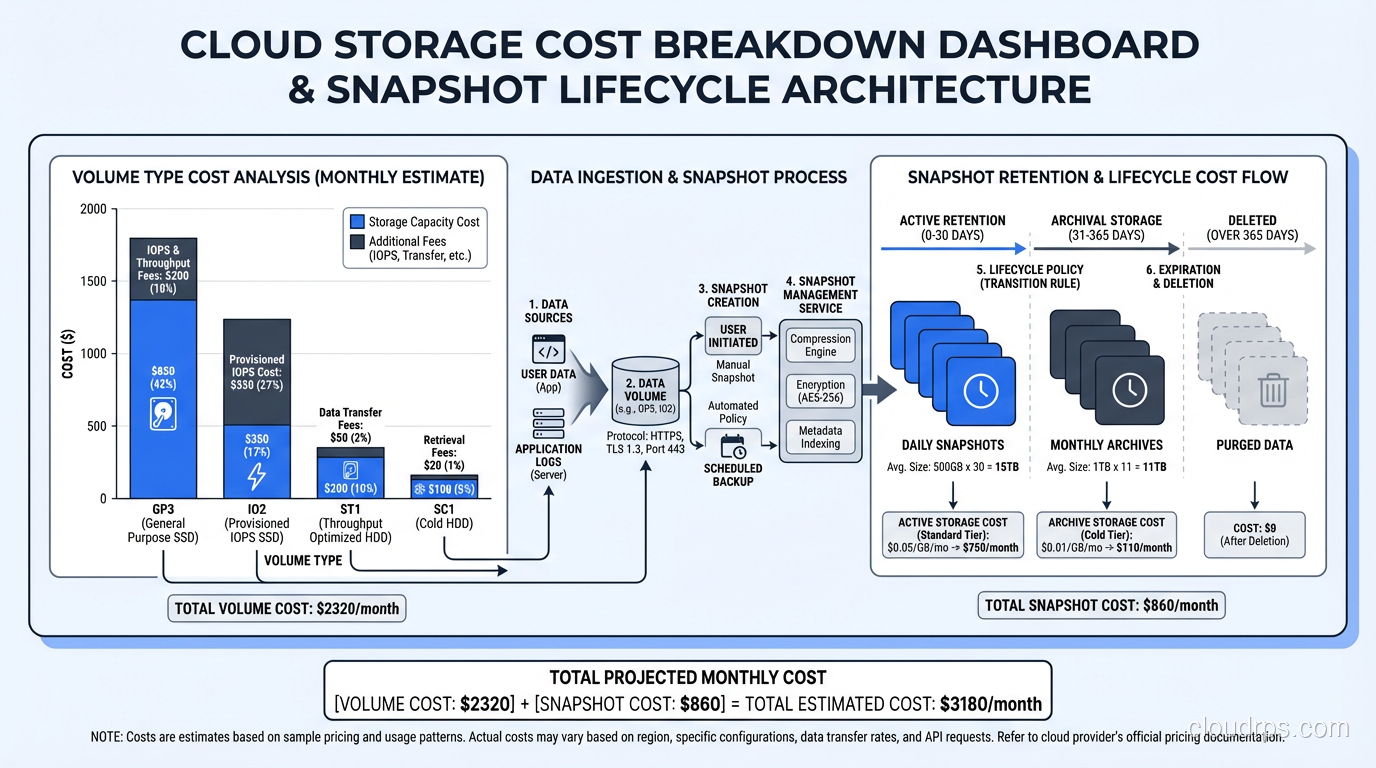
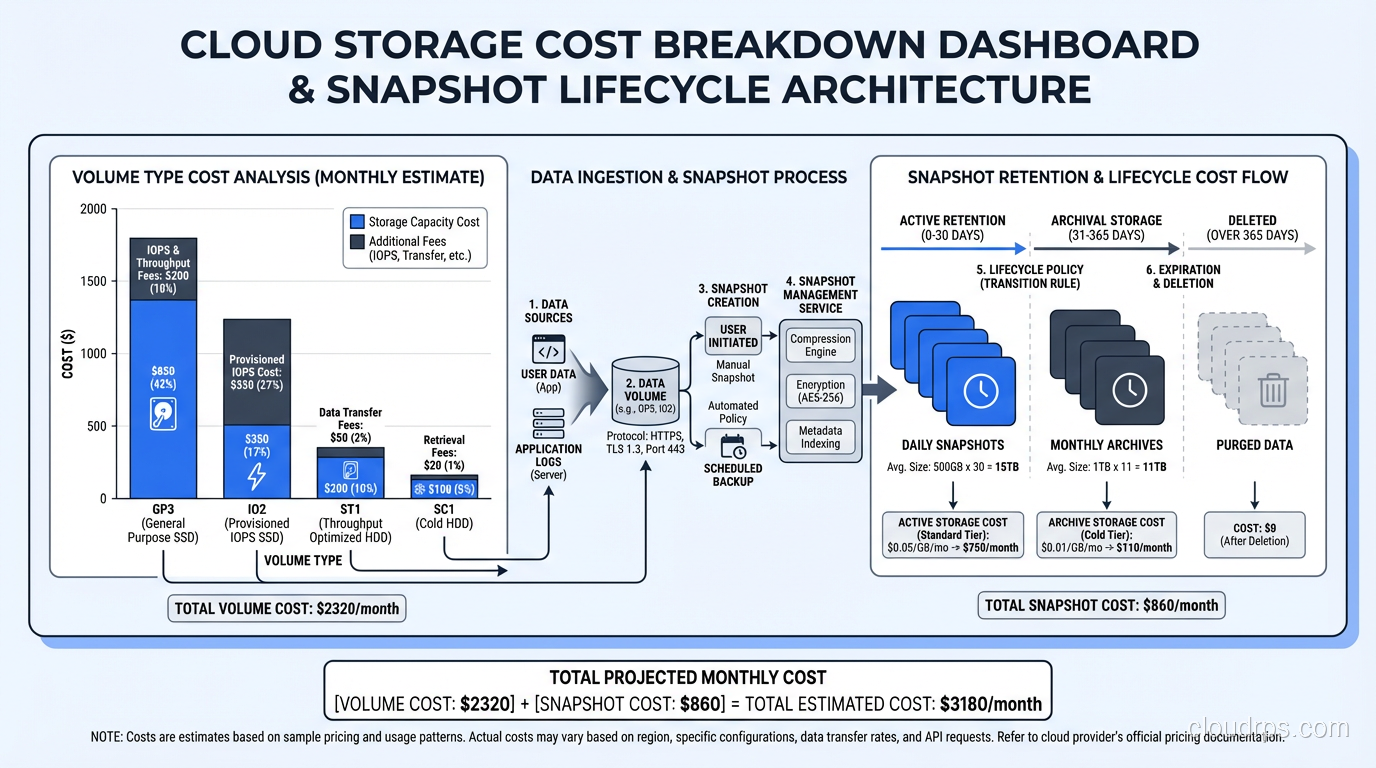
Snapshots and volumes are separate cost items, and managing them badly can get expensive fast.
Volume costs are based on provisioned size and provisioned performance. A 1 TB gp3 volume costs the same whether it is 5% full or 95% full. Right-sizing your volumes matters. I review volume utilization monthly and downsize anything that is consistently below 50% utilization.
Snapshot costs are based on the total amount of stored data across all snapshots, which is less than you might expect because of incremental storage. But snapshots accumulate over time if you do not have a retention policy. I have inherited AWS accounts with thousands of orphaned snapshots costing hundreds of dollars per month.
My cost optimization playbook:
- Tag everything. Volumes and snapshots should have tags indicating the owning service, the environment (prod/staging/dev), and the creation date.
- Automate lifecycle policies. Use AWS Data Lifecycle Manager or equivalent to automatically create and delete snapshots based on a schedule.
- Delete unattached volumes. Volumes that are not attached to any instance are paying for provisioned capacity and doing nothing. I run a weekly audit.
- Review snapshot retention. Do you really need hourly snapshots from six months ago? In most cases, transitioning to daily after a week and weekly after a month is sufficient.
- Use appropriate volume types. I have seen teams running development databases on io2 volumes because the production playbook specified io2. Development workloads almost never need provisioned IOPS.
Disaster Recovery Patterns
Volumes and snapshots are the building blocks for database disaster recovery in the cloud. Here are the patterns I have actually deployed in production.
Pattern 1: Same-Region, Cross-AZ Recovery
The simplest DR pattern. Automated snapshots are taken hourly. If the primary AZ fails, create a new volume from the latest snapshot in a different AZ, attach it to a standby instance, and start the database. Recovery time: 15-30 minutes depending on volume size and initialization.
This is the minimum viable DR for any production database. If you are not doing at least this, you are one AZ failure away from downtime, and AZ failures do happen.
Pattern 2: Cross-Region Recovery
Snapshots are copied to a secondary region on a schedule. If the primary region fails (rare but not impossible), create volumes from the cross-region snapshots and bring up the database in the secondary region. Recovery time: 30-60 minutes.
I use this for workloads where regional outages are in the risk matrix. The cost is the cross-region snapshot copy plus S3 storage in the secondary region, which is typically modest.
Pattern 3: Continuous Replication with Snapshot Backstop
For high-availability requirements where 30-minute recovery time is unacceptable, I combine continuous database replication (streaming replication for PostgreSQL, for example) with snapshot-based backup as a safety net. The replica provides near-instant failover. The snapshots provide point-in-time recovery if both primary and replica are affected (for example, by a data corruption bug that replicates to the standby).
Replication handles the common failure mode (single server failure). Snapshots handle the uncommon failure mode (data corruption, operator error, regional outage). Together, they cover the full spectrum of disaster scenarios.
Volumes vs Object Storage: Know the Boundary
A common source of confusion is when to use block volumes versus object storage (S3, Azure Blob, GCS).
Block volumes are for data that needs to be accessed as a filesystem: databases, application files, operating system storage. They provide low-latency, random-access I/O.
Object storage is for data that is written once and read many times: backups, media files, logs, data lake contents. It provides massive capacity, high durability, and low cost, but higher latency and no filesystem semantics.
Snapshots bridge these two worlds. Your active data lives on a block volume. Your backups live as snapshots in object storage. The cloud provider manages the translation between the two formats.
Practical Tips From Years of Production Experience
Let me close with the operational wisdom that does not make it into documentation.
Always test your restore process. Taking snapshots without ever testing restoration is a false sense of security. I test snapshot restoration quarterly for every production database. The restore works? Great. It does not? Better to find out in a drill than an actual disaster.
Monitor snapshot completion. Snapshots are asynchronous. Creating a snapshot returns immediately, but the actual data copy happens in the background. For large volumes, this can take hours. If you are relying on snapshot timing for RPO guarantees, monitor the actual completion time, not the creation time.
Be careful with encrypted volumes and snapshots. Encrypted snapshots can only be restored in regions where the KMS key is available. If you copy an encrypted snapshot to another region, you need a KMS key in that region. Cross-account snapshot sharing with encrypted snapshots requires explicit KMS key policies. I have seen DR drills fail because the KMS key was not available in the recovery region.
Understand the cost of snapshot deletion. Because snapshots are incremental, deleting a snapshot does not necessarily free up the space you expect. If snapshot B is incremental relative to snapshot A, and you delete snapshot A, the unique blocks from A are rolled into B. You only save storage when you delete snapshots whose unique blocks are not referenced by any other snapshot.
Label your snapshots religiously. At 3 AM during an outage, you need to find the right snapshot fast. “snap-0a1b2c3d4e5f6” tells you nothing. “prod-userdb-hourly-2025-07-10T14:00” tells you everything.
Cloud storage primitives are not glamorous, but they are the foundation of every data protection strategy in the cloud. Get them right, and failures become recoverable incidents. Get them wrong, and failures become catastrophes. I have been on both sides of that line, and I strongly prefer the first.
Get Cloud Architecture Insights
Practical deep dives on infrastructure, security, and scaling. No spam, no fluff.
By subscribing, you agree to receive emails. Unsubscribe anytime.