
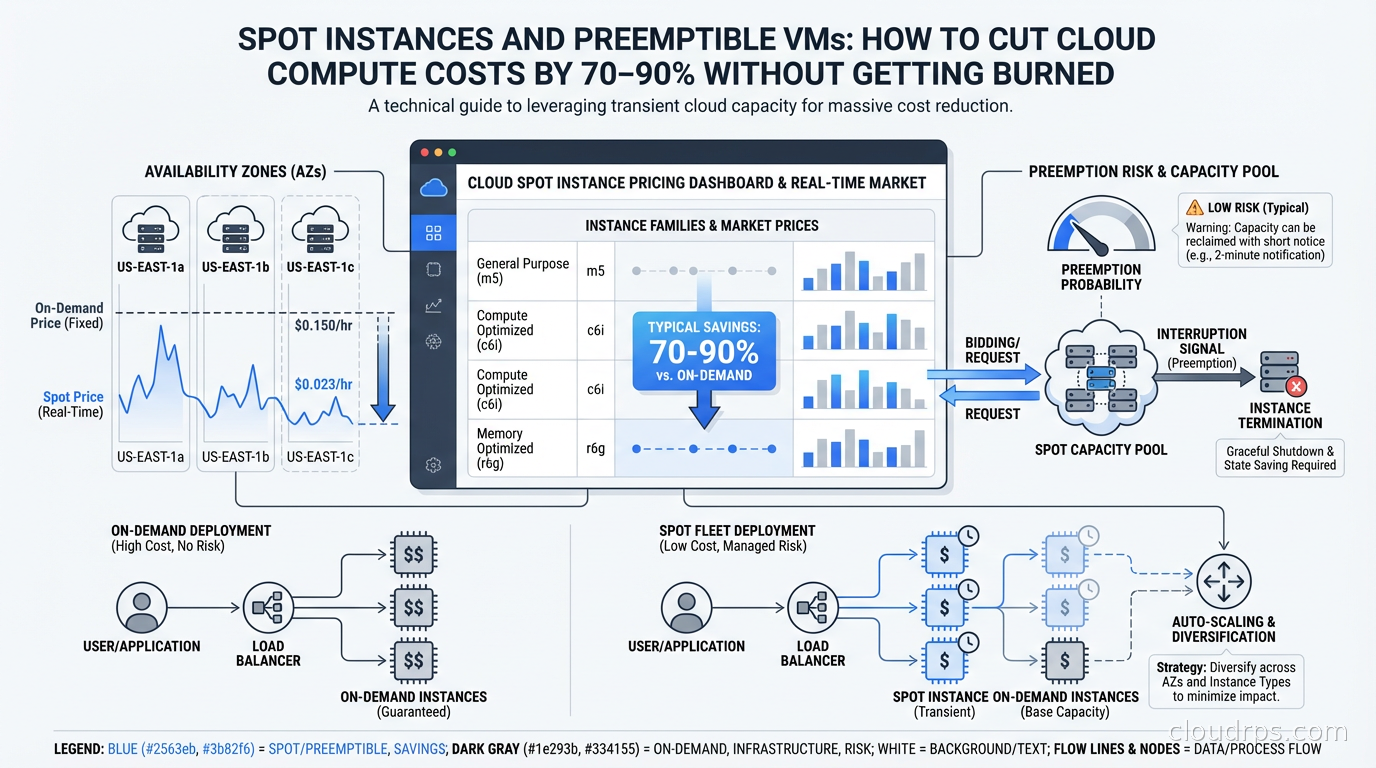
A few years back I was helping a fintech startup cut their AWS bill. They were running a sprawling ETL pipeline on On-Demand m5.xlarge instances 24/7, and the batch job spend ran into the tens of thousands of dollars a month (the figures here are illustrative of the shape of the engagement, not an exact quote from that specific bill). Within six weeks of migrating them to Spot Instances with proper interruption handling, that same workload was costing roughly 80% less. Same results, same throughput, a fraction of the price.
Spot instances are consistently the highest-leverage cost optimization move available in cloud infrastructure. Yet I still run into teams that either avoid them entirely (because someone got burned once and the fear calcified into policy) or use them naively and wonder why production breaks on Friday nights.
Let me give you the full picture: how the spot market works across AWS, GCP, and Azure, which patterns actually protect you from interruptions, which workloads belong on interruptible compute, and which don’t.
What Spot Instances Actually Are
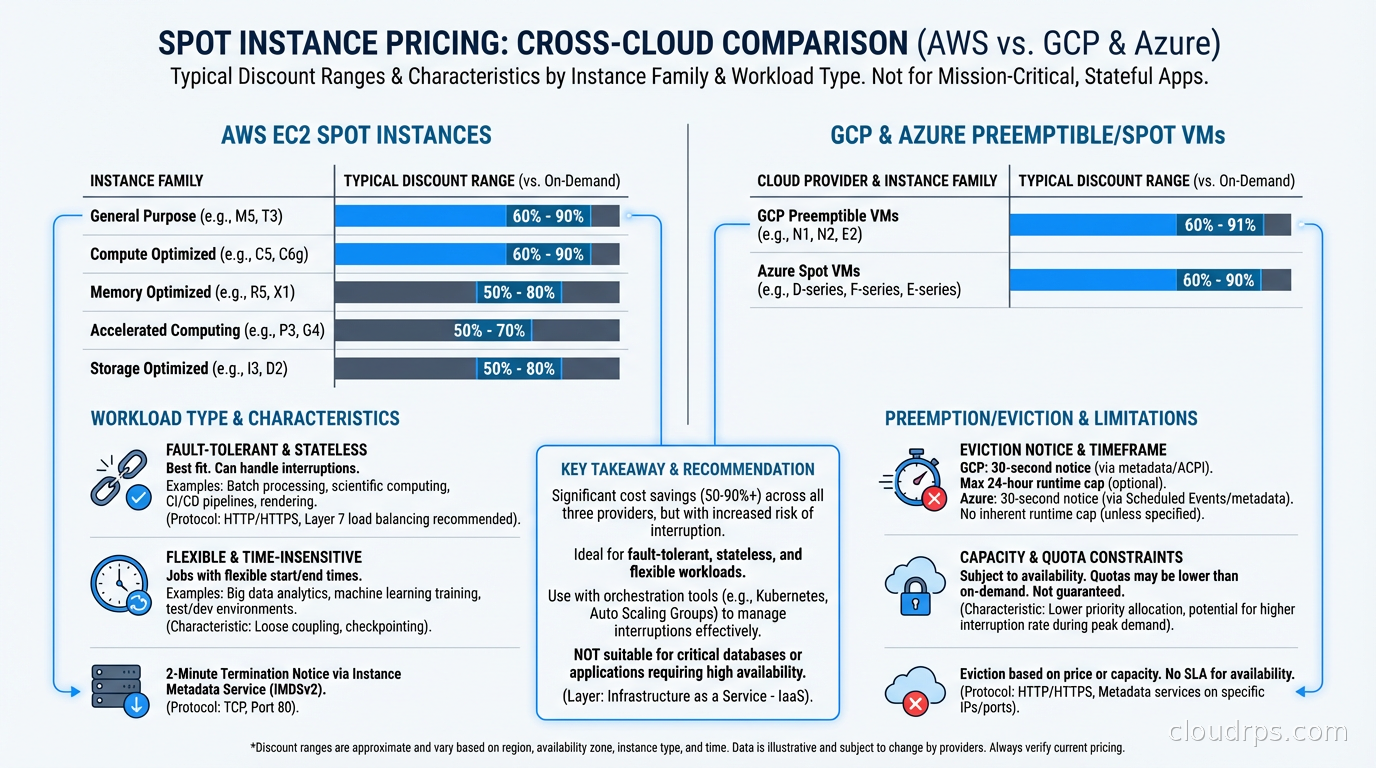
Every cloud provider maintains enormous capacity to handle peak demand. Most of that capacity sits idle most of the time. Spot instances (called preemptible or Spot VMs on GCP and Azure) are the mechanism by which cloud providers monetize that spare capacity at steep discounts, typically 60-90% off On-Demand pricing.
The catch: the cloud provider can reclaim that capacity when they need it back for On-Demand or Reserved customers. You get a short warning (2 minutes on AWS and Azure, 30 seconds on GCP) and then your instance is terminated.
That interruption risk is why spot pricing is so cheap. The market is pricing in the uncertainty. When you design your architecture to handle interruptions gracefully, you capture the discount without paying the reliability penalty.
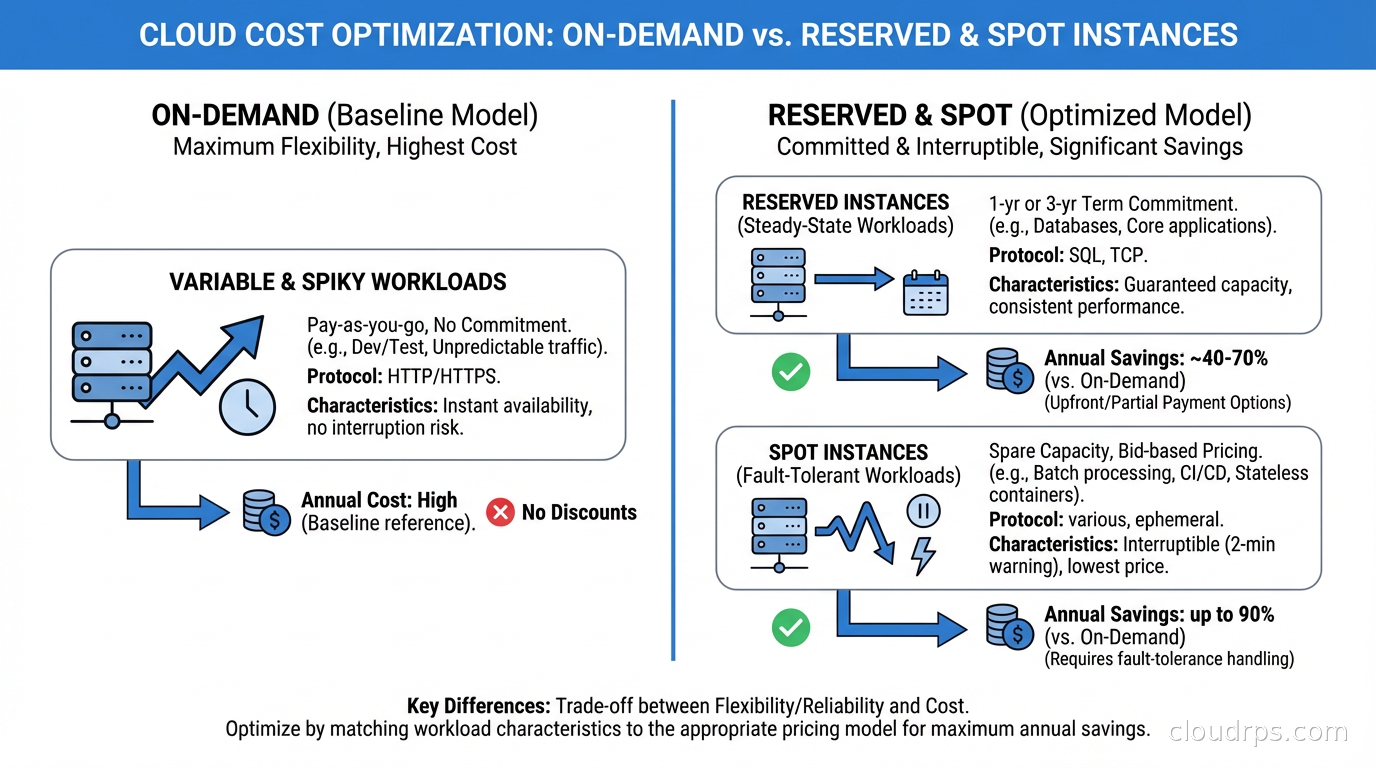
This is fundamentally different from Reserved Instances or Savings Plans, which give you a discount in exchange for a commitment. Spot gives you a deeper discount in exchange for accepting availability risk. Understanding that tradeoff is the whole game. For a complete breakdown of how commitment pricing works across AWS, Azure, and GCP, including how to layer Reserved Instances, Savings Plans, and Committed Use Discounts together, see our guide to cloud commitment pricing.
How Each Cloud’s Spot Market Works
The mechanics differ meaningfully across providers, and those differences shape your architecture choices.
AWS Spot Instances
AWS runs a spot market with instance-type-level pricing per Availability Zone. Each EC2 instance type (say, m5.xlarge) in each AZ has its own spot price, updated continuously based on supply and demand. You can bid at the On-Demand price (which is the default and the sensible choice) and you’ll receive the spot price, which is almost always significantly lower.
When AWS needs capacity back, they issue a two-minute interruption notice via EC2 instance metadata and EventBridge. You have 120 seconds to checkpoint state, drain connections, and shut down gracefully. After that, AWS terminates or stops the instance depending on your interruption behavior configuration.
AWS also offers Spot capacity pools, which represent a specific instance type in a specific AZ. The critical insight: interruption risk varies significantly across pools. Larger, older instance families in less-popular regions have very low interruption rates. Fresh M6i instances in us-east-1a during peak hours? Much higher risk.
GCP Spot VMs
GCP’s Spot VMs (formerly Preemptible VMs, which still exist as a distinct product) work differently. Preemptible VMs have a maximum 24-hour lifetime and can be preempted with only 30 seconds notice. Spot VMs on GCP are the newer product: no maximum lifetime, but still subject to preemption with 30-second notice when Compute Engine needs capacity.
GCP preemption notification comes via a shutdown script triggered 30 seconds before termination. That’s less time than AWS’s two-minute window, which shapes your architecture choices: your shutdown handlers need to be fast.
GCP also guarantees that you won’t be billed for a Spot VM (or its attached Local SSDs) if Compute Engine preempts it within the first 60 seconds of its life. That’s a billing protection, not a guarantee against early preemption: the VM can still be reclaimed in that window, you just won’t pay for the time it ran.
Azure Spot VMs
Azure Spot VMs offer two eviction policies: capacity-based (eviction only when Azure needs capacity) and max-price (eviction if spot price exceeds your specified maximum). For most workloads, capacity-based is the right choice. You want to pay current spot price and only worry about actual capacity pressure, not price volatility.
Azure provides a 30-second eviction notice via a scheduled events endpoint in the Azure Instance Metadata Service. Azure’s spot pricing varies by region and VM series similarly to AWS.
Interruption Rates: The Dirty Secret
Here’s what most blog posts don’t tell you: interruption rates are much lower than people fear.
AWS publishes interruption frequency data that shows most spot pools have interruption rates under 5% per month. Many pools go weeks or months without a single interruption. The pools with high interruption rates tend to be the obvious ones: latest-generation instances in popular sizes in congested regions.
When you run 10 instances in a diversified pool mix, the probability that all 10 get interrupted simultaneously is tiny. This is why instance diversity is the most important spot strategy, and also why naive single-pool spot usage is where people get burned.
GCP preemption rates similarly vary. Older N1 family instances in less-congested regions preempt rarely. Fresh A3 GPU instances during a model training crunch? Different story.
The teams I’ve seen succeed with spot use it at scale, diversify across multiple capacity pools, and build proper interruption handlers. The teams that fail pick one instance type, run it in one AZ, and don’t handle interruptions. Then they conclude “spot doesn’t work” based on a preventable failure mode.
Building for Interruptibility
This is where the real engineering work lives. If you handle interruptions correctly, spot instances become nearly as reliable as On-Demand for the right workloads.
The 2-Minute Handler Pattern (AWS)
On AWS, you monitor the instance metadata endpoint every 5 seconds for a spot interruption notice:
TOKEN=$(curl -s -X PUT "http://169.254.169.254/latest/api/token" \
  -H "X-aws-ec2-metadata-token-ttl-seconds: 21600")

while true; do
  STATUS=$(curl -s -H "X-aws-ec2-metadata-token: $TOKEN" \
    http://169.254.169.254/latest/meta-data/spot/termination-time)
  if [ "$STATUS" != "" ]; then
    # Termination notice received - begin graceful shutdown
    drain_connections
    checkpoint_state
    notify_coordinator
    break
  fi
  sleep 5
done
For containerized workloads, this handler typically lives as a sidecar container or a DaemonSet on the node. On Kubernetes with Karpenter, Karpenter handles the drain coordination for you when it detects an impending spot interruption, which removes most of the operational burden.
Checkpoint Patterns for Batch Jobs
For long-running batch processing, checkpointing is non-negotiable. The pattern: every N processed records (or every T seconds), write a checkpoint to durable storage (S3, GCS, or a database). When a job restarts after interruption, it reads the last checkpoint and resumes from there.
This means your jobs need to be idempotent, at least at the checkpoint boundary level. I’ve seen teams struggle here because their legacy batch code assumed it would always run to completion. Refactoring for checkpointing is real work but pays dividends well beyond spot savings: you also get restart capability for any kind of failure.
Stateless Services and Load Balancing
For stateless web services, interruption handling is simpler. The load balancer deregisters the instance when it gets the interruption notice, in-flight requests complete, and the instance shuts down. New capacity comes up from your Auto Scaling Group or Karpenter. Users see nothing.
The key: your ASG or orchestration layer must be configured to replace interrupted instances quickly. With Karpenter this is nearly immediate. With traditional ASG-based scaling, ensure your scale-out events trigger fast enough that you’re not running degraded capacity for extended periods.
Instance Diversity: The Strategy Nobody Implements Properly
I can’t overstate this. Running spot on a single instance type in a single AZ is like insuring against one specific risk while ignoring everything else. Instance diversity is how you make spot reliable at scale.
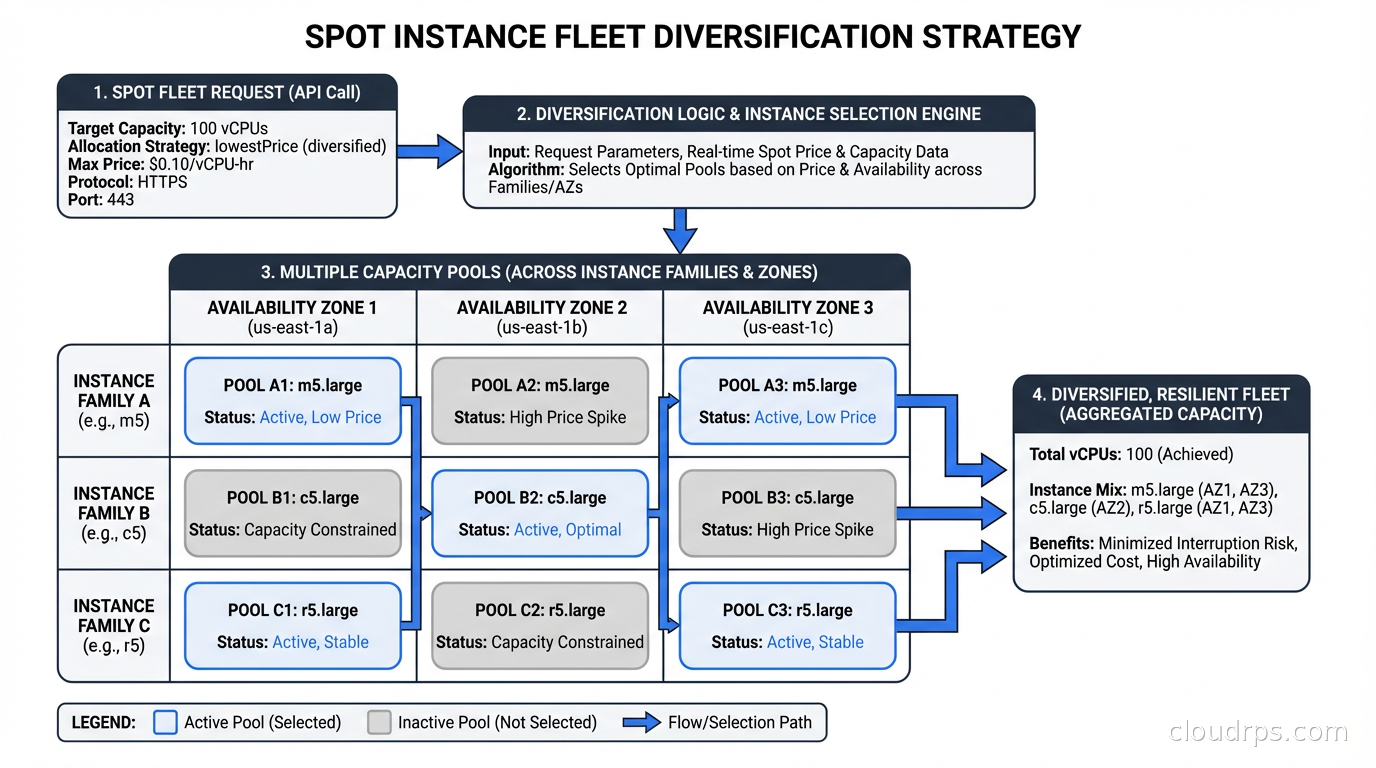
The principle: if any single capacity pool gets reclaimed, you only lose a fraction of your fleet. This works because different instance families rarely experience correlated interruptions, and different AZs have independent capacity pools.
In practice, for a workload needing “32 vCPUs and 128 GB RAM,” acceptable instance types might include:
- m5.8xlarge (32 vCPU / 128 GB)
- m5a.8xlarge (32 vCPU / 128 GB, AMD EPYC)
- m5n.8xlarge (32 vCPU / 128 GB, network-optimized variant)
- m6i.8xlarge (32 vCPU / 128 GB)
- m6a.8xlarge (32 vCPU / 128 GB, AMD)
- m7i.8xlarge (32 vCPU / 128 GB, latest gen)
- r5.4xlarge (16 vCPU / 128 GB, memory-optimized)
That’s seven capacity pools across potentially three AZs, giving you 21 pools total. The probability that all 21 pools experience simultaneous pressure is essentially zero.
For Kubernetes autoscaling workloads, Karpenter handles this beautifully: you specify requirements (CPU, memory, architecture) and it selects from the cheapest available spot pool that matches. It automatically diversifies by default.
AWS Spot in Practice
Spot Fleet
Spot Fleet lets you specify a target capacity and a list of launch specifications (instance types, AZs, weights). AWS fills that capacity from the cheapest available pools. You define a capacity-optimized or price-optimized allocation strategy.
I prefer capacity-optimized in most cases. Price-optimized chases the cheapest pools, which tend to be the most interrupted. Capacity-optimized picks the pools with the most available capacity, which correlates with lower interruption rates. The price difference is usually small and the reliability improvement is meaningful.
EC2 Auto Scaling Groups with Mixed Instances
For most non-Kubernetes workloads, this is my default approach. You configure an ASG with a MixedInstancesPolicy specifying:
- A list of instance type overrides
- A ratio of On-Demand to Spot (e.g., 20% On-Demand baseline, 80% Spot)
- Allocation strategy (capacity-optimized)
The On-Demand baseline provides a floor of reliability. Even if spot gets hammered, you’re running at reduced but nonzero capacity. This is important for services that can’t tolerate a brief total loss of capacity during rebalancing.
Karpenter
If you’re running Kubernetes, Karpenter is the right abstraction. You define NodePools specifying capacity type requirements including spot, and Karpenter selects instance types, launches nodes, handles interruption draining, and replaces terminated nodes automatically. It removes almost all the manual spot management work that traditional node groups require.
GCP Spot VM Patterns
GCP’s Managed Instance Groups (MIGs) support Spot VMs with automatic restart and replacement. You configure the MIG with a spot provisioning model and define an instance redistribution policy.
For batch workloads on GCP, Batch is the managed service worth considering. It natively supports Spot VMs with retry semantics, checkpointing hooks, and job scheduling that accounts for preemption. If you’re running scientific computing, genomics, or large-scale data processing on GCP, Batch with Spot VMs is often the correct architecture rather than managing it yourself.
GKE’s node auto-provisioning and Autopilot mode both support Spot VMs. Similar to Karpenter on AWS, GKE’s autoprovisioner selects Spot capacity when you annotate pods with the appropriate cloud.google.com/gke-spot toleration. The mechanics of taints and tolerations that enable this spot isolation pattern, along with node affinity rules for combining spot and on-demand pools safely, are covered in our guide to Kubernetes pod scheduling and workload isolation.
Workloads That Belong on Spot
The right mental model: a workload belongs on spot if interrupting it is recoverable within your latency and correctness requirements.
Batch processing and ETL: This is the canonical spot use case. If you process records idempotently and checkpoint periodically, interruption is a minor nuisance: the job restarts from checkpoint and finishes. The 70-80% cost savings on large batch workloads is transformational for unit economics.
CI/CD pipeline runners: Build and test jobs are naturally ephemeral and restartable. A failed job just reruns. If you’re running GitHub Actions self-hosted runners, GitLab runners, or Jenkins agents on spot, you can cut that infrastructure cost dramatically. I’ve seen teams run hundreds of concurrent build agents on spot with near-zero issues because CI retries handle the rare interruption transparently.
Machine learning training: Distributed ML training on spot requires checkpointing (saving model checkpoints periodically) but otherwise fits the model well. Frameworks like PyTorch support checkpoint/resume natively. The savings on GPU-heavy training jobs are enormous since GPU compute is expensive and GPU spot discounts can reach 70%.
Stateless web tier with tolerance: If your stateless web service can tolerate brief capacity dips during rebalancing and your load balancer properly drains connections before termination, running part of your web fleet on spot is feasible. I’d recommend the mixed approach: 30-50% On-Demand for baseline reliability, the rest on spot.
Development and test environments: No reason to run dev/test on On-Demand. These environments tolerate interruption, costs matter for environments that run constantly, and the operational discipline of handling interruptions here good practice before you roll it to production.
Workloads That Don’t Belong on Spot
Some workloads are genuinely unsuitable, and forcing them onto spot creates more problems than it solves.
Databases: Databases need to persist state reliably. An interrupted database node mid-write risks corruption, replication lag, or split-brain scenarios. The complexity of safely running primary database nodes on spot isn’t worth the savings. Read replicas are sometimes run on spot with careful configuration, but this is advanced territory. Standard managed databases on On-Demand or Reserved instances is the right default. For the cost math, see what proper database architecture actually requires for reliability.
ZooKeeper, etcd, and consensus systems: These have quorum requirements. Losing nodes unexpectedly during interruptions can break quorum. Keep these on On-Demand.
Real-time latency-sensitive services: If you have P99 latency SLOs in the single-digit milliseconds, spot interruptions and replacement latency will cause SLO violations. On-Demand with proper high availability design is the right approach.
Anything without proper interruption handling: This sounds obvious but I see it constantly. Teams take an existing service, put it on spot to save money, don’t add interruption handling, and then wonder why their metrics degrade unpredictably. Spot without interruption handling is just On-Demand with random failures.
The Cost Math That Actually Matters
Let me give you realistic numbers rather than best-case marketing figures.
A typical m5.xlarge in us-east-1 runs about $0.192/hour On-Demand. Current spot price for the same instance is around $0.035-0.065/hour depending on the pool. That’s 66-82% savings.
For a batch processing fleet running 100 m5.xlarge instances 16 hours per day:
- On-Demand: 100 x $0.192 x 16 x 30 = $9,216/month
- Spot (assuming $0.05/hour average): 100 x $0.050 x 16 x 30 = $2,400/month
- Monthly savings: $6,816 (74%)
Add GPU workloads to the mix and the numbers get even more dramatic. AWS has been retiring the older P3 family (V100-based) in favor of newer generations; a current instance like the p5.48xlarge (8x H100) runs on the order of $98/hour On-Demand as of mid-2026. GPU Spot pricing typically undercuts On-Demand by a wide margin, though GPU Spot capacity is scarcer and more volatile than general-purpose compute, so actual discounts vary by region and time. If you’re running a training cluster for a week, the difference between On-Demand and Spot can still run into tens of thousands of dollars.
This is why FinOps teams obsess over spot adoption rates. Even moderate spot adoption across batch and CI workloads can move the needle on cloud bills significantly.
Pitfalls I’ve Seen Teams Hit
Running without instance type diversity: The most common mistake. Single instance type, single AZ, gets hammered during a capacity crunch. The team experiences a production incident, blames spot, moves everything back to On-Demand. Solution: always diversify across at least 5-7 instance types and 2-3 AZs.
Not testing interruption handling: Teams write interruption handlers but never inject artificial interruptions to verify they work. AWS provides a tool (aws ec2-instance-connect send-ssh-public-key isn’t it, but ec2 spot-instance-interruption simulation via the fault injection service) to test this. Use it regularly. I’ve seen teams discover their shutdown handlers have a bug only when actual interruptions happen in production.
Depending on spot for stateful services without acknowledgment: A team runs Redis on spot to save money. Redis gets interrupted, 45 seconds of cache miss storm, database takes the hit, cascading failure. The spot savings on that one Redis node were trivial next to the incident cost once you tally engineering time and customer SLA credits. This is disaster recovery planning 101: identify your failure modes before they identify you.
Ignoring the On-Demand fallback: Always maintain an On-Demand baseline. If spot capacity dries up temporarily (it can happen during AWS regional capacity crunches), your fleet should degrade gracefully to a reduced but functional On-Demand state, not fall over entirely.
Chasing spot in the wrong regions: Spot prices vary enormously by region. Engineers sometimes try to run workloads in us-east-1 where spot competition is fierce, instead of considering us-east-2 or eu-west-1 where the same instance types are cheaper and less contested. If your workload has no strict data residency requirements, regional flexibility is a significant lever.
When Cloud Repatriation Beats Spot Optimization
It’s worth acknowledging that for very large, steady-state compute workloads, spot optimization doesn’t solve the fundamental problem that cloud on-demand pricing may be structurally expensive compared to bare metal or colocation. The cloud repatriation argument isn’t without merit for specific workloads.
Spot gets you 70-90% off On-Demand. But 70% off a price that’s 4x what dedicated hardware costs is still 1.2x dedicated hardware. For batch processing at scale with a 3-year horizon, the math sometimes favors owned or colocated hardware with Graviton-class efficiency.
The answer isn’t usually all-cloud or all-colo. It’s workload-specific: use spot for elastic, bursty batch capacity; use Reserved or Savings Plans for steady baseline; consider dedicated hardware for true baseline commodity compute with predictable demand.
Putting It All Together
The teams winning at spot are the ones who treat it as an architectural concern, not a billing optimization. They:
Build interruption handlers before deploying to spot, and test them regularly with simulated interruptions.
Diversify across at least 5 instance types and 3 AZs from day one. Let Karpenter or Spot Fleet handle pool selection rather than hardcoding a single type.
Checkpoint everything that’s expensive to recompute. This discipline pays dividends beyond spot: it also makes your jobs resumable after any kind of failure.
Maintain an On-Demand baseline (20-30% of target capacity) so interruption events don’t take you to zero.
Measure actual interruption rates for their specific workload and pools rather than assuming worst-case. Most teams find interruption rates well below their fears.
Start with low-stakes workloads (CI runners, dev environments, batch jobs) before moving production traffic to spot.
The engineers who tell me “we tried spot, it doesn’t work” have almost always tried it without instance diversity and without interruption handling. The engineers running 80% of their compute on spot with zero incidents have done the architectural work upfront.
Spot instances aren’t magic. They’re a tool that rewards understanding how cloud capacity markets work and designing your systems to be resumable. Get that right, and you’re leaving real money on the table by not using them.
Updated September 1, 2026: corrected GCP’s preemption billing guarantee, replaced the retiring P3 GPU instance example, and softened illustrative dollar figures throughout.
Get Cloud Architecture Insights
Practical deep dives on infrastructure, security, and scaling. No spam, no fluff.
By subscribing, you agree to receive emails. Unsubscribe anytime.