
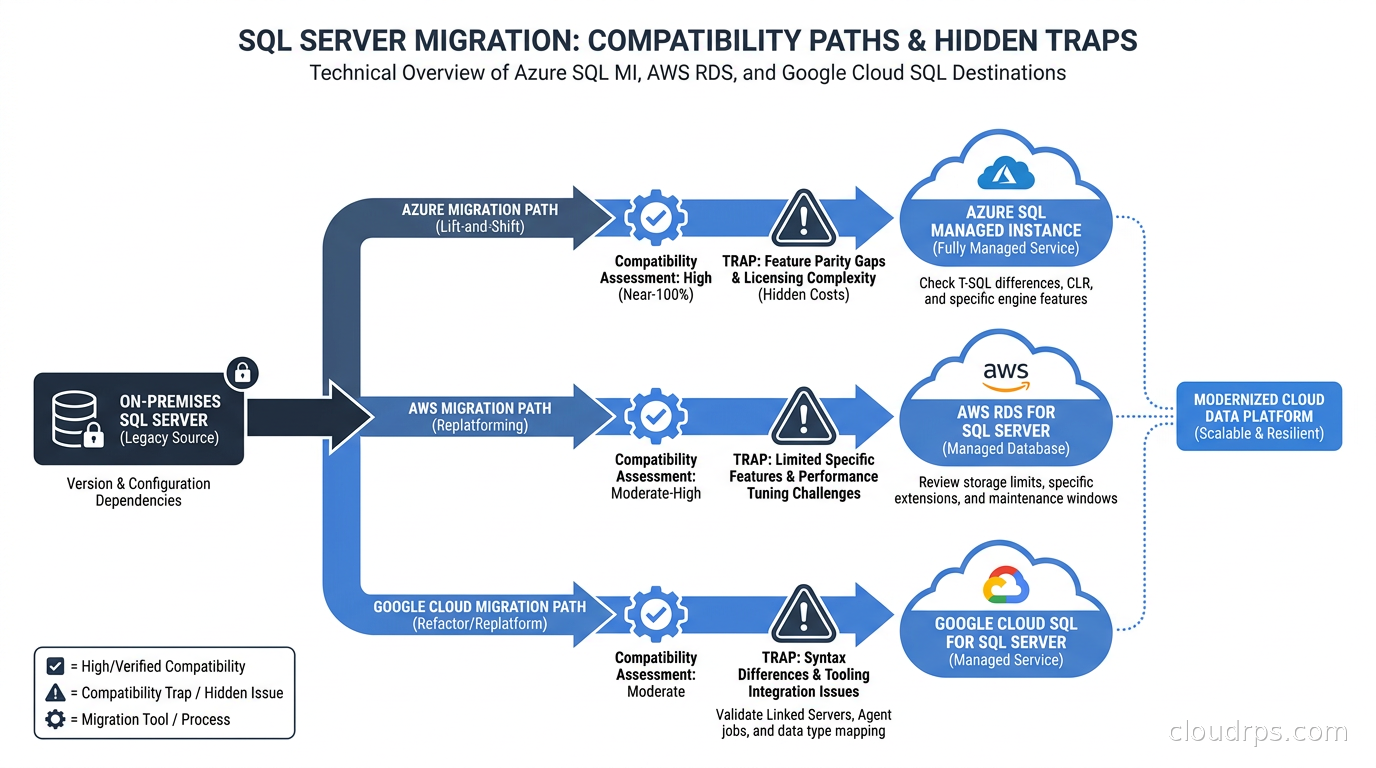
I spent the better part of a year on a migration that should have taken three months. A financial services company wanted to move their on-premises SQL Server estate to the cloud, and they assumed it would work the same way their Oracle-to-PostgreSQL project had. It did not. SQL Server migrations are different in ways that bite you if you do not prepare for them, because you are often staying on SQL Server but moving to a managed service that looks identical until it quietly is not.
Twenty years of working with enterprise databases taught me that the choice between cloud targets matters more for SQL Server than for almost any other workload. Picking the wrong tier costs you months of rework. This guide covers what that choice actually means in practice, which features break at which tier, and how to plan a cutover you can actually execute.
Why SQL Server Migrations Are Structurally Different
When you migrate Oracle to PostgreSQL, you know going in that you are crossing an engine boundary. You expect SQL to need rewriting, that PL/SQL packages will need conversion, that your DBA has a real project ahead. The scope is obvious.
SQL Server migrations are deceptive. You are often staying on SQL Server. You still have T-SQL, still have stored procedures, still have the same syntax. The mental model says: back up, restore, done. The reality is that managed cloud SQL Server services are not identical to the engine you run on bare metal or on a VM. Every managed tier strips something. The question is which things, and whether your workload cares.
The Target Landscape
Before you assess compatibility, you need to know what you are choosing between.
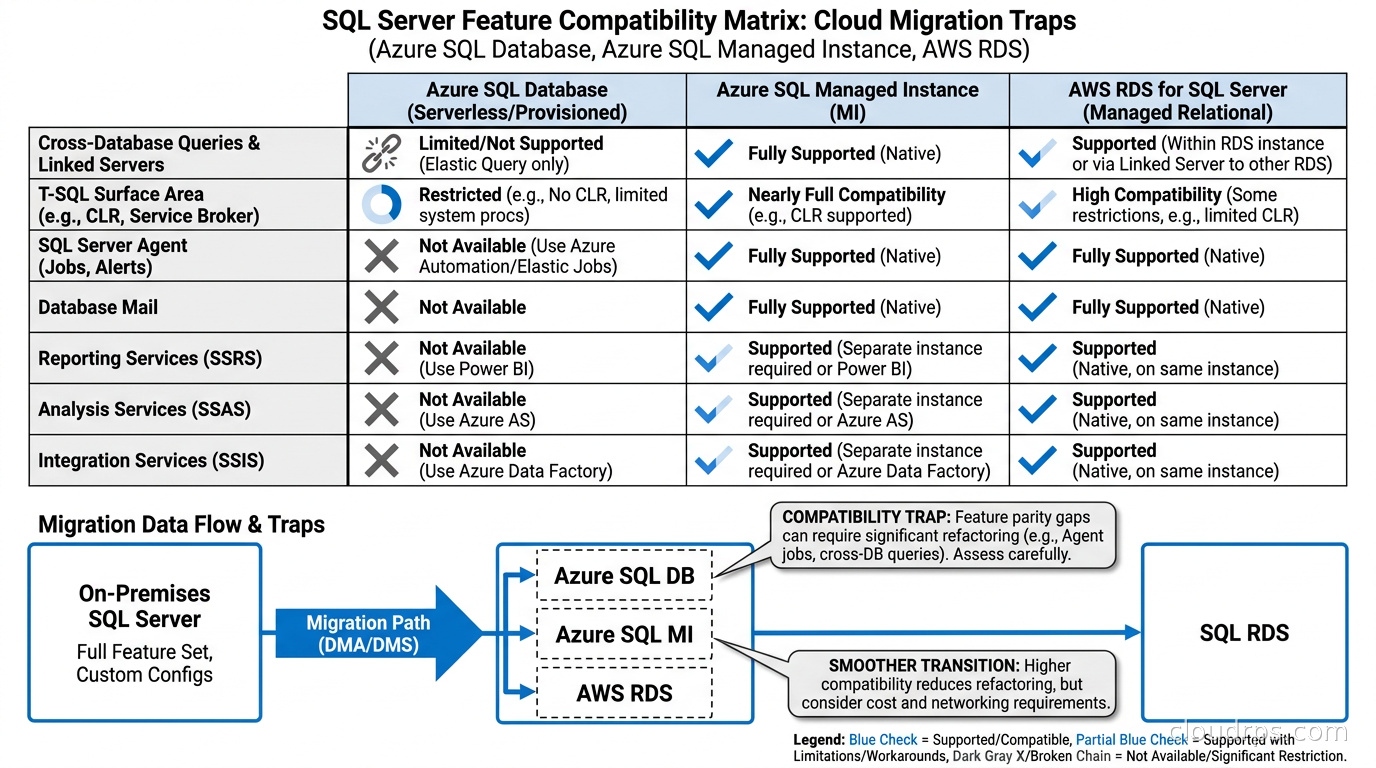
Azure SQL Database is the most managed option from Microsoft. It is a single-database PaaS offering where Microsoft owns the entire server layer. You get automatic patching, automatic backups, automatic high availability in the Business Critical tier. The compatibility level goes up to SQL Server 2022 syntax as of mid-2026. What you give up is the server-level scope: no SQL Server Agent (you use elastic jobs instead), no cross-database queries across instances, no CLR assemblies by default, no linked servers to arbitrary sources, and no native backup and restore to local files.
Azure SQL Managed Instance is Microsoft’s answer to the “we need near-100% compatibility” problem. It is also PaaS, but scoped to an instance rather than a single database. You get SQL Server Agent, cross-database queries within the same instance, CLR, DTC for distributed transactions, and native backup to Azure Blob Storage. As of mid-2026, Microsoft has been steadily reducing the gap between Managed Instance and on-premises SQL Server. It still does not support all features, but the list of gaps is much shorter. Active geo-replication is handled differently than in Azure SQL Database, so check the current Microsoft Learn documentation on replication options before assuming parity.
SQL Server on Azure Virtual Machines is IaaS. You manage the OS, the SQL Server instance, the HA configuration via Always On or FCI, and the patching cycle. The trade-off is full control at the cost of operational overhead. Azure offers built-in integration for backup and patching via the SQL IaaS Extension, but you are still in the VM management business.
Amazon RDS for SQL Server is AWS’s managed offering, supporting Standard, Enterprise, and Developer editions. In June 2026, AWS launched Bring Your Own Media (BYOM) for RDS SQL Server, which lets organizations with Microsoft Software Assurance License Mobility rights reuse existing SQL Server licenses on RDS rather than paying for a new license bundled into the RDS hourly rate. RDS handles OS patching and automated backups but does not expose OS-level access, does not support cross-instance linked servers in the traditional sense, and has its own constraints on what you can restore.
SQL Server on Amazon EC2 gives you the same full control story as Azure VMs: you own the stack, you configure Always On Availability Groups manually, you do your own patching. Some workloads genuinely need this level of control. Most do not.
Google Cloud SQL for SQL Server is Google’s managed offering. It runs SQL Server 2019 and 2022 editions as of late 2026. It is a solid choice if your organization is already deep in Google Cloud and wants to avoid a multi-cloud data plane, but the feature surface is smaller than Azure SQL MI, and the operational tooling ecosystem around SQL Server on GCP is thinner. For a migration targeting Google Cloud, I would still evaluate it seriously, but with clear eyes about the support community depth.
The Compatibility Assessment You Cannot Skip
Every SQL Server migration starts with an assessment. The question is not “will this work” in a generic sense but “what specific features does my workload use that are not available in my target tier.”
Microsoft’s Database Migration Assistant (DMA) has historically been the tool for this. As of September 2026, Microsoft has made the SQL Migration Agent Skills generally available, which adds AI-powered assessment capabilities. I have not done a deep production evaluation of the new tooling, so I will not tell you it is better. What I will tell you is that any automated assessment tool is a starting point, not a conclusion. The tool tells you what features you call in your T-SQL. It does not tell you which of those features you actually depend on for correctness versus which ones were left in the codebase from five years ago and could be cut.
The categories that routinely cause problems:
SQL Server Agent jobs. Every shop has them. Azure SQL Database does not support them natively. If you have a hundred Agent jobs doing maintenance, ETL loading, and reporting, and you target Azure SQL Database, you are rewriting all of them to use Elastic Jobs or another scheduler. Azure SQL Managed Instance supports Agent natively. This single requirement drives many teams toward Managed Instance even when the cost is higher.
Linked servers. T-SQL code that calls across instances via linked servers is common in older estates. Azure SQL Managed Instance can configure linked server connections to Azure SQL Managed Instance and to SQL Server on VMs within the same VNet. What it cannot do is talk to arbitrary on-premises instances the same way your old on-premises linked server network did. RDS for SQL Server has similar constraints. If your workload relies heavily on cross-instance joins, you need to be honest about whether you are migrating a database or migrating an integration architecture.
CLR assemblies. Some shops use CLR to call .NET code from T-SQL. Azure SQL Database supports CLR in a restricted mode. Azure SQL Managed Instance supports CLR more broadly. Either way, test your assemblies explicitly.
SQL Server Service Broker. Azure SQL Database does not support cross-database or cross-instance Service Broker. Azure SQL Managed Instance does support it within the instance. On RDS for SQL Server, Service Broker endpoints created with CREATE ENDPOINT are not supported, which limits cross-instance Service Broker usage. Whether in-database Service Broker queues and conversations work within a single RDS instance is less clearly documented; verify against the current AWS RDS SQL Server feature non-support page before depending on it. If your workload uses Service Broker for cross-database or cross-instance messaging, treat RDS as a question mark requiring explicit testing, not a confirmed supported target.
Distributed transactions with MSDTC. If your application uses DTC to span a SQL Server transaction across other resource managers, Azure SQL Managed Instance supports DTC natively. Azure SQL Database uses elastic transactions instead, which have different semantics. RDS for SQL Server does support MSDTC starting with SQL Server 2016 Enterprise and Standard editions, but with constraints: you need domain-joined instances (through AWS Managed Microsoft AD), and distributed transactions that rely on client-side DLLs or custom XA DLLs are not supported. Verify the current MSDTC documentation for RDS against your specific SQL Server version before assuming the feature works as-is.
Full-text search. Supported on Azure SQL Managed Instance and RDS. Supported on Azure SQL Database as well, but with some differences in catalog behavior.
Database Mail. Commonly used for alerting from Agent jobs. Supported on Azure SQL Managed Instance. Not supported on Azure SQL Database. Not supported on RDS.
I have walked through enough of these assessments to know that teams almost always underestimate the Service Broker and linked server scope. Both of those features were popular in the late 2000s as integration patterns, and a lot of that code is still running in production in 2026.
Choosing Your Target
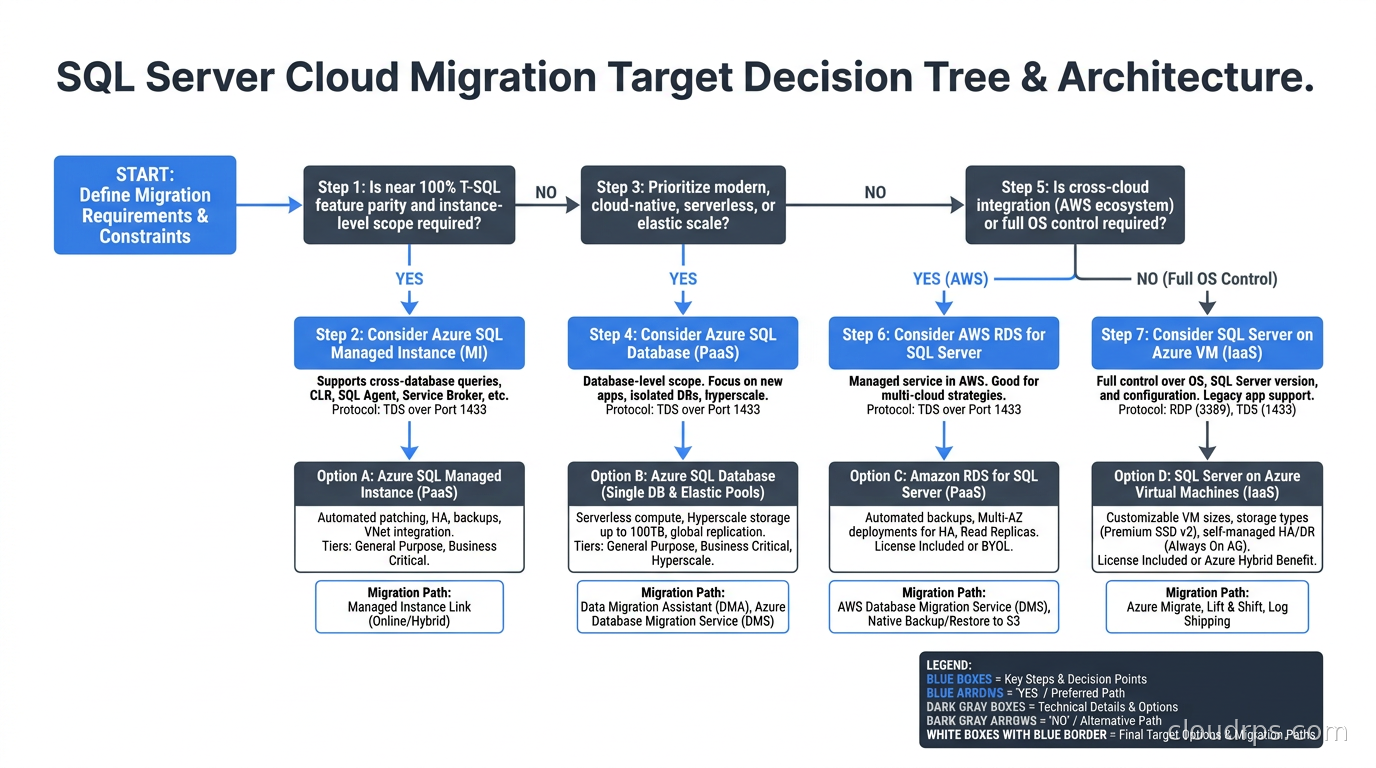
Given this landscape, here is the decision logic I use:
If you have SQL Server Agent jobs, linked servers, DTC, Service Broker, or CLR that you are not prepared to rewrite before cutover: the target is Azure SQL Managed Instance (if you are going Azure) or SQL Server on EC2 (if you are going AWS and need everything). RDS for SQL Server can work for many workloads but requires careful testing around Service Broker endpoint usage and has constraints on DTC that require domain-joined instances.
If you have a relatively modern application that connects to SQL Server as a relational data store without heavy use of server-level features: Azure SQL Database is the right answer for Azure. It gives you the best price-to-manageability ratio, the best scaling options (serverless tier is genuinely useful for variable workloads), and Microsoft invests the most heavily in it as their flagship managed database product.
If you are multi-cloud-neutral and your application uses standard T-SQL without server-level features: both Azure SQL Database and RDS for SQL Server are viable. The choice becomes an ecosystem question rather than a compatibility question.
If you genuinely need a lift-and-shift with no application changes and a short runway: SQL Server on Azure VMs or EC2 with the SQL IaaS Extension gives you that option. Treat it as a stepping stone, not a destination, because you are just moving the operational burden to the cloud without reducing it.
Licensing, Because It Will Surprise You
SQL Server licensing in the cloud is where teams consistently under-budget.
On Azure, SQL Server VMs support License Mobility through Software Assurance, meaning you can bring existing Enterprise Edition licenses to Azure VMs. Azure SQL Database and Azure SQL Managed Instance use a vCore model where you pay for vCores and storage, with an Azure Hybrid Benefit (AHB) option that reduces the cost if you have existing SQL Server licenses with Software Assurance.
On AWS, RDS for SQL Server traditionally bundled the SQL Server license into the hourly rate. The June 2026 BYOM (Bring Your Own Media) launch changes this for organizations that qualify under Microsoft’s License Mobility via Software Assurance. This can meaningfully reduce RDS costs for shops with existing Enterprise Edition licenses. Verify the current terms directly with both Microsoft and AWS, because License Mobility eligibility has specific conditions that change and that I am not going to present as settled fact.
The bottom line: budget for both the SQL Server license cost and the cloud compute and storage costs, and get explicit pricing from both vendors for your specific edition and workload shape before committing. Do not trust back-of-envelope estimates.
This connects to the broader question of cloud commitment pricing strategies and how Reserved Instances interact with database workloads. A large SQL Server estate often benefits significantly from 1-year or 3-year reserved pricing on the underlying compute.
Migration Tooling in 2026
Once you know your target, the migration tools are:
Azure Database Migration Service (DMS) for migrations to Azure SQL Managed Instance. Microsoft has updated the migration tooling significantly over the past two years. The Azure SQL migration extension for Azure Data Studio was deprecated and replaced in early 2026. For large databases, the Log Replay Service approach works well: you take full, differential, and transaction log backups, stage them in Azure Blob Storage, and let Log Replay Service apply them continuously until you are ready to cut over. This lets you run the migration over days or weeks with minimal log lag at cutover.
AWS Database Migration Service (AWS DMS) for migrations to RDS. AWS DMS supports SQL Server as both a source and a target. It runs full-load plus CDC (change data capture) mode, which means you can start the bulk load and then replicate ongoing changes while you prepare for cutover. AWS DMS with SQL Server CDC requires that the source database has CDC enabled at the table level. If your source is on-premises SQL Server with CDC not enabled, turning it on requires a short maintenance window and careful testing in environments where CDC interacts with replication.
Schema Conversion Tool (AWS SCT) is relevant if you are doing a cross-engine migration (SQL Server to Aurora PostgreSQL or Aurora MySQL). For SQL Server to SQL Server migrations, SCT is not needed for the schema itself, though it is useful for finding procedural code that might need adjustment.
Native backup and restore is still the simplest option for smaller databases or when you have a maintenance window to work with. For Managed Instance, you back up to Azure Blob Storage and restore from there. For RDS with BYOM, you stage backups in S3. For any large database, the question is whether you can tolerate the downtime of a full backup-and-restore cutover or whether you need CDC-based continuous replication to keep the cutover window short.
The patterns I describe in zero-downtime database migrations apply here too: use an expand-contract approach for schema changes, keep application changes additive before the cutover, and do not try to do a schema migration and a cloud migration simultaneously.
The Cutover Playbook
The cutover itself follows a pattern I have refined over multiple migrations:
Phase 1: Parallel run. The source database is live on-premises (or on old cloud infrastructure). You have the target running on your cloud managed service. You are continuously replicating via Log Replay Service or AWS DMS. Applications still point to the old database. This phase can run for weeks.
Phase 2: Validation sprint. Run your full integration test suite against the target. Run query performance comparisons. Identify any queries that ran faster on-premises with specific index hints or query plans that do not reproduce in the managed service. Fix them now, not at midnight during the cutover window.
Phase 3: The cutover window. Stop writes to the source. Wait for replication to catch up to zero lag. Switch the application connection strings. Validate that the application is healthy. This is where good database schema-as-code tooling pays for itself: if your migrations are versioned and automated, you know exactly what schema state you are in at every step.
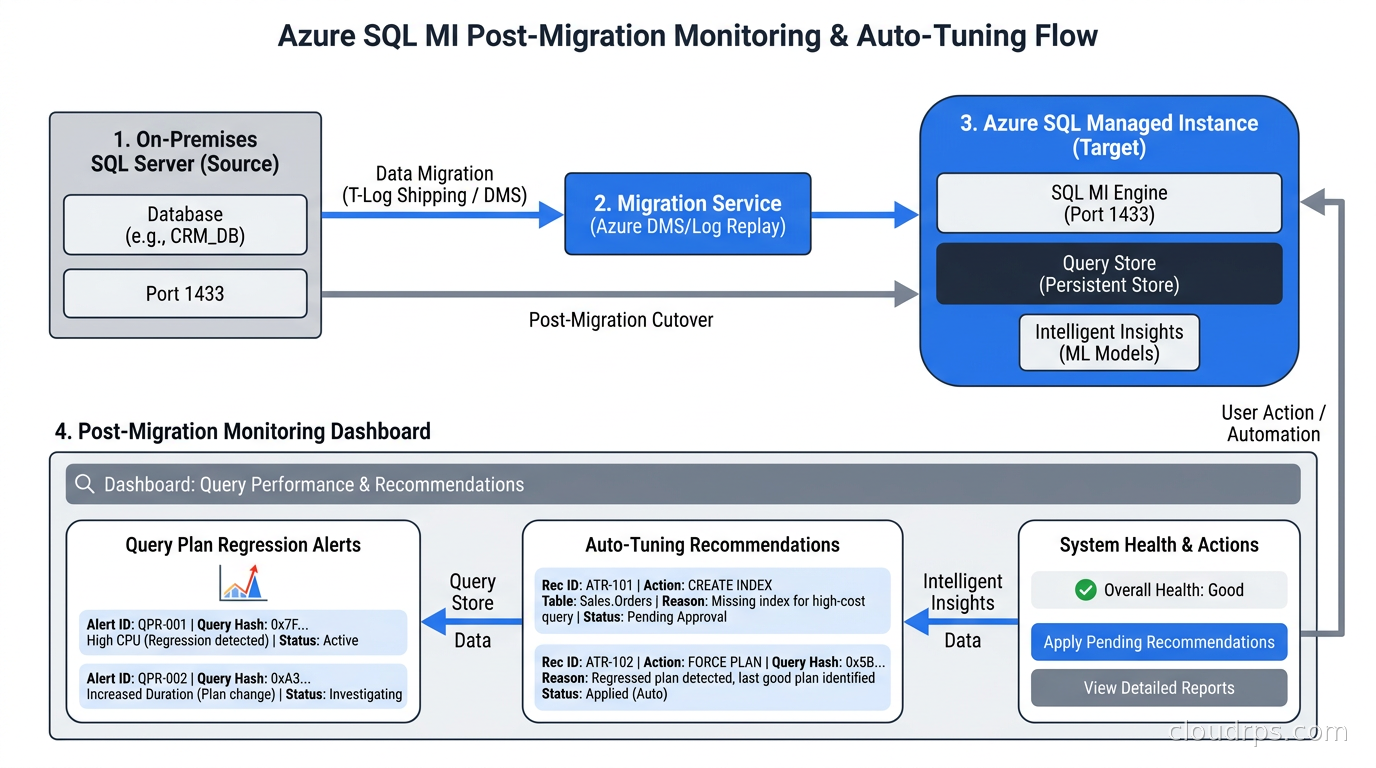
Phase 4: Monitoring. Do not declare success at the 15-minute mark. SQL Server on a managed service can have different query plan behaviors than the instance you migrated from, particularly around parameter sniffing and cardinality estimation when the statistics have not yet been rebuilt. Keep a tight watch on slow query logs for the first week. The database reliability engineering practices around SLIs and SLOs apply: define what “healthy” means before you cut over so you know the rollback trigger.
What Nobody Tells You About Always On in the Cloud
If your on-premises SQL Server runs Always On Availability Groups for HA and you are moving to a managed service, you are giving up manual control of the HA topology but getting something better: the managed service handles failover for you, typically with a recovery time objective measured in seconds to low minutes in the Business Critical or Geo-redundant tiers, rather than the minutes-to-tens-of-minutes that a typical Always On failover takes in practice.
What you gain in simplicity you need to account for in connection string behavior. Always On listeners and read-only routing rules may need to be translated to the application’s use of the managed service’s read replica endpoint. Azure SQL Managed Instance has a built-in read-scale endpoint. RDS for SQL Server supports read replicas, but only for SQL Server Enterprise Edition, and the replication model is transactional replication-based, which has different consistency semantics than Always On.
If your application assumes it can promote any replica to primary on demand, or if it implements its own listener-level routing logic, test this explicitly before you cut over.
The Google Cloud Option
Google Cloud SQL for SQL Server does not get much attention in most migration guides, but it is worth naming clearly. If your organization is Google-first and you are already running GKE, BigQuery, and Cloud Spanner for other workloads, the operational coherence of staying on GCP matters. Google Cloud SQL supports SQL Server 2019 and 2022 Enterprise and Standard editions as of late 2026, with Cloud SQL for SQL Server offering automated backups, read replicas, and point-in-time recovery.
The limitation I would highlight is that the SQL Server-specific community of practice and migration tooling documentation is thicker on Azure and AWS than on GCP. Microsoft’s own migration tooling ecosystem naturally targets Azure SQL products first. If you run into an unusual compatibility problem, the GCP community forums and documentation are likely to have fewer examples than you would find for the equivalent Azure SQL issue.
For workloads where you are already running on GCP and the SQL Server compatibility requirements are modest, Cloud SQL is a rational choice. For workloads with complex SQL Server features where you anticipate needing specialized support, Azure SQL Managed Instance probably deserves the shortlist preference.
A Note on Egress and Data Transfer Costs
One cost dimension that surprises teams during and after SQL Server migrations is data transfer. Moving a large SQL Server database from on-premises to any cloud provider means transferring significant data volumes. For a multi-terabyte warehouse, that transfer can dominate early-phase costs. More importantly, if you have application tiers running in one cloud and a database running in another, or if you have cross-region replication, the egress fees become a recurring line item.
I have written about cloud egress costs and how to architect around them. The same principles apply to database migrations: understand the network topology before you commit to a target, and make sure your application and database tiers are in the same cloud and region unless you have a specific reason to separate them.
Post-Migration: The First 90 Days
The migration is not done when the cutover completes. In my experience, the first three months on a managed SQL Server service reveal the workloads that behaved differently than expected.
Parameter sniffing is the most common issue. SQL Server caches query plans based on the first set of parameters it sees for a stored procedure. On a managed service with smaller instance memory than your on-premises server, the plan cache behaves differently. If you have queries with high variance in runtime across different parameter values, you will see this show up as performance outliers after migration.
Statistics maintenance is another. Managed services automate statistics updates, but the schedule and thresholds are different from what your DBA had tuned on-premises. In the first weeks after migration, run a manual update statistics on your largest tables and compare query plan behavior.
Auto-tuning, which both Azure SQL Database and Azure SQL Managed Instance support, can be genuinely useful here. It detects query plan regressions and can automatically force the last known good plan. I recommend enabling plan-forcing feedback in monitoring-only mode first, watching its recommendations for two to three weeks, and only then enabling automatic forcing. That gives you visibility into what it thinks it needs to change before you let it make changes on its own.
What to Read Before You Start
The honest starting point for any SQL Server migration project is Microsoft’s own feature comparison pages on Microsoft Learn and AWS’s SQL Server on RDS documentation. Both vendors update these regularly, and the specific features that are and are not supported change as managed services add capabilities. Do not rely on blog posts (including this one) as the authoritative source for current feature availability. Verify every feature your assessment flagged against the current vendor documentation before finalizing your target tier.
For the assessment phase, start with the seven Rs framework for cloud migration to make sure you are actually trying to rehost or replatform and not missing an opportunity to refactor or re-architect a workload that would be better off redesigned than moved. SQL Server migrations are expensive enough that it is worth asking, once, whether the workload makes more sense as a cloud-native service before you spend months lifting the existing SQL Server footprint into the cloud intact.
For the post-migration phase, the observability and reliability practices that make PostgreSQL operations sustainable apply here too: SLOs, slow query analysis, connection pool tuning, and backup validation. None of that changes just because you moved to a managed service. The managed service handles the infrastructure layer, not the application-database relationship.
SQL Server in the cloud in 2026 is genuinely better than it was even three years ago. The managed services have improved, the tooling has matured, and the costs have become more predictable. The compatibility gaps are smaller but still real. Know what you are walking into, pick the right tier for your actual feature usage, and treat the assessment phase as the work that makes the cutover boring. Boring cutovers are the good ones.
Get Cloud Architecture Insights
Practical deep dives on infrastructure, security, and scaling. No spam, no fluff.
By subscribing, you agree to receive emails. Unsubscribe anytime.