
I still remember the day I walked into our data center in 2009 and heard silence for the first time. We had just finished migrating our primary database tier from spinning rust to the first generation of enterprise SSDs, and the absence of that familiar mechanical hum felt wrong. Like something had broken. It took me a few minutes to realize that what had broken was every assumption I had held about storage performance for the previous fifteen years.
That migration cut our p99 query latency by 80%. It also cost four times as much per terabyte. And that tradeoff (performance versus cost, with a dozen variables hiding underneath) is still the fundamental question every architect faces when choosing storage in 2025. The technology has evolved dramatically, but the decision framework has not changed as much as vendors would like you to believe.
Let me walk you through how I think about this choice after three decades of managing storage infrastructure at scale.
The Physics That Actually Matters
Before we talk about specs and benchmarks, you need to understand why SSDs and HDDs perform the way they do. This is not academic trivia. It is the foundation for every storage decision you will ever make.
An HDD has a physical read/write head that moves across a spinning magnetic platter. That head needs to seek to the right track, wait for the right sector to rotate underneath it, and then read or write data sequentially. The seek time on a modern enterprise HDD is around 3-4 milliseconds. The rotational latency on a 15,000 RPM drive is about 2 milliseconds. Add those together and you are looking at 5-6 milliseconds just to start a random I/O operation.
An SSD has no moving parts. It reads and writes to NAND flash cells electrically. A random read on a modern NVMe SSD takes around 50-100 microseconds. That is roughly 50 to 100 times faster than an HDD for random access.
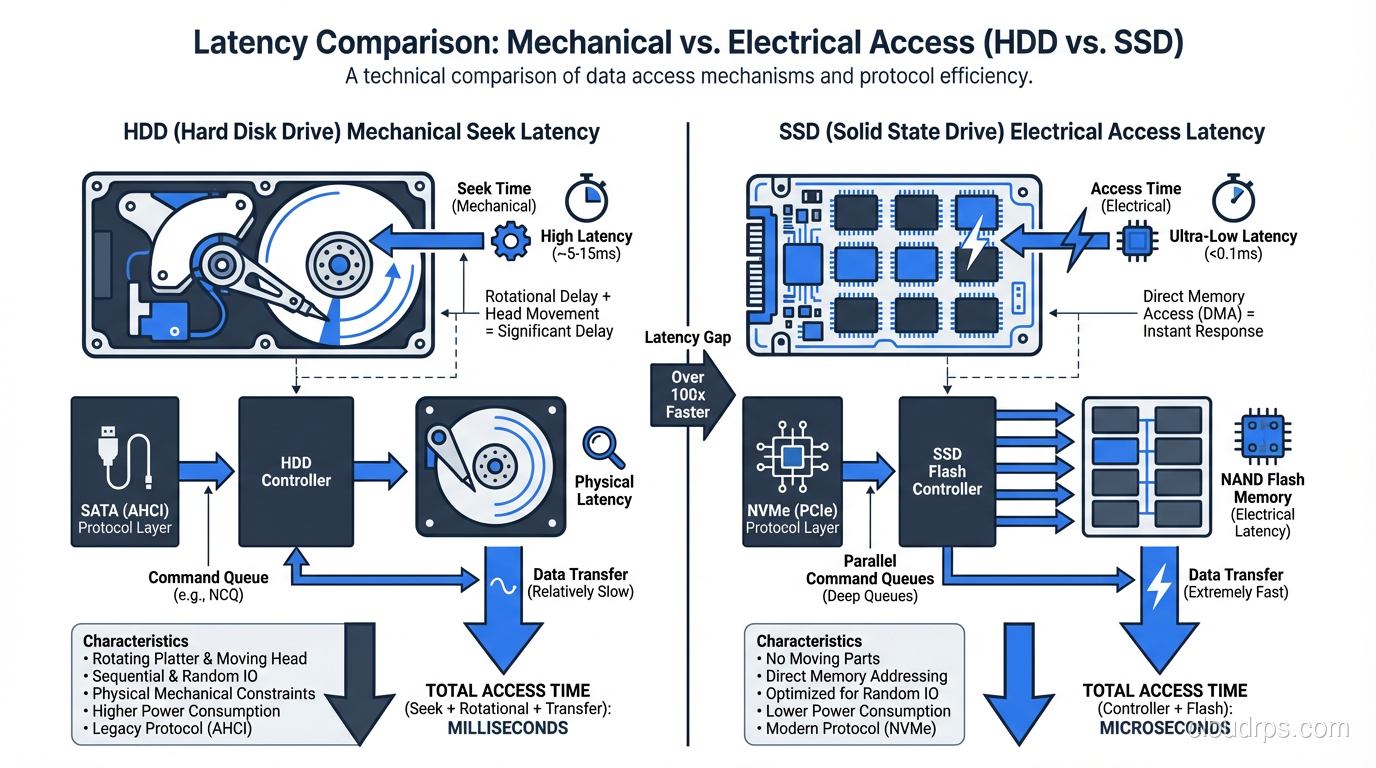
This gap matters enormously for database workloads. A single complex query might touch thousands of random pages scattered across a B-tree index. On an HDD, each of those page reads costs you 5 milliseconds. On an SSD, each costs 0.1 milliseconds. Multiply that by ten thousand page reads and the difference is 50 seconds versus 1 second. That is not a benchmark number. That is a real query I watched run on a production PostgreSQL instance during a migration.
But here is where it gets interesting. For sequential reads and writes (large scans, log writes, bulk data transfers) the gap narrows considerably. A modern enterprise HDD can sustain 200-250 MB/s of sequential throughput. A single NVMe SSD can do 3-7 GB/s. The SSD still wins, but the multiplier is 15-30x instead of 50-100x. And when you factor in cost per gigabyte, the calculus changes.
IOPS, Throughput, and the Metric That Actually Predicts Your Performance
Storage vendors love to throw IOPS numbers at you. A single NVMe SSD can do 500,000 or even 1,000,000 random read IOPS. An enterprise HDD maxes out around 200 IOPS for random workloads. Those numbers are real, but they are misleading if you do not understand your workload.
Here is what I have learned the hard way: most database workloads are neither purely random nor purely sequential. They are a mix, and the mix ratio determines which storage technology gives you the best return on investment.
OLTP databases (your PostgreSQL, MySQL, SQL Server instances running transactional workloads) are heavily random. Index lookups, row fetches, transaction log writes that are sequential but small. SSDs dominate here, and it is not close. If you are running an OLTP workload on HDDs in 2025, you are leaving massive performance on the table.
OLAP and analytics workloads are different. A columnar scan across a multi-terabyte fact table is largely sequential. The query engine reads huge chunks of data in order. HDDs can service this kind of workload reasonably well, especially when you stripe across many drives in a RAID configuration. I have seen well-designed HDD arrays sustain aggregate throughputs of 10+ GB/s for analytical scans.
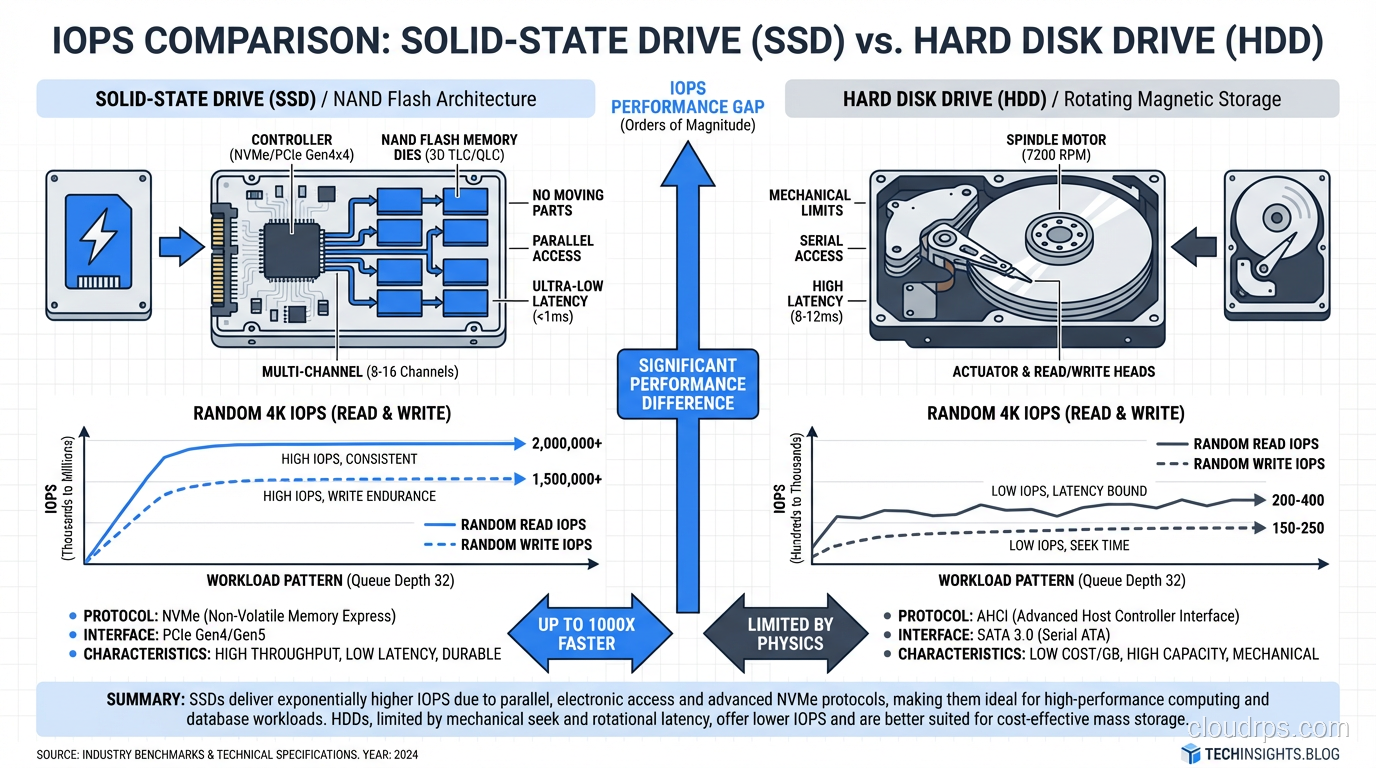
The metric I care about most is not raw IOPS or throughput. It is cost per useful I/O operation for your specific workload. A $200 HDD delivering 200 IOPS costs you $1 per IOP. A $400 NVMe SSD delivering 500,000 IOPS costs you $0.0008 per IOP. For random workloads, SSDs are not just faster; they are dramatically cheaper per unit of actual work done.
Enterprise SSD Types: Not All Flash Is Created Equal
If you have decided that SSDs are right for your workload, your decision process is only half done. The enterprise SSD market has fragmented into distinct tiers, and choosing the wrong one is an expensive mistake.
Read-intensive SSDs use TLC or QLC NAND and are rated for about 1 DWPD (drive write per day) or less. They are cheap, fast for reads, and perfectly fine for read-heavy caches, content delivery, and analytics workloads where data is written once and read many times.
Mixed-use SSDs use TLC NAND with better controllers and over-provisioning. They handle 3 DWPD and work well for general-purpose database workloads where the read/write mix is roughly 70/30.
Write-intensive SSDs use SLC or MLC NAND caching with aggressive wear-leveling algorithms. They handle 10+ DWPD and are built for write-heavy workloads like transaction logs, write-ahead logs, and high-churn caching layers.
I once watched a team deploy QLC read-intensive SSDs for a write-heavy Redis caching tier. The drives started showing elevated latency within six months as the controller struggled with write amplification and garbage collection. By month nine, they were replacing drives. The per-drive cost savings evaporated completely when you factored in the replacements and the unplanned downtime.
Match your SSD endurance class to your write pattern. This is not optional.
When HDDs Still Make Sense in 2025
I am going to say something that might sound contrarian: HDDs are not dead, and anyone who tells you otherwise has never managed a petabyte-scale storage budget.
Here are the workloads where I still specify HDDs:
Cold and warm archival storage. When data is written once and read infrequently (compliance archives, historical logs, backup repositories) the cost per terabyte of HDDs is unbeatable. As of early 2025, enterprise HDDs cost roughly $15-20 per terabyte. Enterprise SSDs cost $80-150 per terabyte depending on endurance class. For 500 TB of archival data, that is the difference between $10,000 and $50,000+.
Bulk data lakes. If you are building a data lake for analytics and your query engine can handle the latency, HDDs behind a well-designed SAN or NAS can deliver excellent sequential throughput at a fraction of the cost.
Media storage. Video surveillance, medical imaging, scientific data collection. Workloads where files are large, writes are sequential, and random access is rare. HDDs handle these beautifully.
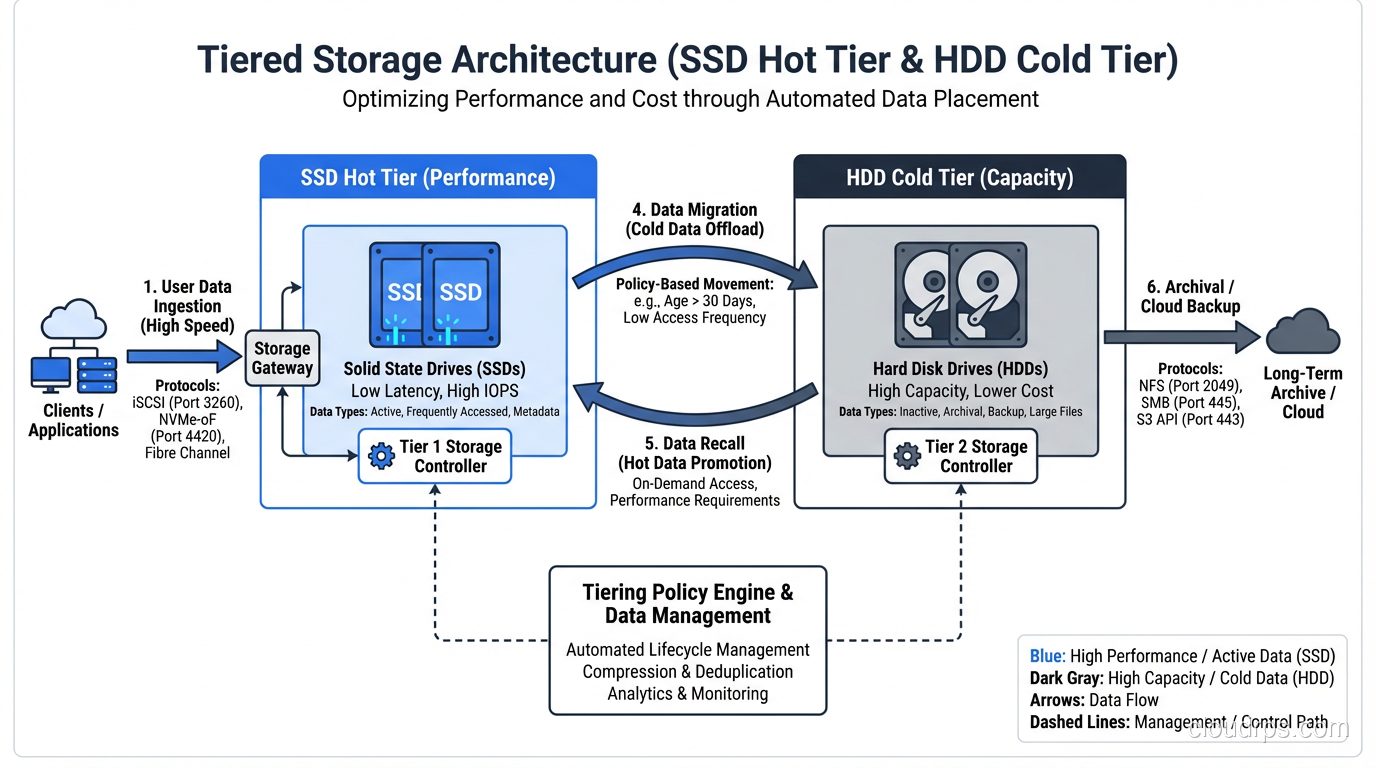
Tiered storage architectures. The smartest storage architectures I have built use SSDs for the hot tier and HDDs for the cold tier, with automated data lifecycle policies moving data between them. You get SSD performance where it matters and HDD economics where it does not.
The Cloud Complicates Everything (And Simplifies It Too)
If you are running workloads in AWS, Azure, or GCP, the SSD-vs-HDD decision maps onto different storage tiers rather than physical drives. But the same principles apply.
AWS EBS gp3 volumes are SSD-backed and give you baseline performance with the ability to provision additional IOPS. EBS st1 volumes are HDD-backed and optimized for sequential throughput. EBS sc1 volumes are cold HDD storage. The pricing reflects the same physics: gp3 costs more per gigabyte but delivers dramatically better random I/O performance.
What cloud providers give you that on-premises storage does not is the ability to change your mind cheaply. Migrating from st1 to gp3 is an API call, not a forklift upgrade. This is genuinely valuable. I have seen teams start with HDD-backed volumes for development, realize their workload is more random than expected, and switch to SSD-backed volumes in an afternoon.
But cloud storage also hides complexity. When you provision an EBS gp3 volume, you are sharing physical SSDs with other tenants. The noisy neighbor problem is real. If your application needs consistent low-latency I/O, you may need to provision io2 Block Express volumes with dedicated IOPS, and pay accordingly.
For a deeper look at the different storage models in cloud environments, I covered the fundamentals in my post on block vs object vs file storage.
Write Amplification, Wear Leveling, and the Durability Question
One area where SSDs have a genuine disadvantage is write endurance. NAND flash cells can only be programmed and erased a finite number of times before they wear out. The controller manages this through wear leveling (distributing writes evenly across all cells) but the underlying limit is real.
Write amplification makes this worse. When an SSD needs to write a 4 KB page, it might need to erase and rewrite an entire 256 KB or larger erase block. The ratio of actual physical writes to logical writes requested by the host is the write amplification factor (WAF). A WAF of 3 means the SSD is writing three times as much data as your application thinks it is writing.
In practice, I monitor SSD health through SMART attributes, specifically the percentage of spare blocks remaining and the total bytes written versus the rated endurance. For critical database volumes, I set alerts at 80% of rated endurance and plan replacements at 90%. I have never actually had an enterprise SSD fail due to wear-out in a well-managed environment, but I have seen it happen in environments where nobody was watching.
HDDs have their own reliability concerns (mechanical wear, head crashes, bearing failures) but they do not have a hard write endurance limit. A well-maintained enterprise HDD can run for 5-7 years in continuous operation. The annualized failure rate for enterprise HDDs is typically 0.5-1.5%, which is comparable to enterprise SSDs.
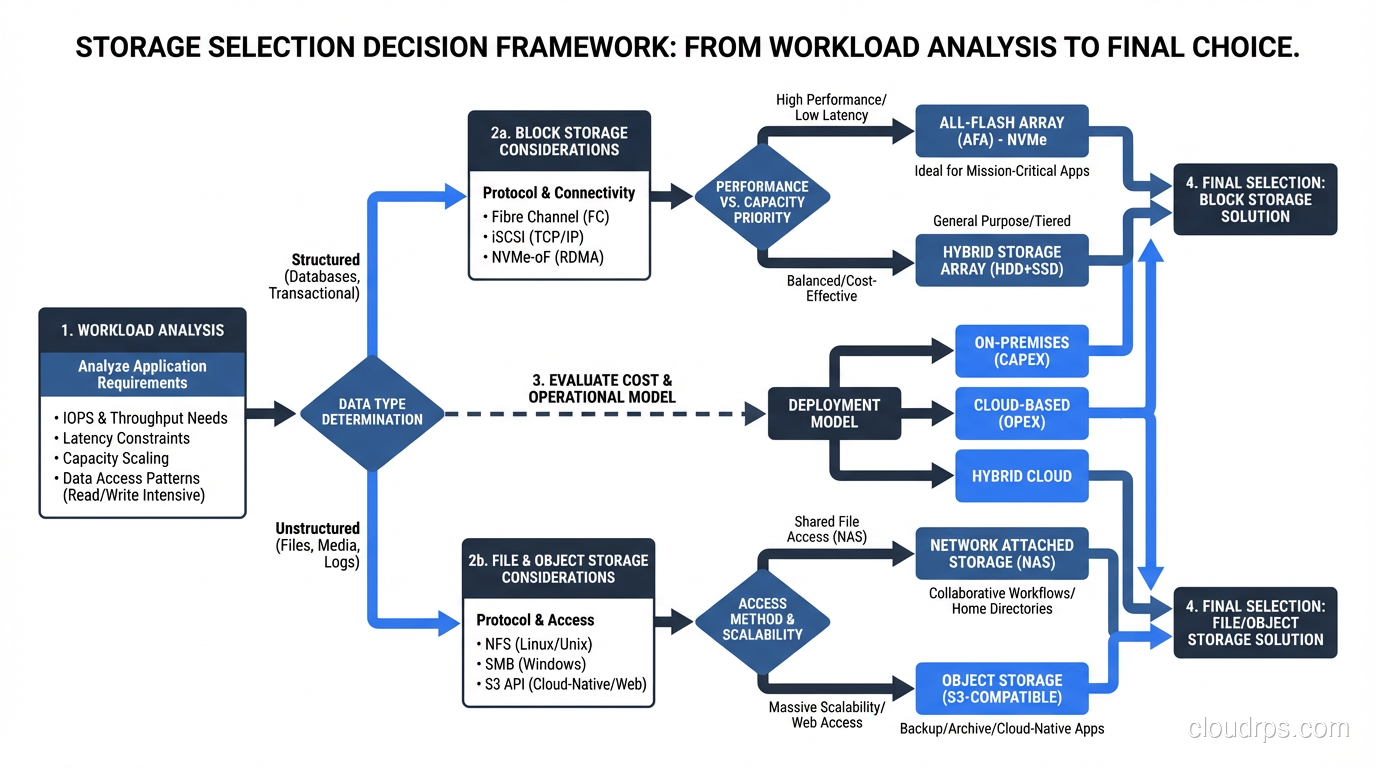
My Decision Framework
After three decades, here is the framework I use. It is simple because the physics is simple.
Step 1: Characterize your workload. Is it random or sequential? Read-heavy or write-heavy? What is your working set size? If you do not know, instrument your existing storage and measure. Never guess.
Step 2: Calculate your performance requirements. How many IOPS do you need? What latency is acceptable? What throughput do you need? Be specific. “As fast as possible” is not a requirement; it is a wish.
Step 3: Calculate your capacity requirements. How much data do you need to store? What is the growth rate? What is the retention period?
Step 4: Run the economics. For your performance and capacity requirements, calculate the total cost of ownership for both SSD and HDD options over a 3-5 year period. Include drive costs, power consumption (SSDs use 2-5W, HDDs use 6-12W), cooling, rack space, and controller/enclosure costs.
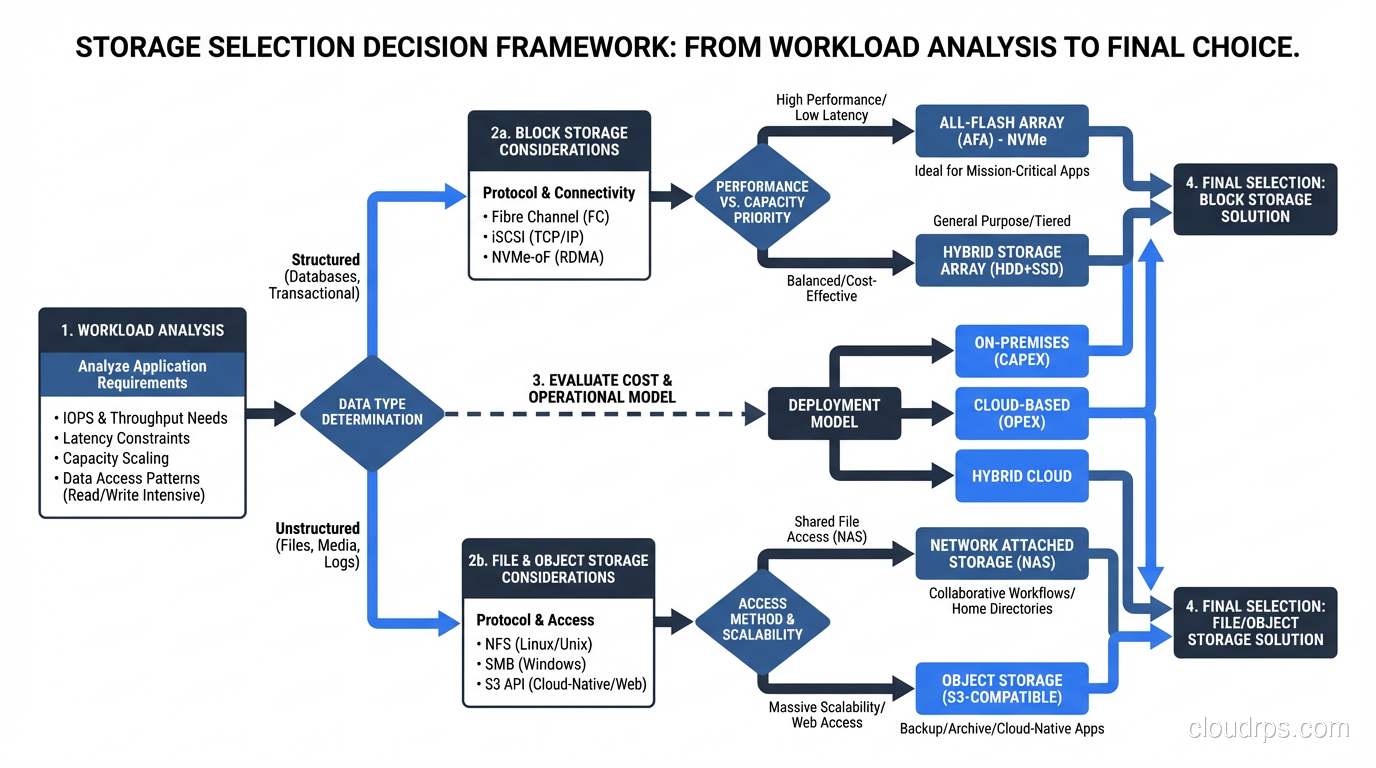
Step 5: Factor in operational complexity. SSDs are simpler to operate in many ways: no defragmentation needed, more tolerant of vibration, lower power and cooling. HDDs require more careful capacity planning because performance degrades as utilization increases.
In my experience, the answer for most database workloads in 2025 is SSDs for the active data tier and HDDs for archival. The total cost of this hybrid approach is usually lower than an all-SSD deployment and dramatically faster than an all-HDD deployment.
NVMe, SATA, and SAS: The Interface Matters More Than You Think
I should mention the interface question because I see teams get this wrong regularly.
SATA SSDs are limited to about 550 MB/s throughput by the SATA III protocol. They are fine for light workloads and are the cheapest enterprise SSDs available.
SAS SSDs offer dual-port connectivity (important for high availability) and slightly higher throughput than SATA, but they are being phased out in favor of NVMe.
NVMe SSDs connect directly to the PCIe bus and can deliver 3-7 GB/s per drive with sub-100-microsecond latency. For any serious database workload, NVMe is the right choice. The protocol overhead is dramatically lower than SATA or SAS, which means you get more of the underlying NAND performance.
The cost premium for NVMe over SATA has shrunk to the point where I no longer recommend SATA SSDs for new deployments unless budget is extremely tight. The performance difference is real, and the operational simplification of standardizing on NVMe is worth the small premium.
What I Would Tell My Junior Self
If I could go back to 2009 and give myself advice before that first SSD migration, I would say three things.
First, do not over-index on peak performance numbers. The steady-state performance of an SSD under sustained load is always lower than the burst performance, and the gap can be significant, especially for write-heavy workloads. Test with realistic workloads, not synthetic benchmarks.
Second, plan for the hybrid approach from day one. Trying to retrofit tiered storage into an architecture that was designed assuming uniform storage performance is painful. I have done it twice, and both times I wished I had thought about it earlier.
Third, monitor everything. Storage is the one infrastructure component where problems are both catastrophic and preventable. SMART data, latency histograms, IOPS counters, queue depths. Collect it all. The drive that fails at 3 AM almost always showed warning signs weeks earlier.
The SSD-versus-HDD question is not really about the technology. It is about understanding your workload deeply enough to make an informed economic decision. The technology gives you options. Your workload determines which option is right.
And if you are still running your primary OLTP database on spinning rust in 2025? Stop reading and go fix that. Seriously. The ROI is the easiest business case you will ever make.
Get Cloud Architecture Insights
Practical deep dives on infrastructure, security, and scaling. No spam, no fluff.
By subscribing, you agree to receive emails. Unsubscribe anytime.