
I was running a security operations center in 2003 when one of my analysts showed me a packet capture of a customer’s login credentials flying across our internal network in plaintext HTTP. The application developers had assumed the internal network was “safe” and didn’t bother with HTTPS. That was a career-defining moment for me, not because the finding was novel, but because it crystallized a principle I’ve enforced ever since: encrypt everything, everywhere, no exceptions.
TLS (Transport Layer Security) is the protocol that makes that possible at internet scale. It’s what puts the S in HTTPS. It secures API calls, email delivery, database connections, and just about every other networked communication that matters. And yet, most engineers treat it as a black box. They know it’s “encryption” and that certificates are involved, and that’s about it.
Let me crack that box open and show you exactly what happens from the moment your browser connects to a server until data starts flowing securely.
A Quick Note on Naming: SSL vs TLS
SSL (Secure Sockets Layer) was the original protocol, developed by Netscape in the mid-1990s. SSL 2.0 was the first public release (1995), followed by SSL 3.0 (1996). Both are now considered broken and should never be used.
TLS 1.0 (1999) was SSL’s successor, followed by TLS 1.1 (2006), TLS 1.2 (2008), and TLS 1.3 (2018). Despite TLS replacing SSL over two decades ago, people still say “SSL” when they mean TLS. SSL certificates are TLS certificates. The SSL/TLS termination on your load balancer is running TLS. I’ll use “TLS” throughout this post because that’s what’s actually running.
TLS 1.0 and 1.1 were deprecated in 2021. TLS 1.2 is still widely deployed and considered secure when configured correctly. TLS 1.3 is the current standard and what you should be targeting for new deployments.
What TLS Actually Provides
TLS gives you three things:
Confidentiality: The data is encrypted. An eavesdropper on the network sees ciphertext, not your passwords or credit card numbers.
Integrity: The data cannot be modified in transit without detection. Every TLS record includes an authentication tag that the receiver verifies.
Authentication: The server proves its identity through a certificate. You know you’re talking to the real bank.example.com and not an impersonator. Client authentication is also possible but less common.
These three properties together are what make secure communication possible over untrusted networks like the internet.
The TLS 1.3 Handshake: Step by Step
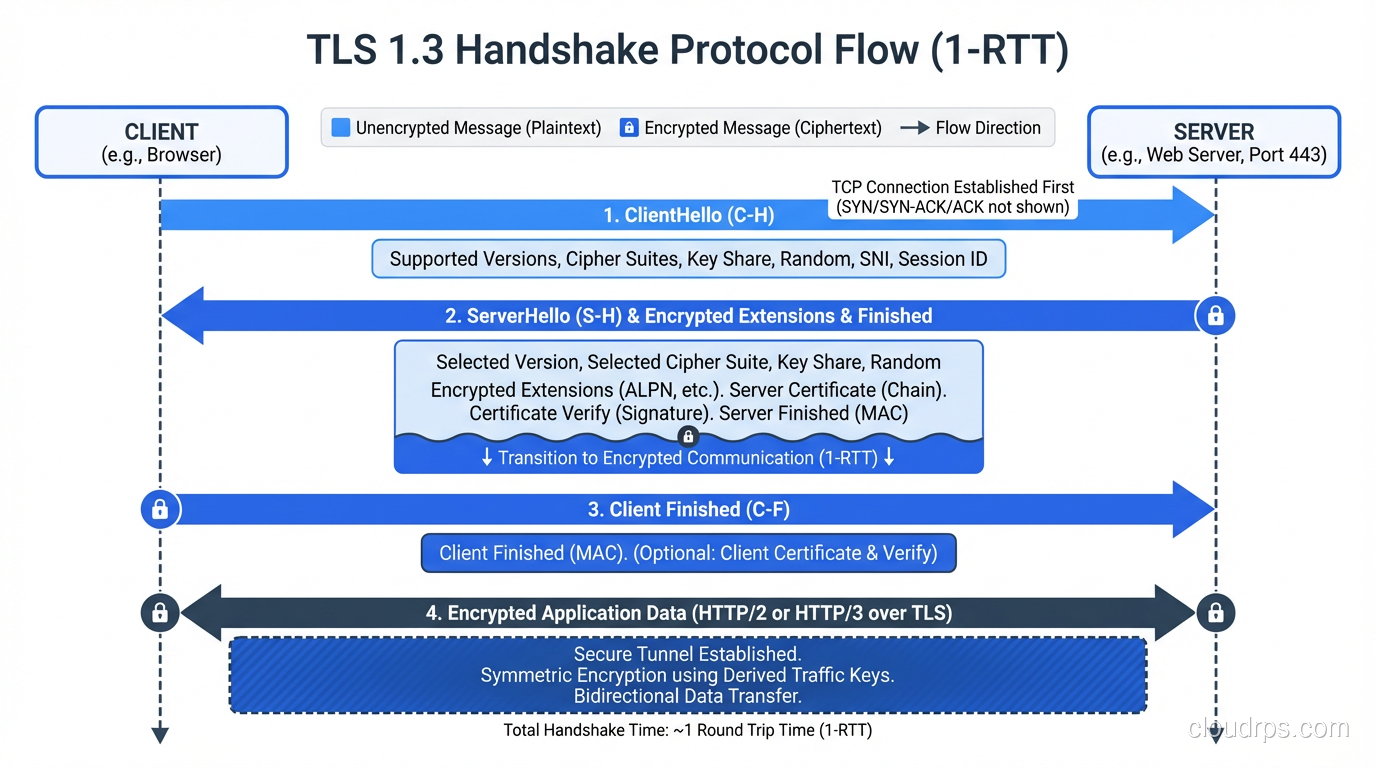
TLS 1.3 simplified the handshake significantly compared to TLS 1.2. It completes in just one round trip (1-RTT) instead of two. Let me walk through every step.
ClientHello
The client sends the first message, which contains:
- Supported TLS versions:The client advertises TLS 1.3 support
- Cipher suites:The list of encryption algorithms the client supports (e.g., TLS_AES_256_GCM_SHA384, TLS_CHACHA20_POLY1305_SHA256)
- Key share:Here’s the big TLS 1.3 optimization: the client guesses which key exchange algorithm the server will pick and includes its key share upfront. Typically this is an X25519 (Curve25519 ECDH) public key
- Supported groups:Which elliptic curves or DH groups the client supports
- SNI (Server Name Indication):The hostname the client is trying to reach, which allows a single IP to serve multiple TLS-enabled sites
- Random bytes:32 bytes of random data used in key derivation
The client is essentially saying: “I support these algorithms, here’s my key exchange material, and here’s the hostname I want to connect to.”
ServerHello and Server Parameters
The server responds with:
- Selected cipher suite:The server picks one from the client’s list
- Key share:The server’s ECDH public key
- Random bytes:Another 32 bytes of random data
At this point, both sides have exchanged ECDH public keys. Both independently compute the shared secret using their own private key and the other side’s public key. This is the hybrid encryption pattern in action, where asymmetric key exchange produces a shared secret that becomes the basis for symmetric encryption.
From the shared secret, both sides derive a set of traffic keys using HKDF (HMAC-based Key Derivation Function). From this point forward, everything is encrypted.
The server then sends (now encrypted):
- Certificate:The server’s X.509 certificate chain, proving its identity
- CertificateVerify:A signature over the handshake transcript using the server’s private key, proving the server actually holds the private key corresponding to the certificate
- Finished:A MAC over the entire handshake, ensuring nothing was tampered with
Client Finishes
The client verifies the server’s certificate chain (more on this below), verifies the CertificateVerify signature, and sends its own Finished message. Application data can begin flowing immediately.
Total round trips: one. In TLS 1.2, this took two round trips. TLS 1.3’s one-RTT handshake means faster connection setup, which is measurable on mobile networks and high-latency connections.
0-RTT Resumption
TLS 1.3 also supports 0-RTT resumption for repeat connections. If you’ve connected to a server before, you can include encrypted application data in the very first message of a new connection, using a pre-shared key from the previous session. The server can process this data immediately without waiting for the handshake to complete.
The catch: 0-RTT data is vulnerable to replay attacks. An attacker who captures the ClientHello with 0-RTT data can replay it, potentially causing the server to process the same request twice. This is why 0-RTT should only be used for idempotent requests (like GET) and never for state-changing operations.
Certificate Validation: The Trust Chain
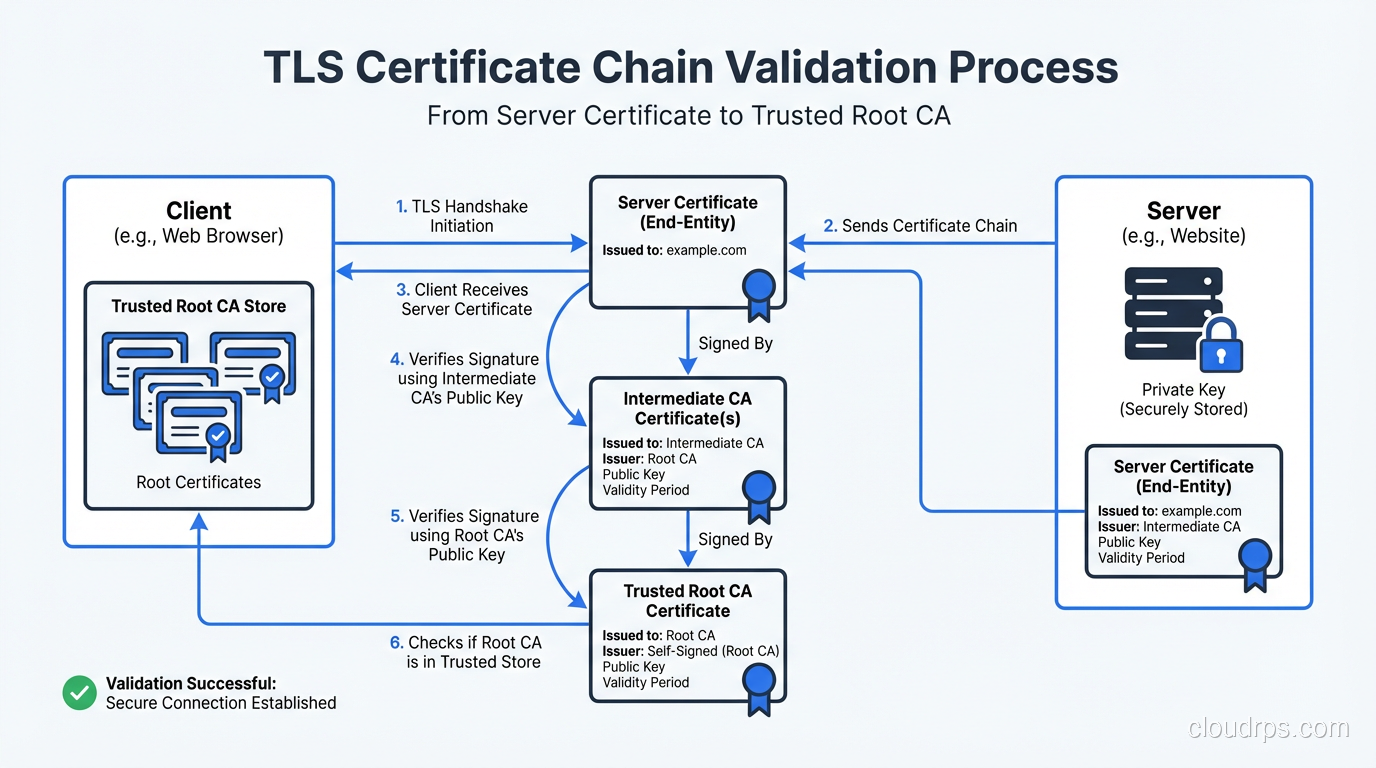
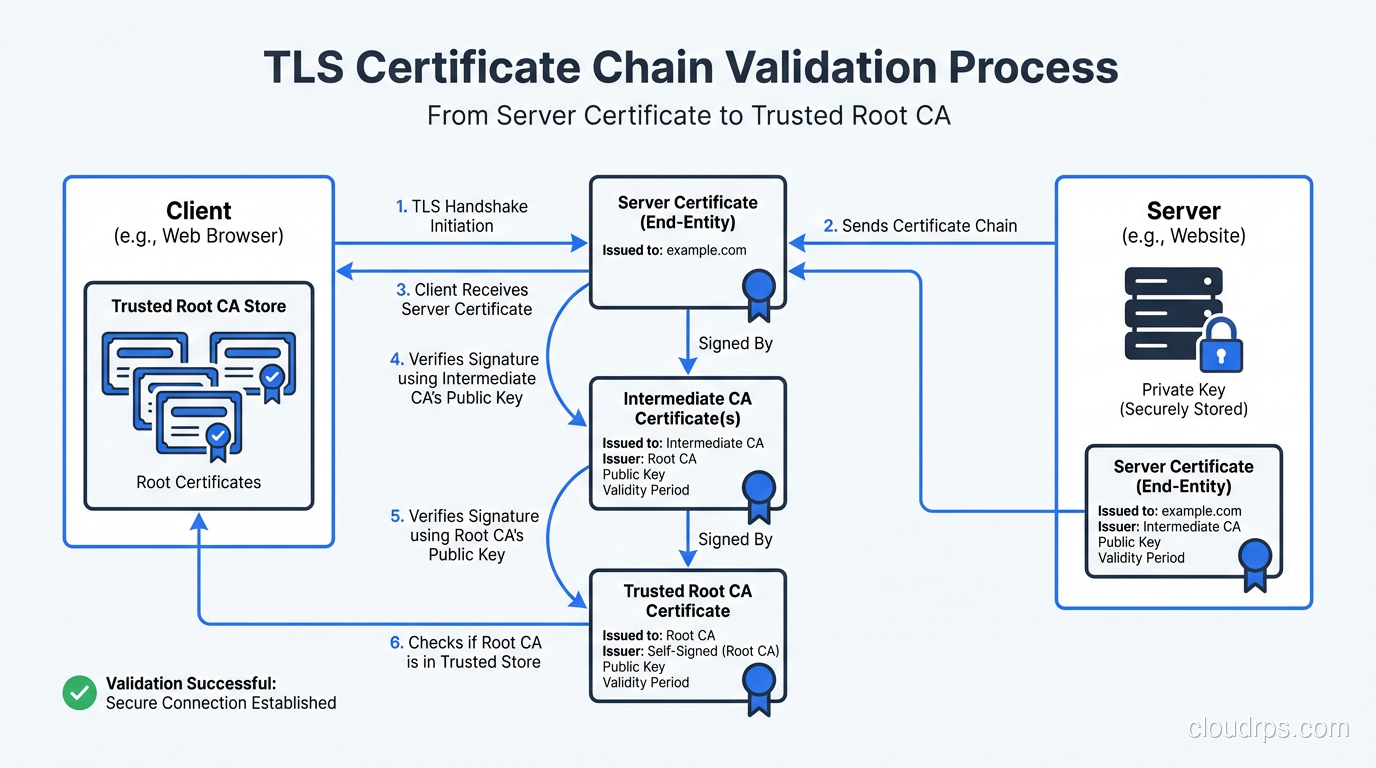
When the server presents its certificate, the client doesn’t just accept it blindly. There’s a structured validation process that’s central to TLS security.
The Certificate Chain
A server certificate is signed by a Certificate Authority (CA). That CA’s certificate might be signed by another CA (an intermediate). The chain continues until you reach a root CA whose certificate is self-signed and pre-installed in the client’s trust store (your browser or operating system ships with a curated list of trusted root CAs).
A typical chain looks like:
Root CA (in trust store) → Intermediate CA → Server Certificate
The client validates each link:
- Is the server certificate signed by the intermediate CA? Verify the signature.
- Is the intermediate CA signed by the root CA? Verify the signature.
- Is the root CA in the client’s trust store? If yes, the chain is trusted.
What Gets Checked
Beyond the chain of trust, the client verifies:
- Hostname match:The certificate’s Subject Alternative Name (SAN) must match the hostname in the URL. A certificate for
www.example.comwon’t validate forapi.example.com(unless a wildcard or SAN covers it). - Expiration:The current date must be within the certificate’s validity period. Expired certificates are rejected.
- Revocation:The certificate hasn’t been revoked by the CA. This is checked via OCSP (Online Certificate Status Protocol) or CRL (Certificate Revocation List). OCSP stapling, where the server includes a recent OCSP response in the handshake, is the efficient approach.
- Key usage:The certificate is authorized for the purpose it’s being used (server authentication).
I’ve lost count of the production outages I’ve seen caused by expired certificates. It’s such a common problem that certificate monitoring should be in every organization’s operational baseline. Automate certificate renewal with ACME (the protocol behind Let’s Encrypt) and monitor expiration dates with alerting at 30, 14, and 7 days.
Certificate Transparency
Certificate Transparency (CT) is a public audit log of all issued certificates. CAs are required to submit certificates to CT logs before issuance, and browsers like Chrome require certificates to include SCTs (Signed Certificate Timestamps) proving they were logged.
This system exists because CAs have been compromised in the past. In 2011, DigiNotar was breached, and the attacker issued fraudulent certificates for Google, Yahoo, and other domains. CT logs make such mis-issuance detectable. If a fraudulent certificate for your domain appears, you can find it in the CT logs and respond.
Monitor CT logs for your domains. Services like crt.sh or Facebook’s CT monitoring tool will alert you when any certificate is issued for domains you own. I’ve caught unauthorized certificate issuance this way. In one case, a contractor had spun up a server and obtained a Let’s Encrypt certificate for a subdomain without going through the proper channels.
Cipher Suites: What’s Actually Encrypting Your Data
A cipher suite is the combination of algorithms used for key exchange, authentication, bulk encryption, and hashing. TLS 1.3 dramatically simplified cipher suite selection compared to TLS 1.2.
TLS 1.3 Cipher Suites
TLS 1.3 only supports five cipher suites, and all of them are strong:
TLS_AES_256_GCM_SHA384:AES-256 in GCM mode, SHA-384 for HKDFTLS_AES_128_GCM_SHA256:AES-128 in GCM mode, SHA-256 for HKDFTLS_CHACHA20_POLY1305_SHA256:ChaCha20 with Poly1305 MACTLS_AES_128_CCM_SHA256:AES-128 in CCM mode (IoT-focused)TLS_AES_128_CCM_8_SHA256:AES-128 CCM with 8-byte tag (IoT-focused)
Key exchange is always ECDHE (or DHE), and forward secrecy is mandatory. There are no cipher suites without forward secrecy in TLS 1.3. That was a deliberate design decision. TLS 1.2 allowed static RSA key exchange (no forward secrecy), and TLS 1.3 removed it entirely.
TLS 1.2: Choose Carefully
TLS 1.2 has dozens of cipher suites, and many are weak. If you still support TLS 1.2 (and most production environments do for compatibility), restrict your configuration to strong suites:
ECDHE-ECDSA-AES256-GCM-SHA384
ECDHE-RSA-AES256-GCM-SHA384
ECDHE-ECDSA-CHACHA20-POLY1305
ECDHE-RSA-CHACHA20-POLY1305
ECDHE-ECDSA-AES128-GCM-SHA256
ECDHE-RSA-AES128-GCM-SHA256
The pattern is: ECDHE for key exchange (forward secrecy), ECDSA or RSA for authentication, AES-GCM or ChaCha20-Poly1305 for encryption. Avoid anything with CBC mode (padding oracle risks), RC4 (broken), or 3DES (slow and limited security margin).
Forward Secrecy: Why It Matters
Forward secrecy (also called perfect forward secrecy, PFS) means that compromising the server’s long-term private key doesn’t compromise past sessions. Each session’s encryption keys are derived from ephemeral key exchange material that’s discarded after the session ends.
Without forward secrecy (static RSA key exchange in TLS 1.2): an attacker records your encrypted traffic today. Years later, they steal the server’s private key (through a breach, a legal order, a compromised backup). They can now decrypt every recorded session that used that key. Every one.
With forward secrecy (ECDHE): the same attacker records traffic and later steals the private key. They still can’t decrypt past sessions, because the session keys were derived from ephemeral DH values that no longer exist. They can only impersonate the server going forward (and even that requires an active MITM attack).
This is why forward secrecy is mandatory in TLS 1.3, and why I insist on ECDHE-only configurations in TLS 1.2. The “harvest now, decrypt later” threat is real. Intelligence agencies and sophisticated adversaries are known to record encrypted traffic with the expectation of future decryption capabilities.
TLS Termination: Where Does It Happen?
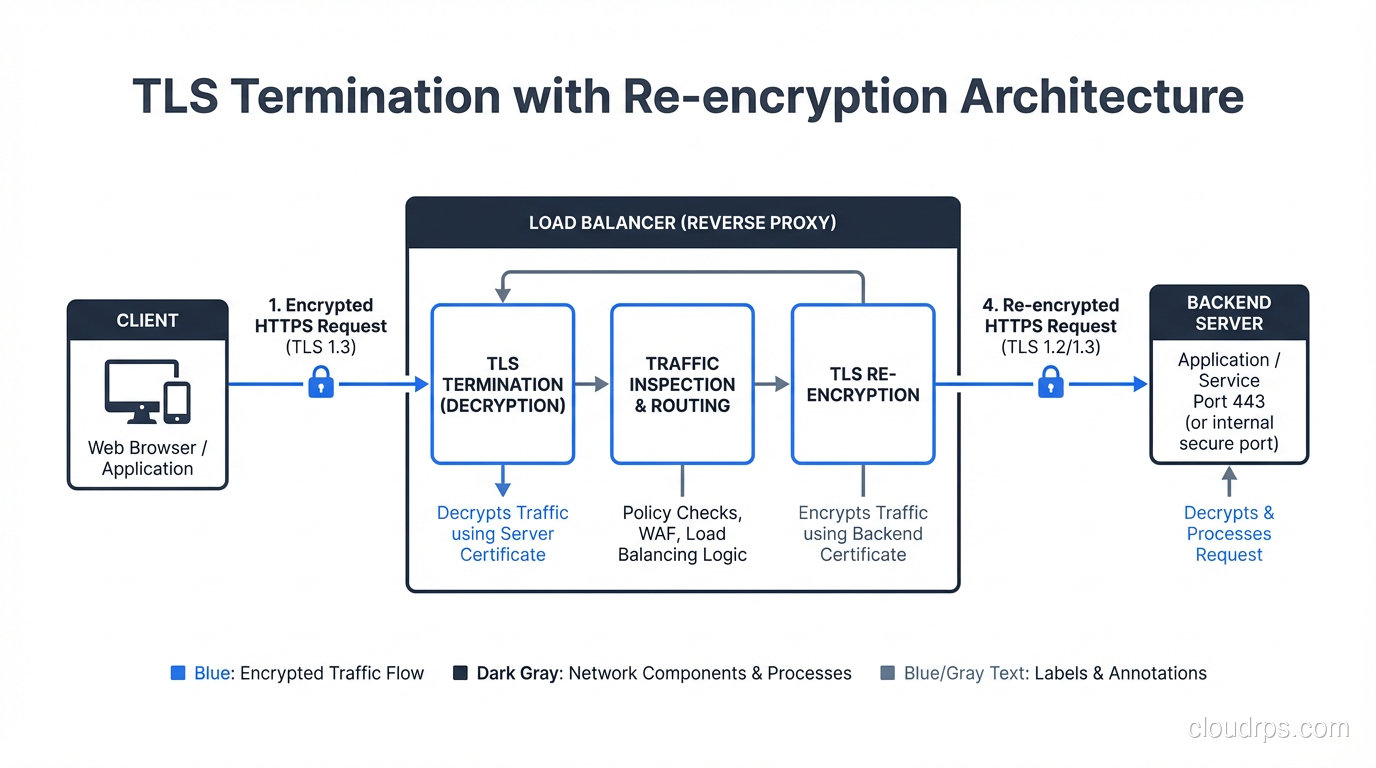
In a typical web architecture, TLS is terminated at a load balancer, reverse proxy, or CDN edge, not at the application server. This means:
- The client connects to the load balancer over TLS
- The load balancer decrypts the traffic
- The load balancer forwards the request to the backend server, often over plain HTTP on the internal network
This creates a segment of unencrypted traffic between the load balancer and the backend. In many environments, this is considered acceptable because the internal network is “trusted.” But as we discussed in the context of zero trust security, internal networks shouldn’t be implicitly trusted.
Best practice: encrypt the backend connection too. Use TLS between the load balancer and the application servers. Yes, it adds some overhead for certificate management and a small amount of CPU. But it eliminates the cleartext segment and reduces your exposure to internal network attacks.
For mutual authentication between internal services, mTLS (mutual TLS) is the standard approach. Both sides present certificates and verify each other. Service mesh platforms like Istio handle this transparently for containerized workloads.
Common TLS Misconfigurations and Attacks
Supporting Legacy Protocols
Every year I audit environments that still have TLS 1.0 or (worse) SSL 3.0 enabled. These protocols have known vulnerabilities (POODLE for SSL 3.0, BEAST for TLS 1.0, and more). Disable them. If you have clients that can’t support TLS 1.2, those clients have bigger problems than your TLS configuration.
Weak Cipher Suites
Enabling weak cipher suites “for compatibility” is a trap. Export ciphers, RC4, single DES, and static RSA key exchange should be disabled. The FREAK, Logjam, and SWEET32 attacks all exploited weak cipher suites that were enabled for backward compatibility.
Certificate Private Key Mishandling
I’ve found private keys stored in Git repositories, embedded in Docker images, shared via Slack, and left in world-readable directories. The private key is the single most sensitive component of your TLS deployment. It should live in a secure key management system or HSM, with access limited to the processes that need it.
Missing HSTS
HTTP Strict Transport Security (HSTS) tells browsers to always use HTTPS for your domain, preventing SSL stripping attacks where an attacker intercepts the initial HTTP request and proxies the connection without TLS. Deploy HSTS with a long max-age and include subdomains:
Strict-Transport-Security: max-age=31536000; includeSubDomains; preload
Submit your domain to the HSTS preload list for the strongest protection.
Certificate Pinning Mistakes
Certificate pinning (HPKP) was removed from browsers because it was too easy to brick your site by pinning the wrong key or forgetting to update pins. Don’t implement certificate pinning in browsers. For mobile apps and API clients, pinning can still make sense, but implement it carefully with backup pins and rotation plans.
TLS and Performance
A persistent myth is that TLS is “slow.” On modern hardware, TLS adds negligible overhead:
Handshake latency: TLS 1.3 adds one round trip. TLS 1.2 adds two. For most users on broadband, this is 20-100ms once per connection. With connection reuse (HTTP/2 or keep-alive), the handshake amortizes across many requests.
Encryption throughput: With AES-NI hardware acceleration (present on virtually all server CPUs since 2010), AES-GCM encryption runs at 5-10 GB/s per core. Your network bandwidth is the bottleneck, not TLS encryption.
TLS session resumption: Both TLS 1.2 (session tickets) and TLS 1.3 (PSK-based resumption) allow abbreviated handshakes for repeat connections, reducing latency further.
HTTP/2 and HTTP/3: Both require TLS (effectively, if not technically for HTTP/2). The multiplexing and header compression benefits of HTTP/2 over HTTP/1.1 actually make TLS+HTTP/2 faster than plain HTTP/1.1 for many workloads.
The “TLS is slow” argument hasn’t been valid for over a decade. If someone is using it to avoid HTTPS, they’re making excuses, not engineering decisions.
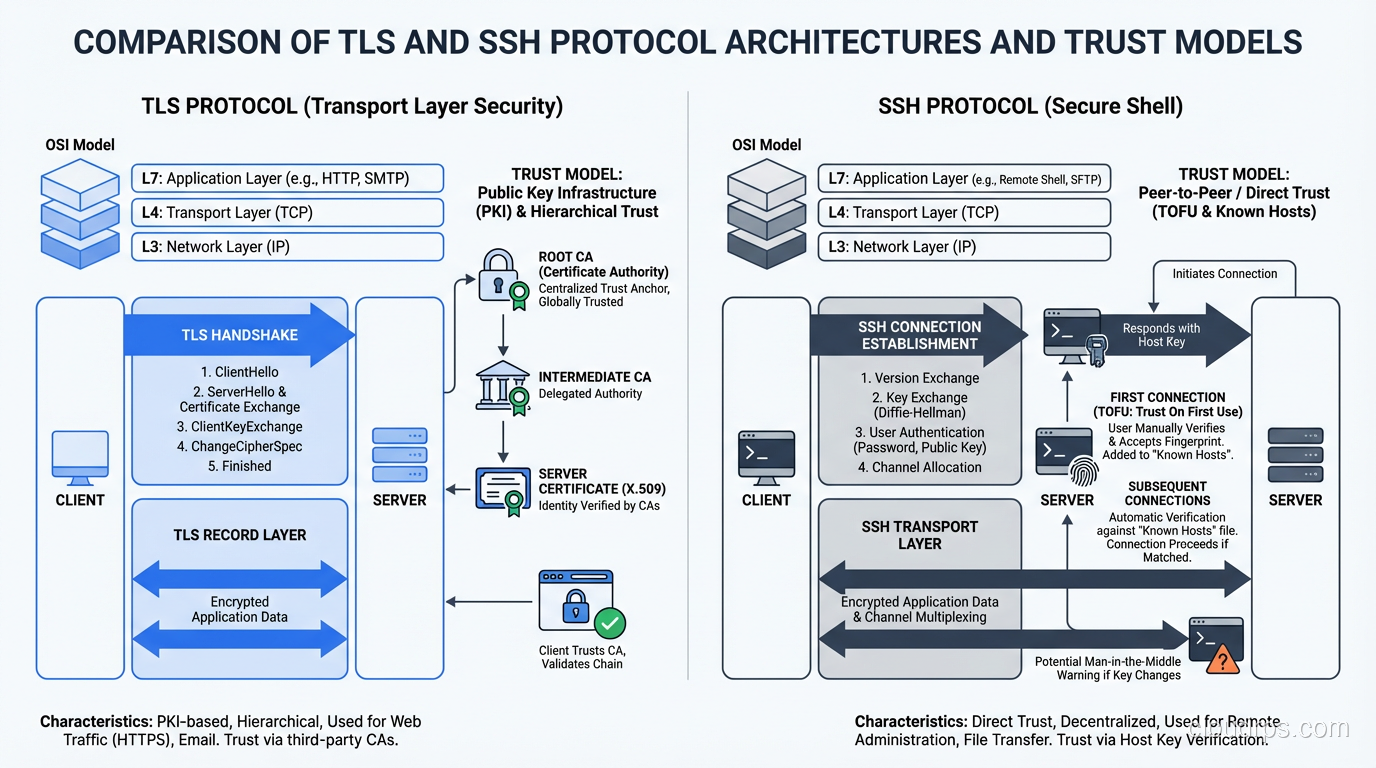
Comparing TLS and SSH
SSH and TLS solve similar problems (authenticated, encrypted communication over untrusted networks) but they were designed for different use cases.
Trust model: TLS uses a hierarchical CA system. SSH defaults to trust-on-first-use (or SSH certificates). The CA model scales better for public-facing services. The TOFU model works well for known infrastructure.
Session type: TLS is optimized for request/response patterns (HTTP) and bulk data transfer. SSH is optimized for interactive terminal sessions and multiplexed channels.
Client authentication: TLS client certificates exist but are rarely used in browser scenarios. SSH requires client authentication (password or key) by default.
Both protocols use the same underlying cryptographic primitives: ECDHE for key exchange, AES-GCM or ChaCha20 for encryption, Ed25519/ECDSA for signatures. The differences are in the protocol design, trust model, and use case optimization.
Wrapping Up
TLS is the most widely deployed security protocol on the planet, and understanding how it works is non-negotiable for any engineer building networked systems. The handshake establishes trust and derives encryption keys. The certificate chain provides authentication. The cipher suite determines the encryption strength. And forward secrecy ensures that today’s secrets stay secret even if tomorrow’s keys are compromised.
The practical takeaways: deploy TLS 1.3 wherever possible. Restrict TLS 1.2 to strong ECDHE cipher suites. Automate certificate management with ACME. Monitor certificate expiration and CT logs. Enable HSTS. Encrypt backend connections, not just the edge. And stop treating “but performance” as a reason to skip encryption. That argument died with the hardware of 2010.
Every HTTPS connection your users make involves this entire dance happening in milliseconds, invisibly. That’s remarkable engineering, and it’s worth understanding.
Get Cloud Architecture Insights
Practical deep dives on infrastructure, security, and scaling. No spam, no fluff.
By subscribing, you agree to receive emails. Unsubscribe anytime.