
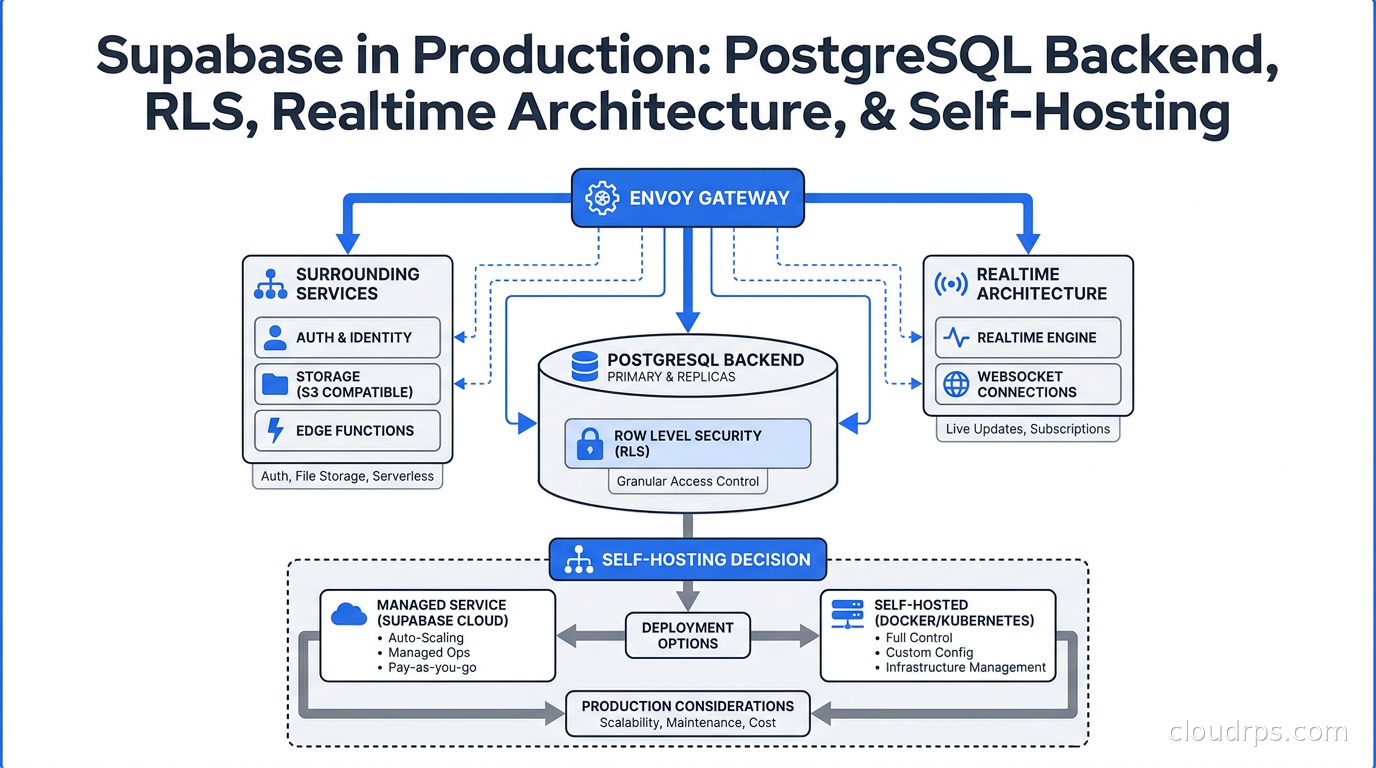
The “Firebase alternative” label attached to Supabase is accurate in the same way calling Kubernetes a “container runner” is accurate. Technically correct, practically misleading. After twenty years building data infrastructure, I have watched more teams than I can count reach for Supabase because it sounded simple, then either unlock its real power or get burned by misunderstanding how it actually works.
What Supabase actually is: a batteries-included development platform that wires together PostgreSQL with an auto-generated REST API, a JWT-based auth service, a WAL-streaming realtime layer, S3-compatible file storage, and an edge function runtime, all fronted by a single gateway. The database is not abstracted. You get raw PostgreSQL access alongside every one of those services. That combination is genuinely powerful, and genuinely dangerous if you deploy it without understanding the security model.
This article is the deep dive I wish existed when I first deployed Supabase for a multi-tenant SaaS application. We will cover the actual component architecture, how Row Level Security works as your access control layer, the connection management gotchas that hit every team, the Realtime machinery behind WebSocket subscriptions, and the honest tradeoffs between managed Supabase and self-hosting.
The Real Architecture: Seven Services Behind One Gateway
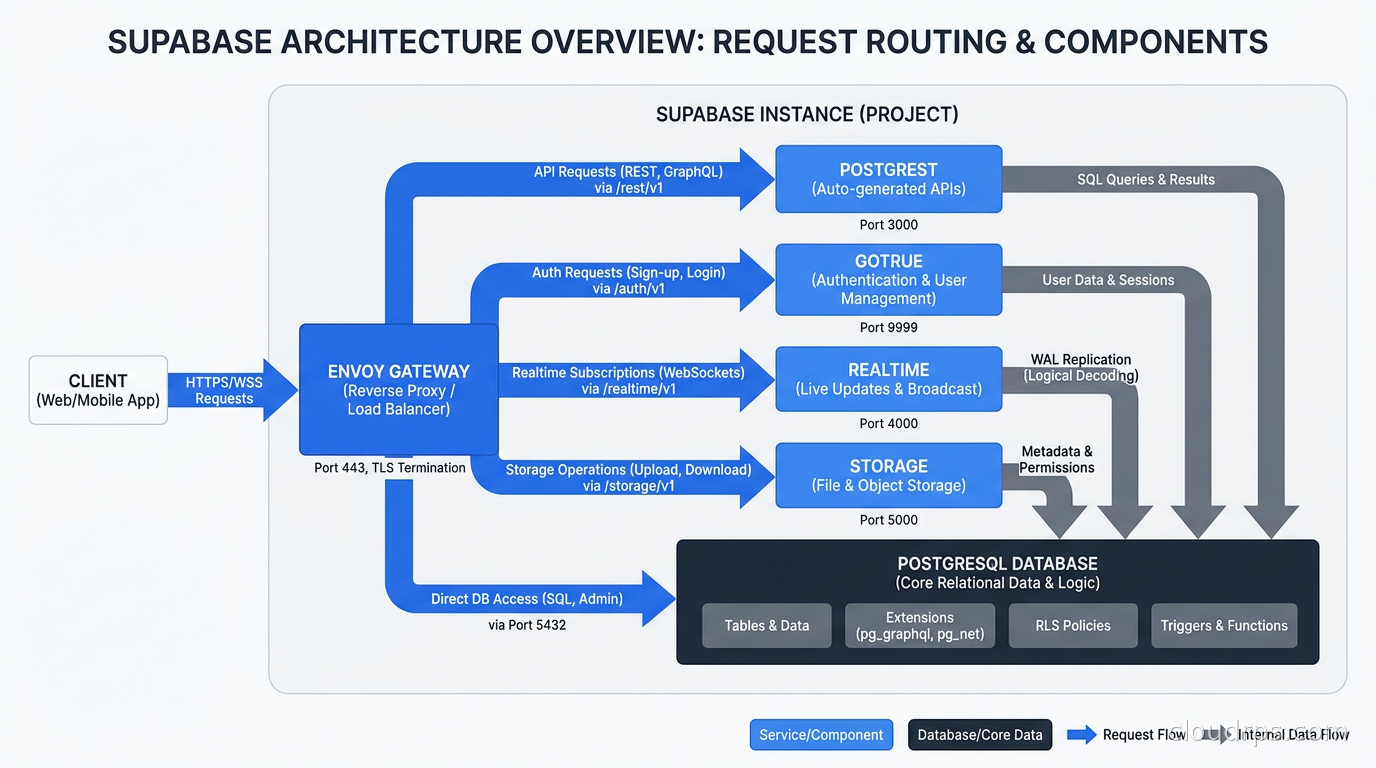
Most developers interact with Supabase through the client library and think of it as a single thing. Under the hood, as of late 2026, an Envoy API gateway sits in front of seven services: GoTrue (auth), PostgREST (REST API), Realtime (WebSocket streaming), Storage (file management), pg_meta (schema introspection), Functions (edge functions), and pg_graphql (GraphQL endpoint). Every one of them talks to a single PostgreSQL instance.
This matters because when you self-host, you are running all seven services plus the gateway plus PostgreSQL. When something breaks, you need to know which component failed.
PostgREST: Your Schema Becomes an API
PostgREST introspects your PostgreSQL schema and generates a REST API automatically. Create a table called invoices and you immediately have GET /invoices, POST /invoices, PATCH /invoices?id=eq.123, and DELETE /invoices?id=eq.123 without writing a line of application code. The v14 upgrade shipped in January 2026 and extended the query language with better nested resource embedding.
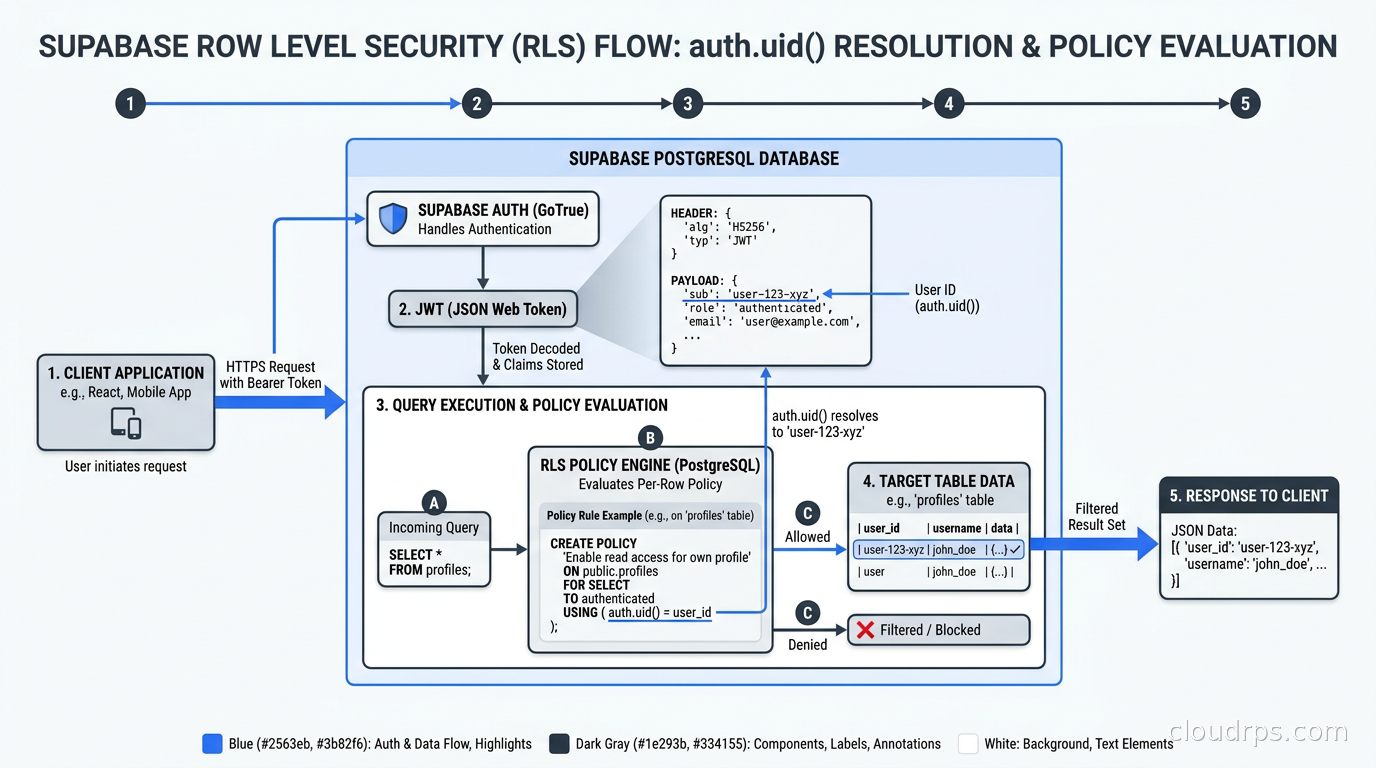
The critical point: every PostgREST request runs under the authenticated user’s context. It does not bypass your database access controls. Every RLS policy you define applies to every API call automatically. This is not just convenient; it is the whole security architecture.
GoTrue: JWT-Native Authentication
GoTrue handles user registration, login, password reset, OAuth provider flows (GitHub, Google, Apple, dozens more), magic links, and as of June 2026, WebAuthn for biometric and hardware key authentication. When a user authenticates, GoTrue issues a JSON Web Token (JWT) signed with your project’s JWT secret.
The key integration point: GoTrue writes the JWT claims into a PostgreSQL session variable called request.jwt.claims. Your RLS policies can read these claims using the auth.uid() function, which extracts the user’s UUID from the JWT. This is the bridge between authentication and authorization.
Supavisor: The Connection Pooler You Need to Understand
PostgreSQL connection limits are a real operational constraint. Every idle connection consumes server memory. Serverless and edge function environments open new connections on every invocation, and without a pooler you will exhaust your connection limit under load.
Supabase built Supavisor in Elixir to solve this at scale. You have three connection surfaces to choose from:
Direct Postgres (port 5432): Direct connections to PostgreSQL. Use this for database migrations, administrative tasks, and long-lived backend processes that need session-level features like advisory locks or LISTEN/NOTIFY. Never use this from serverless functions.
Transaction pooler via Supavisor (port 6543): Each query gets a database connection for its duration and releases it immediately. This is what you use from Vercel, Cloudflare Workers, AWS Lambda, any per-request or per-invocation runtime. Prepared statements do not work in transaction mode because the connection changes between statements. Disable prepared statements in your ORM configuration when using this port. Prisma needs ?pgbouncer=true. Drizzle needs ?ssl=true&connection_limit=1.
Session pooler via Supavisor (port 5432 port-forwarded through Supavisor): Persistent sessions. Useful when your backend is a long-running Node server that needs session-level features but you still want to share a pool of backend connections.
I have cleaned up more than a few production incidents where teams ignored Supavisor entirely, hit their connection limit, and then spent hours debugging application errors that had nothing to do with their application logic. Read the database connection pooling fundamentals before you set up your connection strings. The concepts are the same even when the pooler changes.
Row Level Security: The Access Control Layer That Lives in the Database
Row Level Security is a PostgreSQL feature. You can use it without Supabase. But Supabase makes RLS the central, first-class security mechanism for the entire platform. Understanding it is not optional.
The idea is elegant: instead of writing access checks in your application code, you write SQL policies that the database evaluates on every single query. When RLS is enabled on a table, every SELECT, INSERT, UPDATE, and DELETE goes through your policies. A row that fails the policy is invisible to the requesting user. It does not generate an error. It simply does not exist.
Enabling and Writing Policies
Enabling RLS on a table disables all access by default until you add policies. This is the right default and also the source of many broken applications written by developers who enabled RLS and then wondered why all their queries returned empty sets.
-- Enable RLS
ALTER TABLE documents ENABLE ROW LEVEL SECURITY;

-- Users can only read their own documents
CREATE POLICY "Users read own documents"
ON documents FOR SELECT
USING (user_id = auth.uid());

-- Users can only insert documents with their own user_id
CREATE POLICY "Users insert own documents"
ON documents FOR INSERT
WITH CHECK (user_id = auth.uid());

-- Users can update their own documents
CREATE POLICY "Users update own documents"
ON documents FOR UPDATE
USING (user_id = auth.uid())
WITH CHECK (user_id = auth.uid());
The USING clause controls which rows the user can read or modify (it adds an implicit WHERE clause). The WITH CHECK clause controls what values are allowed when writing. A policy with only USING on an UPDATE lets the user change any column to any value as long as they could see the row. You typically need both.
The Multi-Tenant Organization Pattern
Most production Supabase applications are multi-tenant SaaS products. The common pattern uses a members table to express team membership:
-- Organization membership table
CREATE TABLE org_members (
  org_id UUID NOT NULL,
  user_id UUID NOT NULL REFERENCES auth.users(id),
  role TEXT NOT NULL DEFAULT 'member',
  PRIMARY KEY (org_id, user_id)
);

-- Projects belong to organizations
CREATE TABLE projects (
  id UUID PRIMARY KEY DEFAULT gen_random_uuid(),
  org_id UUID NOT NULL,
  name TEXT NOT NULL
);

ALTER TABLE projects ENABLE ROW LEVEL SECURITY;

-- Members of the organization can read its projects
CREATE POLICY "Org members read projects"
ON projects FOR SELECT
USING (
  org_id IN (
    SELECT org_id FROM org_members
    WHERE user_id = auth.uid()
  )
);
This is correct but introduces a performance problem at scale. That subquery runs on every row evaluation. For a projects table with ten thousand rows and a complex join, this can turn a millisecond query into something much slower. The PostgreSQL indexing strategies matter here: add a partial index on org_members(user_id, org_id) and the planner can satisfy that subquery from an index scan rather than a sequential scan.
An alternative is the JWT claims approach. Store the user’s organization memberships in the JWT metadata and read them with auth.jwt(). This eliminates the subquery entirely at the cost of requiring re-authentication when membership changes and putting size constraints on JWT payloads.
Superuser Bypass: The Service Role Key
Supabase projects have two API keys: the anon key (used by client browsers, respects RLS) and the service role key (bypasses RLS entirely). The service role key is for administrative operations: backfills, migrations, cron jobs, webhook handlers that need to read all tenants’ data.
The service role key is a secret. It should never touch a client browser. I have audited applications where the service role key was hardcoded in client-side JavaScript. That is a complete bypass of your entire security model.
Realtime: WAL-Streaming to WebSocket Clients
Supabase Realtime is architecturally interesting because it solves a genuinely hard problem: streaming database changes to connected clients at low latency without polling.
The implementation uses PostgreSQL’s Write-Ahead Log. The WAL is the append-only journal that PostgreSQL uses to guarantee durability. Realtime acts as a logical replication consumer, reading the decoded WAL stream and filtering changes through your RLS policies before broadcasting them to subscribed WebSocket clients.
This means Realtime respects your RLS policies by default. A user subscribed to changes on the documents table only receives changes for rows their policies allow them to read. The filtering happens at the Realtime server before the change reaches the WebSocket.
Three modes exist in the current Realtime version:
Postgres Changes: Subscribe to INSERT, UPDATE, DELETE events on specific tables or filtered by column values. Built on WAL streaming.
Broadcast: Low-latency arbitrary message passing between clients via named channels. Does not touch the database. Useful for cursor positions, typing indicators, ephemeral state. As of July 2026, binary payloads are supported.
Presence: Track which clients are connected to a channel and their arbitrary metadata (user name, cursor position, online status). Synced state across all subscribers to a channel.
A practical note on Realtime and connection pooling: Realtime maintains its own connection to PostgreSQL for WAL streaming, separate from your application connections. This connection uses logical replication, which has its own slot management considerations. If a Realtime server restarts and falls behind on the WAL, PostgreSQL will accumulate WAL segments to catch up the slot. Monitor WAL slot lag in production. Unmonitored replication slot lag has taken down PostgreSQL instances by filling the disk.
Schema Migrations: The Part Supabase Does Not Manage for You
The dashboard’s table editor is for prototyping. In production, schema changes belong in version-controlled migration files. Supabase CLI generates and applies migrations using supabase db diff and supabase migration new. The approach is standard versioned migrations.
The constraint is that RLS policies are database objects. They live in migration files alongside your schema. Changing a policy is a migration. Testing that a policy change does not break existing functionality requires either a staging database or Supabase’s branching feature (available on managed plans from May 2026 without requiring a GitHub integration).
For zero-downtime database migrations in Supabase, the same principles apply as any PostgreSQL deployment. Additive changes first, non-nullable columns with defaults, separate the deploy from the migration. The Supabase CLI’s supabase db push command handles this against a live project. The catch is that RLS policy changes take effect immediately, so a policy that breaks a client API will break it in production the moment the migration runs.
Self-Hosting: The Honest Tradeoffs
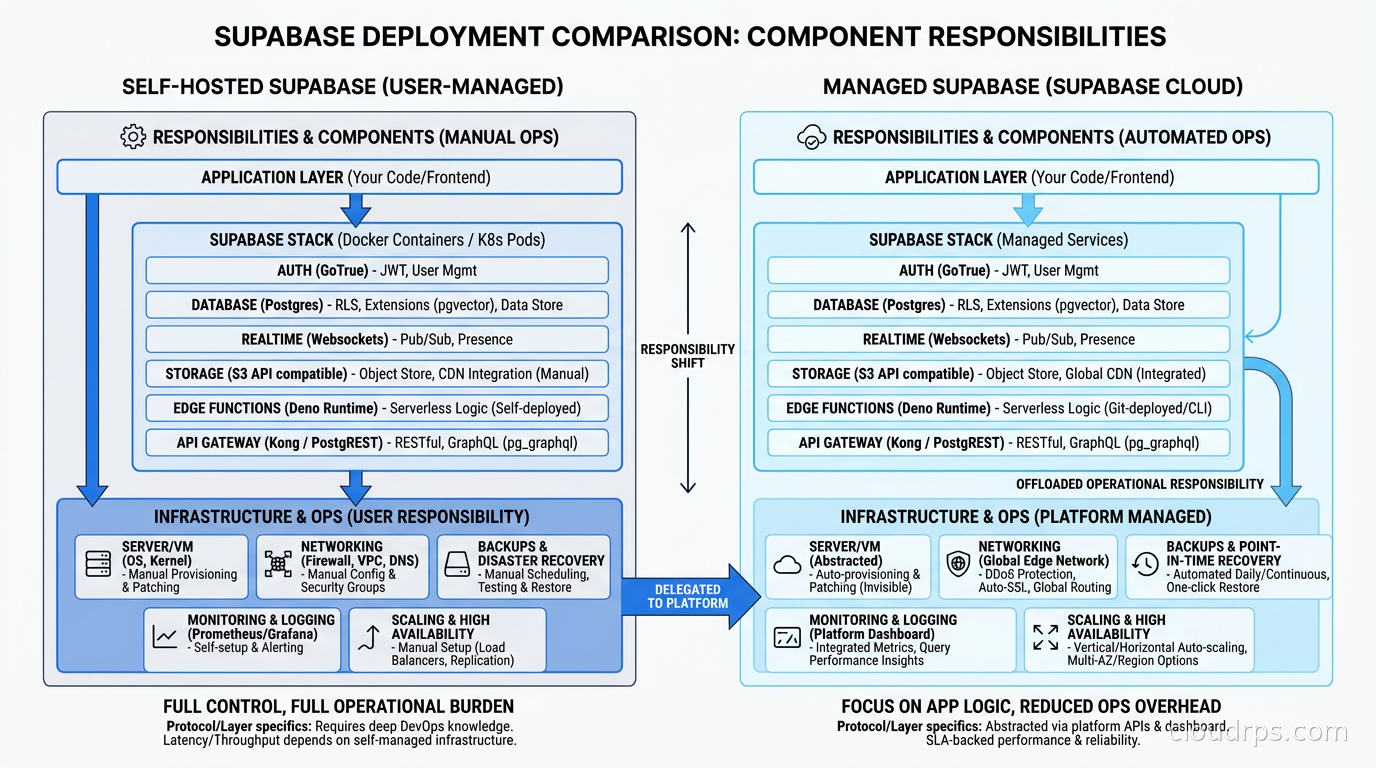
The self-hosted Supabase stack is publicly available. The docker-compose.yml in the Supabase repository runs the full stack. In August 2026, the default gateway switched from Kong to Envoy, reflecting a broader architectural direction. If you followed old self-hosting guides, you will need to update your proxy configuration.
What self-hosting costs you: Managed backups with point-in-time recovery are not automatic. You are running your own PostgreSQL instance with your own backup strategy. The Supabase dashboard’s branching feature (create a copy of your database for a pull request, test against it, discard it) depends on platform infrastructure that is not part of the open-source stack. Upgrades are yours to manage. When Supabase upgrades its cloud-hosted PostgREST or GoTrue versions, your self-hosted stack stays on whatever version you deployed.
What self-hosting gives you: Data residency for GDPR compliance or regulated industries. Complete cost control at scale. No cold starts for edge functions because you control the compute. The ability to customize the stack for your specific requirements.
The decision typically comes down to three things: team operational capacity (can you maintain a PostgreSQL HA cluster and twelve Docker services?), compliance requirements (data residency matters for European products in particular), and cost at scale (the managed plans are very reasonable until you have significant database compute or storage needs).
My recommendation: start managed. The $25/month Pro plan gives you a serious development and early-production environment. The Team plan at $599/month (ISO 27001 certified as of May 2026, HIPAA available as an add-on) covers regulated industries. When you have enough traffic and enough operational maturity to justify it, self-hosting is a reasonable path and the docker-compose stack is genuinely runnable. But I have watched too many teams self-host Supabase on day one to avoid the $25/month fee and then spend engineer-hours maintaining it.
The Multi-Tenancy Fit
Supabase maps naturally to multi-tenant SaaS architectures where each tenant is an organization or team, not a separate database. The RLS-per-tenant model is a shared-database, shared-schema approach with row-level isolation. This is cheaper and simpler than database-per-tenant at small scale and appropriate for most SaaS applications.
The limits of this model: very high-volume tenants that generate millions of rows will share query performance characteristics with all other tenants on the same PostgreSQL instance. Noisy neighbor effects are real. On managed Supabase, you can vertically scale the compute for your project, but you cannot move a single tenant to a larger instance without moving your whole project.
If you have enterprise tenants with strict isolation requirements, the Postgres-native row-level security model does provide actual isolation guarantees. A correctly written RLS policy prevents cross-tenant data access at the database level, not just the application level. This is stronger than application-layer access checks that could have logic bugs.
Comparing Against the Alternatives
When should you use Supabase over serverless databases like Neon, PlanetScale, or Turso? Use Supabase when you need more than a database. If you need auth, storage, and realtime alongside your database, Supabase integrates those as first-class citizens. The integration is not superficial: auth tokens flow automatically into RLS policies, the storage API checks RLS policies on metadata tables, and Realtime filters through RLS. Building that integration yourself against a bare PostgreSQL instance would take weeks.
Use Neon or similar when you need branching-per-PR environments with a true serverless database that scales to zero. Neon’s copy-on-write branching is architecturally superior for CI workflows. Use Supabase’s branching when you need the full stack branched, not just the database.
When should you use Supabase over managed PostgreSQL like Aurora or AlloyDB? Use Aurora or AlloyDB when you need deep database operational control, your team already has strong PostgreSQL operational expertise, you need Aurora Limitless for multi-petabyte scale, or you need AlloyDB’s columnar acceleration for analytical queries. Supabase is the right call when you are a product team that wants to ship features, not a database team that wants to tune PostgreSQL.
What the $10B Valuation Signals
In June 2026, Supabase raised a $500M Series F at a $10B pre-money valuation. I am not citing this as a product recommendation but as a signal about enterprise adoption. The ISO 27001 certification (May 2026), HIPAA add-on availability, SOC2 compliance on the Team plan, and the GitHub secret push protection for Supabase API keys are all enterprise-driven features that did not exist two years ago.
The practical implication: regulated industry workloads (healthcare, finance, education) are now within reach on managed Supabase without building a compliance program from scratch. The compliance certifications are Supabase’s, not yours, which significantly reduces audit burden for small teams.
Production Checklist
Before calling a Supabase deployment production-ready, go through these:
Security: RLS enabled on every table accessed by the anon or user role. Service role key never in client-side code. Verify your policies with SELECT * FROM pg_policies and test each policy with a real JWT. The Supabase SQL editor lets you run queries with SET role = anon to simulate unauthenticated access.
Connection strings: Serverless and edge function deployments use the transaction pooler URL (port 6543) with prepared statements disabled. Long-lived backend servers use session pooler. Direct connections only for migrations and admin operations.
Realtime: If you are not using Realtime, disable the publication to avoid WAL slot accumulation. If you are using it, monitor the replication slot lag with SELECT slot_name, pg_size_pretty(pg_wal_lsn_diff(pg_current_wal_lsn(), restart_lsn)) AS replication_lag FROM pg_replication_slots.
Auth: JWT secret rotation strategy defined. Auth webhook configured if you need to sync user creation to your own user records table. Auth providers limited to the ones you actually use.
Performance: EXPLAIN ANALYZE run on every query that touches RLS-protected tables. Indexes on the columns your policies use. The auth.uid() function is JIT-optimized by PostgreSQL but subqueries in policies still need proper index coverage.
Backups: On managed plans, verify point-in-time recovery is enabled and test a restore. On self-hosted, you own this entirely. Barman or pg_basebackup with WAL archiving. Do not assume the postgres container’s data directory is backed up just because it is on a persistent volume.
The Platform Has Grown Up
I spent a significant part of 2021 advising teams to stay away from Supabase for anything serious because the auth service had rough edges and the RLS story was not well documented. That was fair then. The platform in September 2026 is a different product. The component architecture is well documented, the connection pooling story is clear, the enterprise certifications are in place, and the community tooling (including Drizzle ORM’s first-class Supabase support, dedicated Supabase-aware migration tools, and thorough RLS testing libraries) has matured.
The teams that struggle with Supabase in production are overwhelmingly teams that treated it as a magic backend and skipped understanding the security model. The teams that succeed treat it as what it is: a well-integrated platform built on PostgreSQL, where you are still responsible for designing your data model, writing your RLS policies correctly, and understanding what happens at the database level. That responsibility is not a weakness. It is why Supabase deployments can compete with the security posture of any custom-built backend.
Get Cloud Architecture Insights
Practical deep dives on infrastructure, security, and scaling. No spam, no fluff.
By subscribing, you agree to receive emails. Unsubscribe anytime.