
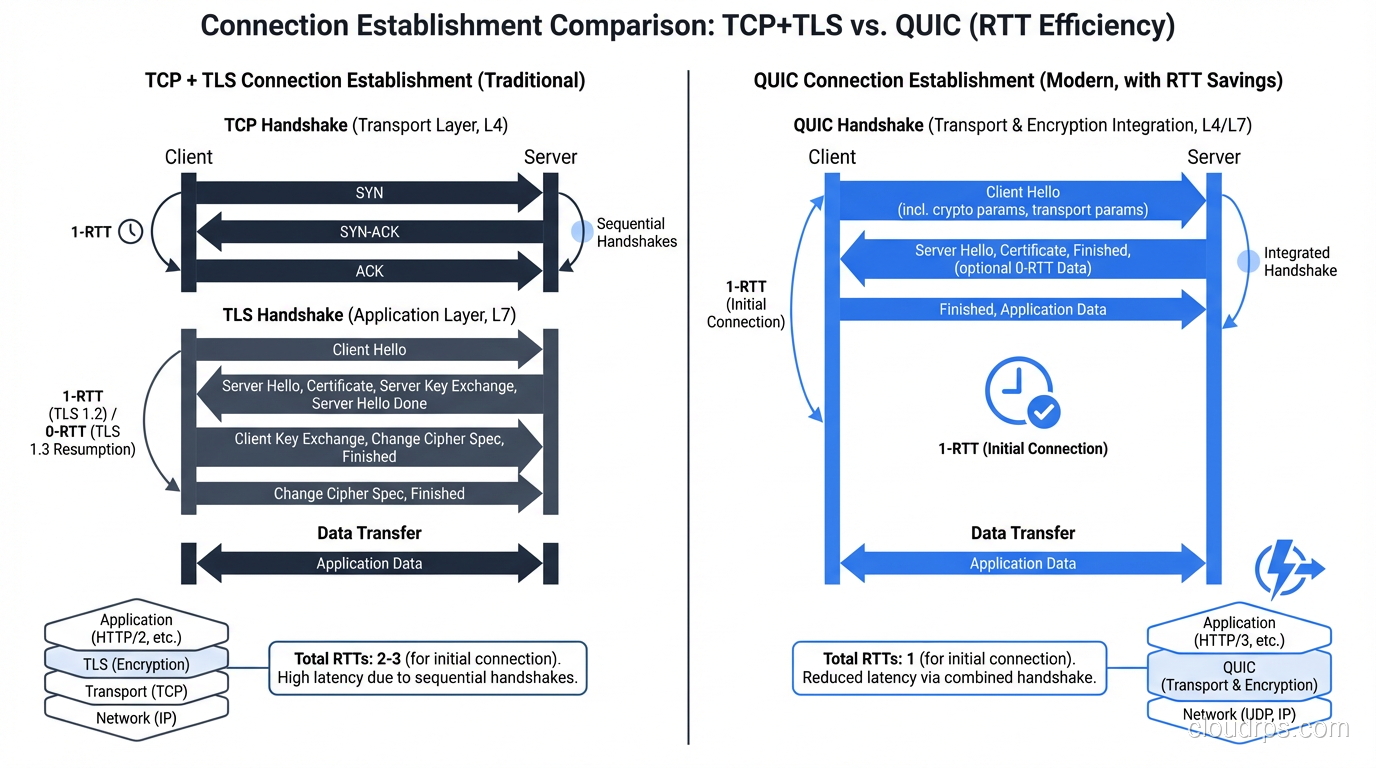
TCP and UDP are the two workhorses of the internet’s transport layer. If you’re reading this, you’re using TCP right now. Your browser established a TCP connection to this server, and every byte of this page was delivered reliably, in order, with error checking. If you’re on a video call in another tab, that’s probably using UDP, with packets flying as fast as possible, and if a few get lost, the video just glitches slightly rather than freezing while it waits for retransmission.
I’ve spent decades building systems on both protocols, and the “TCP vs UDP” question comes up in every architecture review I do. The answer is almost always TCP, not because UDP is bad, but because most applications need reliability and TCP provides it without you having to think about it. The cases where UDP genuinely wins are specific and instructive, and understanding them reveals a lot about how networking actually works.
Where TCP and UDP Sit in the Stack
Both TCP and UDP operate at Layer 4 (Transport) of the OSI model. They sit on top of IP (Layer 3) and provide services to applications (Layer 7). Their job is to take data from an application, package it appropriately, and hand it to IP for delivery.
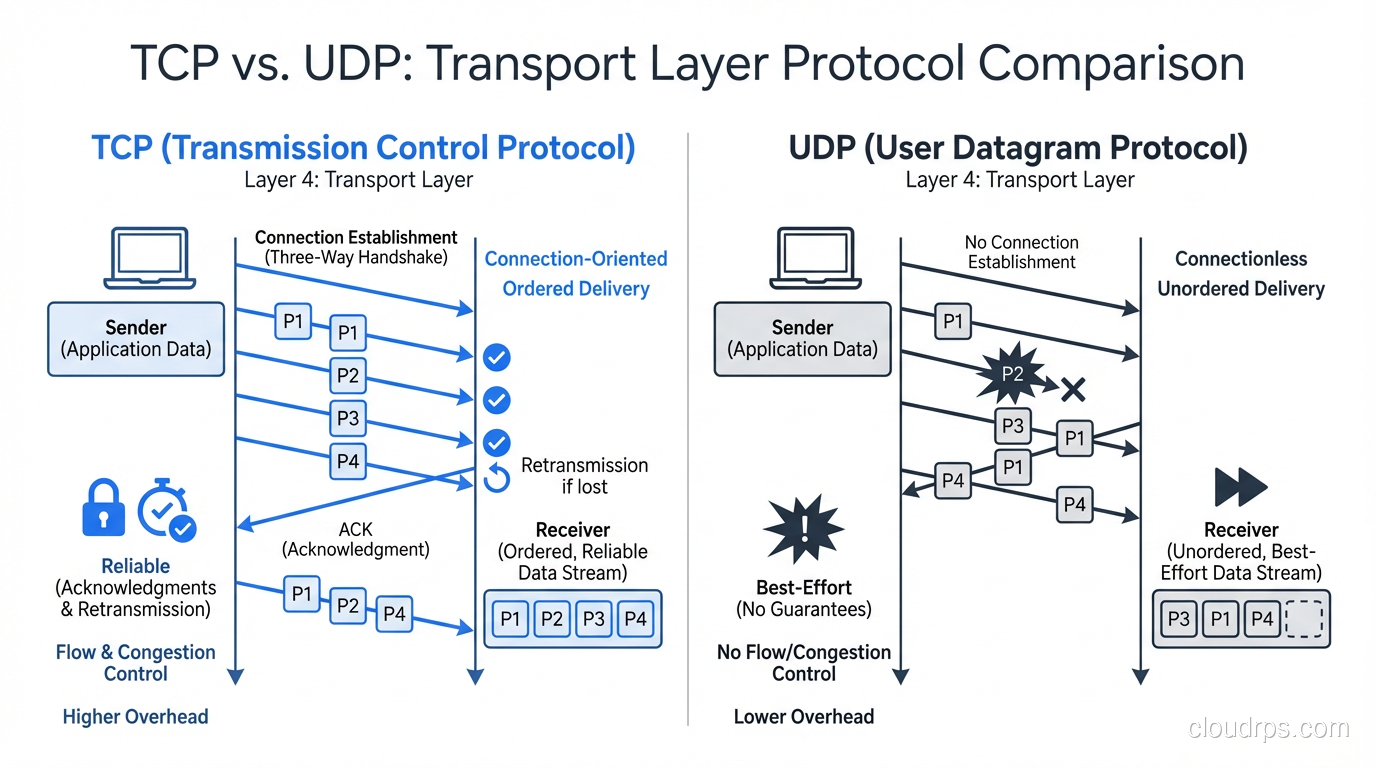
The key difference: TCP provides reliable, ordered delivery. UDP provides fast, best-effort delivery.
Application (HTTP, DNS, etc.)
         ↓
Transport (TCP or UDP)  ← We're here
         ↓
Network (IP)
         ↓
Data Link (Ethernet)
         ↓
Physical (cables, fiber)
TCP Deep Dive: Reliability Has a Cost
TCP (Transmission Control Protocol, RFC 793) is a connection-oriented, reliable, ordered byte stream protocol. Let me break down each of those properties and what they cost you.
Connection-Oriented: The Three-Way Handshake
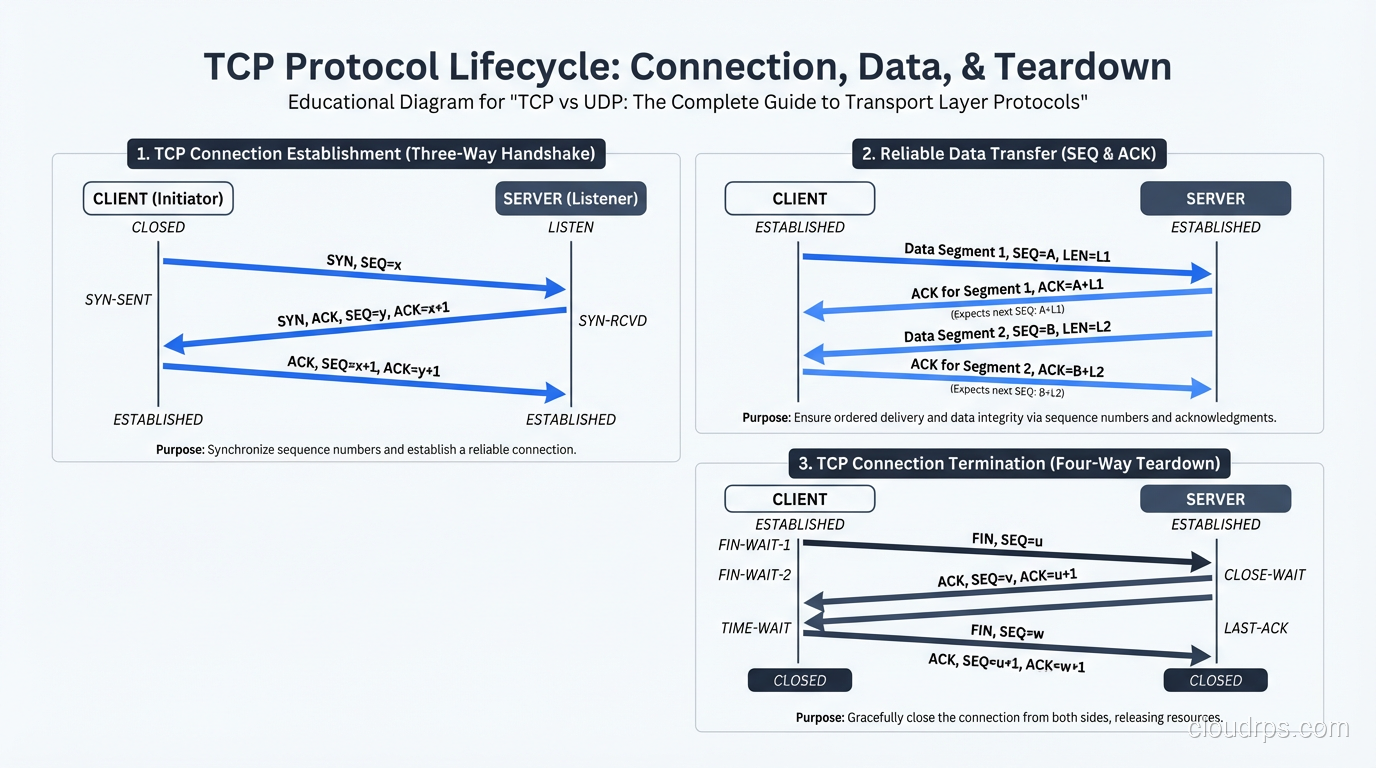
Before any data flows, TCP requires a connection to be established via the three-way handshake:
Client              Server
  |--- SYN ---------->|    (1. Client sends SYN, picks initial sequence number)
  |<-- SYN-ACK -------|    (2. Server responds with SYN-ACK, picks its own seq number)
  |--- ACK ---------->|    (3. Client acknowledges, connection established)
  |--- Data --------->|    (4. Now data can flow)
This costs you one full round trip before any data is sent. On a connection between New York and London (~70ms RTT), that’s 70ms of latency just to establish the connection, before the TLS handshake (another 1-2 RTTs) and before the actual HTTP request.
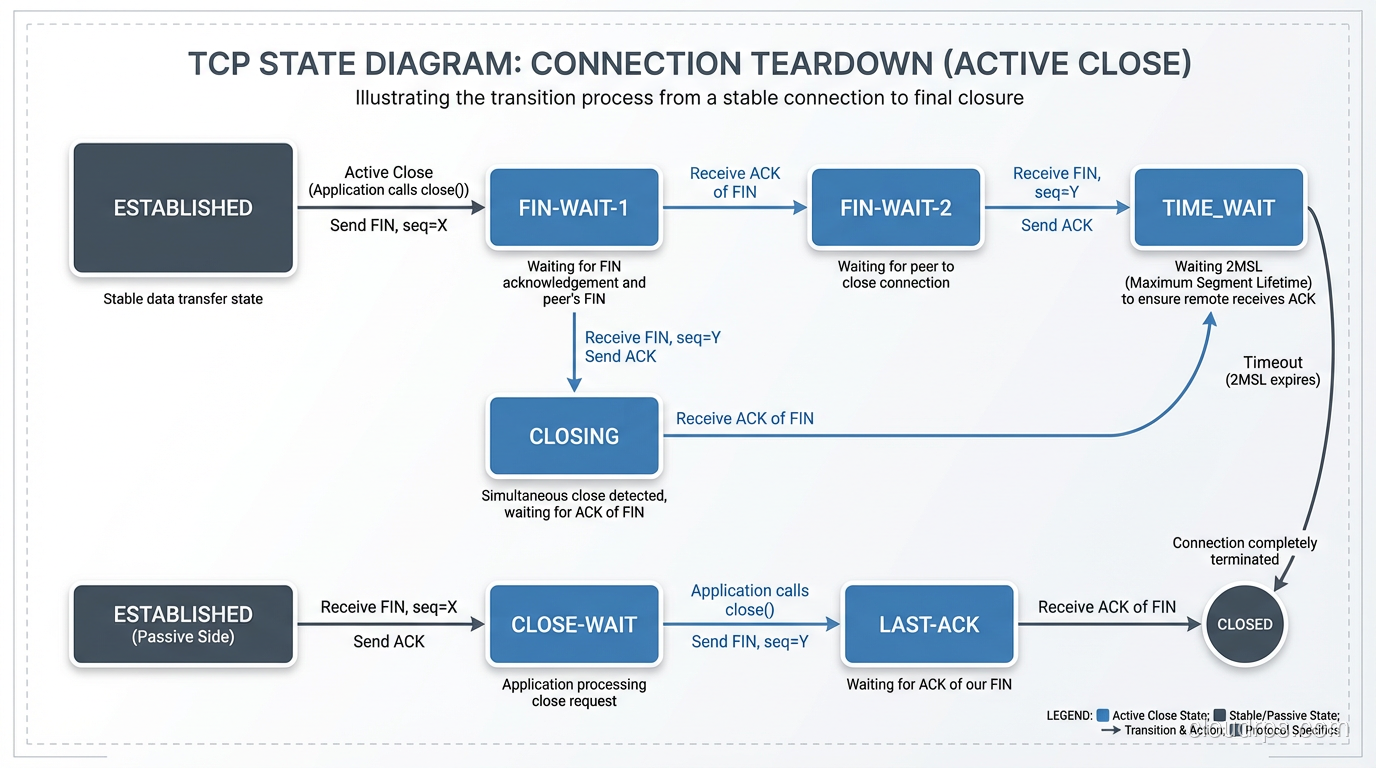
TCP also has a four-way teardown (FIN, ACK, FIN, ACK) when the connection closes. And connections that aren’t properly closed enter TIME_WAIT state on the side that initiates the close, tying up a socket for 2×MSL (typically 60-120 seconds). I’ve seen servers run out of available ports because of TIME_WAIT accumulation from rapid connection cycling.
# Check TIME_WAIT connections on Linux
ss -s
# or
ss -tan state time-wait | wc -l
Reliable Delivery: Sequence Numbers and ACKs
Every byte sent over TCP is assigned a sequence number. The receiver acknowledges received data by sending back an ACK with the next expected sequence number. If the sender doesn’t receive an ACK within a timeout period, it retransmits the data.
Sender                     Receiver
  |--- SEQ=1, Data[1-1460] -->|
  |--- SEQ=1461, Data[1461-2920] -->|
  |<-- ACK=2921 --------------|    (Receiver got everything up to byte 2920)
  |--- SEQ=2921, Data[2921-4380] -->|  (packet lost!)
  |--- SEQ=4381, Data[4381-5840] -->|
  |<-- ACK=2921 --------------|    (Receiver still waiting for byte 2921)
  |<-- ACK=2921 --------------|    (Duplicate ACK)
  |<-- ACK=2921 --------------|    (Duplicate ACK - 3 total = fast retransmit trigger)
  |--- SEQ=2921, Data[2921-4380] -->|  (Retransmit!)
  |<-- ACK=5841 --------------|    (Got everything now)
This is incredibly robust, but it has consequences:
- Head-of-line blocking: If packet 3 is lost, packets 4, 5, 6 (which arrived fine) can’t be delivered to the application until packet 3 is retransmitted and received. The entire stream stalls.
- Retransmission delay: The minimum retransmission timeout (RTO) is typically 200ms, though the fast retransmit mechanism (triggered by 3 duplicate ACKs) is much faster.
Flow Control: The Sliding Window
TCP uses a sliding window mechanism for flow control. The receiver advertises how much buffer space it has available (the receive window). The sender can only have that many unacknowledged bytes in flight.
Receive Window: 65535 bytes
→ Sender can have up to 65,535 unacknowledged bytes in transit
This prevents the sender from overwhelming a slow receiver. But it also means that on high-latency, high-bandwidth links, the window size limits throughput. The classic formula:
Maximum throughput = Window Size / RTT
With a 64KB window and 100ms RTT: 65,535 / 0.1 = 655,350 bytes/sec ≈ 5.2 Mbps. That’s terrible on a gigabit link. This is why TCP Window Scaling (RFC 7323) exists. It allows windows up to 1GB, but both sides need to support it.
Congestion Control: Being a Good Citizen
TCP’s congestion control algorithms prevent network meltdown by reducing sending rate when packet loss is detected. The evolution of these algorithms tells the story of internet scaling:
| Algorithm | Era | Key Innovation |
|---|---|---|
| Tahoe/Reno | 1988-1990 | Slow start, congestion avoidance, fast retransmit |
| NewReno | 1999 | Better handling of multiple losses |
| CUBIC | 2008 | Default in Linux, better for high-BDP networks |
| BBR (Google) | 2016 | Model-based, estimates bandwidth instead of using loss |
| BBRv2 | 2019+ | Fixes BBR’s fairness issues with CUBIC flows |
The choice of congestion control algorithm dramatically affects performance. I’ve seen file transfers double in speed just by switching from CUBIC to BBR on high-latency links:
# Check current congestion control algorithm (Linux)
sysctl net.ipv4.tcp_congestion_control

# Switch to BBR
sysctl -w net.ipv4.tcp_congestion_control=bbr
Gotcha: BBRv1 is known to be unfair to CUBIC flows; it can grab more than its fair share of bandwidth. BBRv2 addresses this, but BBRv1 is still the default in many Linux deployments. If you’re running a CDN or high-traffic service, BBR can be a significant performance win, but be aware of the fairness implications.
The TCP Header
 0                   1                   2                   3
 0 1 2 3 4 5 6 7 8 9 0 1 2 3 4 5 6 7 8 9 0 1 2 3 4 5 6 7 8 9 0 1
+-+-+-+-+-+-+-+-+-+-+-+-+-+-+-+-+-+-+-+-+-+-+-+-+-+-+-+-+-+-+-+-+
|          Source Port          |       Destination Port        |
+-+-+-+-+-+-+-+-+-+-+-+-+-+-+-+-+-+-+-+-+-+-+-+-+-+-+-+-+-+-+-+-+
|                        Sequence Number                        |
+-+-+-+-+-+-+-+-+-+-+-+-+-+-+-+-+-+-+-+-+-+-+-+-+-+-+-+-+-+-+-+-+
|                    Acknowledgment Number                      |
+-+-+-+-+-+-+-+-+-+-+-+-+-+-+-+-+-+-+-+-+-+-+-+-+-+-+-+-+-+-+-+-+
|  Data |           |U|A|P|R|S|F|                               |
| Offset| Reserved  |R|C|S|S|Y|I|            Window             |
|       |           |G|K|H|T|N|N|                               |
+-+-+-+-+-+-+-+-+-+-+-+-+-+-+-+-+-+-+-+-+-+-+-+-+-+-+-+-+-+-+-+-+
|           Checksum            |         Urgent Pointer        |
+-+-+-+-+-+-+-+-+-+-+-+-+-+-+-+-+-+-+-+-+-+-+-+-+-+-+-+-+-+-+-+-+
|                    Options (variable)                         |
+-+-+-+-+-+-+-+-+-+-+-+-+-+-+-+-+-+-+-+-+-+-+-+-+-+-+-+-+-+-+-+-+
That’s a minimum of 20 bytes of overhead per segment (40 with common options like timestamps and window scaling). Compare that to UDP’s 8 bytes.
UDP Deep Dive: Speed Through Simplicity
UDP (User Datagram Protocol, RFC 768) is the antithesis of TCP. It provides connectionless, unreliable, unordered datagram delivery. That sounds terrible until you realize that for many use cases, TCP’s reliability guarantees are actively harmful.
The UDP Header
 0                   1                   2                   3
 0 1 2 3 4 5 6 7 8 9 0 1 2 3 4 5 6 7 8 9 0 1 2 3 4 5 6 7 8 9 0 1
+-+-+-+-+-+-+-+-+-+-+-+-+-+-+-+-+-+-+-+-+-+-+-+-+-+-+-+-+-+-+-+-+
|          Source Port          |       Destination Port        |
+-+-+-+-+-+-+-+-+-+-+-+-+-+-+-+-+-+-+-+-+-+-+-+-+-+-+-+-+-+-+-+-+
|            Length             |           Checksum            |
+-+-+-+-+-+-+-+-+-+-+-+-+-+-+-+-+-+-+-+-+-+-+-+-+-+-+-+-+-+-+-+-+
That’s it. 8 bytes. Source port, destination port, length, checksum. No sequence numbers, no acknowledgments, no windows, no connection state.
What UDP Doesn’t Do
- No connection establishment: Send a datagram whenever you want, no handshake needed
- No guaranteed delivery: Packets can be lost, and the sender never knows
- No ordering: Packets can arrive out of order
- No flow control: The sender can blast as fast as it wants (receiver’s problem)
- No congestion control: UDP doesn’t slow down when the network is congested (network’s problem)
- No retransmission: Lost packets are gone forever (unless the application handles it)
Why UDP Exists
If UDP is so unreliable, why use it? Because sometimes reliability causes more problems than it solves.
Real-time voice/video: If a voice packet is lost and retransmitted, it arrives too late to be useful. Playing it now would cause a gap followed by old audio, worse than just skipping it. For real-time media, “missing a frame” is better than “freezing for 200ms waiting for a retransmit.”
DNS: A DNS query is a single request-response exchange. TCP’s three-way handshake would triple the latency. UDP lets you send the query immediately and get the response immediately. If the response is lost, the client just retries after a short timeout. (DNS does fall back to TCP for responses larger than 512 bytes, or when DNSSEC signatures make responses too big for a single UDP datagram.)
Online gaming: Player positions update 30-60 times per second. If update #47 is lost, you don’t want to stall the game waiting for a retransmit. You just wait for update #48, which makes update #47 irrelevant anyway.
IoT/telemetry: Sensor readings that arrive every second. A missed reading is fine; a 5-second stall in the data stream is not.
Head-to-Head Comparison
| Feature | TCP | UDP |
|---|---|---|
| Connection | 3-way handshake required | No connection, send anytime |
| Reliability | Guaranteed delivery + retransmission | Best-effort, packets can be lost |
| Ordering | Strict byte-stream ordering | No ordering guarantees |
| Flow control | Sliding window | None |
| Congestion control | Yes (CUBIC, BBR, etc.) | None (application must handle) |
| Header size | 20-60 bytes | 8 bytes |
| Latency overhead | 1 RTT connection setup + TLS | None |
| Head-of-line blocking | Yes (stream stalls on packet loss) | No (independent datagrams) |
| Broadcast/multicast | No (unicast only) | Yes |
| Streaming | Byte stream (no message boundaries) | Message-oriented (datagram boundaries preserved) |
| Overhead | Higher (state tracking, retransmission buffers) | Minimal |
When to Use TCP
- Web traffic (HTTP/HTTPS)
- Email (SMTP, IMAP)
- File transfers (FTP, SCP, rsync)
- Database connections (PostgreSQL, MySQL)
- SSH/remote access
- Any application where data integrity matters more than latency
When to Use UDP
- Real-time voice/video (VoIP, video conferencing)
- Online gaming (player state updates)
- DNS queries
- DHCP
- SNMP
- IoT telemetry
- Streaming media (live video where frames can be dropped)
- VPN tunnels (WireGuard, OpenVPN’s UDP mode)
TCP Performance Tuning
If you’re running TCP-heavy workloads (which is most of the internet), understanding TCP tuning can yield significant performance improvements.
Tuning the Linux TCP Stack
# Increase TCP buffer sizes for high-bandwidth links
sysctl -w net.core.rmem_max=16777216
sysctl -w net.core.wmem_max=16777216
sysctl -w net.ipv4.tcp_rmem="4096 87380 16777216"
sysctl -w net.ipv4.tcp_wmem="4096 65536 16777216"

# Enable TCP Fast Open (saves 1 RTT on repeated connections)
sysctl -w net.ipv4.tcp_fastopen=3

# Enable BBR congestion control
sysctl -w net.ipv4.tcp_congestion_control=bbr

# Increase backlog for high-connection-rate servers
sysctl -w net.core.somaxconn=65535
sysctl -w net.ipv4.tcp_max_syn_backlog=65535

# Reduce TIME_WAIT accumulation
sysctl -w net.ipv4.tcp_tw_reuse=1
TCP Fast Open (TFO)
TCP Fast Open (RFC 7413) eliminates the 1-RTT penalty for repeat connections. On the first connection, the server gives the client a cookie. On subsequent connections, the client includes data in the SYN packet along with the cookie, and the server can process it immediately without waiting for the full handshake.
Without TFO:
  SYN →
  ← SYN-ACK
  ACK + Data →     (data sent after 1 RTT)

With TFO (repeat connection):
  SYN + Cookie + Data →     (data sent immediately)
  ← SYN-ACK + Response
TFO is supported by Linux, macOS, and recent Windows, but it’s not universally deployed because middleboxes (firewalls, proxies) sometimes strip TCP options or block SYN packets with data.
QUIC: The Best of Both Worlds?
QUIC (RFC 9000) is the most significant transport protocol development since TCP itself. Developed by Google and standardized by the IETF, QUIC runs over UDP but provides TCP-like reliability with several key improvements.
Why QUIC Exists
QUIC was designed to solve TCP’s problems for web traffic:
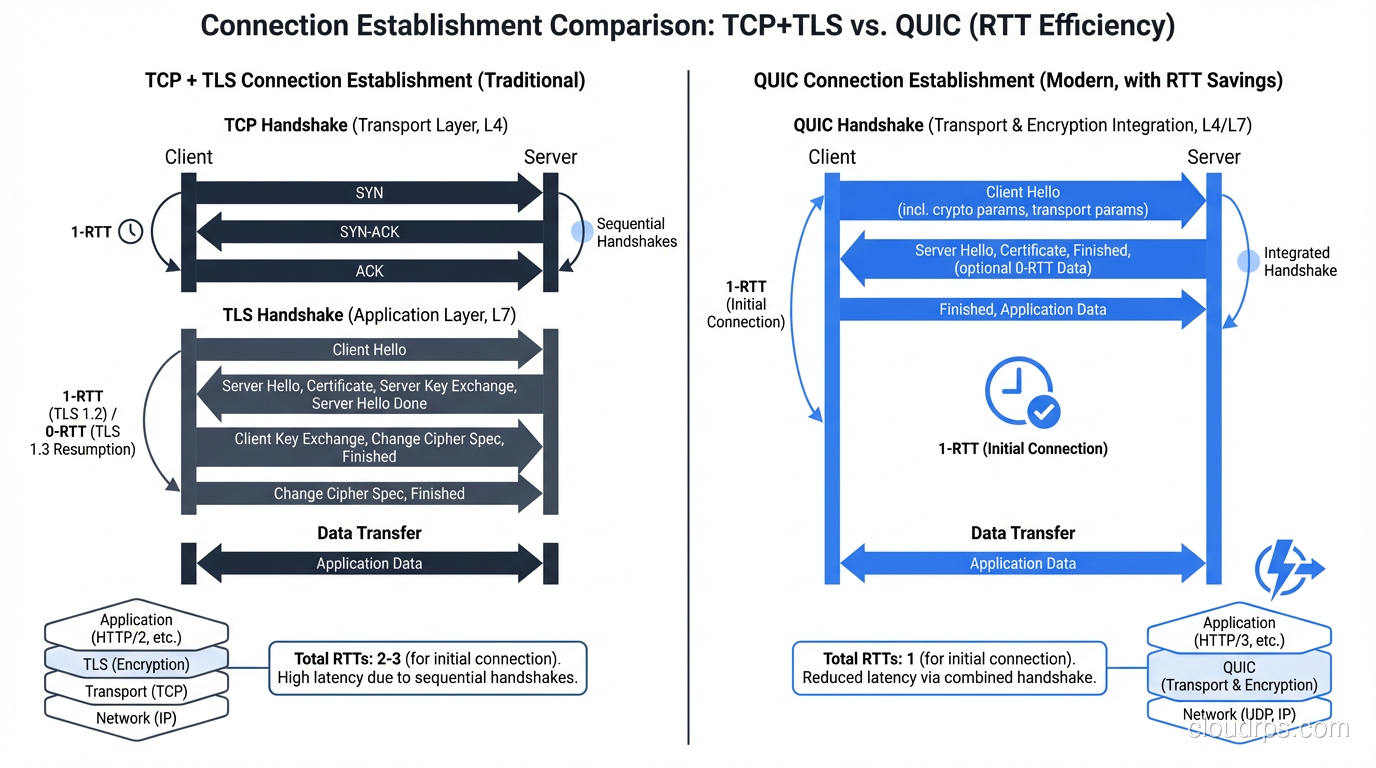
0-RTT connection establishment: QUIC combines the transport handshake and TLS handshake into a single round trip. For repeat connections, it can send data with zero additional RTTs.
No head-of-line blocking: QUIC multiplexes multiple independent streams within a single connection. If stream 3 loses a packet, streams 1, 2, and 4 continue unaffected. This is huge for HTTP/2-style multiplexing.
Connection migration: QUIC connections are identified by a Connection ID, not by the 4-tuple (src_ip, src_port, dst_ip, dst_port). If you switch from Wi-Fi to cellular, the connection survives.
Always encrypted: QUIC mandates TLS 1.3. There’s no unencrypted QUIC.
User-space implementation: QUIC runs in user space (over UDP), so it can be updated without waiting for OS kernel updates. This is why QUIC evolved so much faster than TCP.
QUIC vs TCP Timeline
TCP + TLS 1.3 (new connection):
  [SYN] →
  ← [SYN-ACK]
  [ACK + TLS ClientHello] →
  ← [TLS ServerHello + Finished]
  [TLS Finished + HTTP Request] →
  Total: 2 RTT before first request

QUIC (new connection):
  [QUIC Initial + TLS ClientHello] →
  ← [QUIC Initial + TLS ServerHello + Finished]
  [QUIC Handshake + HTTP Request] →
  Total: 1 RTT before first request

QUIC (0-RTT resume):
  [QUIC 0-RTT + HTTP Request] →
  Total: 0 RTT before first request
QUIC Adoption
HTTP/3 runs exclusively over QUIC. As of 2024, QUIC/HTTP/3 is supported by:
- All major browsers (Chrome, Firefox, Safari, Edge)
- Major CDNs (Cloudflare, CloudFront, Fastly)
- Google services (YouTube, Gmail, Search)
- Meta services (Facebook, Instagram)
About 30% of global web traffic now uses QUIC. It’s not replacing TCP universally; it’s specifically targeting the HTTP/web use case where its advantages are strongest.
QUIC Gotchas
Gotcha #1: Firewall/middlebox issues. QUIC runs over UDP port 443, and some corporate firewalls block non-TCP traffic on port 443 or throttle UDP. Browsers typically fall back to TCP when QUIC fails, but this fallback adds latency.
Gotcha #2: UDP performance in kernels. Most OS kernels are heavily optimized for TCP. UDP packet processing is often slower because it hasn’t received the same attention. QUIC implementations use techniques like UDP GSO (Generic Segmentation Offload) and GRO (Generic Receive Offload) to compensate, but it’s an ongoing effort.
Gotcha #3: Debugging is harder. TCP traffic is easily captured and analyzed with Wireshark. QUIC packets are encrypted (by design), making packet-level debugging more difficult. You need QUIC-aware tools and often need to export TLS session keys.
Protocol Selection for Common Architectures
Here’s how I think about protocol selection in modern architectures:
Microservices (East-West Traffic)
For service-to-service communication within a data center (sub-millisecond latency):
- gRPC over HTTP/2 over TCP: The standard choice. TCP’s overhead is negligible at low latency.
- gRPC over QUIC: Being explored but not mainstream for east-west yet.
- Raw TCP: For custom binary protocols or very high-throughput internal services.
User-Facing Web (North-South Traffic)
- HTTP/3 (QUIC): Use if your CDN/load balancer supports it. The latency savings are real for mobile users.
- HTTP/2 (TCP): The fallback, still excellent.
- WebSocket (TCP): For real-time bidirectional communication.
Real-Time Communication
- WebRTC: Uses UDP for media (SRTP) and TCP for signaling (WebSocket/HTTP)
- Custom game protocols: UDP with application-level reliability for critical data
- VoIP (SIP/RTP): UDP for media, TCP or UDP for signaling
Data Streaming
- Kafka, NATS: TCP, because reliability matters for message delivery
- Log shipping: TCP (rsyslog, Fluentd) or UDP (legacy syslog on port 514)
- Metrics (StatsD): UDP, since losing one metric data point is fine and latency matters more
Debugging Transport Layer Issues
TCP Debugging
# Watch TCP connection states
ss -tan | awk '{print $1}' | sort | uniq -c | sort -rn

# Capture TCP traffic for analysis
tcpdump -i eth0 -w capture.pcap 'tcp port 443'

# Check for retransmissions (high retransmit % = network problems)
ss -ti dst 10.0.1.1

# Check TCP socket buffer utilization
ss -tm
UDP Debugging
# Check for UDP receive buffer overflows (RcvbufErrors)
cat /proc/net/snmp | grep Udp

# Watch UDP traffic
tcpdump -i eth0 'udp port 53'

# Check socket receive buffer size
ss -u -m
Common Issues and Fixes
| Symptom | Likely Cause | Fix |
|---|---|---|
| High TIME_WAIT count | Rapid connection cycling | Enable tcp_tw_reuse, use connection pooling |
| Slow TCP throughput on high-latency links | Small TCP windows | Increase buffer sizes, enable window scaling |
| UDP packet loss under load | Receive buffer overflow | Increase net.core.rmem_max |
| TCP retransmissions | Network congestion or packet loss | Check for errors at Layer 1/2, tune congestion control |
| QUIC falling back to TCP | Firewall blocking UDP 443 | Allow UDP 443 in firewall rules |
Wrapping Up
TCP and UDP are both essential protocols, and understanding their tradeoffs is fundamental to building performant systems. My rules of thumb:
- Default to TCP unless you have a specific reason not to. The reliability and ordering guarantees save you from building those features (badly) in your application.
- Use UDP when latency matters more than reliability (real-time media, gaming) or when you’re building a protocol that needs finer control than TCP provides.
- Adopt QUIC/HTTP/3 for user-facing web traffic. The latency improvements are real, especially for mobile users on lossy networks.
- Tune your TCP stack. The defaults are conservative. Adjusting buffer sizes, congestion control, and enabling TCP Fast Open can yield significant improvements.
The transport layer is often invisible. It “just works” until it doesn’t. When your networking stack breaks down at Layer 4, understanding whether you’re dealing with TCP congestion, UDP packet loss, or a protocol mismatch is the difference between a 5-minute fix and an all-night debugging session.
Get Cloud Architecture Insights
Practical deep dives on infrastructure, security, and scaling. No spam, no fluff.
By subscribing, you agree to receive emails. Unsubscribe anytime.