
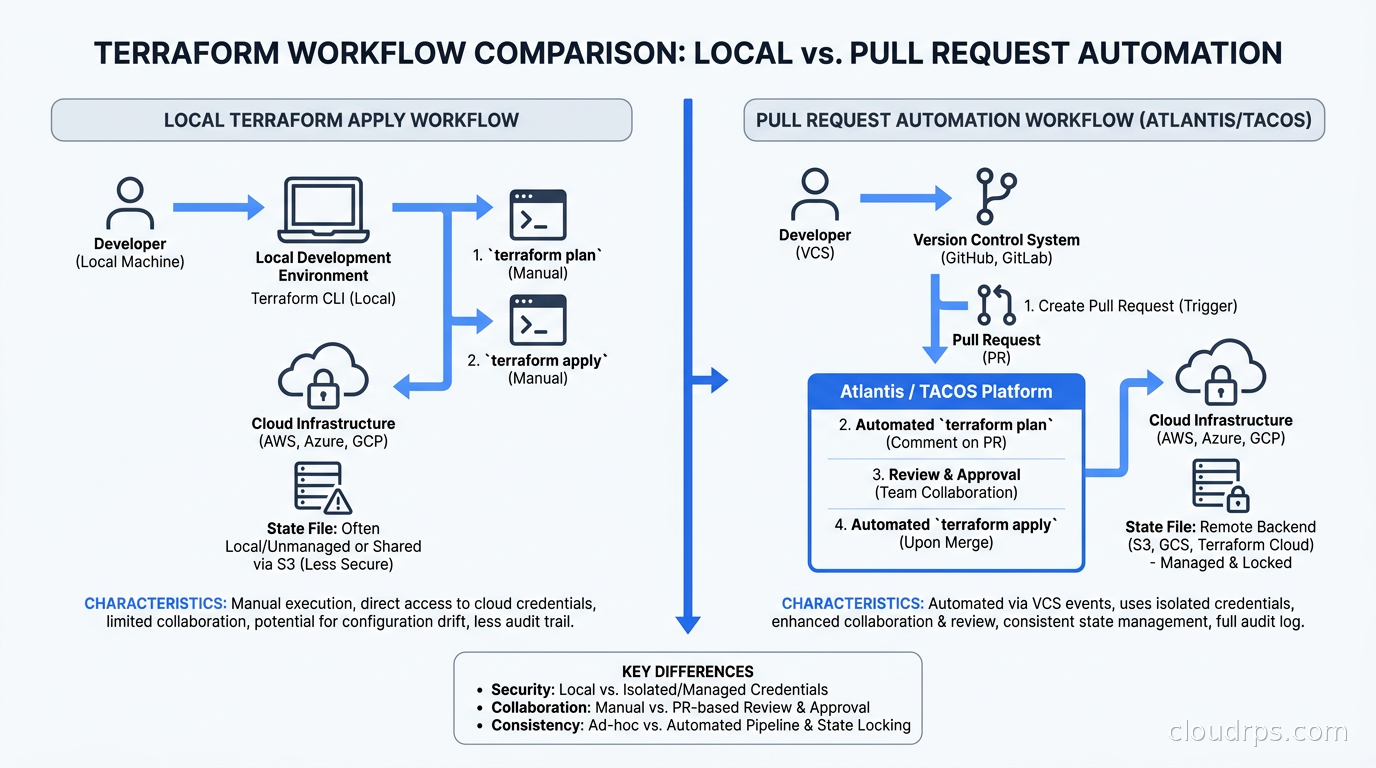
The way most teams run Terraform in year one is the same: everyone has credentials, everyone runs terraform apply locally, and the state file in S3 is a shared lie that nobody quite trusts. By year two, someone has applied a stale plan, a junior engineer has wiped a production resource that was not in their diff, and the senior engineer who “owns” the account has become the bottleneck for every infrastructure change because nobody else is allowed to touch it.
I have been in this situation more times than I can count across twenty years of building cloud infrastructure. The problem is not the people and it is not even Terraform – it is the absence of a formal workflow that enforces the plan-before-apply contract and puts infrastructure changes through the same review process as application code.
That workflow exists. It is called pull request automation, and the tools that provide it belong to a category vendors now call TACOS: Terraform Automation and Collaboration Software. If you are still running terraform apply from a developer laptop with a shared access key, this article is for you.
The Core Problem with Local Terraform Workflows
Before I walk through the tools, I want to be precise about what breaks in the laptop-first workflow, because each failure mode points to a different capability you need from any solution you adopt.
Stale plan-apply gaps. Terraform’s plan is a snapshot of drift at a specific moment. The gap between terraform plan and terraform apply is always nonzero, and on a busy team it can be hours or days. I once watched a plan that showed “no changes” get applied after a colleague had manually fixed an outage in the console. The apply reverted the fix and caused a second outage at 3 AM.
Credential proliferation. If every engineer runs apply locally, every engineer needs IAM credentials powerful enough to create and destroy production resources. That is a wide attack surface, and when someone leaves the company, rotating every credential they touched is a manual audit exercise nobody wants.
State locking that nobody checks. Remote state locking in S3 and DynamoDB prevents concurrent applies, but it only works if everyone is using the same backend. One engineer with a local state file running a plan they never apply can ghost-lock a workspace for hours.
No paper trail. Your application deployments have a CI log. Your Terraform changes have a Slack message that says “deployed the thing.” These are not equivalent audit artifacts, especially when your SOC 2 auditor shows up asking for evidence of change control.
Blast radius is invisible. When someone applies across a whole monorepo root instead of a specific module, the blast radius is not obvious until you watch fourteen resource changes scroll by in the apply output. PR automation that requires plan output in the review gives reviewers a fighting chance to catch these things.
Atlantis: The Open Source Baseline
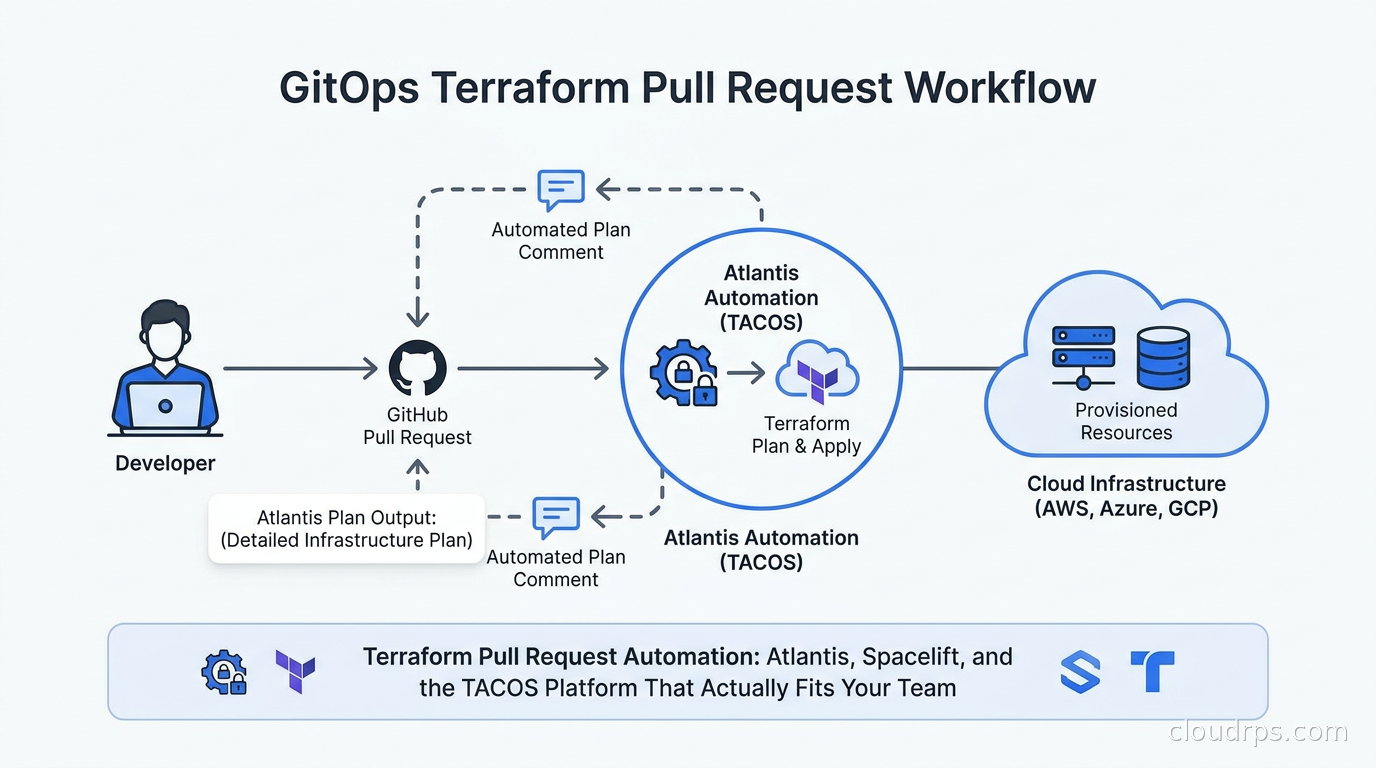
Atlantis is the original Terraform PR automation tool and it remains the right answer for a specific class of team. It is a self-hosted Go binary that listens for webhook events from your Git provider, runs terraform plan and terraform apply in response to PR comments, and posts output back to the PR.
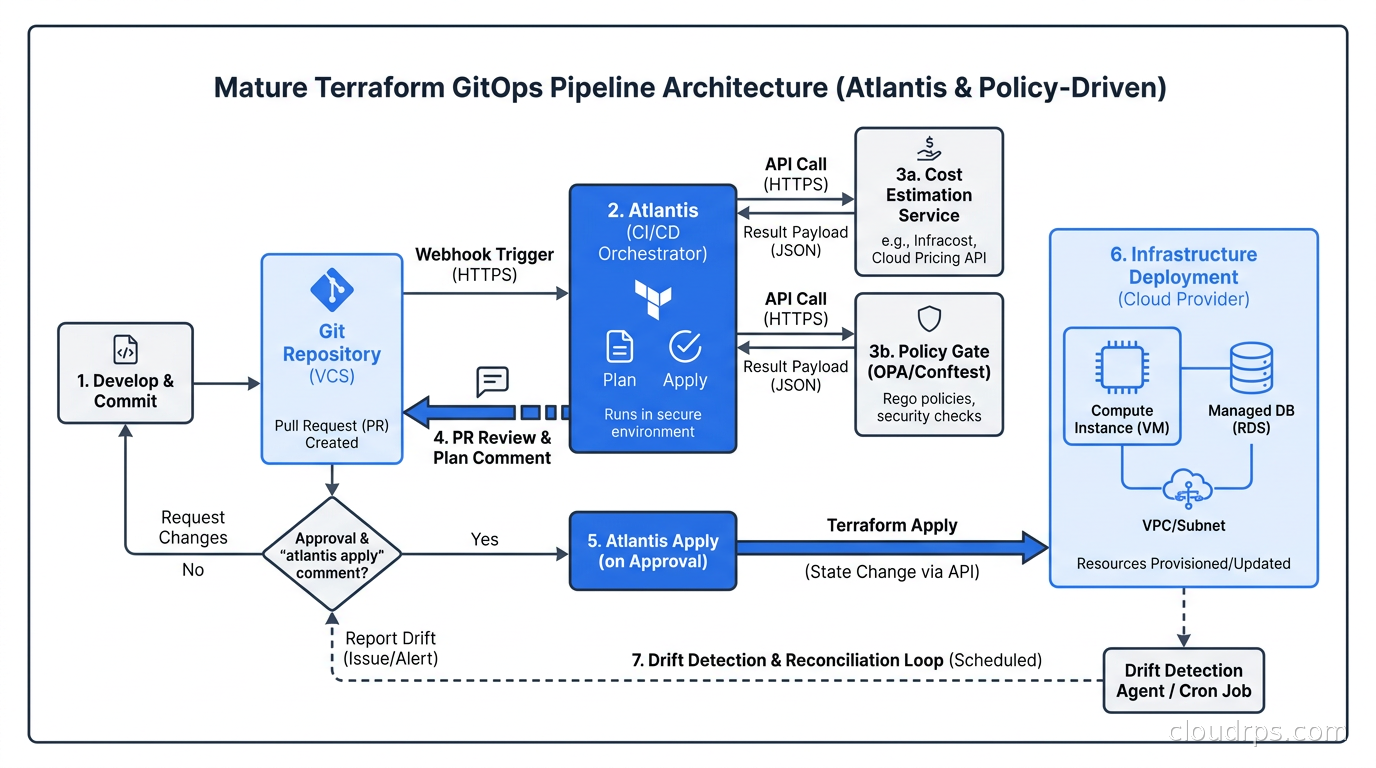
The workflow looks like this: a developer opens a PR, Atlantis automatically runs plan and posts the output as a comment. Reviewers see the plan diff. Someone with merge rights comments atlantis apply. Atlantis runs the apply, posts output, and the PR can be merged. No credentials on developer machines. No manual applies. Full audit trail in Git.
Atlantis runs on a VM, in a Docker container, or on Kubernetes. The Kubernetes deployment is the most common production pattern I see today. By default, you run it as a Deployment with a single replica backed by a PersistentVolumeClaim for its data directory. Atlantis does now support a multi-replica HA configuration using Redis for distributed locking and an S3-compatible backend for plan storage, but that configuration adds meaningful operational complexity. Most teams I work with start with a single replica and revisit HA only when queue depth becomes a problem. Expose it via an ingress or LoadBalancer, and configure your Git provider to send webhooks to the Atlantis URL.
The configuration is a YAML file checked into your repo called atlantis.yaml. You define projects, working directories, workflow steps, and apply requirements. A minimal project block looks like this:
projects:
  - name: networking
    dir: modules/networking
    workspace: production
    apply_requirements: [approved, mergeable]
    workflow: default
The apply_requirements field is the safety lock. Setting both approved and mergeable means Atlantis will not apply unless the PR has a human approval and is not blocked by branch protection rules. This is the minimum configuration I recommend for any environment where a mistake costs money.
Where Atlantis falls short is governance at scale. When you have fifty Terraform modules across multiple teams, you want policy gates that prevent any team from applying to a module they do not own, a way to see drift across all workspaces without running plan manually, and a dashboard that shows the state of your infrastructure fleet without grepping through S3. Atlantis gives you none of that. It is a workflow enforcer, not a platform.
That said, if you have a small-to-medium team, one cloud provider, and you want zero SaaS costs and full control over execution, Atlantis is the right call. I have seen it run reliably for years with minimal operational overhead.
For credential management with Atlantis on Kubernetes, pair it with workload identity federation rather than long-lived access keys. An IRSA annotation on the Atlantis service account gives it ephemeral credentials scoped to exactly what it needs, and you never store a secret.
The TACOS Landscape in 2026
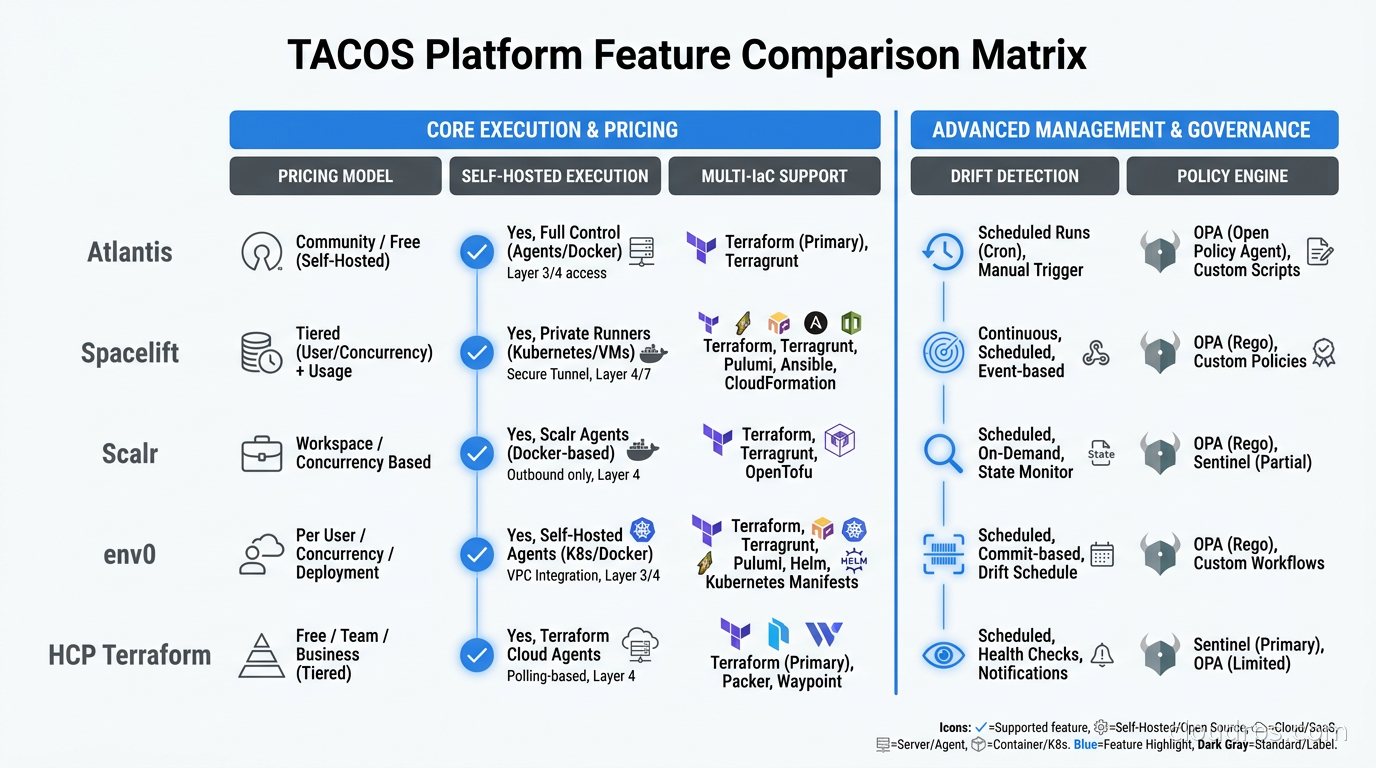
Once your team grows past the point where Atlantis’s limitations start to hurt, you are shopping in the TACOS market. The key players as of September 2026 are Spacelift, Scalr, env0, HCP Terraform, and a newer open-source entrant called Digger. Each has a genuinely different pricing model and a different idea of what problems it solves.
Spacelift
Spacelift is the platform I recommend most often to teams running more than one IaC tool. Its differentiating feature is breadth: a single Spacelift account can manage Terraform, OpenTofu, Pulumi, CloudFormation, Ansible, and Kubernetes manifests through the same interface and policy engine. If your platform team is responsible for IaC diversity across business units, that matters.
Spacelift’s policy engine is built on Open Policy Agent. You write Rego policies to control what can be applied, who can approve, what resource types are permitted, and whether a plan can proceed based on cost estimates from Infracost. This integrates naturally with the broader policy as code practices your security team probably already wants.
Spacelift bills by concurrent worker slots, not by the number of resources or runs. As of mid-2026, the free tier provides two users and one public worker. Paid tiers add private workers (self-hosted agents running in your VPC), additional concurrency, SSO, and SAML. The pricing model rewards teams that batch changes into large concurrent runs rather than frequent small ones.
Private workers are the feature I care most about in enterprise contexts. You run a Spacelift worker agent in your network, Spacelift sends it job definitions over an outbound HTTPS connection, and the execution happens inside your perimeter without Spacelift ever needing inbound access to your infrastructure. This sidesteps the compliance question of whether a SaaS platform can access your AWS account.
Scalr
Scalr takes a different architectural position. It is explicitly focused on Terraform and OpenTofu only, and it uses per-run pricing rather than per-seat or per-concurrency pricing. As of June 2026, the free tier allows 50 runs per month with two concurrent runs, and the paid tiers charge per run executed.
That pricing model has a practical implication: Scalr is cheaper for teams that run infrequently but in parallel, and more expensive for teams that make hundreds of small changes daily. If your infrastructure is mature and stable with occasional bursts, Scalr’s economics work well. If you are actively iterating on infrastructure with many small PRs per day, do the math before signing up.
What Scalr does particularly well is multi-workspace governance. The workspace hierarchy gives you an organization tier, environment tier, and workspace tier, and you can set variable and policy inheritance at each level. A security policy set at the organization tier propagates automatically to every workspace below it. This is the governance pattern I try to replicate in Atlantis via yaml configuration and it never feels as clean.
Scalr also includes drift detection in its standard plan, which means it periodically runs plan against all your workspaces and alerts you when cloud resources diverge from your IaC definition. That capability is the cornerstone of any serious infrastructure drift remediation practice.
HCP Terraform
HCP Terraform (previously Terraform Cloud) is the managed offering from HashiCorp and now IBM. As of July 2026, it moved to per-managed-resource pricing: $0.10 per resource per month on the Essentials tier, with the first 500 resources free. Standard and Premium tiers cost more per resource and add audit logging, SSO, and policy enforcement via Sentinel.
HCP Terraform’s advantage is depth of Terraform integration. It predates every other TACOS platform, and the feature set in areas like run triggers, workspace variables, and the Terraform private module registry is the reference implementation. If you are running HashiCorp Sentinel policies or relying heavily on the Terraform module registry, HCP Terraform is the path of least friction.
The per-resource pricing model deserves careful attention. A large organization managing tens of thousands of Terraform resources will see significant monthly costs on HCP Terraform that would be lower on per-run platforms like Scalr. I have seen teams switch for exactly this reason.
env0 and Digger
env0 positions itself similarly to Spacelift with multi-IaC support, and its billing model as of August 2026 is per successful apply or per environment on paid tiers, with quote-only pricing that makes it hard to evaluate without a sales conversation. I have seen it chosen by teams that prioritize its user interface and template-based self-service provisioning, which gives developers a guardrailed way to request infrastructure without writing Terraform themselves.
Digger is the open-source entrant I watch with interest. It is a GitHub Actions-native tool that runs Terraform through your existing CI pipelines rather than a dedicated server. The architecture means you do not have a separate process to maintain. The tradeoff is that it inherits GitHub Actions limitations around concurrency and secrets management. For teams already heavily invested in GitHub Actions self-hosted runners, Digger can be a natural fit.
Terragrunt and Large Monorepos
No discussion of Terraform PR automation is complete without addressing Terragrunt, because a non-trivial fraction of teams running Terraform at scale use it. Terragrunt adds DRY configuration across modules, environment promotion patterns, dependency graphs between modules, and run-all commands that apply multiple modules in dependency order.
Atlantis has built-in Terragrunt support. Spacelift and Scalr both support Terragrunt through custom workflow definitions. The complication comes from run-all in a monorepo context: a single PR that touches a shared module can trigger downstream plans for every module that depends on it, which can be dozens of plan runs for a large codebase.
The pattern I have settled on is to use separate Atlantis projects for each Terragrunt module that can be independently applied, and to rely on Terragrunt’s dependency graph for local development and manual full-stack deploys only. Letting the PR automation scope to individual modules keeps review diffs comprehensible and limits blast radius. A reviewer looking at a plan that changes seventeen resources in four modules cannot give meaningful approval.
Security Architecture for PR Automation
Regardless of which tool you choose, the security architecture of your PR automation setup deserves explicit thought. The automation platform needs credentials to plan and apply against your cloud provider. How those credentials flow is where most organizations underinvest.
The two patterns that work at scale are workload identity federation (OIDC tokens) and self-hosted execution agents in your network. I prefer combining both: run the automation platform (Atlantis or a TACOS agent) on Kubernetes inside your network, and have it authenticate to AWS, Azure, or GCP using OIDC tokens rather than long-lived access keys. The OIDC approach means no secrets to rotate, no credentials to leak, and a full audit trail of which automation run assumed which role.
For Atlantis specifically, the webhook secret is the trust anchor. Atlantis validates that incoming webhook payloads were signed by your Git provider using the webhook secret you configure. If that secret is compromised, an attacker can trigger arbitrary plan and apply operations. Treat it with the same care you would an API key with production write access.
Branch protection rules are the second line of defense. Configure your Git provider to require PR approval before merge, and configure Atlantis’s apply_requirements to match. If Atlantis allows apply without human approval and your branch protection is misconfigured, you have a gap.
For secret management within Terraform runs, avoid putting secrets in Terraform variables as plaintext. Use dynamic secrets from HashiCorp Vault or Pulumi ESC where possible, or retrieve secrets at apply time from your secrets manager using a data source. Static secrets in variable files will eventually end up in state files, which end up in S3, which eventually get leaked.
How to Choose
The decision tree I have settled on after evaluating these platforms for multiple clients comes down to three questions.
First: do you need multi-IaC? If your platform team runs Terraform alongside Pulumi, Ansible, or CloudFormation and wants unified visibility across all of them, you need Spacelift or env0. Atlantis and Scalr stop at Terraform and OpenTofu.
Second: what is your pricing sensitivity? Run the math on your actual run volume and resource count. Per-run pricing (Scalr) favors stable, infrequent infrastructure. Per-resource pricing (HCP Terraform) favors teams with high run frequency but modest resource counts. Per-concurrency pricing (Spacelift) favors teams that batch large parallel runs. Atlantis is free but you pay in operational overhead to run and maintain it.
Third: how much does your compliance posture require execution in your own network? If your security team requires that your Terraform execution never leave your VPC, you need either Atlantis or a platform with a self-hosted agent option (Spacelift private workers, Scalr self-hosted agents, env0 agents). HCP Terraform’s managed workers run in HashiCorp’s infrastructure, which can be a blocker in regulated industries.
The path I see work most reliably for growing engineering organizations is to start with Atlantis, migrate to a TACOS platform when the operational overhead or governance limitations start to hurt, and make the TACOS selection based on IaC diversity and pricing model, in that order.
Getting Atlantis Running on Kubernetes
For teams starting from scratch, here is the deployment pattern that works well. Add the Atlantis Helm chart to your platform cluster, configure a secret with your Git provider webhook secret and your VCS API token, and point your Git provider to the Atlantis ingress URL.
The key Kubernetes-specific configurations: set statefulset.enabled: true to get stable pod identity, configure a PersistentVolumeClaim for the Atlantis data directory so in-flight lock state survives pod restarts, and use an IRSA or Workload Identity annotation on the service account so Atlantis assumes an IAM role rather than using access key credentials.
Store the atlantis.yaml project configuration in your repository root. Start with explicit apply_requirements: [approved, mergeable] on every project. Add autoplan configuration that specifies exactly which file paths trigger a plan for each project – by default Atlantis will plan any project that has changed files anywhere in its directory, which produces noisy plan comments on PRs that touch shared documentation or scripts.
The Terraform state management question is separate from the automation question but they interact. Atlantis needs to be able to acquire the DynamoDB lock for your state backend. Configure the IAM role Atlantis assumes with exactly the permissions needed to read and write the S3 state bucket and acquire DynamoDB locks, scoped to the specific bucket ARN and table ARN. Least-privilege here reduces the blast radius if the automation is ever misused.
For teams using OpenTofu instead of Terraform, Atlantis supports OpenTofu natively via the executables configuration block. You specify the path to the tofu binary in the Helm chart, and Atlantis invokes it in place of the terraform binary. The PR workflow is identical from the developer’s perspective.
What a Mature PR Automation Practice Looks Like
After twenty years I have a benchmark for what good looks like: no infrastructure engineer has raw production cloud credentials on their laptop. Every change goes through a PR with plan output visible to reviewers. The CI system checks plan output against cost estimates (Infracost plugs into both Atlantis and TACOS platforms). Policy gates catch resource type violations, missing tags, and deviation from approved patterns before anything reaches production. And the drift detection loop runs nightly, opening tickets for anything that has diverged from the declared state.
That is not utopia. It is achievable in a few months of focused platform work, and it is the difference between an infrastructure team that spends its time on reliability and one that spends its time in postmortem docs.
The infrastructure as code tooling is table stakes. The workflow around that tooling is where the real leverage lives.
Conclusion
If you are still applying Terraform from developer laptops, the first step is Atlantis. It is free, self-hosted, and solves the core problem immediately. If you are already using Atlantis and hitting its governance or multi-IaC limits, evaluate TACOS platforms based on your IaC breadth, run volume, and compliance requirements.
For most teams in 2026, Spacelift wins on multi-IaC breadth and policy depth, Scalr wins on per-run economics for Terraform/OpenTofu-focused teams, and HCP Terraform wins on ecosystem depth if you are already deep in the HashiCorp stack. Atlantis remains the right answer for teams that want full control and zero SaaS dependency.
The most important thing is to close the loop: plan in CI, review in the PR, apply through the automation, never locally. Once that discipline is in place, everything else – drift detection, cost governance, policy enforcement – builds on a foundation that actually holds.
Get Cloud Architecture Insights
Practical deep dives on infrastructure, security, and scaling. No spam, no fluff.
By subscribing, you agree to receive emails. Unsubscribe anytime.