

I have seen Terraform state corruption end careers. Not metaphorically. A platform engineer at a mid-sized SaaS company ran terraform apply from his laptop at the same time the CI pipeline was running apply from GitHub Actions, because someone forgot to configure state locking. Both applies partially succeeded. The state file ended up in an inconsistent half-merged condition. Forty-three cloud resources were in states that Terraform no longer understood, and rolling it back took a week of manual reconciliation. That engineer left the company shortly after.
State management is the thing infrastructure as code practitioners spend the least time on when they are learning Terraform, and the most time on when they are operating it at scale. This guide covers everything that actually matters: backends, locking, state structure, workspaces, and patterns that hold up in production.
What Terraform State Actually Is
When you run terraform apply, Terraform builds a graph of every resource it manages and records the result in a JSON file called state. This file maps your configuration resources to real-world infrastructure identifiers. It tracks attributes (the S3 bucket’s ARN, the RDS instance’s endpoint), dependencies between resources, and metadata that Terraform uses to plan future changes.
Without state, Terraform cannot do incremental applies. Every run would have to re-create everything or query your cloud provider’s API for every attribute of every existing resource. State is the cache that makes Terraform practical.
By default, state is stored in terraform.tfstate in your working directory. This is fine for local experimentation and is a disaster for teams. Local state means:
- Every engineer runs against their own view of reality
- No locking, so concurrent applies will race and corrupt state
- State files end up committed to git, leaking sensitive attribute values (database passwords, access keys, certificate private keys)
- Losing your laptop means losing your infrastructure map
Remote backends solve all of these problems. Moving to a remote backend is the first thing any team should do before Terraform goes anywhere near production.
Remote Backends: Your Options
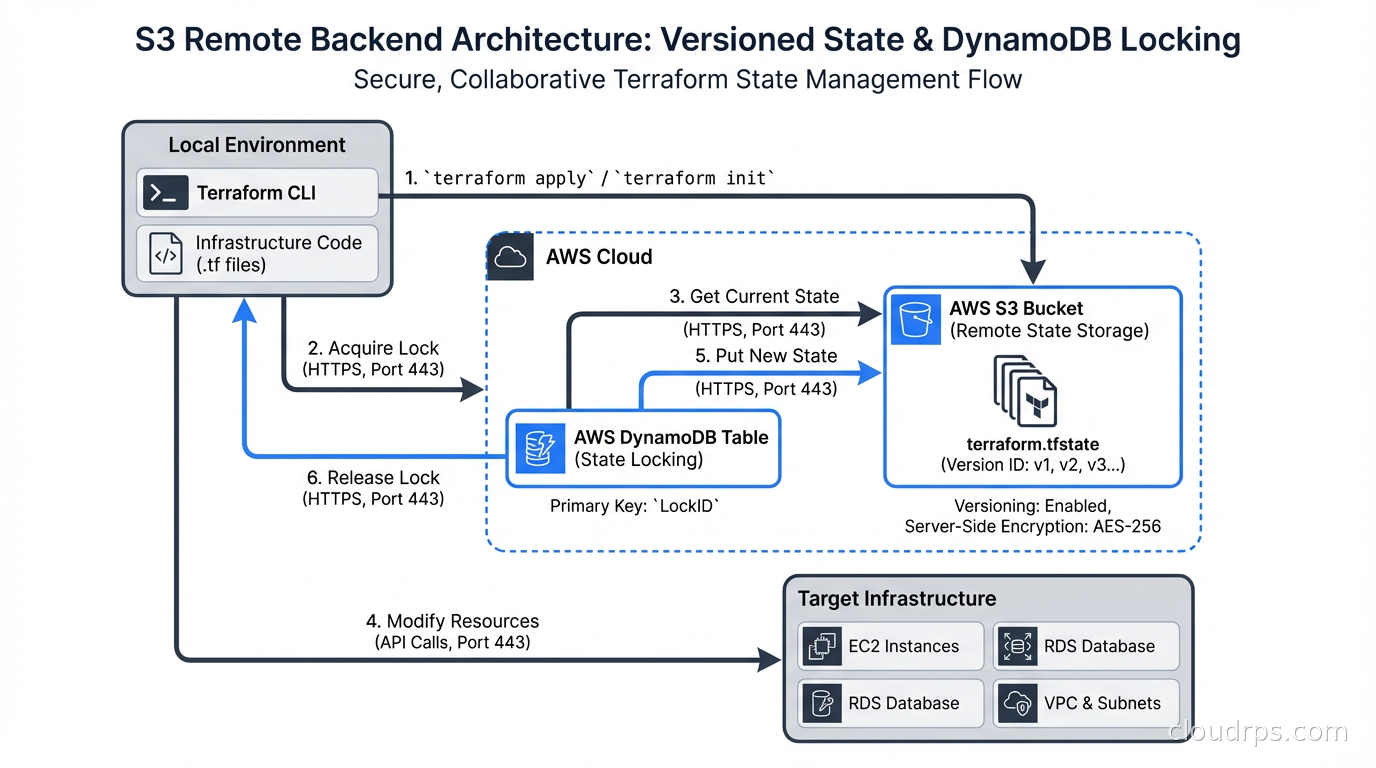
The S3 backend with DynamoDB locking is the most widely used option for AWS-hosted teams. It stores state in an S3 bucket (with versioning enabled for rollback) and uses a DynamoDB table for distributed locking. Setup is straightforward:
terraform {
  backend "s3" {
    bucket         = "my-company-tf-state"
    key            = "services/api-gateway/terraform.tfstate"
    region         = "us-east-1"
    dynamodb_table = "terraform-state-locks"
    encrypt        = true
  }
}
The key is the path within the bucket. This is where state organization starts. I use a convention of {environment}/{service}/terraform.tfstate. The path makes it easy to audit which state files exist and which services they cover.
The S3 bucket needs versioning enabled and a lifecycle policy that retains state versions for at least 30 days. The DynamoDB table needs a partition key of LockID (string). That is the entire locking infrastructure.
For Azure teams, the azurerm backend stores state in Azure Blob Storage. For GCP, the gcs backend uses Cloud Storage. Both include native locking without the need for a separate database.
Terraform Cloud and HCP Terraform (the managed successor) provide a backend with built-in locking, run history, plan output storage, drift detection, and team access controls. For teams that do not want to operate backend infrastructure themselves, it is a reasonable choice. HashiCorp restructured licensing in 2023, which led many organizations toward OpenTofu (the open-source Terraform fork maintained by the Linux Foundation). OpenTofu is compatible with the same backend configurations, and it ships native, pluggable state-at-rest encryption that works with any backend, something the open-source Terraform CLI still doesn’t match directly. Terraform has taken a different route to the same underlying problem: version 1.10 introduced ephemeral values, which keep secrets out of state and plan files in the first place rather than encrypting them after the fact, and HCP Terraform’s paid tier added a Hold Your Own Key option (generally available in mid-2025) for encrypting state and plan artifacts at the platform level. For teams on the free, self-hosted Terraform CLI, OpenTofu’s built-in encryption is still the more direct answer to encrypting state at rest. For a detailed breakdown of what’s different and whether to migrate, see our OpenTofu vs Terraform fork guide.
State Locking: How It Works and What Breaks It
When Terraform starts a plan or apply, it writes a lock entry to your backend’s locking mechanism. For S3/DynamoDB, it creates an item in DynamoDB with the state file path as the key, a unique lock ID, and metadata including who acquired the lock and when. If another process tries to acquire the lock while it is held, Terraform exits with an error rather than proceeding.
Locks are released when the operation completes. They are also released automatically if Terraform crashes, because the lock entry includes a timeout mechanism. You can manually release a stuck lock with:
terraform force-unlock LOCK_ID
Use this carefully. Forcing a lock release while another apply is genuinely in progress will corrupt your state.
The most common locking failure I see is not corruption from concurrent applies. It is stale locks from interrupted CI runs. A CI job that gets killed mid-apply (pipeline timeout, instance preemption) may leave a lock in place. The next run sees the lock, assumes another apply is running, and fails. Your CI system should have a documented process for investigating and clearing stale locks, including checking whether the original process is actually still running before clearing the lock.
Structuring State Files
How you carve up your state files has long-term architectural consequences. The two extremes are both wrong:
One giant state file for all infrastructure means every Terraform operation locks the entire infrastructure, every change risks affecting everything, and the blast radius of a state corruption event is maximum. I have seen organizations with 600+ resources in a single state file. A plan takes twelve minutes because it is refreshing every resource. Every developer has to coordinate before running apply.
One state file per resource creates massive operational overhead. You spend more time managing state files than writing infrastructure code.
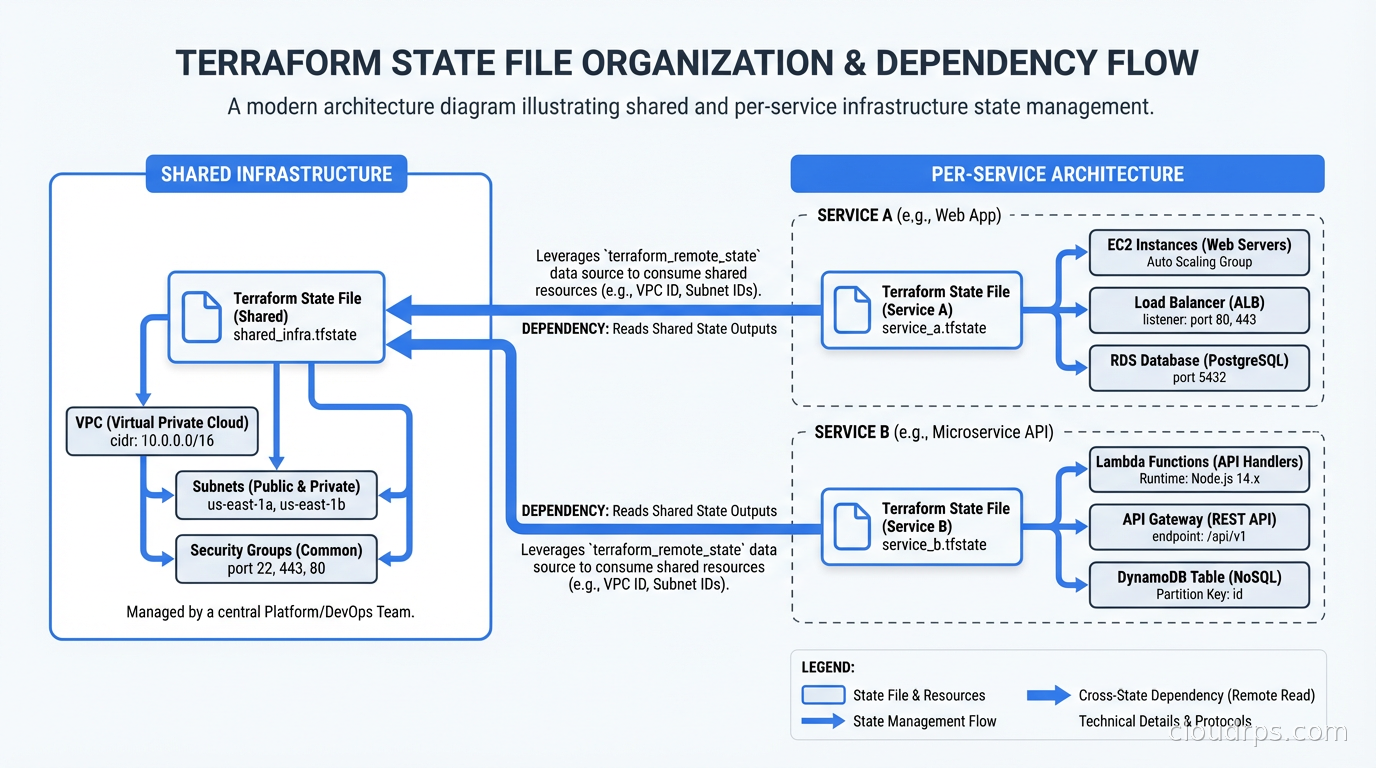
The right answer is state files organized by lifecycle and team ownership. Resources that change together belong in the same state file. Resources that change independently should be in separate state files.
A practical structure I have used:
state/
  shared/
    networking/terraform.tfstate     # VPCs, subnets, peering - changes rarely
    dns/terraform.tfstate            # Route53 zones - changes occasionally
    security/terraform.tfstate       # IAM roles, policies - changes moderately
  services/
    api-gateway/terraform.tfstate    # App infrastructure - changes frequently
    background-workers/terraform.tfstate
    data-pipeline/terraform.tfstate
The networking state file rarely changes. The service state files change every deployment. Separating them means service deployments do not acquire locks on networking infrastructure, and a mistake in the API gateway state cannot accidentally destroy your VPCs.
Referencing State Across Files
When services depend on shared infrastructure, you need to reference outputs from one state file in another. This is what terraform_remote_state is for:
data "terraform_remote_state" "networking" {
  backend = "s3"
  config = {
    bucket = "my-company-tf-state"
    key    = "shared/networking/terraform.tfstate"
    region = "us-east-1"
  }
}

resource "aws_instance" "api" {
  subnet_id = data.terraform_remote_state.networking.outputs.private_subnet_ids[0]
}
The networking module exports its subnet IDs as outputs. The service module reads them from remote state. This creates a read dependency rather than a write dependency. The service module can never accidentally modify networking infrastructure, and you can iterate on service infrastructure without touching the networking state.
The alternative to terraform_remote_state is using data sources to query the cloud provider directly (e.g., aws_subnet data source filtered by tags). This is more resilient because it does not require tight coupling between module outputs, but it does mean more API calls and potentially more drift between what Terraform expects and what actually exists.
Workspaces: What They Are Good For
Terraform workspaces are a mechanism for maintaining multiple independent state files within the same backend configuration. The default workspace is called default. Creating a workspace called staging creates a separate state file at env:/staging/path/to/terraform.tfstate (the exact path depends on the backend).
Inside your configuration, terraform.workspace gives you the current workspace name. You can use it to parameterize resource naming and sizing:
resource "aws_instance" "app" {
  instance_type = terraform.workspace == "production" ? "m5.xlarge" : "t3.medium"
  tags = {
    Environment = terraform.workspace
  }
}
The promise of workspaces is that you can use the same Terraform code for multiple environments without duplicating configuration. The reality is more nuanced.
Workspaces work well for ephemeral environments: spinning up a full copy of your infrastructure for a feature branch, running integration tests against it, then destroying it. I have seen teams use this pattern very effectively. Create a workspace named after the PR, apply, test, destroy when the PR merges.
Workspaces work poorly for long-lived environment promotion (dev, staging, production) because the differences between environments are usually not just names and sizes. Production has multiple availability zones, staging has one. Production has RDS Multi-AZ, staging has a single instance. Production has WAF rules, staging does not. These differences are hard to express cleanly through a single terraform.workspace variable, and the configuration becomes a mess of conditionals.
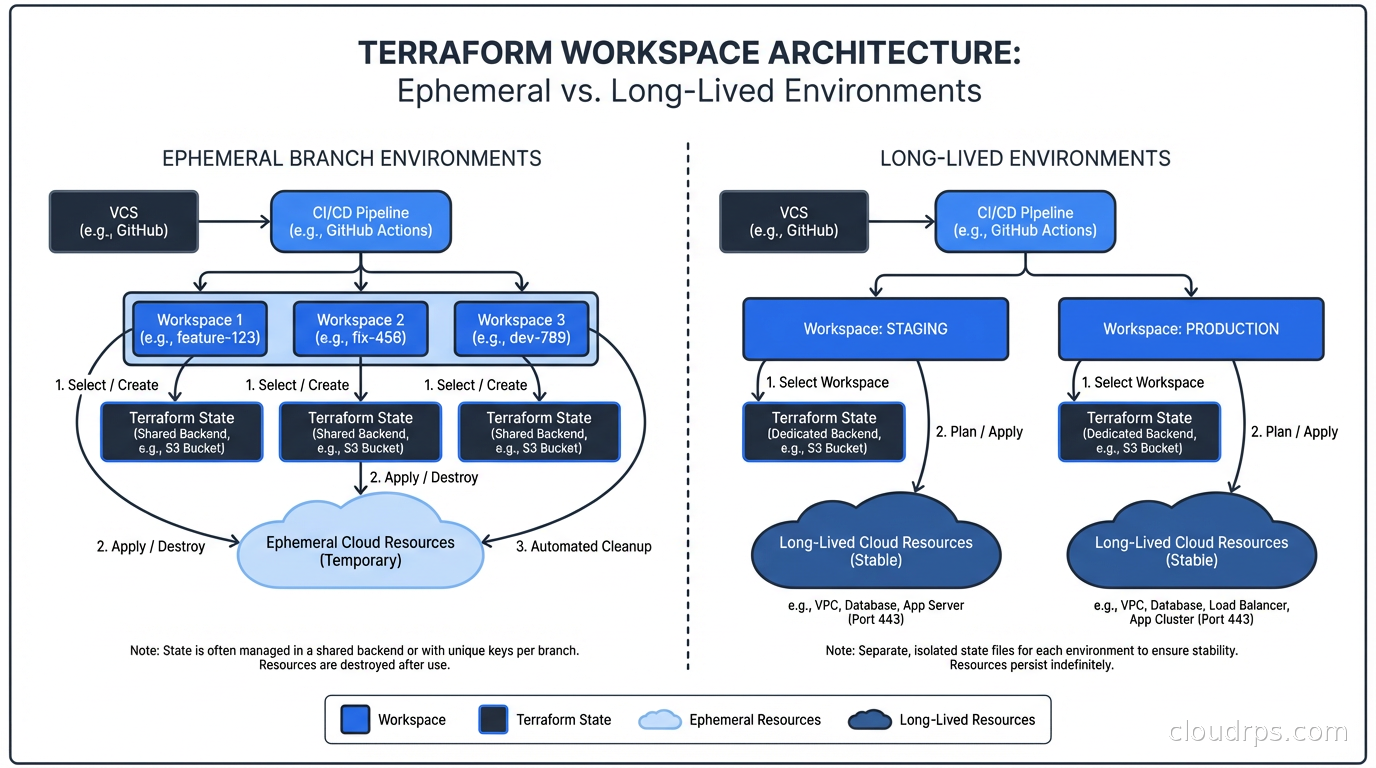
For long-lived environments, my strong preference is separate directories (or modules invoked separately) with separate backend configurations. More files, but each environment is independently reviewable and you are not one bad conditional away from deploying production infrastructure to staging.
State Security: What You Are Leaking Without Knowing
State files contain sensitive data. Every attribute Terraform tracks for every resource ends up in state. Database connection strings, IAM access keys created by Terraform, KMS key ARNs, certificate private key material (depending on how they are created), S3 bucket names that reveal your internal naming conventions. All of it, in plaintext JSON.
This is why the S3 backend configuration includes encrypt = true. It uses S3’s server-side encryption, which protects data at rest in the bucket. You should also use bucket policies that restrict access to the state bucket to only the IAM roles and CI principals that need it.
Enabling S3 versioning on the state bucket gives you a rollback mechanism. I have used state version rollback exactly twice in my career. Both times, it prevented what would have been multi-hour outages. The storage cost for state versions is trivial. Enable it.
For secrets created outside Terraform that Terraform tracks (RDS master passwords, for instance), consider whether you want Terraform to manage them at all. The secret management tools like Vault and AWS Secrets Manager can hold credentials and expose them to your applications without those credentials ever appearing in Terraform state. The aws_db_instance resource’s password attribute does end up in state if you set it directly. Using manage_master_user_password = true (which delegates to Secrets Manager) keeps it out of state.
Operating State in a CI/CD Pipeline
The pattern I recommend for teams doing GitOps-style infrastructure delivery:
- Pull requests trigger
terraform planonly, neverapply - Plan output is posted to the PR as a comment
- Engineers review the plan before approving
- Merge to main triggers
terraform applywith the plan artifact from step 2 (so there is no drift between what was reviewed and what executes) - The CI service account has write access to the state backend and the minimum set of cloud permissions to create the specific resources it manages
Step 4 is important and often skipped. Running plan on the PR and then apply on merge introduces a window where infrastructure state may have changed. Using a saved plan file from the exact revision that was reviewed eliminates this race. Terraform supports this natively with terraform plan -out=tfplan and terraform apply tfplan.
For CI/CD systems, the CI service account should not have human-equivalent cloud permissions. It should have only what it needs to create and manage the resources in its scope. A CI account that deploys your ECS services does not need IAM admin rights. Role-based permission boundaries are your friend here.
The disaster recovery planning angle on Terraform state: if your state backend goes down or your state files are corrupted, you need a recovery path. S3 versioning handles corruption. For backend availability, the S3 backend will refuse to run any apply during an outage (because it cannot acquire a lock), which is the correct safe-fail behavior. The gap in most DR plans is that teams do not know what to do with imported state or manual cloud changes made during an outage. Document that process before you need it.
State Import and Drift
terraform import brings existing resources that were created outside Terraform under state management. It creates the state entry but does not generate configuration. The workflow is: import the resource, run terraform plan to see the configuration drift, write the configuration to match, run plan again to verify zero diff.
Drift happens when someone makes a manual change in the cloud console or via CLI outside of Terraform. Terraform’s refresh mechanism (run during plan by default) queries the cloud provider and updates in-memory state to reflect reality, then calculates the diff against configuration. If you are using cloud landing zones with guardrails that block console changes to managed resources, drift is less common. Without those guardrails, drift accumulates and eventually breaks things. For a complete guide to detecting, preventing, and remediating drift at scale, see Infrastructure Drift: Detection and Remediation.
The terraform plan -refresh-only command shows you only the drift without calculating configuration changes. Useful for auditing before a planned maintenance window.
At Scale: Multiple Teams, Multiple Accounts
In a multi-cloud or multi-account environment, state management complexity scales with the number of independent infrastructure domains. I have worked in organizations with 300+ state files across 50+ AWS accounts. The tooling that helps at that scale:
Terragrunt (by Gruntwork) adds DRY configuration on top of Terraform, allowing you to define backend configuration once and have it dynamically generate per-module backend paths. It also handles dependency ordering across modules, which is essential when you have 50 modules with inter-dependencies.
Atlantis is an open-source Terraform automation server that handles plan/apply from pull request workflows. It integrates with GitHub, GitLab, and Bitbucket and provides per-workspace locking at the pull request level, preventing the scenario where two PRs touching the same module race to apply. For a full comparison of Atlantis against commercial TACOS platforms like Spacelift, Scalr, and env0, see the Terraform PR automation guide.
Both tools are worth knowing. Neither is magic. The foundational discipline is still: separate state by lifecycle, use remote backends always, enable locking, protect state files like the sensitive data they are.
Terraform state management is not exciting. Nobody gives a talk at KubeCon about their DynamoDB lock table. But the teams that get it right have reliable infrastructure delivery. The teams that get it wrong eventually end up on a conference call where someone is saying “we are going to have to manually reconcile forty resources” and everyone on the call knows exactly how that happened.
Updated September 1, 2026: reworked the OpenTofu vs. Terraform state encryption comparison to reflect Terraform 1.10’s ephemeral values and HCP Terraform’s Hold Your Own Key feature.
Get Cloud Architecture Insights
Practical deep dives on infrastructure, security, and scaling. No spam, no fluff.
By subscribing, you agree to receive emails. Unsubscribe anytime.