
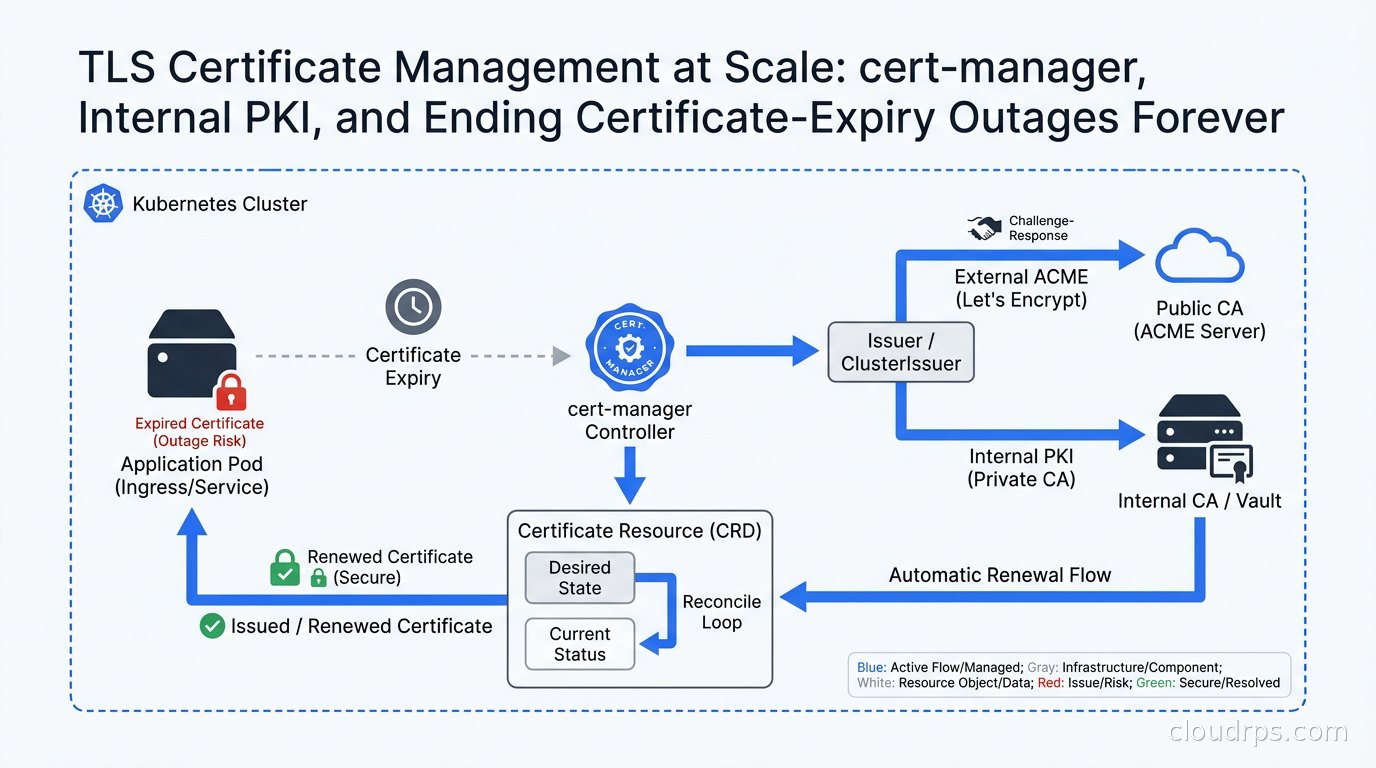
Three years into my time at a fintech company, we had an outage that I still think about. Not because it was spectacular in some novel way, but because it was so preventable. Our internal mTLS certificates for service-to-service communication had a one-year TTL. Someone provisioned them manually in 2019, added a reminder to a shared calendar, and then that person left the company. The reminder got buried. On a Tuesday morning in production, every service in our payments cluster started rejecting connections from every other service, simultaneously. The root cause took forty minutes to find because nobody thought to check certificate expiry first. TLS handshake errors look like a dozen different things before you think to look at the cert.
Twenty years of running infrastructure teaches you that certificate management is one of those disciplines where the difference between teams who do it right and teams who do it badly is measured in outages. The teams who do it right have automated everything. The teams who do it badly are on their third 3am incident this year.
This article covers how to build a certificate management system that actually works at scale: CA hierarchy design, cert-manager in Kubernetes, internal CA options, short-lived certificates, and the monitoring you need to stay ahead of expiry before it bites you.
Why Certificate Management Becomes a Problem
In small environments, managing TLS certificates manually is annoying but survivable. You get a cert from Let’s Encrypt or your CA of choice, you set a renewal reminder, you update it every 90 days or once a year. Tedious, but tractable.
The problem compounds in a few dimensions as you grow:
Volume. A mature Kubernetes cluster with dozens of services, multiple environments, and a service mesh doing mTLS on every service-to-service connection can easily have hundreds of active certificates. A single team cannot manually track hundreds of expiry dates. You will miss one, and the miss will happen at the worst possible time.
Short lifetimes as a security property. The security community has largely converged on short-lived certificates as the right answer. A certificate with a 24-hour or 7-day TTL is far safer than one with a 1-year TTL because the blast radius of a compromised private key is bounded in time. But short-lived certs mean you need automated rotation or you have a cert expiring every week that needs manual renewal. Manual renewal of short-lived certs is not a system; it is a disaster waiting to happen.
Environment sprawl. Dev, staging, production, DR, each region, each cluster. The cert for the payments service in prod-us-east is different from the one in prod-eu-west. Multiplied by service count, you are managing a certificate estate that requires automation to track.
Compliance. Many frameworks require you to prove that all your certificates are within their validity window and that expired or revoked certificates are removed from service quickly. You cannot prove that if you are managing certs manually. An automated inventory with expiry tracking is table stakes for a SOC 2 Type II audit.
CA Hierarchy: Get This Right First
Before you deploy any tooling, you need to understand certificate authority hierarchy because getting it wrong means a painful migration later.
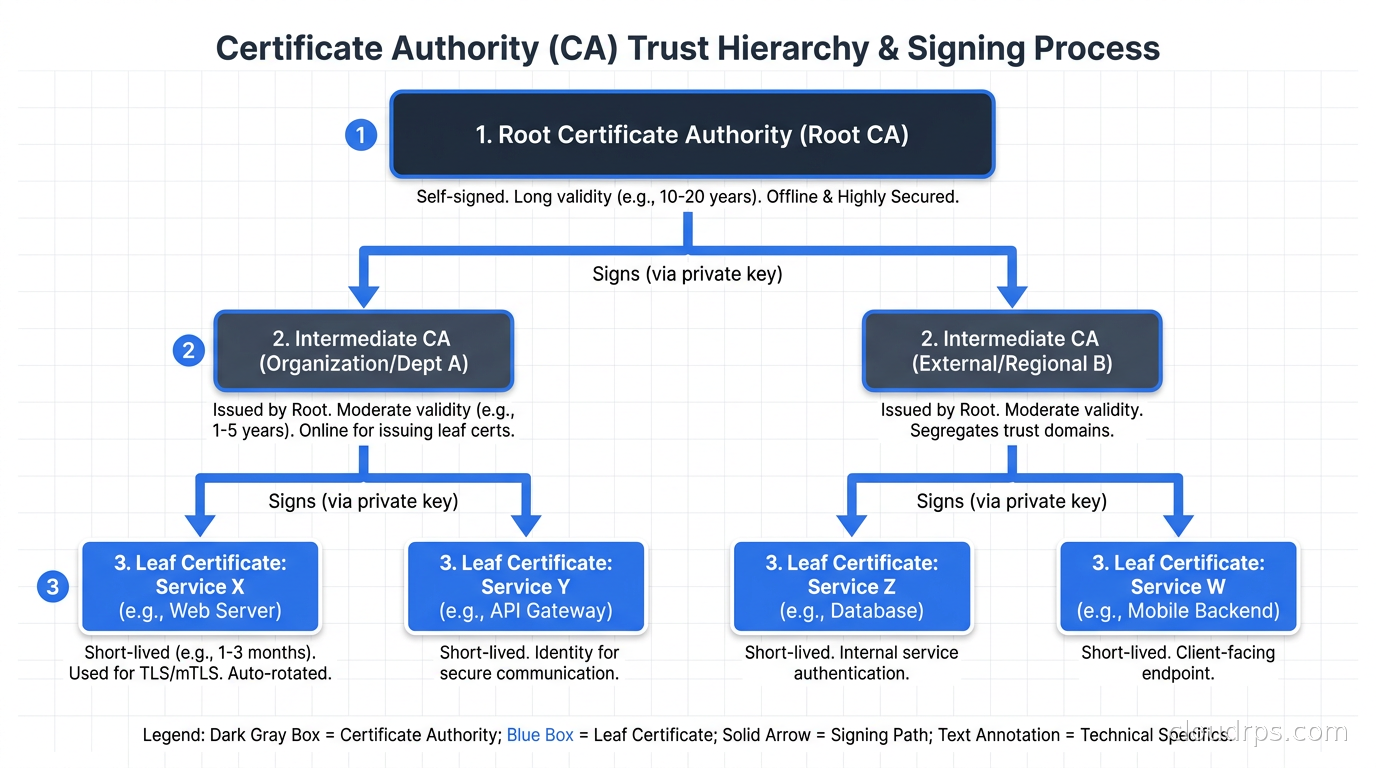
A CA hierarchy has at least two tiers and usually three in enterprise environments:
Root CA. This is the trust anchor. Everything downstream trusts this. The root CA private key should be air-gapped, stored on an HSM, and used as rarely as possible. In practice, the root CA’s only job is to sign intermediate CA certificates. Some organizations go months or years between root CA operations. If your root CA key is compromised, you have to re-issue every certificate in your estate, tell every browser and operating system to update their trust stores, and have a very bad week.
Intermediate CAs. These are the operational CAs. Your root CA signs the intermediate CA certificates, and then you use the intermediate CAs to issue leaf certificates for actual services. The key property here is that if an intermediate CA is compromised, you can revoke it and re-issue from the root without touching the root key. You might have separate intermediate CAs per environment (one for prod, one for staging), per certificate purpose (one for TLS, one for code signing), or per team that needs autonomy.
Leaf certificates. The actual TLS certificates that services present. These are what cert-manager and your services interact with day to day.
For Kubernetes-centric infrastructure, a common pattern I have landed on is:
- Offline root CA (HSM-backed, air-gapped, touched only a few times a year)
- One or two intermediate CAs per environment, provisioned in Vault PKI or Smallstep
- cert-manager running in each cluster, talking to the intermediate CA via ACME or Vault’s PKI API
- Services getting short-lived leaf certificates (24 hours to 7 days) that are auto-renewed by cert-manager
The key insight is that the further down the chain you go, the shorter the validity should be. Root CAs can have 20-year validity because they are never exposed. Intermediate CAs might have 5 years. Leaf certificates should be as short as your renewal automation can reliably handle.
Understanding the basics of how TLS works under the hood is prerequisite reading for any engineer designing this hierarchy. If you have not read that piece, start there before diving into operational tooling.
cert-manager: The Standard Answer for Kubernetes
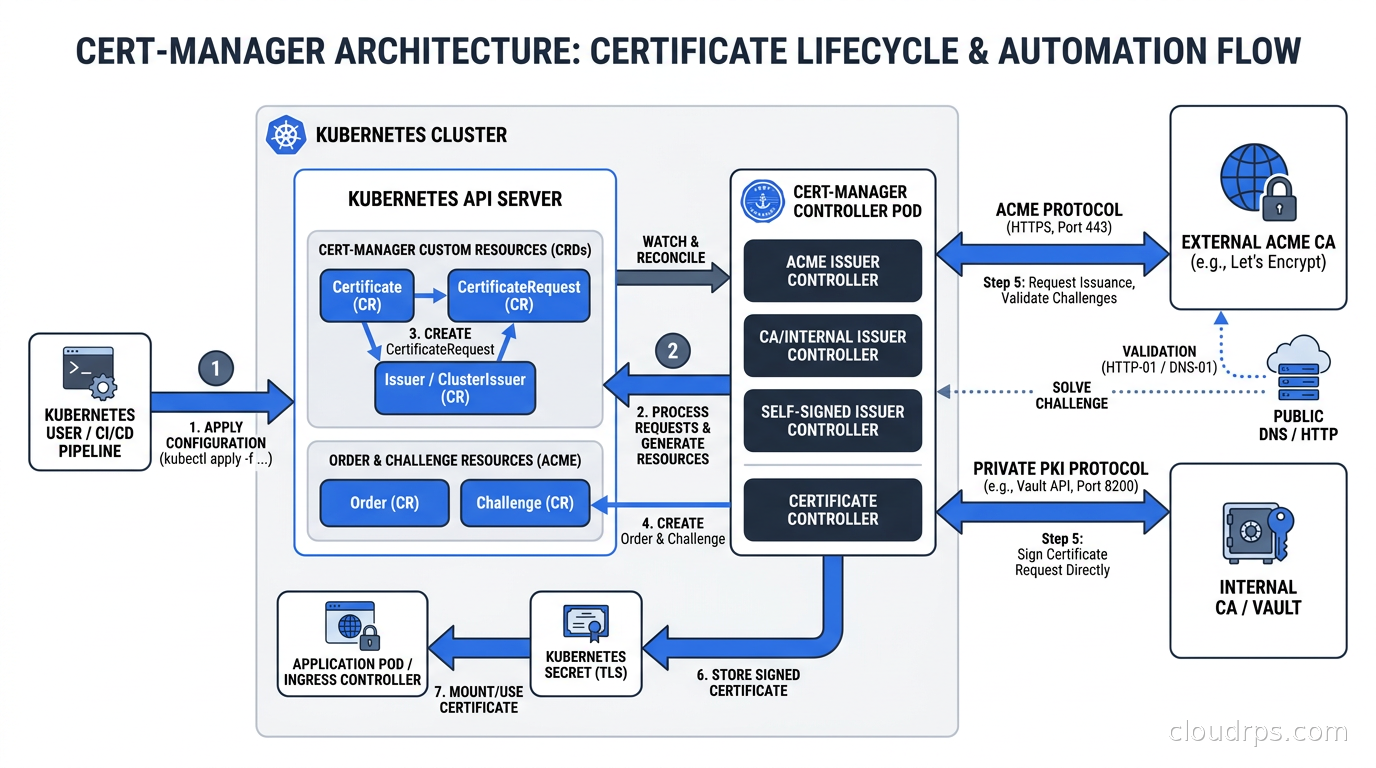
cert-manager is the de facto standard for certificate management in Kubernetes. It runs as a set of controllers that watch for Certificate and Issuer custom resources and reconcile the actual state of TLS secrets in your cluster against the desired state you have declared.
The core objects you work with:
Issuer / ClusterIssuer. An Issuer is namespace-scoped and represents a certificate authority that cert-manager can use to sign certificates in that namespace. A ClusterIssuer is cluster-scoped. You will typically use ClusterIssuer for shared infrastructure like your internal CA, and Issuer for things like per-namespace Let’s Encrypt configurations.
Certificate. This is the object you create to request a certificate. You specify the DNS names, the issuer to use, the desired duration and renewal window. cert-manager creates a CertificateRequest, gets it signed by the issuer, and stores the resulting certificate and private key in a Kubernetes Secret. Your deployment mounts that secret.
CertificateRequest. Created automatically by cert-manager when processing a Certificate. You usually do not create these directly, but they are useful for auditing what was requested and what was issued.
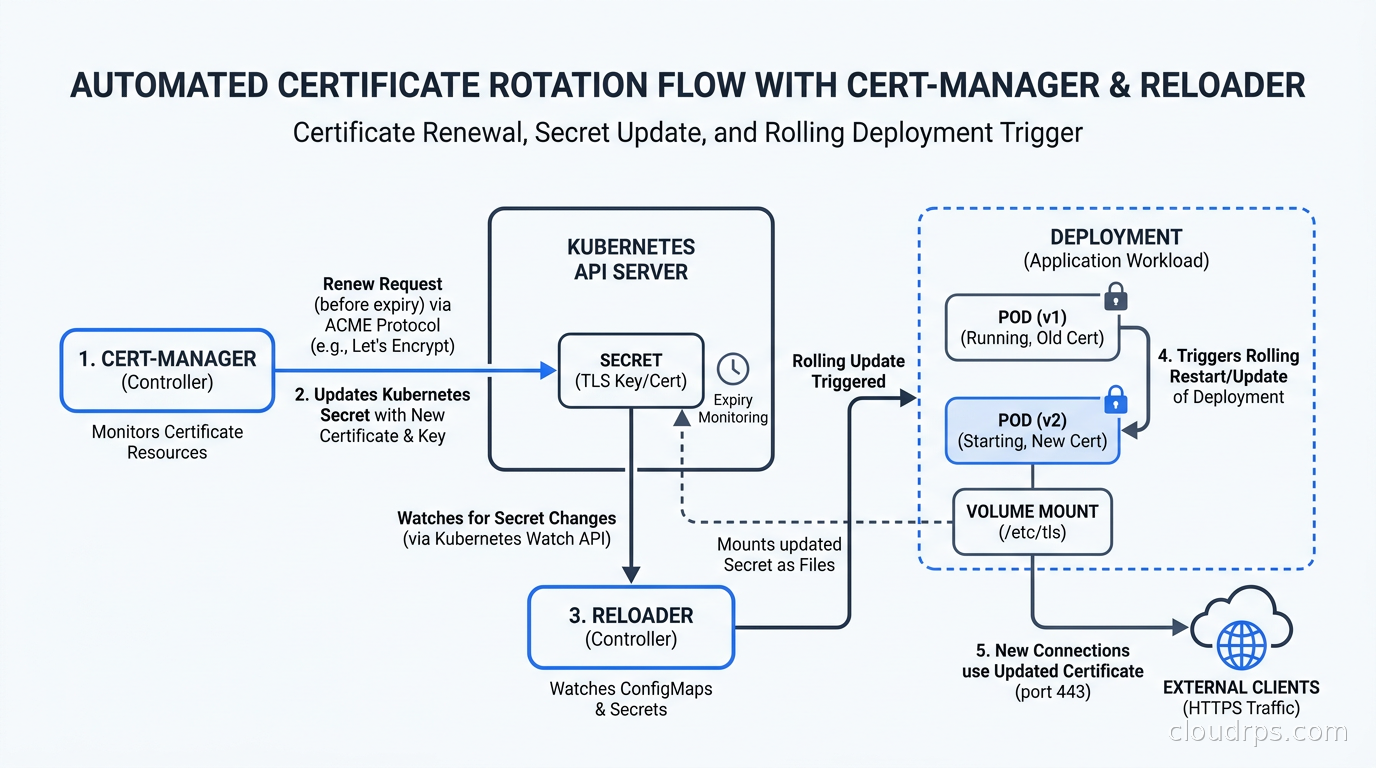
The renewal loop is the important operational property: cert-manager continuously reconciles. When a certificate is within its renewal window (by default, 2/3 of the way through its lifetime), cert-manager creates a new CertificateRequest, gets a fresh certificate, and updates the Secret. Your pods need to pick up the new cert, which either means mounting the secret with a projected volume that updates automatically, or triggering a rolling restart via something like Reloader (a controller that watches secrets and triggers rollouts when they change).
Here is a basic Certificate resource for an internal service:
apiVersion: cert-manager.io/v1
kind: Certificate
metadata:
  name: payments-service-tls
  namespace: payments
spec:
  secretName: payments-service-tls-secret
  duration: 168h       # 7 days
  renewBefore: 48h     # renew when 2 days remain
  dnsNames:
    - payments-service.payments.svc.cluster.local
    - payments-service.payments.svc
  issuerRef:
    name: internal-ca-issuer
    kind: ClusterIssuer
That duration: 168h is deliberate. Seven days forces weekly rotation, which means your rotation machinery gets exercised constantly and you know it works. If rotation breaks, you find out within a week, not in a year when the cert expires.
Internal CA Options: Vault PKI vs Smallstep vs CFSSL
For internal services, you need a CA that cert-manager can talk to. The main options are:
HashiCorp Vault PKI Secrets Engine. If you already run Vault for secret management, its PKI engine is the natural choice. Vault’s PKI engine can act as both an intermediate CA and an ACME server. cert-manager has a native Vault issuer. The operational model is that Vault manages the intermediate CA key material, and cert-manager authenticates to Vault (typically via Kubernetes service account auth) to request certificate signatures.
The Vault PKI engine gives you fine-grained policy control: which service accounts can request certificates for which DNS names, maximum TTL per role, whether to allow wildcard SANs. This is valuable in a regulated environment where you need to prove that the payments service cannot issue itself a certificate for the auth service’s DNS name.
Smallstep CA (step-ca). Smallstep is a purpose-built ACME CA that is significantly simpler to operate than Vault for certificate-only use cases. It supports ACME natively, which means cert-manager’s ACME issuer works with it out of the box. Smallstep also has native support for ACME device attestation and SSH certificates. If you do not already run Vault, Smallstep is often the right choice for a certificate-focused infrastructure.
Smallstep’s killer feature is the step CLI, which makes the human-side of CA operations (provisioner management, certificate inspection, CA bootstrapping) dramatically more ergonomic than equivalent Vault operations.
CFSSL. Cloudflare’s CFSSL is a battle-tested CA toolkit that is solid but shows its age compared to the above options. I would not start a new deployment on CFSSL today, but if you are already running it, it works fine.
My current default recommendation: use Vault PKI if you already run Vault, use Smallstep if you do not. Do not run a CA on CFSSL for new deployments.
ACME and Let’s Encrypt for External-Facing Certs
For certificates presented to external clients, browsers, and public-internet services, Let’s Encrypt via ACME remains the right answer for most teams. It is free, automated, widely trusted, and the 90-day TTL forces regular rotation which is healthy operationally.
cert-manager’s ACME issuer supports two challenge types:
HTTP-01. cert-manager creates a temporary pod that responds to a challenge at /.well-known/acme-challenge/ on your domain. This works well if your service is already publicly accessible. It does not work for wildcard certificates or private services.
DNS-01. cert-manager creates a temporary DNS record to prove domain ownership. This works for wildcard certificates and for services that are not publicly accessible (because you prove ownership via DNS, not HTTP). cert-manager has built-in providers for Route 53, Cloudflare, Google Cloud DNS, Azure DNS, and others. This is what I use by default because it handles wildcard certs and works regardless of whether the service is publicly reachable at challenge time.
For internal services that will never be exposed to the internet, Let’s Encrypt is wrong. Use your internal CA. For anything with a public DNS name presented to real users or to external systems, Let’s Encrypt is right.
Short-Lived Certificates: The Security Property You Want
I want to be direct about this: if you are issuing certificates with 1-year TTLs for internal service communication, you are doing it wrong, and the fact that it has not caused a security incident yet is luck.
The argument for short-lived certificates is straightforward. A private key can be stolen without the theft being detected. If the certificate attached to that key is valid for one year, an attacker has up to a year to use it for impersonation or interception. If the certificate is valid for 24 hours, the blast radius is 24 hours. Combined with a capability to revoke compromised certificates (via OCSP or CRL), short-lived certs plus revocation gives you a much stronger security posture than long-lived certs.
The practical question is: how short is short enough given your renewal automation? My current thinking:
- Service mesh mTLS certificates (SPIFFE X.509 SVIDs): 1 hour to 24 hours. These are issued and rotated by the mesh control plane (Istio, Linkerd, or SPIRE). Your mesh handles rotation; the application never touches the cert.
- Internal service TLS: 7 days. Long enough that a hiccup in cert-manager does not immediately break services, short enough to be meaningfully short-lived.
- External-facing TLS: 90 days (Let’s Encrypt default). This is fine for external certs because the threat model is different.
- Client certificates for human users or CI/CD pipelines: varies, but I lean toward 24-hour or per-session certs for human-facing client certs.
The operational prerequisite for short-lived certs is that your renewal machinery must be reliable and observable. If cert-manager is down for a week and your certs are 7-day, you have a problem. This means cert-manager itself needs to be treated as critical infrastructure, not an afterthought: properly resourced, on stable nodes, with monitoring.
Monitoring Certificate Expiry: The Part Teams Skip
The most common failure mode I see is teams that have cert-manager running but no monitoring of the certificate estate. cert-manager will rotate certificates that it manages. But if cert-manager is misconfigured for some certificate, or if there is a cert somewhere that cert-manager does not manage (a legacy ingress cert loaded into a secret manually, a cert in a load balancer that nobody remembers), it will expire.
You need two layers of monitoring:
Prometheus / cert-manager metrics. cert-manager exposes Prometheus metrics about the certificates it manages. The critical ones are certmanager_certificate_expiration_timestamp_seconds (seconds until expiry for each certificate) and certmanager_certificate_ready_status (whether the cert is in a ready state). Alert on any certificate with fewer than 7 days until expiry. Alert on any certificate that is not in ready status.
A Prometheus alerting rule that I use:
- alert: CertificateExpiringSoon
  expr: |
    (certmanager_certificate_expiration_timestamp_seconds - time()) / 86400 < 7
  for: 1h
  labels:
    severity: warning
  annotations:
    summary: "Certificate {{ $labels.name }} in {{ $labels.namespace }} expires in < 7 days"

- alert: CertificateNotReady
  expr: certmanager_certificate_ready_status{condition="False"} == 1
  for: 15m
  labels:
    severity: critical
  annotations:
    summary: "Certificate {{ $labels.name }} in {{ $labels.namespace }} is not ready"
External certificate scanning. For any certificate that is presented at a TCP endpoint (HTTP servers, gRPC services, anything with a TLS listener), you can scan the expiry from outside using tools like ssl-expiry-check, Blackbox Exporter, or purpose-built certificate monitoring services. This catches certificates that cert-manager does not manage, including the forgotten load balancer cert that was set up before cert-manager existed.
The Prometheus Blackbox Exporter has a tls_config module that you can point at any TLS endpoint. It exports the certificate expiry as a metric. Plug that into your existing alerting and you have a complete picture.
Service Mesh Integration
If you are running a service mesh, the mesh’s control plane handles mTLS certificate issuance for service-to-service communication via the SPIFFE/SPIRE workload identity framework. Istio’s Citadel component (now part of istiod), Linkerd’s identity controller, and SPIRE all issue and rotate SPIFFE X.509 SVIDs automatically, with very short TTLs (typically 1 hour).
For these mesh-managed certs, cert-manager is not in the picture. The mesh control plane is the CA. Your job is to make sure the root of trust for the mesh is properly managed. Both Istio and Linkerd support plugging in your own root CA rather than using their default self-signed root. You should do this in production because it lets you establish a chain of trust from your corporate root CA all the way down to the SPIFFE SVIDs issued to individual pods.
In Istio, you do this by creating a cacerts secret in the istio-system namespace containing your intermediate CA cert, key, and root cert chain before bootstrapping the mesh. Istio uses this to sign all SVIDs. If you are running Istio Ambient Mesh, the same pattern applies but the ztunnel handles the certificate workload rather than envoy sidecars.
The interplay between cert-manager (for service TLS) and the mesh PKI (for mTLS between pods) is a common source of confusion. They serve different purposes and coexist. cert-manager manages the certificates that services load explicitly (ingress TLS, client certificates for upstream APIs, certificates mounted in pod volumes). The mesh PKI manages the transparent mTLS between pods.
Operational Patterns That Save You
Use annotations to trigger restarts. The cert-manager reloader pattern works like this: run Stakater Reloader (or a similar controller) in your cluster. Annotate your Deployments with reloader.stakater.com/auto: "true". When cert-manager updates the TLS secret, Reloader detects the change and triggers a rolling restart. This ensures your pods are always presenting fresh certificates.
Without this, you have pods that have the old certificate mounted because Kubernetes does not automatically restart pods when a secret is updated. The secret in the volume updates eventually, but the process may cache the old cert in memory. Reloader eliminates the ambiguity.
Test rotation in staging regularly. At least monthly, force a certificate rotation in your staging environment and verify that it completes without service disruption. This is the kind of exercise that the chaos engineering mindset applies to certificate management. Rotation in anger, when a cert is expiring, is not the time to discover that your restart annotation was missing.
Use cert-manager’s cmctl tool for debugging. The cert-manager CLI tool cmctl gives you visibility into the state of certificates and certificate requests in your cluster. cmctl status certificate <name> shows you what cert-manager sees, including renewal status and any errors. cmctl renew lets you trigger an immediate renewal, which is useful when you need to force rotation for a rotated CA.
Separate cert-manager into its own namespace with dedicated node resources. cert-manager talks to your CA for every certificate renewal. If cert-manager is starved of CPU or gets evicted during a high-load period, your certificate renewals stop. In a cluster under memory pressure, cert-manager pods competing with workload pods for resources is a failure mode. Dedicate resources to it.
Document your CA hierarchy. This sounds obvious, but I have inherited environments where nobody knew which CA had signed which intermediate, where the root CA key was stored, or what the root CA’s expiry was. The root CA expiry is particularly dangerous because when the root expires, every certificate chaining to it is simultaneously invalid. Root CAs have very long validity periods by design, which means the expiry event is decades away and easy to forget. Set a calendar reminder for your root CA expiry and store the reminder somewhere more durable than a personal calendar.
The Policy Layer
As you scale your certificate estate, you want policy controls on what can be issued. Not every service should be able to request a certificate for any DNS name. The RBAC controls in Kubernetes apply to cert-manager resources: you can control which service accounts can create Certificate objects in which namespaces, and which ClusterIssuers they are allowed to use.
For more granular control, Vault’s PKI roles let you define exactly what a given auth role can request: allowed domains, maximum TTL, whether wildcards are permitted, whether IP SANs are allowed. This is the right control point for preventing a misconfigured or compromised service from issuing itself certificates it should not have.
Policy-as-code tools like OPA or Kyverno can add another layer: Kyverno policies that validate Certificate resources against your naming conventions and issuer allowlists before cert-manager processes them.
What About Certificate Revocation?
I will be honest: revocation is the unsatisfying part of PKI. CRL distribution and OCSP responders are operational overhead, and in practice, most clients do not aggressively check revocation for internal certificates. The defense in depth argument is that short-lived certificates largely substitute for revocation: if a certificate has a 24-hour TTL, the attacker has at most 24 hours before it expires naturally.
For external-facing certificates, OCSP stapling is standard and the CAs (Let’s Encrypt, DigiCert, etc.) handle the OCSP responder infrastructure. For internal certificates, if you need hard revocation (e.g., a private key was definitely compromised and you cannot wait for natural expiry), Vault PKI supports certificate revocation and CRL generation. Smallstep also supports OCSP.
For most internal use cases, the answer is: issue short-lived certs, and if a key is compromised, revoke via Vault and rotate the issuing intermediate CA key if the compromise was of the CA itself. The rotation machinery you have built for normal operations is the same machinery that handles emergency rotations.
Tying It Together: A Reference Architecture
For a production Kubernetes environment, here is the architecture I land on:
Offline root CA on an HSM (YubiHSM, AWS CloudHSM, or a Nitro Enclave for the paranoid). Used only to sign intermediate CAs. Key ceremony documented, attended by multiple people. Root cert validity: 20 years.
Intermediate CAs in Vault PKI, one per environment (prod, staging, dev), signed by the root CA. Intermediate cert validity: 5 years. Vault runs in HA mode and is treated as critical infrastructure. The Vault PKI secrets engine is configured with roles per service tier.
cert-manager in each cluster, configured with a ClusterIssuer pointing at the Vault PKI intermediate for that environment. cert-manager authenticates to Vault using Kubernetes service account JWT tokens via Vault’s Kubernetes auth method.
Certificate objects per service, with 7-day duration and 48-hour renewal window. Reloader watches the resulting secrets and triggers rolling restarts on updates.
Service mesh PKI (Istio or Linkerd) plugged into the same root CA chain via a signing intermediate, issuing 1-hour SPIFFE SVIDs for pod-to-pod mTLS.
Prometheus alerts on certificate expiry and cert-manager health. Blackbox Exporter scanning all externally-presented TLS endpoints. PagerDuty integration for anything expiring within 7 days.
Smallstep for SSH certificate issuance (a separate but related problem where the same short-lived cert philosophy applies to SSH access).
This is not a weekend project. Getting it right takes time. But every hour you invest in automating certificate management returns dividends every time a certificate would otherwise expire unnoticed. The fintech outage from 2019 taught me that. I have not had a certificate-expiry outage since we built an architecture like this, and that is not an accident.
Where to Start
If you are starting from scratch in a Kubernetes environment: install cert-manager first, configure a self-signed ClusterIssuer for development, and get your teams using Certificate objects instead of manually created secrets. That alone eliminates the manual cert management problem for your cluster.
Then, when you are ready to invest more, build out Vault PKI or Smallstep as your internal CA, hook cert-manager to it, and start issuing certs with real chain-of-trust. Move your external-facing services to Let’s Encrypt via cert-manager’s ACME issuer.
Finally, shorten your TTLs. If you are issuing 1-year internal certs, move to 90 days. Then 30 days. Then 7 days. Each step forces you to verify that your rotation automation is reliable. By the time you are at 7-day certs, your rotation machinery has been exercised hundreds of times and you trust it.
Certificate expiry outages are not an act of god. They are an operational choice made by teams that have not yet automated their certificate lifecycle. Automate it, monitor it, and you can remove it from your list of things to worry about. That list is already long enough.
For teams running workload identity federation alongside certificate management, the same OIDC trust framework that powers keyless cloud access also provides the mechanism for cert-manager to authenticate to Vault without storing any long-lived credentials. The two systems are complementary, and building both together gives you a security posture that is considerably stronger than either alone.
Get Cloud Architecture Insights
Practical deep dives on infrastructure, security, and scaling. No spam, no fluff.
By subscribing, you agree to receive emails. Unsubscribe anytime.