
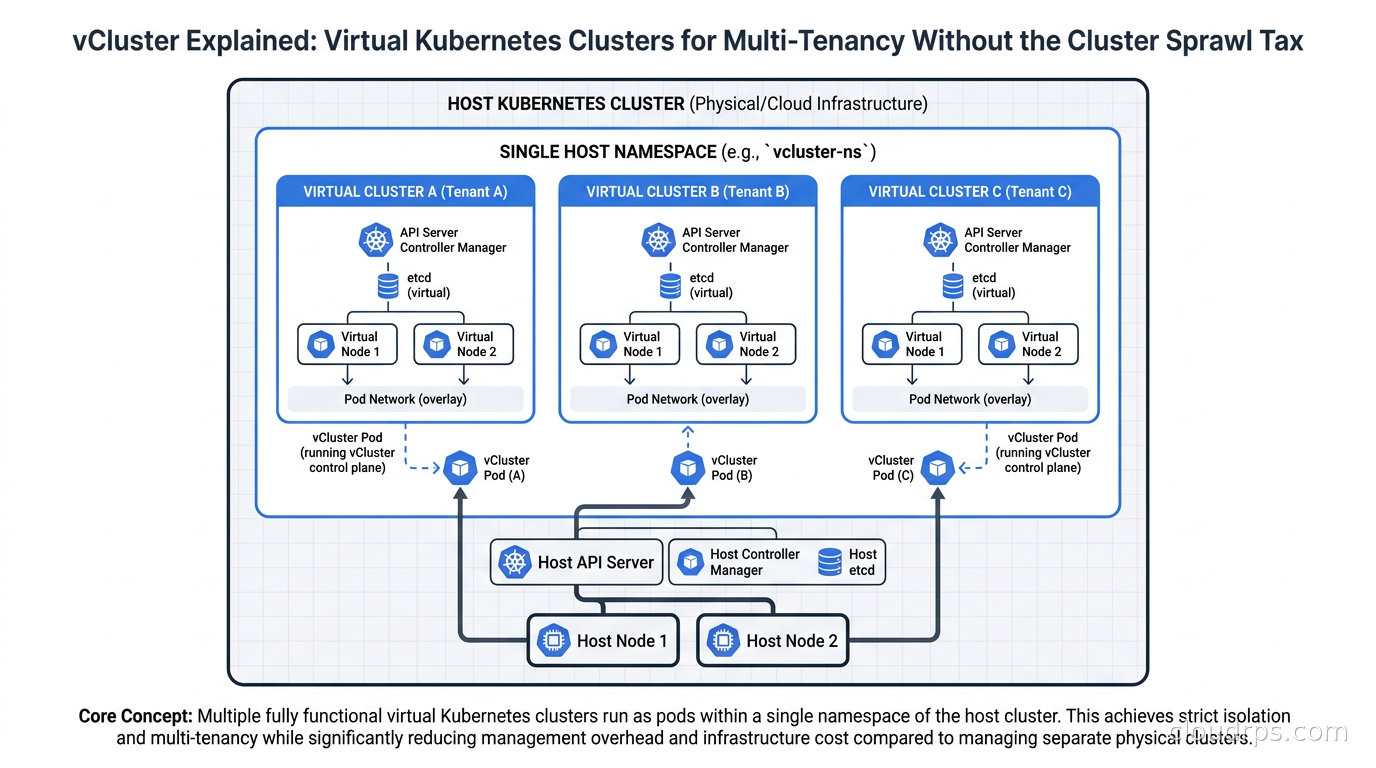
Three years ago I helped a fintech company audit their Kubernetes footprint. They had 47 clusters. Forty-seven. Development, staging, production, and then a whole constellation of team clusters because someone decided years earlier that each squad needed their own cluster for “isolation.” Their AWS bill for EKS control planes alone was pushing $41,000 a year before a single workload pod ran. The utilization across most of those clusters sat around 15%.
I have seen this pattern play out more times than I can count in twenty years of building cloud infrastructure. Organizations start Kubernetes with one cluster, realize namespaces do not give them the isolation they need, and then sprawl outward into dozens of clusters that nobody is really managing well. vCluster is the technology that finally gives platform teams a third option between “share namespaces and fight over everything” and “run a separate cluster per team and drown in ops overhead.”
The Multi-Tenancy Problem Nobody Solved Well
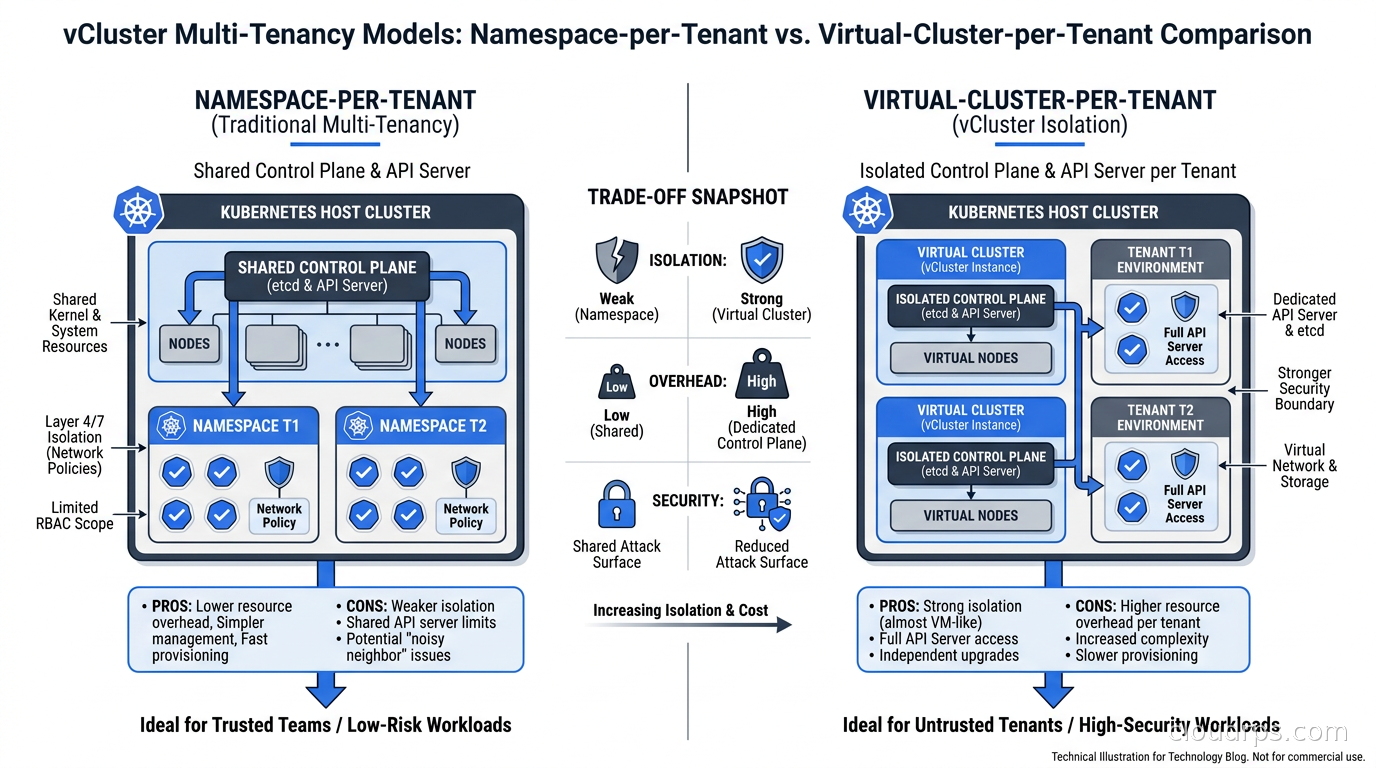
Kubernetes was not designed with strong multi-tenancy in mind. Namespaces give you a naming scope and basic resource quotas, but they share the same API server, the same etcd, the same control plane. A team that installs a Custom Resource Definition in their namespace installs it cluster-wide. A misconfigured ClusterRole can expose resources across the entire cluster. A noisy neighbor that hammers the API server impacts every other tenant.
The standard advice for years was: give teams their own namespace, bolt on OPA or Kyverno policies to prevent the worst behavior, and accept that it is not real isolation. If you needed stronger guarantees, give teams their own cluster. This worked until you had 10 teams, and then the ops overhead became crushing.
The problems with dedicated clusters compound quickly. Every cluster needs its own ingress controller, cert-manager, logging DaemonSet, monitoring stack, and security tooling. The control plane costs alone (EKS charges $0.10 per hour per cluster, roughly $876 per year) become significant at scale. Upgrading Kubernetes versions means running upgrade procedures across dozens of clusters simultaneously. Secret management becomes its own distributed systems problem. And the cognitive load on the platform team managing all of this is brutal.
What platform teams needed was something that looked like a real cluster from the tenant’s perspective but did not actually cost a real cluster’s worth of money and operations work.
What vCluster Actually Does
vCluster, built by loft-sh and now part of the broader CNCF ecosystem, creates virtual Kubernetes clusters that run inside a namespace on a host cluster. Each virtual cluster has its own API server, its own controller manager, its own etcd (or a lightweight SQLite-based alternative). From inside the virtual cluster, it looks and feels exactly like a real Kubernetes cluster. Teams can install CRDs, create RBAC policies, deploy operators, and have full cluster-admin rights within their virtual cluster without touching anything on the host.
The trick is in how scheduling works. When a pod gets created inside a virtual cluster, vCluster’s syncer component translates it and creates a corresponding pod on the host cluster. The host scheduler places it on real nodes. The workload runs on real hardware. But the tenant sees it as their cluster’s pod, managed by their cluster’s control plane.
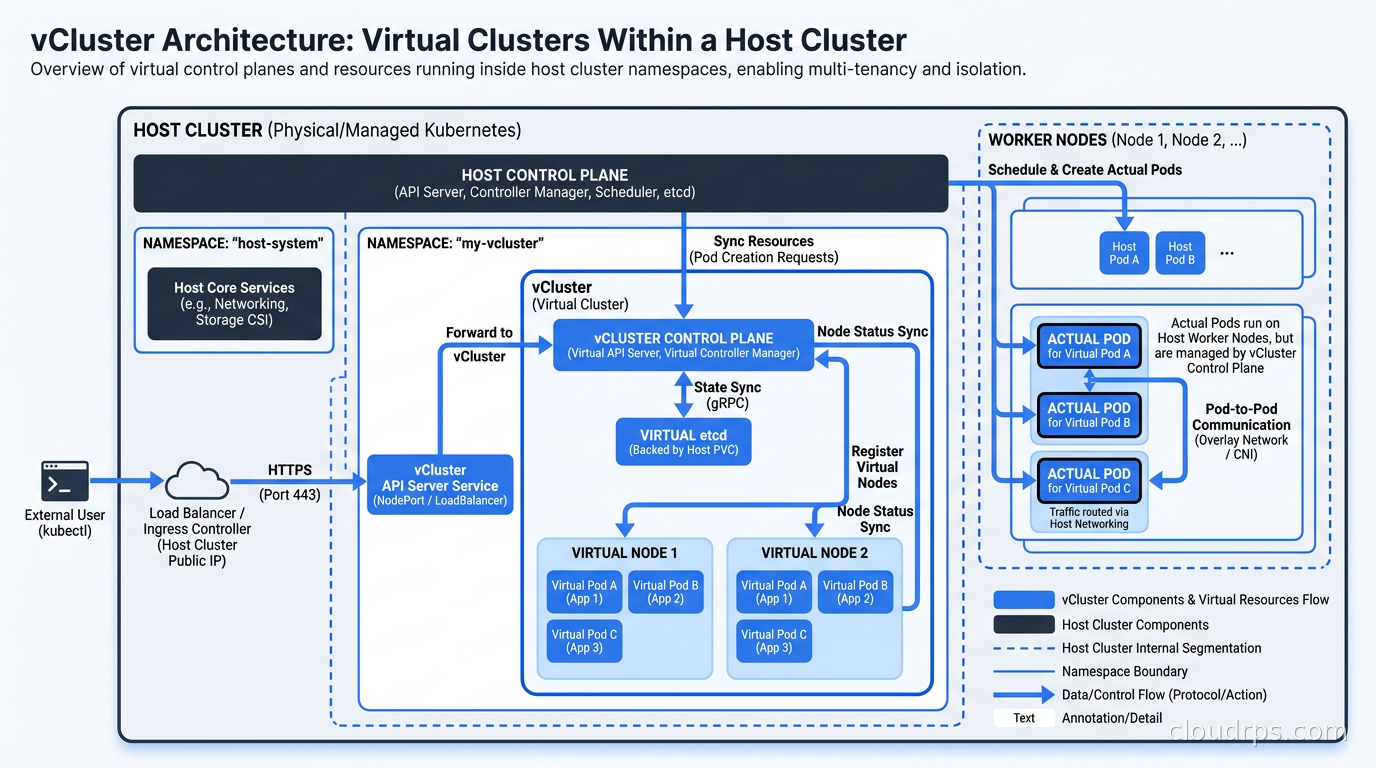
This syncer pattern is where the isolation boundaries live. By default, vCluster syncs pods, services, endpoints, configmaps, secrets, and persistent volume claims from the virtual to the host. It translates names to prevent collisions. Everything else stays virtualized. The host cluster’s kube-system is invisible to the tenant. Other tenants’ namespaces are invisible. The tenant’s RBAC rules cannot escape their virtual cluster.
The performance overhead is minimal. The virtual API server runs as a pod on the host. Most API calls never touch the host at all, since the virtual etcd handles the virtual cluster’s state. Only the synced objects (pods, services) require round-trips to the host API. In practice, I have seen vCluster add less than 50ms of latency to workload scheduling, which matters exactly zero for any real workload.
Isolation Models: Choosing the Right Trade-off
vCluster supports several isolation configurations, and understanding the trade-offs is important before you build your platform on top of it.
The default configuration shares the host cluster’s network namespace. Pod-to-pod traffic between virtual clusters is technically possible unless you enforce NetworkPolicies. This is usually fine for internal developer platforms where teams trust each other, but it is not appropriate for environments where you are running untrusted code or have compliance requirements around network isolation.
For stronger isolation, vCluster supports dedicated node pools per virtual cluster. You label nodes and configure vCluster to schedule workloads only on designated nodes. Now you have real compute isolation, though you lose the efficiency of bin-packing across all tenants. This is the model I recommend for production multi-tenant environments serving external customers.
For the strictest requirements, vCluster Pro supports virtual cluster-level network policies that enforce isolation even within a shared node pool. Combined with Cilium or Calico on the host cluster, you can achieve network segmentation that satisfies most compliance frameworks.
This is something I appreciate about vCluster’s design: it gives you a spectrum of isolation rather than a binary choice. Development environments for internal teams can run in the economical shared mode. Sensitive production tenants can run in isolated mode. The platform team controls this per-virtual-cluster without changing the tenant’s experience.
Comparing vCluster to the Alternatives
It is worth being precise about where vCluster fits relative to the other solutions you have probably considered.
Namespaces with policy enforcement (OPA, Kyverno) give you resource isolation and policy guardrails, but tenants still share the control plane. CRDs are cluster-scoped. A tenant cannot install operators without platform team involvement. If you are running an internal developer platform, the friction of “open a ticket to install a CRD” kills developer velocity. This is covered in depth in our policy as code guide, but the short version is that policy enforcement handles access control, not true isolation.
Dedicated real clusters, managed via tools like Karmada or Rancher Fleet, give you real isolation but at real cost. Our Kubernetes multi-cluster management guide covers those tools, and they absolutely have their place for managing production clusters across regions. But they are not designed to solve the “100 developer environments” problem.
vCluster sits between these extremes. Better isolation than namespaces. Dramatically lower cost than dedicated real clusters. The trade-off is operational complexity in the vCluster control plane itself (you are now managing virtual clusters as objects), though vCluster’s tooling has matured significantly in the past two years.
The Cost Math
Let me walk through the numbers from the fintech audit I mentioned earlier. Before vCluster, they were running 47 clusters:
- EKS control plane cost: 47 x $876/year = $41,172/year
- Baseline infrastructure per cluster (logging, monitoring, ingress): roughly $150/month = $84,600/year
- Platform engineering time managing 47 upgrade cycles: significant but hard to quantify
After consolidating to 8 host clusters (production environments) with vCluster for all development and staging environments:
- EKS control plane cost: 8 x $876/year = $7,008/year
- Baseline infrastructure on host clusters: $12,000/year
- Control plane savings alone: over $34,000/year
The real savings were in engineering time. Managing 8 clusters instead of 47 for upgrades, security patching, and incident response freed up roughly 20 hours per month of senior platform engineering capacity. At fully-loaded rates, that is worth more than the compute savings.
I bring this up because cost often drives the initial vCluster conversation, but it should not be the only frame. The bigger win is that your platform team can stop doing repetitive cluster maintenance and start building the self-service tooling that actually improves developer productivity. One natural next investment after stabilizing vCluster for team isolation is cloud development environments (CDEs): provisioning CDE workspaces inside virtual clusters gives each developer a full, isolated Kubernetes environment without the cost of dedicated real clusters. Our Kubernetes cost visibility guide has good tools for measuring these savings once you have migrated.
Setting Up vCluster in Practice
Installation is straightforward. You install the vcluster CLI and then spin up a virtual cluster with:
vcluster create my-team-cluster --namespace team-namespace
This creates the virtual cluster, deploys the virtual API server and control plane as pods in the specified namespace, and gives you a kubeconfig that connects to the virtual cluster’s API. From that point, everything you do with kubectl targets the virtual cluster.
For platform teams, you typically do not want teams spinning up their own virtual clusters directly. Instead, you build automation (often a Backstage template, or a simple API endpoint) that creates virtual clusters on demand, applies your standard configuration, and returns credentials. Teams get what looks like a dedicated cluster in minutes without any interaction with the host cluster.
The vCluster configuration YAML is where you tune the important settings. You control which objects get synced to the host, what resource quotas apply, whether to enable isolated mode, and how to configure the virtual cluster’s storage class mapping. A minimal hardened configuration for an internal platform looks something like:
sync:
  pods:
    enabled: true
  services:
    enabled: true
  persistentvolumeclaims:
    enabled: true
isolation:
  enabled: true
  resourceQuota:
    enabled: true
    quota:
      requests.cpu: "10"
      requests.memory: "20Gi"
      pods: "50"
The isolation flag enforces additional security policies within the virtual cluster, preventing privilege escalation and restricting host path mounts. Enable this for any environment that does not have a small, trusted team behind it.
Ephemeral Environments: The Underrated Use Case
Most of the vCluster conversation centers on multi-tenancy, but I think the ephemeral environment use case is actually more immediately impactful for most organizations.
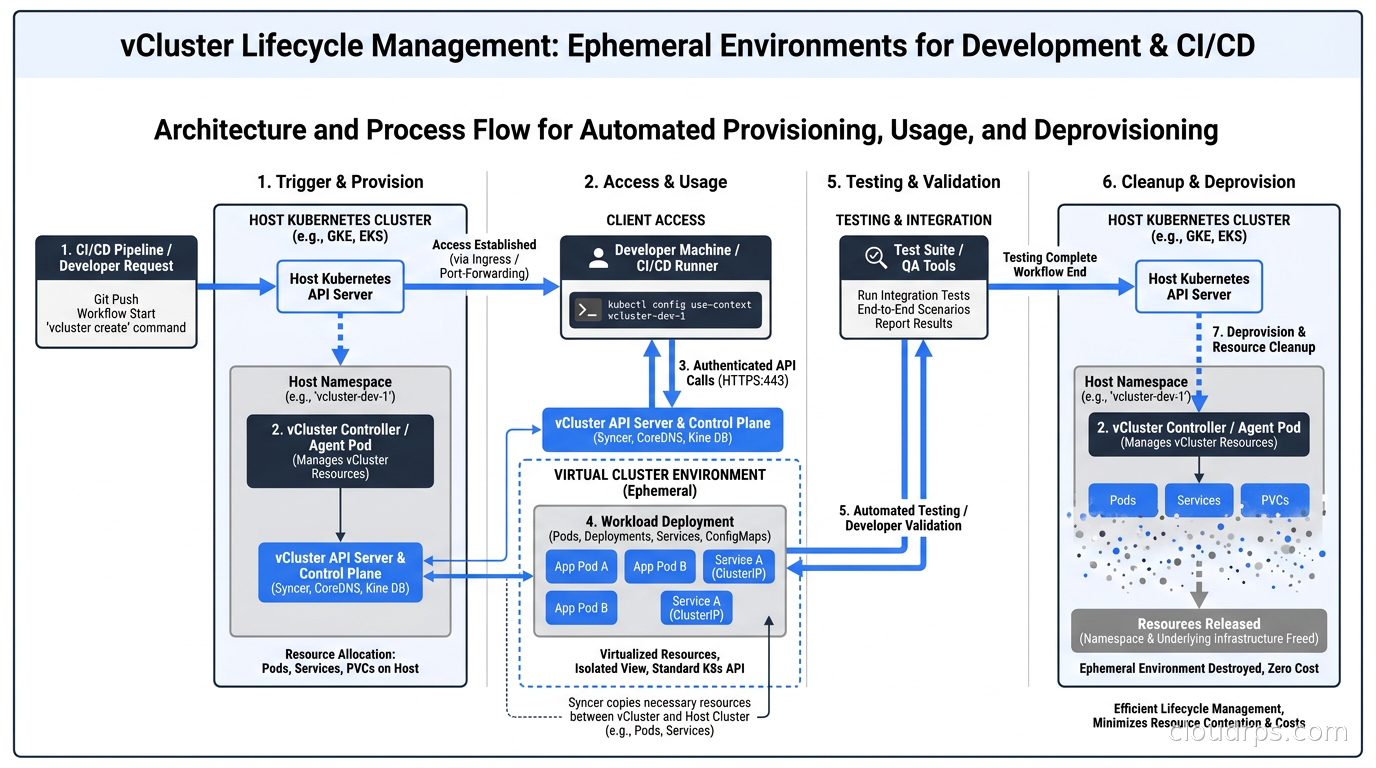
Ephemeral environments, also called preview environments or per-PR environments, give every pull request its own running copy of the application stack. Developers and QA engineers test against a live environment that exactly matches the PR’s changes before merge. The feedback loop shrinks from “deployed to staging, wait for a shared environment to be free” to “here is your environment URL, it is up in two minutes.”
The traditional way to do this with real clusters is prohibitively expensive. A full Kubernetes cluster per PR, even with minimal resources, costs real money and takes 10-15 minutes to provision. vCluster changes this equation entirely. Virtual clusters spin up in under 60 seconds. You delete them when the PR is closed. The infrastructure cost is essentially the incremental compute for whatever the PR’s workloads need, not a full cluster’s worth of overhead.
I have implemented this pattern using GitHub Actions that trigger on PR open, call a simple API to provision a vCluster in a preexisting host cluster, deploy the application stack via Helm, and post the environment URL as a PR comment. Cleanup runs on PR close. The entire workflow takes about 90 seconds from PR push to live environment. Developers stop sharing staging and fighting over “who broke staging” is a fight nobody misses.
This pattern integrates cleanly with GitOps workflows. Our ArgoCD and Flux guide covers the deployment side, and vCluster works natively with ArgoCD’s ApplicationSet controller to manage virtual clusters as ArgoCD targets.
RBAC and Access Control
One thing that makes vCluster particularly useful for platform engineering is that you can decouple virtual cluster access from host cluster access entirely. Teams interact with their virtual cluster using standard Kubernetes RBAC. They can be cluster-admin in their virtual cluster without having any permissions on the host cluster.
The host cluster’s RBAC controls who can create, modify, and delete virtual clusters. Platform admins typically have full access. Team leads might have read access to virtual cluster status. Individual developers have no direct access to the host at all. This separation of concerns is exactly what the Kubernetes RBAC model was designed for, but which traditional single-cluster deployments make difficult to enforce cleanly.
On the identity side, vCluster integrates with your existing OIDC provider. You can configure the virtual cluster’s API server to accept the same identity tokens as your host cluster, which means developers use the same SSO login they use everywhere else. There is no separate user management per virtual cluster. This is critical for security: you do not want teams managing their own user databases inside each virtual cluster, because then you lose centralized access revocation when someone leaves the team.
Our Kubernetes RBAC guide covers the underlying access control model in detail, which applies directly to how you structure permissions within virtual clusters.
Production Considerations
vCluster is mature enough for production workloads, but there are a few things I want to flag before you go all-in.
The syncer is the component you need to understand deeply. It is the bridge between the virtual and host worlds, and it has opinions about which Kubernetes resources it syncs. By default, it does not sync CRDs from the virtual cluster to the host, which is usually what you want. If a tenant installs a custom CRD in their virtual cluster, it stays in their virtual control plane and does not pollute the host cluster’s API surface. But this means that if a workload in the virtual cluster needs a CRD that creates host-level resources (certain storage operators, for example), you need to either install those CRDs on the host separately or configure additional sync rules.
Networking is the other area that requires careful thought. By default, vCluster virtualizes services within the virtual cluster, but host services are not visible to the virtual cluster unless you explicitly configure cross-cluster service discovery. This is usually fine, but if your platform relies on shared services (a centralized secret store, a shared service mesh control plane), you need to account for how virtual clusters will reach them.
On the storage side, vCluster passes PersistentVolumeClaims through to the host cluster’s storage classes. Make sure your host cluster has appropriate storage classes configured, and that your virtual cluster quotas include storage limits. Teams with cluster-admin inside their virtual cluster can create large PVCs without limit if you do not set quotas.
For observability, the workloads running inside virtual clusters appear as pods on the host cluster with translated names. Your existing monitoring stack (Prometheus, the LGTM stack) picks them up automatically. You may want to add labels to distinguish which virtual cluster each pod belongs to, which vCluster supports via node label syncing.
When vCluster Is Not the Right Tool
I would be doing you a disservice if I did not talk about when NOT to use vCluster.
For genuine production multi-tenancy with strong regulatory requirements, dedicated real clusters with physical node separation are still the right answer. A PCI-DSS environment, a HIPAA workload processing PHI, or anything where you have contractual obligations around compute isolation needs real hardware separation. vCluster can meet many compliance requirements, but if your compliance team needs documented proof of physical isolation, you are going to have a difficult conversation.
For very large production deployments with thousands of pods, the syncer overhead becomes more significant. vCluster’s sweet spot is development and staging environments, and production use cases with moderate scale. The teams at CoreWeave and Adobe who are using vCluster in production are sophisticated enough to tune the syncer and understand the failure modes. If your platform team does not have deep Kubernetes expertise, the operational complexity of debugging the virtual-to-host translation layer when something goes wrong is real.
And for teams that actually need multi-region or multi-cloud cluster federation, vCluster is solving the wrong problem. That is where tools like Karmada shine.
Integrating vCluster into Your Platform Engineering Strategy
The organizations getting the most value from vCluster treat it as a building block in a larger internal developer platform strategy. Virtual clusters are the provisioning primitive. On top of that, they build:
- A catalog (Backstage or similar) where teams request environments
- Templates that pre-configure virtual clusters with standard tooling
- GitOps pipelines that deploy applications into virtual clusters
- Cost tracking that attributes virtual cluster costs back to teams
Done well, a developer should never have to think about vCluster at all. They request an environment, they get a kubeconfig, they deploy their application. The virtual cluster machinery is invisible. That abstraction is what transforms a cool technology into a genuine productivity multiplier.
The platform engineering movement is fundamentally about building these paved roads, and vCluster is currently one of the most useful paving materials available for Kubernetes-native organizations.
The Bottom Line
vCluster is not magic, but it is genuinely useful in ways that namespace-based multi-tenancy has never been. After twenty years of watching organizations struggle with the cluster-vs-namespace trade-off, I think virtual clusters represent a real third path.
If you are running more than 10 clusters and a meaningful percentage are non-production, I would strongly encourage you to model what consolidation with vCluster would look like. The cost savings are real. The operational simplification is real. And the developer experience improvement, particularly if you implement ephemeral per-PR environments, tends to surprise people who have never had it before.
Start with a single host cluster for your development environments. Migrate your team clusters to virtual clusters over a quarter. Measure the control plane cost savings and the platform team hours recovered. If you like what you see, you can evaluate whether staging makes sense to migrate next.
The fintech company from the start of this article is now running 6 host clusters with over 80 active virtual clusters. Their platform engineering team has three fewer “ticket request” workflows than before and ships new platform capabilities twice as often. That is what the right level of abstraction buys you.
Get Cloud Architecture Insights
Practical deep dives on infrastructure, security, and scaling. No spam, no fluff.
By subscribing, you agree to receive emails. Unsubscribe anytime.