
I have spent the last twenty years running infrastructure for organizations ranging from 50-person startups to global enterprises, and I cannot recall a migration wave this large and this forced since the virtualization revolution itself in the mid-2000s. The Broadcom acquisition of VMware in late 2023 set off a chain of events that is still reshaping data centers today: mandatory subscription conversions, elimination of perpetual licenses, minimum core requirements, and price increases that many customers described as 300 to 1,200 percent compared to their previous contracts. I have sat in rooms with infrastructure teams staring at renewal quotes that doubled their entire annual IT budget. The exodus is real, it is accelerating, and picking the wrong destination is going to hurt just as much as staying.
This is the guide I wish existed when the calls started coming in. We will go deep on Proxmox VE and XCP-ng, touch on the other contenders, walk through a real decision framework, and cover the migration mechanics that actually matter.
What Broke and Why It Matters
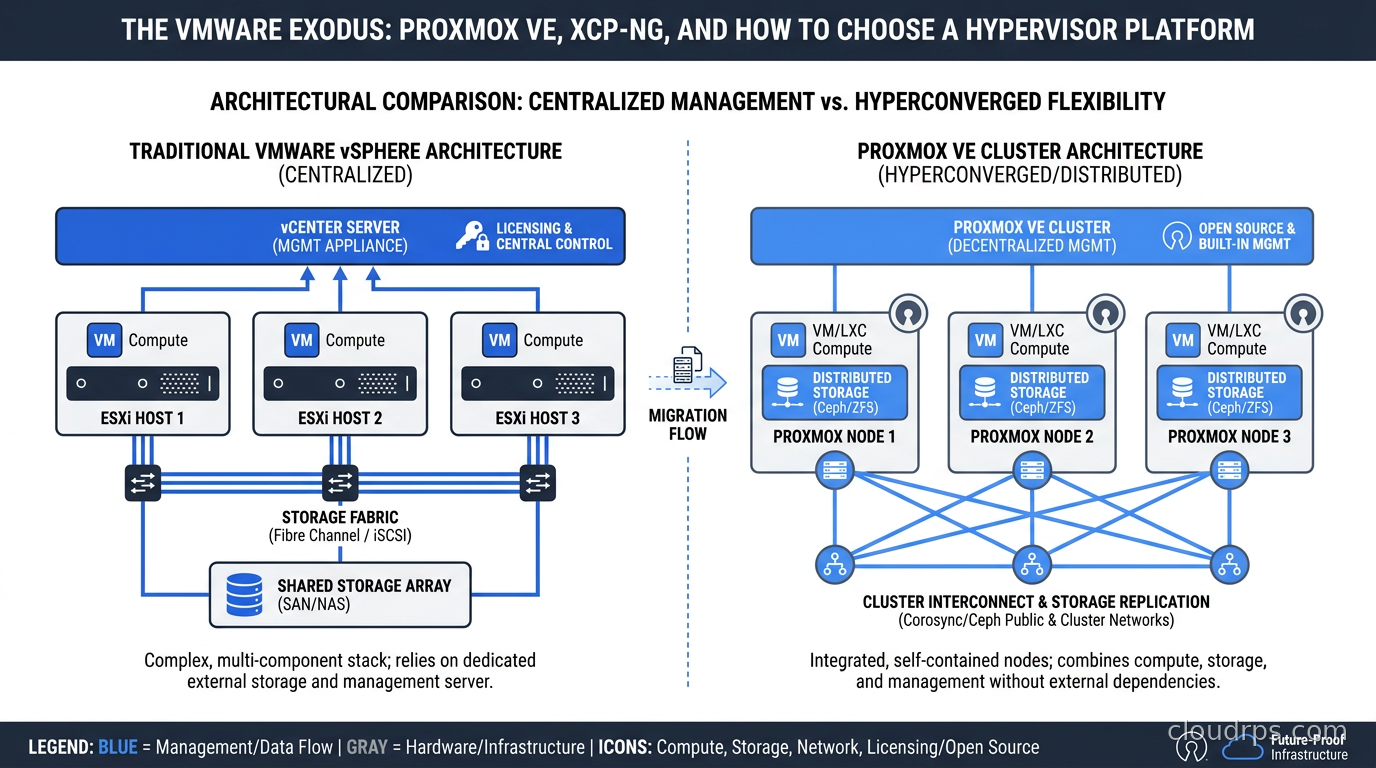
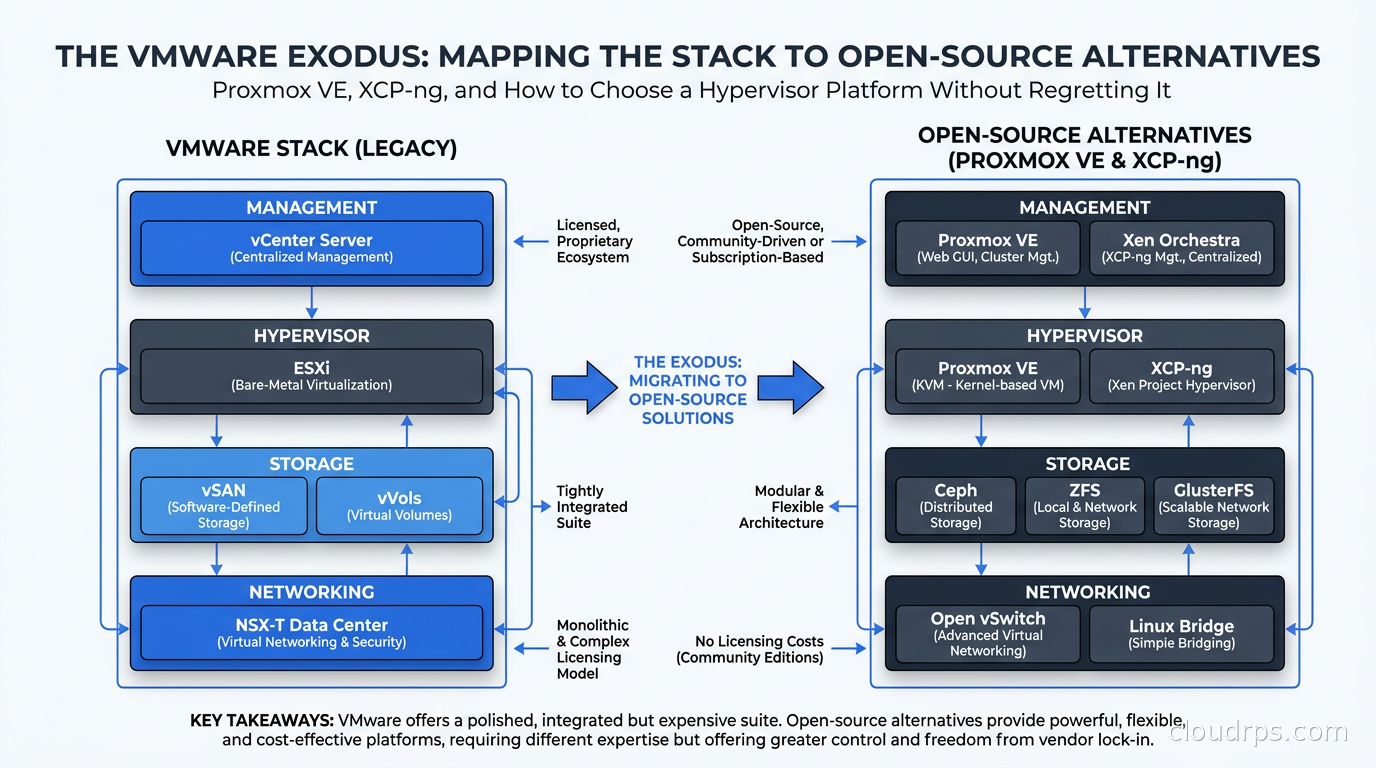
Before picking a destination, you need to understand the full scope of what you are leaving behind. Most organizations running VMware are not just running ESXi. They are running a stack: ESXi as the hypervisor on each host, vCenter Server for centralized management and orchestration, vSAN if they chose hyperconverged storage, NSX-T for software-defined networking, vSphere with Kubernetes (formerly Tanzu) if they went down the container path, and Site Recovery Manager for DR. Broadcom repackaged most of this into VMware Cloud Foundation (VCF), a single bundle with pricing that reflects enterprise software margins, not infrastructure software margins.
The organizations that feel the most pain are mid-market shops: 20 to 200 hosts, mature VMware environments built over 10-plus years, teams that know VMware deeply but have not been actively exploring alternatives. They have automation built around vCenter APIs, runbooks that assume vMotion and DRS, and monitoring integrations tied to VMware-specific metrics. Moving is not just a hypervisor swap. It is a toolchain replacement.
Understanding this scope is critical because the alternative you choose needs to cover not just the compute layer but the management, storage, and networking layers that VCF bundled together.
Proxmox VE: The Pragmatic Choice for Most Teams
Proxmox Virtual Environment is the alternative I recommend most often for small to mid-sized environments, and the market data backs this up: evaluations increased roughly 340 percent year-over-year in the 2024-2025 period. It is not hype. Proxmox genuinely solves the core problem elegantly.
Proxmox VE is a Debian-based hypervisor platform that combines KVM (for full virtualization) and LXC (for container-based workloads) under a unified management layer. The web UI is not VMware-level polished, but it is genuinely functional and improves with every release. Critically, it ships with built-in clustering, live migration, high availability, backup and restore via Proxmox Backup Server, and a reasonable software-defined storage story through Ceph integration.
The licensing model is what draws people in. Proxmox VE is open source under the AGPL license. You can run it on as many hosts as you want without paying a cent. The paid subscription adds access to the enterprise update repository (with more conservative, tested packages), support tickets, and the Proxmox Datacenter Manager, which launched in December 2025 and positions itself directly as a vCenter replacement for multi-cluster environments. A community subscription runs around 100 euros per host per year. Enterprise support for a 10-host environment is roughly 1,000 to 3,000 euros annually. Compare that to VMware Cloud Foundation at 45,000-plus dollars for the same footprint and you understand why the spreadsheets look the way they do.
Where Proxmox shines:
- Environments under 100 hosts where the operational simplicity of a single platform matters more than enterprise feature depth
- Teams comfortable with Linux who want to inspect, modify, and automate at the OS level
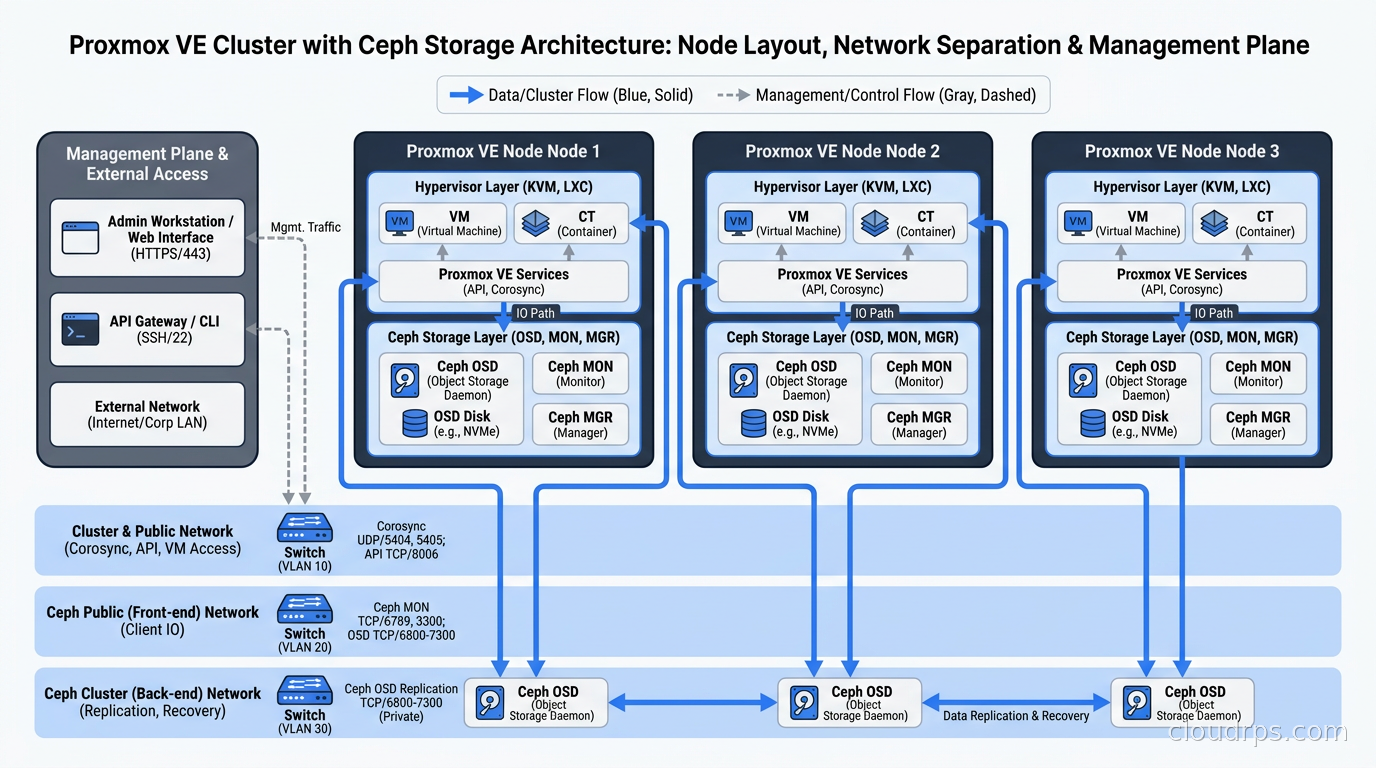
- Organizations that want Ceph as their hyperconverged storage layer, since Proxmox and Ceph integrate tightly and the community documentation is excellent
- Shops replacing VMware for on-premises infrastructure who do not need NSX-level software-defined networking
Where Proxmox shows its limits:
- Large-scale environments where multi-cluster management, advanced DRS-equivalent workload balancing, and enterprise SLA support matter. Proxmox Datacenter Manager is early; it is not vCenter. Yet.
- Organizations with heavy NSX-T investments. Proxmox networking is based on Linux bridges, OVS, and SDN overlays. The capabilities are there but the operational model is different and requires Linux networking knowledge.
- Any team that needs professional enterprise support with guaranteed response SLAs baked into contract terms. The community is excellent, but it is still community support at the free tier.
The Proxmox API is REST-based and well-documented. Terraform providers exist (community-maintained but mature), Ansible collections exist, and the tooling ecosystem has grown substantially as the user base has expanded. I have seen teams automate entire Proxmox cluster deployments using Terraform and Ansible within weeks of starting their migration. That is a good sign about the integration surface.
XCP-ng: The Enterprise-Grade Alternative Nobody Talks About Enough
XCP-ng is a fork of Citrix XenServer, maintained by Vates SAS, and it is the hypervisor I recommend when Proxmox does not fit. Where Proxmox is pragmatic and Linux-native, XCP-ng is enterprise-oriented and Xen-native. The management layer, Xen Orchestra (XO), is genuinely impressive: it provides multi-host, multi-pool management with a web UI that is arguably cleaner than Proxmox’s, VM console access, backup orchestration, patch management, and a REST API that integrates cleanly with external tooling.
XCP-ng runs on the Xen hypervisor, which has a longer production track record in enterprise environments than KVM (though KVM has thoroughly caught up in stability and performance). More importantly, XCP-ng has maintained hardware certification partnerships that matter for organizations running on HP ProLiant, Dell PowerEdge, and Lenovo ThinkSystem hardware with vendor support requirements.
The XO Appliance (XOA) is the commercial product layered on top of the open-source Xen Orchestra. Pricing is reasonable: roughly 2,500 euros per year for a team plan covering unlimited hosts. That is a different conversation than VMware, but it is also not zero. The free Xen Orchestra built from source (XO from source) is fully functional but requires self-maintenance.
Where XCP-ng makes more sense than Proxmox:
- Organizations that require hardware vendor certifications for their hypervisor layer
- Environments where the management UI quality and multi-pool management are important for non-Linux-expert operators
- Teams coming from XenServer (Citrix) environments who can migrate VMs using standard XVA tooling
- Situations where a commercial support relationship with a dedicated vendor (Vates) matters for procurement and contractual reasons
The tradeoff: XCP-ng’s ecosystem is smaller than Proxmox’s. Terraform providers exist but are less mature. The community forums are active but smaller. If something goes wrong at 2 AM, you are more likely to find a Proxmox answer faster than an XCP-ng answer.
I ran XCP-ng in production for a financial services client for about 18 months before this article, and the stability was genuinely excellent. Live migration worked cleanly, the Xen Orchestra backup workflows integrated with their existing S3-compatible storage, and we never had a surprise. The operational model requires understanding Xen concepts (pools, storage repositories, networks as XenServer objects), which has a learning curve but is not steep.
The Other Contenders Worth Knowing
OpenStack deserves mention because it keeps appearing in these conversations. I wrote about what OpenStack is and when it makes sense separately, but the short version for this context: OpenStack is not a Proxmox/XCP-ng replacement. It is a cloud platform. Running OpenStack to replace VMware is like replacing a pickup truck with a semi because both can haul cargo. Unless you are building a private cloud with self-service provisioning for dozens of tenants, the operational complexity of OpenStack will destroy your team.
Nutanix is worth acknowledging as the enterprise alternative with the most feature parity to VMware Cloud Foundation. AHV (Acropolis Hypervisor) is their KVM-based hypervisor, Prism Central is their vCenter equivalent, and the whole stack is genuinely polished. The catch is price: Nutanix is not a cheap VMware alternative. It is a different expensive VMware alternative. For organizations where the VMware complexity fits and the only issue is Broadcom pricing, Nutanix is worth evaluating seriously. For organizations with 200-plus hosts who need enterprise everything, this conversation belongs in a separate article.
Harvester is a SUSE-backed HCI platform built on Kubernetes, KubeVirt, and Longhorn. It is the right answer if you are moving toward a cloud-native future where VMs are a transitional workload alongside containers. I have seen a few forward-thinking infrastructure teams adopt Harvester as a stepping stone: run legacy VMs via KubeVirt while containerizing applications on the same cluster. It is early-stage operationally, but the architecture is genuinely elegant. If you want to go straight to KubeVirt without the Harvester HCI layer and integrate VMs directly into an existing Kubernetes cluster, the KubeVirt production guide covers the full architecture, v1.8 features, and when it makes sense over Proxmox or XCP-ng. If you are heading toward a pure Kubernetes cluster without VMs, the choice of node OS becomes important: the guide to Talos Linux and immutable Kubernetes node operating systems covers how to eliminate SSH access and configuration drift from bare metal nodes from the start.
The Decision Framework
When I work with organizations navigating this decision, I ask five questions:
1. What is your host count and growth trajectory? Under 50 hosts: Proxmox. 50 to 200 hosts: evaluate both Proxmox and XCP-ng. Over 200 hosts with enterprise requirements: XCP-ng, Nutanix, or a serious conversation about a hybrid approach.
2. What does your team know? A team fluent in Linux will be productive with Proxmox inside a month. A team that has only ever touched VMware GUI will have a steeper path with Proxmox networking but will find XCP-ng’s Xen Orchestra more familiar in workflow. Neither is a disqualifier, but it affects timeline.
3. What is your storage story? If you are running vSAN today, you need a replacement for hyperconverged storage. Proxmox integrates with Ceph, and you can run Ceph on the same nodes. XCP-ng integrates with various storage backends including LVHD (local), NFS, iSCSI, and Gluster. Ceph expertise is more available than Gluster expertise at this point, which is a practical consideration.
4. What is your network complexity? Plain VLANs and trunks: either platform handles this trivially. You had NSX-T microsegmentation and distributed firewalls: you are looking at rebuilding that capability using host-based firewalling (nftables/iptables on Proxmox nodes) or an overlay network like Cilium if you are moving toward containers. This is real work that your project plan needs to account for.
5. What does the support relationship need to look like? If your organization requires a vendor with a signed SLA for your hypervisor platform, Proxmox subscriptions and Vates/XCP-ng both offer this. If you need the hypervisor certified on the hardware vendor’s support matrix, XCP-ng has the edge.
Executing the Migration
The biggest mistake I see is treating this as a hypervisor swap and not a platform migration. The technical VM conversion is usually the easiest part.
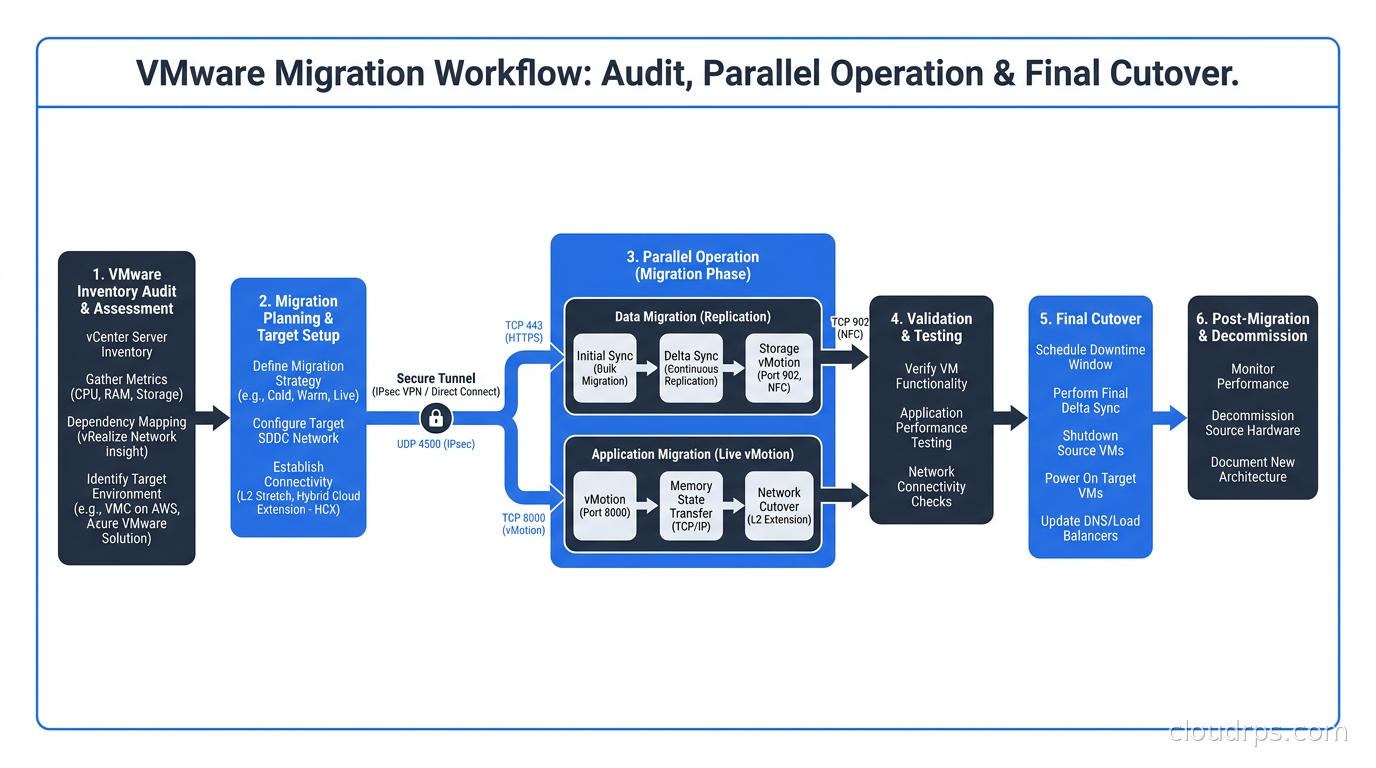
Inventory first. Before you touch anything, export a complete inventory from vCenter: every VM, its CPU/RAM allocation, storage consumption, network configuration, snapshot state, and any VMware Tools dependency. You will find VMs that have not been powered on in three years, VMs with 47 snapshots that have been there since 2019, and applications where the “owner” has long since left the company. Clean this up before migrating it. Moving technical debt does not eliminate it.
Run parallel for at least 30 days. Stand up your Proxmox or XCP-ng cluster on dedicated hardware before you decommission anything. Migrate non-critical workloads first. Validate your backup and restore procedures. Run DR drills. I have never regretted spending more time on parallel operation, and I have seen projects that tried to do cutover-then-validate collapse badly when something did not behave as expected.
VM conversion tools matter. For VMware to Proxmox, the most common paths are: using qemu-img to convert VMDK to qcow2, using virt-v2v for conversion with VMware Tools removal included, or using Proxmox’s built-in import functionality for OVA/OVF exports. For XCP-ng, XVA format is native, and xe-import handles most cases cleanly. Vates maintains migration tooling that handles large-scale batch conversions. Test your conversion workflow on five VMs before you run 500.
Rebuild your automation. If you had vCenter-based automation (Ansible VMware modules, Terraform vsphere provider, PowerCLI scripts), you are rewriting it. This is not optional. The Terraform Proxmox provider (Telmate and BPG are the two main ones) and the Ansible community.general proxmox modules are mature enough for production use, but your playbooks will need changes. Budget the engineering time honestly.
Networking is where projects slip. Map your VMware port groups and dvSwitch configurations to Linux bridge or OVS configurations before you start. A distributed vSwitch with 15 VLANs and custom MTU settings has a direct analog in Proxmox bridge+VLAN configuration, but it requires intentional mapping. The default Proxmox networking setup is one bridge per NIC. Real environments need VLAN trunking, bonding, and careful MTU consistency across nodes. Get your network engineer involved early, not late.
If you are running workloads that eventually move toward containers, look at what I wrote about running Kubernetes alongside your VM workloads and persistent storage patterns since Ceph (which you may set up for Proxmox storage anyway) integrates cleanly with Kubernetes via Rook.
The Cost Reality Check
Organizations approaching this migration focused entirely on licensing cost savings sometimes underestimate total migration cost. The licensing delta is real and substantial. But migrations have costs: engineering time for planning and execution, tooling for VM conversion, training for the operations team, potential hardware for parallel operation, and time to rebuild automation. For a 50-host environment, I estimate 3 to 6 months of engineering effort (not full-time, but significant part-time investment) to complete a proper migration including all the adjacent tooling.
That math still works heavily in favor of migrating off VMware over a 3-year horizon. The licensing savings on 50 hosts over three years typically far exceed migration costs. But if your renewal is in 60 days and you are expecting to have this done in 60 days, you are going to make bad decisions under time pressure.
Negotiate your VMware renewal for one more year if you can. Pay for the breathing room. A panicked migration that breaks production because you ran out of runway is worse than one more year of VMware subscription cost. Broadcom will negotiate with organizations that have alternatives on the table, sometimes more than the initial quotes suggest.
Consider as well that this is an opportunity to right-size your infrastructure. Many VMware environments are over-provisioned in ways that accumulated over years of conservative capacity planning. Audit CPU and memory utilization before migrating. I have seen environments migrate 200 VMware VMs to 80 Proxmox VMs after pruning the decommissioned and idle workloads that nobody wanted to delete in the old platform. That changes the hardware procurement conversation.
For organizations thinking about the long-term cost picture, understanding FinOps principles and total cost of ownership modeling will help you build a defensible business case for the migration investment.
The Workloads That Need Special Attention
Windows Server workloads running on VMware with vSphere integration features (VMware Tools) need VMware Tools removed and replaced with the KVM or Xen guest agent equivalents. This is well-understood and documented, but it requires a reboot window and testing. Windows VMs on Proxmox/KVM perform excellently with VirtIO drivers installed; the conversion step is required.
vSAN-backed storage has no one-step migration path. You are rebuilding your storage layer. If you are going to Proxmox with Ceph, you need to plan your Ceph cluster design (replication factor, OSD layout, network separation for cluster traffic), deploy it, and migrate data. This is real infrastructure work, not a checkbox task.
High-availability clusters that relied on vSphere HA need mapping to Proxmox HA Manager or XCP-ng’s high availability configuration. Both support HA with watchdog-based fencing, but the configuration model differs. Test your HA failover scenarios explicitly before you decommission your VMware environment.
Nested virtualization (VMs inside VMs, common for lab environments and some CI/CD setups) works on Proxmox KVM with hardware virtualization exposure enabled. It also works on XCP-ng. This is one of the things VMware handled cleanly for years, and both alternatives support it without significant pain.
What I Would Do
If I were starting a 75-host VMware migration today for a mid-market company with a Linux-comfortable ops team, I would go Proxmox VE with Ceph for storage and commit to Proxmox Datacenter Manager as it matures for multi-cluster management. The community ecosystem, the Terraform and Ansible tooling maturity, and the cost profile make it the pragmatic choice for most environments I encounter.
If I were a 150-host environment with hardware vendor support requirements and a team that prefers a managed vendor relationship, I would evaluate XCP-ng/Vates seriously. The operational model is solid, Xen Orchestra is genuinely good, and having a European vendor committed to the platform’s long-term development matters for organizations that cannot afford to bet on community-only support.
Whatever direction you go, do it deliberately. Audit your environment, build a migration runbook, test it, and give yourself real timeline. The organizations that have come through this cleanly are the ones that treated it as a project with proper engineering investment, not a crisis response.
The hypervisor you have been using for a decade is gone as a viable long-term option for most organizations. That is a real disruption. But the alternatives have matured considerably, the community support is deep, and the cost profiles are genuinely better. The migration is worth doing. Just do it right.
For the compute layer decisions that follow your hypervisor choice, including when bare metal makes more sense than VMs for specific workloads, see the bare metal cloud versus VM comparison I wrote. And if you are considering a hybrid path where some workloads move to public cloud while others stay on-prem, the cloud repatriation patterns and cloud landing zone design guides cover the other side of that equation.
The era of VMware as the default enterprise hypervisor is over. The era of hypervisor pluralism is here. Pick your platform, plan your migration, and move forward. Staying on Broadcom’s terms is the one option that guarantees you do not control your own infrastructure roadmap.
Get Cloud Architecture Insights
Practical deep dives on infrastructure, security, and scaling. No spam, no fluff.
By subscribing, you agree to receive emails. Unsubscribe anytime.