
The first time I truly appreciated what a WAF does, I was staring at Apache access logs at 2 AM. An attacker was methodically probing a client’s e-commerce application with SQL injection payloads. Every request was slightly different – they were fuzzing parameters, testing encodings, trying to slip past input validation. The application’s code had a vulnerability (we found it the next morning), but the WAF sitting in front of it had been silently blocking every attempt for the past six hours.
Without that WAF, the attacker would have had the customer database before anyone noticed. With it, we had six hours of detailed attack logs and zero data loss.
That was 2011. Since then, I’ve deployed, tuned, broken, and fixed WAFs across everything from three-tier monoliths to microservices architectures. They’re one of the most misunderstood security tools in the stack, simultaneously oversold by vendors and underutilized by teams. Let me set the record straight.
What a WAF Actually Does
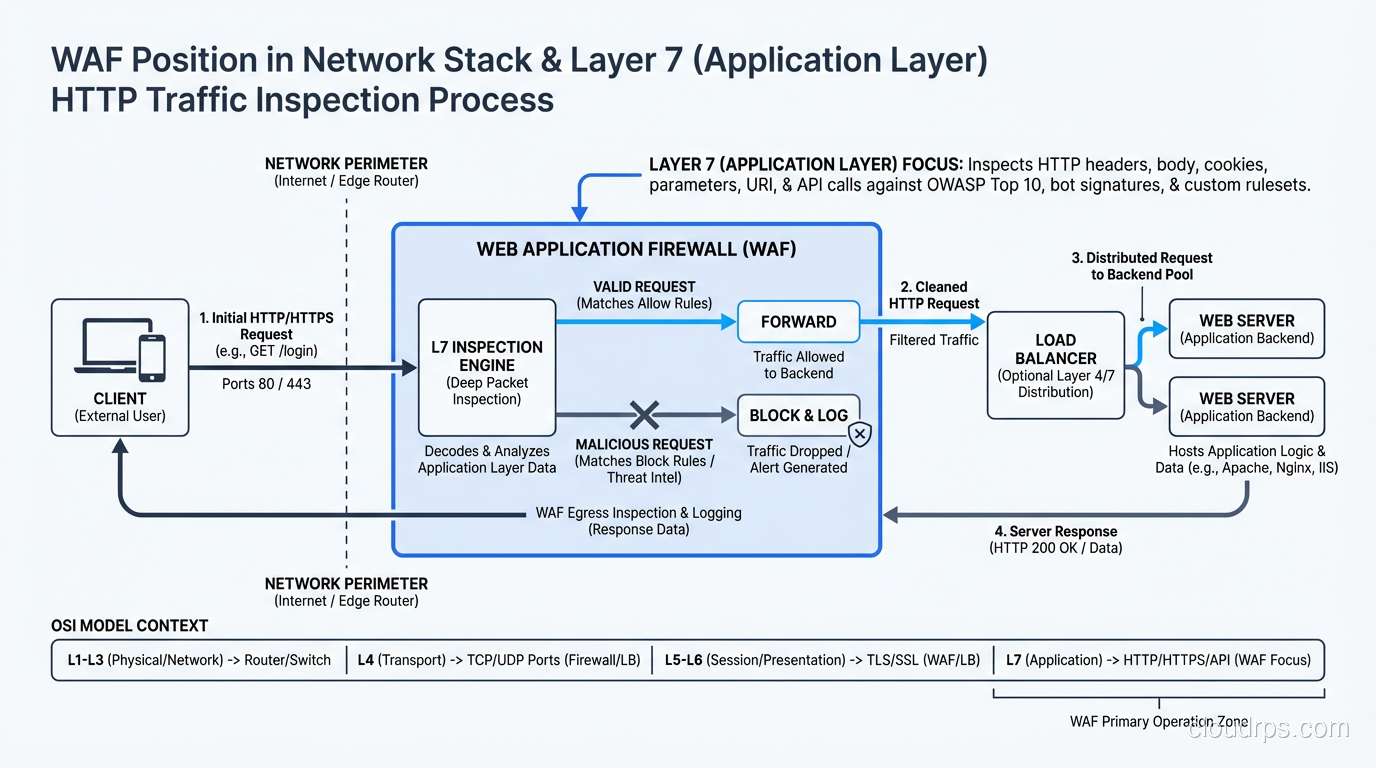
A Web Application Firewall operates at Layer 7 of the OSI model, inspecting HTTP and HTTPS traffic for malicious patterns before that traffic reaches your application. Unlike traditional firewalls that work at layers 3 and 4 (IP addresses and ports), a WAF understands HTTP requests and responses – headers, cookies, query parameters, POST bodies, and even JSON and XML payloads. Most WAFs ship as part of a reverse proxy deployment, so if that architecture distinction is fuzzy, my forward proxy vs reverse proxy explainer sets it up properly.
The fundamental job of a WAF is to identify and block requests that look like attacks while allowing legitimate traffic through. This sounds simple. It is not.
The challenge is that HTTP is an incredibly flexible protocol, and web applications use it in wildly different ways. A string that’s a SQL injection attempt against one application might be a perfectly valid search query in another. The WAF has to make these distinctions at wire speed, across potentially millions of requests per second, without false positives that block real users and without false negatives that let attacks through.
How WAF Detection Works
WAFs use several detection mechanisms, and understanding them is essential to tuning and operating one effectively.
Signature-Based Detection
The oldest and most common approach. The WAF maintains a database of known attack patterns – regular expressions and string matching rules that identify SQL injection, cross-site scripting (XSS), command injection, path traversal, and other attack types.
For example, a signature might flag any request parameter containing ' OR 1=1-- as a SQL injection attempt. The ModSecurity Core Rule Set (CRS), which is the open-source standard for WAF rules, contains thousands of these signatures organized by attack category.
Signature-based detection is fast and has low false positive rates for well-known attack patterns. But it’s inherently reactive – it can only detect attacks it has signatures for – and it struggles with novel encodings and obfuscation.
Anomaly-Based Detection
Instead of matching known bad patterns, anomaly detection builds a model of “normal” and flags deviations. This can include:
- Request structure anomalies: Parameters that don’t appear in normal traffic, unusual HTTP methods, oversized headers
- Statistical anomalies: Sudden spikes in request rates, unusual geographic origins, abnormal session patterns
- Protocol anomalies: Malformed HTTP, invalid content types, missing required headers
The ModSecurity CRS uses an “anomaly scoring” approach where each rule violation adds to a request’s score. When the cumulative score exceeds a threshold, the request is blocked. This reduces false positives because a single minor anomaly doesn’t trigger a block – it takes multiple suspicious signals.
Positive Security Model
The most secure but hardest to implement approach. Instead of defining what’s bad (negative security model), you define what’s good. Every parameter has an expected type, length, and character set. Anything that doesn’t match the expected profile is blocked.
I’ve implemented positive security models for high-value applications (banking, healthcare), and when done correctly, they’re extremely effective. But they require intimate knowledge of the application and constant maintenance as the application evolves. For most organizations, a well-tuned negative security model with anomaly scoring is the practical choice.
Machine Learning and Behavioral Analysis
Modern WAFs from vendors like Cloudflare, AWS, and Imperva incorporate ML models that learn traffic patterns and identify anomalies that rules-based systems miss. These can be effective but they’re also black boxes – when they block a legitimate request, troubleshooting is harder because there’s no specific rule to examine.
I treat ML-based detection as a complement to rules-based detection, not a replacement. Rules give you predictability and debuggability. ML fills the gaps.
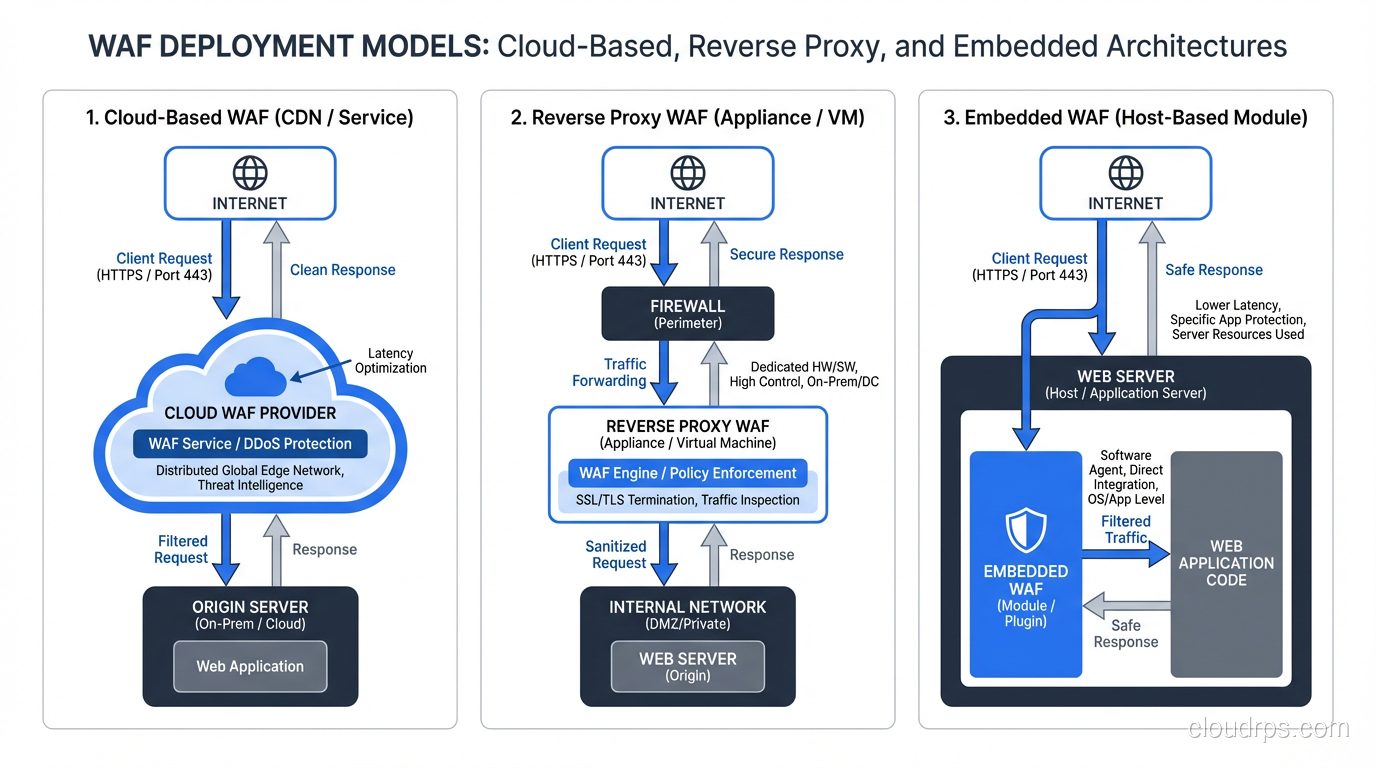
WAF Deployment Models
Where you place the WAF in your architecture significantly affects its capabilities and operational characteristics.
Cloud-Based WAF (WAF-as-a-Service)
Services like Cloudflare WAF, AWS WAF, and Azure WAF Front Door run in the provider’s edge network. Traffic flows through the provider’s infrastructure, gets inspected, and clean traffic is forwarded to your origin servers.
Pros: Scales automatically, provides DDoS protection as a side benefit, minimal infrastructure to manage, global distribution.
Cons: You’re sending all your traffic through a third party, latency can increase, customization is often limited to what the vendor’s UI and API expose.
I use cloud WAFs for most internet-facing applications today. The operational simplicity and built-in DDoS protection make them the right default choice.
Reverse Proxy WAF
A WAF appliance (physical or virtual) or software (like ModSecurity with Nginx, or OWASP ModSecurity Core Rule Set) deployed as a reverse proxy in your own infrastructure. All traffic passes through the WAF before reaching the application.
Pros: Full control over rules and configuration, no third-party traffic dependency, can inspect internal traffic.
Cons: You own the infrastructure, scaling, and availability. If the WAF goes down, your application is either down or unprotected.
I deploy reverse proxy WAFs for internal applications, environments with data residency requirements, and situations where I need deep rule customization.
Embedded WAF / Application-Level
WAF functionality integrated directly into the application runtime or web server. Examples include RASP (Runtime Application Self-Protection) agents and web server modules.
Pros: Has full visibility into application context, can protect against logic flaws.
Cons: Ties security to the application deployment, adds processing overhead to the application, and creates a complex debugging environment.
I use RASP as a defense-in-depth layer, not a primary WAF. It catches things the network WAF misses but shouldn’t be your only protection.
What a WAF Protects Against (and What It Doesn’t)
A well-configured WAF addresses most of the OWASP Top 10:
Effective against:
- SQL Injection (SQLi)
- Cross-Site Scripting (XSS)
- Command Injection
- Path Traversal / Local File Inclusion
- Remote File Inclusion
- HTTP Request Smuggling
- XML External Entity (XXE) attacks
- Known CVE exploits (with virtual patching rules)
Limited effectiveness against:
- Business logic flaws (the WAF doesn’t understand your application’s logic)
- Authentication attacks (credential stuffing can be mitigated with rate limiting but not eliminated)
- API abuse (requires specific API-aware WAF configuration)
- Zero-day vulnerabilities (until signatures are created)
- Encrypted payload attacks (if the WAF can’t terminate TLS)
Not effective against:
- Insider threats
- Server-side vulnerabilities that don’t require malicious HTTP input
- Supply chain attacks
- Social engineering
I’ve seen organizations deploy a WAF and then consider their web application “secured.” That’s dangerously wrong. A WAF is a critical layer in a defense-in-depth strategy, not a substitute for secure coding practices, vulnerability management, and proper network segmentation.
The Art of WAF Tuning
Here’s where most WAF deployments fail. Out-of-the-box WAF rules will either block too much legitimate traffic or miss real attacks. Tuning is the process of finding the right balance for your specific application, and it’s an ongoing process, not a one-time task.
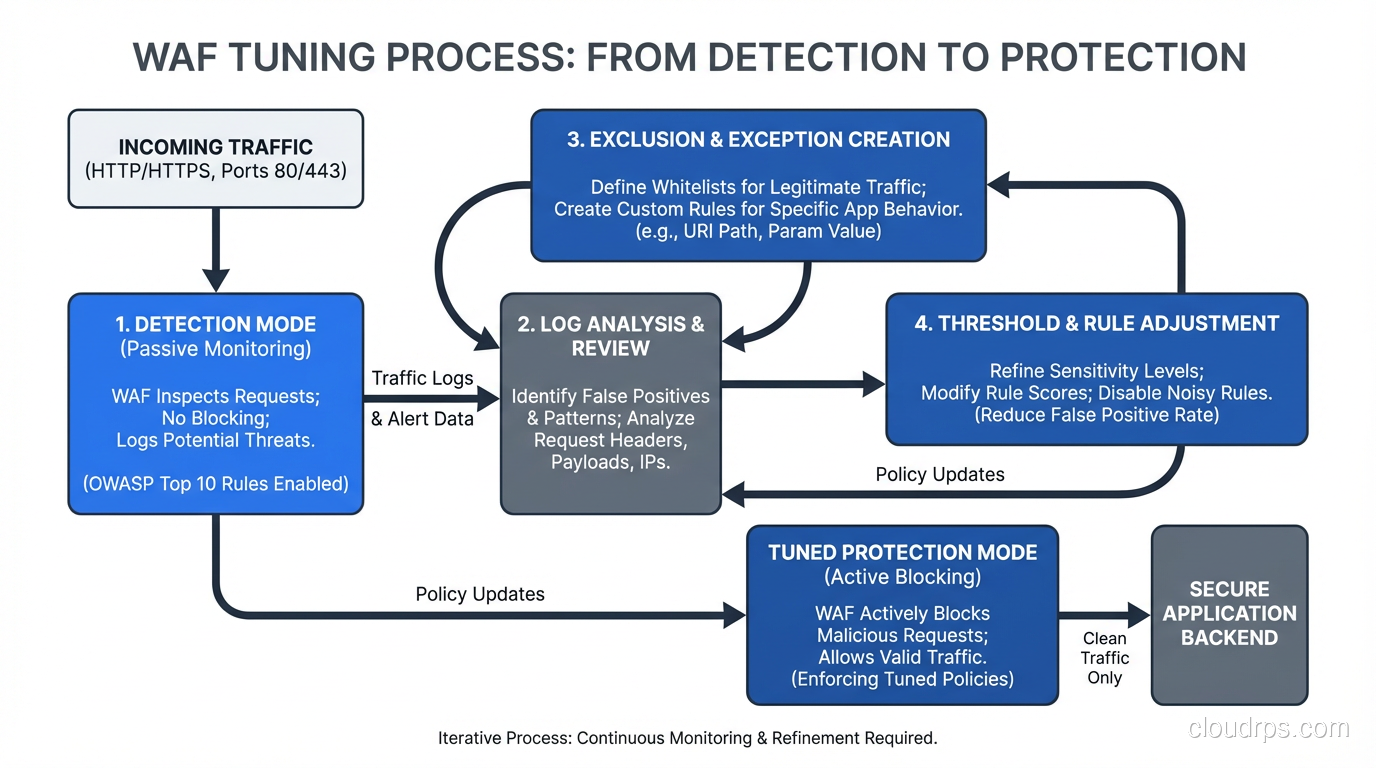
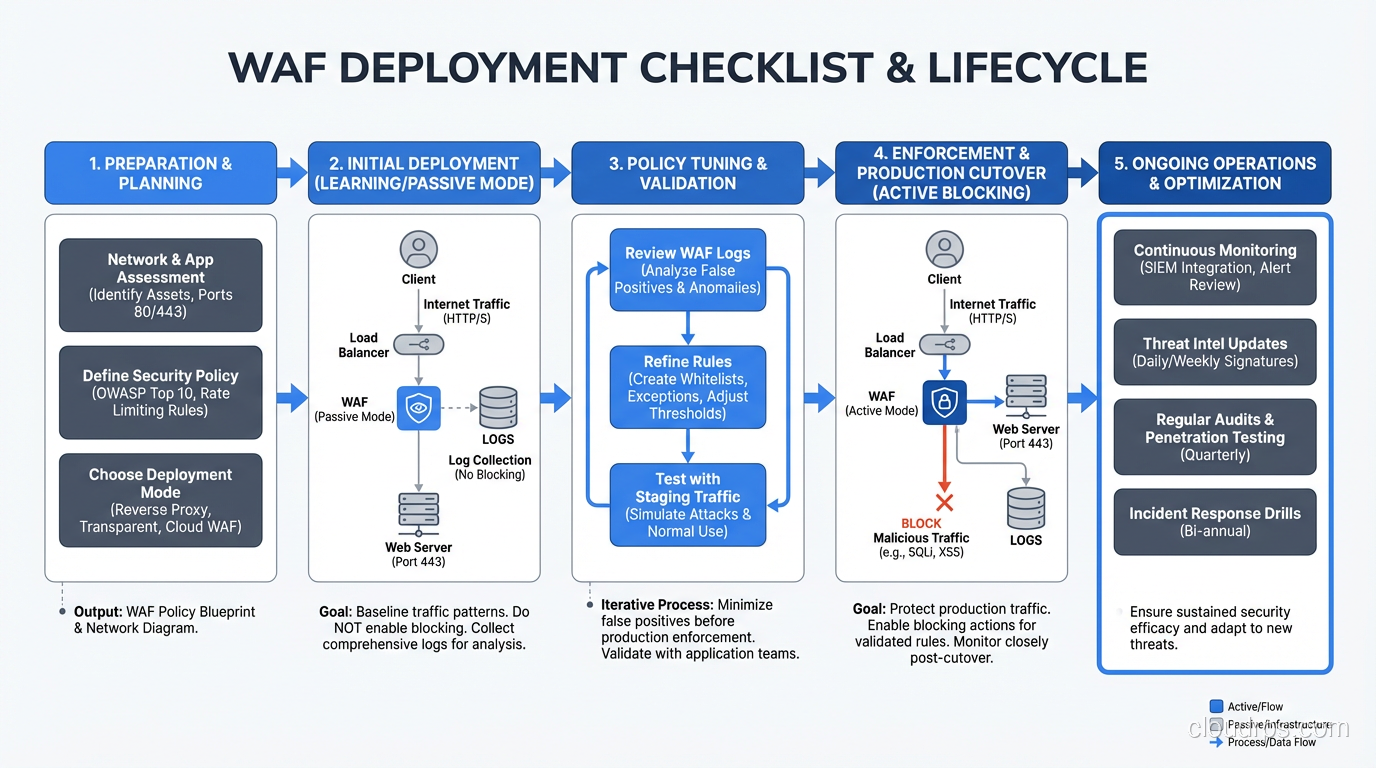
Start in Detection Mode
Never deploy a WAF in blocking mode on day one. Start in detection-only (monitor/log) mode and let it observe real traffic for at least two weeks. Analyze the logs to identify:
- True positives: Real attacks correctly identified (confirm these are working)
- False positives: Legitimate traffic incorrectly flagged (these need rule exclusions)
- Patterns: Are certain rules generating most of the noise? Is traffic from specific paths or parameters consistently flagged?
Create Targeted Exclusions
When you find false positives, don’t disable the entire rule. Create targeted exclusions that exempt specific parameters or paths while leaving the rule active for everything else.
For example, if rule 942100 (SQL injection detection) flags your application’s search parameter because users legitimately type things like John's Pizza, don’t disable all SQL injection detection. Exclude that specific parameter on that specific path from that specific rule.
In ModSecurity, this looks like:
SecRule REQUEST_URI "@beginsWith /search" \
    "id:1000,phase:1,nolog,pass,\
    ctl:ruleRemoveTargetById=942100;ARGS:query"
Tune the Anomaly Threshold
If you’re using anomaly scoring, start with a high threshold (permissive) and gradually lower it as you eliminate false positives. I typically start at a score of 10 or higher and work down to 5 over the course of several weeks.
Monitor Continuously
WAF tuning is never done. Your application changes, new features add new parameters, user behavior shifts. What was correctly blocked last month might be a false positive today.
I set up weekly WAF review sessions during the first three months of a deployment, then monthly thereafter. Each session reviews blocked requests, analyzes false positive trends, and adjusts rules.
Virtual Patching: The WAF’s Secret Weapon
This is the use case that made me a WAF convert. Virtual patching uses WAF rules to block exploitation of a known vulnerability before the application code is fixed.
The scenario: it’s Friday afternoon. A critical SQL injection vulnerability is disclosed in your application framework. The development team can’t ship a code fix until Monday. Without a WAF, you’re exposed all weekend. With a WAF, you deploy a targeted rule in minutes that blocks the specific attack vector while allowing normal traffic.
I’ve used virtual patching to buy time during Log4Shell, Spring4Shell, and dozens of less famous vulnerabilities. In every case, the WAF rule was deployed hours before the application patch was ready. That gap matters enormously.
Virtual patching is not a substitute for fixing the vulnerability. But it buys you time, and in security, time is everything.
WAF and API Security
Traditional WAFs were designed for HTML-based web applications. Modern applications are API-driven, and this creates challenges:
- JSON and GraphQL payloads need different parsing than form-encoded HTML
- API authentication uses tokens instead of cookies
- API abuse looks different from web application attacks – it’s about business logic, rate limiting, and data exfiltration through legitimate endpoints
Modern WAFs (sometimes marketed as WAAP – Web Application and API Protection) have adapted with JSON-aware rule engines, API schema validation, and bot mitigation capabilities. If your WAF doesn’t understand JSON payloads, it’s not protecting your API.
When evaluating WAFs, I always test API traffic scenarios specifically. I’ve seen WAFs that handle HTML-form SQL injection beautifully but completely miss the same injection in a JSON body because their parser doesn’t inspect nested JSON objects.
Operational Considerations
Performance Impact
A WAF adds latency to every request. For cloud WAFs, this is typically 1-5ms. For reverse proxy WAFs, it depends on your rule set complexity and hardware. I’ve seen poorly tuned ModSecurity instances add 50ms+ per request.
The biggest performance killers are regex-heavy rules and large rule sets that process every request. Optimize by:
- Disabling rules that don’t apply to your application’s technology stack
- Using early chain rules that skip expensive processing for clearly benign requests
- Implementing efficient IP reputation lists
High Availability
If your WAF is a single point of failure, a WAF outage means either an application outage or unprotected traffic. Design for failure:
- Deploy WAFs in active-active pairs behind a load balancer
- Configure a “fail open” or “fail closed” policy and make sure stakeholders understand the tradeoff
- Monitor WAF health independently from application health
Logging and Integration
WAF logs are security gold. They show you what attacks are targeting your application, which vectors are most common, and whether your blocking policies are effective. Feed WAF logs into your SIEM, set up alerts for unusual patterns, and use the data to prioritize application security fixes.
The best WAF deployments I’ve seen treat the WAF as a sensor as much as a shield. The blocking is important, but the visibility is equally valuable.
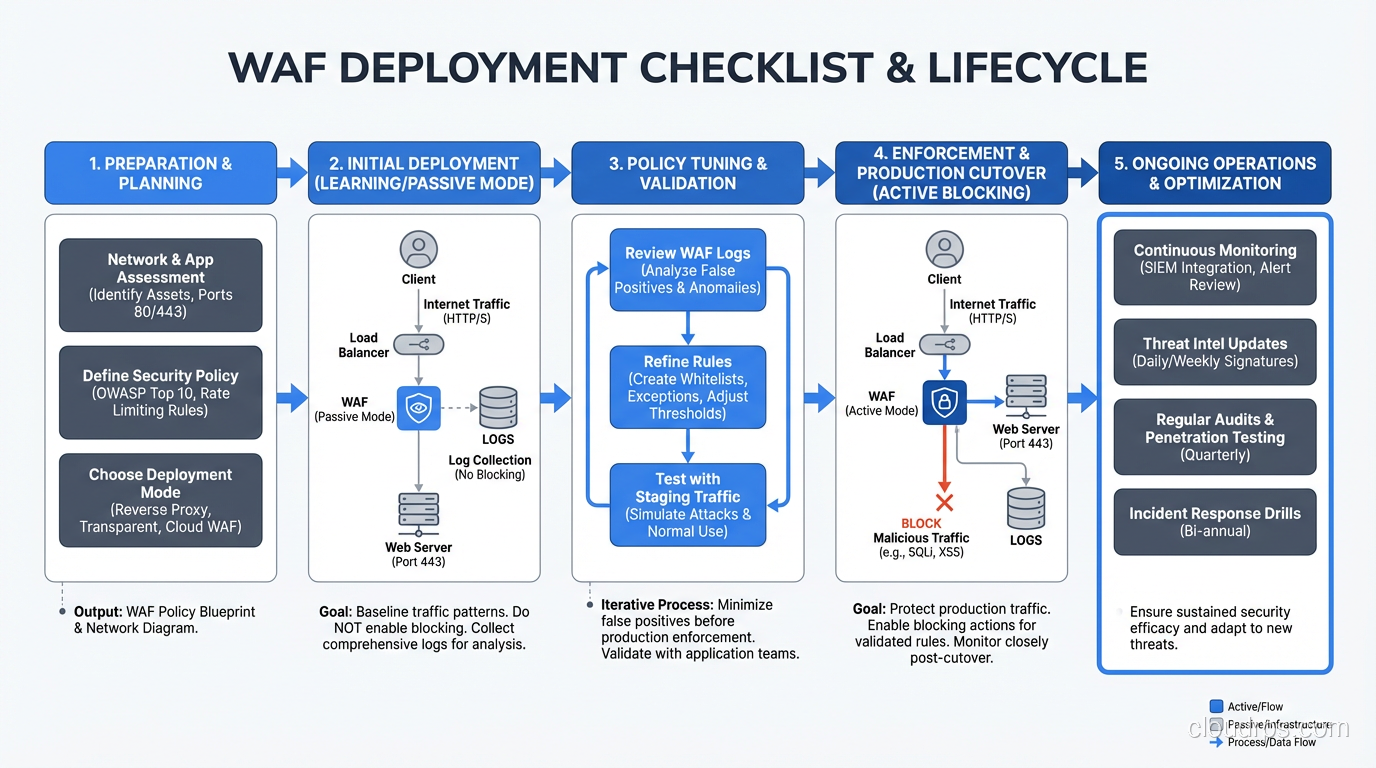
My WAF Deployment Checklist
After years of doing this, here’s what I walk through on every new WAF deployment:
- Inventory all applications and endpoints – you can’t protect what you don’t know about
- Deploy in detection mode for at least two weeks
- Analyze false positives and create targeted exclusions
- Enable blocking mode with high anomaly thresholds
- Lower thresholds gradually over weeks, monitoring false positive rates
- Set up virtual patching processes – know who can deploy emergency rules and how fast
- Integrate WAF logs with SIEM and alerting
- Document your rule exclusions – future you will forget why you created them
- Schedule regular tuning reviews – monthly at minimum
- Test your WAF – run controlled attacks against it periodically to verify it’s actually blocking what you think it is
A WAF is not a silver bullet. It’s a power tool that requires skill to operate effectively. But in the hands of a competent security team, it’s one of the most versatile and impactful defenses you can deploy for web applications. Every internet-facing application should have one. The only question is which deployment model fits your architecture.
Get Cloud Architecture Insights
Practical deep dives on infrastructure, security, and scaling. No spam, no fluff.
By subscribing, you agree to receive emails. Unsubscribe anytime.