
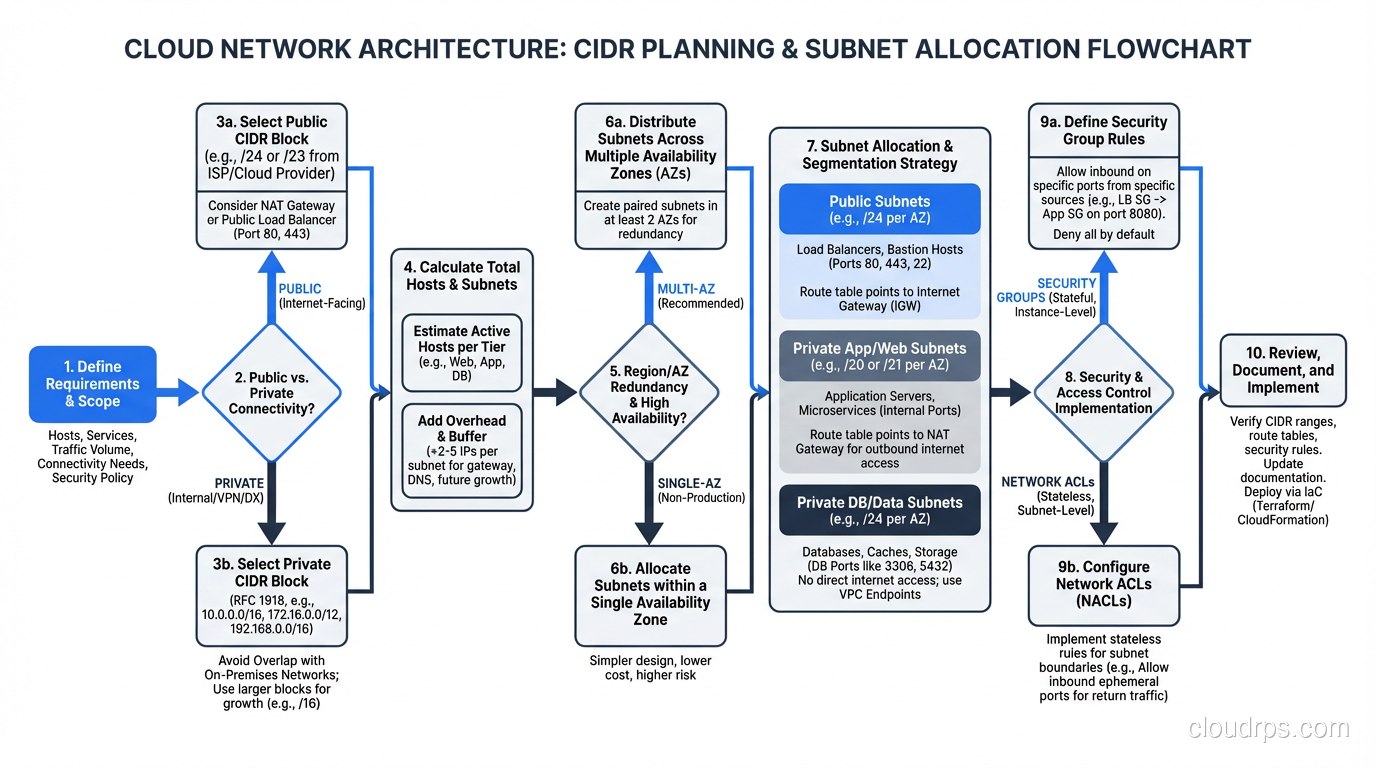
If you’ve spent any time configuring cloud infrastructure, you’ve seen CIDR notation, those mysterious slash numbers after IP addresses like 10.0.0.0/16 or 192.168.1.0/24. For many engineers, CIDR is something they cargo-cult from documentation without really understanding. They copy 10.0.0.0/16 into their VPC configuration because the tutorial said so, without grasping what that /16 actually means or why it matters.
I’ve been doing network design since before CIDR existed. I remember classful addressing (the Class A, B, C system that CIDR replaced) and the pain it caused. I’ve designed addressing schemes for data centers, campuses, and cloud environments serving millions of users. And I can tell you that a solid understanding of CIDR is one of those foundational skills that pays dividends for your entire career.
I’ll build that understanding from the ground up.
Before CIDR: The Classful Era
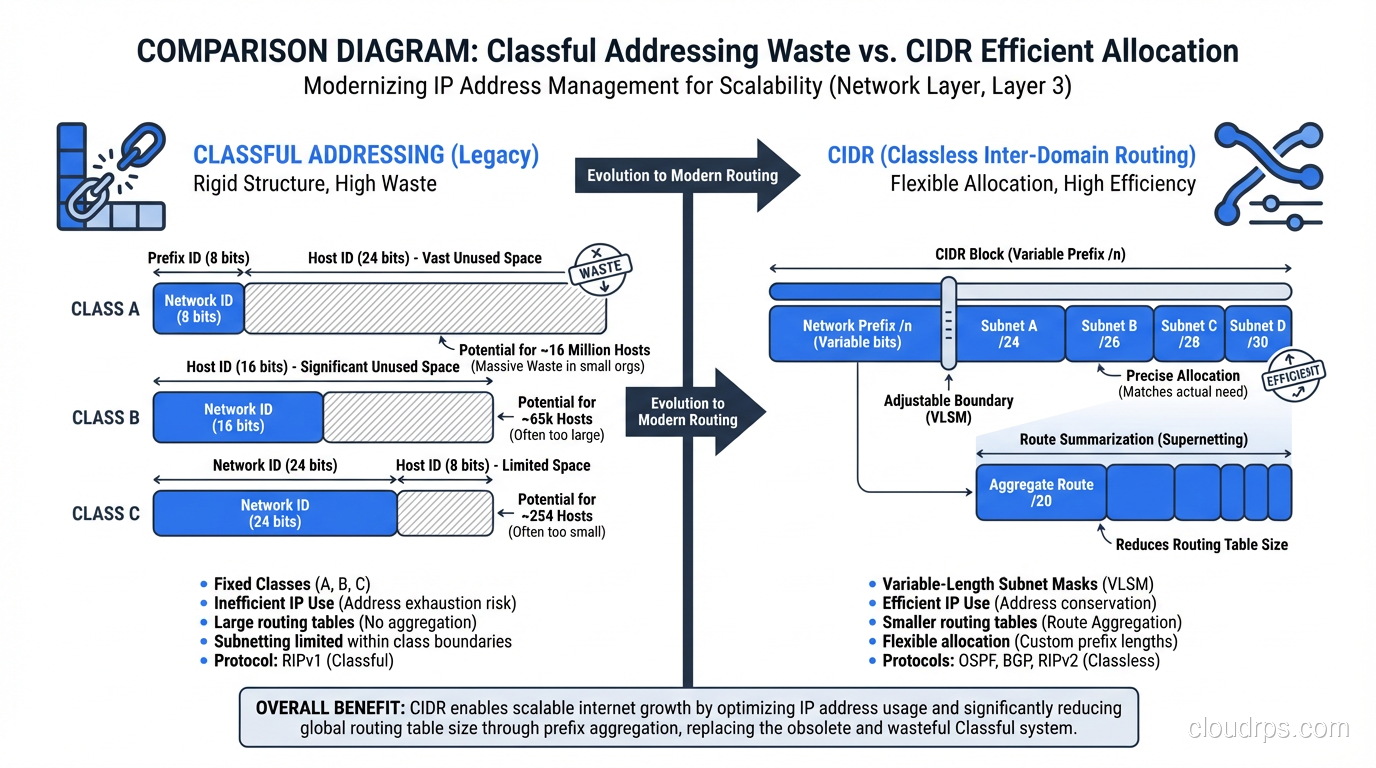
To understand why CIDR exists, you need to understand what came before it. In the original IPv4 design, IP addresses were divided into classes based on their first few bits:
- Class A: First bit 0. Network portion: 8 bits. Host portion: 24 bits. Range: 1.0.0.0 to 126.0.0.0. Each Class A network could have ~16.7 million hosts.
- Class B: First two bits 10. Network portion: 16 bits. Host portion: 16 bits. Range: 128.0.0.0 to 191.255.0.0. Each Class B network could have ~65,534 hosts.
- Class C: First three bits 110. Network portion: 24 bits. Host portion: 8 bits. Range: 192.0.0.0 to 223.255.255.0. Each Class C network could have 254 hosts.
The problem was granularity. If a company needed 300 IP addresses, a Class C (254 hosts) was too small, so they’d get a Class B (65,534 hosts). That wasted 65,234 addresses. A university that needed 5,000 addresses would also get a Class B, wasting 60,534. A large corporation that needed 100,000 addresses would get a Class A with 16.7 million addresses, wasting millions.
This was staggeringly wasteful. Class B allocations were handed out like candy in the 1980s to organizations that didn’t need anywhere near 65,000 addresses. The routing tables bloated as each allocation added an entry. By the early 1990s, it was clear that classful addressing was going to exhaust the IPv4 space and collapse the global routing table long before the theoretical address limit was reached.
CIDR was introduced in 1993 (RFCs 1518 and 1519) to fix both problems.
What CIDR Notation Means
CIDR notation takes an IP address and appends a slash followed by a number: 192.168.1.0/24. The number after the slash, called the prefix length, tells you how many bits of the address identify the network. The remaining bits identify individual hosts on that network.
An IPv4 address is 32 bits long. So:
/24means 24 bits for the network, 8 bits for hosts = 256 addresses (254 usable, minus network and broadcast)/16means 16 bits for the network, 16 bits for hosts = 65,536 addresses/8means 8 bits for the network, 24 bits for hosts = 16,777,216 addresses/32means all 32 bits identify the network = exactly 1 address (a single host)/0means zero network bits = the entire IPv4 address space
The beauty of CIDR is that the prefix length can be any number from 0 to 32. You’re not limited to 8, 16, or 24 like the classful system. Need 500 addresses? Use a /23 (512 addresses). Need 2,000? Use a /21 (2,048 addresses). You can right-size your allocation instead of choosing from three predetermined sizes.
The Binary Reality
You can’t truly understand CIDR without understanding the binary. I know, nobody likes binary math. But it’s the difference between cargo-culting CIDR values and actually understanding what you’re doing.
An IP address like 192.168.1.0 in binary is:
11000000.10101000.00000001.00000000
A /24 prefix means the first 24 bits are the network part:
11000000.10101000.00000001 | 00000000
[------- network --------] [- host -]
The host portion (the last 8 bits) can vary from 00000000 to 11111111, giving you addresses 192.168.1.0 through 192.168.1.255. That’s your subnet.
Now consider a /20:
11000000.10101000.0000 | 0001.00000000
[---- network --------] [--- host ---]
The network part is the first 20 bits. The host part is 12 bits (2^12 = 4,096 addresses). The range is 192.168.0.0 through 192.168.15.255. Notice how it doesn’t align to an octet boundary. That’s the whole point of CIDR. We’re no longer constrained to 8-bit boundaries.
Subnet Masks: The Other Notation
Subnet masks are an older way of expressing the same information. A subnet mask is a 32-bit number where the network bits are all 1s and the host bits are all 0s.
| CIDR | Subnet Mask | Addresses |
|---|---|---|
| /8 | 255.0.0.0 | 16,777,216 |
| /16 | 255.255.0.0 | 65,536 |
| /20 | 255.255.240.0 | 4,096 |
| /24 | 255.255.255.0 | 256 |
| /28 | 255.255.255.240 | 16 |
| /32 | 255.255.255.255 | 1 |
CIDR notation is more compact and is the standard in modern networking. You’ll still see subnet masks in older documentation, Windows network configuration, and some legacy systems. They’re equivalent representations: /24 and 255.255.255.0 mean exactly the same thing.
CIDR in Cloud VPC Design
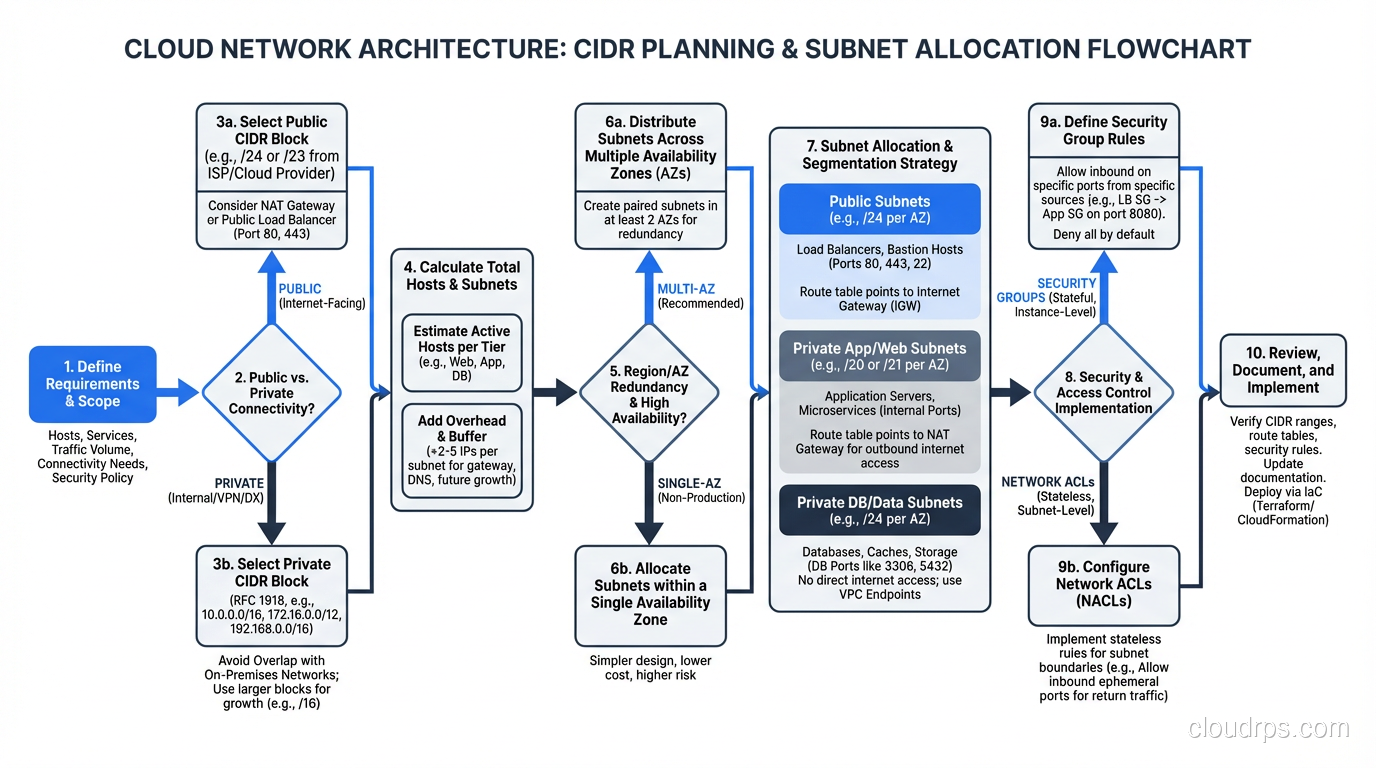
This is where CIDR knowledge becomes directly practical. Every cloud VPC requires you to specify a CIDR block, and getting it wrong has real consequences.
AWS VPC CIDR Planning
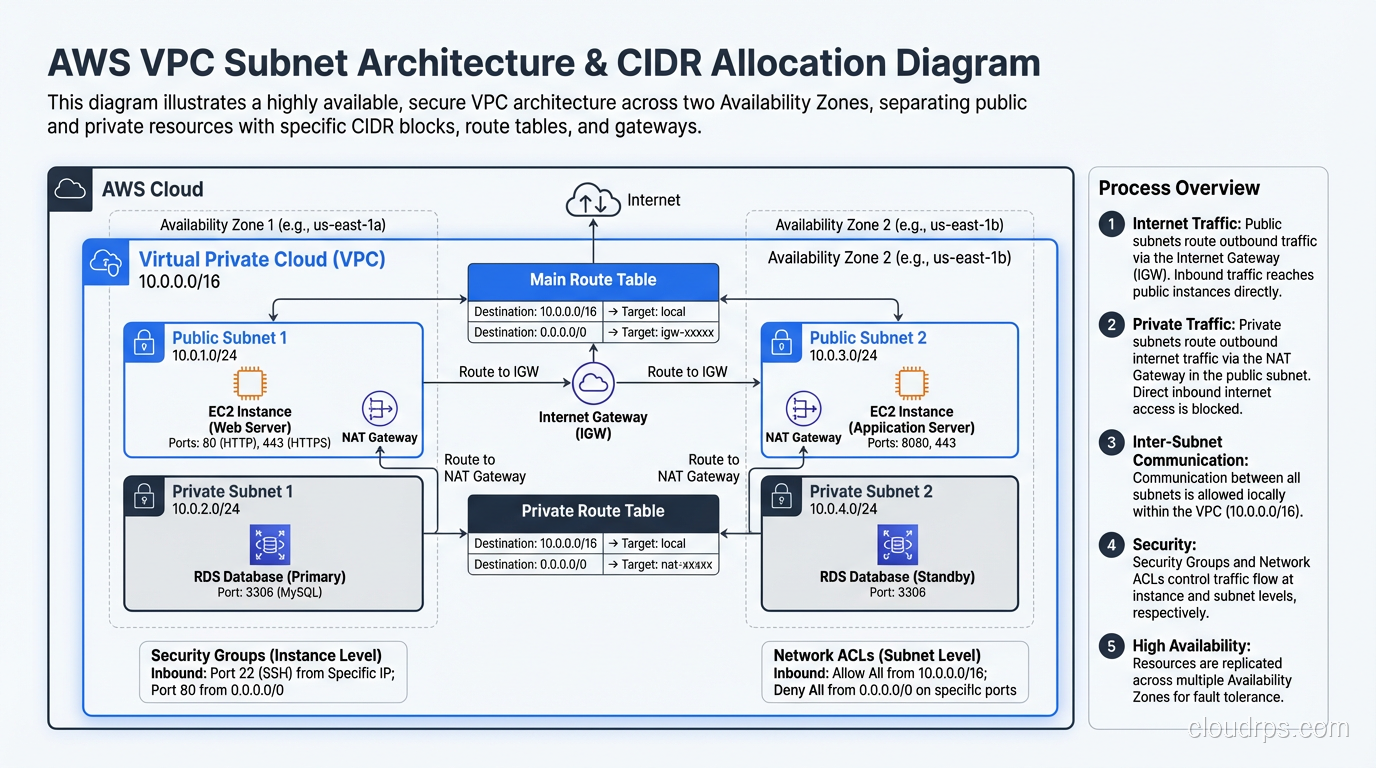
When you create an AWS VPC, you assign it a primary CIDR block. This block determines how many IP addresses are available in the entire VPC. AWS allows VPC CIDR blocks from /16 (65,536 addresses) to /28 (16 addresses).
A common pattern:
- VPC:
10.0.0.0/16(65,536 addresses) - Public subnet AZ-a:
10.0.1.0/24(256 addresses) - Public subnet AZ-b:
10.0.2.0/24(256 addresses) - Private subnet AZ-a:
10.0.10.0/24(256 addresses) - Private subnet AZ-b:
10.0.11.0/24(256 addresses)
Note: AWS reserves 5 addresses in every subnet (first four and last one), so a /24 gives you 251 usable addresses, not 254.
The most common mistake I see is starting too small. A company creates a VPC with a /24 (256 addresses), thinking it’s enough. Six months later they need more subnets for a new service, and they’ve run out of space. You can add secondary CIDR blocks, but it’s messy. Start with a /16 unless you have a specific reason not to.
The second most common mistake is using overlapping CIDR blocks across VPCs. If VPC A is 10.0.0.0/16 and VPC B is 10.0.0.0/16, you can never peer them or connect them via Transit Gateway. Plan your addressing holistically across all environments: dev, staging, production, different regions.
For more on how NAT works within these VPC designs, check out our NAT explainer.
The /16 Trap
Here’s a lesson I learned the hard way. A company I consulted for used 10.0.0.0/16 for every VPC across their entire organization. Dev VPC: 10.0.0.0/16. Staging: 10.0.0.0/16. Production: 10.0.0.0/16. Each region: 10.0.0.0/16.
It worked fine in isolation. Then they needed to peer VPCs. Then they needed a Transit Gateway. Then they needed hybrid connectivity to their data center, which also used 10.0.0.0/16. Everything overlapped with everything.
The remediation took months. They had to migrate workloads to new VPCs with non-overlapping CIDR blocks, update every security group, every NACL, every route table, every DNS entry. It was brutal.
My advice: develop an organization-wide IP address plan before you create your first VPC. Divide the RFC 1918 space (10.0.0.0/8, 172.16.0.0/12, 192.168.0.0/16) into non-overlapping blocks per environment, per region, per account. Document it. Enforce it.
Supernetting and Route Aggregation
CIDR also works in the other direction. Just as you can subdivide a large block into smaller subnets, you can aggregate multiple smaller blocks into a larger one. This is called supernetting or route aggregation.
If you own four contiguous /24 blocks:
198.51.100.0/24198.51.101.0/24198.51.102.0/24198.51.103.0/24
You can advertise them as a single /22: 198.51.100.0/22. This reduces the number of entries in the global routing table, which is critical for internet stability. BGP routers have to store and process every route in the global table, and as of 2024, the table has over 1 million entries. Without CIDR aggregation, it would be many times larger.
For a deeper dive into how routing protocols handle these aggregated routes, see our routing protocols explainer.
Calculating CIDR: The Quick Reference
Here’s the cheat sheet I keep in my head. For any prefix length, the number of addresses is 2^(32 - prefix_length).
| Prefix | Addresses | Common Use |
|---|---|---|
| /32 | 1 | Single host |
| /31 | 2 | Point-to-point links (RFC 3021) |
| /30 | 4 | Legacy point-to-point links |
| /28 | 16 | Small server subnet |
| /27 | 32 | Department subnet |
| /26 | 64 | Medium subnet |
| /25 | 128 | Large subnet |
| /24 | 256 | Standard subnet (the “old Class C”) |
| /23 | 512 | Double subnet |
| /22 | 1,024 | Large subnet |
| /20 | 4,096 | Campus/site block |
| /16 | 65,536 | VPC/site allocation |
| /12 | 1,048,576 | Major allocation |
| /8 | 16,777,216 | Regional block |
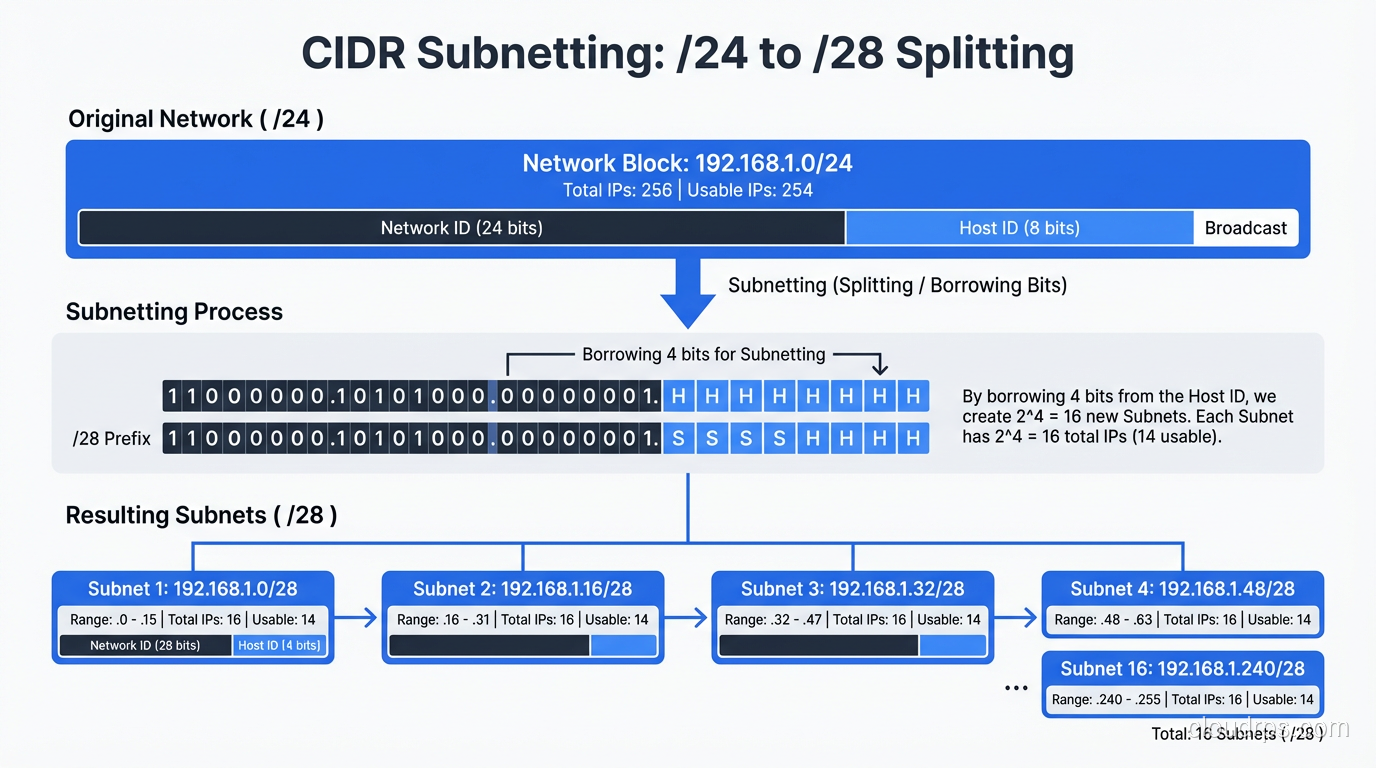
For subnetting, remember the powers of 2. A /24 split into two equal subnets gives you two /25s. Split into four gives you four /26s. Each additional bit in the prefix doubles the number of subnets and halves the number of hosts per subnet.
CIDR and IPv6
CIDR notation works the same way with IPv6, but the numbers are much larger. An IPv6 address is 128 bits, so prefix lengths range from /0 to /128.
Standard conventions in IPv6:
- /128: Single host (equivalent to IPv4 /32)
- /64: Standard subnet. Every IPv6 subnet is a /64 by convention. That’s 2^64 = 18.4 quintillion addresses per subnet. Yes, per subnet.
- /48: Standard site allocation. An organization typically gets a /48, which gives them 65,536 /64 subnets.
- /32: ISP allocation from a Regional Internet Registry.
The /64 subnet size throws off people coming from IPv4. “Why waste so many addresses on a single subnet?” Because IPv6 has so many addresses that efficiency at the subnet level doesn’t matter. What matters is simplicity, and having a fixed /64 boundary everywhere simplifies autoconfiguration (SLAAC), routing, and management.
For more on why IPv6 uses this approach, we’ve covered the design philosophy in detail.
Private vs. Public CIDR Space
The RFC 1918 private address ranges are:
10.0.0.0/8(16.7 million addresses)172.16.0.0/12(1 million addresses)192.168.0.0/16(65,536 addresses)
These ranges are not routable on the public internet. Any organization can use them internally without coordination with anyone else. This is what makes NAT possible. Millions of networks all use 192.168.1.0/24 internally, and it doesn’t cause conflicts because that traffic never reaches the public internet with those source addresses.
There’s also:
100.64.0.0/10: Shared Address Space (RFC 6598), used for CGNAT169.254.0.0/16: Link-Local, used for APIPA when DHCP fails127.0.0.0/8: Loopback
When planning your internal addressing, use the RFC 1918 space. If you need more than the 10.0.0.0/8 gives you (unlikely, but I’ve seen it at hyperscale), you have a problem that requires creative solutions, or a strong push to IPv6.
Common Pitfalls
After decades of helping organizations with CIDR planning, here are the mistakes I see repeatedly:
Starting too small. VPCs with /24 blocks that run out of space in months. Always plan for growth. A /16 costs nothing extra in the cloud.
Overlapping ranges. The most painful mistake. Once you need to interconnect networks, overlapping CIDR blocks require renumbering, which is one of the most disruptive things you can do to a running network.
Not accounting for cloud reservations. AWS reserves 5 IPs per subnet. Azure reserves 5. GCP reserves 4. A /28 in AWS gives you 11 usable addresses, not 16.
Forgetting about hybrid connectivity. Your cloud CIDR blocks can’t overlap with your on-premises networks if you ever want to connect them. And you will want to connect them.
Inconsistent documentation. Address plans that exist only in someone’s head. When that person leaves, nobody knows what’s allocated where. Document your CIDR allocations. Use a spreadsheet, an IPAM tool, whatever. Just write it down.
Wrapping Up
CIDR is one of those networking fundamentals that seems simple on the surface (it’s just a number after a slash) but has deep implications for network design, scalability, and operational complexity. The classful addressing system it replaced was wasteful and inflexible. CIDR gave us the ability to right-size allocations, aggregate routes, and use the IPv4 address space far more efficiently.
For cloud architects and infrastructure engineers, CIDR is a daily tool. You’ll use it when designing VPCs, configuring security groups, setting up VPN tunnels, planning hybrid connectivity, and troubleshooting routing issues. The time you invest in truly understanding it (not just memorizing a few common prefix lengths, but understanding the binary and the math) will pay for itself many times over.
Start with a solid address plan. Avoid overlaps. Plan for growth. And when in doubt, go bigger. Running out of address space in a VPC is a much worse problem than having unused space.
Get Cloud Architecture Insights
Practical deep dives on infrastructure, security, and scaling. No spam, no fluff.
By subscribing, you agree to receive emails. Unsubscribe anytime.