
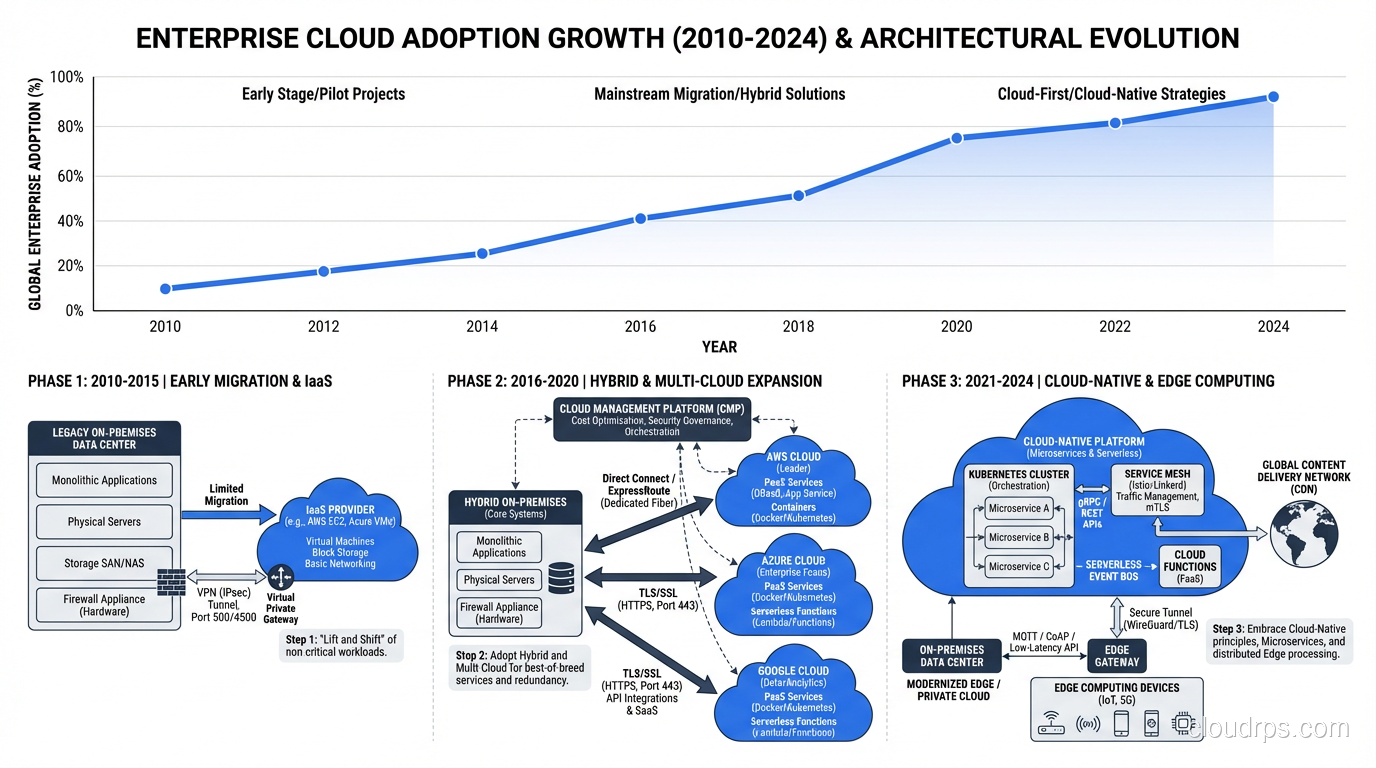
I’ve been building infrastructure since before “cloud” meant anything other than weather. In 1996, I was racking servers in a facility in Northern Virginia, running cables through raised floors, and arguing with HVAC contractors about cooling capacity. So when people ask me what cloud computing is, I don’t give them the marketing pitch. I give them the truth.
And the truth is both simpler and more complicated than most explanations make it sound.
The Real Definition (No Marketing Fluff)
Cloud computing is someone else’s computers, managed by someone else’s operations team, billed on someone else’s meter. That’s it. That’s the core of it.
But here’s what that one-liner misses: the “someone else” part is doing enormous heavy lifting. The reason cloud computing changed everything isn’t that it moved servers to a different building. It’s that it introduced a layer of automation and abstraction that made infrastructure programmable. That distinction matters more than most people realize.
When I ran physical data centers, provisioning a new server meant a purchase order, a 6-8 week lead time, a truck delivery, two hours of rack-and-stack, another hour of cabling, OS installation, network configuration, and then, finally, handing it over to the application team. Total elapsed time from request to production: 8 to 12 weeks on a good day.
In the cloud, I can spin up an equivalent server in 47 seconds. I’ve timed it.
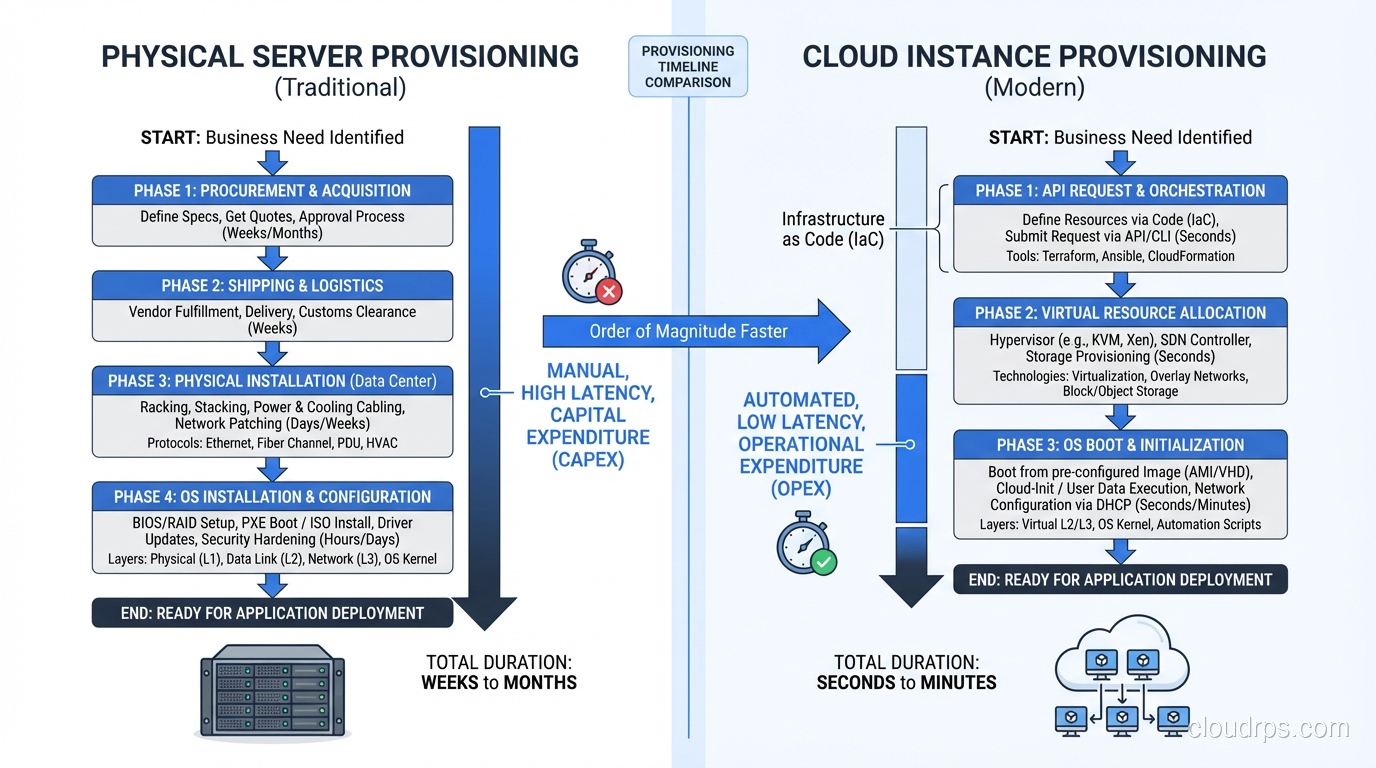
That speed difference isn’t incremental improvement. It’s a fundamentally different way of thinking about infrastructure. And it cascades into everything: how you architect systems, how you handle failure, how you scale, how you budget.
How Cloud Computing Actually Works Under the Hood
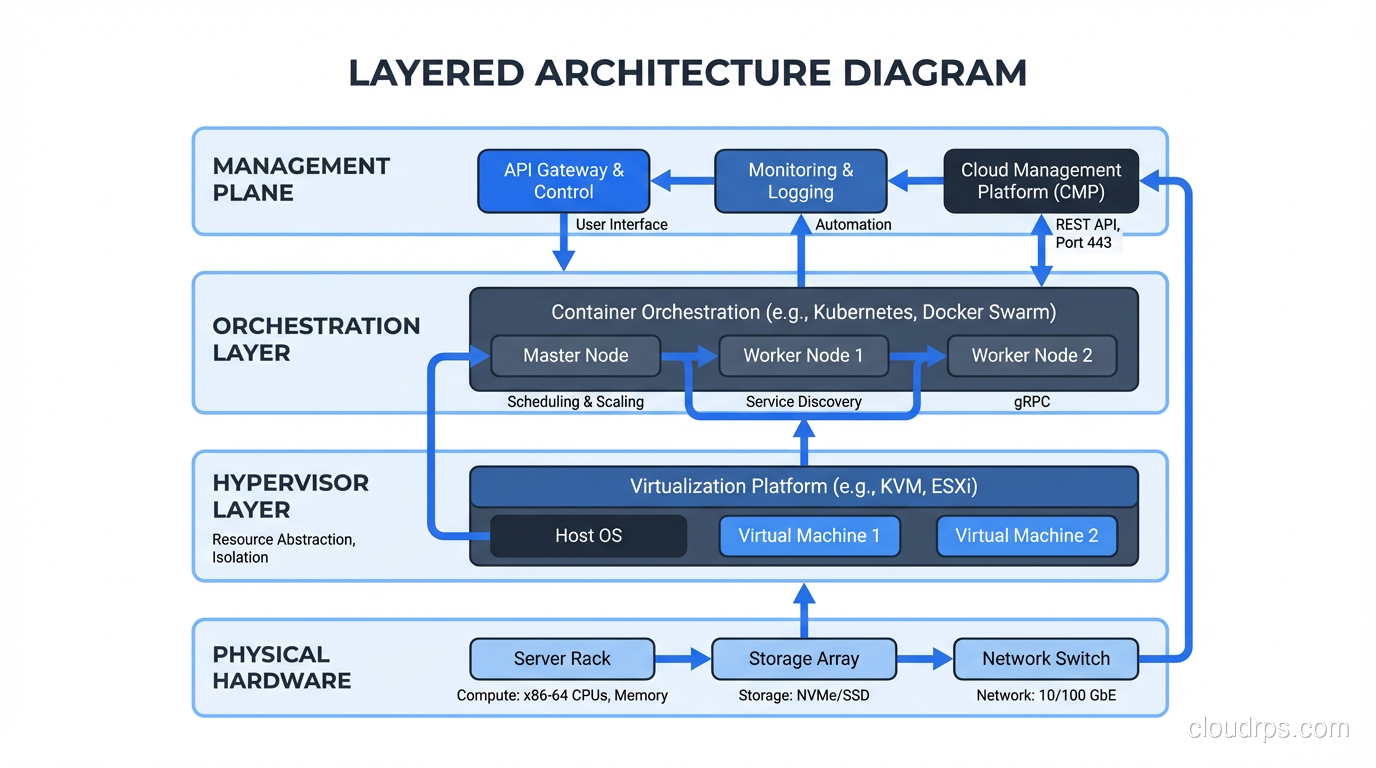
Here’s something that trips up a lot of people who are new to this space: the cloud is not magic. It runs on real, physical hardware in real, physical buildings. I’ve walked through AWS data centers (back when they still let certain partners do that). They look exactly like the data centers I used to manage, just bigger and with better automation.
The magic, if you want to call it that, is in the abstraction layers.
At the bottom, you have physical servers. Thousands of them, racked in rows, connected by high-speed networking. These servers run hypervisors, software that lets you carve one physical machine into multiple virtual machines. If you want the deep dive on that, I wrote about it in Virtualization and Hypervisors: How Virtual Machines Actually Work.
On top of the hypervisors, you have orchestration software. This is the layer that takes your API call saying “give me a server with 4 CPUs and 16 GB of RAM” and figures out which physical host has capacity, creates the virtual machine, attaches storage, configures networking, and hands you back an IP address. All in under a minute.
On top of the orchestration, you have the management plane: the consoles, APIs, CLIs, and SDKs that let you interact with the infrastructure. This is what makes cloud computing feel like a utility. You don’t call the power company and ask them which generator is producing your electricity. You flip a switch and it works. Cloud computing brings that same abstraction to servers, storage, and networking.
The Five Characteristics That Actually Matter
NIST published a formal definition of cloud computing back in 2011, and honestly, it holds up well. But let me translate their five essential characteristics into plain language:
On-Demand Self-Service
You can provision resources without calling anyone. No tickets, no approvals (well, no infrastructure approvals; your finance team might have opinions). This seems obvious now, but in 2006 when AWS launched EC2, this was revolutionary. I remember the first time I launched an instance from my laptop at a coffee shop. I literally laughed out loud. I’d spent fifteen years jumping through hoops to get servers, and suddenly I could do it between sips of coffee.
Broad Network Access
You can reach your resources from anywhere over standard networks. Again, seems obvious now. But I remember the days of dedicated circuits and VPN concentrators just to reach your own infrastructure. The fact that cloud resources are accessible over the internet (with proper security, obviously) changed how distributed teams work.
Resource Pooling
The provider serves multiple customers from the same physical infrastructure. This is multi-tenancy, and it’s how cloud providers achieve their economics. Your virtual machine might be running on the same physical host as some other company’s virtual machine. The hypervisor keeps them isolated. This freaks some people out, but honestly, the isolation mechanisms are solid. I’ve done enough security assessments to be comfortable with it for most workloads.
Rapid Elasticity
You can scale up and scale down quickly. “Quickly” means different things at different layers: a new VM in 60 seconds, a new container in 5 seconds, a new serverless function invocation in milliseconds. But the point is you’re not locked into the capacity you bought six months ago.
Measured Service
You pay for what you use, and you can see what you’re using. This is the utility model. Just like electricity, you have a meter running. The bill at the end of the month reflects actual consumption. In theory this saves money compared to buying hardware you might not fully utilize. In practice… well, I’ve seen plenty of cloud bills that would make your eyes water. The meter runs whether you’re watching it or not.
The Three Service Models (And Why They Matter)
Cloud computing comes in three fundamental flavors, and understanding the difference between them will save you from a lot of bad decisions. I wrote a detailed breakdown in IaaS vs PaaS vs SaaS: Cloud Service Models Explained with Real Examples, but here’s the quick version:
Infrastructure as a Service (IaaS) gives you virtual machines, storage, and networking. You manage the operating system and everything above it. AWS EC2, Azure Virtual Machines, Google Compute Engine. This is what most people think of when they hear “cloud computing.”
Platform as a Service (PaaS) gives you a runtime environment. You deploy your code, and the platform handles the OS, patching, scaling, and infrastructure. Heroku, AWS Elastic Beanstalk, Google App Engine. Less control, less operational burden.
Serverless takes it further. You write functions, and the platform handles everything else. No servers to manage, no capacity to plan. You pay per execution. AWS Lambda, Azure Functions, Google Cloud Functions. I have strong opinions about serverless that I unpacked in What Does Serverless Really Mean?.
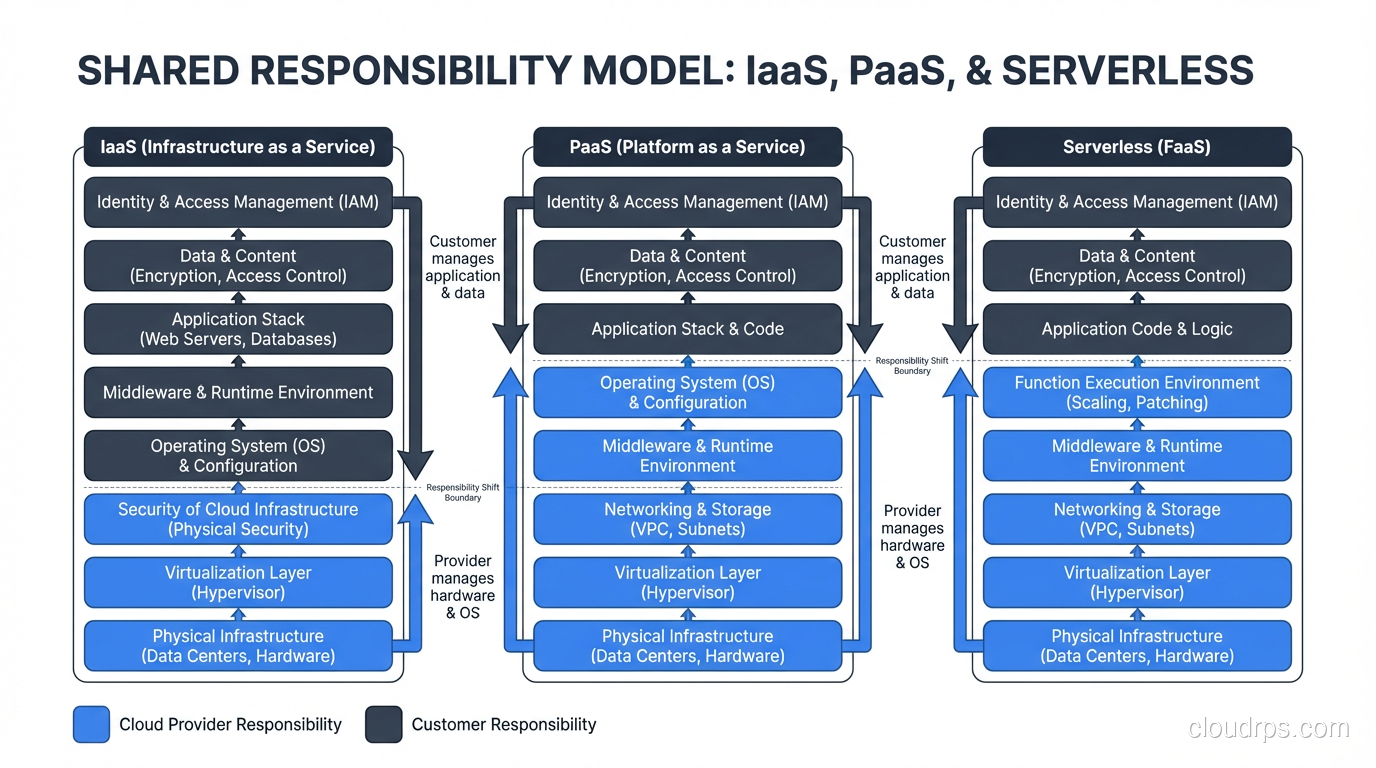
The key insight is that as you move from IaaS to PaaS to Serverless, you trade control for convenience. There’s no universally right answer. I’ve built systems at every layer, and the choice always depends on the specific requirements.
Public Cloud, Private Cloud, Hybrid: What’s the Difference?
I need to address this because the terminology gets abused constantly.
Public cloud means you’re using shared infrastructure operated by a third party (AWS, Azure, GCP, and dozens of others). “Public” doesn’t mean your data is public. It means the infrastructure platform is available to the general public. Your stuff is still isolated and secured.
Private cloud means you’re running cloud-like infrastructure dedicated to your organization. This could be on-premises using something like OpenStack or VMware, or it could be a dedicated section of a public cloud provider’s infrastructure. The key distinction is single-tenant physical infrastructure.
Hybrid cloud means you’re using both, with some level of integration between them. This is where most large enterprises land. Some workloads in the public cloud, some on-premises, with networking and identity connecting them.
In my experience, about 80% of organizations that say they’re doing “hybrid cloud” are actually doing “two separate environments that don’t talk to each other well.” True hybrid cloud with seamless workload portability is harder than the sales decks suggest. But when done right, it gives you real flexibility.
What Cloud Computing Is NOT
Let me clear up some misconceptions I keep running into:
Cloud computing is not just hosting. Traditional hosting gives you a fixed server at a fixed price. Cloud gives you programmable infrastructure that scales. The difference is in the API-driven, elastic nature of the resource model.
Cloud computing is not automatically cheaper. I’ve seen migrations where the cloud bill ended up 3x the previous on-premises cost. Cloud changes the cost model from capital expenditure to operational expenditure. Whether that saves money depends entirely on your utilization patterns and how well you optimize.
Cloud computing is not automatically more secure. The shared responsibility model means the cloud provider secures the infrastructure, but you’re responsible for securing what you put on it. I’ve seen horrifically insecure deployments on the most secure cloud platforms. Security is about configuration and practice, not just platform choice.
Cloud computing is not one-size-fits-all. Some workloads, particularly those with steady, predictable demand and strict data residency requirements, might genuinely be better served by on-premises infrastructure. The right answer depends on your specific situation.
Why Cloud Computing Won (And It Did Win)
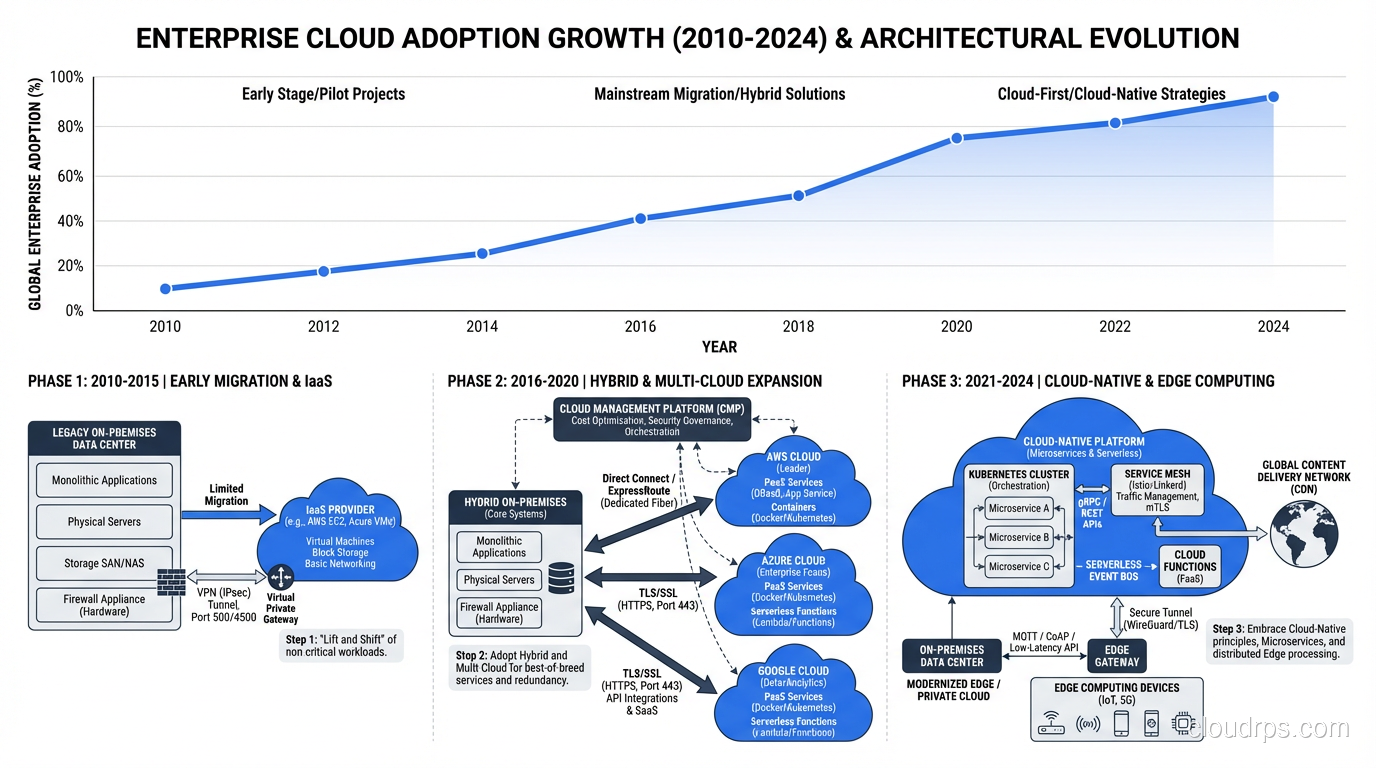
Despite everything I just said about it not being automatically cheaper or better, cloud computing won the infrastructure war. The market is enormous and still growing. Most new applications are built cloud-first. Even the most conservative enterprises are migrating.
Why? Three reasons that come from watching this play out over twenty years:
Speed. The provisioning speed I mentioned earlier cascades into development velocity. Teams that can get infrastructure in minutes iterate faster than teams that wait weeks. Over time, that speed compounds into a massive competitive advantage.
Elasticity. The ability to handle 10x traffic spikes without pre-provisioning for peak capacity is transformative. I once ran a retail client’s infrastructure that had to handle Black Friday traffic. We provisioned for peak and let those servers sit idle the other 364 days. In the cloud, you scale up for the spike and scale back down. That flexibility changes how you think about capacity.
Innovation access. Cloud providers invest billions in R&D and make the results available as managed services. Machine learning, databases, analytics, IoT platforms: building these from scratch on-premises would take years and cost millions. In the cloud, it’s an API call and a monthly bill.
Where To Go From Here
If you’re just getting started with cloud computing, here’s my honest advice after three decades in infrastructure:
Start with the fundamentals. Understand the service models. Learn how virtualization works under the hood. Get comfortable with the shared responsibility model. Don’t jump straight to Kubernetes or microservices or whatever the hot architecture of the month is.
Pick one cloud provider and learn it well before trying to go multi-cloud. Multi-cloud strategies are legitimate for large organizations, but premature multi-cloud is a complexity tax that kills small teams.
Build something real. Spin up a web application. Deploy a database. Configure networking. Break things and fix them. The best way to understand cloud computing is to use it, make mistakes, and learn from them.
And remember: under all the abstraction, automation, and marketing language, cloud computing is still just servers in a building somewhere. Understanding what’s really happening under the hood (the physical machines, the hypervisors, the network fabric) will make you a better cloud architect than any certification ever will.
I’ve spent thirty years learning that the hard way. Hopefully I can save you some of that time.
Get Cloud Architecture Insights
Practical deep dives on infrastructure, security, and scaling. No spam, no fluff.
By subscribing, you agree to receive emails. Unsubscribe anytime.