
There’s a running joke in data engineering circles: every company that builds a data lake ends up with a data swamp. I’ve seen it happen so many times that I can usually predict the exact moment a project starts going sideways. It’s the moment someone says, “Just dump everything in there and we’ll figure out the structure later.”
That philosophy (store everything, worry about schema later) is technically the founding idea behind data lakes. But without governance, cataloging, and clear architectural zones, you end up with petabytes of data that nobody can find, nobody trusts, and nobody uses. I’ve been called in to rescue at least a dozen data lake projects that followed this path, and the recovery is always more expensive than doing it right the first time.
Here’s what a data lake actually is, how to build one that stays useful, and the mistakes I keep seeing teams make.
What a Data Lake Actually Is
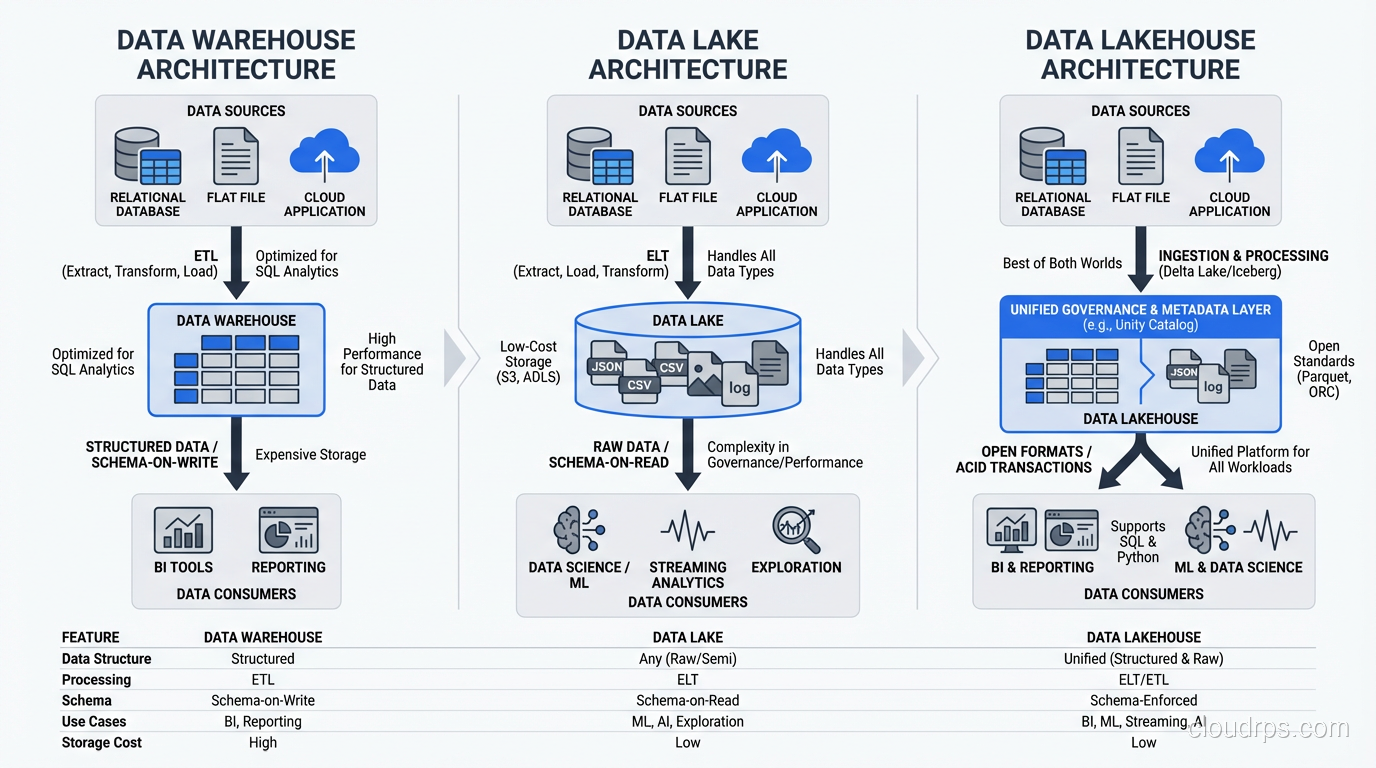
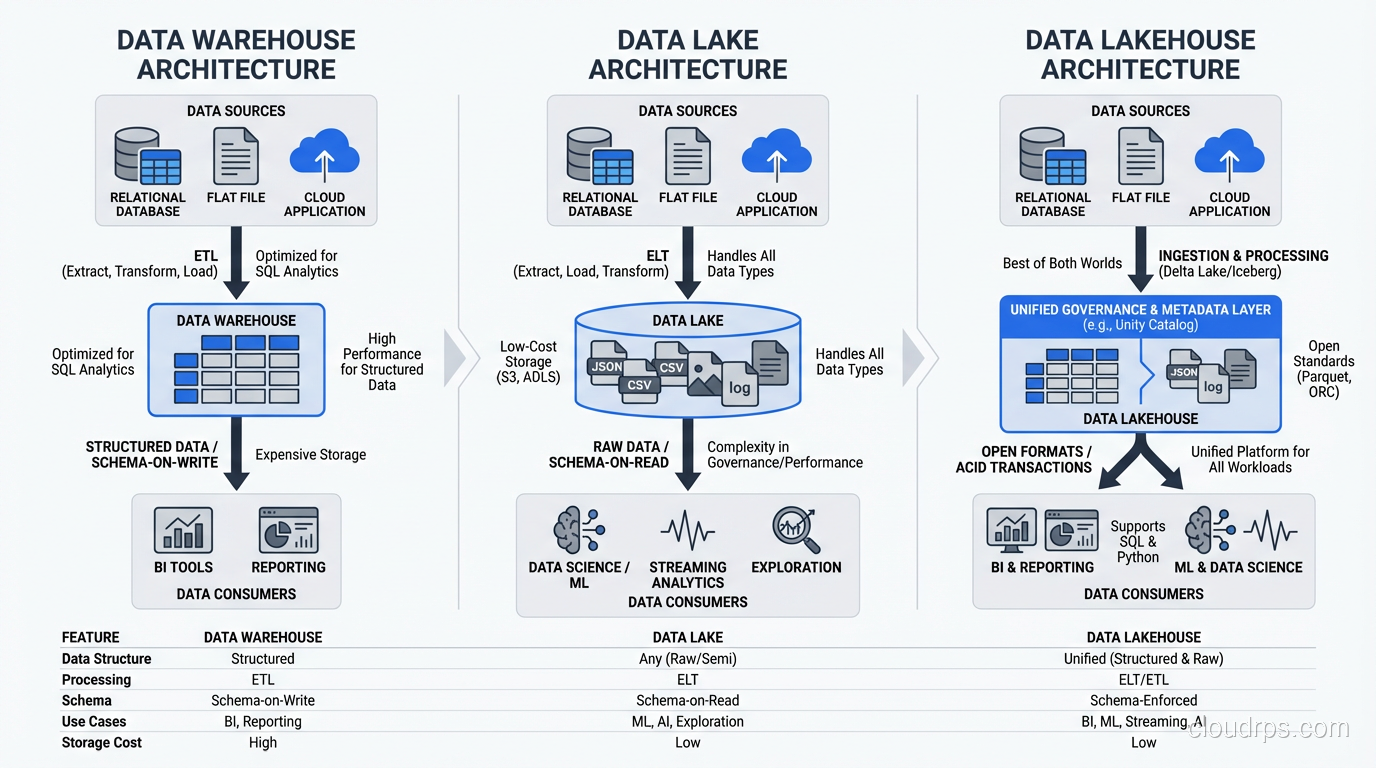
A data lake is a centralized repository that stores data in its raw, native format (structured, semi-structured, and unstructured) at any scale. Unlike a data warehouse, which requires you to define schema before loading data (schema-on-write), a data lake lets you store first and apply structure when you read (schema-on-read).
The concept came directly from the Hadoop ecosystem, where HDFS provided cheap, scalable storage and tools like Hive and Pig let you project schema onto raw files at query time. Today, most data lakes run on cloud object storage (S3, Azure Data Lake Storage, Google Cloud Storage) rather than HDFS, but the principles are the same.
The key properties of a data lake:
- Schema-on-read: Data is stored raw and structure is applied when queried
- Multi-format support: Handles CSV, JSON, Parquet, Avro, images, logs, binary files, anything
- Decoupled storage and compute: You can scale storage independently from processing power
- Low-cost storage tier: Designed to store massive volumes affordably, often using object storage
Data Lake vs Data Warehouse: The Real Differences
I’ve sat through too many vendor presentations that muddy this distinction, so let me be blunt about the differences.
A data warehouse is optimized for analytical queries on structured, curated data. It uses predefined schemas, enforces data quality at load time, and provides fast query performance through indexing, materialized views, and columnar storage. Think Snowflake, BigQuery, Redshift.
A data lake is optimized for storing everything cheaply and flexibly. It doesn’t enforce schema, doesn’t optimize for query speed out of the box, and trades curation for flexibility. Think S3 with Parquet files, Azure Data Lake Storage, HDFS.
In practice, here’s how I explain it to executives: the data warehouse is your accounting ledger: structured, audited, trusted. The data lake is your filing cabinet. Everything goes in, and the value depends entirely on how well you organize it.
| Characteristic | Data Warehouse | Data Lake |
|---|---|---|
| Schema | Defined before loading | Applied at query time |
| Data types | Structured only | Any format |
| Query performance | Optimized | Variable |
| Cost per TB | Higher | Lower |
| Data quality | Enforced | Not enforced by default |
| Users | Analysts, BI tools | Data engineers, data scientists |
The Lakehouse: Having It Both Ways
The newest pattern, the lakehouse, attempts to combine the best of both. You store data in open formats on object storage (lake-style), but overlay table formats like Delta Lake, Apache Iceberg, or Apache Hudi that provide ACID transactions, schema enforcement, and time travel (warehouse-style). Apache Iceberg in particular has become the dominant open table format, with broad query engine support and a mature ecosystem: see my deep dive on Apache Iceberg and data lakehouse architecture for a full breakdown of how the metadata layer works and when to choose Iceberg over alternatives.
I’ve been implementing lakehouses for the past three years, and they genuinely deliver on the promise for most use cases. The tooling has matured enough that I’d recommend this pattern for any greenfield data platform in 2026.
Data Lake Architecture: The Zone Model
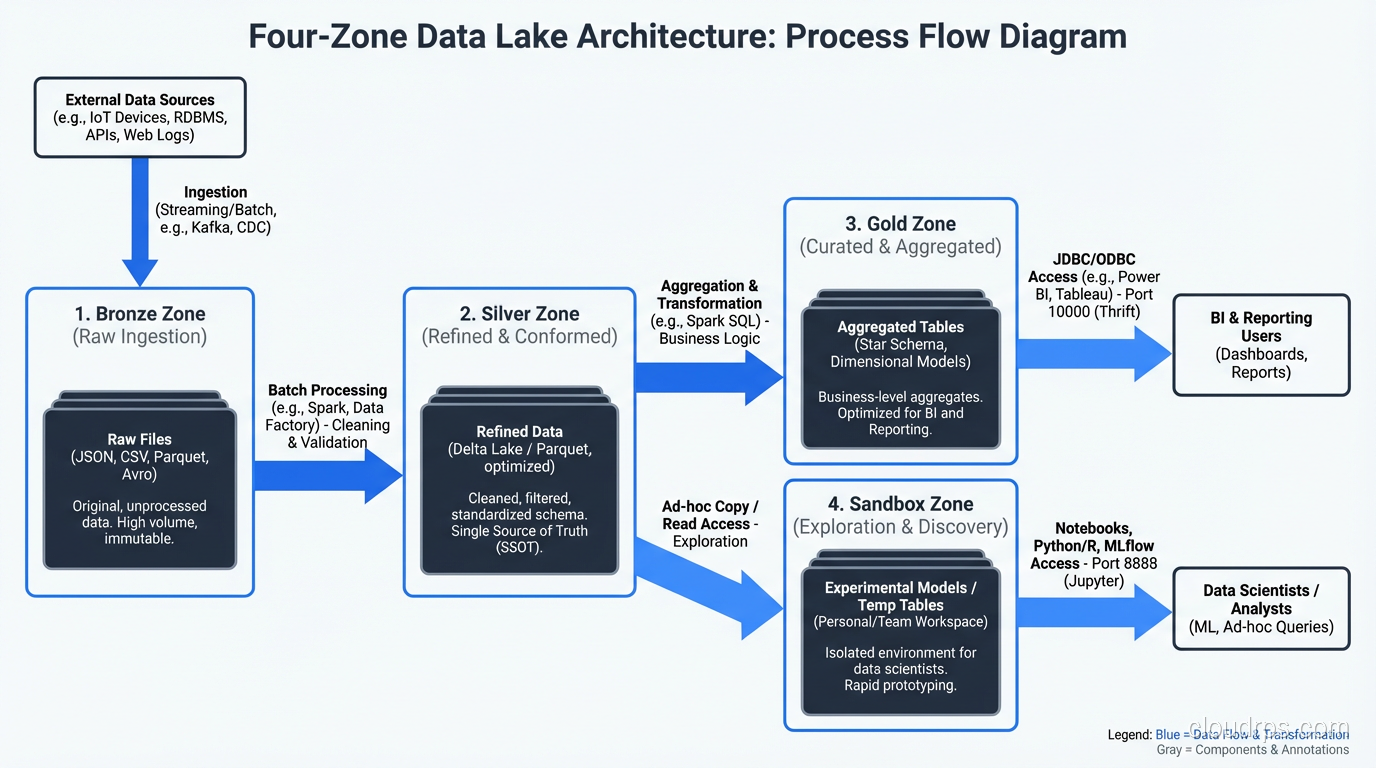
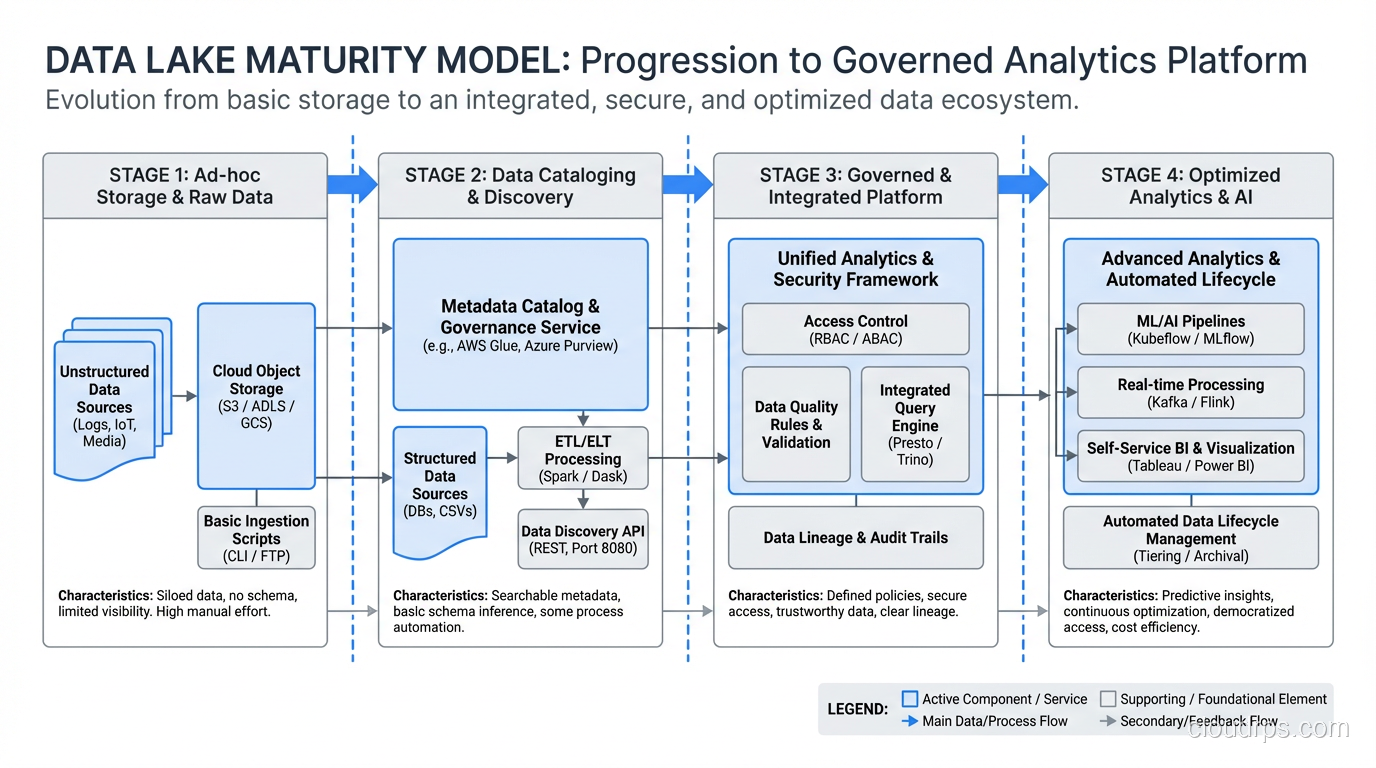
Every successful data lake I’ve built or rescued uses some variant of a zone-based architecture. The zones create a progression from raw data to curated, query-ready data. Here’s the model I use.
Raw Zone (Bronze)
This is where data lands first, exactly as it arrived from the source. No transformations, no deduplication, no schema changes. JSON from APIs stays as JSON. CSV exports stay as CSV. Database CDC records stay in their native format.
The raw zone is your insurance policy. When (not if) a transformation bug corrupts data downstream, you can always go back to the source of truth and reprocess. I’ve used this fallback dozens of times over the years. The one time a team deleted their raw zone to save storage costs, they regretted it within three months.
Cleaned Zone (Silver)
In this zone, data has been validated, deduplicated, and converted to efficient formats (usually Parquet or ORC). Schema is applied and enforced. Null handling, type casting, and basic quality checks happen here.
This is where most of the engineering effort goes. The transformations from raw to cleaned need to be idempotent, well-tested, and rerunnable. I use Apache Spark for most of this work, though dbt has become a viable option for SQL-centric pipelines.
Curated Zone (Gold)
This is the business-ready layer. Data is aggregated, joined across sources, and modeled for specific use cases: star schemas for BI tools, feature tables for machine learning, denormalized views for APIs.
The curated zone is where the data lake meets the data warehouse. In fact, many teams materialize their gold-layer tables into an actual data warehouse (Snowflake, BigQuery) for query performance.
Sandbox Zone
I always add a sandbox zone, a space where data scientists and analysts can experiment without affecting production data. They can create derived datasets, test transformations, and explore raw data without risking the curated layers.
Governance still applies in the sandbox (especially around PII), but the rules are looser. Think of it as the data equivalent of a development environment.
Real-World Use Cases
Centralized Analytics Platform
The most common use case. You have data scattered across dozens of operational systems: your CRM, ERP, marketing platforms, product databases, third-party feeds. The data lake becomes the single location where all of this data is collected, standardized, and made available for analytics.
I built one of these for a healthcare company with data in 23 different source systems. Before the data lake, generating a cross-functional report required manually exporting data from multiple systems and joining it in Excel. After the data lake, the same analysis ran as an automated Spark job.
Machine Learning Feature Store
Data scientists need large, diverse datasets for model training. A well-organized data lake provides the raw material: historical transactions, user behavior logs, sensor data, text corpora. The curated zone can serve as a feature store, providing pre-computed features for model training and inference.
Regulatory Compliance and Audit
Industries like financial services and healthcare must retain raw data for regulatory purposes, sometimes for seven years or more. A data lake with proper lifecycle policies (hot/warm/cold storage tiers) provides cost-effective long-term retention while keeping the data accessible when auditors come knocking.
IoT and Sensor Data Collection
IoT generates enormous volumes of semi-structured data: temperature readings, GPS coordinates, machine telemetry. This data doesn’t fit neatly into a relational schema, arrives continuously, and needs to be stored cheaply at scale. A data lake is the natural landing zone, with stream processing handling the real-time path. For the different ways to choose databases for these patterns, see SQL vs NoSQL databases.
The Pitfalls That Sink Data Lake Projects
I’ve watched enough data lake projects fail to write a taxonomy of failure modes. Here are the ones I see most often.
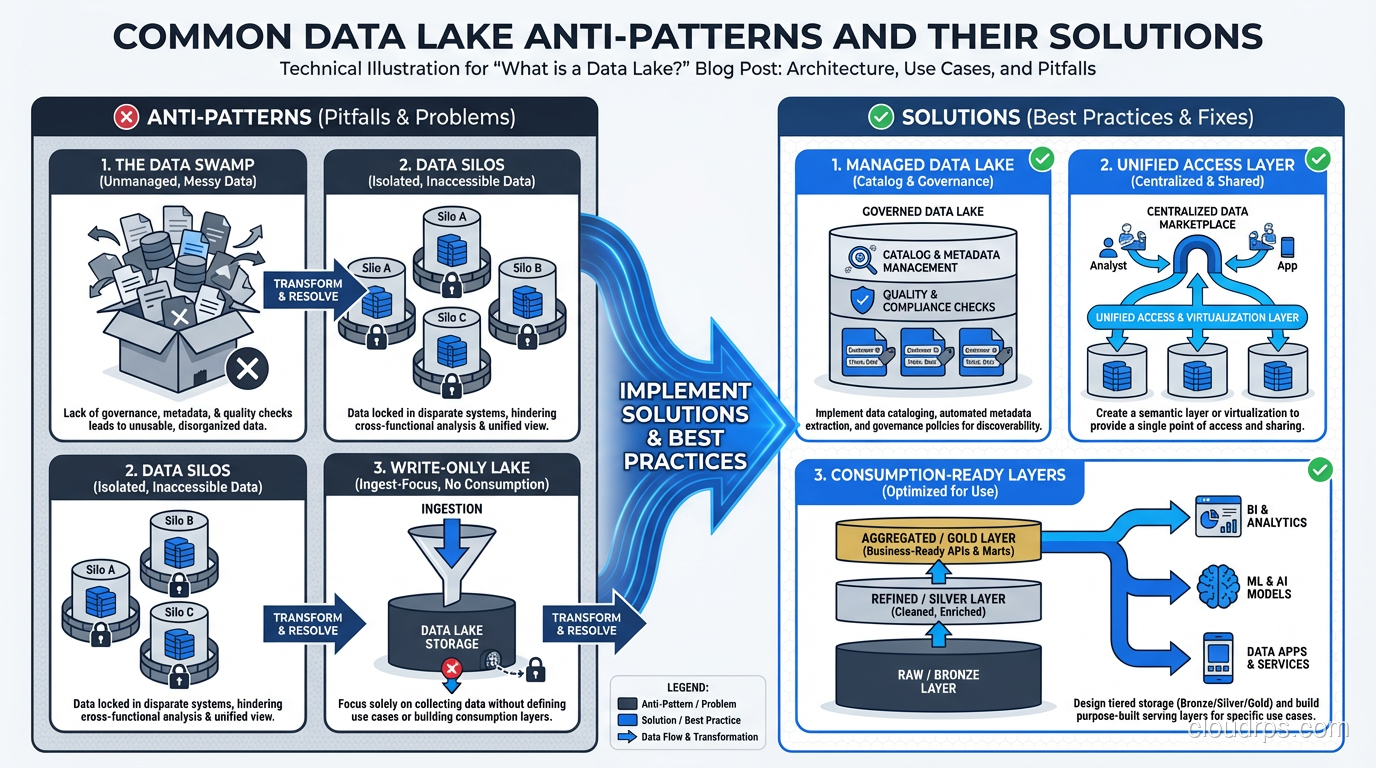
The Data Swamp
Symptom: millions of files with no naming convention, no catalog, no documentation. Nobody knows what data exists, where it came from, or whether it’s current.
Root cause: treating the data lake as a dumping ground with no governance layer.
Fix: implement a data catalog (Apache Atlas, AWS Glue Catalog, or similar) from day one. Enforce naming conventions for paths and files. Tag every dataset with source, owner, refresh frequency, and data classification. This isn’t optional; it’s foundational.
The Never-Ending Ingestion Project
Symptom: eighteen months into the project, you’re still building ingestion pipelines and haven’t delivered a single analytical use case.
Root cause: trying to ingest everything before delivering any value. Boiling the ocean.
Fix: start with two or three high-value use cases and build only the ingestion pipelines those use cases need. Deliver value in the first three months. Expand from there.
The Performance Cliff
Symptom: queries that ran fine on small test datasets take hours on production data.
Root cause: wrong file formats, wrong file sizes, no partitioning, no statistics.
Fix: use columnar formats (Parquet, ORC). Partition by commonly filtered columns (date is almost always the first choice). Keep file sizes between 128MB and 1GB. Collect statistics for query optimization. Use table formats (Iceberg, Delta Lake) for automatic compaction and optimization.
The Security Afterthought
Symptom: six months after launch, the security team discovers that every analyst has access to every dataset, including PII, PHI, and financial data.
Root cause: deferring access control because “we’ll figure it out later.”
Fix: implement column-level and row-level security from the start. Use a policy engine (Apache Ranger, Lake Formation, Unity Catalog) that integrates with your data catalog. Classify data as part of ingestion, not as an afterthought.
The Cost Surprise
Symptom: your cloud bill triples because you’re storing everything in the hot tier and running full-table scans on every query.
Root cause: no lifecycle policies, no storage tiering, no query optimization.
Fix: implement storage lifecycle policies that move old data to cheaper tiers (S3 Infrequent Access, Glacier). Partition and index data so queries scan only what they need. Monitor query patterns and optimize the most expensive jobs.
Technology Stack Choices
Storage Layer
For cloud deployments: S3, ADLS Gen2, or GCS. These are the obvious choices and they work well. For on-premises: HDFS or MinIO (S3-compatible object storage).
The storage layer decision is less about the storage technology itself and more about the ecosystem it connects to. If you’re on AWS, S3 integrates natively with Glue, Athena, EMR, Redshift Spectrum, and SageMaker. The integration tax of fighting against your cloud provider’s native services is real and expensive. For a deeper discussion on storage types, see block vs object vs file storage.
Processing Layer
Apache Spark remains the workhorse for batch transformation. For SQL-first teams, dbt on Spark or directly on the lakehouse is increasingly viable. For streaming, Apache Flink or Kafka Streams, depending on your complexity needs.
Table Format
This is the most consequential technology decision for a 2026 data lake. Delta Lake, Apache Iceberg, and Apache Hudi each provide ACID transactions, schema evolution, and time travel on top of object storage. My recommendation: Iceberg for multi-engine environments (it has the broadest engine support), Delta Lake if you’re invested in the Databricks ecosystem.
Catalog and Governance
Unity Catalog (Databricks), AWS Lake Formation, or Apache Polaris for Iceberg. The catalog is what prevents your lake from becoming a swamp. Don’t skip it.
Building a Data Lake That Lasts
After building data lakes across retail, healthcare, financial services, and manufacturing, here’s my condensed playbook:
Start with use cases, not technology. Know what questions you need to answer before you start building.
Implement governance from day one. Catalog, classification, access control, lineage. These are not phase-two features.
Use the zone model. Raw, cleaned, curated. The progression from bronze to gold creates natural quality gates.
Choose open formats. Parquet for data, Iceberg or Delta for table management. Avoid proprietary lock-in on the storage layer.
Automate data quality. Great Expectations, dbt tests, custom validation frameworks. Pick one and enforce it in every pipeline.
Plan for cost from the start. Storage tiering, partition pruning, lifecycle policies. Cloud storage is cheap per gigabyte but expensive at petabyte scale if you’re not careful.
Measure data freshness. SLAs on data pipelines are just as important as SLAs on APIs. If your dashboard shows yesterday’s data when the business expects this morning’s data, trust erodes fast.
The data lake is one of the most powerful patterns in modern data architecture. It’s also one of the most frequently botched. The difference between a data lake and a data swamp isn’t technology. It’s discipline. If your organization is struggling with a centralized data team becoming a bottleneck, it may be worth exploring data mesh architecture, which distributes data ownership to domain teams while maintaining federated governance.
Get Cloud Architecture Insights
Practical deep dives on infrastructure, security, and scaling. No spam, no fluff.
By subscribing, you agree to receive emails. Unsubscribe anytime.