
The $47,000 Wake-Up Call
I’ll never forget the Monday morning when our VP of Engineering forwarded me an AWS bill that had jumped from $12,000 to $47,000 in a single month. No new product launch. No traffic spike. Just a slow, quiet accumulation of forgotten resources, over-provisioned instances, and a dev team that had spun up a fleet of GPU instances for a machine learning experiment and never shut them down.
I spent the next 72 hours doing forensic accounting on our cloud bill, and what I found was embarrassing. We had 14 unattached EBS volumes. Three RDS instances running in production that nobody could identify an owner for. A NAT Gateway that was quietly racking up data transfer charges because someone had misconfigured a VPC peering connection. And the GPU instances? They’d been idle for two weeks.
That experience changed how I think about cloud infrastructure. It wasn’t a technology problem. It was a people and process problem. And it’s exactly the kind of problem that FinOps was built to solve.
What FinOps Actually Is (And What It Isn’t)
Let me clear up a common misconception right away: FinOps is not about cutting costs. If your entire FinOps strategy boils down to “spend less money on cloud,” you’re doing it wrong.
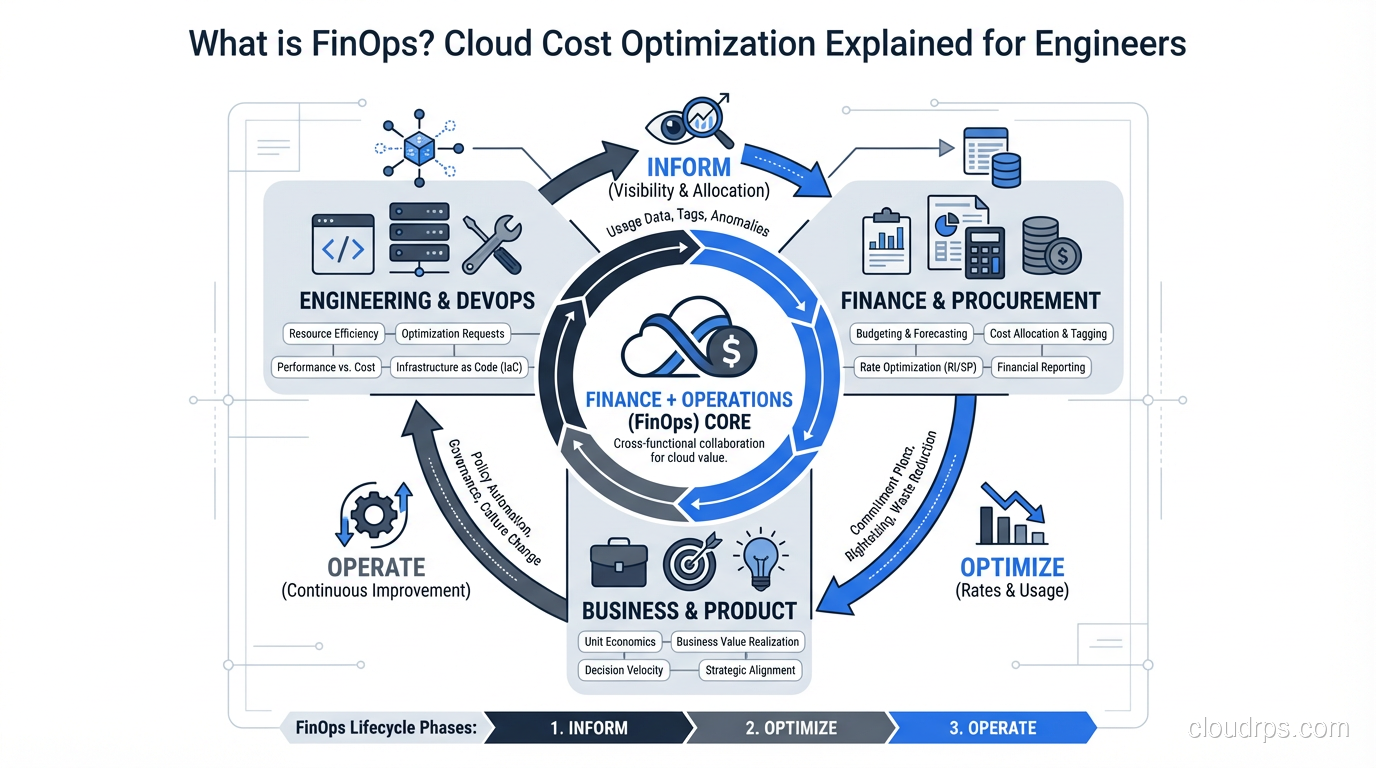
FinOps, short for Cloud Financial Operations, is a cultural practice and operational framework that brings financial accountability to the variable spending model of cloud computing. The goal isn’t to minimize your cloud bill. The goal is to maximize the business value you get from every dollar you spend.
This distinction matters more than you might think. If you’ve read my breakdown of what cloud computing actually is, you know that one of the core value propositions of the cloud is its pay-as-you-go model. You trade capital expenditure for operational expenditure. You gain flexibility and speed. But that flexibility comes with a catch: if nobody is watching the meter, costs can spiral out of control in ways that would never happen with on-premises infrastructure.
Think about it this way. In the old data center world, you had a natural spending cap. You could only spend as much as you had physical rack space, power, and cooling for. In the cloud, your credit card is the only limit. Any developer with the right IAM permissions can spin up resources that cost hundreds of dollars per hour. That’s simultaneously the greatest strength and the greatest risk of cloud infrastructure.
The FinOps Foundation (part of the Linux Foundation) defines three core principles that I’ve found genuinely useful in practice:
- Teams need to collaborate. Engineering, finance, and business leadership all need to be at the table. Cloud cost is not just an “IT problem.”
- Everyone takes ownership of their cloud usage. Individual engineering teams should understand and be accountable for their own spend.
- A centralized team drives FinOps. You need dedicated people (even if it’s just one person to start) who own the practice.
These aren’t just nice-sounding principles. They represent a real shift in how most organizations operate. In my experience, the single biggest barrier to effective cloud cost management isn’t technical. It’s organizational.
The FinOps Lifecycle: Inform, Optimize, Operate
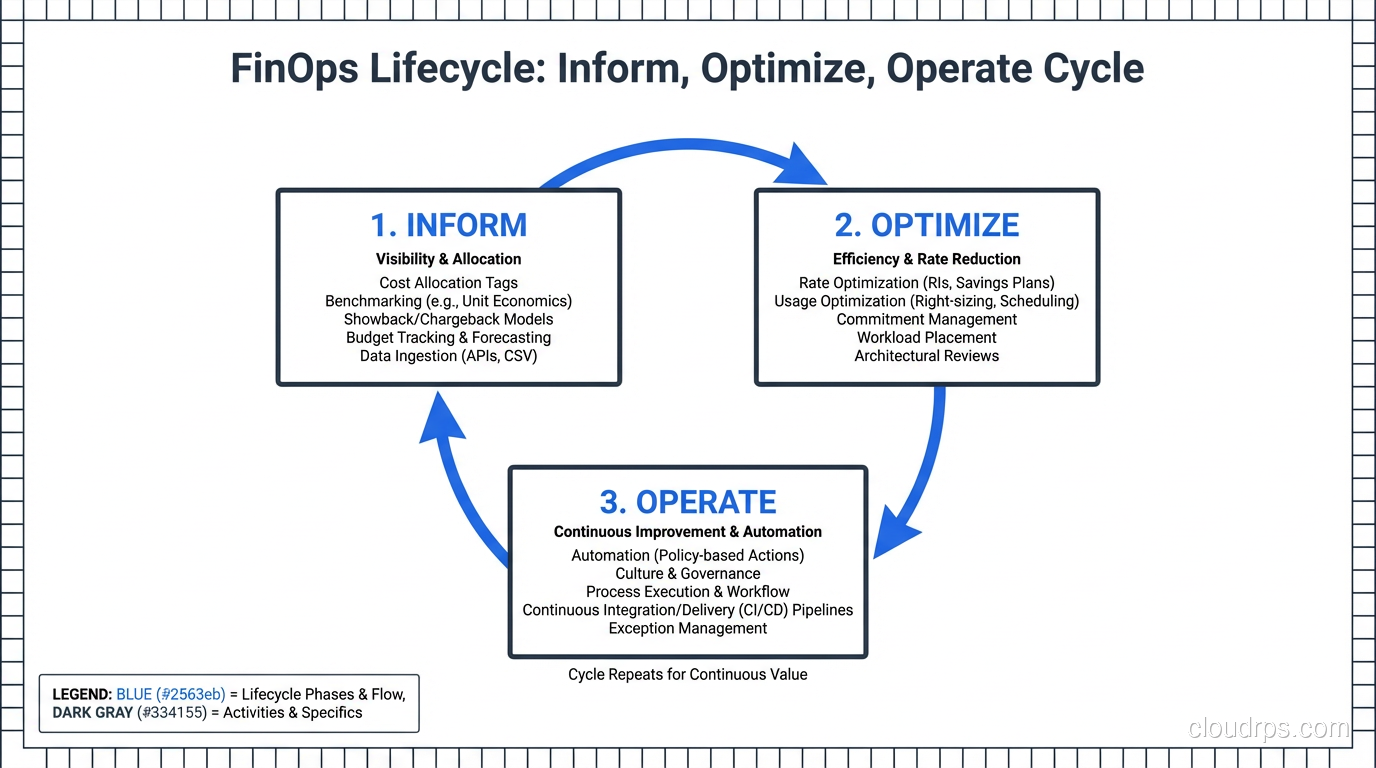
The FinOps framework breaks down into three phases that cycle continuously. I’ve implemented this lifecycle at three different companies, and while the specifics vary, the pattern holds.
Phase 1: Inform
You cannot optimize what you cannot see. The Inform phase is about building visibility into your cloud spending so that every team understands where the money is going.
This sounds simple, but it’s where most organizations fail before they even get started. Here’s why: cloud bills are deliberately complex. An AWS invoice for even a mid-size company can have thousands of line items across dozens of services. Without proper tooling and tagging, it’s nearly impossible to answer basic questions like “How much does Feature X cost us to run?” or “Which team is responsible for this spending?”
The critical activities in this phase include:
- Tagging everything. Every resource needs tags for team, environment, project, and cost center at minimum. I’ll say more about this later because it’s one of the most common failure points I see.
- Building cost allocation reports. Break spending down by team, service, and environment. Your finance team needs to see cost per business unit. Your engineering teams need to see cost per service.
- Setting up anomaly detection. You want alerts when spending deviates from expected patterns. That $47,000 surprise I mentioned? It would have been caught in week one if we’d had anomaly alerting in place.
- Creating showback or chargeback models. Showback means showing teams what they’re spending. Chargeback means actually billing internal teams for their usage. Start with showback. It’s less politically fraught and still drives behavioral change.
If you already have solid monitoring and logging practices in place, you’re halfway there. The observability mindset transfers directly to cost observability.
Phase 2: Optimize
Once you can see the spending, you can start making it more efficient. This is where the tactical work happens, and it’s the phase most people think of when they hear “cloud cost optimization.”
I’ll cover the specific tactics in detail in the next section, but the key principle here is that optimization is continuous, not a one-time project. Your cloud environment changes constantly. New services get deployed. Traffic patterns shift. Pricing models evolve. An optimization you made six months ago might no longer be relevant.
Phase 3: Operate
The Operate phase is about building the organizational muscle to sustain FinOps over time. This includes governance policies, automation, and the ongoing cultural practices that keep cost optimization from being a quarterly fire drill.
In practice, this means things like:
- Automated policies that shut down non-production resources outside business hours
- Budget alerts and approval workflows for high-cost resource provisioning
- Regular (monthly or bi-weekly) cost review meetings with engineering leads
- Integration of cost considerations into architectural decision-making and code reviews
The Operate phase is where FinOps either becomes part of your engineering culture or dies a slow death. I’ve seen both outcomes, and the difference almost always comes down to executive sponsorship and whether engineers feel like cost awareness is helping them (by giving them data to make better decisions) rather than punishing them (by making them feel guilty for spending money).
Practical Cost Optimization Tactics That Actually Work
Alright, let’s get into the specific moves that save real money. I’m going to focus on AWS since that’s where I have the deepest experience, but every one of these concepts applies to Azure and GCP as well.
Right-Sizing Instances
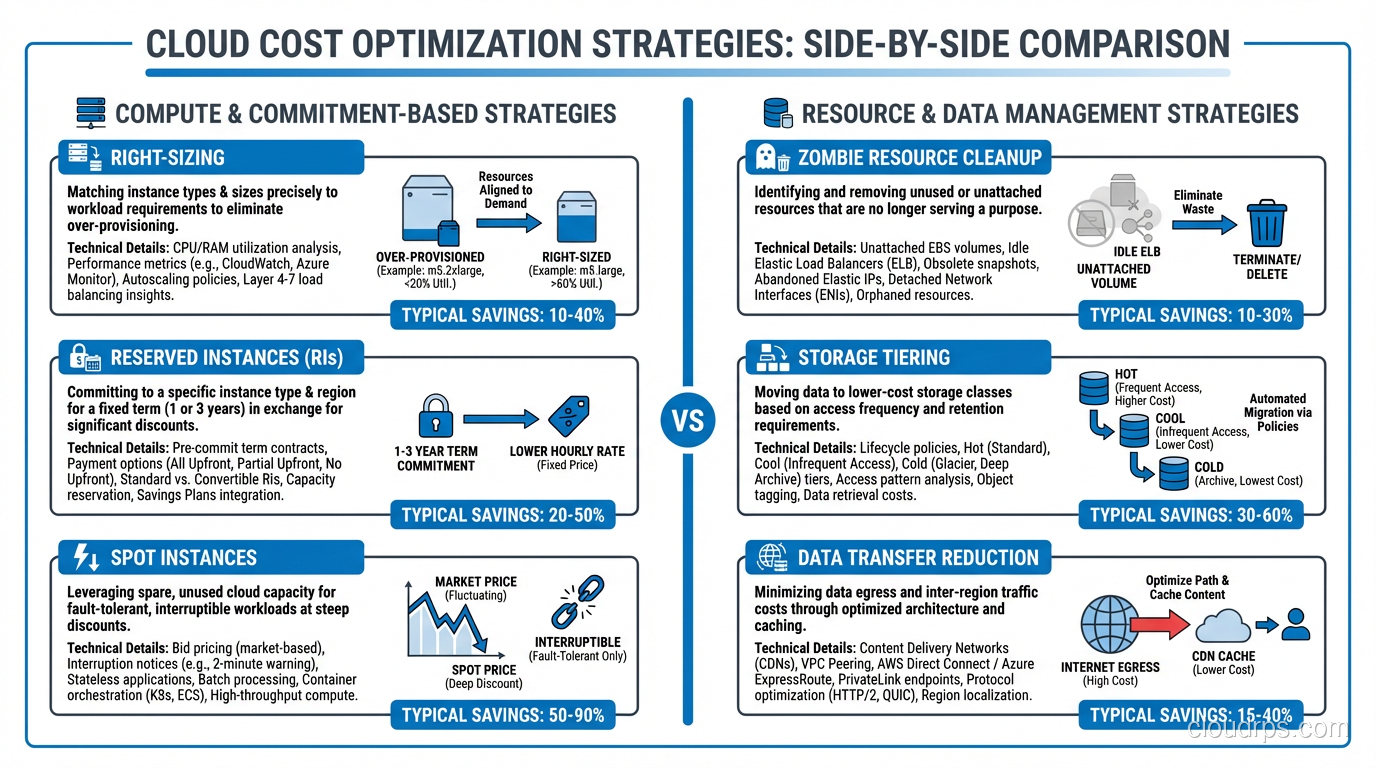
This is the single highest-impact optimization for most organizations, and it’s also one of the simplest conceptually. Right-sizing means matching your instance types to your actual workload requirements rather than the requirements someone guessed at six months ago.
Here’s a pattern I see constantly: a developer needs to deploy a new service. They don’t know exactly how much CPU and memory it will need, so they pick something “safe,” usually an m5.xlarge or bigger. The service runs fine, using about 15% of the available CPU and 30% of the memory. Nobody ever revisits the decision.
Multiply that by 50 services and you’re paying for three to four times the compute you actually need.
The fix is straightforward. Use AWS Compute Optimizer or similar tools to analyze actual utilization patterns over at least two weeks (ideally a month). Then resize instances to match real workload requirements with reasonable headroom. If you’re running containers on Kubernetes, the same principle applies to pod resource requests and limits. The Vertical Pod Autoscaler (VPA) can actually automate this right-sizing for you by continuously adjusting resource requests based on observed usage.
One important caveat: right-sizing requires understanding your workload patterns. A service that averages 15% CPU but spikes to 90% during batch processing at 2 AM needs different treatment than a service that sits at a steady 15% around the clock. This is where the relationship between scalability and elasticity becomes directly relevant to your bottom line.
Reserved Instances vs. Savings Plans vs. On-Demand
If you’re running anything on-demand that you know you’ll need for the next year or more, you’re leaving money on the table. Depending on the commitment level, Reserved Instances (RIs) and Savings Plans can save you 30% to 72% compared to on-demand pricing.
Here’s how I think about the decision:
On-Demand is for workloads that are temporary, unpredictable, or genuinely variable. Dev/test environments that come and go, burst capacity, new services you’re still sizing.
Savings Plans are my default recommendation for most organizations. Compute Savings Plans are flexible across instance families, regions, and even compute services (EC2, Fargate, Lambda). You commit to a dollar amount per hour of compute usage, not to specific instance types. This gives you optimization flexibility while still capturing significant discounts.
Reserved Instances offer the deepest discounts but lock you into specific instance types and regions. I only recommend these when you have very stable, well-understood workloads that you’re confident won’t change. Think databases, core platform services, or that one legacy monolith that hasn’t changed in three years and probably never will.
Spot Instances deserve their own mention. For fault-tolerant, stateless workloads, Spot instances can save you up to 90% compared to on-demand. I’ve used them extensively for batch processing, CI/CD pipelines, and non-critical background jobs. The trade-off is that AWS can reclaim them with two minutes’ notice. If your architecture can handle that (and with proper queue-based designs, it absolutely can), Spot is the best deal in cloud computing.
When thinking through total cost of ownership, these commitment decisions are some of the most impactful levers you have.
Kill the Zombies: Idle Resource Cleanup
Every cloud environment I’ve ever audited has zombies. Resources that are running, costing money, and providing zero value. Common culprits include:
- Unattached EBS volumes. When you terminate an EC2 instance, attached EBS volumes don’t automatically get deleted unless you configured that explicitly. I’ve found terabytes of orphaned volumes at companies that had no idea they existed.
- Old snapshots. EBS snapshots are cheap individually, but they accumulate. I once found a company with 14,000 snapshots going back three years, costing them over $2,000/month.
- Idle load balancers. ALBs and NLBs charge a fixed hourly rate whether they’re routing traffic or not. Forgotten load balancers from decommissioned services are free money left on the table.
- Unused Elastic IPs. AWS charges you for Elastic IPs that aren’t associated with a running instance. It’s a small amount per IP, but it adds up, and it’s a signal of sloppy resource management.
- Non-production environments running 24/7. Your staging environment probably doesn’t need to run at 3 AM on a Saturday. Scheduling non-prod environments to shut down outside business hours can cut those costs by 65-70%.
For serverless architectures, zombie resources look different but still exist. Unused API Gateway endpoints, orphaned Lambda functions with CloudWatch log groups growing indefinitely, and DynamoDB tables with provisioned capacity nobody remembers setting up.
Storage Tiering
Storage is one of those costs that creeps up slowly because individual objects are cheap but volume accumulates relentlessly. S3 offers multiple storage classes, and using them properly can dramatically reduce costs:
- S3 Standard for frequently accessed data
- S3 Intelligent-Tiering for data with unknown or changing access patterns (this is an underrated option that I recommend as a default for many use cases)
- S3 Infrequent Access for data accessed less than once a month
- S3 Glacier and Glacier Deep Archive for long-term retention and compliance data
Implement S3 Lifecycle policies to automatically transition objects between tiers based on age. This is one of those “set it and forget it” optimizations that pays dividends indefinitely.
The same principle applies to your block and file storage choices. Are you running gp3 volumes where you could use sc1 or st1? Are you paying for provisioned IOPS on EBS volumes that don’t need them?
Data Transfer: The Hidden Cost Killer
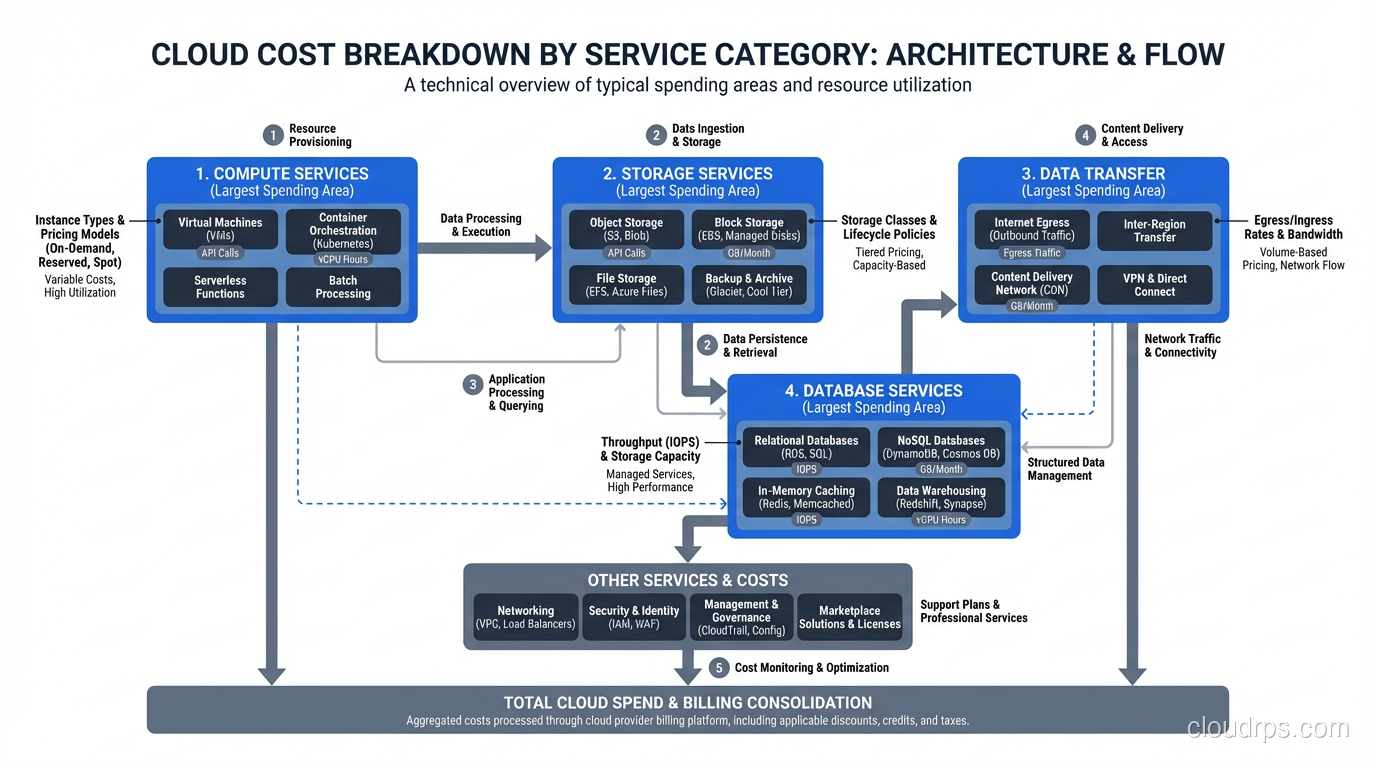
Data transfer charges are the most commonly overlooked cost in cloud computing. AWS charges for data moving between availability zones, between regions, and out to the internet. These charges don’t show up in any resource’s individual pricing page, so teams often don’t realize they’re accumulating until they see the bill.
Some practical ways to reduce data transfer costs:
- Keep chatty services in the same AZ when possible (this creates a trade-off with availability, so be thoughtful)
- Use VPC endpoints for AWS service traffic instead of routing through NAT Gateways
- Implement CloudFront or another CDN for serving static content to users
- Compress data before transferring between services
- Review cross-region replication to ensure it’s still necessary
I’ve seen data transfer account for 15-25% of total cloud spend at companies that weren’t paying attention to it. At one company, replacing NAT Gateway traffic with VPC endpoints for S3 and DynamoDB alone saved $8,000/month.
Common Mistakes I See Repeatedly
After helping multiple organizations implement FinOps practices, I’ve seen the same mistakes come up again and again.
Not Tagging Resources (Or Tagging Them Inconsistently)
If I could only give one piece of FinOps advice, it would be this: implement a mandatory, enforced tagging strategy from day one. Without consistent tags, you cannot allocate costs to teams or projects. You cannot identify resource owners. You cannot build meaningful cost reports.
The most common failure mode isn’t “no tags.” It’s inconsistent tags. One team uses environment: prod while another uses env: production and a third uses Environment: PROD. All three mean the same thing but create three separate categories in your cost reports.
Use AWS Organizations Tag Policies or similar governance tools to enforce a standard taxonomy. Require tags at provisioning time using Service Control Policies or CI/CD pipeline checks. Make it impossible to deploy untagged resources.
Treating Cost Optimization as a One-Time Project
I have seen this play out multiple times. Leadership gets the cloud bill, panics, assigns a tiger team to cut costs, the team finds easy wins, costs go down for a quarter, then attention shifts elsewhere and costs creep right back up.
FinOps has to be a continuous practice, not a project. Build it into your operational rhythm the same way you build in on-call rotations and sprint planning.
Ignoring the Human Side
Engineers who feel punished for spending money will start hiding costs or avoiding the cloud entirely. Neither outcome is good. The goal is to make engineers feel empowered with cost data, not surveilled. Frame cost optimization as an engineering challenge (because it is one) rather than a budget constraint.
Over-Optimizing Too Early
This is the FinOps equivalent of premature optimization in code. Don’t spend three weeks negotiating a Reserved Instance strategy for a startup that’s still figuring out product-market fit. Start with visibility and easy wins. Optimize aggressively once your workload patterns are stable and well-understood.
Building Your FinOps Team and Culture
You don’t need a massive dedicated team to start doing FinOps effectively. Here’s what I recommend based on company size:
Startups and small teams (under 50 engineers): Assign FinOps as a part-time responsibility to a senior engineer or engineering manager who has good relationships with both the technical team and finance. Give them a few hours a week and access to billing data.
Mid-size companies (50-200 engineers): Hire or designate a full-time FinOps practitioner. This person needs a rare combination of skills: they need to understand cloud architecture deeply enough to make optimization recommendations and understand finance well enough to build compelling business cases. They should report to engineering leadership, not finance.
Large enterprises (200+ engineers): Build a dedicated FinOps team with a mix of cloud engineers, data analysts, and someone with a finance background. This team operates as an internal consultancy, working with individual engineering teams to optimize their specific workloads.
Regardless of team size, the cultural elements are the same:
- Make cost data visible and accessible to every engineer
- Include cost impact in architecture review discussions
- Celebrate cost optimization wins the same way you celebrate feature launches
- Set team-level budgets and give teams autonomy in how they manage within those budgets
Tools and Dashboards Worth Your Time
You don’t need to buy expensive third-party tooling on day one. Start with the native tools your cloud provider gives you and expand from there.
Start Here (Free / Included)
AWS Cost Explorer is genuinely useful for basic cost analysis. It lets you break down spending by service, account, tag, and time period. The forecasting feature is rough but helpful for spotting trends. If you’re on Azure, Cost Management + Billing provides similar capabilities. GCP has its Billing Console and BigQuery export for custom analysis.
AWS Budgets lets you set spending thresholds and get alerts. Set up budgets per team and per environment at minimum. The alerts are essential for catching runaway costs early.
AWS Compute Optimizer analyzes your EC2 instances, EBS volumes, and Lambda functions and recommends right-sizing changes with projected savings. It’s free and remarkably accurate in my experience.
Level Up (When You’re Ready)
Kubecost is excellent if you’re running Kubernetes. It provides cost allocation at the namespace, deployment, and pod level, which is exactly the granularity you need when multiple teams share a cluster. The open-source version is solid; the commercial version adds more features.
Infracost integrates into your CI/CD pipeline and shows the cost impact of infrastructure changes before they’re deployed. Imagine getting a comment on your Terraform PR that says “this change will increase monthly costs by $340.” That’s a game-changer for cost-aware engineering culture.
CloudHealth (by VMware/Broadcom) and Spot by NetApp are enterprise-grade platforms for multi-cloud cost management. They’re expensive but worth it if you’re spending millions on cloud and need sophisticated optimization, governance, and reporting.
AWS Cost and Usage Reports (CUR) exported to S3 and queried with Athena give you the most granular cost data available. This is the power-user move for building custom dashboards and analysis. If you’re comfortable with SQL and have a data engineering team, this is the most flexible option.
Where to Start Tomorrow
If you’ve read this far and you’re feeling overwhelmed, here’s my advice: don’t try to boil the ocean. Start with these five actions, in order, and you’ll be ahead of 90% of organizations.
Turn on AWS Cost Explorer (or equivalent) and spend an hour exploring your bill. Just look at it. Understand the shape of your spending. Which services cost the most? Has spending been increasing?
Implement a basic tagging strategy. Pick four required tags (team, environment, project, cost-center) and start enforcing them on new resources. Don’t try to retroactively tag everything right away.
Set up budget alerts. Create a budget for your total cloud spend and set alerts at 80% and 100%. Then create per-team or per-account budgets.
Find and kill your zombies. Run Trusted Advisor, Compute Optimizer, or even just a manual audit of your running resources. I guarantee you’ll find idle resources costing you money right now.
Schedule a monthly cost review. Thirty minutes with engineering leads, looking at spending trends and discussing the top cost drivers. Consistency matters more than depth in the early stages.
FinOps is a journey, not a destination. The organizations that do it well treat cloud cost optimization as a core engineering discipline, right alongside performance, reliability, and security. You don’t have to get it perfect on day one. You just have to start paying attention and keep iterating. The $47,000 surprise that kicked off my own FinOps journey was painful, but it was also one of the best things that happened to my team. It forced us to build habits and systems that made us better engineers, not just cheaper ones.
Get Cloud Architecture Insights
Practical deep dives on infrastructure, security, and scaling. No spam, no fluff.
By subscribing, you agree to receive emails. Unsubscribe anytime.