
MPLS is one of those technologies that network engineers either love with a quiet reverence or curse under their breath while reviewing monthly circuit bills. I’ve been on both sides. I’ve designed MPLS networks that connected 200+ branch offices with rock-solid reliability, and I’ve ripped them out and replaced them with SD-WAN when the cost-benefit math stopped making sense.
But here’s the thing: even if you’re running a pure cloud-native operation and have never ordered an MPLS circuit in your life, understanding how MPLS works makes you a better network engineer. It’s the foundation that enterprise WANs were built on for two decades, and many of the concepts it introduced still influence how we think about traffic engineering today.
How Traditional IP Routing Works (And Why It’s Slow)
Before we get into MPLS, you need to understand the problem it was solving.
In traditional IP routing, every router along a packet’s path makes an independent forwarding decision. Each router:
- Receives the packet
- Extracts the destination IP address from the header
- Performs a longest-prefix match against its routing table
- Determines the next hop
- Forwards the packet
This happens at every single hop. A packet traversing 15 routers gets its destination IP looked up 15 times. In the 1990s, when routing protocols were filling routing tables with hundreds of thousands of prefixes, this longest-prefix match was computationally expensive. Routers had to walk through variable-length prefix trees (tries) in software for every packet. Core internet routers were struggling.
The engineers at Ipsilon Networks, Cisco, and others had the same basic insight: what if we could make the forwarding decision once, at the edge of the network, and then use a simpler, fixed-length lookup for the rest of the path?
That insight became MPLS.
MPLS Fundamentals: Labels Instead of IP Lookups
MPLS stands for Multiprotocol Label Switching. The “multiprotocol” part means it can carry any type of payload (IPv4, IPv6, Ethernet frames, ATM cells) though in practice it’s almost always IP. The “label switching” part is the magic.
The MPLS Label
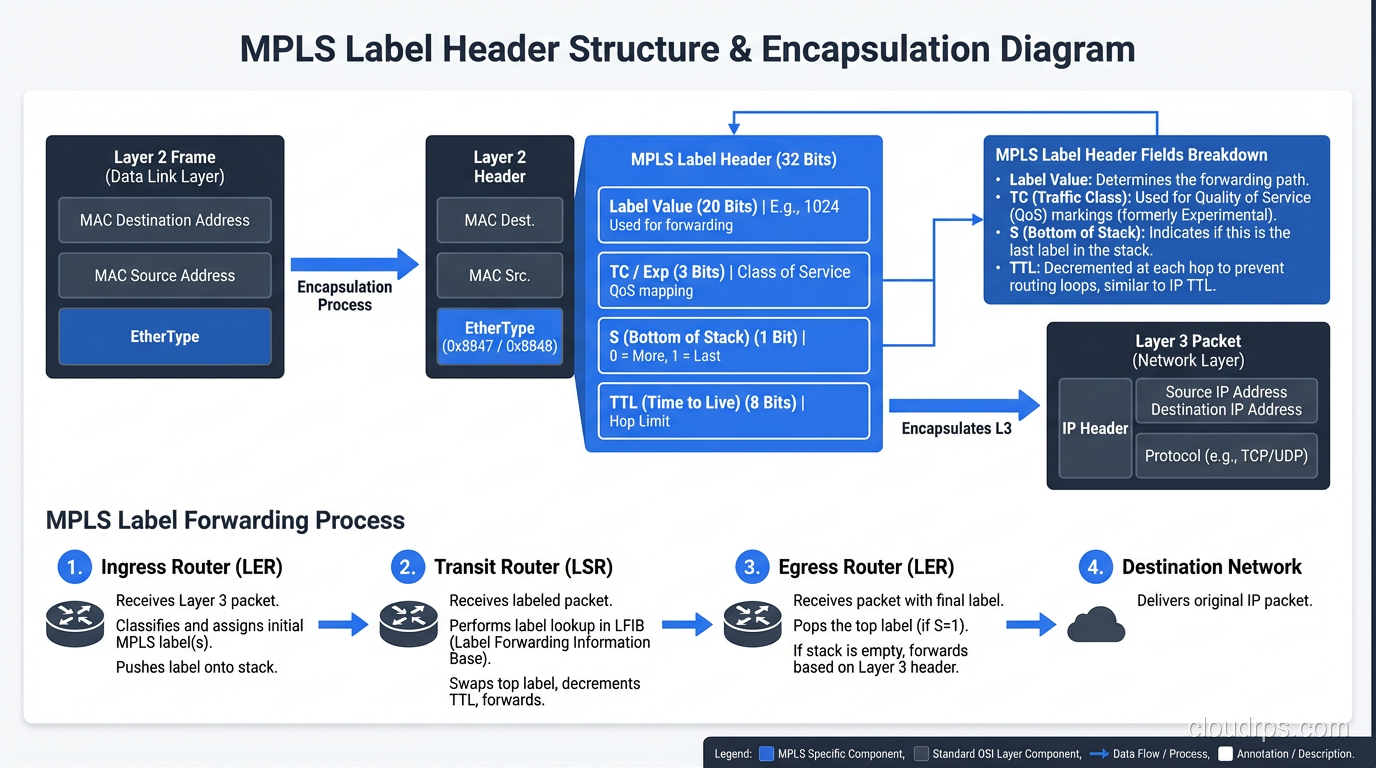
An MPLS label is a 32-bit header inserted between the Layer 2 (Ethernet) header and the Layer 3 (IP) header. It’s sometimes called a “Layer 2.5” header because of this position. The structure looks like this:
 0                   1                   2                   3
 0 1 2 3 4 5 6 7 8 9 0 1 2 3 4 5 6 7 8 9 0 1 2 3 4 5 6 7 8 9 0 1
+-+-+-+-+-+-+-+-+-+-+-+-+-+-+-+-+-+-+-+-+-+-+-+-+-+-+-+-+-+-+-+-+
|                Label                  | TC  |S|       TTL     |
+-+-+-+-+-+-+-+-+-+-+-+-+-+-+-+-+-+-+-+-+-+-+-+-+-+-+-+-+-+-+-+-+
| Field | Bits | Purpose |
|---|---|---|
| Label | 20 | The actual label value (0-1,048,575) |
| TC (Traffic Class) | 3 | QoS/priority markings (formerly EXP) |
| S (Bottom of Stack) | 1 | Set to 1 if this is the last label in the stack |
| TTL | 8 | Time to live, works like IP TTL |
That 20-bit label is a fixed-length, flat lookup. No longest-prefix matching, no variable-length comparison. A router can look up a 20-bit label in a simple table in constant time. That’s dramatically faster than parsing a full IP routing table, or at least it was in the 1990s hardware.
Key MPLS Components
Let’s define the cast of characters:
LER (Label Edge Router): The routers at the edge of the MPLS network. These are where the real IP routing decisions happen. An ingress LER adds (pushes) labels onto packets entering the MPLS domain. An egress LER removes (pops) labels from packets leaving it.
LSR (Label Switch Router): The core routers inside the MPLS network. They don’t look at the IP header at all. They just swap one label for another and forward.
LSP (Label Switched Path): The path a packet takes through the MPLS network, defined by a sequence of labels. Think of it as a virtual circuit through the label-switching fabric.
FEC (Forwarding Equivalence Class): A group of packets that are forwarded the same way. All packets going to the same destination prefix might be in the same FEC, or you might split them by QoS class.
The Three Label Operations
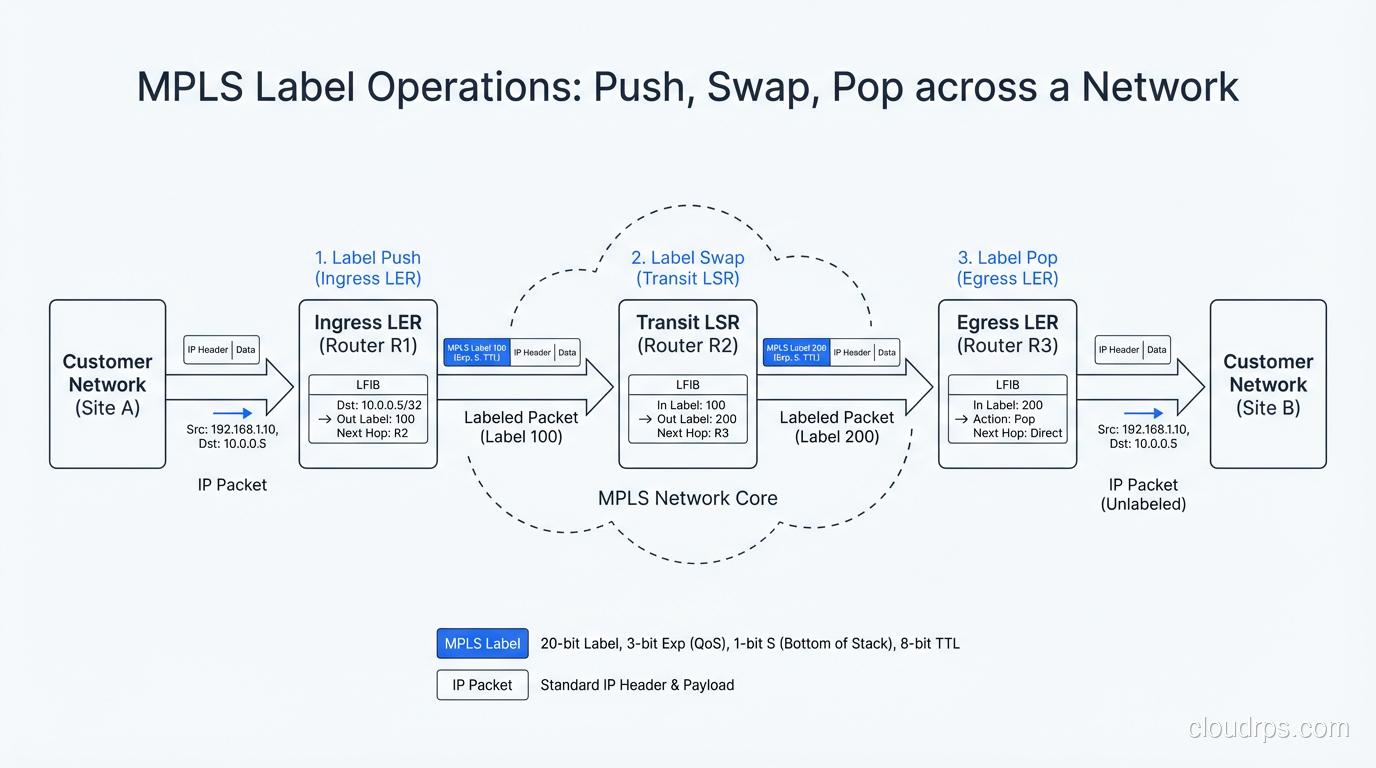
MPLS routers perform exactly three operations on labels:
- Push: Add a label to a packet (done by the ingress LER)
- Swap: Replace the current label with a new one (done by LSRs in the core)
- Pop: Remove the label (done by the egress LER, or the penultimate hop via PHP)
Here’s a concrete example. Say a packet needs to get from Branch Office A to Branch Office B:
[Branch A] → [Ingress LER] → [LSR-1] → [LSR-2] → [Egress LER] → [Branch B]

Step 1: Ingress LER receives IP packet, looks up destination
        → FEC match → Push Label 42 → Forward to LSR-1

Step 2: LSR-1 receives packet with Label 42
        → LFIB lookup → Swap Label 42 for Label 78 → Forward to LSR-2

Step 3: LSR-2 receives packet with Label 78
        → LFIB lookup → Swap Label 78 for Label 15 → Forward to Egress LER

Step 4: Egress LER receives packet with Label 15
        → Pop Label 15 → Regular IP forwarding to Branch B
Each router maintains an LFIB (Label Forwarding Information Base), essentially a simple table mapping incoming labels to outgoing labels and next-hop interfaces.
Label Distribution Protocol (LDP)
Labels don’t magically appear. Routers need to agree on which labels to use. That’s the job of the Label Distribution Protocol (LDP). LDP runs between MPLS routers and automatically distributes label bindings, essentially saying “if you want to reach prefix 10.0.0.0/8, send me a packet with label 42.”
LDP uses the underlying IGP (OSPF, IS-IS) routing tables to build the label forwarding tables. It’s downstream-allocated, meaning the router closer to the destination assigns the label and tells its upstream neighbor about it.
There’s also RSVP-TE (Resource Reservation Protocol - Traffic Engineering), which is used when you want explicit control over the path. While LDP follows the IGP shortest path, RSVP-TE lets you specify exactly which routers a packet should traverse. This is useful for traffic engineering, which we’ll get into next.
Traffic Engineering: Why MPLS Really Took Off
Here’s a confession: by the time MPLS was widely deployed in the mid-2000s, the original speed advantage of label switching had largely evaporated. Advances in ASIC-based forwarding meant routers could do line-rate IP lookups on million-entry tables. The speed argument was moot.
But MPLS had developed a killer feature that kept it relevant: traffic engineering.
In pure IP routing with OSPF or BGP, traffic follows the shortest path (or equal-cost multipath if you’re lucky). You can’t easily say “send this traffic along a specific path that avoids this congested link.” IP routing is destination-based, so all traffic to the same destination takes the same path.
MPLS-TE changed that. With RSVP-TE, you can:
- Define explicit paths through the network, overriding the IGP shortest path
- Reserve bandwidth along those paths, ensuring QoS guarantees
- Automatically reroute around failures using Fast Reroute (FRR) with sub-50ms failover
- Balance traffic across multiple paths based on actual bandwidth utilization, not just hop count
This was huge for service providers. A carrier might have a backbone with multiple 100G links between cities. Without MPLS-TE, all traffic between New York and Chicago might take the same “shortest” path, leaving other links underutilized. With MPLS-TE, they could engineer traffic across all available links based on demand.
Penultimate Hop Popping (PHP)
One neat optimization: in many MPLS networks, the second-to-last router (the penultimate hop) pops the label instead of the egress router. This is called PHP. The logic is that the egress router has to do a full IP lookup anyway to forward the packet to its final destination, so why make it do a label pop and an IP lookup? Let the penultimate hop pop the label so the egress router receives a plain IP packet and only has to do one lookup.
It’s a small optimization, but in high-throughput core networks, every microsecond matters.
MPLS VPNs: The Enterprise Workhorse
If traffic engineering kept service providers interested, MPLS VPNs were what sold MPLS to enterprises. Specifically, L3VPN (RFC 4364, the Rosen/Rekhter model) became the dominant WAN technology for large enterprises from roughly 2005 to 2020.
How L3VPN Works
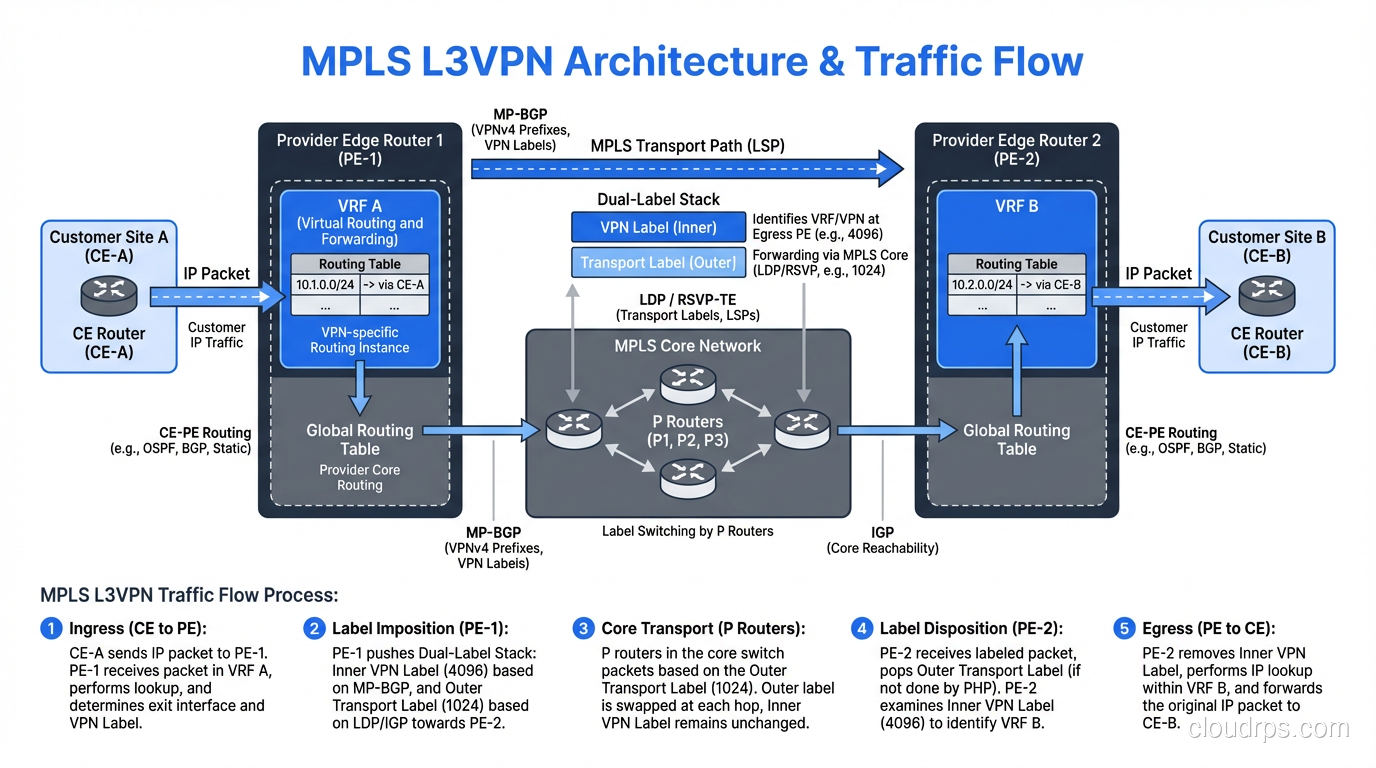
An MPLS L3VPN uses a concept called VRFs (Virtual Routing and Forwarding) on the provider’s edge routers. Each customer gets their own VRF, which is essentially a separate routing table. This means:
- Customer A and Customer B can both use the 10.0.0.0/8 address space without conflict
- Traffic isolation is enforced at the routing level, so Customer A can never see Customer B’s routes
- The provider backbone doesn’t know or care about customer IP addresses
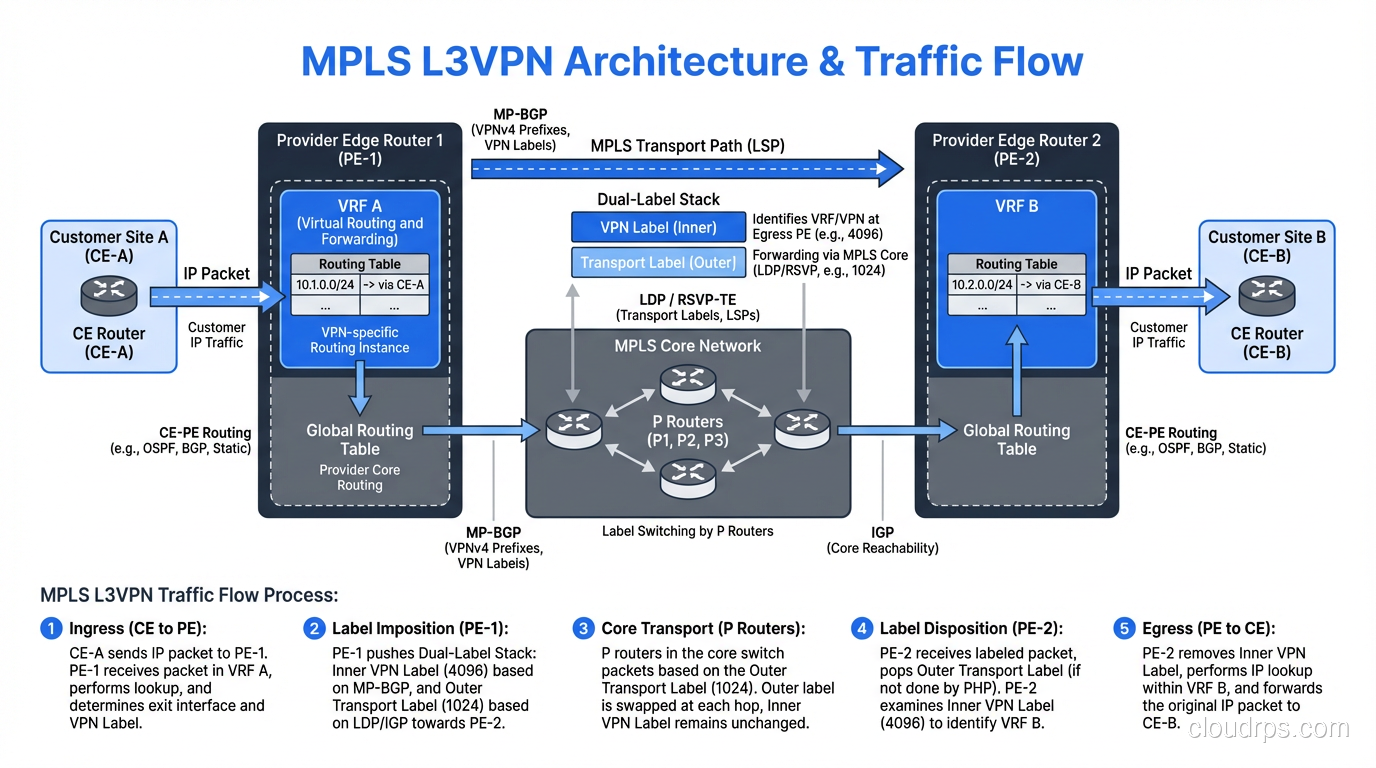
The magic is in the label stack. MPLS L3VPN uses two labels:
- Outer label (transport): Gets the packet across the provider backbone to the right PE router
- Inner label (VPN): Identifies the specific VRF/customer on the destination PE router
[Customer Site] → [CE Router] → [PE Router (ingress)] → [P Router] → [PE Router (egress)] → [CE Router] → [Customer Site]

Packet on the wire between PE routers:
| Ethernet | Outer Label (transport) | Inner Label (VPN) | IP Packet |
Routes between PE routers are exchanged using MP-BGP (Multiprotocol BGP) with special address families. The PE routers use Route Distinguishers (RDs) and Route Targets (RTs) to keep everything organized.
L2VPN and VPLS
MPLS also supports Layer 2 VPNs. VPLS (Virtual Private LAN Service) essentially creates a giant virtual Ethernet switch across the provider’s MPLS backbone. Each customer site appears to be on the same LAN segment, even if they’re in different cities.
I used to deploy VPLS for customers who needed Layer 2 adjacency between data centers, usually for stretched VLANs, legacy clustering, or vMotion. It worked, but it had all the problems of stretched Layer 2 (broadcast storms, STP complexity) plus the fun of debugging them across a carrier network you don’t control.
MPLS QoS: Why Voice Engineers Loved It
One of MPLS’s strongest selling points was deterministic QoS. The 3-bit TC field in the MPLS header (originally called the EXP field) allows for 8 traffic classes. Combined with the provider’s traffic engineering and bandwidth reservation capabilities, MPLS could guarantee:
- Maximum latency
- Maximum jitter
- Minimum bandwidth
- Zero packet loss (for highest-priority classes)
This made MPLS the go-to choice for carrying voice (VoIP) and video traffic in enterprise WANs. When I was designing WAN architectures in the 2010s, the typical setup was:
| Traffic Class | MPLS CoS | Typical Bandwidth % |
|---|---|---|
| Voice (RTP) | EF (Expedited Forwarding) | 10-15% |
| Video conferencing | AF41 | 15-20% |
| Business-critical apps | AF31 | 20-30% |
| Default/web/email | BE (Best Effort) | Remaining |
These QoS policies were enforced end-to-end across the provider’s backbone. Internet-based VPNs couldn’t match this because the public internet offers no QoS guarantees.
The Great MPLS vs SD-WAN Debate
Starting around 2015, SD-WAN (Software-Defined Wide Area Networking) emerged as a serious challenger to MPLS for enterprise WANs. The pitch was compelling: why pay $1,000-$5,000/month per site for MPLS circuits when you could use commodity internet connections at a fraction of the cost and overlay intelligent routing on top?
The Cost Argument
MPLS pricing is eye-watering compared to broadband internet:
| Circuit Type | Typical Monthly Cost (US) | Bandwidth |
|---|---|---|
| MPLS 10 Mbps | $500-$1,500 | Dedicated, SLA-backed |
| MPLS 100 Mbps | $2,000-$8,000 | Dedicated, SLA-backed |
| Business broadband 100 Mbps | $100-$300 | Best effort |
| DIA (Dedicated Internet) 100 Mbps | $300-$800 | SLA-backed |
For a company with 100 branch offices, the difference between MPLS and internet+SD-WAN could be millions of dollars per year.
What MPLS Still Does Better
I’m not going to tell you SD-WAN has fully replaced MPLS, because it hasn’t, and for some use cases, it shouldn’t. MPLS still wins on:
- Deterministic latency: The public internet simply cannot guarantee consistent latency. For real-time trading, industrial control, or high-quality video, MPLS is still the safer bet.
- Carrier-grade reliability: MPLS circuits typically come with 99.99% SLAs. Internet circuits are usually 99.9% at best.
- Regulatory compliance: Some industries (healthcare, financial services) have compliance requirements that are easier to satisfy with private MPLS networks.
The Hybrid Approach
In my experience, the best approach for most enterprises is hybrid: keep MPLS for your critical sites (headquarters, primary data centers) and use SD-WAN over internet for branch offices. The SD-WAN overlay can bond multiple internet connections, measure path quality in real-time, and fail over automatically.
Most major SD-WAN vendors (Cisco Viptela, VMware VeloCloud, Fortinet, Palo Alto Prisma) support MPLS as one of many underlay transports. You get the cost savings of internet where you can tolerate it and the reliability of MPLS where you can’t.
MPLS in Cloud Architectures
If you’re building on AWS, Azure, or GCP, you might think MPLS is irrelevant. It’s not; it’s just been abstracted.
AWS Direct Connect and Azure ExpressRoute both use MPLS under the hood. When you order a Direct Connect, your traffic is carried over a dedicated VLAN on an MPLS backbone between the colocation facility and AWS’s network. The BGP session you establish with AWS is essentially the CE-PE peering in an MPLS L3VPN.
Similarly, cloud backbone networks (like Google’s B4 network) use concepts borrowed directly from MPLS-TE: centralized traffic engineering, explicit path selection, and bandwidth reservation. They’ve evolved beyond traditional MPLS into SDN-controlled segment routing, but the DNA is the same.
Segment Routing: MPLS Evolved
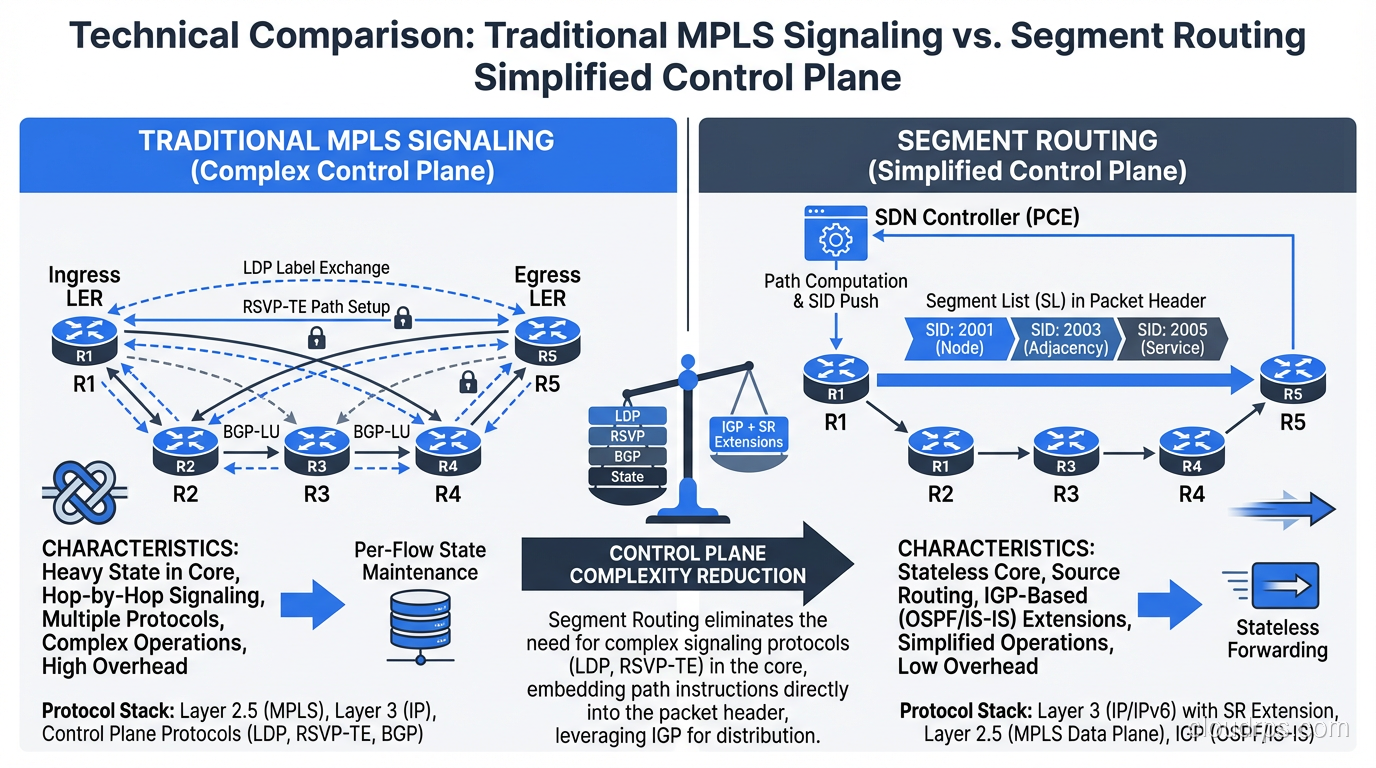
Segment Routing (SR) is the modern evolution of MPLS, and it’s where things are heading. SR-MPLS replaces LDP and RSVP-TE with a simpler model where path information is encoded as an ordered list of segments (labels) in the packet header. The source router defines the entire path by stacking the right labels, with no per-hop signaling needed.
This dramatically simplifies the control plane. Instead of maintaining LDP sessions between every pair of routers and RSVP-TE state for every tunnel, you just need an IGP (with segment routing extensions) and a controller that computes paths.
SR also has an IPv6 variant called SRv6 that encodes segments as IPv6 addresses instead of MPLS labels. It’s gaining traction, especially in 5G transport networks.
MPLS Debugging: A Quick Field Guide
If you find yourself troubleshooting an MPLS network (my condolences and congratulations), here are the key commands on Cisco IOS/IOS-XR:
! Show the MPLS forwarding table (LFIB)
show mpls forwarding-table

! Show LDP neighbors and sessions
show mpls ldp neighbor
show mpls ldp bindings

! Trace an LSP (like traceroute but for MPLS)
traceroute mpls ipv4 10.1.1.0/24

! Show VRF routing table for a specific customer
show ip route vrf CUSTOMER_A

! Show BGP VPNv4 routes (L3VPN)
show bgp vpnv4 unicast vrf CUSTOMER_A
The most common issue I’ve debugged is LDP session flaps caused by interface MTU mismatches. MPLS adds at least 4 bytes (one label) to every packet. If your interface MTU is 1500 and you’re pushing MPLS labels onto 1500-byte IP packets, you’ll get fragmentation or drops. Always set your core-facing interfaces to at least 1512 bytes MTU, preferably 9000 (jumbo frames) if your infrastructure supports it.
Wrapping Up
MPLS has been the backbone of enterprise and service provider networking for over two decades. While SD-WAN is replacing it at the branch, and segment routing is evolving the technology in the core, the fundamental concept (use simple label switching in the core and smart routing at the edge) remains as relevant as ever.
Understanding MPLS matters even if you never configure an LSP yourself. The concepts of label stacking, traffic engineering, VRFs, and forwarding equivalence classes show up everywhere in modern networking, from cloud provider backbones to Layer 4/7 load balancing decisions to SD-WAN overlays.
If you’re designing a WAN today, don’t reflexively dismiss MPLS as “legacy.” Look at your latency requirements, compliance needs, and budget. Sometimes the boring, expensive, reliable option is the right one. And if you’re going SD-WAN, understanding the MPLS network you’re replacing will make you far better at architecting what comes next.
Get Cloud Architecture Insights
Practical deep dives on infrastructure, security, and scaling. No spam, no fluff.
By subscribing, you agree to receive emails. Unsubscribe anytime.