
If you’ve ever wondered how your entire household (laptops, phones, tablets, smart TVs, thermostats) can all share a single IP address on the internet, the answer is NAT. Network Address Translation is one of those technologies that’s so successful it’s become invisible. Billions of devices depend on it every second of every day, and most people have never heard of it.
I first encountered NAT early in my career, configuring it on Cisco 2500 series routers with ip nat inside and ip nat outside commands that I can still type from muscle memory. Back then, NAT was a clever workaround for a looming address shortage. Twenty years later, it’s load-bearing infrastructure that holds the internet together, for better and worse.
Why NAT Exists
The short answer: we ran out of IPv4 addresses. The longer answer is more nuanced.
IPv4 gives us about 4.3 billion addresses. That seemed like plenty when the internet was a few thousand academic and military hosts. By the early 1990s, it was clear that the explosive growth of the commercial internet would exhaust the available space. (For the full story on address exhaustion and where we go from here, see our post on why we need IPv6.)
NAT was defined in RFC 1631 in 1994 as a short-term solution to buy time until IPv6 could be deployed. The idea was simple: let multiple devices on a private network share a smaller number of public IP addresses. Instead of every device needing a globally unique address, devices could use private addresses internally (the familiar 10.x.x.x, 172.16-31.x.x, and 192.168.x.x ranges from RFC 1918), and a NAT device at the network boundary would translate between private and public addresses. Proxies sit in this same rough problem space of rewriting traffic in the middle, which I covered in forward proxies vs reverse proxies.
The “short-term” part is worth noting. NAT has been a stopgap for thirty years. IPv6 deployment is happening, but slowly. In the meantime, NAT became permanent infrastructure.
How NAT Works: The Basics
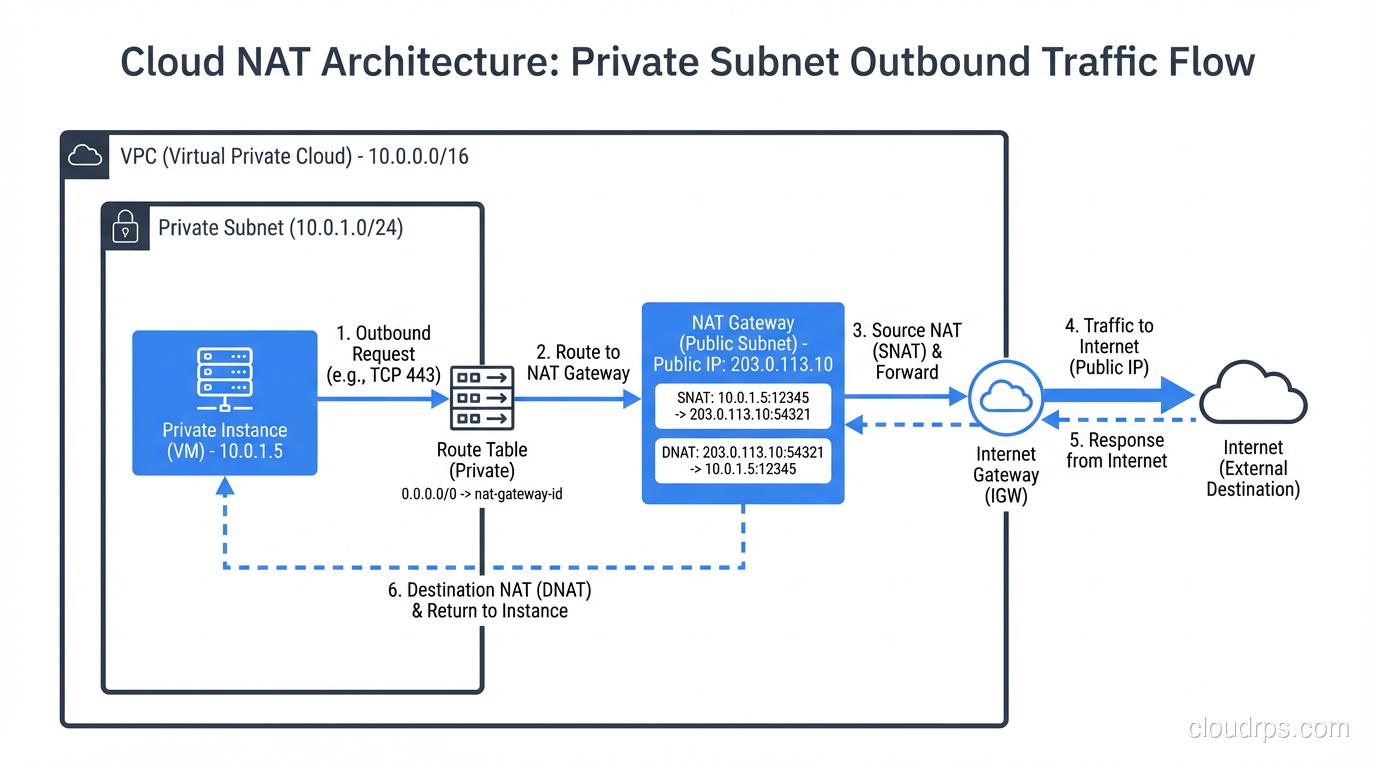
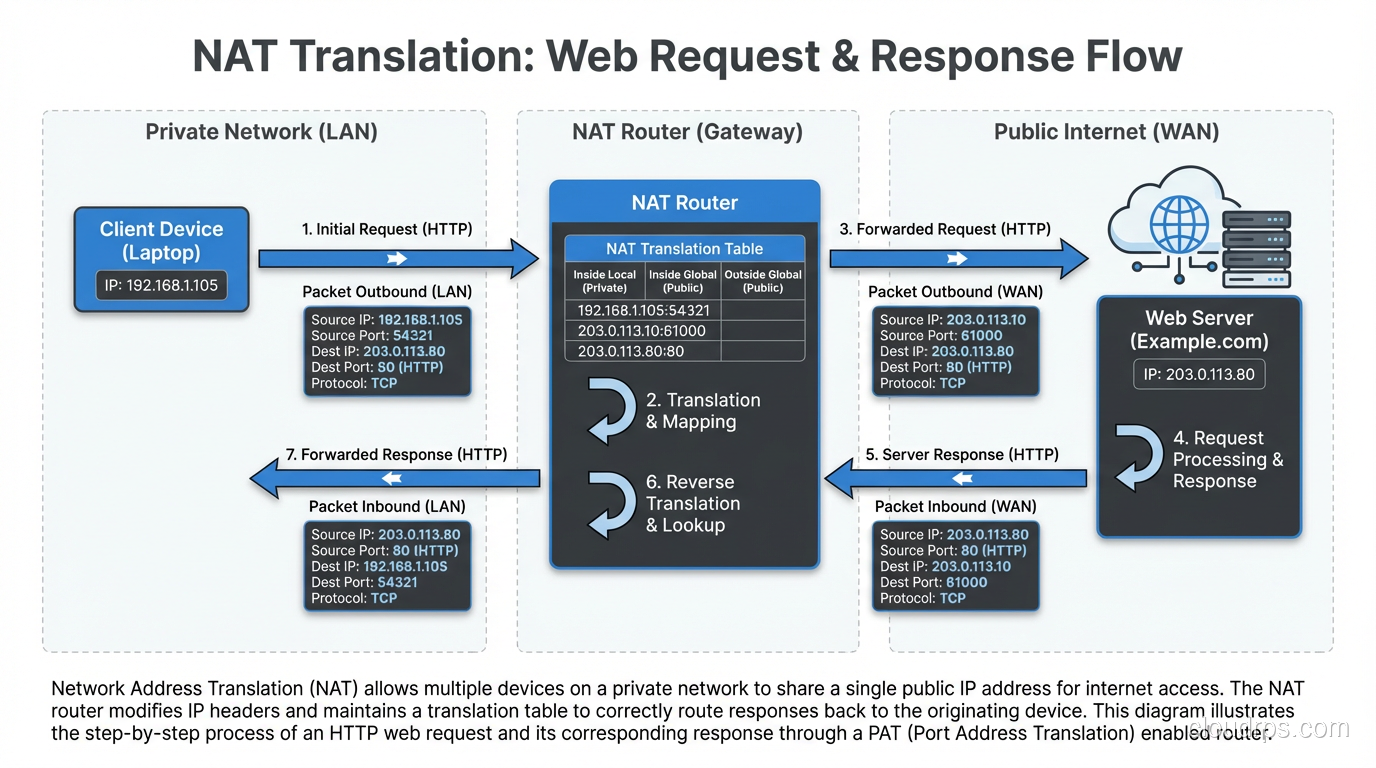
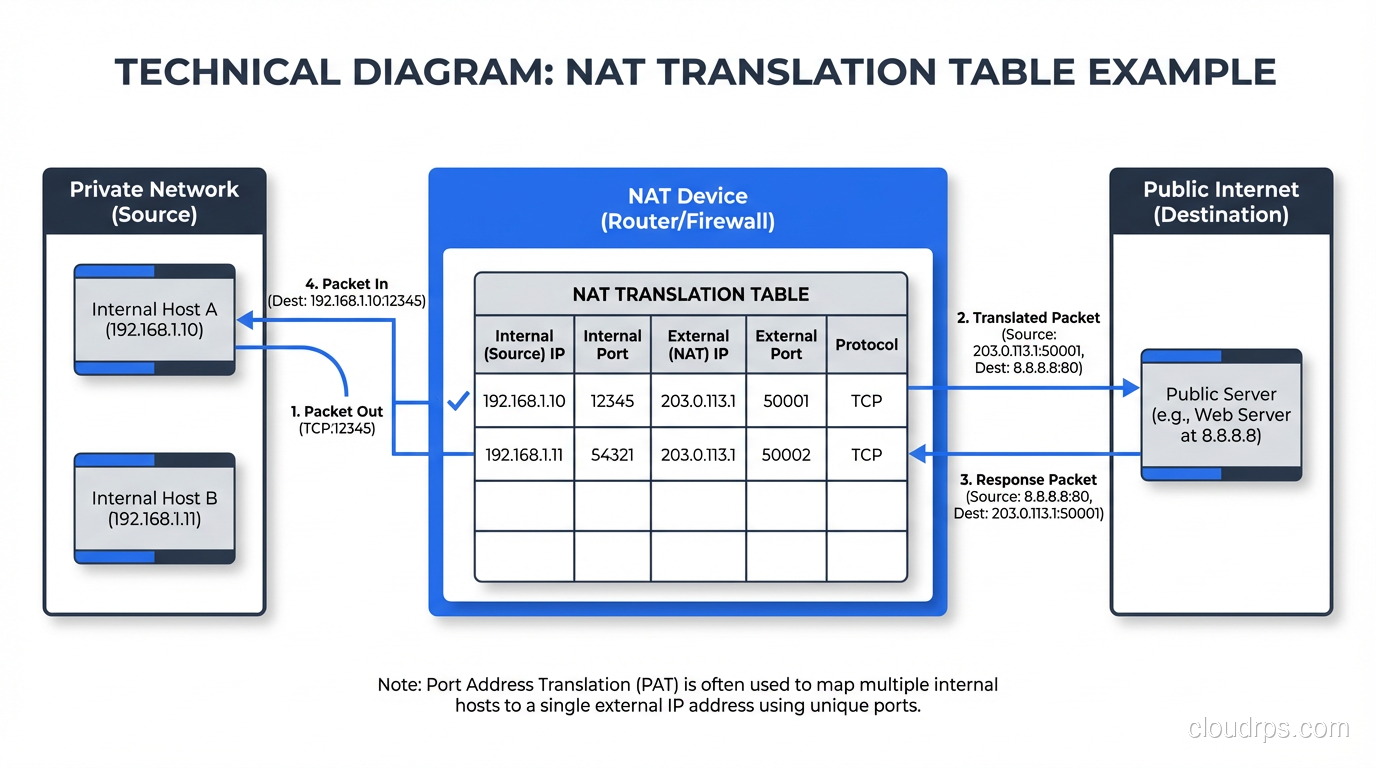
NAT sits at the boundary between a private network and a public network, typically on a router or firewall. When a device on the private network sends a packet to the internet, the NAT device rewrites the source IP address in the packet header, replacing the private address with a public address. When the response comes back, the NAT device rewrites the destination address, replacing the public address with the original private address.
Here’s a concrete example:
- Your laptop (192.168.1.100) sends a packet to a web server (93.184.216.34).
- The packet arrives at your home router, which performs NAT.
- The router rewrites the source address from 192.168.1.100 to the router’s public IP, say 203.0.113.50.
- The web server receives the packet and sees it came from 203.0.113.50.
- The web server responds to 203.0.113.50.
- Your router receives the response, looks up its NAT translation table, and rewrites the destination from 203.0.113.50 back to 192.168.1.100.
- Your laptop receives the response, oblivious to the translation that happened.
The key piece is the NAT translation table. The router maintains a mapping of internal addresses and ports to external addresses and ports. Without this table, the router wouldn’t know which internal device to forward return traffic to.
Types of NAT
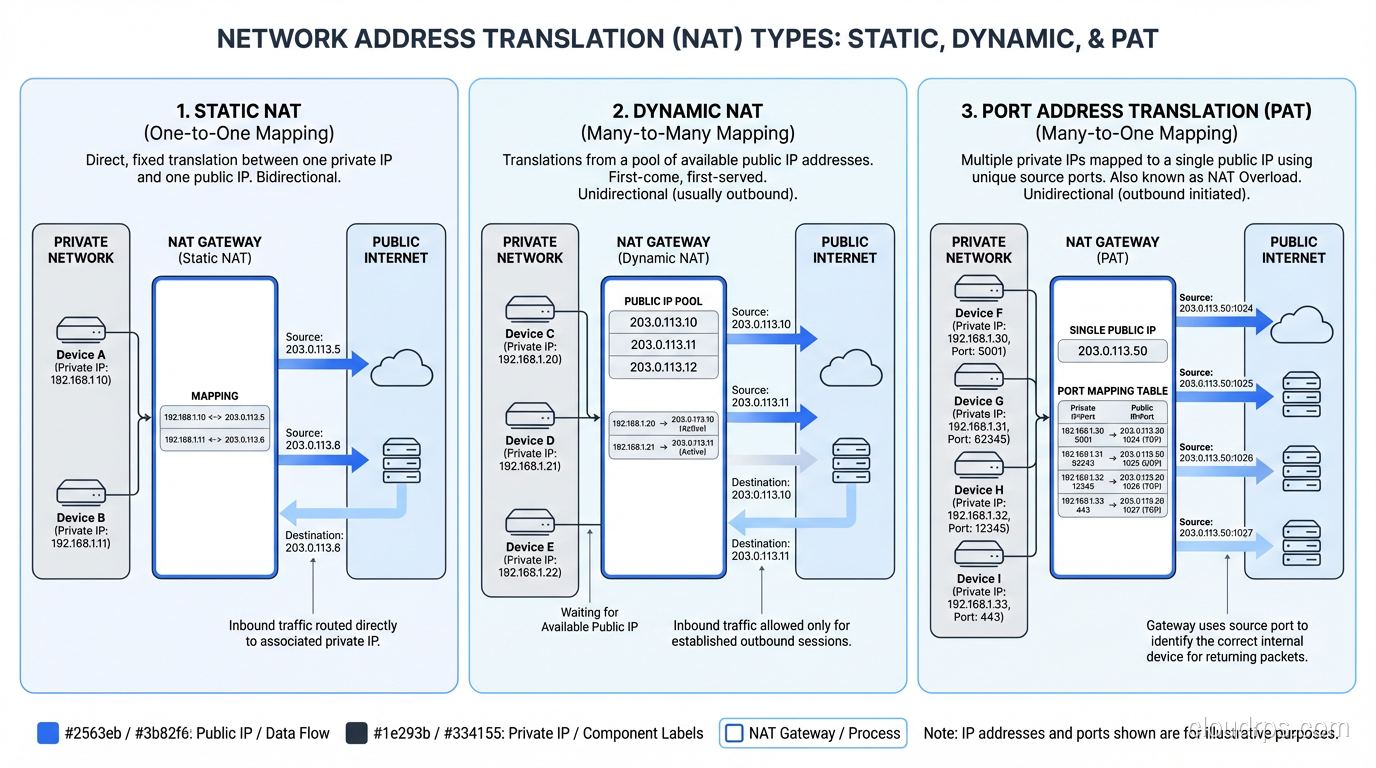
Not all NAT is the same. There are several distinct flavors, each with different use cases and trade-offs.
Static NAT
Static NAT creates a permanent, one-to-one mapping between a private address and a public address. If you have a server at 10.0.1.50 and you want it reachable from the internet at 203.0.113.10, you create a static NAT entry that maps those two addresses permanently.
This is used when you have internal servers that need to be accessible from the outside: web servers, mail servers, VPN endpoints. The mapping doesn’t change and doesn’t time out.
Static NAT doesn’t save addresses. You need one public IP for every static mapping. Its purpose is to allow external access to internal resources while keeping the internal addressing scheme private.
Dynamic NAT
Dynamic NAT maps private addresses to public addresses from a pool, on a first-come, first-served basis. You configure a pool of, say, 10 public addresses, and the NAT device assigns them to internal devices as they initiate outbound connections. When a connection closes and the mapping times out, that public address goes back into the pool.
Dynamic NAT does save addresses if you have more internal devices than public IPs, as long as not all devices need internet access simultaneously. But it has a hard limit: if all pool addresses are in use and another device tries to connect, it’s out of luck.
I almost never see dynamic NAT in modern deployments. PAT (below) is almost universally preferred because it’s far more efficient.
PAT (Port Address Translation)
PAT (also called NAT overload, NAPT, or sometimes just “NAT” in casual conversation) is what your home router does. It maps multiple private addresses to a single public address by using port numbers to distinguish between connections.
Here’s how it works:
- Your laptop (192.168.1.100:54321) connects to a web server.
- Your phone (192.168.1.101:49876) connects to a different web server.
- The router translates both to the same public IP (203.0.113.50) but uses different source ports: 203.0.113.50:10001 for the laptop and 203.0.113.50:10002 for the phone.
- When responses come back to port 10001, the router knows that maps to the laptop. Port 10002 maps to the phone.
PAT is incredibly efficient. A single public IP can support roughly 65,000 simultaneous connections (limited by the number of available ports, minus reserved ranges). In practice, with modern connection tracking, a single IP can handle even more because the same port can be reused for connections to different destinations.
This is the form of NAT that runs the consumer internet. Every home router, every corporate firewall, every mobile carrier uses PAT.
Carrier-Grade NAT (CGNAT)
When ISPs themselves started running out of IPv4 addresses, they deployed NAT at the carrier level. CGNAT (defined in RFC 6598) puts another layer of NAT between the customer’s router and the public internet.
With CGNAT, your home router performs NAT from your devices to a private address (often from the 100.64.0.0/10 range reserved specifically for CGNAT). Then the ISP’s CGNAT device performs another NAT from that private address to a shared public address. You’re behind two layers of NAT.
CGNAT has real consequences:
- Port forwarding doesn’t work. You can’t host a game server or access your home security cameras from outside without using relay services.
- IP reputation suffers. When hundreds of customers share one public IP, if one of them sends spam, the whole IP gets blocklisted. Everyone suffers.
- Logging requirements explode. For law enforcement and abuse complaints, ISPs have to log not just IP addresses but port ranges and timestamps to identify specific customers.
- Port exhaustion becomes real. With thousands of customers behind one public IP, the 65,535 port limit is no longer theoretical.
I worked with an ISP that had deployed CGNAT and was seeing bizarre customer complaints: online banking sessions timing out, video calls dropping, certain gaming services not connecting. The root cause in every case was CGNAT interactions with applications that didn’t expect to be behind double NAT.
NAT in Cloud Environments
Cloud networking makes heavy use of NAT, but it’s abstracted behind managed services.
AWS NAT Gateway
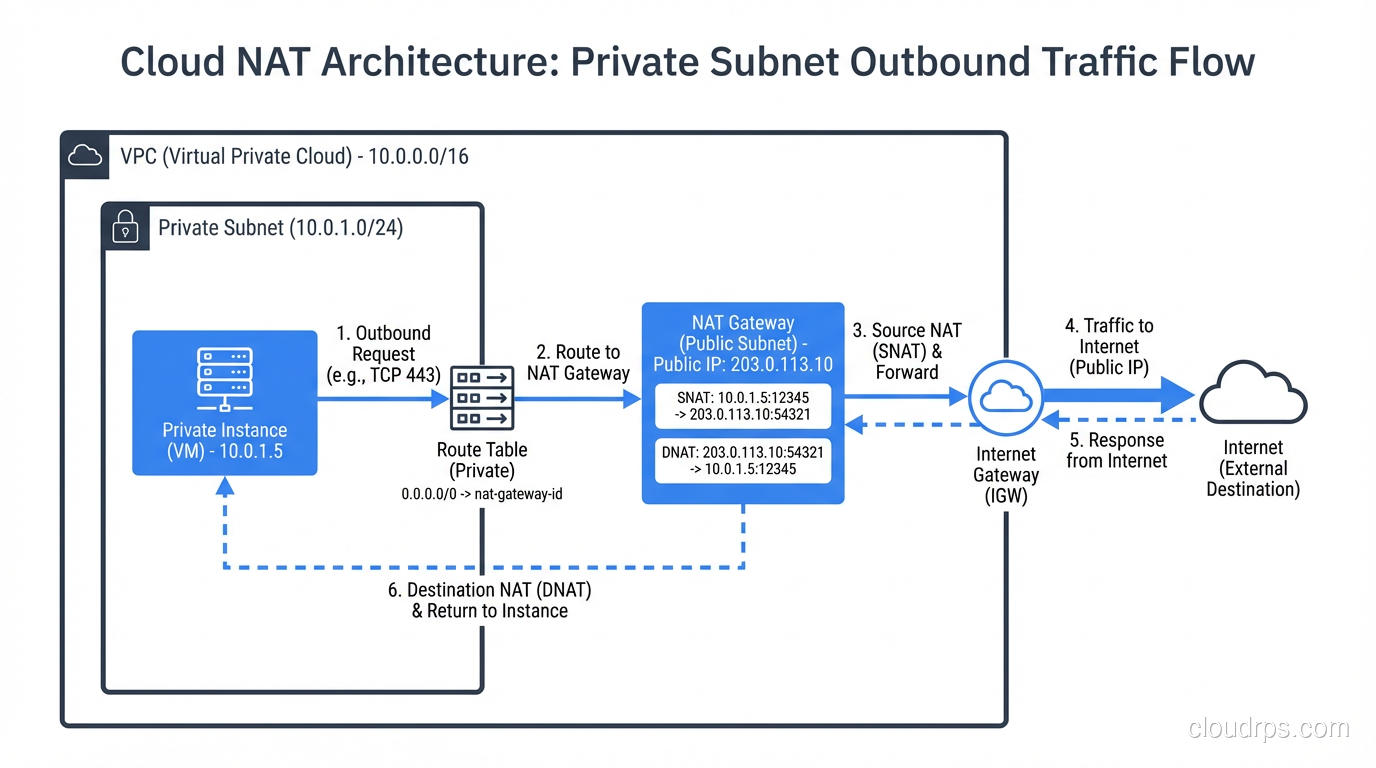
In AWS, instances in private subnets can’t reach the internet directly. You deploy a NAT Gateway in a public subnet, and route outbound traffic from private subnets through it. The NAT Gateway performs PAT, translating private instance addresses to the gateway’s Elastic IP.
At $0.045 per hour plus $0.045 per GB of processed data, NAT Gateways are one of the sneakiest costs in AWS bills. I’ve seen companies spending thousands of dollars per month on NAT Gateway data processing charges because their private instances were pulling Docker images, package updates, and API calls through it. If your traffic is heading to other AWS services, use VPC endpoints instead. They bypass NAT entirely.
Azure NAT Gateway
Azure’s implementation is similar. A NAT Gateway resource provides outbound connectivity for VMs in a virtual network. Azure also supports multiple public IPs per NAT Gateway for higher port availability.
GCP Cloud NAT
Google Cloud’s Cloud NAT is a software-defined NAT service. It’s regional and handles NAT for VMs without external IP addresses. GCP’s implementation automatically allocates ports across NAT IPs, which is a nice touch that reduces port exhaustion issues.
In all three clouds, understanding NAT behavior is critical for designing secure network architectures and debugging connectivity issues.
NAT and Security: The Persistent Myth
I need to address this directly because I hear it constantly: “NAT provides security.”
NAT provides obscurity, not security. Yes, devices behind NAT aren’t directly reachable from the internet. That’s a side effect of how NAT works, not a security feature. NAT hides your internal topology, which makes scanning and reconnaissance harder, but it doesn’t protect against any attack that originates from inside the network, and it doesn’t protect against attacks that your devices initiate (visiting a malicious website, downloading malware, etc.).
A stateful firewall provides the security that people attribute to NAT. And you can have a stateful firewall without NAT (as is common in IPv6 deployments). The confusion arises because most NAT devices are also firewalls, so the security comes from the firewall rules, not from the address translation.
In IPv6 networks, where every device can have a globally routable address, the firewall does the heavy lifting. No NAT needed. The security posture is the same, or better, because you don’t have the operational complexity of translation tables and broken end-to-end connectivity.
NAT Traversal: The Bane of Peer-to-Peer
NAT creates a fundamental problem for any application where two endpoints behind NAT need to communicate directly. If both your laptop and your friend’s laptop are behind NAT, neither can initiate a connection to the other because neither has a publicly reachable address.
The solutions are collectively called “NAT traversal” techniques:
STUN (Session Traversal Utilities for NAT): A device sends a request to a STUN server on the public internet. The server tells the device what its public IP and port are (as seen by the STUN server). The device can then share this information with a peer, who can attempt to send packets to that public address:port. This works for the simpler types of NAT but fails for symmetric NAT.
TURN (Traversal Using Relays around NAT): When direct peer-to-peer communication is impossible (both devices are behind restrictive NAT), traffic is relayed through a TURN server. The TURN server has a public address and acts as an intermediary. This always works but adds latency and bandwidth costs because all traffic passes through the relay.
ICE (Interactive Connectivity Establishment): The framework that ties STUN and TURN together. ICE tries multiple connectivity methods in order of preference (direct connection, STUN-assisted connection, TURN relay) and picks the best one that works. WebRTC uses ICE, which is why video calls usually manage to work regardless of your NAT situation.
UDP hole punching: A technique where both NAT devices are tricked into creating outbound mappings that the peer can then use. It’s clever, unreliable on restrictive NAT types, and forms the basis of how many peer-to-peer systems work.
Every one of these techniques adds complexity, latency, and potential failure modes. In an IPv6 world with globally routable addresses, none of this would be necessary. This is one of the strongest arguments for moving to IPv6. For more on CIDR and address planning that can help with your transition, we’ve covered that separately.
Debugging NAT Issues
When NAT goes wrong, it can be maddening. The symptoms are often intermittent and confusing.
Connection timeouts: NAT tables have finite lifetimes. If an idle TCP connection doesn’t send keepalive packets, the NAT mapping may expire, and the next packet gets dropped because the NAT device doesn’t recognize it as part of an existing conversation. This is especially common with long-lived database connections and WebSocket connections.
I once debugged an issue where an application’s database connections were failing every 30 minutes. The application used connection pooling with connections that could be idle for hours. The AWS NAT Gateway was expiring idle TCP mappings after 350 seconds. The fix was to enable TCP keepalives with an interval shorter than 350 seconds. Simple in hindsight, infuriating to diagnose.
Asymmetric routing: In environments with multiple NAT devices or multiple internet links, it’s possible for outbound traffic to go through one NAT device and return traffic to arrive at another. The second device doesn’t have the translation entry, so it drops the packet. This is subtle and requires careful routing design.
Port exhaustion: When a single internal host opens many connections through PAT (common with web scrapers, monitoring systems, or microservices making many API calls), it can exhaust available ports on the NAT device. The symptom is intermittent connection failures from specific hosts.
For debugging, I rely on the NAT translation table. On Cisco devices, show ip nat translations gives you the current state. On Linux, conntrack -L shows the connection tracking table (which is what NAT uses under the hood). In AWS, VPC Flow Logs will show you the pre-NAT and post-NAT addresses.
NAT64 and the IPv6 Transition
As the internet transitions to IPv6, NAT takes on a new role. NAT64 is a mechanism that allows IPv6-only devices to communicate with IPv4-only servers. A NAT64 gateway translates between the two protocols, mapping IPv6 addresses to IPv4 addresses and vice versa.
This is particularly relevant for mobile carriers that have deployed IPv6-only networks (like T-Mobile). When an IPv6-only smartphone needs to access a legacy IPv4-only website, the carrier’s NAT64 gateway handles the translation.
DNS64 works alongside NAT64. It synthesizes AAAA (IPv6) DNS records for domains that only have A (IPv4) records, pointing IPv6 clients to the NAT64 gateway.
NAT64 is explicitly a transition technology. The end goal is a world where everything speaks IPv6 natively and NAT becomes unnecessary. We’re not there yet, but the trajectory is clear.
Wrapping Up
NAT is one of the most impactful technologies in the history of the internet. It single-handedly extended the life of IPv4 by decades, enabling the explosion of connected devices that we take for granted. But it came at a cost: broken end-to-end connectivity, complex NAT traversal workarounds, debugging nightmares, and an entire class of applications that are harder than they should be.
Understanding NAT (how it works, the different types, and its failure modes) is essential for anyone working with networks. Whether you’re configuring a home router, designing a cloud VPC, or troubleshooting why your application can’t establish peer-to-peer connections, NAT is probably involved.
The future is IPv6, where every device gets a globally routable address and NAT becomes a historical curiosity. But that future is still years away for most networks. In the meantime, NAT remains one of the most important tools in a network engineer’s toolkit.
Updated September 1, 2026: corrected biographical details as part of an accuracy review.
Get Cloud Architecture Insights
Practical deep dives on infrastructure, security, and scaling. No spam, no fluff.
By subscribing, you agree to receive emails. Unsubscribe anytime.