
I deployed my first OpenStack cluster in 2013. It was the Grizzly release, and it took my team three weeks to get a basic compute environment working. The documentation had gaps you could drive a truck through. Networking was a disaster. The deployment tooling was immature at best.
I deployed my most recent OpenStack cluster in 2023. It took two days. The tooling has matured enormously. The documentation is actually helpful. Networking works as expected. The platform has grown from an ambitious experiment into serious infrastructure.
Between those two deployments, I’ve watched OpenStack nearly die, reinvent itself, and find its place in the cloud landscape. That decade of experience gives me a perspective that most OpenStack guides don’t have: I know when it’s the right answer, when it’s the wrong answer, and why.
What OpenStack Actually Is
OpenStack is an open-source platform for building and managing cloud infrastructure. Think of it as an AWS-like layer that you install on your own hardware. It gives you API-driven provisioning of virtual machines, networking, storage, and identity management, the same core capabilities that make cloud computing valuable, but running on hardware you own and control.
That description makes it sound simple. It is absolutely not simple.
OpenStack is actually a collection of interconnected projects, each handling a specific infrastructure function. You pick and choose the components you need, configure them to work together, and operate the result. It’s more like building a car from parts than buying a car. If you enjoy that kind of thing (I do), it’s deeply satisfying. If you just want to drive somewhere, you might prefer a car that already works.
The Core Components
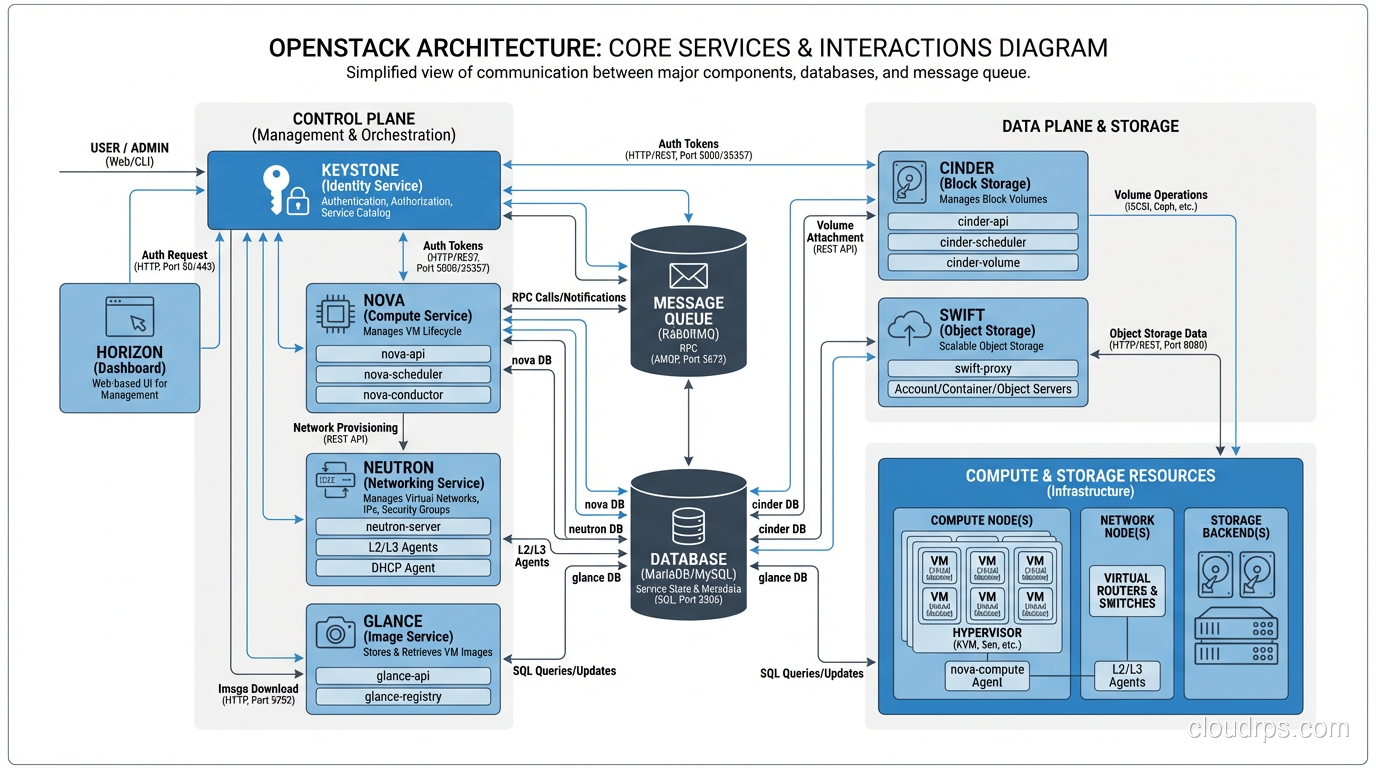
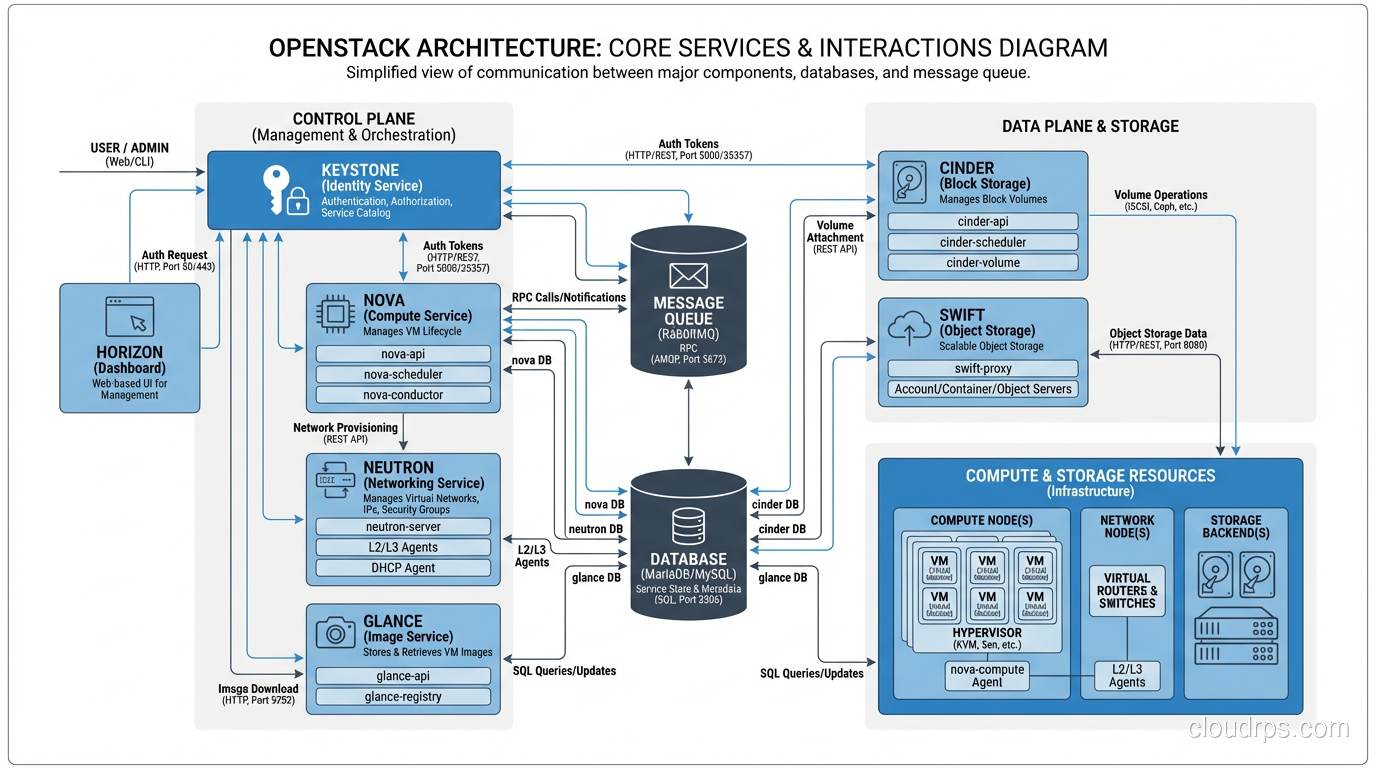
OpenStack’s strength is its modular architecture. Each component (service) handles one aspect of cloud infrastructure and communicates with others through APIs. Here are the core services that every OpenStack deployment includes:
Nova (Compute)
Nova is the compute service. It manages virtual machines. You ask Nova for a VM with specific specs, and Nova finds a physical host with available capacity, launches the VM using a hypervisor (typically KVM), and manages its lifecycle.
Nova is the heart of OpenStack. It handles scheduling (which physical host gets which VM), quotas (how many resources each project can consume), and integration with networking and storage services. If you’ve used EC2, Nova is the equivalent.
In my deployments, Nova is the component that works most reliably. It’s the oldest, most battle-tested part of OpenStack, and it shows.
Neutron (Networking)
Neutron provides virtual networking: tenant-isolated networks, subnets, routers, floating IPs, security groups, load balancers. It’s the equivalent of VPC in AWS.
Neutron is also the component that has caused me the most pain. Networking in OpenStack is genuinely complex because it’s solving a genuinely complex problem: creating isolated virtual networks for multiple tenants on shared physical infrastructure. The combination of Linux bridges, OVS (Open vSwitch), overlay networks (VXLAN), and provider networks creates a stack that’s powerful but difficult to debug when things go wrong.
In my experience, 60% of OpenStack troubleshooting is Neutron troubleshooting. If you’re evaluating OpenStack, make sure your team has strong Linux networking skills.
Cinder (Block Storage)
Cinder provides persistent block storage, the equivalent of EBS. You create volumes, attach them to VMs, and they persist independently of the VM lifecycle. Under the hood, Cinder integrates with various storage backends: Ceph (most common in production), LVM, NetApp, Pure Storage, and dozens of others.
Cinder with Ceph as the backend is a combination I’ve used successfully in multiple production environments. Ceph provides distributed, replicated storage, and Cinder provides the API layer and lifecycle management. It works well, though Ceph itself requires operational expertise.
Swift (Object Storage)
Swift is object storage, the equivalent of S3. Store and retrieve unstructured data via HTTP API. Swift is self-healing, meaning it automatically detects and repairs corrupted or missing data replicas.
Swift was one of the original OpenStack projects, and it’s one of the most mature. Some organizations run Swift even if they don’t run the rest of OpenStack, just for object storage.
Keystone (Identity)
Keystone handles authentication and authorization. Every API call to every OpenStack service goes through Keystone for identity verification. It supports local authentication, LDAP integration, and federated identity (SAML, OpenID Connect).
Keystone is the glue that holds OpenStack together. When Keystone is down, nothing works. Design it for redundancy.
Glance (Image Service)
Glance manages VM images, the templates used to launch instances. Upload an Ubuntu cloud image to Glance, and Nova uses it to boot VMs. Glance stores images in a backend (Swift, Ceph, local filesystem, S3-compatible storage).
When OpenStack Makes Sense
After a decade of OpenStack deployments, here are the scenarios where I actively recommend it:
Regulatory Requirements for On-Premises Infrastructure
Some industries and governments require that data stays on infrastructure you physically control. Financial services, defense, healthcare in certain jurisdictions. When you can’t use public cloud, OpenStack gives you a cloud-like operating model on hardware you own.
Predictable, Large-Scale Compute
If you’re running thousands of VMs with predictable demand, the economics shift away from public cloud. I’ve seen organizations where a 1,000-node OpenStack cluster costs 30-40% less per compute-hour than the equivalent EC2 instances at reserved pricing. The break-even point depends on your scale, utilization rates, and operational staff costs, but at sufficient scale, the economics favor private cloud.
Edge and Telecom
Telecom companies and organizations deploying infrastructure at edge locations use OpenStack extensively. It’s the de facto platform for NFV (Network Function Virtualization) and telecom edge clouds. If you’re building a telco cloud, you’re probably looking at OpenStack.
Development and Testing Environments
OpenStack is excellent for providing self-service development environments. Developers get cloud-like APIs for provisioning VMs and networks without the cost of public cloud. I’ve deployed several internal development clouds on OpenStack that served hundreds of developers cost-effectively.
Training and Education
If you want to understand how cloud infrastructure works at the deepest level, deploying OpenStack is the best education available. You’ll learn about every layer of the cloud stack (compute, networking, storage, identity, orchestration) because you’re building all of them.
When OpenStack Does NOT Make Sense
Equally important are the scenarios where I actively steer people away from OpenStack:
Small Deployments
If you need fewer than 20-30 compute nodes, the operational overhead of OpenStack doesn’t justify itself. The management infrastructure alone (control plane nodes, monitoring, logging) consumes a non-trivial number of servers. At small scale, the overhead-to-compute ratio is unfavorable.
Teams Without Linux Expertise
OpenStack runs on Linux, is configured in Linux, is debugged in Linux, and fails in Linux-specific ways. If your team isn’t deeply comfortable with Linux systems administration, networking, and storage, OpenStack will be an ongoing struggle.
Chasing Feature Parity with AWS
If you need the breadth of AWS services (machine learning, managed databases, analytics, IoT), OpenStack isn’t the answer. OpenStack provides IaaS: compute, storage, and networking. It doesn’t provide the hundreds of managed services that public cloud offers. Organizations that deploy OpenStack expecting an AWS-like experience are always disappointed.
When Time-to-Market Matters Most
OpenStack takes weeks to months to deploy, stabilize, and operationalize. Public cloud takes minutes. If your priority is shipping product quickly, the operational investment in OpenStack is a distraction.
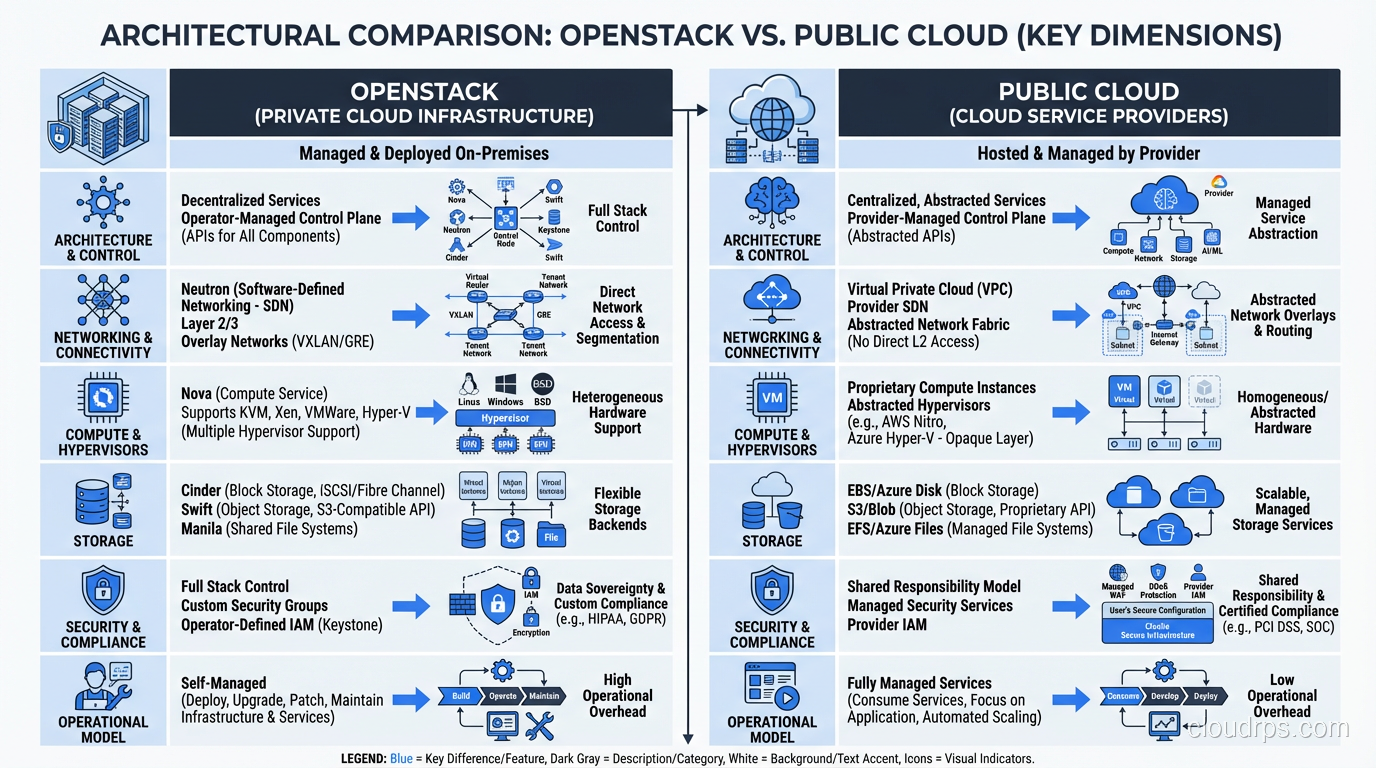
OpenStack vs Public Cloud: An Honest Comparison
| Aspect | OpenStack | Public Cloud (AWS/Azure/GCP) |
|---|---|---|
| Initial cost | High (hardware + deployment) | None |
| Ongoing cost at scale | Lower per compute-hour | Higher per compute-hour |
| Time to first VM | Weeks to months | Minutes |
| Service breadth | IaaS (compute/network/storage) | Hundreds of managed services |
| Operational overhead | High (you manage everything) | Low (provider manages infrastructure) |
| Data sovereignty | Complete control | Provider-dependent |
| Customization | Full (open source) | Limited (provider’s choices) |
| Scaling ceiling | Your hardware budget | Effectively unlimited |
The honest summary: OpenStack trades operational simplicity for control and potentially better economics at scale. Public cloud trades cost at scale for operational simplicity and service breadth.
Deploying OpenStack: What It Actually Takes
Let me be concrete about what deploying OpenStack in production requires, because I’ve seen too many projects fail due to underestimating the effort.
Hardware
At minimum for a production deployment:
- 3 controller nodes (high availability for the control plane): 32+ GB RAM, 8+ cores, SSD storage
- Compute nodes (as many as you need): CPU and RAM optimized for your workloads
- 3+ storage nodes (if using Ceph): lots of disks, 10GbE networking minimum
- 2 network nodes (for routing and NAT): 10GbE networking
- Management network (out-of-band management, IPMI)
- Provider network (tenant traffic)
- Storage network (Ceph replication traffic)
Physically separating network traffic types is important for performance and security. I’ve seen deployments that tried to run everything on a single network and hit bandwidth ceilings within months.
Deployment Tooling
Don’t deploy OpenStack by hand. Use one of the established deployment tools:
- Kolla-Ansible: Deploys OpenStack in Docker containers using Ansible. My current recommendation for most deployments. Containerized services simplify upgrades significantly.
- TripleO: OpenStack-on-OpenStack. Uses a small “undercloud” OpenStack to deploy the “overcloud” production OpenStack. Powerful but complex. The Red Hat/OSP approach.
- MAAS + Juju: Canonical’s approach. MAAS provisions bare metal, Juju deploys OpenStack. Works well in the Ubuntu ecosystem.
Team
This is the part people underestimate most. A production OpenStack deployment requires:
- Linux systems administration expertise
- Networking expertise (L2/L3, overlays, Linux networking stack)
- Storage expertise (Ceph or equivalent)
- OpenStack-specific knowledge
- Monitoring and capacity management skills
For a mid-size deployment (50-200 compute nodes), I typically recommend a dedicated team of 3-5 engineers for ongoing operations. That’s a significant staffing commitment.
The Evolution of OpenStack
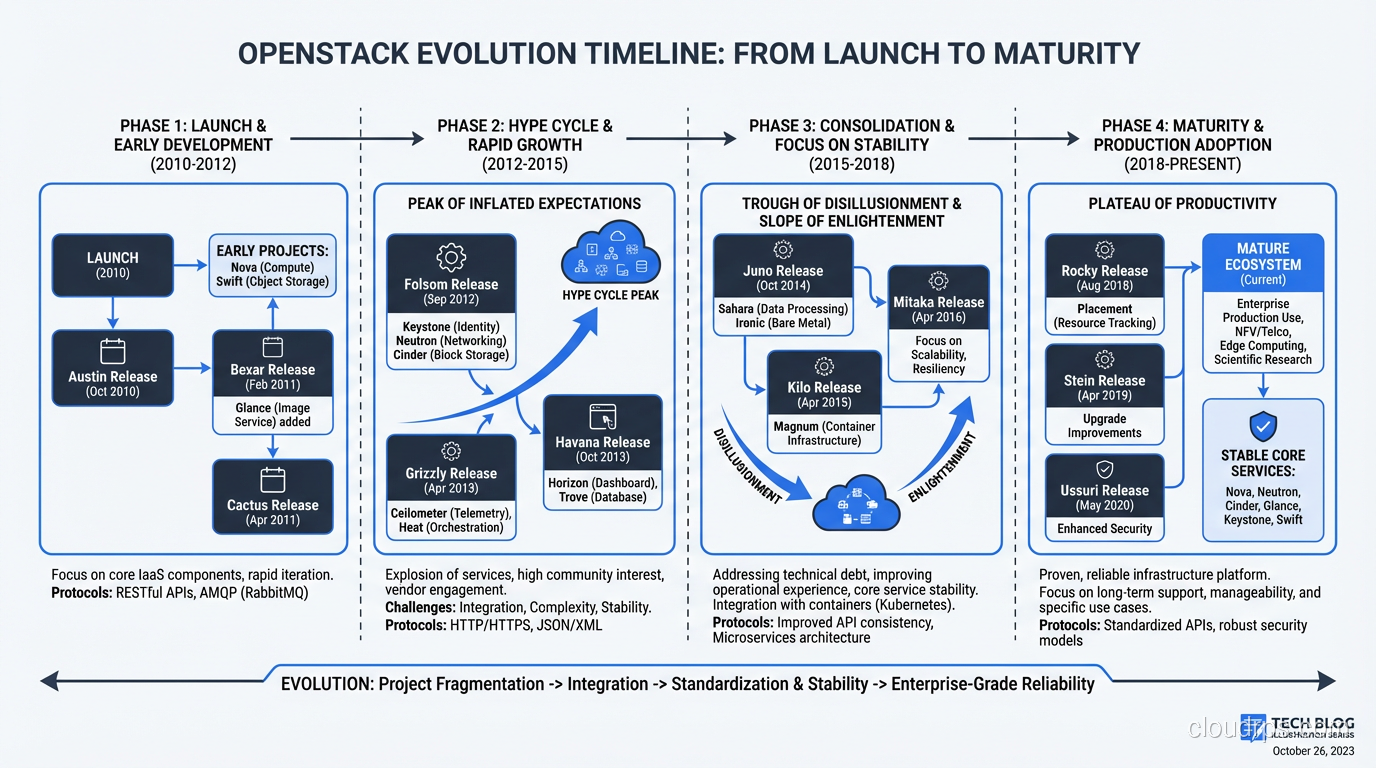
OpenStack has changed substantially since its peak hype around 2014-2016. At that point, the OpenStack Summit attracted 7,000+ attendees and every infrastructure vendor was rushing to add OpenStack support.
The hype cycle played out predictably. Expectations exceeded reality. Deployments failed because organizations underestimated the operational complexity. The narrative shifted from “OpenStack will replace AWS” to “OpenStack is dead.”
Neither narrative was right. OpenStack didn’t replace AWS, and it didn’t die. It matured into a stable, well-understood platform with a clear niche: private cloud for organizations that need it. The community got smaller but more focused. The releases got more stable. The tooling got better.
Today’s OpenStack is a much better product than the 2014 version, running in production at scale in telecoms, research institutions, financial services, and government agencies worldwide. The hype is gone, which means the people still using it are using it for the right reasons.
My Honest Recommendation
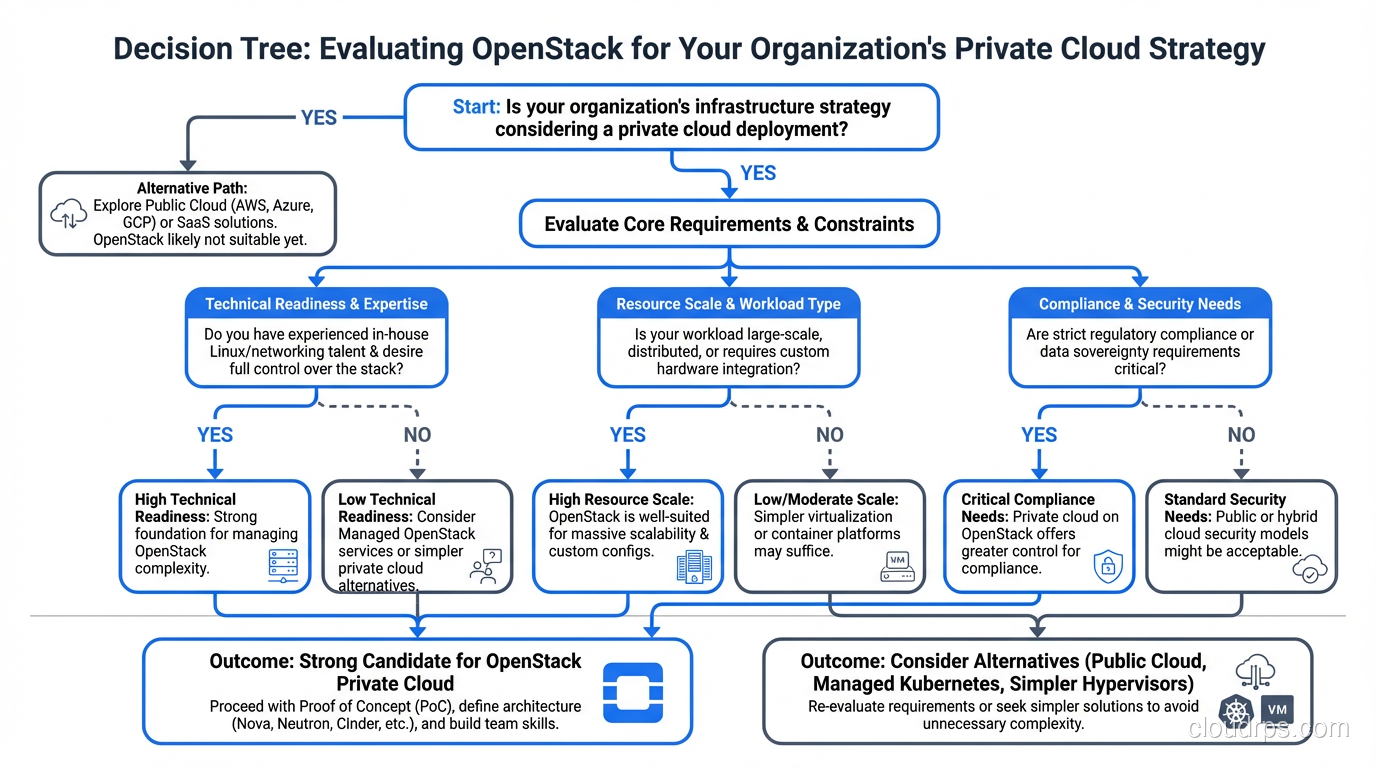
If you’re considering OpenStack, ask yourself these questions:
- Do I have a genuine reason to run infrastructure on-premises? (Regulatory, economic, or strategic, not just preference)
- Do I have the team to operate it? (Linux, networking, storage expertise at a professional level)
- Is my scale sufficient to justify the operational overhead? (30+ compute nodes minimum)
- Am I okay with IaaS-only? (No managed databases, ML services, or serverless equivalent)
If you answered yes to all four, OpenStack deserves serious evaluation. If you answered no to any of them, public cloud is probably the better choice.
I’ve deployed OpenStack successfully for organizations that needed it. I’ve also talked organizations out of OpenStack when it wasn’t the right fit. The platform is powerful and mature, but it demands respect: respect for its complexity, respect for the operational investment it requires, and respect for the problems it solves versus the ones it doesn’t.
After ten years and more OpenStack clusters than I can count, that’s where I’ve landed. It’s a tool. A very good tool for certain jobs. And like all tools, using it for the wrong job doesn’t make it a bad tool. It makes it the wrong choice.
Get Cloud Architecture Insights
Practical deep dives on infrastructure, security, and scaling. No spam, no fluff.
By subscribing, you agree to receive emails. Unsubscribe anytime.