
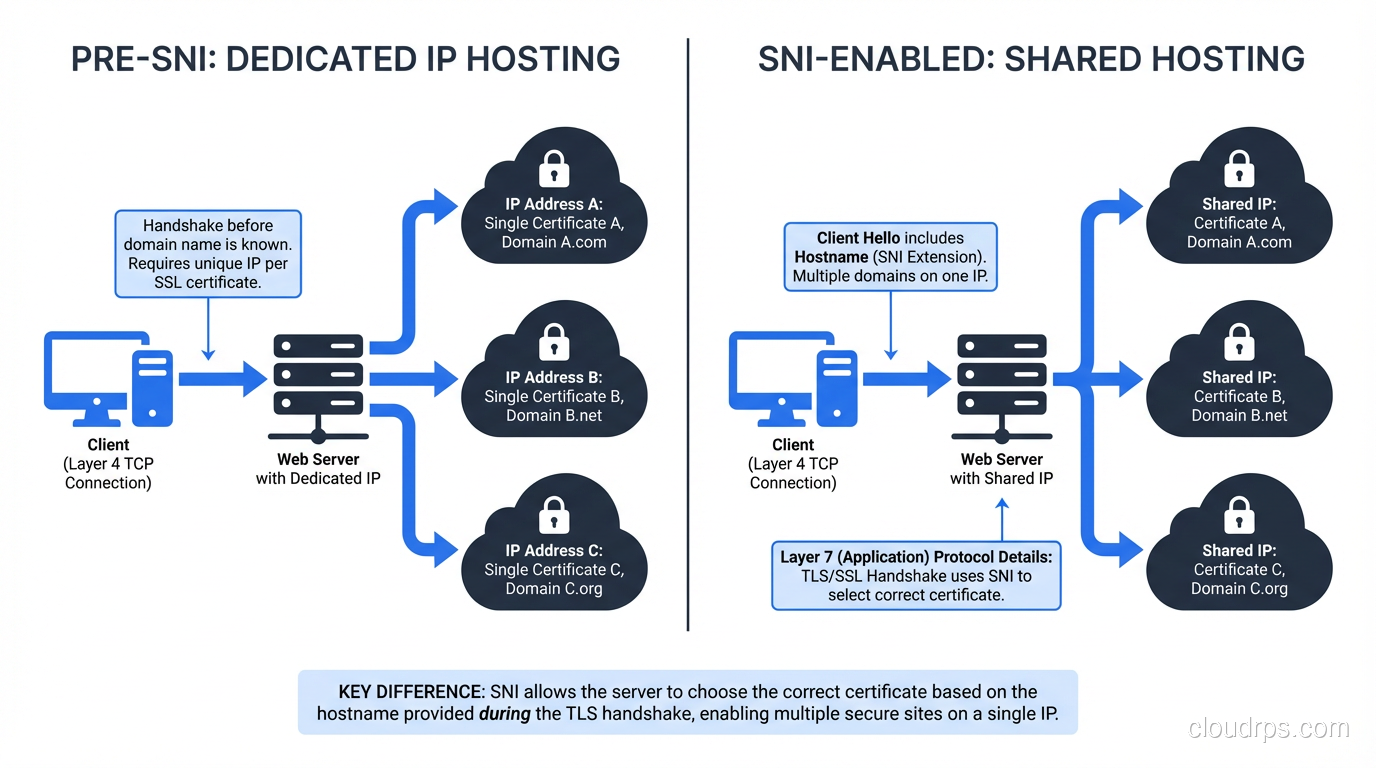
If you’ve ever wondered how Cloudflare, AWS CloudFront, or any shared hosting provider manages to serve HTTPS for millions of domains from a relatively small pool of IP addresses, the answer is three letters: SNI.
Server Name Indication is one of those quiet, unglamorous pieces of internet infrastructure that most developers never think about until something breaks and they’re staring at a certificate mismatch error at 2 AM. I’ve been in that exact situation more times than I’d like to admit, and every time it traces back to someone not understanding how SNI works under the hood.
Let me walk you through it properly.
The Problem SNI Was Built to Solve
Back in the early days of HTTPS, there was a fundamental conflict between two things the internet needed: virtual hosting and encrypted connections.
HTTP/1.1 introduced the Host header, which was revolutionary. It meant a single web server on a single IP address could host hundreds of different websites. The server would read the Host header from the incoming HTTP request and route traffic to the right virtual host. Simple. Elegant. It’s how shared hosting became cheap enough that anyone could have a website for $5 a month.
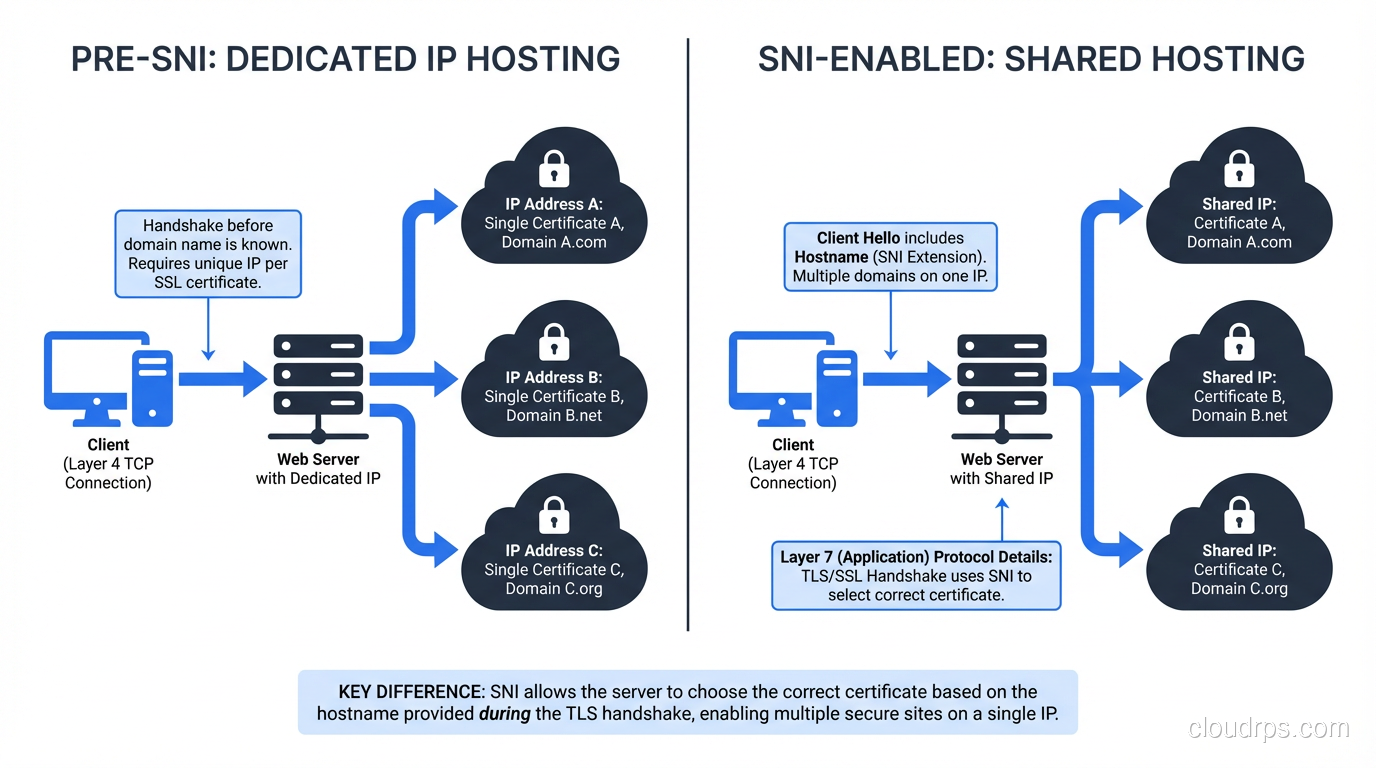
But here’s the catch. With TLS (formerly SSL), the encrypted connection has to be established before any HTTP data is sent. The server needs to present a certificate during the TLS handshake, but at that point, it hasn’t seen the Host header yet, because the HTTP request is inside the encrypted tunnel that hasn’t been built yet.
Think of it like this: you walk up to an apartment building and ring the buzzer, but you can’t tell the intercom which apartment you want until the front door is already open. The building has to decide which resident to connect you to before you’ve said a word.
So in the pre-SNI world, the server had no idea which domain the client was trying to reach during the TLS handshake. It could only present one certificate. If you wanted HTTPS for multiple domains, you needed one dedicated IP address per domain, each bound to a separate certificate.
Why Dedicated IPs Were Unsustainable
IPv4 addresses are a finite resource, about 4.3 billion of them, and we’ve been running out for years. Burning one IP address per HTTPS domain was simply not going to scale. Let’s look at the math:
| Scenario | IP Addresses Needed |
|---|---|
| Shared host with 500 HTTP domains | 1 |
| Same host with 500 HTTPS domains (pre-SNI) | 500 |
| CloudFront serving 1M custom domains | 1,000,000 |
That CloudFront example isn’t hypothetical. AWS would have needed a million IP addresses just for custom domain HTTPS if SNI didn’t exist. The entire internet would have ground to a halt.
There were workarounds. Multi-domain (SAN) certificates could list multiple domains on a single cert, but they were expensive, inflexible, and a nightmare to manage. Wildcard certificates helped for subdomains but didn’t solve the multi-domain problem. None of these were real solutions.
How SNI Actually Works
SNI was introduced in RFC 4366 (2006) as an extension to TLS. The concept is beautifully simple: the client includes the hostname it’s trying to reach in the very first message of the TLS handshake, the ClientHello.
Here’s the step-by-step flow:
The TLS Handshake with SNI
Client sends ClientHello: This is the opening move of the TLS handshake. Along with supported cipher suites and the TLS version, the client includes an SNI extension containing the target hostname in plaintext. For example:
server_name: www.example.com.Server reads the SNI hostname: Before selecting a certificate, the server checks the SNI value and looks up which certificate corresponds to that domain.
Server sends ServerHello + Certificate: The server picks the right certificate and sends it back, along with its chosen cipher suite.
Handshake completes: Key exchange happens, and the encrypted tunnel is established, all with the correct certificate for the requested domain.
Here’s what a ClientHello with SNI looks like if you capture it with Wireshark or openssl s_client:
$ openssl s_client -connect 93.184.216.34:443 -servername www.example.com

CONNECTED(00000003)
---
Certificate chain
 0 s:C = US, ST = California, L = Los Angeles, O = Internet Corporation for Assigned Names and Numbers, CN = www.example.org
---
Server certificate
-----BEGIN CERTIFICATE-----
MIIHQDCCBiigAwIBAgIQD9...
Notice the -servername flag. That’s the SNI value being sent. Without it, you’d get whatever default certificate the server has configured, which might not match your domain at all.
What the Packet Looks Like
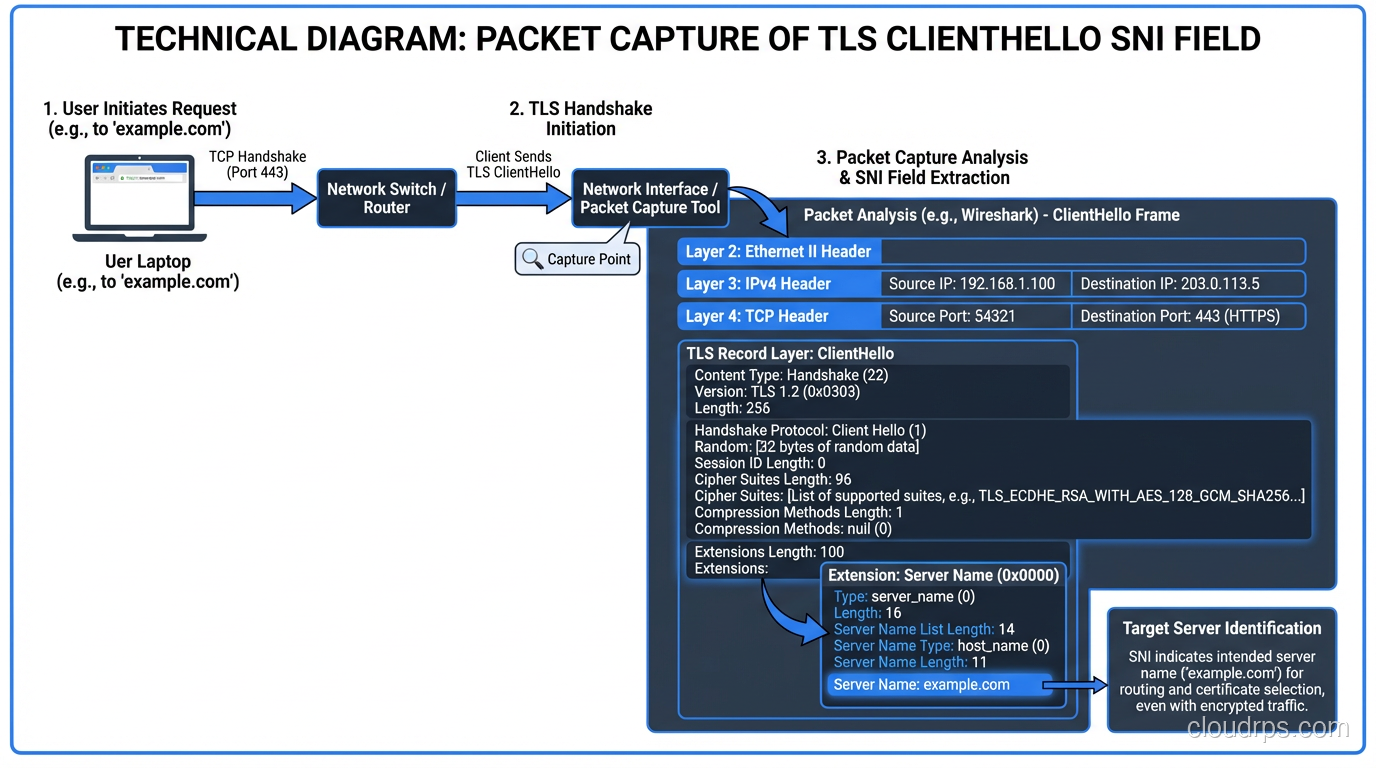
If you’re the type who likes to see the bytes on the wire (and if you’re reading this blog, you probably are), here’s the relevant part of the ClientHello:
Extension: server_name (len=19)
    Server Name Indication extension
        Server Name list length: 17
        Server Name Type: host_name (0)
        Server Name length: 14
        Server Name: www.example.com
The SNI extension is type 0x0000 in the TLS extensions list. The hostname is sent as a DNS name: no path, no port, just the hostname. And critically, it’s sent in plaintext. I’ll come back to why that matters.
Server-Side Configuration
On the server side, SNI support is handled by the TLS library and the web server configuration. Here’s what it looks like in Nginx:
server {
    listen 443 ssl;
    server_name www.alpha.com;
    ssl_certificate /etc/ssl/alpha.com.crt;
    ssl_certificate_key /etc/ssl/alpha.com.key;
}

server {
    listen 443 ssl;
    server_name www.beta.com;
    ssl_certificate /etc/ssl/beta.com.crt;
    ssl_certificate_key /etc/ssl/beta.com.key;
}
Both server blocks listen on the same 443 port (and the same IP). Nginx uses the SNI value from the ClientHello to decide which server block (and therefore which certificate) to use. Apache has VirtualHost equivalents, and HAProxy, Caddy, and Traefik all handle this natively.
SNI in the Real World: CDNs, Cloud, and Edge Networks
SNI is the backbone of how modern content delivery networks operate. Every major CDN (CloudFront, Cloudflare, Fastly, Akamai) relies on SNI to serve HTTPS for millions of customer domains from shared infrastructure.
CloudFront’s SNI Story
AWS CloudFront is a great case study. When CloudFront first launched custom SSL support around 2012-2013, they offered two options:
- SNI Custom SSL: free, uses SNI
- Dedicated IP Custom SSL: $600/month per distribution
That $600/month price wasn’t greed. AWS literally had to allocate dedicated IP addresses across all their edge locations worldwide (hundreds of PoPs) for each distribution that needed dedicated IP SSL. The cost reflected the scarcity of IPv4 addresses.
Today, almost nobody uses the dedicated IP option. SNI support is universal enough that it’s the default, and CloudFront doesn’t even prominently advertise the dedicated IP alternative anymore.
Load Balancers and SNI Routing
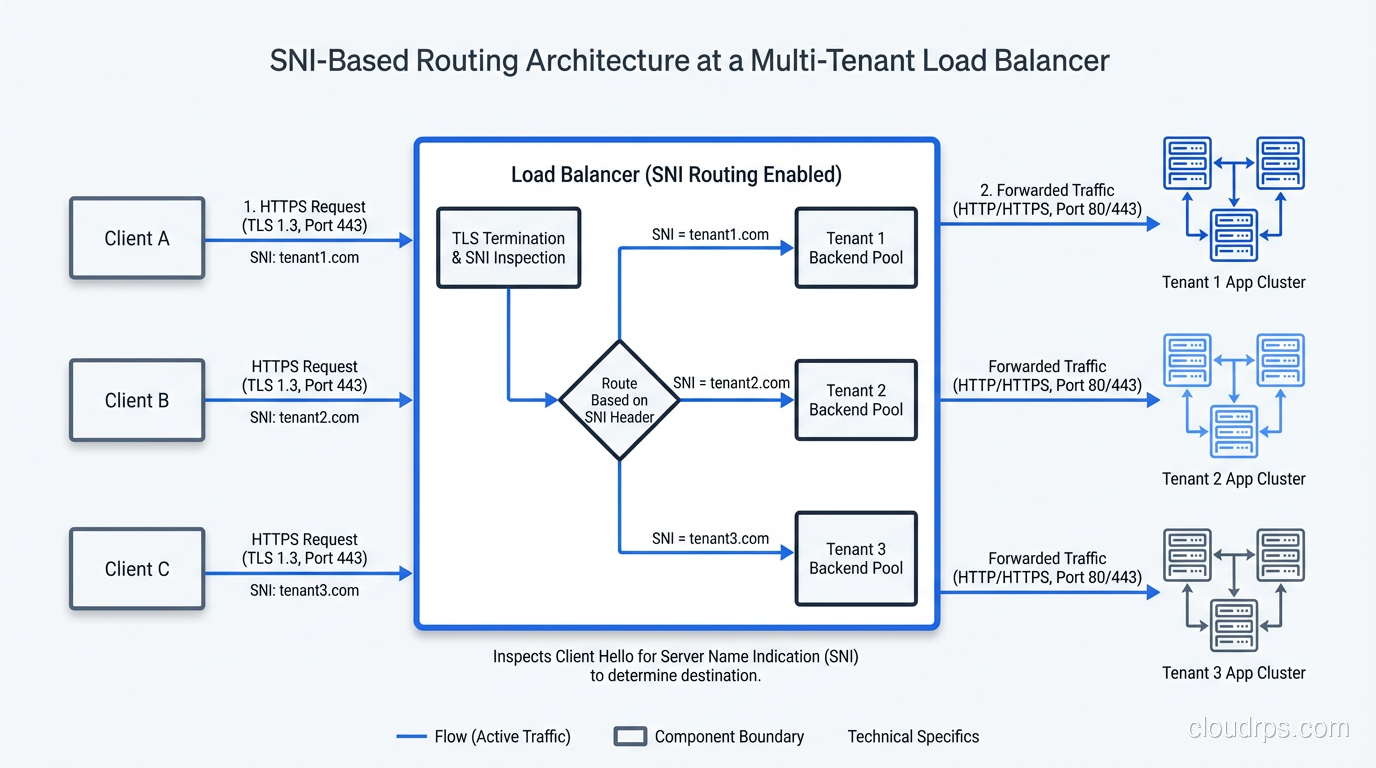
Modern load balancers use SNI for more than just certificate selection. They use it for routing decisions. An AWS Application Load Balancer or an Envoy proxy can inspect the SNI value and route traffic to entirely different backend target groups, before the TLS handshake even completes (in the case of TLS passthrough) or after termination.
This is particularly useful in multi-tenant architectures. I worked on a SaaS platform where we had 3,000+ customer custom domains all pointing to the same set of load balancers. SNI-based routing let us direct traffic to the right tenant’s infrastructure without maintaining thousands of separate listeners.
The Privacy Problem: SNI Leaks Your Destination
Here’s the uncomfortable truth about SNI that security engineers lose sleep over: the SNI hostname is sent in plaintext.
Even though the rest of your HTTPS traffic is encrypted, anyone watching the network (your ISP, a corporate firewall, a government) can see exactly which hostname you’re connecting to by reading the SNI field in the ClientHello. This is different from DNS queries, which have their own privacy problems, but SNI leakage happens even if you’re using DNS-over-HTTPS or DNS-over-TLS.
This isn’t theoretical. Countries like China, Russia, and others have used SNI inspection for censorship. Corporate firewalls routinely use SNI to enforce web filtering policies. Your VPN might encrypt your DNS queries, but if your TLS ClientHello is visible before the VPN tunnel is established, the SNI is exposed.
Encrypted Client Hello (ECH): The Fix
The IETF has been working on Encrypted Client Hello (ECH), formerly known as ESNI (Encrypted SNI). ECH encrypts the entire ClientHello, including the SNI field, using a public key that’s published in the server’s DNS records (specifically, in an HTTPS or SVCB record).
Here’s how ECH works at a high level:
- The client fetches the server’s ECH public key from DNS (ideally over DoH/DoT)
- The client encrypts the “inner” ClientHello (with the real SNI) using that key
- The “outer” ClientHello contains a generic/shared SNI (like
cloudflare-ech.com) - The server decrypts the inner ClientHello and proceeds with the real SNI
As of early 2024, ECH is supported in Firefox and Chrome (behind flags in some cases), and Cloudflare has deployed it across their network. It’s still not universally available, but it’s getting there.
# Check if a server supports ECH by looking for HTTPS DNS records
$ dig +short TYPE65 example.com
1 . alpn="h2,h3" ech="AEX+DQBBuwAgAC..."
The presence of an ech parameter in the HTTPS record means the server is advertising ECH support.
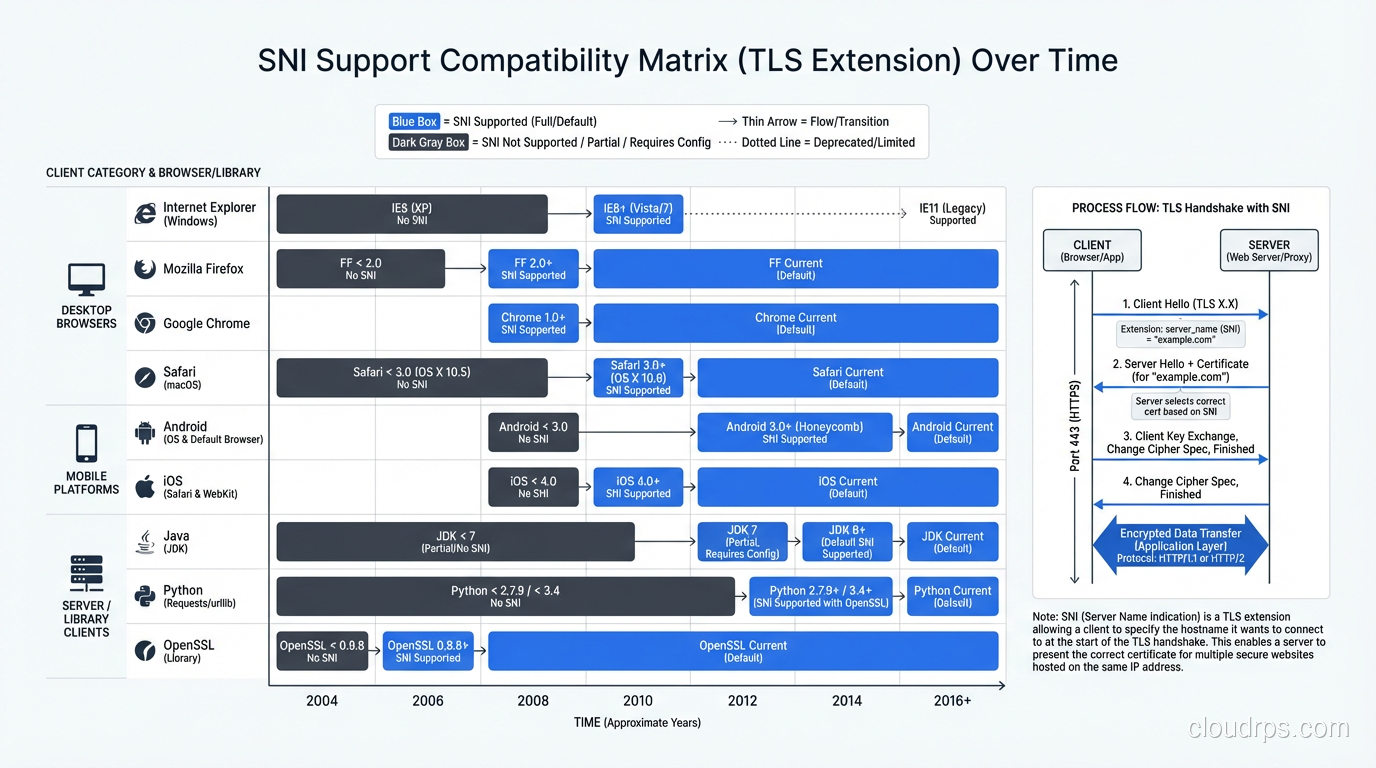
Client Compatibility: Is SNI Universal Yet?
In 2024, yes. For all practical purposes, SNI support is universal. But it wasn’t always, and understanding the history helps when you’re debugging weird edge cases.
The Holdouts
The last major client that didn’t support SNI was Internet Explorer on Windows XP. Windows XP’s TLS stack (SChannel) didn’t include SNI support. IE on Windows XP continued to have meaningful market share until around 2015-2016 in some markets.
Here’s the compatibility timeline:
| Client | SNI Support Since |
|---|---|
| Firefox | 2.0 (2006) |
| Chrome | All versions |
| Safari | 3.0 (2007) / iOS 3.0 |
| IE | 7+ on Vista+ (2006) |
| Android Browser | 3.0+ (2011) |
| curl | 7.18.1 (2008) |
| OpenSSL | 0.9.8f (2007) |
| Java | 7 (2011) |
| Python (urllib3) | Requires PyOpenSSL or Python 2.7.9+ |
The one that still trips people up is Java. Java 7 added SNI support, but it was buggy. Java 8 improved it significantly. If you’re running an old Java application that makes HTTPS calls to SNI-required hosts, you might see certificate mismatch errors, and the fix is usually upgrading your JDK or explicitly setting the SNI hostname in your SSL socket factory.
// Java: Explicitly setting SNI for an SSLSocket
SSLParameters sslParams = new SSLParameters();
sslParams.setServerNames(List.of(new SNIHostName("www.example.com")));
sslSocket.setSSLParameters(sslParams);
API Clients and Webhooks
I’ve seen SNI-related failures crop up in unexpected places: legacy payment gateways making callbacks, IoT devices phoning home, old embedded systems running outdated TLS stacks. If you’re building an API that sits behind shared infrastructure (CDN, cloud load balancer), always test with your oldest supported client. Don’t assume SNI works everywhere.
Debugging SNI Issues
When something goes wrong with SNI, the symptoms are usually one of:
- Certificate mismatch error: the client gets a cert for the wrong domain
- Connection refused or reset: the server has no default cert and drops the connection
- Wrong site served: the server falls back to a default vhost
Quick Diagnostic Commands
Test what certificate a server returns for a specific SNI value:
# With SNI (correct)
openssl s_client -connect example.com:443 -servername example.com 2>/dev/null | openssl x509 -noout -subject

# Without SNI (see what default cert you get)
openssl s_client -connect example.com:443 2>/dev/null | openssl x509 -noout -subject

# Test a specific IP with a specific SNI
openssl s_client -connect 1.2.3.4:443 -servername mysite.com 2>/dev/null | openssl x509 -noout -subject
If the first and second commands return different certificates, the server is using SNI to select certificates, which is normal. If the first command returns the wrong certificate, your server configuration has a bug.
Common Gotchas
Gotcha #1: Default server block matters. In Nginx, the first server block that matches the port becomes the default if no SNI match is found. Make sure your default block either has a catch-all cert or returns a meaningful error.
Gotcha #2: SNI is case-insensitive. Per the RFC, www.Example.COM and www.example.com should match the same certificate. Most servers handle this, but I’ve seen custom routing logic break on case sensitivity.
Gotcha #3: SNI doesn’t include the port. The SNI value is just the hostname. If you’re running multiple services on different ports with different certs, SNI routing alone won’t distinguish them, but that’s generally not an issue since each port has its own listener.
Gotcha #4: Proxy protocol and SNI. If you’re using HAProxy or AWS NLB with proxy protocol, make sure SNI is being preserved through the proxy chain. I’ve seen setups where a Layer 4 proxy strips or corrupts the SNI extension.
SNI and HTTP/3 (QUIC)
HTTP/3 uses QUIC instead of TCP+TLS, but SNI still exists in QUIC’s TLS 1.3 handshake. The ClientHello is carried inside the QUIC CRYPTO frame in the first flight, and it includes the SNI extension just like traditional TLS.
What’s interesting is that QUIC makes ECH even more relevant. Because QUIC’s initial handshake packets are partially encrypted, but the ClientHello (including SNI) is still visible in the initial CRYPTO frame. ECH would encrypt it, and combined with QUIC’s connection migration features, it would make traffic analysis significantly harder.
Wrapping Up
SNI is one of those “boring but essential” technologies that made the modern encrypted web possible. Without it, we’d either be stuck with expensive dedicated-IP HTTPS hosting or we’d have far less HTTPS adoption than we do today.
The key takeaways:
- SNI lets a single IP serve TLS certificates for multiple domains by including the hostname in the ClientHello
- It’s universally supported in modern clients; the last significant holdout (IE on XP) died years ago
- The SNI hostname is sent in plaintext, which is a privacy concern being addressed by Encrypted Client Hello (ECH)
- CDNs, cloud load balancers, and shared hosting platforms depend on SNI fundamentally
- When debugging certificate issues, always check what SNI value the client is sending
If you’re building anything that terminates TLS, understanding SNI isn’t optional; it’s foundational. And if you’re running into weird certificate errors in production, openssl s_client -servername is your best friend.
Get Cloud Architecture Insights
Practical deep dives on infrastructure, security, and scaling. No spam, no fluff.
By subscribing, you agree to receive emails. Unsubscribe anytime.