
The term “VPN” has been so thoroughly co-opted by consumer marketing that most people think it means “the thing that lets me watch Netflix from another country.” And sure, it can do that. But VPN technology is one of the most critical pieces of enterprise networking infrastructure, and understanding how it actually works (not the marketing version, the real version) matters if you’re building or managing anything at scale.
I’ve deployed VPN infrastructure for organizations ranging from ten-person startups to global enterprises with hundreds of thousands of endpoints. I’ve migrated companies from legacy MPLS circuits to internet-based VPNs, saving them millions in WAN costs. I’ve also been the person who gets woken up at 3 AM because the site-to-site VPN tunnel between data centers dropped and replication stopped.
Here’s what’s really happening when you “connect to a VPN.”
What a VPN Actually Is
A Virtual Private Network creates a private, encrypted communication channel over a public network, typically the internet. That’s the one-sentence version. The slightly longer version is that a VPN does three things:
- Tunneling: It encapsulates your network packets inside another protocol, creating a “tunnel” through the public network.
- Encryption: It encrypts the contents of those packets so that anyone intercepting them sees gibberish.
- Authentication: It verifies that both ends of the connection are who they claim to be.
The result is that two networks (or a device and a network) that are physically separated can behave as if they’re on the same local network, with the public internet acting as the transport layer.
Think of it like this: you’re sending a letter (your data), you put it inside a locked briefcase (encryption), you address the briefcase to a specific person (tunneling), and both you and the recipient have keys that prove your identities (authentication). Anyone who intercepts the briefcase in transit can see that it’s going from point A to point B, but they can’t read the letter inside.
Tunneling: The Envelope Within an Envelope
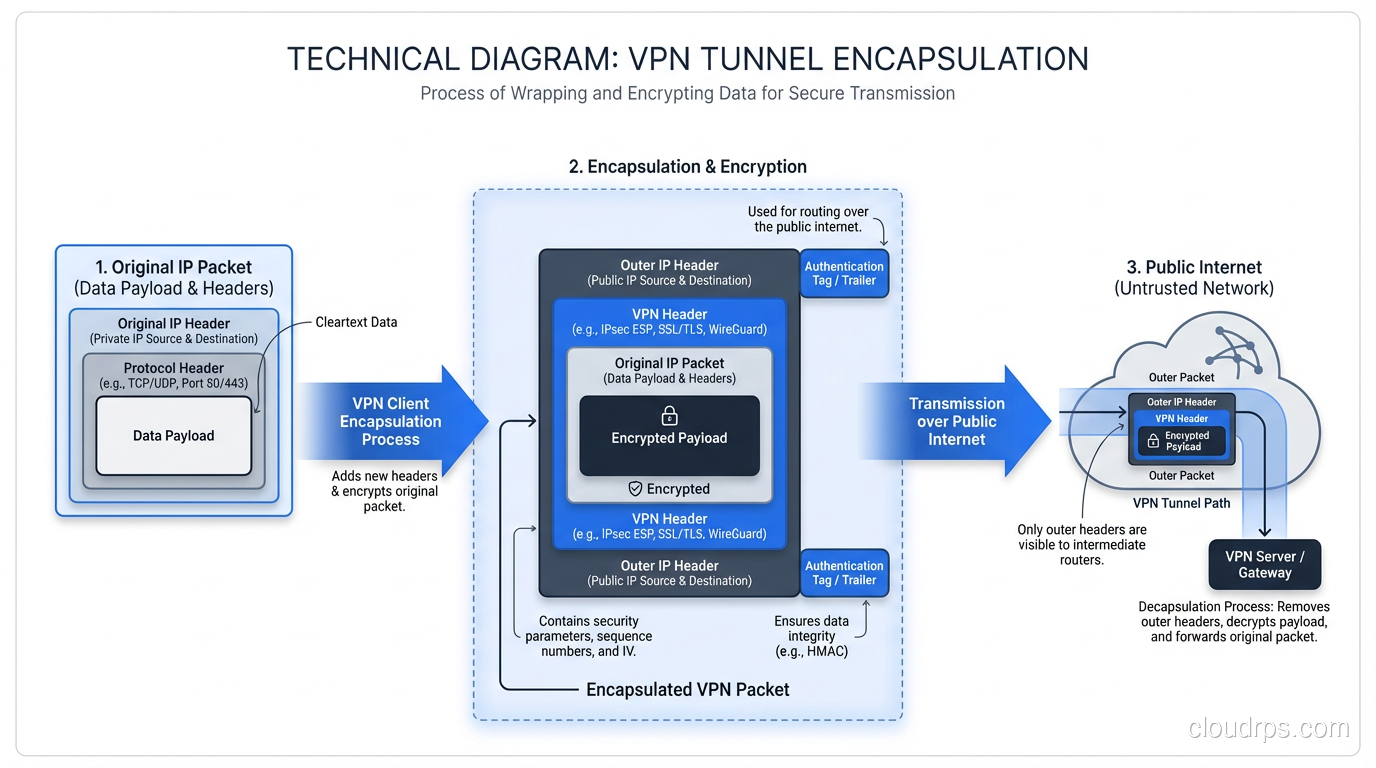
Tunneling is the core mechanism. When your device sends a packet through a VPN, the original packet (headers, payload, everything) gets wrapped inside a new packet. The outer packet is addressed to the VPN endpoint. The inner packet is addressed to the actual destination.
This is important for a subtle reason: NAT devices and routers along the path only see the outer packet. They route it to the VPN endpoint based on the outer headers. The inner packet, with its potentially private IP addresses and sensitive payload, is hidden inside the encrypted tunnel.
When the packet arrives at the VPN endpoint, the outer layer is stripped off, the inner packet is decrypted, and the original packet emerges on the other side. It’s like a teleporter for network packets.
Different VPN protocols handle tunneling differently, and the choice of protocol matters enormously for performance, security, and compatibility.
VPN Protocols: The Major Players
IPsec
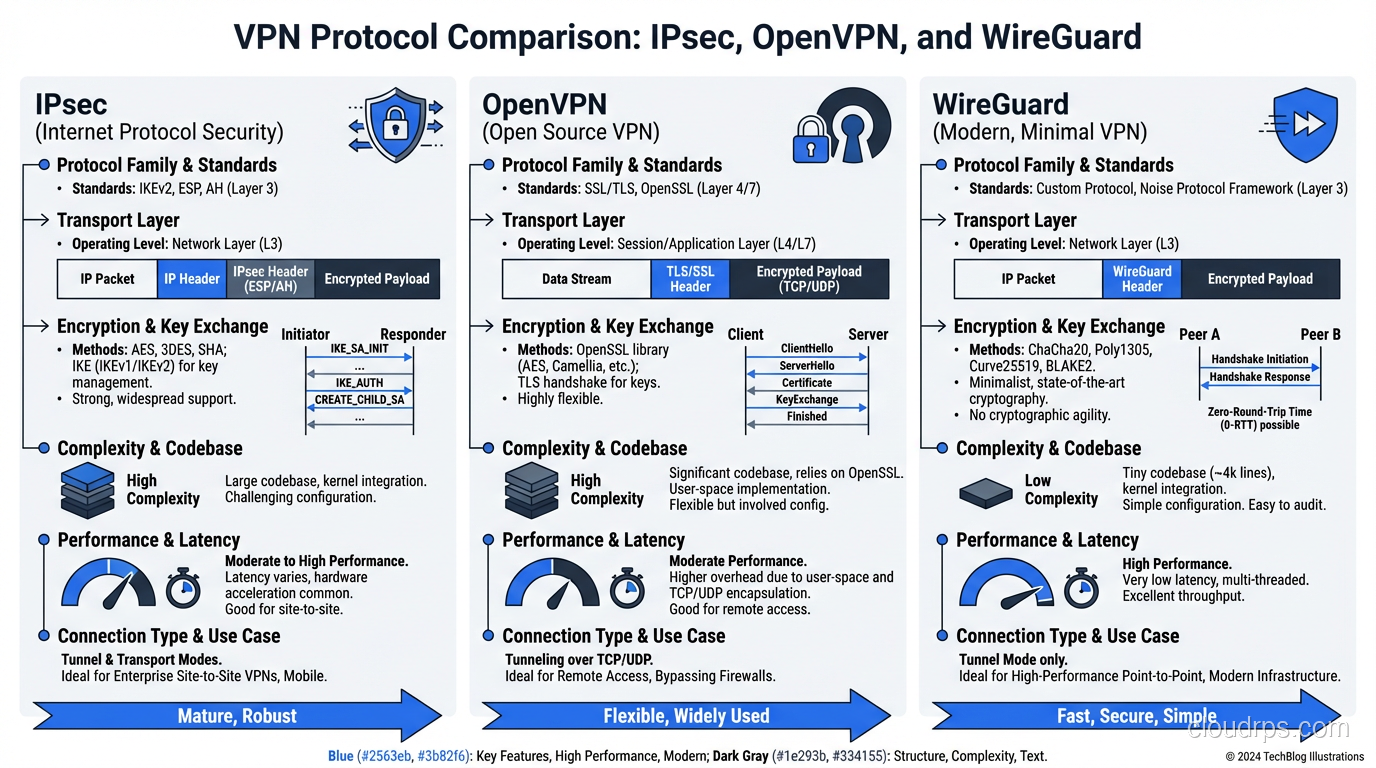
IPsec (Internet Protocol Security) is the granddaddy of VPN protocols. It operates at Layer 3 of the OSI model, which means it works at the IP packet level. IPsec is actually a suite of protocols:
- IKE (Internet Key Exchange): Handles the initial handshake, authentication, and key negotiation. IKEv2 is the current version and is significantly better than IKEv1.
- ESP (Encapsulating Security Payload): Handles the actual encryption and integrity protection of the data.
- AH (Authentication Header): Provides authentication and integrity but not encryption. Rarely used in practice because ESP can do everything AH does plus encryption.
IPsec can operate in two modes:
- Transport mode: Only the payload of the IP packet is encrypted. The original IP header remains intact. Used for host-to-host communication.
- Tunnel mode: The entire original IP packet (header and payload) is encrypted and encapsulated in a new IP packet. This is what’s used for site-to-site and remote access VPNs.
IPsec is the standard for site-to-site VPNs. Every enterprise firewall (Cisco, Palo Alto, Fortinet, Check Point) supports IPsec. AWS, Azure, and GCP all use IPsec for their managed VPN gateway services. It’s battle-tested and well-understood.
The downside? IPsec is complex. The IKE negotiation involves multiple phases, numerous parameters that both sides must agree on (encryption algorithm, hash function, DH group, lifetime), and debugging a failed IPsec tunnel is one of the most frustrating experiences in networking. I’ve spent entire days matching phase 1 and phase 2 proposals between two vendors’ firewalls because one side defaulted to AES-256-CBC and the other to AES-256-GCM.
OpenVPN
OpenVPN is an open-source VPN solution that uses SSL/TLS for key exchange and can operate over either UDP or TCP. It runs in userspace (not in the kernel), which makes it more portable but somewhat slower than kernel-based solutions.
OpenVPN uses the TUN/TAP interface. TUN operates at Layer 3 (routing IP packets), while TAP operates at Layer 2 (bridging Ethernet frames). Most deployments use TUN mode.
The big advantage of OpenVPN is flexibility and compatibility. It can run on virtually any operating system, it can punch through most firewalls (especially when configured to use TCP port 443, making it look like regular HTTPS traffic), and it has a mature ecosystem of management tools.
The disadvantage is performance. Because it runs in userspace and copies packets between kernel space and userspace, OpenVPN introduces overhead. For a remote access VPN where individual users are connecting at home broadband speeds, this doesn’t matter. For a high-throughput site-to-site tunnel, it can be a bottleneck.
WireGuard
WireGuard is the new kid on the block, and it’s impressive. Written by Jason Donenfeld, it’s a minimalist VPN protocol that lives entirely in the Linux kernel (with userspace implementations for other platforms). The entire codebase is about 4,000 lines of code. For comparison, OpenVPN is over 100,000 lines, and IPsec implementations are even larger.
WireGuard uses modern cryptography exclusively: Curve25519 for key exchange, ChaCha20 for encryption, Poly1305 for authentication, BLAKE2s for hashing. There are no cipher negotiation options, no configuration choices for cryptographic primitives. You use what WireGuard provides, and what it provides is state-of-the-art.
Performance is excellent. Because it runs in the kernel and uses modern, efficient cryptographic primitives, WireGuard can saturate multi-gigabit links without breaking a sweat. Connection establishment is nearly instantaneous; there’s no multi-round handshake like IKE.
The trade-off is that WireGuard is relatively new and makes some assumptions that don’t fit every enterprise scenario. It doesn’t support TCP transport (UDP only), it doesn’t have built-in mechanisms for dynamic IP address assignment, and its key management is deliberately simple (static public/private key pairs rather than PKI certificates). For enterprises that need certificate-based authentication integrated with their CA hierarchy, this is a limitation.
That said, I’ve been migrating personal and small-team infrastructure to WireGuard for years now, and I have zero desire to go back.
The Encryption Layer
All VPN protocols encrypt data in transit, but the details matter. The encryption used in a VPN typically involves both symmetric and asymmetric cryptography.
The initial key exchange uses asymmetric cryptography (public/private key pairs) to establish a shared secret between the two endpoints. This is the expensive operation, computationally speaking, but it only happens once per session (or periodically for rekeying).
Once the shared secret is established, the actual data encryption uses symmetric cryptography, the same key on both sides. AES-256-GCM is the most common choice in modern deployments. GCM (Galois/Counter Mode) provides both encryption and authentication in a single operation, which is more efficient than encrypting and computing a separate HMAC.
The key exchange also establishes Perfect Forward Secrecy (PFS) in properly configured setups. PFS means that even if someone captures your encrypted traffic today and later obtains the long-term private key, they can’t decrypt the captured traffic. Each session generates ephemeral keys that are discarded after use. If your VPN configuration doesn’t include PFS, fix that immediately.
This encryption layer is closely related to how SSL/TLS secures web traffic, though VPN protocols typically operate at a lower level in the network stack.
Split Tunneling: The Performance Trade-Off
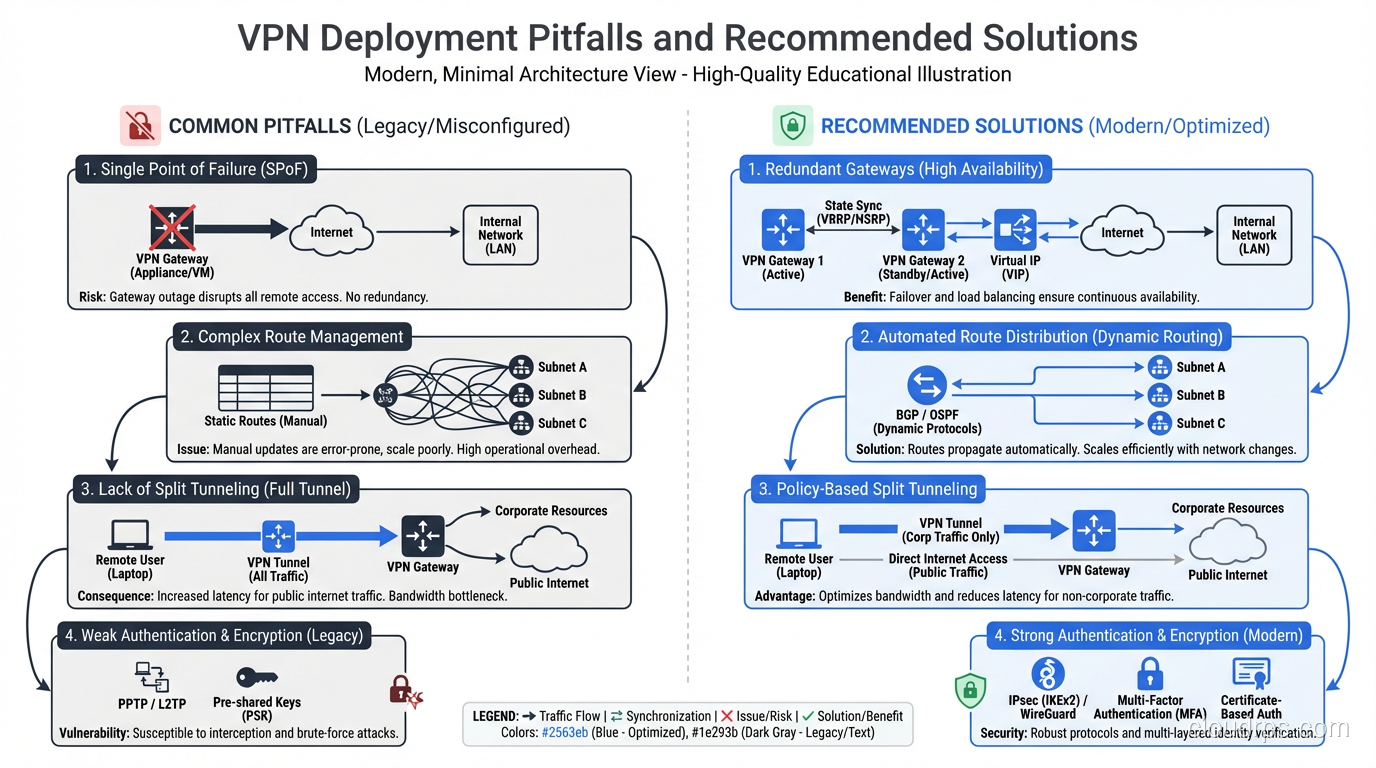
When you connect to a VPN, there’s an important question: does ALL your traffic go through the tunnel, or only traffic destined for specific networks?
Full tunnel: Every packet your device sends goes through the VPN. Your web browsing, video streaming, software updates, everything goes to the VPN endpoint first, then out to the internet. This provides maximum privacy (your ISP sees only encrypted VPN traffic) but increases latency and loads the VPN infrastructure with traffic it doesn’t need to carry.
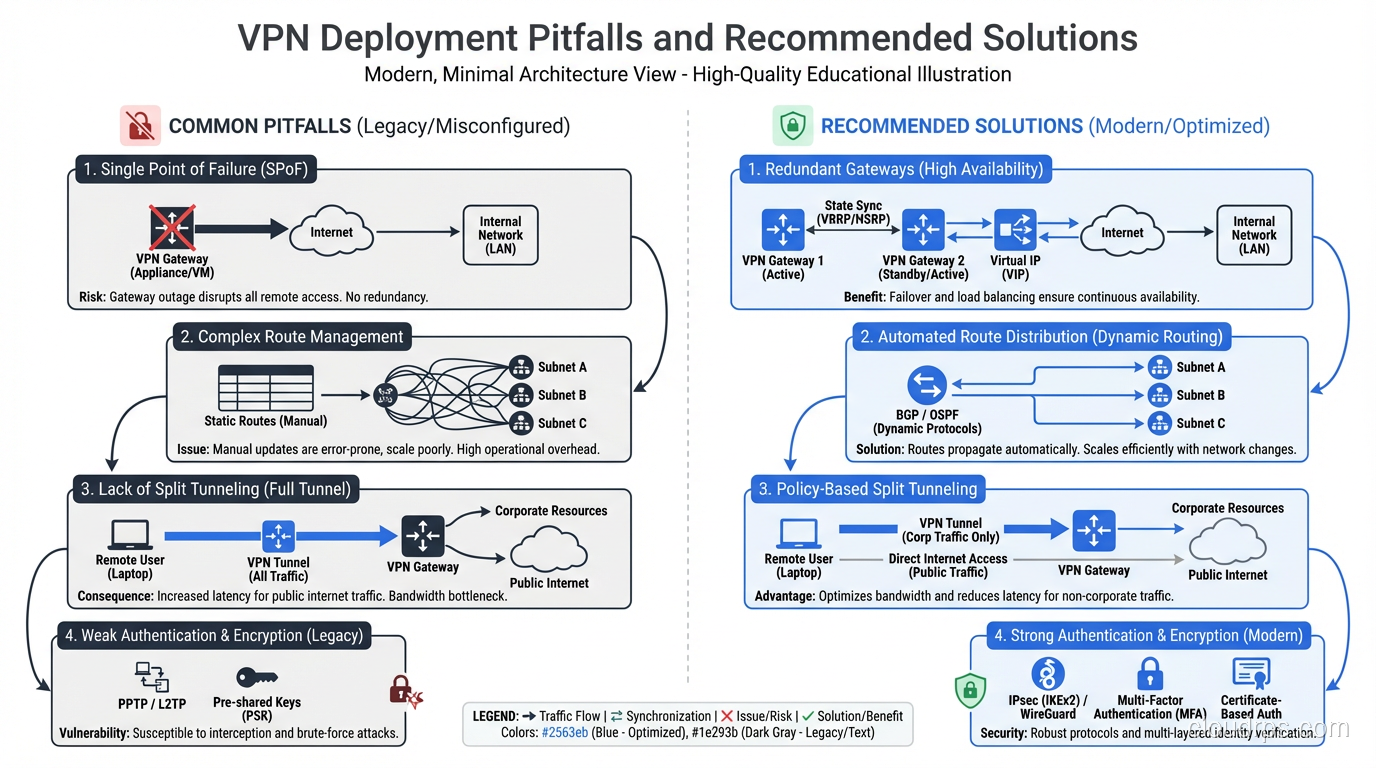
Split tunnel: Only traffic destined for specific networks (typically internal corporate resources) goes through the VPN. Everything else takes the normal internet path. This is better for performance but means your non-VPN traffic is visible to your ISP and local network.
The security implications are real. With split tunneling, a compromised device on a coffee shop WiFi network has a direct path to the internet AND a VPN tunnel to your corporate network. Malware could exfiltrate data over the direct internet path while maintaining VPN access to internal resources.
Most security-conscious enterprises mandate full tunnel for remote access VPNs. Most performance-conscious users prefer split tunnel. I’ve seen this debate play out in every organization I’ve consulted for. My advice: full tunnel by default with performance-based exceptions for specific traffic classes (like video conferencing, which is latency-sensitive and doesn’t carry sensitive data).
Site-to-Site vs. Remote Access
VPNs come in two fundamental flavors.
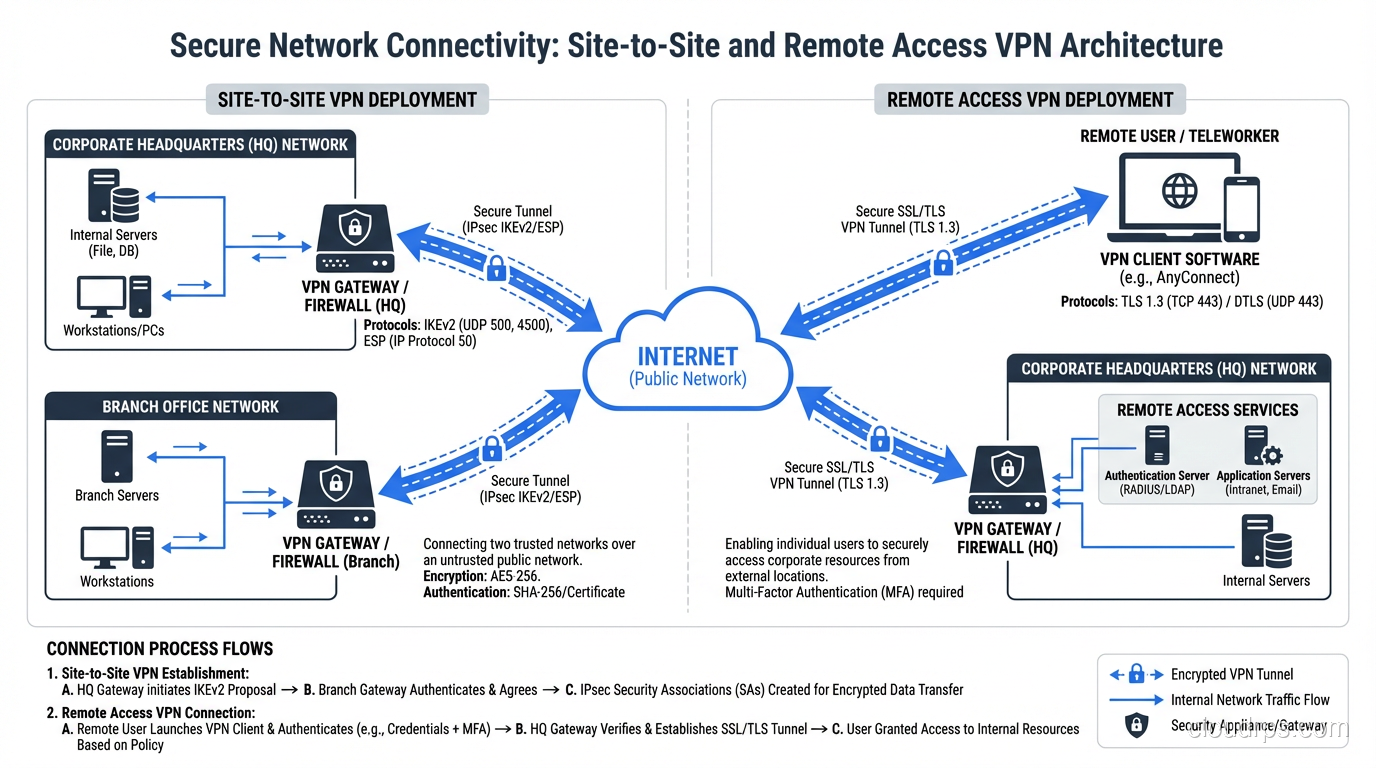
Site-to-site VPNs connect two networks. Think of a company with offices in New York and London. Each office has a VPN gateway (usually a firewall or router), and there’s a persistent tunnel between them. Users at either site don’t even know the VPN exists; their traffic is transparently routed through the tunnel when it’s destined for the other site.
Remote access VPNs connect individual devices to a network. This is what you use when you work from home and connect to your company’s VPN. Your laptop runs a VPN client that establishes a tunnel to the corporate VPN concentrator.
The engineering challenges are different. Site-to-site VPNs are relatively straightforward: two endpoints with static configurations, a persistent tunnel, and routing entries that direct the right traffic through the tunnel. The complexity comes from scale (hundreds of sites) and redundancy (what happens when a tunnel goes down).
Remote access VPNs have to deal with scale differently: thousands or millions of individual endpoints, each with different operating systems, network conditions, and security postures. During the COVID-19 pandemic, I watched multiple organizations’ VPN infrastructure collapse under the weight of their entire workforce suddenly connecting from home. VPN concentrators that were sized for 20% of the workforce had to handle 100% overnight.
Modern Alternatives: Beyond Traditional VPNs
The VPN model, especially remote access VPN, is increasingly being challenged by newer architectures.
Zero Trust Network Access (ZTNA)
The traditional VPN gives you network-level access. Once you’re connected, you can reach anything on the network that routing and firewall rules allow. ZTNA flips this on its head: you get access to specific applications, not networks. Every access request is authenticated, authorized, and encrypted independently.
Products like Zscaler Private Access, Cloudflare Access, and Google’s BeyondCorp implement this model. Instead of tunneling into a network and then accessing an internal web app, you access the web app directly through an identity-aware proxy. The proxy verifies your identity, checks your device posture, and allows or denies access to that specific application.
SD-WAN
For site-to-site connectivity, SD-WAN (Software-Defined Wide Area Network) is increasingly replacing traditional VPN configurations. SD-WAN solutions from vendors like Cisco Viptela, VMware VeloCloud, and Fortinet abstract away the underlying transport (MPLS, broadband, LTE) and dynamically route traffic across multiple paths based on application requirements.
Under the hood, SD-WAN still uses VPN tunnels (typically IPsec), but the management, routing intelligence, and failover capabilities are dramatically better than manually configured VPN tunnels between firewalls.
Common Pitfalls I’ve Seen
After thirty years of VPN deployments, here are the mistakes that keep recurring:
MTU issues. VPN encapsulation adds overhead to every packet. If your original packet is at the maximum MTU (1500 bytes for Ethernet) and you add IPsec headers (50-60 bytes), the resulting packet exceeds the link MTU and needs to be fragmented. Fragmentation kills performance. Always reduce the MTU inside the VPN tunnel. For IPsec, 1400 bytes is a safe starting point. For WireGuard, 1420 bytes.
Single points of failure. One VPN gateway, one tunnel, no redundancy. When it goes down (and it will), all connectivity is lost. Always deploy redundant tunnels with automatic failover.
Ignoring DNS. You set up split tunneling so internal traffic goes through the VPN, but DNS queries for internal hostnames still go to the public resolver and fail. Or worse, they leak internal hostnames to the public resolver. Always configure DNS correctly for your VPN deployment.
Weak authentication. Pre-shared keys that are the same across all users. No multi-factor authentication. Certificate-based auth with expired or self-signed certs. I’ve seen all of these. VPN authentication should be as strong as your most sensitive application’s authentication.
No monitoring. VPN tunnels go down silently. If you’re not monitoring tunnel state, you won’t know it’s down until a user complains. Monitor both endpoints, track tunnel uptime, and alert on state changes.
Performance Considerations
VPN overhead is real but often overstated. With modern hardware and protocols:
- WireGuard adds roughly 60 bytes of overhead per packet and can handle multi-gigabit throughput on commodity hardware.
- IPsec with AES-NI (hardware acceleration, available on virtually all modern x86 CPUs) can encrypt at 10+ Gbps without breaking a sweat.
- OpenVPN is the slowest of the three due to userspace overhead, but still handles hundreds of megabits per second on modern hardware.
The real performance killer is latency, not throughput. A VPN tunnel that routes traffic from New York to San Francisco via a VPN endpoint in London adds hundreds of milliseconds of latency. Choose your VPN endpoint locations wisely. Geographic proximity to both the user and the destination matters.
Wrapping Up
VPNs are one of those technologies that seem simple on the surface but have enormous depth. Whether you’re using IPsec for site-to-site connectivity, WireGuard for remote access, or evaluating ZTNA as a modern alternative, the fundamental concepts are the same: tunneling creates a virtual link, encryption protects data in transit, and authentication ensures only authorized parties can use the tunnel.
The technology continues to evolve. WireGuard is pushing performance and simplicity. ZTNA is challenging the network-level access model. SD-WAN is transforming site-to-site connectivity. But the core principles haven’t changed since the first IPsec tunnels were deployed in the late 1990s.
If you’re deploying VPN infrastructure, start with the fundamentals: choose the right protocol for your use case, configure encryption properly (with PFS), plan your MTU, deploy redundancy, and monitor everything. The details matter, and cutting corners on VPN infrastructure is a recipe for late-night pages.
Get Cloud Architecture Insights
Practical deep dives on infrastructure, security, and scaling. No spam, no fluff.
By subscribing, you agree to receive emails. Unsubscribe anytime.