
I’ve configured my first load balancer in 1998, a Cisco LocalDirector that cost more than my car. It could barely handle a few thousand connections per second, and configuring it required a serial console cable and a prayer. Today, a cloud load balancer handles millions of connections, configures itself through an API, and costs pennies per hour.
The technology has changed beyond recognition, but the fundamental decisions haven’t. You still need to understand what layer you’re balancing at, what algorithm to use, and how to handle the edge cases that will absolutely come up in production. Let me walk you through it.
What Load Balancers Actually Do
A load balancer distributes incoming network traffic across multiple backend servers. That’s the one-sentence version. The real version is more nuanced:
- Traffic distribution: Spreading requests across servers so no single server is overwhelmed
- Health checking: Monitoring backend servers and routing traffic away from unhealthy ones
- High availability: Ensuring the service stays up even when individual servers fail
- TLS termination: Handling the encryption/decryption overhead so backend servers don’t have to
- Session persistence: Routing a user’s requests to the same backend server when needed
- Rate limiting and security: Protecting backends from traffic surges and malicious requests
The load balancer is the front door of your architecture. Every request comes through it. Getting it right is foundational; getting it wrong means every layer behind it suffers.
Layer 4 vs. Layer 7: The Critical Distinction
This is the most important decision you’ll make about your load balancer, and it maps directly to the OSI model layers. Let me explain both and when each is the right choice.
Layer 4 (Transport Layer) Load Balancing
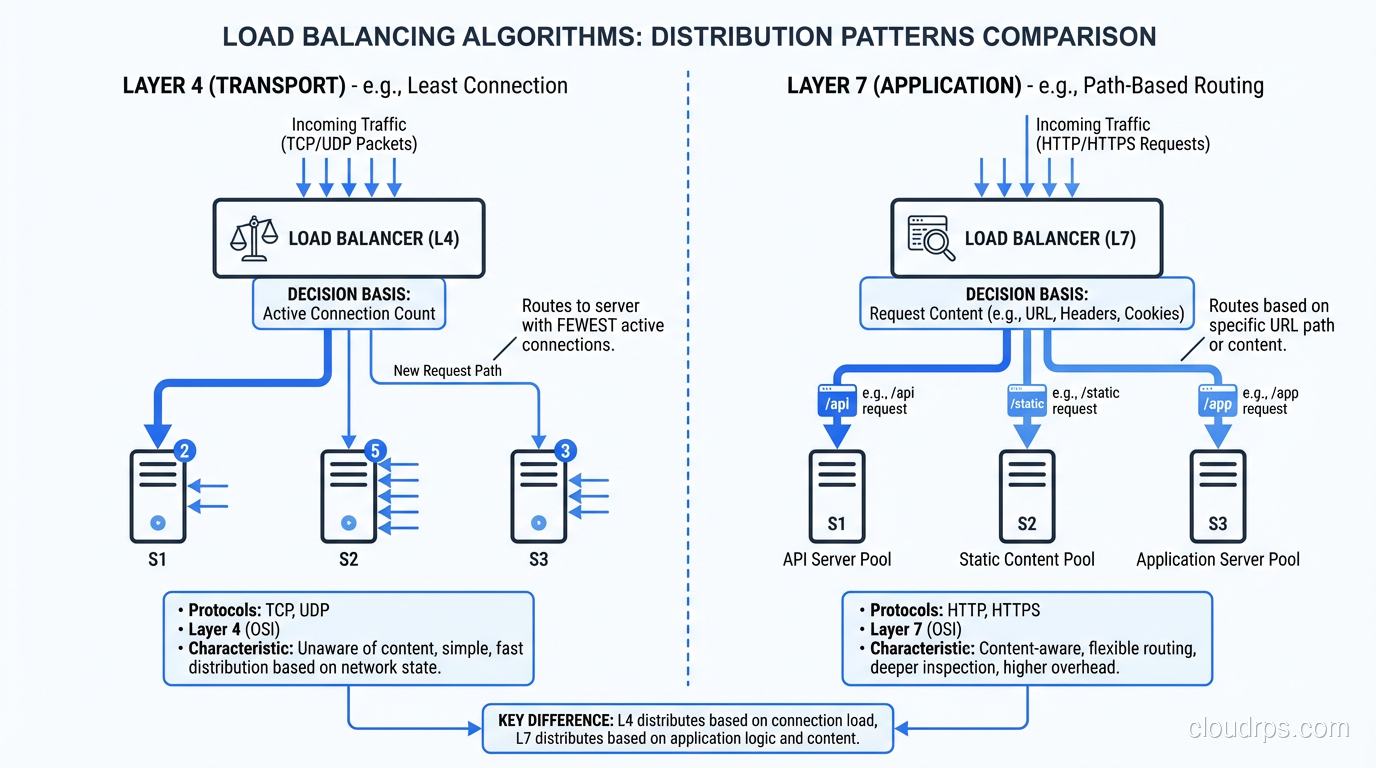
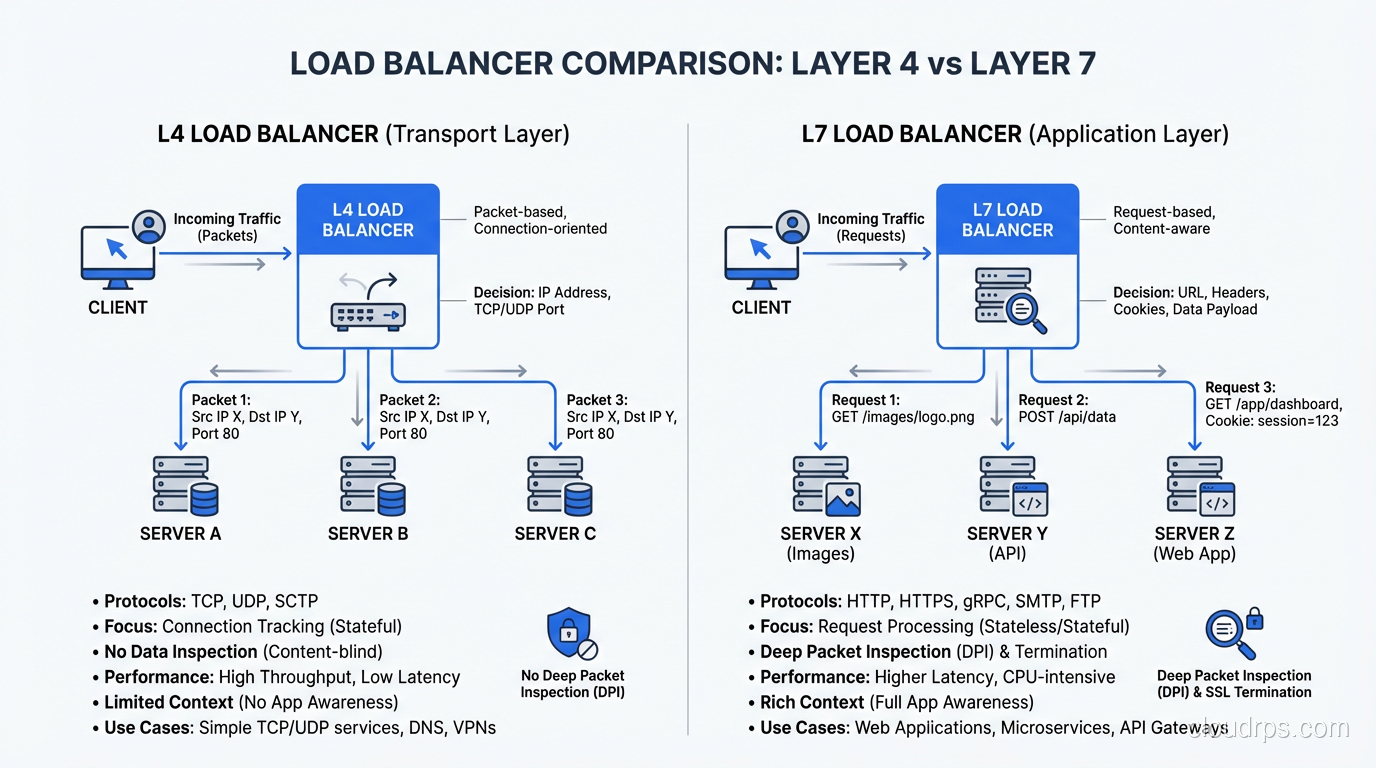
A Layer 4 load balancer operates at the TCP/UDP level. It sees source IP, destination IP, source port, and destination port. It does not look at the contents of the packets. It doesn’t know whether you’re sending HTTP, WebSocket, gRPC, or raw TCP.
When a connection comes in, the L4 load balancer selects a backend server and forwards the entire TCP connection to it. All packets in that connection go to the same server. The load balancer is essentially a very smart network device that rewrites packet headers.
Strengths:
- Extremely fast. Because it doesn’t parse application-layer protocols, it can handle enormous throughput with minimal latency (microseconds of added latency).
- Protocol-agnostic. Anything that runs over TCP or UDP works: HTTP, database connections, SMTP, custom protocols.
- Simple to configure and operate.
- Excellent for connection-heavy workloads (databases, WebSockets, long-lived connections).
Limitations:
- Cannot route based on request content (URL path, headers, cookies)
- Cannot modify the request or response
- Cannot terminate TLS (well, it can, but then it’s doing L7 work)
- Limited health checking. It can check if a port is open, but can’t verify the application is actually working correctly
Cloud implementations: AWS Network Load Balancer (NLB), GCP Network Load Balancer, Azure Load Balancer Standard.
Layer 7 (Application Layer) Load Balancing
A Layer 7 load balancer understands the application protocol, typically HTTP/HTTPS. It reads the full request: URL, headers, cookies, even the request body if configured to do so. It can make routing decisions based on any of these.
The L7 load balancer terminates the client’s connection, inspects the request, makes a routing decision, and opens a new connection to the selected backend server. It’s acting as a reverse proxy, not a packet forwarder.
Strengths:
- Content-based routing. Route
/api/*to your API servers and/static/*to your CDN origin. Route based on cookies, headers, or query parameters. - TLS termination. Handle HTTPS at the load balancer, so your backends receive plain HTTP. This simplifies backend configuration and centralizes certificate management.
- Request/response modification. Add headers (X-Forwarded-For, X-Request-ID), rewrite URLs, compress responses.
- Advanced health checking. Send an HTTP request to a health endpoint and verify the response code and body.
- Web Application Firewall (WAF) integration. Inspect requests for malicious content before they reach your backends.
- HTTP/2 and WebSocket support with protocol-level awareness.
Limitations:
- Higher latency than L4 (typically 1-5ms of added latency due to protocol parsing)
- Lower maximum throughput than L4
- Only supports HTTP/HTTPS (and protocols that layer on top, like gRPC and WebSocket)
- More complex to configure
Cloud implementations: AWS Application Load Balancer (ALB), GCP HTTP(S) Load Balancer, Azure Application Gateway.
Global Load Balancing
Global load balancers distribute traffic across multiple geographic regions. They’re the outermost layer of your traffic management, routing users to the nearest healthy region.
DNS-Based Global Load Balancing
The simplest form of global load balancing uses DNS to return different IP addresses based on the client’s location. AWS Route 53, Google Cloud DNS, and Cloudflare all support this.
- Latency-based routing: Return the IP of the region with the lowest latency to the user
- Geolocation routing: Return the IP of the region nearest to the user’s geographic location
- Failover routing: Return the secondary region’s IP when the primary region’s health check fails
The limitation of DNS-based routing is DNS caching. When you fail over from one region to another by changing DNS records, some clients will continue using the old IP until their DNS cache expires. Set your TTL low (30-60 seconds) for records that might change during failover, but understand that some resolvers ignore TTL settings.
Anycast-Based Global Load Balancing
Anycast advertises the same IP address from multiple locations. When a client connects, the network routes them to the nearest location automatically. This is how Cloudflare, Google’s Global Load Balancer, and many CDNs work.
Anycast is faster than DNS-based routing for failover because it operates at the network layer. When a location goes down, BGP reconverges and traffic automatically shifts to the next nearest location. No DNS TTL to wait for.
My recommendation: For global traffic management, use anycast when available (GCP’s Global Load Balancer is excellent for this). Fall back to DNS-based routing with low TTLs when anycast isn’t an option.
Load Balancing Algorithms
How does the load balancer decide which backend server gets the next request? The algorithm matters more than most people realize.
Round Robin
Each server gets requests in turn: server 1, server 2, server 3, server 1, server 2, server 3… Simple and effective when all servers are identical and all requests take roughly the same time.
When it fails: When servers have different capacities or when requests vary significantly in processing time. The server that gets the three expensive report-generation requests is overloaded while the server that got three lightweight health checks is idle.
Weighted Round Robin
Like round robin, but servers with higher weights get more requests. Server 1 (weight 3) gets three requests for every one request Server 2 (weight 1) gets. Useful when you have servers with different capacities.
Least Connections
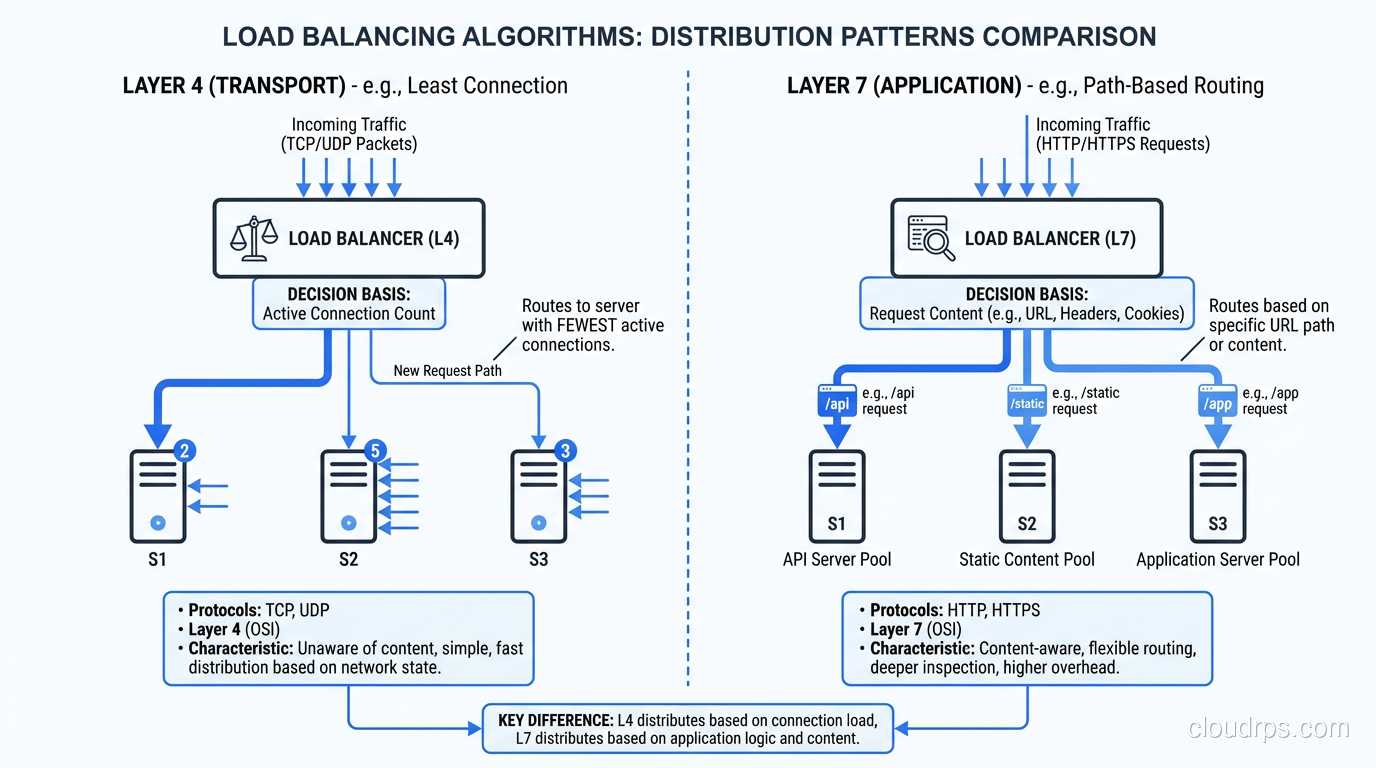
Route to the server with the fewest active connections. This naturally balances load when request processing times vary. Slow servers accumulate connections and get fewer new requests.
This is my default recommendation for most workloads. It handles heterogeneous servers and variable request processing times gracefully.
Least Response Time
Route to the server with the fastest recent response time. This is the smartest algorithm because it accounts for both server load and server performance, but it requires the load balancer to track response time metrics.
IP Hash
Hash the client’s IP address to determine which server handles the request. The same client always goes to the same server. This provides session persistence without cookies, but it creates uneven distribution when clients share IP addresses (corporate NAT, mobile carriers).
Random
Randomly select a backend. Surprisingly effective at large scale (the law of large numbers ensures roughly even distribution) and very simple to implement. Some modern load balancers use “power of two choices,” where they pick two random servers and route to the one with fewer connections.
Practical Load Balancer Configurations
Let me share the configurations I use for common scenarios.
Standard Web Application
L7 load balancer (ALB or equivalent) with:
- TLS termination (redirect HTTP to HTTPS)
- Path-based routing:
/api/*to API target group,/*to web target group - Health checks: HTTP GET to
/health, expect 200, interval 10s, threshold 3 - Sticky sessions: disabled (externalize sessions to Redis)
- Idle timeout: 60 seconds
- Algorithm: least connections
High-Throughput API
L4 load balancer (NLB or equivalent) with:
- TLS passthrough (let backends handle TLS) or TLS termination depending on compliance requirements
- Health checks: TCP port check, interval 10s
- Connection idle timeout: 350 seconds (to handle keep-alive connections)
- Cross-zone load balancing: enabled
- Algorithm: least connections
Database Connections
L4 load balancer (NLB), because databases speak their own protocols (PostgreSQL wire protocol, MySQL protocol), so L7 is not appropriate. Use TCP health checks. Be very careful with connection idle timeouts, since database connections are often long-lived.
For database read replicas, consider using a specialized proxy (PgBouncer, ProxySQL, HAProxy with database health checks) instead of a cloud load balancer. They understand database protocols and can make smarter routing decisions.
Global Multi-Region
Global load balancer (Route 53, GCP Global LB, Cloudflare) routing to regional L7 load balancers in each region. The global layer handles geographic routing and regional failover. The regional layer handles request routing, TLS termination, and health checking for backends within the region.
This is essential for any serious high-availability architecture and becomes critical as you scale your web application across regions.
Health Checks: Getting Them Right
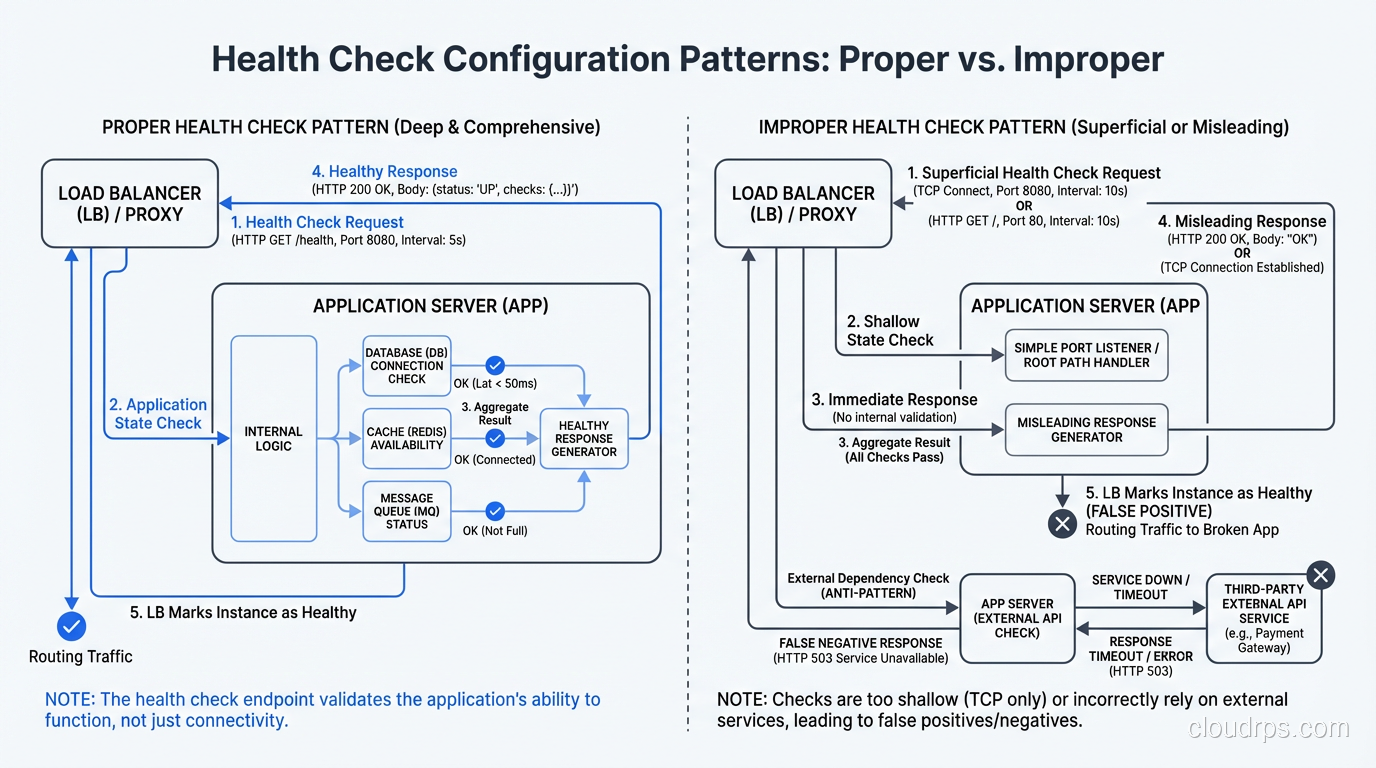
Health checks are the load balancer’s way of knowing which backends are alive and healthy. Getting them wrong leads to two bad outcomes: sending traffic to dead servers (checks too lenient) or pulling healthy servers out of rotation (checks too aggressive).
For L4 load balancers: TCP health checks that verify the port is accepting connections. Quick and reliable. Interval: 10 seconds. Unhealthy threshold: 3 consecutive failures. Healthy threshold: 2 consecutive successes.
For L7 load balancers: HTTP health checks that hit a dedicated health endpoint. The endpoint should check that the application is actually running (not just that the web server is up). It should NOT check downstream dependencies like the database, because that creates cascading failures where a database issue takes down the load balancer’s view of all backends.
GET /health
200 OK {"status": "healthy", "version": "1.2.3"}
The health endpoint should be fast (under 100ms) and lightweight. Don’t run database queries or external API calls in the health check.
Common Load Balancer Mistakes
Mistake 1: Using L7 When L4 Would Suffice
L7 load balancers have lower throughput and higher latency than L4. If you don’t need content-based routing, TLS termination at the load balancer, or HTTP-level health checks, use L4. You’ll get better performance and simpler configuration.
Mistake 2: Relying on Sticky Sessions
Sticky sessions (also called session affinity) route a user’s requests to the same backend server. This is a crutch for applications that store state locally. It creates hot spots, complicates scaling, and means a server failure loses all sessions for the users assigned to it. Externalize your sessions and use stateless backends.
Mistake 3: Ignoring Connection Draining
When you take a backend server out of rotation (for deployment, maintenance, or failure), existing connections need to complete gracefully. Configure connection draining with an appropriate timeout. For web APIs, 30 seconds is usually enough. For WebSocket applications, you might need minutes.
Mistake 4: Not Monitoring the Load Balancer
The load balancer itself needs monitoring: request rate, error rate (4xx, 5xx), latency, active connections, backend health status. These metrics are often the first indicator that something is wrong in your system.
Mistake 5: Single Load Balancer
Your load balancer is a single point of failure unless you’ve designed for redundancy. Cloud load balancers handle this transparently (they’re inherently distributed). If you’re running your own (Nginx, HAProxy), you need at least two instances with failover (keepalived, VRRP, or floating IPs).
Choosing the Right Load Balancer
Here’s my decision framework:
- Do you need content-based routing? (URL paths, headers, cookies) → L7
- Is it HTTP/HTTPS traffic only? → L7 is the natural fit
- Is it TCP/UDP, database connections, or a custom protocol? → L4
- Do you need maximum throughput with minimum latency? → L4
- Do you need global traffic management? → Add a global load balancer in front
- Are you on a public cloud? → Use the managed load balancer (NLB/ALB on AWS, etc.)
- Are you on-premises? → HAProxy or Nginx for software, F5 or Citrix for hardware
For most web applications, the answer is an L7 load balancer for HTTP traffic and an L4 load balancer for everything else. The two coexist happily. They solve different problems at different layers.
The load balancer is the most critical piece of infrastructure in your stack. It touches every request. Choose it carefully, configure it correctly, and monitor it relentlessly.
Get Cloud Architecture Insights
Practical deep dives on infrastructure, security, and scaling. No spam, no fluff.
By subscribing, you agree to receive emails. Unsubscribe anytime.