
I’ve integrated with hundreds of APIs over the past three decades. Payment processors, cloud providers, SaaS platforms, internal services, government systems, hardware controllers. Some were a joy. I was making successful API calls within minutes of reading the documentation. Others were a nightmare. I spent days deciphering cryptic error messages, reverse-engineering undocumented behavior, and questioning whether the API designer had ever actually used their own product.
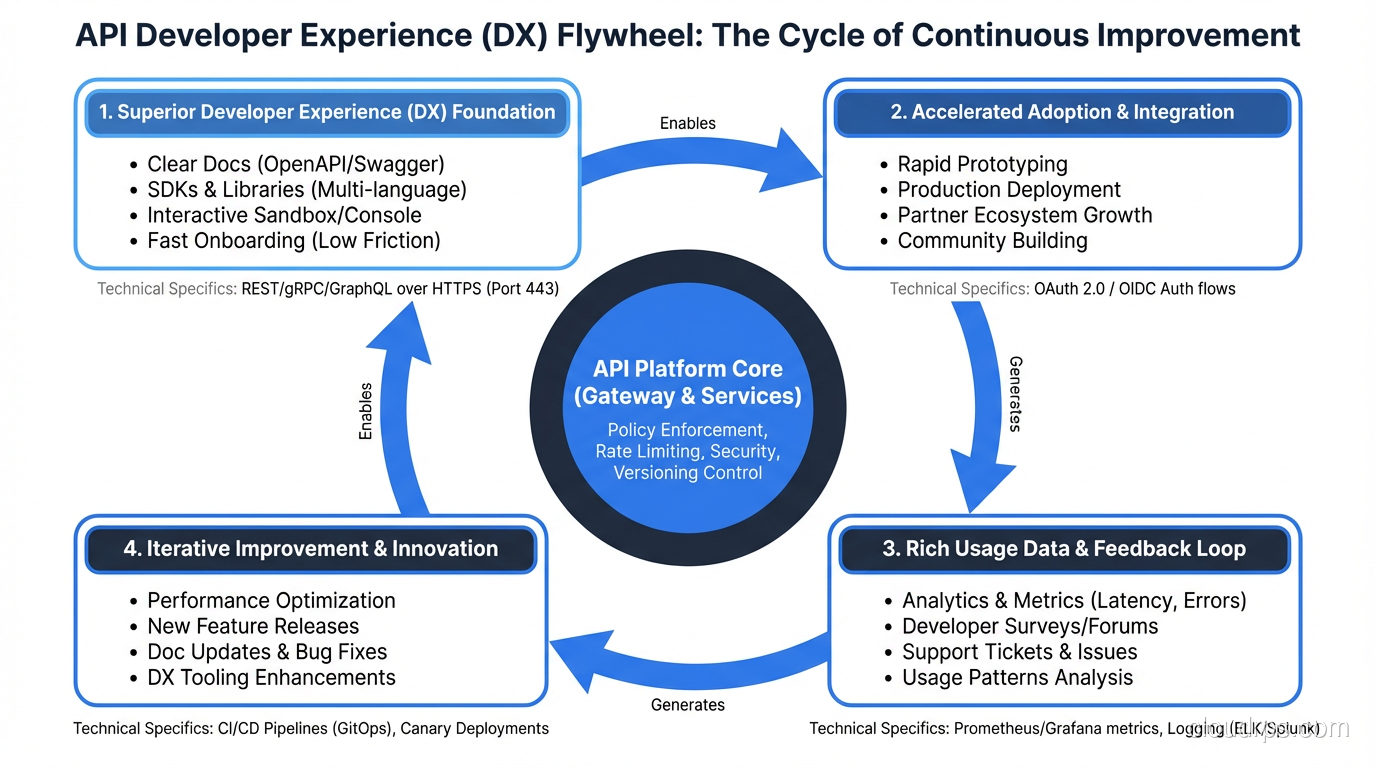
The difference between a good API and a bad one has nothing to do with the underlying technology. It has everything to do with design choices that demonstrate empathy for the developer who has to use it. A developer-friendly API reduces friction at every step: discovery, authentication, first request, error handling, and production integration.
Here’s what I’ve learned about what actually matters, drawn from both building APIs and suffering through other people’s.
Principle 1: Consistent, Predictable Naming
The fastest way to make an API confusing is inconsistent naming. I’ve integrated with APIs where some endpoints use camelCase, others use snake_case, and a few use kebab-case, all in the same API. Where some resources are plural (/users) and others are singular (/user). Where the same concept is called “customer” in one endpoint and “client” in another.
Pick conventions and stick to them:
- URL paths: lowercase, hyphenated, plural nouns.
/api/users,/api/order-items,/api/payment-methods. - JSON fields: Pick either
camelCaseorsnake_caseand use it everywhere. Most APIs usecamelCase(JavaScript convention) orsnake_case(Python/Ruby convention). I don’t care which you pick. I care that you’re consistent. - Resource naming: Use the same term for the same concept across all endpoints, documentation, and error messages. If it’s a “user” in the URL, it should be a “user” in the response body, not a “member” or “account.”
The best APIs feel obvious. You guess the endpoint for listing a user’s orders (GET /api/users/123/orders) and you’re right. That only happens when naming is consistent and predictable.
Principle 2: Error Responses That Help You Fix the Problem
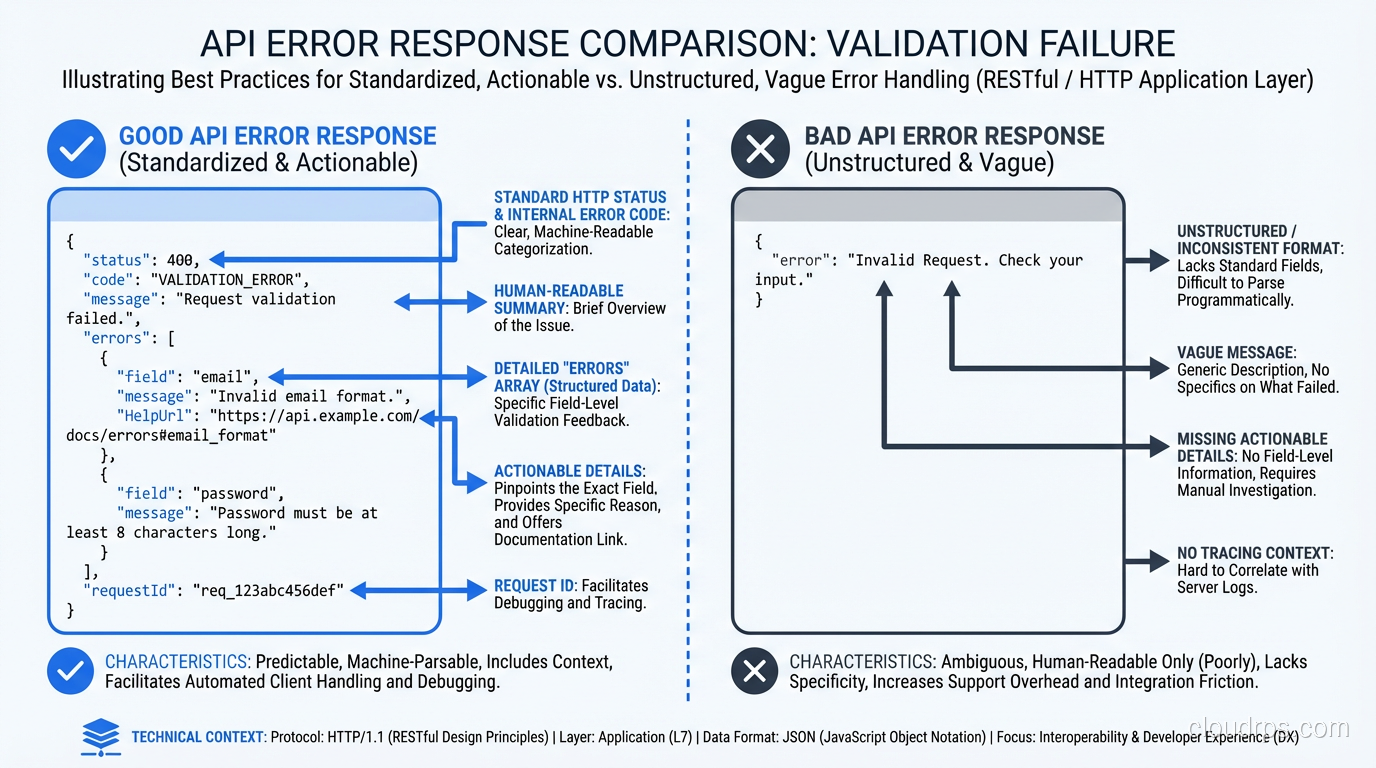
This is where most APIs fail miserably. A 400 Bad Request with no body, or worse, a 500 Internal Server Error with a stack trace. I’ve lost entire days to APIs that returned {"error": "invalid request"} with no indication of what was invalid.
A developer-friendly error response includes:
{
  "error": {
    "code": "VALIDATION_ERROR",
    "message": "The request body contains invalid fields.",
    "details": [
      {
        "field": "email",
        "issue": "Must be a valid email address.",
        "value": "not-an-email"
      },
      {
        "field": "age",
        "issue": "Must be a positive integer.",
        "value": -5
      }
    ],
    "documentation_url": "https://docs.example.com/errors/VALIDATION_ERROR"
  }
}
Key elements:
- Machine-readable error code:
VALIDATION_ERROR, not just a status code. Clients can switch on this code to handle different errors programmatically. - Human-readable message: A clear sentence explaining what went wrong.
- Field-level details: Which specific fields failed validation and why. This is the difference between “something is wrong” and “here’s exactly what to fix.”
- Documentation link: A URL where the developer can learn more about this error and how to resolve it.
Use the Right HTTP Status Codes
- 400: Client sent a malformed request (missing required fields, wrong types)
- 401: Not authenticated (no token or invalid token)
- 403: Authenticated but not authorized (valid token, insufficient permissions)
- 404: Resource doesn’t exist
- 409: Conflict (trying to create something that already exists)
- 422: Validation error (syntactically correct but semantically invalid)
- 429: Rate limited
- 500: Server error (your bug, not the client’s)
I’ve seen APIs return 200 for everything, including errors, with a "success": false field in the body. This breaks HTTP conventions, confuses monitoring tools, and makes debugging with browser DevTools or proxy tools unnecessarily difficult.
Principle 3: Pagination That Scales
Any endpoint that returns a list needs pagination. Returning all 50,000 records in a single response is not an option.
The three common patterns:
Offset-based Pagination
GET /api/users?offset=20&limit=10
Simple to implement, simple to understand. The problem: offset-based pagination breaks with concurrent writes. If a record is inserted while a client is paginating, they’ll see a duplicate or miss a record. At scale, large offsets are also expensive for databases since OFFSET 10000 means the database skips 10,000 rows.
Cursor-based Pagination
GET /api/users?cursor=eyJpZCI6MTIzfQ&limit=10
The cursor is an opaque token (usually a base64-encoded identifier) that marks the position in the result set. The server returns a cursor for the next page, and the client includes it in the next request.
Cursor-based pagination handles concurrent writes correctly and performs well at any depth. It’s the standard for high-traffic APIs (Stripe, GitHub, Slack all use it).
Page-based Pagination
GET /api/users?page=3&per_page=10
Human-friendly but has the same problems as offset-based under the hood.
My recommendation: Use cursor-based pagination for all list endpoints. Include metadata in the response:
{
  "data": [...],
  "pagination": {
    "has_more": true,
    "next_cursor": "eyJpZCI6MTMzfQ",
    "total_count": 1547
  }
}
total_count is optional (it can be expensive to compute) but valuable for UIs that show “page X of Y.”
Principle 4: Authentication That Isn’t Painful
The first thing a developer does with your API is authenticate. Make this easy.
- Use standard authentication (OAuth 2.0, API keys, JWTs). Don’t invent your own scheme.
- Provide sandbox/test credentials immediately, ideally without requiring a sales call, contract, or two-week approval process. Stripe lets you make API calls within 30 seconds of signing up. This is the gold standard.
- Test environments should be free and clearly separated from production.
- Error messages for auth failures should be specific: “API key expired on 2026-01-15” is infinitely better than “Unauthorized.”
Rate Limiting Done Right
Every API needs rate limiting, but good APIs make rate limits transparent:
HTTP/1.1 200 OK
X-RateLimit-Limit: 1000
X-RateLimit-Remaining: 998
X-RateLimit-Reset: 1706644800
When the limit is exceeded, return 429 with a Retry-After header telling the client exactly when they can try again. Don’t make developers guess.
Principle 5: Documentation That Developers Actually Use
The best documentation I’ve encountered (Stripe, Twilio, Plaid) shares common traits:
- Getting started guide: A quick tutorial that takes the developer from zero to a successful API call in under five minutes. This is the single most important page in your docs.
- Interactive examples: Runnable code samples in multiple languages, with a “try it” button that makes a real API call against a sandbox.
- Complete API reference: Every endpoint, every parameter, every response code documented. Auto-generated from an OpenAPI spec is fine, but augment it with human-written descriptions.
- Error catalog: Every error code your API returns, with causes and solutions.
- Changelog: What changed, when, and whether it’s breaking.
Documentation should be versioned alongside the API. If the API changes and the docs don’t update, the docs are wrong, and wrong docs are worse than no docs.
Principle 6: Sensible Defaults and Progressive Complexity
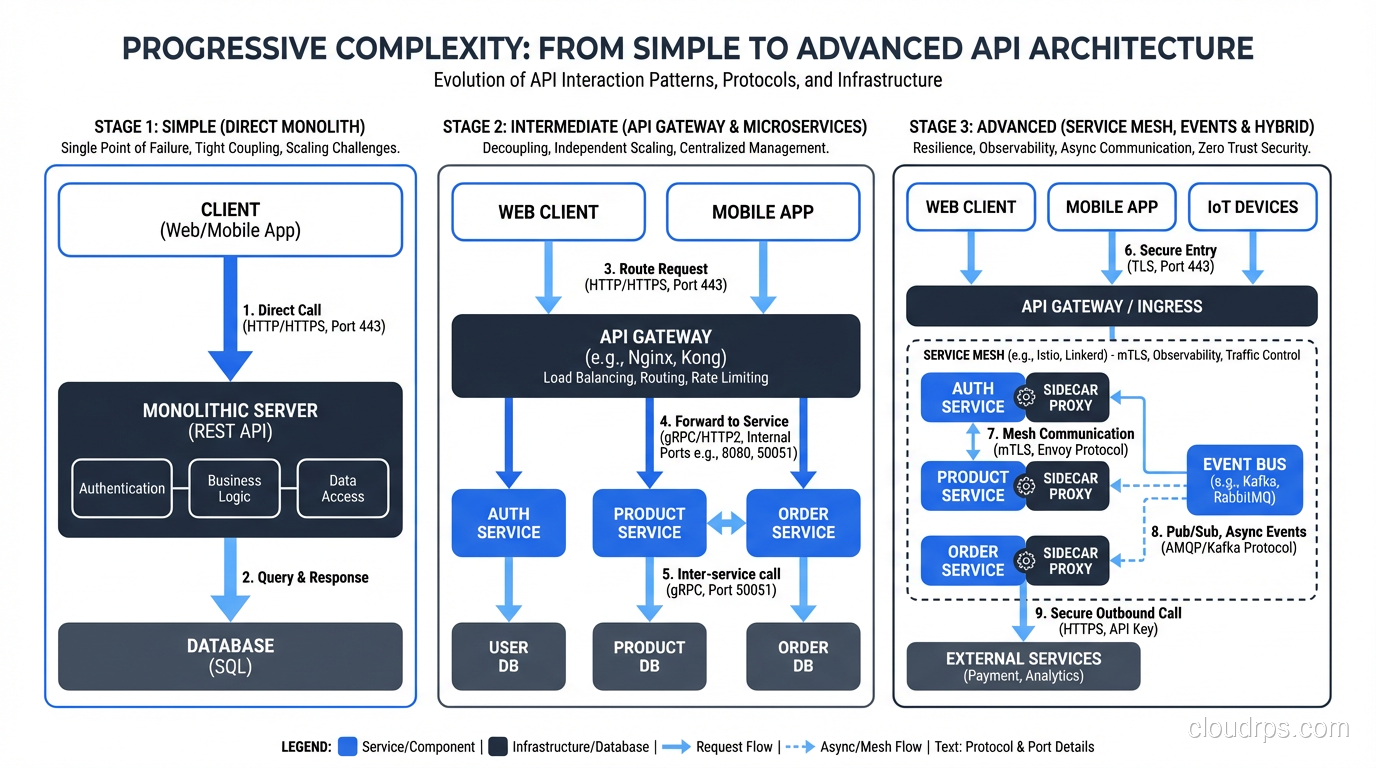
A well-designed API works with minimal configuration for common cases and supports complex configuration for advanced cases.
Example: A search endpoint that returns sensible results with just a query parameter (GET /api/search?q=widget) but also supports advanced filtering, sorting, field selection, and aggregation for power users.
The first API call should be simple. The hundredth API call can be complex. Don’t front-load complexity.
Field Selection (Sparse Fieldsets)
Let clients request only the fields they need:
GET /api/users/123?fields=name,email,avatar_url
This reduces payload size, improves performance, and is especially valuable for mobile clients. Both REST and GraphQL address this need. GraphQL makes it fundamental; REST makes it optional.
Principle 7: Versioning That Doesn’t Break Existing Clients
APIs evolve. Fields are added, deprecated, removed. Endpoints change. The question is how to handle this without breaking existing clients.
URL Versioning
GET /api/v1/users/123
GET /api/v2/users/123
Most common, easiest to understand, works with all HTTP tools. The downside: every version duplicates the API surface area, and you need to maintain multiple versions simultaneously.
Header Versioning
GET /api/users/123
Accept: application/vnd.example.v2+json
Cleaner URLs, but less visible and harder to test with simple tools like curl.
Query Parameter Versioning
GET /api/users/123?version=2
Simple but feels hacky. Works fine in practice.
My recommendation: URL versioning for public APIs (clarity wins), header versioning for internal APIs. Regardless of mechanism:
- Maintain backward compatibility within a version. Adding a field is fine. Removing or renaming a field is a breaking change.
- Deprecate before removing. Announce deprecation, give clients 6-12 months to migrate, then remove.
- Never sunset a version without active outreach. Automated email isn’t enough. Reach out to your top consumers directly.
Principle 8: Webhooks and Event-Driven Integration
Polling is wasteful and introduces latency. If something changes in your system that clients care about, send them a webhook.
Good webhook design:
- Configurable: Let clients subscribe to specific event types (not all-or-nothing)
- Signed: Include a signature header so clients can verify the webhook came from you
- Retried with backoff: If the client’s endpoint is down, retry with exponential backoff
- Idempotent: Include an event ID so clients can deduplicate retries
- Minimal payload: Include enough data to identify what changed, plus a URL to fetch the full resource. Don’t embed large objects in webhooks.
{
  "event_id": "evt_abc123",
  "event_type": "order.completed",
  "created_at": "2026-02-15T10:30:00Z",
  "data": {
    "order_id": "ord_xyz789",
    "url": "https://api.example.com/api/orders/ord_xyz789"
  }
}
Principle 9: SDKs and Client Libraries
Providing SDKs in popular languages (Python, JavaScript, Go, Java, Ruby) dramatically lowers the integration barrier. A developer who can pip install your-api-client and make authenticated calls in five lines of code is a happy developer.
Generate SDKs from your OpenAPI spec using tools like openapi-generator, Speakeasy, or Stainless. Keep them updated when the API changes.
But here’s the nuance: SDKs supplement good API design, they don’t replace it. If the underlying API is well-designed, developers who prefer raw HTTP calls (and many do) should have an equally good experience. The API should be usable without the SDK.
Principle 10: Treat Your API as a Product
The most developer-friendly APIs are the ones where the team treats the API as a product with developers as the customer. This means:
- Collecting feedback from developers who use the API
- Tracking adoption metrics (time to first API call, error rates, support tickets)
- Investing in developer experience (documentation, SDKs, sandbox environments, example applications)
- Maintaining backward compatibility as a core engineering requirement
The APIs I keep recommending to others (Stripe, Twilio, GitHub, Cloudflare) all treat developer experience as a competitive advantage. They invest heavily in documentation, tooling, and support because they understand that a developer-friendly API with thoughtful HTTP method usage is a product differentiator, not a cost center.
If you’re building an API that others will consume, whether internal teams or external developers, spend the time to design it well. The investment compounds with every developer who integrates with it.
Get Cloud Architecture Insights
Practical deep dives on infrastructure, security, and scaling. No spam, no fluff.
By subscribing, you agree to receive emails. Unsubscribe anytime.