
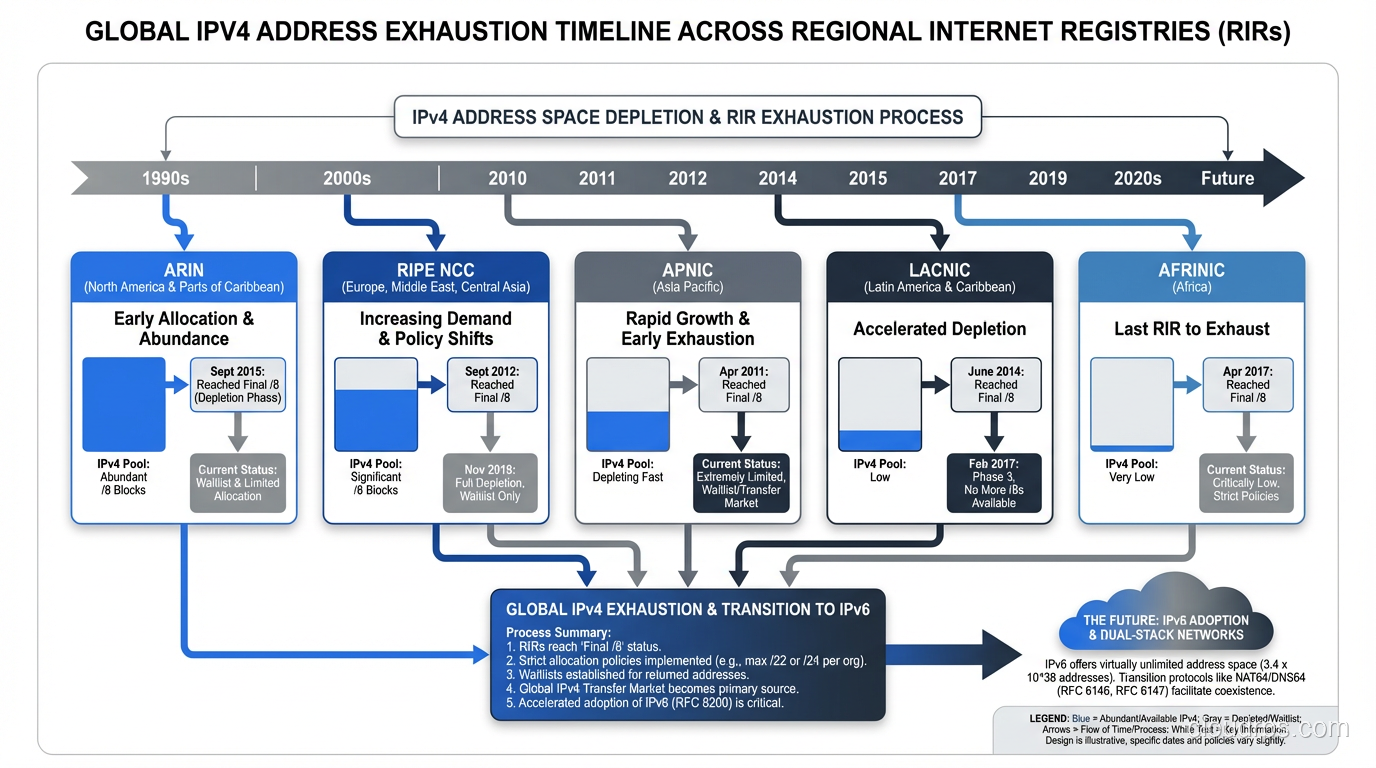
On January 31, 2011, IANA allocated the last blocks of IPv4 address space to the five Regional Internet Registries. It was the beginning of the end for a numbering system that had powered the internet since 1983. And yet, here we are in 2024, and most networks still run primarily on IPv4.
I was working at a tier-1 ISP when ARIN (the North American registry) started rationing addresses in the mid-2010s. Watching the free pool counter tick down on their website was like watching a doomsday clock. We all knew IPv6 was the answer. We’d known for twenty years. But nobody wanted to be the one to go first.
Let me tell you why IPv6 exists, why the transition has been so painfully slow, and why it actually matters for anyone building infrastructure today.
The IPv4 Math Problem
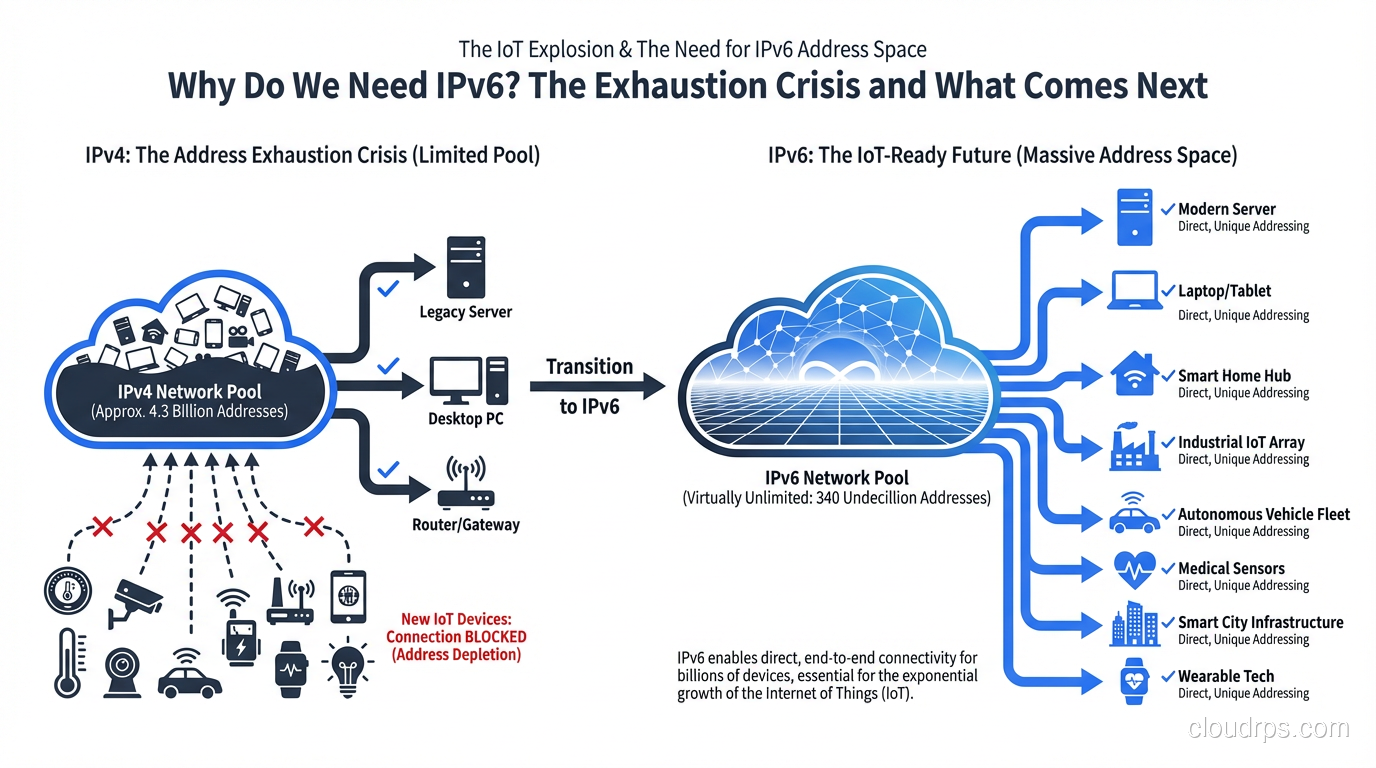
IPv4 addresses are 32 bits long. That gives us 2^32 possible addresses: roughly 4.3 billion. When Vint Cerf and Bob Kahn designed the protocol in the 1970s, 4.3 billion seemed like an impossibly large number. The internet was a research project connecting a few dozen universities. Nobody anticipated smartphones, IoT sensors, cloud computing, or the fact that every person on Earth would eventually want multiple connected devices.
The math just doesn’t work anymore. There are 8 billion people on the planet. The average household in a developed country has 20+ IP-capable devices. Enterprise networks consume massive blocks. Cloud providers need IP addresses for every VM, every container endpoint, every load balancer. We ran out. It’s that simple.
And it’s actually worse than the raw numbers suggest. Large chunks of the IPv4 space were allocated in the early days using classful addressing. Entire /8 blocks (16.7 million addresses each) went to single organizations. MIT, Apple, Ford Motor Company, the US Department of Defense: they each hold more IPv4 addresses than many entire countries. Some of that space has been returned and reallocated, but a lot of it is still sitting underutilized.
The NAT Band-Aid
When address scarcity first became apparent in the 1990s, the industry responded with two major innovations: CIDR (Classless Inter-Domain Routing, which you can read about in our CIDR explainer) and NAT (Network Address Translation).
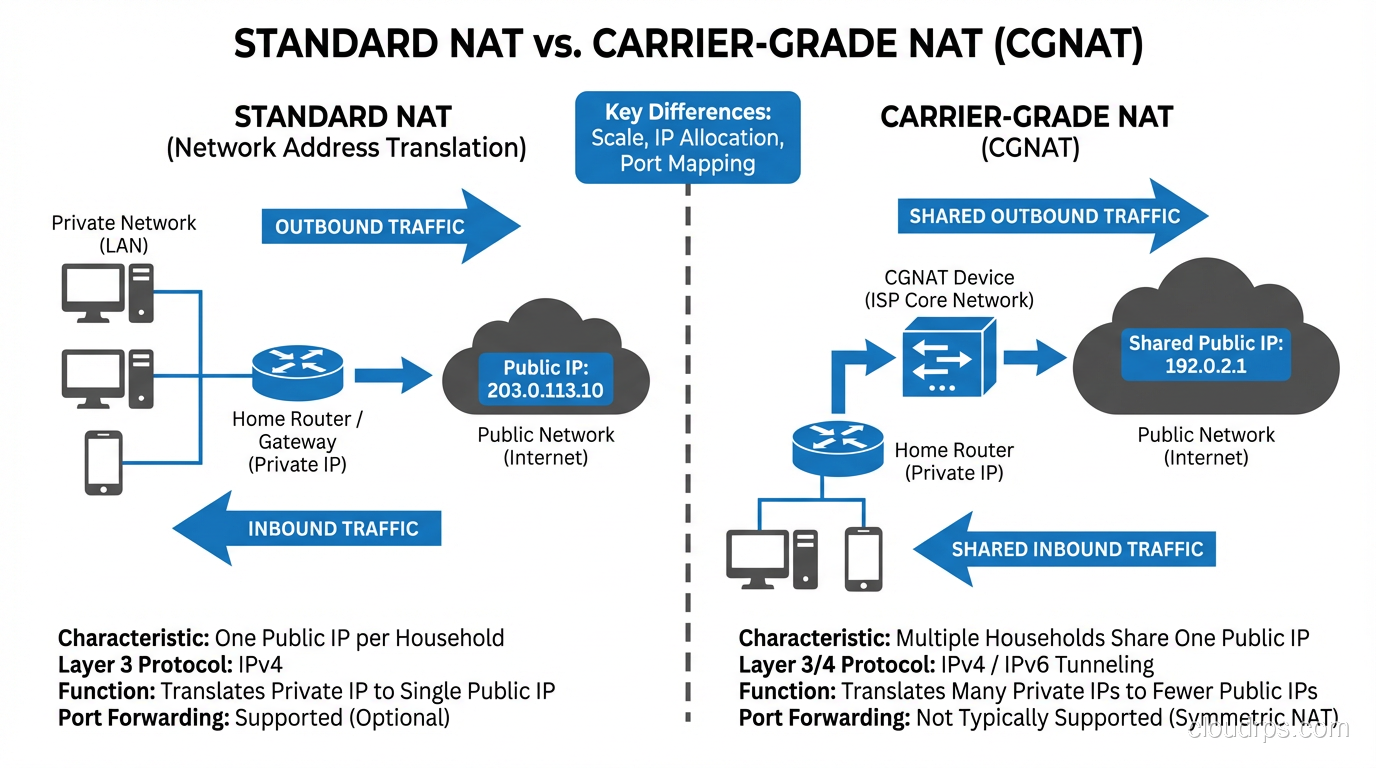
NAT was the game-changer, for better and worse. By allowing thousands of devices to share a single public IP address, NAT dramatically slowed IPv4 exhaustion. Your home network might have 30 devices, but they all appear to the internet as one address. Your ISP might serve a million customers with a fraction of the IP addresses they’d otherwise need.
NAT worked so well that it became a crutch. Entire generations of network engineers grew up thinking NAT was normal, even desirable. “NAT provides security!” is something I still hear, and while there’s a grain of truth to it (NAT does hide internal topology), it was never designed as a security mechanism. It’s a hack that happens to have a security side effect.
But NAT has real costs.
NAT Breaks the End-to-End Principle
The internet was designed so that any device could communicate directly with any other device. That’s the end-to-end principle, and it’s what made the internet so powerful and flexible. NAT breaks this. Devices behind NAT can’t be reached from the outside without port forwarding, UPnP, or NAT traversal hacks like STUN and TURN.
This is why video calling, online gaming, peer-to-peer file sharing, and VoIP are all harder than they should be. Every one of these applications has had to develop elaborate workarounds for NAT. WebRTC’s ICE framework exists almost entirely because of NAT. That’s a lot of engineering effort spent working around an address shortage.
Carrier-Grade NAT Makes It Worse
When ISPs started running out of addresses, they deployed Carrier-Grade NAT (CGNAT), which is NAT on top of NAT. Your home router NATs your devices to a private address, and then the ISP NATs that private address to a shared public address. You might be sharing a public IP with hundreds of other households.
CGNAT causes real problems. Port space becomes scarce (there are only 65,535 ports per IP). Logging and forensics become nightmarish. When law enforcement asks “who had this IP at this time,” the ISP has to dig through CGNAT logs to find the specific session. Services that use IP-based rate limiting or geolocation get confused. And latency increases because every packet needs an extra layer of translation.
I’ve worked with gaming companies that received a flood of abuse reports because their anti-cheat systems were banning IP addresses, not realizing that hundreds of legitimate players shared that same address through CGNAT. It was a mess.
Enter IPv6
IPv6 uses 128-bit addresses. That’s 2^128 possible addresses: approximately 340 undecillion. Written out, that’s 340,282,366,920,938,463,463,374,607,431,768,211,456. This isn’t just “more addresses.” This is an almost incomprehensibly large number. You could assign a billion IPv6 addresses to every square meter of Earth’s surface and still have space left over.
The address format changes too. Instead of four decimal octets (192.168.1.1), IPv6 uses eight groups of four hexadecimal digits, separated by colons: 2001:0db8:85a3:0000:0000:8a2e:0370:7334. There are shortening rules (you can drop leading zeros and collapse consecutive groups of all zeros with ::) so that address becomes 2001:db8:85a3::8a2e:370:7334.
But IPv6 isn’t just about more addresses. The protocol was redesigned from scratch to fix issues that had accumulated over IPv4’s lifetime.
Simplified Header
The IPv4 header has a variable length (20-60 bytes) with optional fields that routers have to parse. The IPv6 header is a fixed 40 bytes with a cleaner structure. Optional information goes into extension headers, which routers can skip if they don’t need to process them. This makes forwarding faster at the hardware level.
No More Broadcast
IPv4 has broadcast addresses that send packets to every device on a subnet. This creates unnecessary traffic and was a common attack vector (smurf attacks, anyone?). IPv6 replaces broadcast entirely with multicast and anycast. If you need to reach all nodes on a link, you use a well-known multicast address.
Built-in Autoconfiguration
IPv6 has Stateless Address Autoconfiguration (SLAAC), which lets devices configure their own addresses without a DHCP server. A device generates its own address based on the network prefix (advertised by the router) and its own interface identifier. Plug in a device, and it just works. DHCPv6 exists too, for scenarios where you need more control, but SLAAC is elegant for simple deployments.
Mandatory IPsec Support
When IPv6 was designed, IPsec was intended to be mandatory. In practice, the requirement was relaxed, but IPv6 still has much better integration with IPsec than IPv4. The extension header mechanism makes IPsec cleaner to implement.
Why the Transition Is Taking So Long
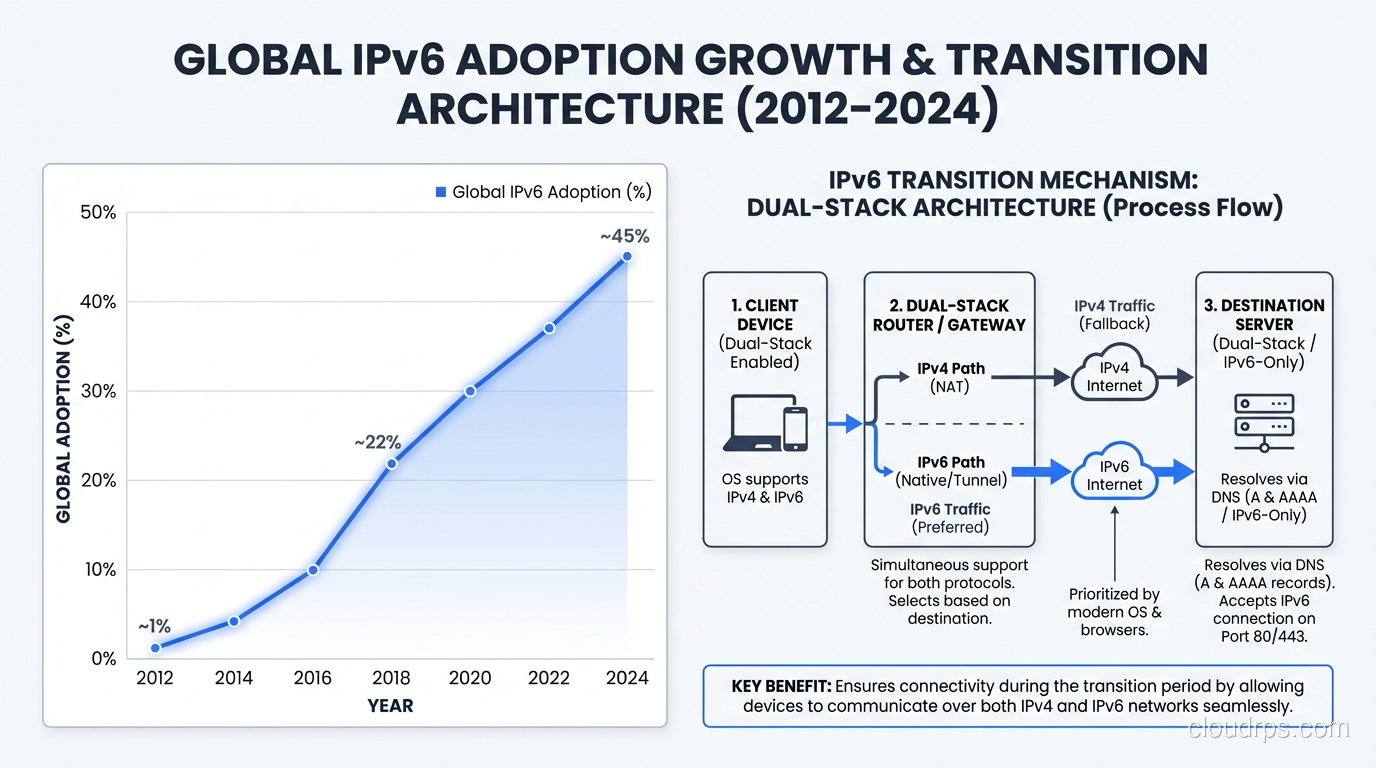
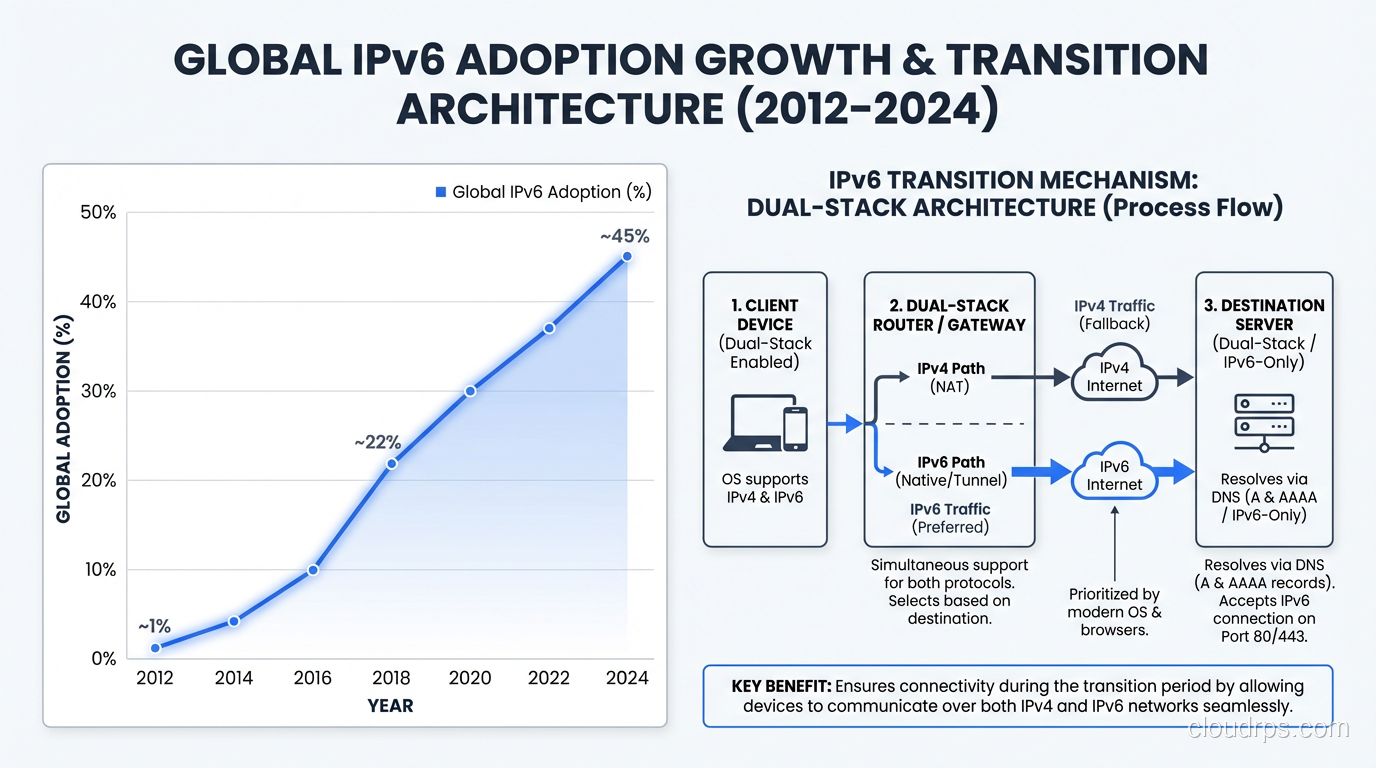
IPv6 was standardized in 1998 (RFC 2460). That’s over 25 years ago. And yet, as of 2024, global IPv6 adoption is roughly 40-45% of internet traffic according to Google’s measurements. That’s actually huge progress (it was under 5% in 2014), but we’re still far from complete.
Here’s why the transition is so slow.
There’s No Flag Day
You can’t switch the internet from IPv4 to IPv6 on a Tuesday afternoon. The two protocols are not directly compatible. An IPv4-only device can’t talk to an IPv6-only server. So the transition has to be gradual, with both protocols running simultaneously.
This “dual-stack” approach is the most common transition strategy. Every device, every router, every server runs both IPv4 and IPv6. It works, but it means maintaining two parallel networks, two sets of firewall rules, two address plans. It’s double the operational complexity. Every network engineer I know who runs dual-stack has at least one horror story about a firewall rule that was applied to IPv4 but forgotten on IPv6.
The Chicken-and-Egg Problem
Content providers don’t deploy IPv6 because not enough users have it. ISPs don’t deploy IPv6 because not enough content is available over it. This deadlock persisted for years until the largest players (Google, Facebook, Netflix, Apple) forced the issue by making their content available over IPv6 and measuring the results.
Mobile carriers have actually led the adoption charge. T-Mobile US runs over 90% IPv6. Reliance Jio in India is almost entirely IPv6. Mobile networks have a natural advantage: they control the entire stack from device to first-hop router, and they face extreme address pressure because of the sheer number of smartphones.
Legacy Software and Hardware
The amount of software that assumes IPv4 is staggering. Hardcoded IP addresses in configuration files. Regular expressions that validate “IP addresses” by checking for four dot-separated numbers. Database schemas with 32-bit integer columns for storing IPs. Firewalls, load balancers, and monitoring tools that only speak IPv4.
I once audited a Fortune 500 company’s IPv6 readiness and found IPv4 assumptions in over 2,000 source files across their application stack. The remediation estimate was months of developer time. And this was a company that wanted to move to IPv6. Imagine the ones that don’t.
The IPv4 Market
Here’s something that surprises most people: IPv4 addresses are traded on an open market, and they’re not cheap. As of 2024, a single IPv4 address costs roughly $30-50 on the transfer market. A /16 block (65,536 addresses) can sell for over $2 million.
Companies like Microsoft, Amazon, and various private equity firms have bought massive IPv4 blocks as investments. Amazon reportedly holds over 100 million IPv4 addresses. The existence of this market creates a perverse incentive: organizations that hold legacy IPv4 space can profit by selling it rather than returning it, and the high prices make IPv4 “work” for those willing to pay.
But this market also creates pressure toward IPv6. If you’re a startup that needs 1,000 public IPs for your infrastructure, you’re looking at a $30,000-50,000 bill just for addresses. Or you could use IPv6 for free. The economics are starting to tip.
What IPv6 Means for Cloud Architecture
If you’re building on AWS, Azure, or GCP, IPv6 is increasingly relevant. AWS charges for public IPv4 addresses ($0.005 per hour per address since February 2024). That adds up fast. A thousand Elastic IPs cost you $3,600 per month. IPv6 addresses are free.
For cloud architects, here’s what matters:
- VPC design: Plan your IPv6 CIDR blocks alongside IPv4. AWS gives you a /56 per VPC for IPv6.
- Load balancers: Make sure your ALBs and NLBs are dual-stack.
- Security groups: Audit rules for both address families. A common mistake is locking down IPv4 ingress while leaving IPv6 wide open.
- Internal services: Service-to-service communication within a VPC can use IPv6 natively. If you’re using CIDR notation for your network planning, you’ll need to understand the IPv6 prefix length conventions too.
- DNS: Your DNS needs to serve both A records (IPv4) and AAAA records (IPv6).
For a broader perspective on how networking protocols work together, see our networking protocols overview.
The Real Question: Can We Skip IPv6?
I get asked this more often than you’d think. “Can’t we just use more NAT? Or move everything to domain names? Or use some other overlay?”
No. NAT was a brilliant stopgap, but it’s created a fragile, complex internet where peer-to-peer communication is artificially difficult, where forensics and security are compromised, and where we’re burning engineering cycles on workarounds instead of features. CGNAT is already causing real problems for real users.
IPv6 is not optional. It’s not a matter of if, but when. The organizations that have already deployed it are seeing real benefits: simpler network architectures, better end-to-end connectivity, lower costs (especially in the cloud), and future-proofing against the continuing explosion of connected devices.
The Internet of Things alone will drive this. Billions of sensors, actuators, cameras, and controllers all needing IP addresses. You’re not going to NAT a smart factory with 100,000 sensors. You’re not going to NAT a fleet of autonomous vehicles. You need addressability, and IPv6 provides it.
How to Start
If you haven’t begun your IPv6 journey, here’s my practical advice from helping dozens of organizations through the transition:
- Enable dual-stack on your edge first. Your website, API endpoints, and load balancers should accept IPv6 traffic. This is usually the easiest win.
- Update your monitoring. Make sure your logging, alerting, and analytics can handle IPv6 addresses. Test with actual IPv6 traffic, not just in the lab.
- Train your team. IPv6 subnetting works differently. The conventions are different. A /64 is the standard subnet size, not a /24. Make sure your engineers understand the differences.
- Audit your code. Search for hardcoded IPv4 addresses, IPv4-only socket calls, and IP validation patterns. Start fixing them.
- Talk to your ISP. Make sure your upstream connectivity supports IPv6. Most transit providers do now, but verify.
Wrapping Up
IPv4 exhaustion isn’t a theoretical future problem. It happened years ago. We’ve been living on borrowed time, propped up by NAT, CGNAT, and an increasingly expensive IPv4 transfer market. IPv6 fixes the fundamental problem (not enough addresses) while also delivering a cleaner, more efficient protocol.
The transition is happening whether we like it or not. Mobile networks are already majority IPv6. Cloud providers are incentivizing it with pricing. The cost of clinging to IPv4 grows every year. The best time to start your IPv6 deployment was a decade ago. The second best time is now.
Don’t be the engineer who has to explain to leadership why the IPv4 addresses for a new data center cost more than the servers inside it.
Get Cloud Architecture Insights
Practical deep dives on infrastructure, security, and scaling. No spam, no fluff.
By subscribing, you agree to receive emails. Unsubscribe anytime.