
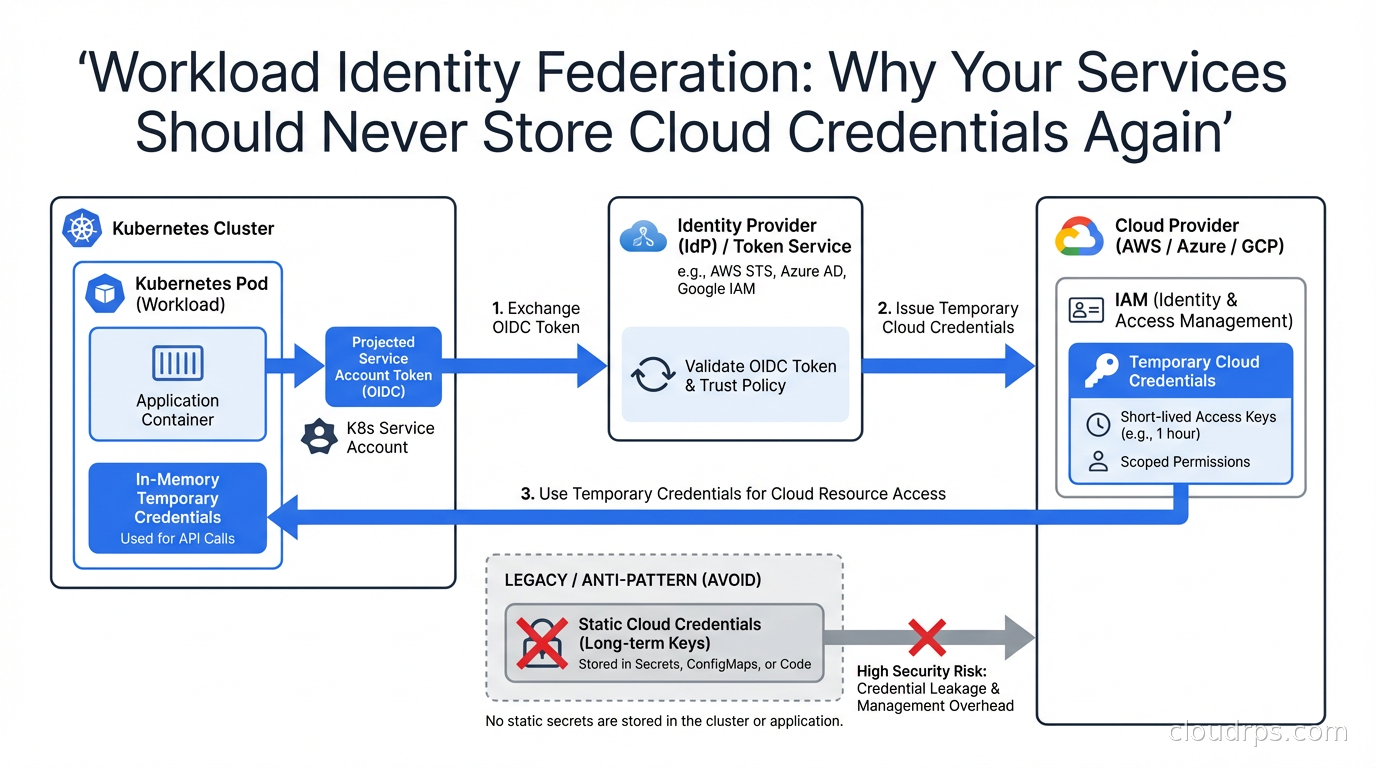
The most dangerous file in most cloud environments is a JSON file sitting on a developer’s laptop or baked into a Docker image. It has a name like service-account-key.json or shows up as AWS_ACCESS_KEY_ID and AWS_SECRET_ACCESS_KEY in a .env file. I have spent twenty years watching these credentials get leaked in Git commits, exposed in container image layers, and harvested from misconfigured S3 buckets. Every single one of those incidents was preventable.
Workload Identity Federation is how you stop all of it. The core idea: instead of issuing a static secret to your service, you configure your cloud provider to trust the identity tokens that your compute platform already issues, and exchange those short-lived tokens for temporary cloud credentials on the fly. No static keys. Nothing to rotate. Nothing to leak.
This article covers how the mechanism works at the OIDC level, then walks through the three major implementations you will encounter in practice: AWS IAM Roles for Service Accounts (IRSA) on EKS, GKE Workload Identity Federation, and Azure Workload Identity. I also cover GitHub Actions OIDC, which is one of the highest-value places to eliminate static credentials in a typical engineering organization.
The Problem With Static Credentials
Before getting into the solution, it is worth being precise about the failure modes. Static credentials fail in at least four distinct ways.
First, humans store them in the wrong places. I have lost count of the number of times I have run git log -p on a client repo and found an access key committed six months ago and “deleted” in a subsequent commit. Git history is forever. Once that key touched a public or semi-public repo, it needs to be rotated immediately, but most teams discover the leak weeks later during a billing spike.
Second, they end up in container images. A developer runs docker build with credentials in the environment to pull from a private registry or access a secret during build, and the key lands in an intermediate layer. Even if the final image does not expose it, anyone who can pull the image and run docker history or scan the layers can extract it.
Third, rotation is painful enough that it rarely happens. Most credential rotation policies say “every 90 days” but enforcing that across dozens of services and multiple environments is operationally miserable. Teams treat rotation as a risk event because they know it will break something. So the 90-day key becomes a two-year key.
Fourth, static credentials have no context. An AWS access key works from anywhere: your pod, a developer’s laptop, an attacker’s machine in another country. There is nothing binding the credential to the workload it was supposed to serve. Workload identity fixes this by making the credential inseparable from the runtime context.
How OIDC Federation Works
Every major Kubernetes distribution, GitHub Actions, and most other compute platforms now act as an OpenID Connect (OIDC) identity provider. They issue signed JSON Web Tokens (JWTs) to the workloads they run. These tokens contain claims that describe the workload: the Kubernetes namespace, the service account name, the pod name, the cluster identifier. The tokens are short-lived, typically valid for one hour, and signed with the platform’s private key.
Cloud IAM systems (AWS IAM, GCP IAM, Azure Active Directory) can be configured to trust these external OIDC providers. When your service needs a cloud credential, the flow works like this:
- The compute platform injects an OIDC token into the workload (via a projected volume in Kubernetes, or as an environment variable in GitHub Actions).
- The workload presents that token to the cloud provider’s STS (Security Token Service) or equivalent.
- The cloud provider validates the token signature against the OIDC provider’s public keys, checks that the claims match an IAM trust policy you configured, and if everything checks out, issues a short-lived cloud credential (an STS
AssumeRoleWithWebIdentitytoken on AWS, an access token on GCP, etc.). - The workload uses that short-lived credential. It expires in an hour. There is nothing to rotate, nothing to store, nothing to leak.
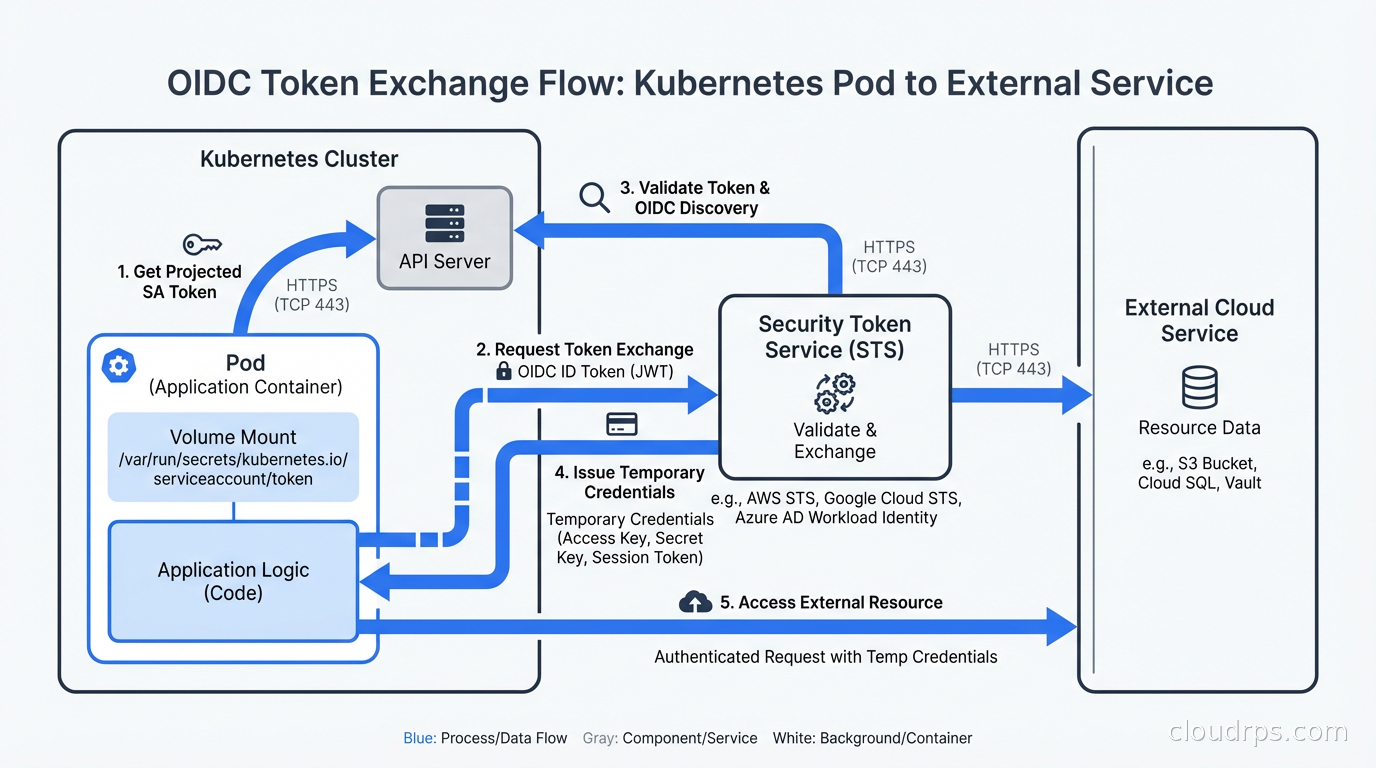
The beauty of this design is that the trust relationship is defined in IAM policy, not in the credential itself. You can say “I trust tokens issued by EKS cluster X, for service account Y in namespace Z, and those tokens may assume IAM role R.” An attacker who steals the OIDC token gets a token that only works for that specific claim set, only works when presented from a context that matches the trust policy, and expires within an hour.
This is zero trust security applied to machine identity: verify every request, bind credentials to context, grant minimal privilege, make nothing long-lived.
AWS IRSA: IAM Roles for Service Accounts
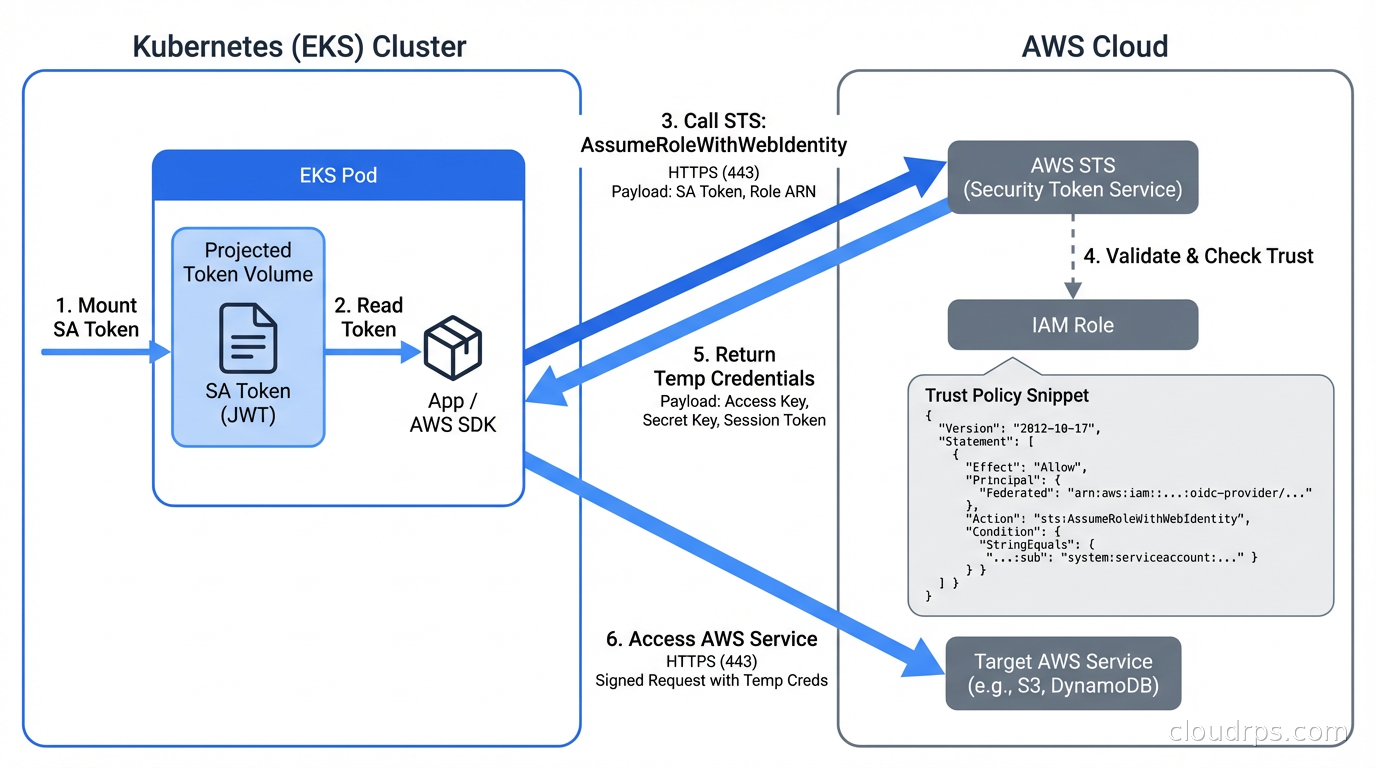
IRSA is the AWS implementation of workload identity for EKS. The setup has three moving parts: an OIDC provider registration, an IAM role with a trust policy, and a Kubernetes service account annotation.
Registering the OIDC Provider
Every EKS cluster has an OIDC issuer URL. You can find it in the EKS console or with:
aws eks describe-cluster --name my-cluster \
  --query "cluster.identity.oidc.issuer" --output text
You register this URL as an IAM OIDC identity provider in your AWS account. With eksctl, this is one command:
eksctl utils associate-iam-oidc-provider \
  --cluster my-cluster --approve
With Terraform:
data "tls_certificate" "eks" {
  url = aws_eks_cluster.main.identity[0].oidc[0].issuer
}

resource "aws_iam_openid_connect_provider" "eks" {
  client_id_list  = ["sts.amazonaws.com"]
  thumbprint_list = [data.tls_certificate.eks.certificates[0].sha1_fingerprint]
  url             = aws_eks_cluster.main.identity[0].oidc[0].issuer
}
The IAM Trust Policy
This is where you define what OIDC tokens are allowed to assume your role. The trust policy looks like this:
{
  "Version": "2012-10-17",
  "Statement": [
    {
      "Effect": "Allow",
      "Principal": {
        "Federated": "arn:aws:iam::123456789012:oidc-provider/oidc.eks.us-east-1.amazonaws.com/id/EXAMPLED539D4633E53DE1B716D3041E"
      },
      "Action": "sts:AssumeRoleWithWebIdentity",
      "Condition": {
        "StringEquals": {
          "oidc.eks.us-east-1.amazonaws.com/id/EXAMPLED539D4633E53DE1B716D3041E:sub": "system:serviceaccount:production:my-app",
          "oidc.eks.us-east-1.amazonaws.com/id/EXAMPLED539D4633E53DE1B716D3041E:aud": "sts.amazonaws.com"
        }
      }
    }
  ]
}
The sub condition is what binds the role to a specific Kubernetes service account in a specific namespace. An attacker who compromises a different service account in a different namespace cannot assume this role, even from the same cluster.
The Service Account Annotation
On the Kubernetes side, you annotate the service account with the IAM role ARN:
apiVersion: v1
kind: ServiceAccount
metadata:
  name: my-app
  namespace: production
  annotations:
    eks.amazonaws.com/role-arn: arn:aws:iam::123456789012:role/my-app-role
EKS automatically injects two environment variables (AWS_WEB_IDENTITY_TOKEN_FILE and AWS_ROLE_ARN) and a projected service account token volume into pods that use this service account. The AWS SDKs pick these up automatically through the default credential provider chain. Your application code does not change at all.
One gotcha I have hit repeatedly: the OIDC provider registration is per-AWS-account, and AWS has a limit of 100 OIDC providers per account. If you are managing a fleet of dozens of EKS clusters, you can run into this limit. The workaround is to use a single OIDC provider registration and target trust policies at the cluster issuer URL, but at that scale you should also be looking at EKS Pod Identity, which AWS launched in 2023 as a simpler alternative that uses the EKS auth API directly rather than OIDC federation. Pod Identity removes the OIDC provider limit and simplifies the trust policy syntax considerably.
EKS Pod Identity vs IRSA
For new EKS clusters, EKS Pod Identity is the better choice unless you need cross-account role assumption (which still requires IRSA). Pod Identity works through an agent daemonset that intercepts credential requests from pods, calls the EKS auth API, and returns temporary credentials. The IAM trust policy is simpler because you reference the EKS cluster directly rather than the OIDC issuer URL. For existing clusters that already use IRSA, there is no urgent reason to migrate, but new greenfield work should start with Pod Identity.
GKE Workload Identity Federation
GCP’s implementation is called Workload Identity Federation for GKE (it was “Workload Identity” before a 2024 rebrand). The mechanism is similar to IRSA but GCP manages the OIDC pool automatically, which removes one manual registration step.
GKE clusters have Workload Identity enabled at the cluster level:
gcloud container clusters create my-cluster \
  --workload-pool=my-project.svc.id.goog
Or on an existing cluster:
gcloud container clusters update my-cluster \
  --workload-pool=my-project.svc.id.goog
You then create a GCP service account (IAM service account, not Kubernetes service account) with the permissions your workload needs, and bind the Kubernetes service account to it:
gcloud iam service-accounts add-iam-policy-binding \
  my-app@my-project.iam.gserviceaccount.com \
  --role roles/iam.workloadIdentityUser \
  --member "serviceAccount:my-project.svc.id.goog[production/my-app]"
Then annotate the Kubernetes service account:
apiVersion: v1
kind: ServiceAccount
metadata:
  name: my-app
  namespace: production
  annotations:
    iam.gke.io/gcp-service-account: my-app@my-project.iam.gserviceaccount.com
GCP injects the necessary metadata automatically. The GCP client libraries detect the GKE environment and use the projected token to fetch credentials from the GCP metadata server. Again, no application code changes.
One important difference from IRSA: GCP uses a workload pool identity format (my-project.svc.id.goog[namespace/ksa-name]) rather than an OIDC subject claim. This format is stable across cluster recreations, which matters if you are doing blue-green cluster upgrades. With IRSA, if you delete and recreate a cluster, the OIDC issuer URL changes and you need to update trust policies. With GKE Workload Identity, the binding is to the workload pool, which is project-scoped and persistent.
Google has also been gradually restricting service account key creation through organization policy. If your GCP organization policy has iam.disableServiceAccountKeyCreation enforced, new service account JSON keys cannot be created at all. This is a forcing function for Workload Identity adoption, and frankly I think more organizations should enforce it.
Azure Workload Identity
Azure’s implementation, Azure Workload Identity, reached GA in 2023 and has largely replaced the older AAD Pod Identity (which was a community project and is now deprecated). The architecture is similar: AKS clusters act as OIDC providers, and Azure AD is configured to trust them.
Azure Workload Identity uses a mutating admission webhook to inject the projected service account token and the necessary environment variables into pods. Setup requires the OIDC issuer feature on your AKS cluster:
az aks update --resource-group my-rg --name my-cluster \
  --enable-oidc-issuer --enable-workload-identity
You then create a managed identity, create a federated credential binding it to your Kubernetes service account, and annotate the service account:
# Create managed identity
az identity create --resource-group my-rg --name my-app-identity

# Create federated credential
az identity federated-credential create \
  --name my-app-federated \
  --identity-name my-app-identity \
  --resource-group my-rg \
  --issuer $(az aks show --resource-group my-rg --name my-cluster --query "oidcIssuerProfile.issuerUrl" -o tsv) \
  --subject "system:serviceaccount:production:my-app" \
  --audience api://AzureADTokenExchange
The pattern is consistent across all three cloud providers: compute platform issues OIDC token, cloud IAM trusts the token, workload gets temporary credentials.
GitHub Actions OIDC
One of the highest-leverage places to eliminate static credentials is CI/CD pipelines. I have seen GitHub Actions workflows with AWS_ACCESS_KEY_ID and AWS_SECRET_ACCESS_KEY stored as repository secrets, valid for years, scoped to admin permissions because the person who set them up thought “I’ll tighten this later.” Later never comes.
GitHub Actions has supported OIDC since 2021. The workflow just needs permission to request the token:
permissions:
  id-token: write
  contents: read

jobs:
  deploy:
    runs-on: ubuntu-latest
    steps:
      - uses: actions/checkout@v4

      - name: Configure AWS credentials
        uses: aws-actions/configure-aws-credentials@v4
        with:
          role-to-assume: arn:aws:iam::123456789012:role/github-actions-deploy
          aws-region: us-east-1
The IAM trust policy for GitHub Actions uses the GitHub OIDC provider and can be scoped to a specific repo, branch, or even deployment environment:
{
  "Condition": {
    "StringLike": {
      "token.actions.githubusercontent.com:sub": "repo:myorg/myrepo:environment:production"
    }
  }
}
That last detail matters: by scoping the trust to an environment (not just the repo), you ensure that only workflows with explicit environment approval can assume the production role. A developer pushing to a feature branch cannot trigger a production deployment even if they compromise the workflow file, because environment approvals are controlled separately in GitHub.
GCP and Azure have equivalent configurations. Once you set this up, you delete the static credentials from your GitHub secrets and you never create new ones. The GitHub Actions runner requests a fresh OIDC token for each job, exchanges it for cloud credentials, uses them for that job’s lifetime, and they expire automatically.
Cross-Cloud Scenarios
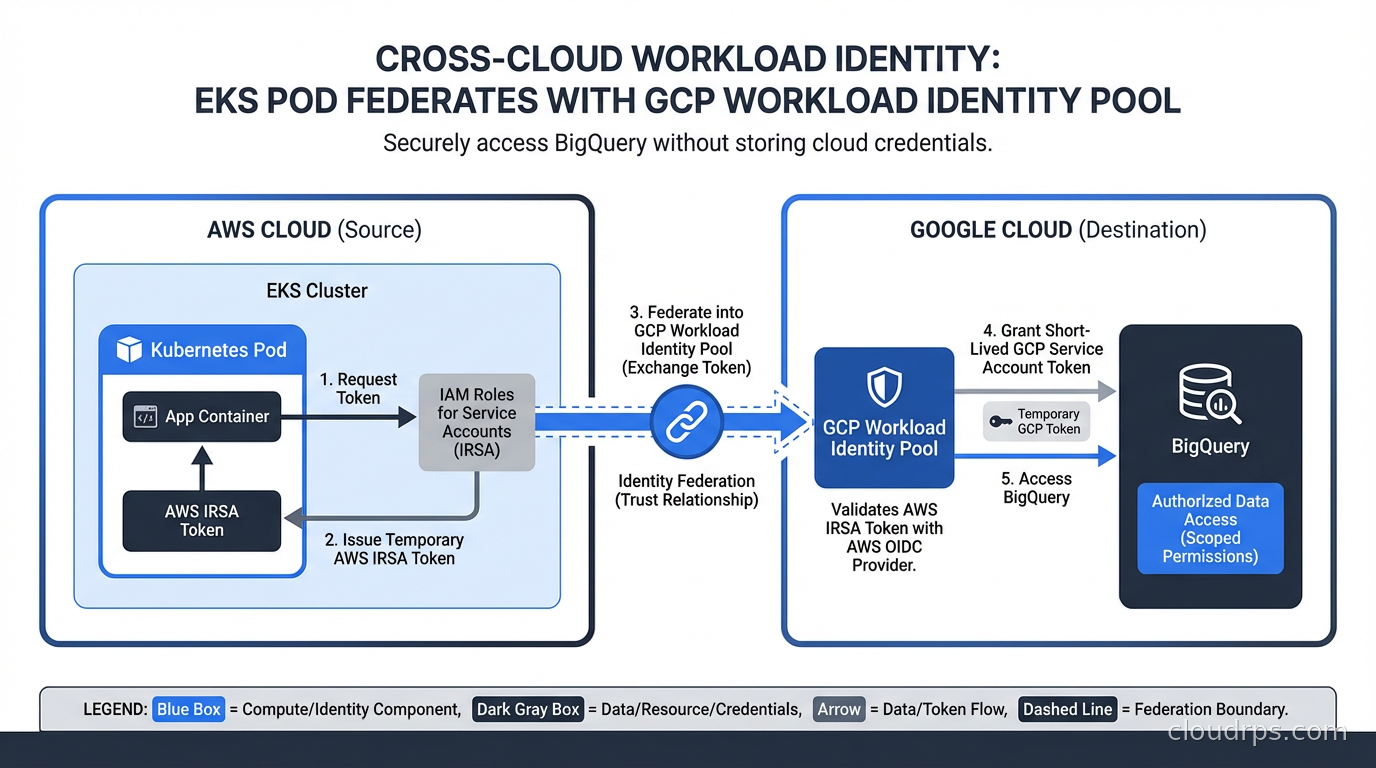
Some organizations need services running in one cloud to access resources in another. Workload Identity Federation handles this too. GCP has native support for using AWS or Azure workload identities to access GCP resources through its Workload Identity Federation feature. An EC2 instance or EKS pod can present its AWS-issued token to GCP and get GCP credentials back, without any GCP service account key.
This is increasingly common in hybrid architectures where, say, AWS is the primary compute platform but BigQuery or Vertex AI is the analytics layer. Before Workload Identity Federation, the standard approach was to create a GCP service account, download a JSON key, store it as an AWS Secrets Manager secret, and pull it in at runtime. The whole chain involved at least two static secrets and a multi-step retrieval process. With federation, the AWS IAM role identity flows directly into GCP with no intermediate static credential.
Migrating From Static Credentials
The migration is straightforward in principle but requires discipline to execute across a large environment. Here is the approach I have used successfully:
Start by auditing your current credential usage. Scan environment variables in your Kubernetes deployments and Secrets Manager/Vault for anything that looks like a cloud access key. AWS access keys start with AKIA (long-lived) or ASIA (temporary). GCP service account keys are JSON files with a "type": "service_account" field. This audit usually surfaces credentials that nobody remembers creating. It is also the first step of a broader non-human identity governance program, which extends the same discovery and lifecycle discipline to API keys, OAuth tokens, and CI/CD credentials that workload identity federation cannot yet replace.
For each credential, identify the IAM permissions it uses. CloudTrail Access Analyzer in AWS is excellent for this: it can generate a least-privilege policy based on actual usage over a time window. Do not trust what people say the credentials are used for; look at the actual API calls.
Create the workload identity configuration (OIDC provider, IAM role, trust policy, service account annotation) for each service. Deploy the new configuration alongside the old credentials. Use feature flags or a canary deployment to route some traffic through the new code path first. The AWS SDK will use IRSA automatically if the environment variables are present; you do not need code changes for most languages.
Once you have validated that the workload identity path works, remove the static credentials. Then enforce the removal: AWS SCPs can deny iam:CreateAccessKey for specific roles, and GCP organization policy can disable service account key creation entirely. Make the wrong thing impossible, not just discouraged.
This pairs well with the patterns covered in our secret management guide: Vault and cloud-native secrets managers still have a role for application-level secrets (database passwords, API keys for third-party services), but cloud provider credentials should never go through a secrets manager if Workload Identity is an option.
Common Pitfalls
Token audience mismatches. OIDC tokens have an aud claim that specifies the intended audience. AWS STS expects sts.amazonaws.com. If your OIDC token has a different audience (this happens if you misconfigure the projected volume or use a custom audience), the trust policy validation fails with an unhelpful error. Always check the token claims with jwt.io or the AWS CLI sts decode-authorization-message when debugging.
Namespace and service account drift. The trust policy binding is exact: namespace production, service account my-app. If someone renames the namespace for staging parity or creates a service account with a typo, the role assumption silently falls back to the instance role or fails entirely. Enforce service account names with Kubernetes RBAC and admission policies so that naming drift triggers a deployment failure rather than a silent permission error.
Instance metadata endpoint conflicts. On EKS, pods running with hostNetwork: true can reach the EC2 instance metadata endpoint (169.254.169.254) and inherit the node’s IAM role permissions, bypassing IRSA entirely. Block this with a network policy or configure IMDSv2 with hop limit 1 on the node launch template. If the metadata service is only accessible with 1 hop, pods on the overlay network cannot reach it, and they must use IRSA.
IRSA on Fargate. IRSA works on EKS Fargate, but the setup is slightly different because there is no node IAM role to worry about. Each Fargate pod gets its own projected token. Make sure your Fargate profile uses the right pod execution role and that the OIDC provider is registered.
Over-permissive trust policies. I have seen trust policies that use StringLike with a wildcard on the sub claim, effectively allowing any service account in any namespace to assume the role. The trust policy is your security boundary: be specific. Use StringEquals and specify the exact namespace and service account name.
Audit and Observability
Once you are on workload identity, your CloudTrail or GCP audit logs will show AssumeRoleWithWebIdentity events with the OIDC subject as the principal. This is a significant observability improvement over static credentials: you can see exactly which pod, from which namespace, using which service account, assumed which role, at what time. Static credential usage in CloudTrail shows only the access key ID, which tells you nothing about the actual workload.
Set up CloudTrail alerts for any iam:CreateAccessKey calls in production accounts. Once you have migrated to workload identity, there should be zero. Any new static key creation is an anomaly worth investigating immediately.
This observability model supports the kind of continuous access review that zero trust security requires. You can verify that your trust policies are as tight as you think they are by looking at actual access patterns, identify unused roles, and detect any attempt to use workload identity to access resources outside the expected scope. Our guide to cloud-native observability covers the tooling to surface these audit events alongside your application metrics and logs.
Putting It Together
Workload Identity Federation is one of those improvements that sounds complex on paper but is almost always simpler to implement than teams expect, especially on managed Kubernetes like EKS and GKE where the cloud provider does most of the heavy lifting. The operational overhead of static credentials, including rotation, storage, leak detection, and audit, is almost always higher than the one-time cost of setting up OIDC federation.
The payoff is real: no static keys to rotate, no keys to leak in Git history, no credentials that work outside the intended workload context, and better audit trails than anything you get from static credentials. If you are currently storing AWS_ACCESS_KEY_ID in Kubernetes Secrets or .env files, the migration is worth prioritizing above almost anything else on your security backlog.
For teams running services across multiple clouds, the cross-cloud federation capabilities mean you can extend this model beyond a single provider. A well-designed workload identity architecture ends up with static credentials only for things that genuinely cannot use federation: on-premises services with no OIDC provider, third-party SaaS integrations that do not support token-based auth. Everything running in a major cloud or CI/CD platform should be using workload identity. For workloads that span multiple clusters, bare metal, or on-premises environments where cloud-native OIDC falls short, SPIFFE and SPIRE provide a universal workload identity layer that federates across any environment without depending on a specific cloud provider’s identity system.
The combination of workload identity for cloud API access, Kubernetes RBAC for cluster resources, and policy-as-code enforcement for admission control gives you a principled security posture that is both stronger than the static-credential approach and easier to reason about at audit time. That is the kind of defense-in-depth that holds up when someone actually tests it. One natural extension of this model: the same Kubernetes service account OIDC tokens that authenticate your pods to AWS or GCP can also authenticate cert-manager to Vault’s PKI secrets engine, so your TLS certificate management pipeline is also keyless. No static Vault tokens, no AppRole credentials sitting in secrets. The OIDC trust chain goes all the way down.
Updated September 1, 2026: corrected biographical details as part of an accuracy review.
Get Cloud Architecture Insights
Practical deep dives on infrastructure, security, and scaling. No spam, no fluff.
By subscribing, you agree to receive emails. Unsubscribe anytime.