
The most dangerous two words in production engineering are “ALTER TABLE.” I’ve watched a MySQL ALTER TABLE ADD COLUMN on a 200 million row table lock writes for forty minutes on a production database because someone didn’t know that MySQL 5.7 didn’t support online DDL for certain column types. I’ve watched a PostgreSQL migration that worked fine in staging fail in production because the staging table had 10,000 rows and production had 80 million. I’ve watched a perfectly reasonable index creation cause a cascade of read replica lag that took four hours to recover from.
Database migrations are one of those areas where the gap between “works in development” and “safe in production” is enormous and not always obvious. The naive approach, run your migration tool and wait, works fine up to a certain scale. Past that scale, you need proper techniques or you’re gambling with availability.
This is a practical guide to those techniques. I’ll cover the conceptual patterns first, then the specific tools, then the operational checklist I use before running anything significant in production.
Why Naive Migrations Fail
Understanding failure modes is the precondition for avoiding them.
Lock escalation is the most common failure. Many DDL operations acquire locks that block reads or writes for their duration. Adding a NOT NULL column with a default in old versions of PostgreSQL required rewriting the entire table while holding an exclusive lock. On a table that’s getting thousands of writes per second, even a 10-second rewrite causes a visible outage. Connection queuing makes this worse: once the lock blocks a few slow-running transactions, connections pile up behind them. By the time the DDL finishes, you have hundreds of connections in queue and your application is behaving like it’s down.
Replication lag is the failure mode you don’t notice until it’s too late. Large table rewrites and index creations generate enormous amounts of write-ahead log (WAL) in PostgreSQL, or binary log in MySQL. Replicas have to apply all of that before they catch up. During a major migration, replica lag can reach hours. If you’re routing read traffic to replicas (which you should be), your read queries are suddenly running against stale data. If you’re using a replica as a failover target, you’ve temporarily degraded your HA posture.
Application compatibility failures are the insidious ones. If you deploy code that references a new column before the migration adds that column, the deployment fails. If you drop a column that old code still queries, the old code breaks. If you rename a column without updating all the queries atomically, things break. The deployment-migration ordering problem is why so many teams have “migration days” with maintenance windows: it’s easier to take the app down than to reason about compatibility.
The solution to all three failure modes is the same conceptual approach: make changes incrementally, maintain backward compatibility at each step, and never do anything that requires the old and new states to coexist unsafely.
The Expand-Contract Pattern
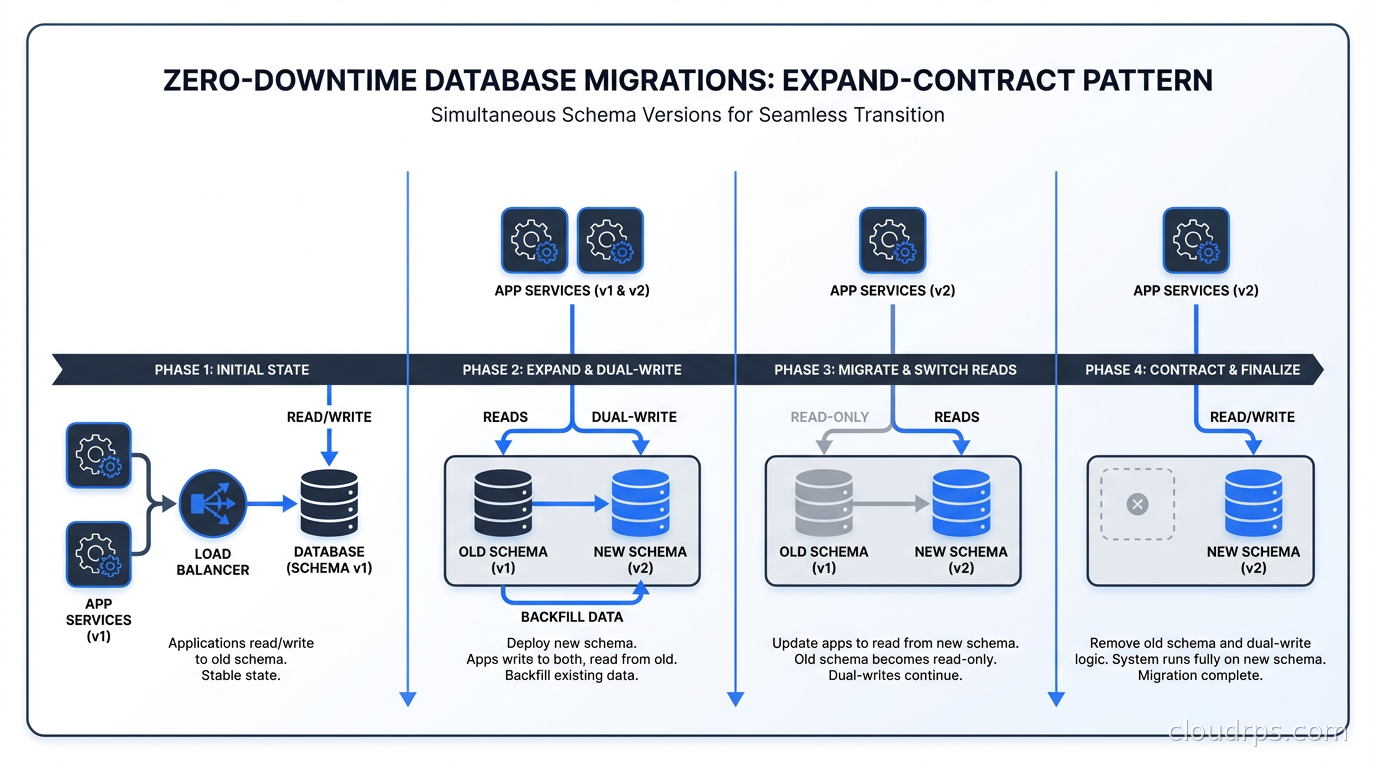
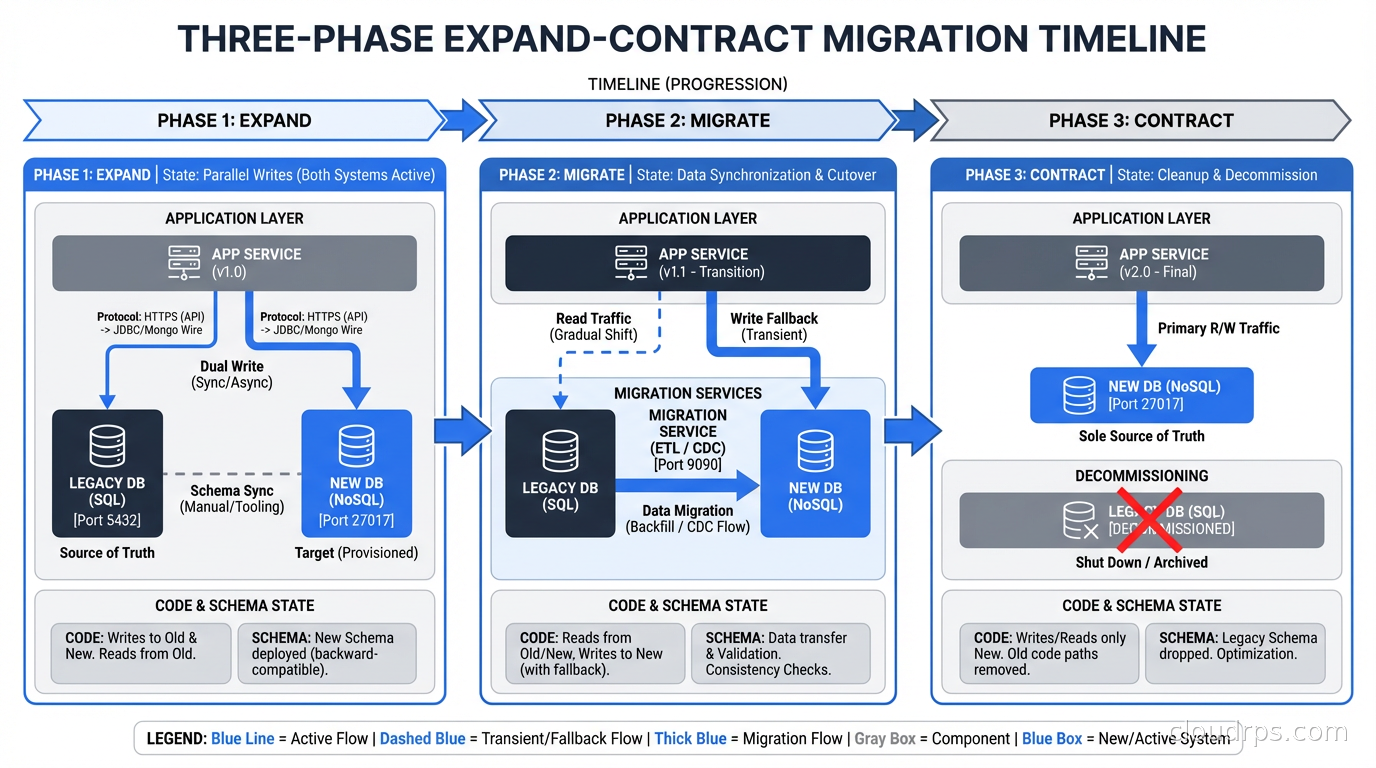
The expand-contract pattern (sometimes called parallel change or the strangler fig applied to schema changes) is the foundational technique for zero-downtime migrations. It has three phases.
Expand: Add new schema elements without removing or changing old ones. Add new columns (nullable, without constraints), add new tables, add new indexes. The existing code continues to work unchanged. New code can start writing to the new schema elements.
Migrate: Gradually move data and update code to use the new schema. This is the longest phase. Update your application code to read from both old and new schema elements (with appropriate fallback logic), backfill historical data into new columns, write to both old and new columns simultaneously. This dual-write period ensures you can roll back to old code without losing data.
Contract: Remove the old schema elements once you’re confident the new schema is correct and all code has been updated. Drop old columns, drop old tables, remove old indexes. This step is safe because all running code has already been updated to use the new schema exclusively.
This might sound like a lot of work for something like renaming a column. You’re right: it is more work than ALTER TABLE ... RENAME COLUMN. But for high-traffic production databases, it’s the difference between a seamless migration and a production incident.
The expand-contract pattern requires that your deployment and migration processes can be separated. You need to be able to deploy code that handles both the old and new schema, deploy the schema change, verify correctness, and then deploy the code that removes the old schema handling. If your deployment pipeline bundles code changes with schema changes atomically, you’ll need to decouple them.
Online Schema Change Tools
Even with the expand-contract pattern, some schema changes require physically restructuring the table: adding a NOT NULL column without a default, changing column types, restructuring indexes. These operations need specialized tools to avoid lock-based outages.
gh-ost for MySQL
gh-ost (GitHub’s Online Schema Transmogrifier) is the tool for large table schema changes in MySQL. Instead of the naive approach of having MySQL do the DDL with locks, gh-ost:
- Creates a ghost table with the new schema
- Copies rows from the original table to the ghost table in batches (you control the batch size and delay to limit load)
- Tails the MySQL binary log and applies changes that happen to the original table during the copy onto the ghost table
- When the ghost table is caught up, performs a quick atomic swap: rename original to old, ghost to original
The critical benefit is that gh-ost is non-blocking. It uses row-level operations during the copy, not DDL locks. The final cutover is just a table rename, which is atomic and takes milliseconds.
gh-ost has a control socket that lets you pause the migration, adjust the throttle, or abort cleanly at any point. I’ve used this to pause migrations during peak traffic hours and resume during off-peak windows. The entire migration, including the copy phase, can be interrupted and restarted.
Running gh-ost in production:
gh-ost \
  --host="replica.db.internal" \
  --port=3306 \
  --user="gh-ost" \
  --password="..." \
  --database="myapp" \
  --table="orders" \
  --alter="ADD COLUMN shipped_at DATETIME NULL" \
  --allow-on-master \
  --initially-drop-ghost-table \
  --initially-drop-old-table \
  --max-load="Threads_running=25" \
  --critical-load="Threads_running=1000" \
  --chunk-size=500 \
  --throttle-control-replicas="replica.db.internal" \
  --max-lag-millis=1500 \
  --execute
The --max-lag-millis flag is important: gh-ost pauses row copy if replica lag exceeds the threshold. This self-throttle prevents the migration from causing the replica lag problems I described earlier.
pg_repack and pglogical for PostgreSQL
PostgreSQL’s DDL story is better than MySQL’s in several ways. Since PostgreSQL 11, adding a column with a default value is instant (no table rewrite), because PostgreSQL stores the default in the system catalog and only writes it when rows are accessed. Many operations that used to require full rewrites in older versions now run online.
But when you do need a full table rewrite (changing column types, adding a NOT NULL constraint to a column with nulls that need to be backfilled), pg_repack is the tool. Like gh-ost, it builds a new table structure while the original is live, uses triggers to capture ongoing changes, and performs an atomic cutover. It requires no maintenance window. The same tool is the right choice when a table has accumulated significant bloat from MVCC dead tuples, as an alternative to the exclusive-lock VACUUM FULL. See our PostgreSQL VACUUM and autovacuum guide for the full operational context.
Install it as a PostgreSQL extension and run:
-- Check what pg_repack will do
SELECT * FROM repack.tables;

-- Repack a specific table
SELECT repack.repack_table_no_order('public.orders');
For PostgreSQL, also consider pglogical for migrations that need to run across major version upgrades or require logical replication to a new schema. This is common for major version migrations where you’re moving from PostgreSQL 14 to 17 and want to do it without downtime.
Index Operations
Index creation deserves special mention because it’s easy to do wrong and commonly causes incidents.
In PostgreSQL, always use CREATE INDEX CONCURRENTLY. Without CONCURRENTLY, index creation takes a lock that blocks writes. With it, the index builds without blocking, at the cost of taking longer and not being transactional (if it fails, you have an invalid index that you need to clean up with DROP INDEX CONCURRENTLY). Before building the index, make sure you are choosing the right index type for your query pattern: B-tree for equality and range queries, GIN for JSONB and arrays, BRIN for large sequential tables. The PostgreSQL indexing strategies guide covers every index type with concrete decision rules.
In MySQL, ALTER TABLE ... ADD INDEX is online by default since MySQL 5.6 for InnoDB. But monitor the process list while it runs: it should show “altering table” with minimal lock state, not “waiting for metadata lock.”
For very large tables, consider building the index on a replica first, validating it, then promoting the replica or using pt-online-schema-change to apply the same index to the primary.
Handling NOT NULL Constraints
Adding a NOT NULL constraint to an existing column is one of the trickier migrations because it requires all existing rows to have a non-null value (otherwise the constraint immediately fails) and it validates the entire table on constraint creation, potentially taking a long time and causing lock issues.
The safe pattern in PostgreSQL:
- Add the column as nullable first:
ALTER TABLE orders ADD COLUMN shipped_at TIMESTAMPTZ - Backfill existing rows in batches: write a script that does
UPDATE orders SET shipped_at = created_at WHERE shipped_at IS NULL LIMIT 1000in a loop, committing between batches - Add the NOT NULL constraint with
NOT VALID:ALTER TABLE orders ADD CONSTRAINT orders_shipped_at_not_null CHECK (shipped_at IS NOT NULL) NOT VALID - Validate the constraint in a separate transaction:
ALTER TABLE orders VALIDATE CONSTRAINT orders_shipped_at_not_null
The NOT VALID clause is the key: it adds the constraint but only enforces it for new rows. The VALIDATE CONSTRAINT step checks existing rows without taking an exclusive lock (it takes a SHARE UPDATE EXCLUSIVE lock that allows reads and writes to continue). Once validated, you can convert it to a proper NOT NULL constraint in the next migration.

Large Backfills Without Killing Production
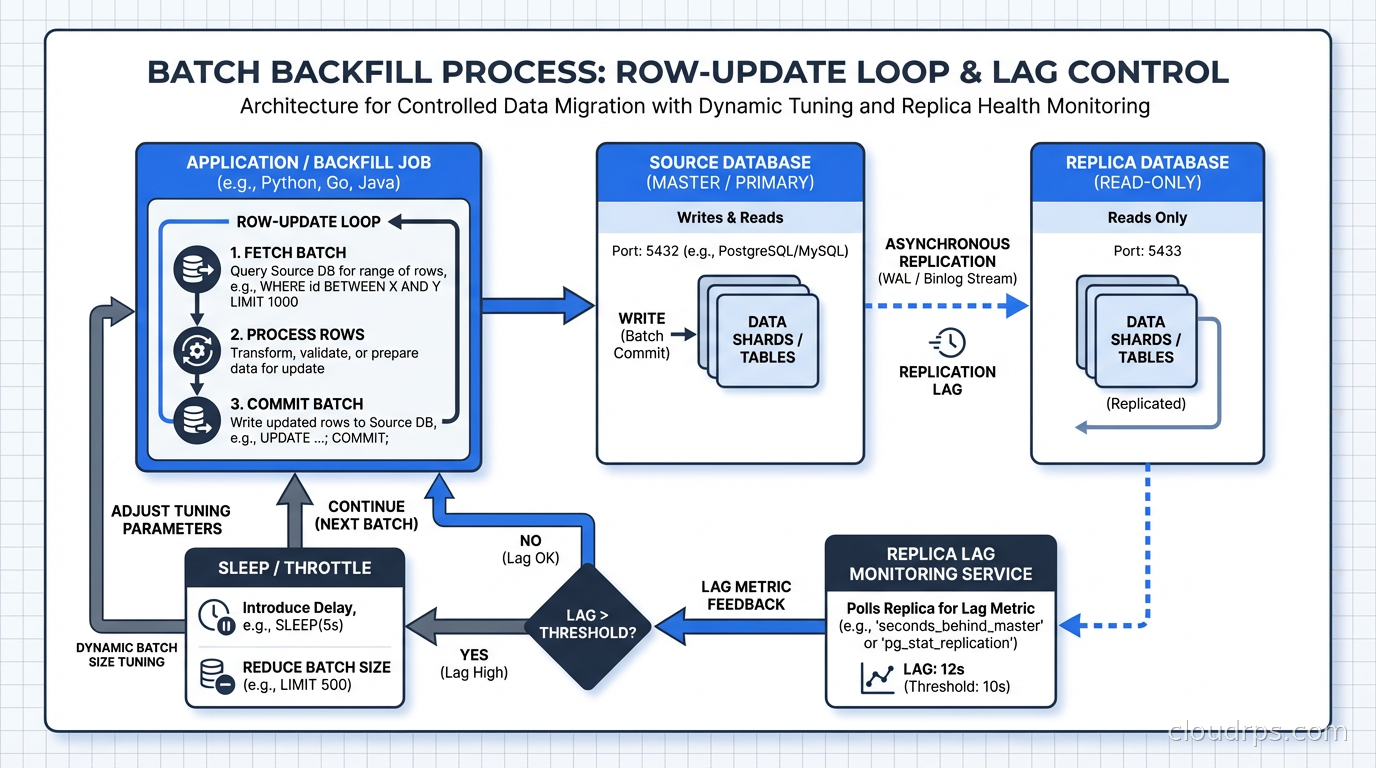
Any migration that requires updating millions of rows needs to do it in batches. A single UPDATE orders SET order_status = 'legacy' WHERE created_at < '2020-01-01' on 50 million rows is a disaster: it holds a transaction open for potentially minutes, generates enormous WAL, blocks replication, and can cause lock contention throughout the table.
The batch backfill pattern:
import time
import psycopg2

conn = psycopg2.connect(DATABASE_URL)
batch_size = 1000
sleep_between_batches = 0.1  # seconds

while True:
    with conn.cursor() as cur:
        cur.execute("""
            UPDATE orders
            SET order_status = 'legacy'
            WHERE id IN (
                SELECT id FROM orders
                WHERE created_at < '2020-01-01'
                AND order_status != 'legacy'
                LIMIT %s
            )
        """, (batch_size,))
        rows_updated = cur.rowcount
        conn.commit()

    if rows_updated == 0:
        print("Backfill complete")
        break

    print(f"Updated {rows_updated} rows")
    time.sleep(sleep_between_batches)
Key parameters to tune: batch size (larger batches are faster but hold larger transactions), sleep between batches (reduces load on the database during peak traffic), and the WHERE clause index (make sure the column you’re filtering on is indexed or you’re doing full table scans on every iteration).
Monitor replica lag throughout the backfill. If lag starts climbing, reduce batch size or increase sleep. I typically aim for keeping replica lag under 10 seconds during non-critical backfills and under 1 second during migrations of tables that support latency-sensitive operations. This connects to why database replication architecture matters so much for operational safety.
Testing Migrations Before Production
The gap between staging and production test coverage is where most migration incidents originate. Staging has a small fraction of production data. What takes 2 seconds in staging might take 20 minutes in production.
The practices that actually close this gap:
Run migrations against a production data clone. Most cloud databases support creating read-only clones of production. Run your migration against the clone with production-scale data before running it in production. This is the most reliable way to get accurate timing estimates.
Use EXPLAIN ANALYZE on the migration SQL. For index creations and constraint validations, the planner output tells you how many rows will be scanned and gives you a rough estimate of execution time.
Run with --dry-run or equivalent first. gh-ost, pglogical, and most migration frameworks have dry-run modes that validate the migration is structurally correct without executing it.
Check lock contention in staging. Run the migration in staging while simulating production-level query traffic. If the migration takes a lock, staged traffic reveals it.
The database connection pooling configuration matters during migrations too. If you’re using PgBouncer in transaction mode, some DDL operations require session-level connection handling. Test your migrations with the same pooler configuration as production.
The Rollback Plan
Every migration needs a rollback plan before it runs, not after something goes wrong.
For expand-contract migrations, rollback is conceptually simple: you’re maintaining backward compatibility throughout, so rolling back means deploying the previous version of your code. The schema change itself might not roll back immediately (you might leave a new column in place that the old code ignores), but that’s usually fine.
For online schema changes with gh-ost or pg_repack, you can abort at any point during the copy phase without any data loss or schema change. The original table is untouched until the atomic cutover. If you abort before the cutover, nothing changes in production.
For constraint additions, the NOT VALID pattern I described gives you a clean rollback: drop the constraint at any point before validation, and you’re back to the original state.
What you should never do: ship a migration that has no rollback path. If the only recovery option from a migration failure is restoring from backup, you have taken on unacceptable risk. This is directly tied to your RTO and RPO requirements because a failed migration with no rollback path immediately triggers your disaster recovery playbook.
Coordinating Deployments and Migrations
The deployment-migration ordering problem has a clean solution once you adopt the expand-contract pattern, but it requires discipline.
The rule is: schema changes must be backward compatible with both the version of the code before and after the deployment. This means:
- Add columns as nullable before any code references them
- Keep old columns until all code that references them has been removed and deployed
- Add new tables before any code creates rows in them
- Don’t rename things; add a new name and remove the old name in separate steps
Your migration tooling should support running migrations independently of deployments. In Rails, this means decoupling db:migrate from the deployment step. In Python, Alembic migrations should be runnable separately from application deployments. The CI/CD pipeline for a production database migration should have explicit review steps for high-risk changes.
For major schema restructuring, consider blue-green deployment patterns. Run the old and new schema simultaneously across blue and green environments, with dual writes during transition. This gives you the cleanest rollback path for large migrations: flip back to the old environment if the new schema causes problems.
The teams I’ve worked with that have the cleanest migration record treat database schema changes the same way they treat API contract changes: with explicit versioning, backward compatibility requirements, and deprecation periods before removal. The teams that have incidents treat schema changes as implementation details that can be changed freely. The difference in incident rate is stark. For the tooling side of this, my companion guide on database schema-as-code with Atlas, Flyway, and Bytebase covers the CI/CD pipeline, schema linting, and declarative migration workflows that make these practices operationally sustainable. If your migration is a cross-database engine change rather than an in-place schema evolution, the same expand-contract and CDC principles apply: the Oracle to PostgreSQL migration guide walks through how to combine ora2pg schema conversion with a continuous CDC pipeline to achieve a near-zero-downtime cutover from Oracle to a managed PostgreSQL service.
Get Cloud Architecture Insights
Practical deep dives on infrastructure, security, and scaling. No spam, no fluff.
By subscribing, you agree to receive emails. Unsubscribe anytime.